mirror HONDA CIVIC 2017 10.G Owner's Manual
[x] Cancel search | Manufacturer: HONDA, Model Year: 2017, Model line: CIVIC, Model: HONDA CIVIC 2017 10.GPages: 601, PDF Size: 32.51 MB
Page 451 of 601
450
uuWhen Driving uLaneWatchTM*
Driving
LaneWatchTM*
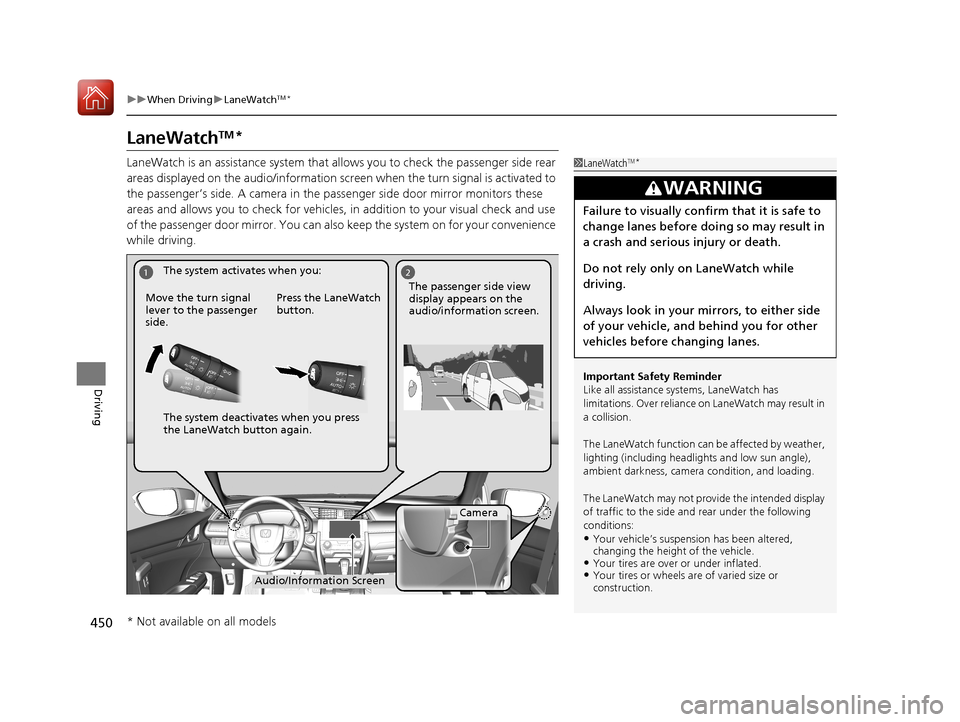
LaneWatch is an assistance system that allows you to check the passenger side rear
areas displayed on the audio/information screen when the turn signal is activated to
the passenger’s side. A camera in the pass enger side door mirror monitors these
areas and allows you to chec k for vehicles, in addition to your visual check and use
of the passenger door mirror. You can also keep the system on for your convenience
while driving.1 LaneWatchTM*
Important Safety Reminder
Like all assistance systems, LaneWatch has
limitations. Over reliance on LaneWatch may result in
a collision.
The LaneWatch function can be affected by weather,
lighting (including headli ghts and low sun angle),
ambient darkness, camera condition, and loading.
The LaneWatch may not prov ide the intended display
of traffic to the side and rear under the following
conditions:
•Your vehicle’s suspensi on has been altered,
changing the height of the vehicle.
•Your tires are over or under inflated.•Your tires or wheels are of varied size or
construction.
3WARNING
Failure to visually confirm that it is safe to
change lanes before doing so may result in
a crash and serious injury or death.
Do not rely only on LaneWatch while
driving.
Always look in your mi rrors, to either side
of your vehicle, and behind you for other
vehicles before changing lanes.
12
Camera
Audio/Information Screen
Move the turn signal
lever to the passenger
side.
Press the LaneWatch
button.
The passenger side view
display appears on the
audio/information screen.
The system activates when you:
The system deactivates when you press
the LaneWatch button again.
* Not available on all models
17 CIVIC 4D HCM (KA KC KL)-31TBA6100.book 450 ページ 2016年8月31日 水曜日 午後6時5分
Page 452 of 601
451
uuWhen Driving uLaneWatchTM*
Driving
■Customizing the La neWatch settings
You can customize the following items using the audio/information screen.
• Show with Turn Signal : Selects whether LaneWatch monitor comes on when
you operate the turn signal light lever.
• Display Time after Turn Signal Off : Changes the length of time the LaneWatch
display stays on after you pull the turn signal lever back.
• Reference Lines : Selects whether the reference lines appear on the LaneWatch
monitor.
• Display : Allows for display adjustments of items, such as brightness, contrast and
black level. This setting is part of the System setup group.
2Customized Features P. 308
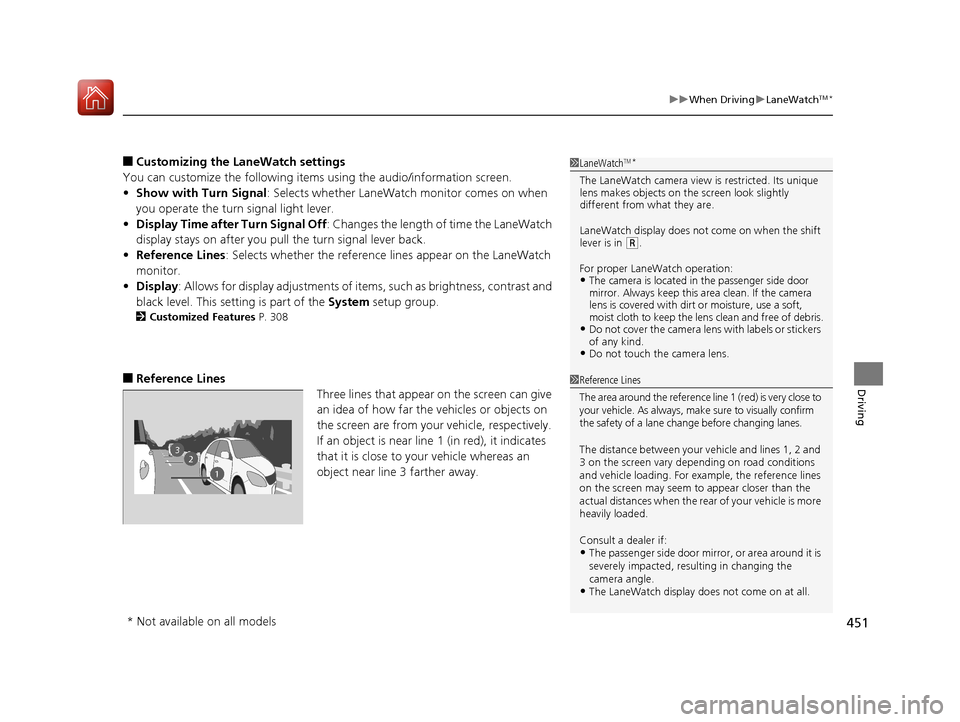
■Reference Lines
Three lines that appear on the screen can give
an idea of how far the vehicles or objects on
the screen are from your vehicle, respectively.
If an object is near line 1 (in red), it indicates
that it is close to your vehicle whereas an
object near line 3 farther away.
1LaneWatchTM*
The LaneWatch camera view is restricted. Its unique
lens makes objects on the screen look slightly
different from what they are.
LaneWatch display does not come on when the shift
lever is in
( R.
For proper LaneWatch operation:
•The camera is located in the passenger side door
mirror. Always keep this area clean. If the camera
lens is covered with dirt or moisture, use a soft,
moist cloth to keep the lens clean and free of debris.
•Do not cover the camera lens with labels or stickers
of any kind.
•Do not touch the camera lens.
23
1
1Reference Lines
The area around the reference lin e 1 (red) is very close to
your vehicle. As always, m ake sure to visually confirm
the safety of a lane chan ge before changing lanes.
The distance betwee n your vehicle and lines 1, 2 and
3 on the screen vary depending on road conditions
and vehicle loading. For ex ample, the reference lines
on the screen may seem to appear closer than the
actual distances when the rear of your vehicle is more
heavily loaded.
Consult a dealer if:
•The passenger side door mirr or, or area around it is
severely impacted, resulting in changing the
camera angle.
•The LaneWatch display doe s not come on at all.
* Not available on all models
17 CIVIC 4D HCM (KA KC KL)-31TBA6100.book 451 ページ 2016年8月31日 水曜日 午後6時5分
Page 466 of 601
465
uuBraking uCollision Mitigation Braking SystemTM (CMBSTM)*
Continued
Driving
Collision Mitigation Braking SystemTM (CMBSTM)*
Can assist you when there is a possibility of your vehicle colliding with a vehicle or a
pedestrian detected in front of yours. The CMBSTM is designed to alert you when a
potential collision is determined, as well as to reduce your vehicle speed to help
minimize collision severity when a collision is deemed unavoidable.
■How the system works
1 Collision Mitigation Braking SystemTM (CMBSTM)*
Important Safety Reminder
The CMBSTM is designed to reduce the severity of an
unavoidable collision. It does not prevent collision nor
stop the vehicle automatically. It is still your
responsibility to operate the brake pedal and steering
wheel appropriately acco rding to the driving
conditions.
The CMBS
TM may not activate or may not detect a
vehicle in front of y our vehicle under certain
conditions:
2 CMBS
TM Conditions and Limitations P. 469
You can read about handling information for the
camera equipped with this system. 2 Front Sensor Camera
* P. 420
Be careful not to have the radar sensor cover strongly
impacted.
1 How the system works
Rapid vibrations on the steering wheel alert you
when your vehicle speed is between 19 and 62 mph
(30 and 100 km/h) with an oncoming vehicle
detected in front of you.
When the CMBS
TM activates, it may automatically
apply the brake. It will be canceled when your vehicle
stops or a potential coll ision is not determined.
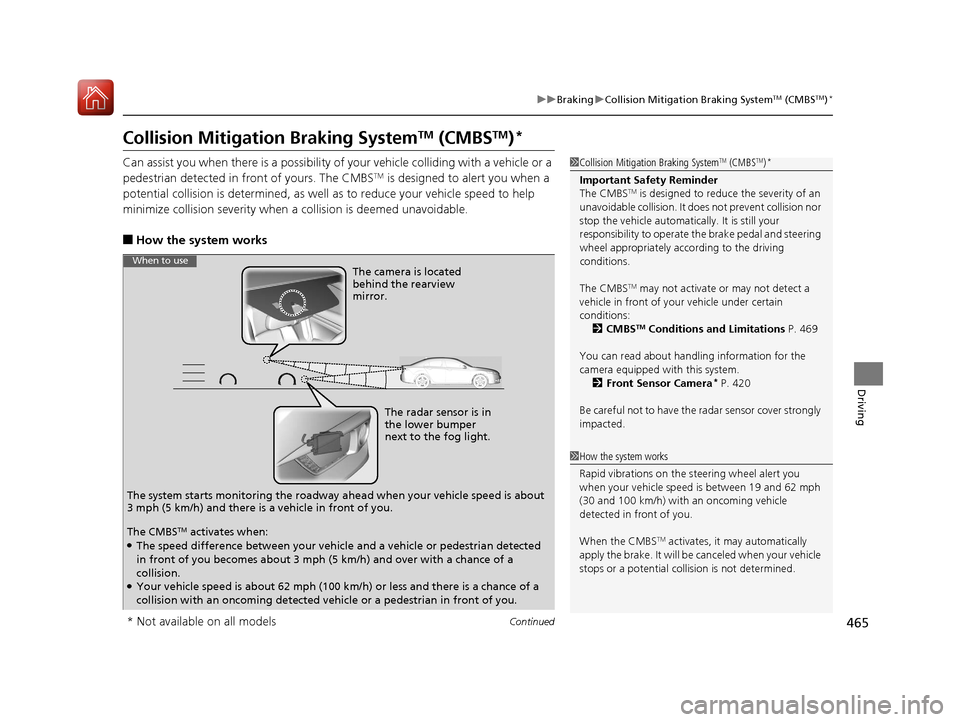
The radar sensor is in
the lower bumper
next to the fog light.
The camera is located
behind the rearview
mirror.
The system starts monitoring the roadway ah ead when your vehicle speed is about
3 mph (5 km/h) and there is a vehicle in front of you.
When to use
The CMBSTM activates when:●The speed difference between your vehicle and a vehicle or pedestrian detected
in front of you becomes about 3 mph (5 km/h) and over with a chance of a
collision.
●Your vehicle speed is about 62 mph (100 km/h) or less and there is a chance of a
collision with an oncoming detected vehicle or a pedestrian in front of you.
* Not available on all models
17 CIVIC 4D HCM (KA KC KL)-31TBA6100.book 465 ページ 2016年8月31日 水曜日 午後6時5分
Page 472 of 601
471
uuBraking uCollision Mitigation Braking SystemTM (CMBSTM)*
Continued
Driving
• When there is a group of people in front of your vehicle walking together side by
side.
• Surrounding conditions or belongings of the pedestrian alter the pedestrian’s
shape, preventing the system from recogn izing that the person is a pedestrian.
• When the pedestrian is shorte r than about 3.3 feet (1 meter) or taller than about
6.6 feet (2 meters) in height.
• When a pedestrian blends in with the background.
• When a pedestrian is bent over or squatting, or when their hands are raised or
they are running.
• When several pedestrians are walking ahead in a group.
• When the camera cannot correctly identify that a pedestrian is present due to an
unusual shape (holding luggage, body position, size).
■Automatic shutoff
The CMBS may automatically shut itself o ff and the CMBS indicator comes and stays
on when:
• The temperature inside the system is high.
• You drive off-road or on a mountain road, or curved and winding road for an
extended period.
• An abnormal tire condition is detected (wrong tire size, flat tire, etc.).
• The camera behind the rearview mirror, or the area around the camera, including
the windshield, gets dirty.
Once the conditions that caused the CMBS to shut off improve or are addressed
(e.g., cleaning), the system comes back on.
Limitations applicable to pedestrian detection only
17 CIVIC 4D HCM (KA KC KL)-31TBA6100.book 471 ページ 2016年8月31日 水曜日 午後6時5分
Page 517 of 601
516
uuReplacing Light Bulbs uParking/Daytime Running Lights
Maintenance
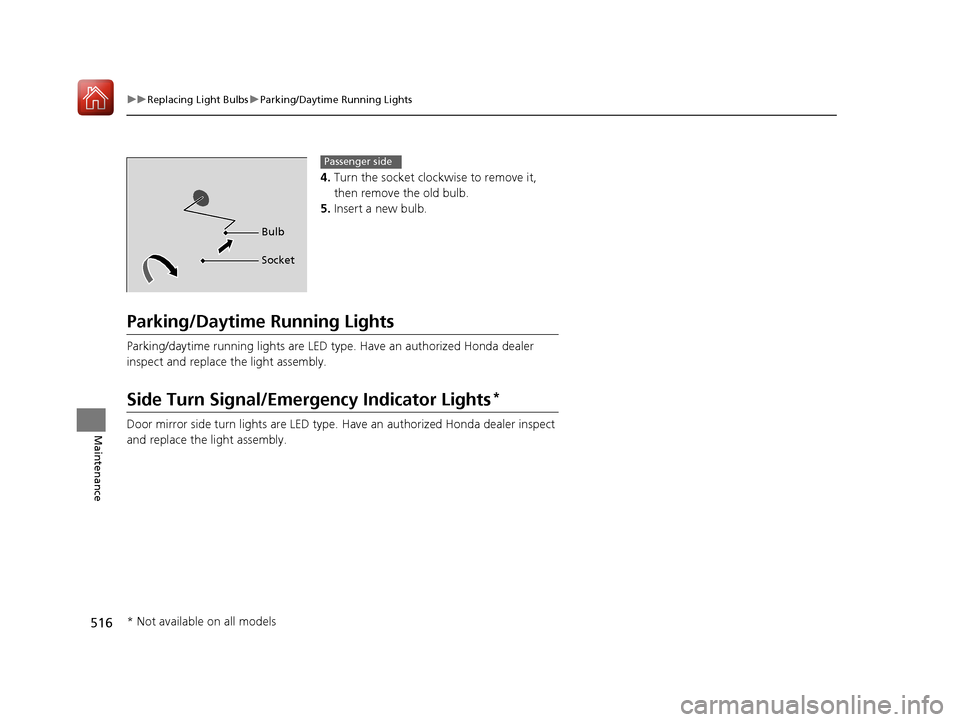
4. Turn the socket clockwise to remove it,
then remove the old bulb.
5. Insert a new bulb.
Parking/Daytime Running Lights
Parking/daytime running lights are LED type . Have an authorized Honda dealer
inspect and replace the light assembly.
Side Turn Signal/Emergency Indicator Lights*
Door mirror side turn lights are LED type. Have an authorized Honda dealer inspect
and replace the light assembly.
Bulb
Socket
Passenger side
* Not available on all models
17 CIVIC 4D HCM (KA KC KL)-31TBA6100.book 516 ページ 2016年8月31日 水曜日 午後6時5分
Page 539 of 601
538
uuCleaning uExterior Care
Maintenance
Exterior Care
Dust off the vehicle body after you drive. Regularly inspect your vehicle for scratches
on painted surfaces. A scratch on a painted surface can result in body rust. If you
find a scratch, promptly repair it.
Wash the vehicle regularly. Wash more frequently when driving in the following
conditions:
• If driving on roads with road salt.
• If driving in coastal areas.
• If tar, soot, bird droppings, insects, or tree sap are stuck to painted surfaces.
• Make sure to follow the instructions indicated on the automated car wash.
• Fold in the door mirrors.
• Turn off the automatic intermittent wipers
*.
• Keep sufficient distance between the cleaning nozzl e and the vehicle body.
• Take particular care around the windows. St anding too close may cause water to
enter the vehicle interior.
• Do not spray high pressure water directly into the engine compartment. Instead,
use low pressure water and a mild detergent.
■Washing the Vehicle
■Using an Automated Car Wash
■Using High Pressure Cleaners
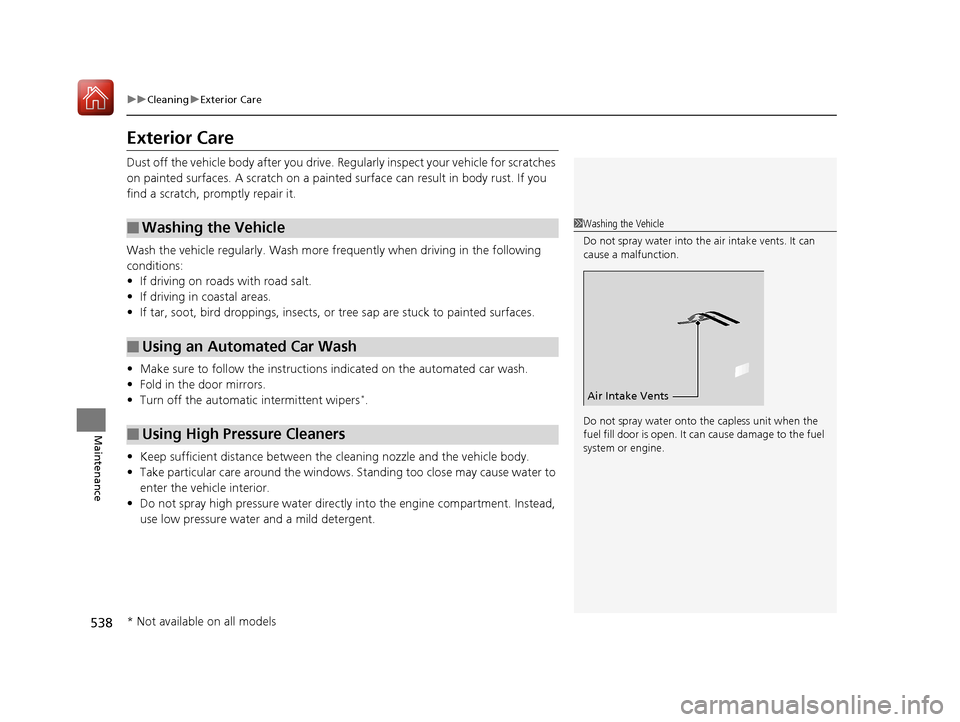
1 Washing the Vehicle
Do not spray water into the air intake vents. It can
cause a malfunction.
Do not spray water onto the capless unit when the
fuel fill door is open. It ca n cause damage to the fuel
system or engine.
Air Intake Vents
* Not available on all models
17 CIVIC 4D HCM (KA KC KL)-31TBA6100.book 538 ページ 2016年8月31日 水曜日 午後6時5分
Page 577 of 601
576
Information
Specifications
■Vehicle Specifications
■ Air Conditioning
*
ModelHonda Civic 4-Door
No. of Passengers:
Front 2
Rear 3
Total 5
Weights:Gross Vehicle
Weight Rating U.S.: 3,737 lbs (1,695 kg)
Canada: 1,695 kg
Gross Axle Weight
Rating (Front)U.S.: 1,984 lbs (900 kg)
Canada: 900 kg
Gross Axle Weight
Rating (Rear)U.S.: 1,786 lbs (810 kg)
Canada: 810 kg
Refrigerant TypeHFO-1234yf (R-1234yf)
Charge Quantity 13.2 – 15.0 oz (375 – 425 g)
Lubricant TypeRL85HM (POE)
Quantity 4.7 – 6.3 cu-in (77 – 103 cm3)
2.0 L engine models■ Engine Specifications
■ Fuel
■ Washer Fluid
Displacement121.76 cu-in (1,996 cm3)
Spark Plugs NGK
DILKAR7H11GS
DILKAR7G11GS
DENSO DXE22HQR-D11S
Fuel:
TypeUnleaded gasoline, Pump octane number
of 87 or higher
Fuel Tank Capacity 12.39 US gal (46.9 L)
Tank CapacityU.S.: 2.6 US qt (2.5 L)
Canada: 4.8 US qt (4.5 L)
■ Light Bulbs
Headlights (Low Beam)55W (H11)
Headlights (High Beam) 60W (HB3)
Parking/Daytime Running LightsLED
Front Side Marker Lights 3W
Front Turn Signal Lights21W (Amber)
Brake Lights 21W
Rear Turn Signal Lights21W (Amber)
Tail/Rear Side Marker Lights LED
Back-Up Lights16W
Taillights LED
High-Mount Brake Light21W
Rear License Plate Light LED
Interior LightsMap Lights8WCeiling Light8WVanity Mirror Lights*2WTrunk Light5W
* Not available on all models
17 CIVIC 4D HCM (KA KC KL)-31TBA6100.book 576 ページ 2016年8月31日 水曜日 午後6時5分
Page 579 of 601
578
uuSpecifications u
Information
■Vehicle Specifications
■ Air Conditioning
ModelHonda Civic 4-Door
No. of Passengers:
Front 2
Rear 3
Total 5
Weights:Gross Vehicle
Weight Rating U.S.: 3,902 lbs (1,770 kg)
Canada: 1,770 kg
Gross Axle Weight
Rating (Front)U.S.: 2,105 lbs (955 kg)
Canada: 955 kg
Gross Axle Weight
Rating (Rear)U.S.: 1,808 lbs (820 kg)
Canada: 820 kg
Refrigerant TypeHFO-1234yf (R-1234yf)
Charge Quantity 13.2 – 15.0 oz (375 – 425 g)
Lubricant TypeRL85HM (POE)
Quantity 4.7 – 6.3 cu-in (77 – 103 cm3)
1.5 L engine models■ Engine Specifications
■ Fuel
■ Washer Fluid
Displacement91.26 cu-in (1,496 cm3)
Spark Plugs NGK ILZKAR8H8S
Fuel:
TypeUnleaded gasoline, Pump octane number
of 87 or higher
Fuel Tank Capacity 12.39 US gal (46.9 L)
Tank CapacityU.S.: 2.6 US qt (2.5 L)
Canada: 4.8 US qt (4.5 L)
■ Light Bulbs
*1: Except Tour models
*2: Tour models
Headlights (Low Beam)55W (H11)*1
LED*2
Headlights (High Beam) 60W (HB3)*1
LED*2
Fog Lights35W (H8)
Parking/Daytime Running Lights LED
Front Side Marker Lights3W
Front Turn Signal Lights 21W (Amber)*1
LED*2
Side Turn Signal Lights
(on Door Mirrors)*LED
Brake Lights 21W
Rear Turn Signal Lights21W (Amber)
Tail/Rear Side Marker Lights LED
Back-Up Lights16W
Taillights LED
High-Mount Brake Light21W
Rear License Plate Light LED
Interior LightsMap Lights8WCeiling Light8WVanity Mirror Lights2WTrunk Light5W
* Not available on all models
17 CIVIC 4D HCM (KA KC KL)-31TBA6100.book 578 ページ 2016年8月31日 水曜日 午後6時5分
Page 590 of 601
Index
589
Index
Index
A
ABS (Anti-lock Brake System).................. 463
Accessories and Modifications ................ 541
Accessory Power Socket ........................... 187
Adaptive Cruise Control (ACC) with Low
Speed Follow (LSF) ........................... 89, 422
Adding the Coolant ................................. 506
Additives
Coolant .................................................. 505
Engine Oil ............................................... 498
Washer ................................................... 509
Additives, Engine Oil ............................... 498
Adjusting Armrest .................................................. 180
Clock ...................................................... 128
Front Head Restraints .............................. 176
Front Seats.............................................. 173
Mirrors.................................................... 171
Rear Seats ............................................... 179
Steering Wheel ....................................... 170
Temperature ................................... 112, 116
Adjusting the Clock ................................. 128
Adjusting the Sound ........................ 216, 251
Agile Handling Assist ............................... 449
Air Conditioning System (Climate Control
System) .................................................... 196
Changing the Mode................................ 196
Defrosting the Windshield and
Windows .............................................. 199 Dust and Pollen Filter ............................... 535
Recirculation/Fresh Air Mode ................... 198
Sensor ..................................................... 202
Synchronized Mode ................................. 201
Using Automatic Climate Control ............ 196
Air Conditioning System (Heating System) .................................................... 193
Sensor ..................................................... 195
Using Automatic Heating ......................... 193
Air Pressure ............................... 523, 577, 579
Airbags ........................................................ 46
Advanced Airbags ..................................... 52
After a Collision ......................................... 49
Airbag Care ............................................... 59
Event Data Recorder .................................... 0
Front Airbags (SRS) .................................... 49
Indicator .............................................. 57, 81
Passenger Front Airbag Off Indicator ......... 58
Sensors ...................................................... 46
Side Airbags .............................................. 53
Side Curtain Airbags .................................. 55
AM/FM Radio .................................... 218, 258
Android Auto ............................................ 295
Anti-lock Brake System (ABS) .................. 463
Indicator .................................................... 81
Apple CarPlay ........................................... 292
Armrest ..................................................... 180
Audio Remote Controls ............................ 207 Audio System
............................ 204, 211, 229
Adjusting the Sound........................ 216, 251
Audio/Information Screen................ 212, 230
Changing the Home Screen Icon Layout ................................................... 234
Changing the Screen Interface ................ 248
Closing Apps ........................................... 250
Customizing the Meter............................ 235
Display Setup .................................. 217, 252
Error Messages ........................................ 299
General Information ................................ 302
Home Screen........................................... 241
iPod ................................................ 220, 270
Limitations for Manual Operation ............ 253
Menu Customize ..................................... 249
MP3/WMA/AAC .............................. 223, 279
Reactivating ............................................ 206
Recommended Devices............................ 303
Remote Controls ..................................... 207
Security Code .......................................... 206
Selecting an Audio Source ....................... 253
Status Area ............................................. 247
Theft Protection ...................................... 206
USB Flash Drives ...................................... 303
USB Port(s) .............................................. 205
Wallpaper Setup.............................. 214, 239
Audio/Information Screen ............... 212, 230
Authorized Manuals ................................ 587
17 CIVIC 4D HCM (KA KC KL)-31TBA6100.book 589 ページ 2016年8月31日 水曜日 午後6時5分
Page 592 of 601
591
Index
Controls.................................................... 127
Coolant (Engine) ...................................... 505
Adding the Coolant ................................ 506
Overheating ............................................ 559
Creeping (Continuously Variable
Transmission) .......................................... 410
Cruise Control .......................................... 417
Indicator ................................................... 86
Cup Holders .............................................. 185
Customer Service Information ................ 588
Customized Features ....................... 118, 308
D
Daytime Running Lights .......................... 165
Dead Battery ............................................ 555
Defaulting All the Settings ...................... 338
Defrosting the Windshield and
Windows ......................................... 194, 199
Devices that Emit Radio Waves ............... 581
Dimming
Headlights .............................................. 162
Rearview Mirror ...................................... 171
Dipstick (Engine Oil) ................................ 499
Directional Signals (Turn Signal) ............. 162
Display Button .......................................... 230
Display Setup .................................... 217, 252
Display/Information Button .................... 113
Door Mirrors ............................................. 172 Doors
......................................................... 130
Auto Door Locking .................................. 143
Auto Door Unlocking ............................... 143
Door and Trunk Open Indicator ........... 37, 82
Door Open Message ............................ 37, 94
Keys ........................................................ 130
Locking/Unlocking the Doors from the Inside............................................... 140
Locking/Unlocking the Doors from the Outside............................................ 133
DOT Tire Quality Grading ........................ 525
Driver Information Interface ................... 113
Driving ....................................................... 395
Braking .................................................... 457
Continuously Variable Transmission ......... 410
Cruise Control ......................................... 417
Shifting Gear ........................................... 413
Shifting Position ...................................... 411
Starting the Engine .......................... 402, 404
Dust and Pollen Filter ............................... 535
E
Eco Assist® System ........................................ 9
ECON Button ............................................. 416
Elapsed Time ............................................. 115
Electric Power Steering (EPS) System ........ 82
Indicator ............................................ 82, 565
Electronic Stability Control (ESC) ............. 447Emergency
................................................ 571
Emergency Engine Stop ........................... 554
Emergency Trunk Opener ................ 149, 573
Emissions Testing (Readiness Codes) ....... 583
Engine
Coolant ................................................... 505
Jump Starting .......................................... 555
Oil ........................................................... 498
Starting ........................................... 402, 404
Switch Buzzer.......................................... 157
Engine Coolant ......................................... 505
Adding the Coolant................................. 506
Overheating ............................................ 559
Temperature Gauge ................................ 109
Engine Oil ................................................. 498
Adding .................................................... 501
Checking................................................. 499
Displaying Maintenance Minder Information ................................... 485, 490
Low Oil Pressure Indicator ................. 78, 561
Recommended Engine Oil ....................... 498
ENGINE START/STOP Button .................... 158
EPS (Electric Power Steering) System ...... 565
Exhaust Gas Hazard (Carbon Monoxide) ................................................. 72
Exterior Care (Cleaning) ........................... 538
Exterior Mirrors ........................................ 172
17 CIVIC 4D HCM (KA KC KL)-31TBA6100.book 591 ページ 2016年8月31日 水曜日 午後6時5分