service HONDA CIVIC 2017 10.G Owner's Guide
[x] Cancel search | Manufacturer: HONDA, Model Year: 2017, Model line: CIVIC, Model: HONDA CIVIC 2017 10.GPages: 601, PDF Size: 32.51 MB
Page 491 of 601
490
uuMaintenance MinderTMuTo Use Maintenance MinderTM
Maintenance
To Use Maintenance MinderTM
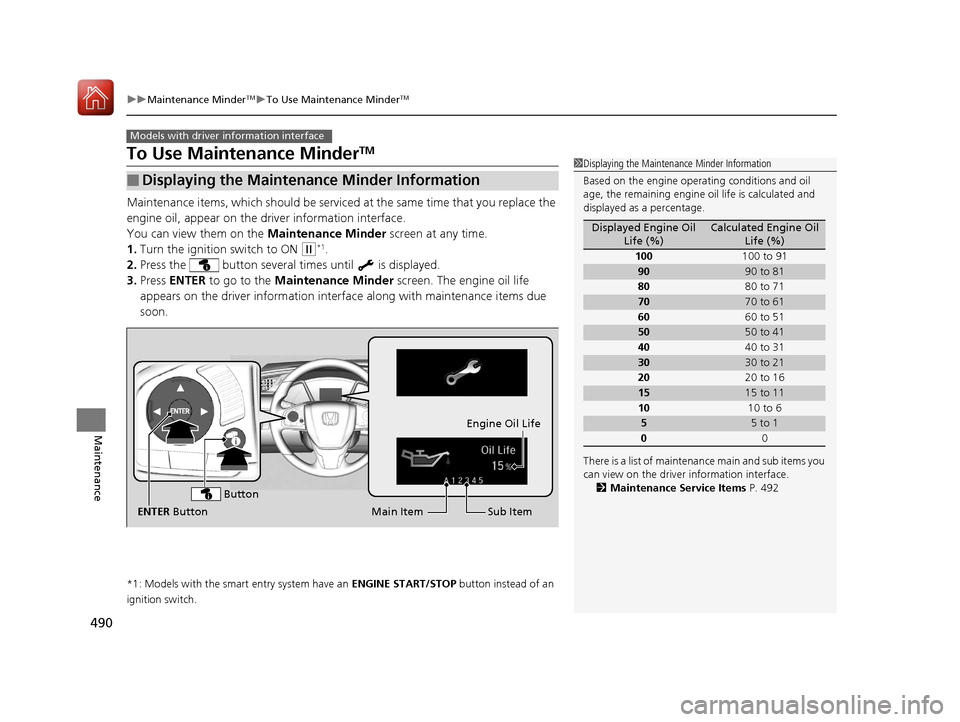
Maintenance items, which should be serviced at the same time that you replace the
engine oil, appear on the driver information interface.
You can view them on the Maintenance Minder screen at any time.
1. Turn the ignition switch to ON
(w*1.
2. Press the button several times until is displayed.
3. Press ENTER to go to the Maintenance Minder screen. The engine oil life
appears on the driver info rmation interface along with maintenance items due
soon.
*1: Models with the smart entry system have an ENGINE START/STOP button instead of an
ignition switch.
■Displaying the Maintenance Minder Information
Models with driver information interface
1 Displaying the Maintena nce Minder Information
Based on the engine opera ting conditions and oil
age, the remaining engine oi l life is calculated and
displayed as a percentage.
There is a list of maintena nce main and sub items you
can view on the driver information interface.
2 Maintenance Service Items P. 492
Displayed Engine Oil
Life (%)Calculated Engine Oil Life (%)
100 100 to 91
9090 to 81
80 80 to 71
7070 to 61
60 60 to 51
5050 to 41
40 40 to 31
3030 to 21
20 20 to 16
1515 to 11
10 10 to 6
55 to 1
0 0
Sub Item
Engine Oil Life
Main Item
ENTER Button
Button
17 CIVIC 4D HCM (KA KC KL)-31TBA6100.book 490 ページ 2016年8月31日 水曜日 午後6時5分
Page 492 of 601
491
uuMaintenance MinderTMuTo Use Maintenance MinderTM
Continued
Maintenance
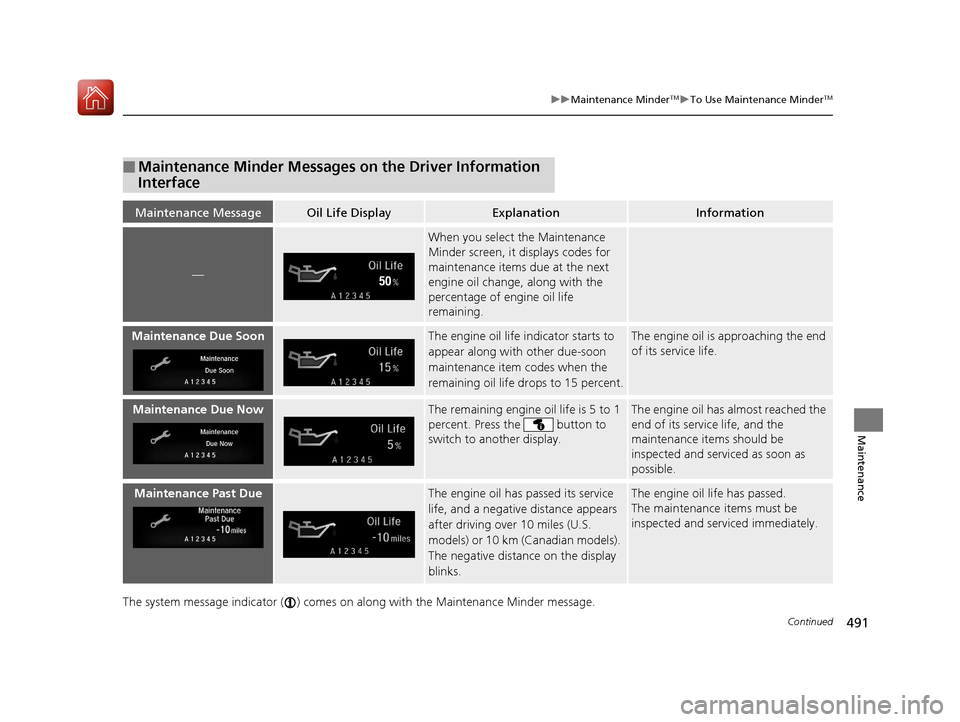
The system message indicator ( ) comes on along with the Maintenance Minder message.
■Maintenance Minder Messages on the Driver Information
Interface
Maintenance MessageOil Life DisplayExplanationInformation
—
When you select the Maintenance
Minder screen, it displays codes for
maintenance items due at the next
engine oil change, along with the
percentage of engine oil life
remaining.
Maintenance Due SoonThe engine oil life indicator starts to
appear along with other due-soon
maintenance item codes when the
remaining oil life drops to 15 percent.The engine oil is approaching the end
of its service life.
Maintenance Due NowThe remaining engine oil life is 5 to 1
percent. Press the button to
switch to another display.The engine oil has almost reached the
end of its service life, and the
maintenance items should be
inspected and serviced as soon as
possible.
Maintenance Past DueThe engine oil has passed its service
life, and a negative distance appears
after driving over 10 miles (U.S.
models) or 10 km (Canadian models).
The negative distance on the display
blinks.The engine oil life has passed.
The maintenance items must be
inspected and serviced immediately.
17 CIVIC 4D HCM (KA KC KL)-31TBA6100.book 491 ページ 2016年8月31日 水曜日 午後6時5分
Page 493 of 601
492
uuMaintenance MinderTMuTo Use Maintenance MinderTM
Maintenance
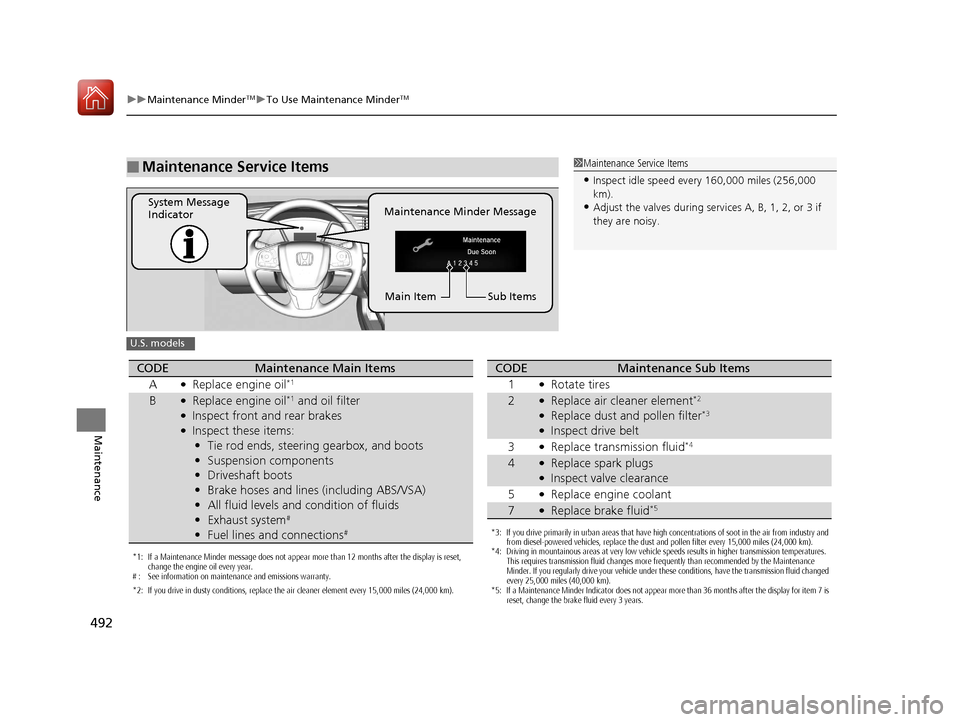
■Maintenance Service Items1Maintenance Service Items
•Inspect idle speed every 160,000 miles (256,000
km).
•Adjust the valves during services A, B, 1, 2, or 3 if
they are noisy.Maintenance Minder Message
System Message
Indicator
Sub Items
Main Item
U.S. models
*1: If a Maintenance Minder message does not appear more than 12 months after the display is reset,
change the engine oil every year.
# : See information on maintenance and emissions warranty.
*2: If you drive in dusty conditions, replace the air cleaner element every 15,000 miles (24,000 km).
CODEMaintenance Main Items
A
●Replace engine oil*1
B●Replace engine oil*1 and oil filter●Inspect front and rear brakes●Inspect these items: • Tie rod ends, steering gearbox, and boots
• Suspension components
• Driveshaft boots
• Brake hoses and lines (including ABS/VSA)
• All fluid levels and condition of fluids
• Exhaust system
#
•Fuel lines and connections#*3: If you drive primarily in urban areas that have high concentrations of soot in the air from industry and
from diesel-powered vehicles, replace the dust and pollen filter every 15,000 miles (24,000 km).
*4: Driving in mountainous areas at very low vehicle speeds results in higher transmission temperatures.
This requires transmission fluid changes more frequently than recommended by the Maintenance
Minder. If you regularly drive your vehicle under these conditions, have the transmission fluid changed
every 25,000 miles (40,000 km).
*5: If a Maintenance Minder Indicator does not appear more than 36 months after the display for item 7 is reset, change the brake fluid every 3 years.
CODEMaintenance Sub Items
1
●Rotate tires
2●Replace air cleaner element*2
●Replace dust and pollen filter*3
●Inspect drive belt
3
●Replace transmission fluid*4
4●Replace spark plugs●Inspect valve clearance
5
●Replace engine coolant
7●Replace brake fluid*5
17 CIVIC 4D HCM (KA KC KL)-31TBA6100.book 492 ページ 2016年8月31日 水曜日 午後6時5分
Page 494 of 601
493
uuMaintenance MinderTMuTo Use Maintenance MinderTM
Continued
Maintenance
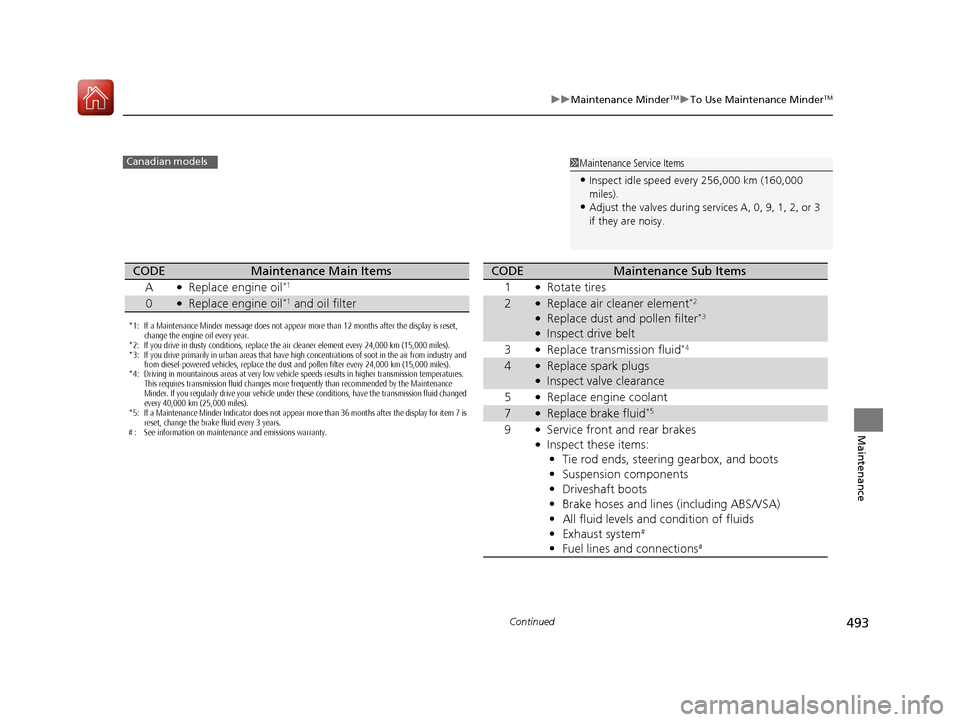
1Maintenance Service Items
•Inspect idle speed every 256,000 km (160,000
miles).
•Adjust the valves during services A, 0, 9, 1, 2, or 3
if they are noisy.
Canadian models
*1: If a Maintenance Minder message does not appear more than 12 months after the display is reset,
change the engine oil every year.
*2: If you drive in dusty conditions, replace the air cleaner element every 24,000 km (15,000 miles).
*3: If you drive primarily in urban areas that have high concentrations of soot in the air from industry and from diesel-powered vehicles, replace the dust and pollen filter every 24,000 km (15,000 miles).
*4: Driving in mountainous areas at very low vehicle speeds results in higher transmission temperatures.
This requires transmission fluid changes more frequently than recommended by the Maintenance
Minder. If you regularly drive your vehicle under these conditions, have the transmission fluid changed
every 40,000 km (25,000 miles).
*5: If a Maintenance Minder Indicator does not appear more than 36 months after the display for item 7 is reset, change the brake fluid every 3 years.
# : See information on maintenance and emissions warranty.
CODEMaintenance Main Items
A
●Replace engine oil*1
0●Replace engine oil*1 and oil filter
CODEMaintenance Sub Items
1
●Rotate tires
2●Replace air cleaner element*2
●Replace dust and pollen filter*3
●Inspect drive belt
3
●Replace transmission fluid*4
4●Replace spark plugs●Inspect valve clearance
5
●Replace engine coolant
7●Replace brake fluid*5
9●Service front and rear brakes●Inspect these items: • Tie rod ends, steering gearbox, and boots
• Suspension components
• Driveshaft boots
• Brake hoses and lines (including ABS/VSA)
• All fluid levels and condition of fluids
• Exhaust system
#
•Fuel lines and connections#
17 CIVIC 4D HCM (KA KC KL)-31TBA6100.book 493 ページ 2016年8月31日 水曜日 午後6時5分
Page 495 of 601
uuMaintenance MinderTMuTo Use Maintenance MinderTM
494
Maintenance
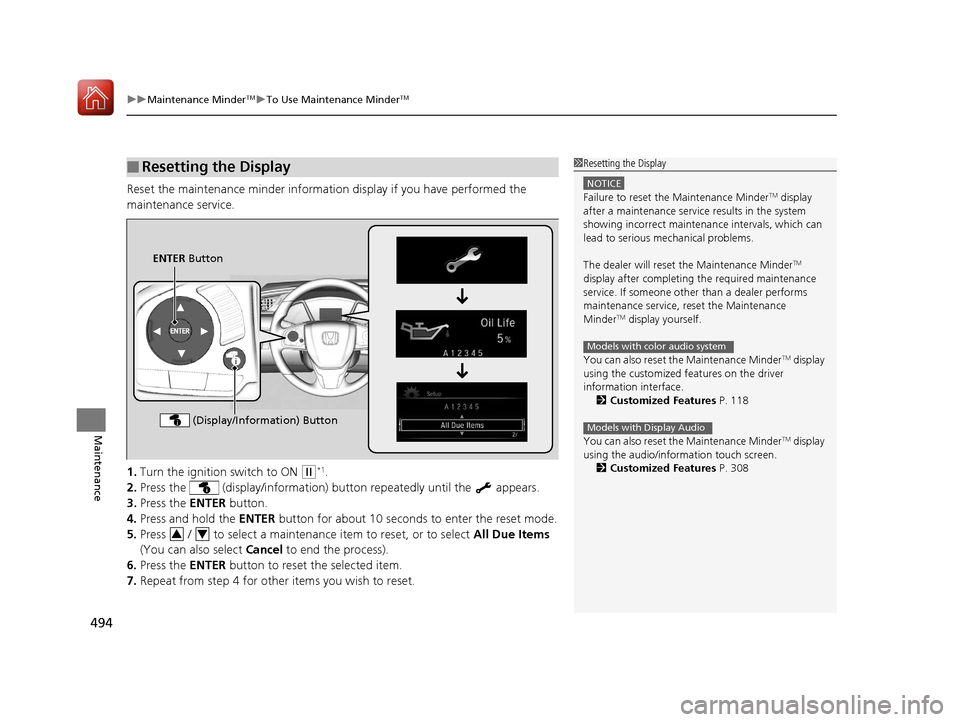
Reset the maintenance minder informat ion display if you have performed the
maintenance service.
1. Turn the ignition switch to ON
(w*1.
2. Press the (display/information) bu tton repeatedly until the appears.
3. Press the ENTER button.
4. Press and hold the ENTER button for about 10 seconds to enter the reset mode.
5. Press / to select a maintenance item to reset, or to select All Due Items
(You can also select Cancel to end the process).
6. Press the ENTER button to reset the selected item.
7. Repeat from step 4 for other items you wish to reset.
■Resetting the Display1Resetting the Display
NOTICE
Failure to reset the Maintenance MinderTM display
after a maintenance servic e results in the system
showing incorrect maintenance intervals, which can
lead to serious mechanical problems.
The dealer will reset the Maintenance Minder
TM
display after completing th e required maintenance
service. If someone other than a dealer performs
maintenance service, reset the Maintenance
Minder
TM display yourself.
You can also reset the Maintenance Minder
TM display
using the customized features on the driver
information interface.
2 Customized Features P. 118
You can also reset the Maintenance Minder
TM display
using the audio/information touch screen.
2 Customized Features P. 308
Models with color audio system
Models with Display Audio
ENTER Button
(Display/Information) Button
34
17 CIVIC 4D HCM (KA KC KL)-31TBA6100.book 494 ページ 2016年8月31日 水曜日 午後6時5分
Page 526 of 601
525
uuChecking and Maintaining Tires uDOT Tire Quality Grading (U.S. Vehicles)
Continued
Maintenance
DOT Tire Quality Grading (U.S. Vehicles)
The tires on your vehicle m eet all U.S. Federal Safety
Requirements. All tires are also graded for treadwear, traction,
and temperature performance according to Department of
Transportation (DOT) standards. The following explains these
gradings.
Quality grades can be found where applicable on th e tire sidewall
between tread shoulder and maximum section width.
The treadwear grade is a comparative rating based on the wear
rate of the tire when tested un der controlled conditions on a
specified government test course. For example, a tire graded 150
would wear one and one-half (1 1/2) times as well on the
government course as a tire graded 100. The relative performance
of tires depends upon the actual co nditions of their use, however,
and may depart significantly from the norm due to variations in
driving habits, service practi ces and differences in road
characteristics and climate.
■Uniform Tire Quality Grading
■Treadwear
1 Uniform Tire Quality Grading
For example:
Treadwear 200
Traction AA
Temperature A
All passenger car tires must conform
to Federal Safety Requirements in
addition to these grades.
17 CIVIC 4D HCM (KA KC KL)-31TBA6100.book 525 ページ 2016年8月31日 水曜日 午後6時5分
Page 528 of 601
527
uuChecking and Maintaining Tires uWear Indicators
Maintenance
Wear Indicators
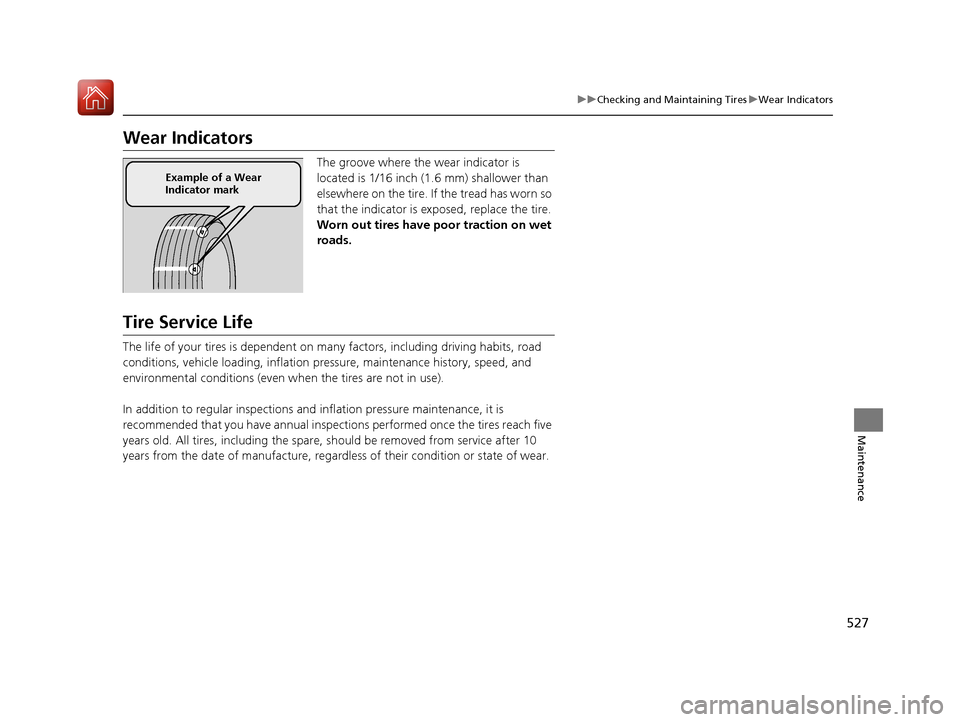
The groove where the wear indicator is
located is 1/16 inch (1.6 mm) shallower than
elsewhere on the tire. If the tread has worn so
that the indicator is ex posed, replace the tire.
Worn out tires have po or traction on wet
roads.
Tire Service Life
The life of your tires is dependent on many factors, including driving habits, road
conditions, vehicle loading, inflation pressure, maintenance history, speed, and
environmental conditions (even wh en the tires are not in use).
In addition to regular inspections and in flation pressure maintenance, it is
recommended that you have annual inspections performed once the tires reach five
years old. All tires, including the spare, should be removed from service after 10
years from the date of manufacture, regardle ss of their condition or state of wear.
Example of a Wear
Indicator mark
17 CIVIC 4D HCM (KA KC KL)-31TBA6100.book 527 ページ 2016年8月31日 水曜日 午後6時5分
Page 536 of 601
535
Maintenance
Heating System*/Climate Control System* Maintenance
Air Conditioning*
To ensure proper and safe operation, the Society of Automotive Engineers (SAE
J2845) recommends that the refrigerant system only be serviced by trained and
certified technicians.
Never repair or replace the air conditio ning evaporator (cooling coil) with one
removed from a used or salvaged vehicle.
New replacement mobile air conditioning evaporators must be certified (and
labeled) as meeting SAE Standard J2842.
Dust and Pollen Filter
The heating system*/climate control system* is equipped with a dust and pollen filter
that collects pollen, dust, and other de bris in the air. The Maintenance MinderTM
messages will let you know when to replace the filter.
We recommend that you repl ace the dust and pollen filter sooner when using your
vehicle in areas with high concentrations of dust.
1 Heating System*/Climate Control System* Maintenance
NOTICE
Vented refrigerant is harmful to the environment.
To avoid refrigerant from venting, never replace the
evaporator with one removed from a used or
salvaged vehicle.
Refrigerant in your vehicle’s air conditioning system is
flammable and can be igni ted during servicing if
proper procedures are not followed.
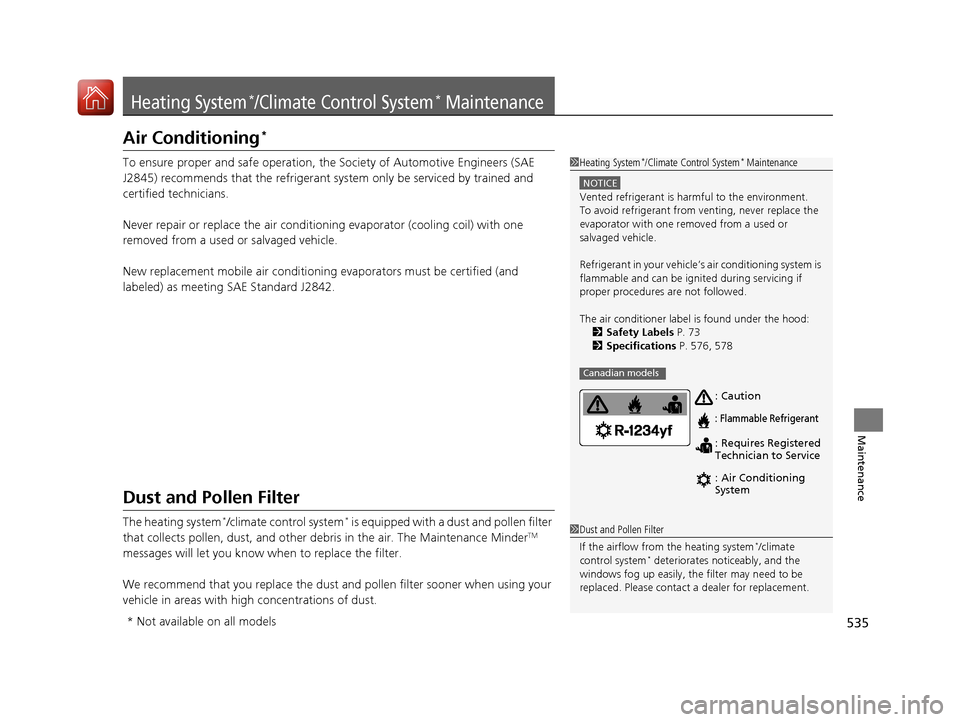
The air conditioner labe l is found under the hood:
2 Safety Labels P. 73
2 Specifications P. 576, 578
Canadian models
: Caution
: Flammable Refrigerant
: Requires Registered
Technician to Service
: Air Conditioning
System
1Dust and Pollen Filter
If the airflow from the heating system
*/climate
control system* deteriorates noticeably, and the
windows fog up easily, the filter may need to be
replaced. Please contact a dealer for replacement.
* Not available on all models
17 CIVIC 4D HCM (KA KC KL)-31TBA6100.book 535 ページ 2016年8月31日 水曜日 午後6時5分
Page 546 of 601
545Continued
Handling the Unexpected
If a Tire Goes Flat
Changing a Flat Tire
If a tire goes flat while driving, grasp the steering wheel firmly, and brake gradually
to reduce speed. Then, stop in a safe plac e. Replace the flat tire with a compact
spare tire. Go to a dealer as soon as possib le to have the full-size tire repaired or
replaced.
1. Park the vehicle on firm, level, and non-slippery surface, and apply the parking
brake.
2. Move the shift lever to
(P.
2. Move the shift lever to
(R.
3. Turn on the hazard warning lights an d turn the ignition switch to LOCK
(0*1.
*1: Models with the smart entry system have an ENGINE START/STOP button instead of an
ignition switch.
1 Changing a Flat Tire
Follow compact spare precautions:
Periodically check the tire pressure of the compact
spare. It should be set to the specified pressure.
Specified Pressure: 60 psi (420 kPa, 4.2 kgf/cm
2)
When driving with the compact spare tire, keep the
vehicle speed under 50 mph (80 km/h). Replace with
a full-size tire as soon as possible.
The compact spare tire and wheel in your vehicle are
specifically for this model. Do not use them with
another vehicle. Do not us e another type of compact
spare tire or wheel with your vehicle.
Do not mount tire chains on a compact spare tire.
If a chain-mounted front tire goes flat, remove one of
the full-size rear tires and replace it with the compact
spare tire. Remove the flat front tire and replace it
with the full-size tire that was removed from the rear.
Mount the tire chains on the front tire.
NOTICE
Do not use the jack if it doesn’t work properly. Call
your dealer or a prof essional towing service.
Continuously variable transmission models
Manual transmission models
All models
17 CIVIC 4D HCM (KA KC KL)-31TBA6100.book 545 ページ 2016年8月31日 水曜日 午後6時5分
Page 558 of 601
557
uuJump Starting uJump Starting Procedure
Handling the Unexpected
Once your vehicle's engine has started, re move the jumper cables in the following
order.
1. Disconnect the jumper cable from your vehicle's ground.
2. Disconnect the other end of the jumper cable from the booster battery -
terminal.
3. Disconnect the jumper cable from your vehicle's battery + terminal.
4. Disconnect the other end of the jumper cable from the booster battery +
terminal.
Have your vehicle inspected by a n earby service station or a dealer.
*1: Models with the smart entry system have an ENGINE START/STOP button instead of an
ignition switch.
■What to Do After the Engine Starts1 What to Do After the Engine Starts
The VSA ® and CMBS
TM * indicators may come on
when your turn the ignition switch to ON ( w*1 after
re-connecting a battery.
Drive a short distance at more than12 mph (20 km/h).
Each indicator should go off. If either or both do not,
have your vehicle ch ecked by a dealer.
* Not available on all models
17 CIVIC 4D HCM (KA KC KL)-31TBA6100.book 557 ページ 2016年8月31日 水曜日 午後6時5分