start stop button HONDA CIVIC 2017 10.G Workshop Manual
[x] Cancel search | Manufacturer: HONDA, Model Year: 2017, Model line: CIVIC, Model: HONDA CIVIC 2017 10.GPages: 601, PDF Size: 32.51 MB
Page 182 of 601
181Continued
Controls
Interior Lights/Interior Convenience Items
Interior Lights
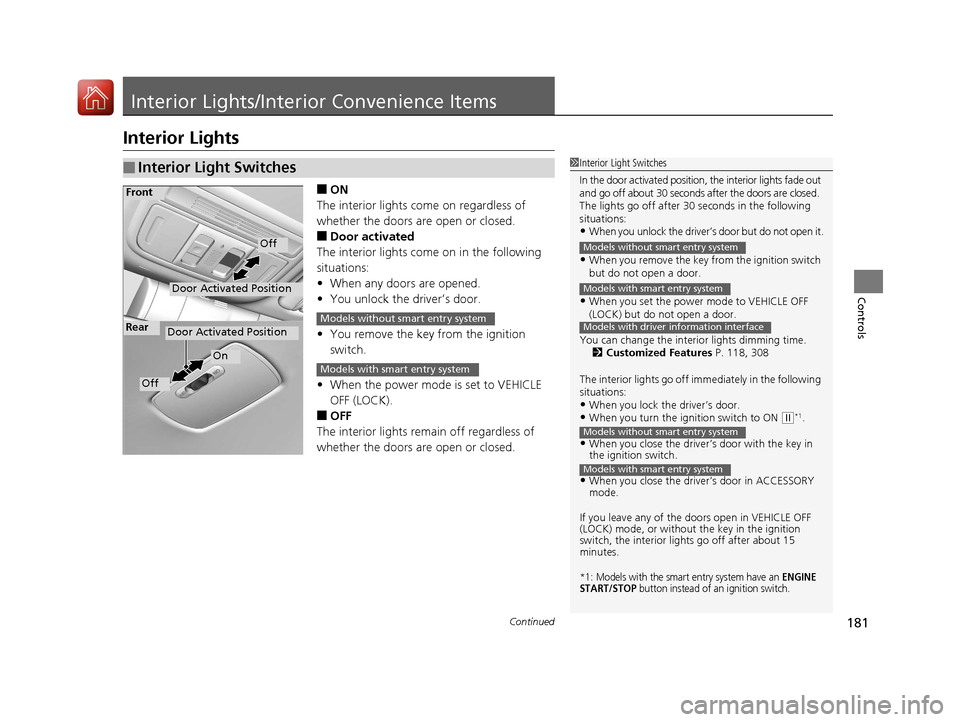
■ON
The interior lights come on regardless of
whether the doors are open or closed.
■Door activated
The interior lights come on in the following
situations:
• When any doors are opened.
• You unlock the driver’s door.
• You remove the key from the ignition
switch.
• When the power mode is set to VEHICLE
OFF (LOCK).
■OFF
The interior lights remain off regardless of
whether the doors are open or closed.
■Interior Light Switches1 Interior Light Switches
In the door activated position, the interior lights fade out
and go off about 30 seconds after the doors are closed.
The lights go off after 30 seconds in the following
situations:
•When you unlock the driver’s door but do not open it.
•When you remove the key from the ignition switch
but do not open a door.
•When you set the power mode to VEHICLE OFF
(LOCK) but do not open a door.
You can change the interi or lights dimming time.
2 Customized Features P. 118, 308
The interior lights go off i mmediately in the following
situations:
•When you lock the driver’s door.•When you turn the ignition switch to ON ( w*1.
•When you close the driver’s door with the key in
the ignition switch.
•When you close the driver’s door in ACCESSORY
mode.
If you leave any of the doors open in VEHICLE OFF
(LOCK) mode, or without the key in the ignition
switch, the interior li ghts go off after about 15
minutes.
*1: Models with the smart entry system have an ENGINE
START/STOP button instead of an ignition switch.
Models without smart entry system
Models with smart entry system
Models with driver information interface
Models without smart entry system
Models with smart entry system
Door Activated Position
Off
Front
Door Activated Position
On
Off
RearModels without smart entry system
Models with smart entry system
17 CIVIC 4D HCM (KA KC KL)-31TBA6100.book 181 ページ 2016年8月31日 水曜日 午後6時5分
Page 188 of 601
Continued187
uuInterior Lights/Interior Convenience Items uInterior Convenience Items
Controls
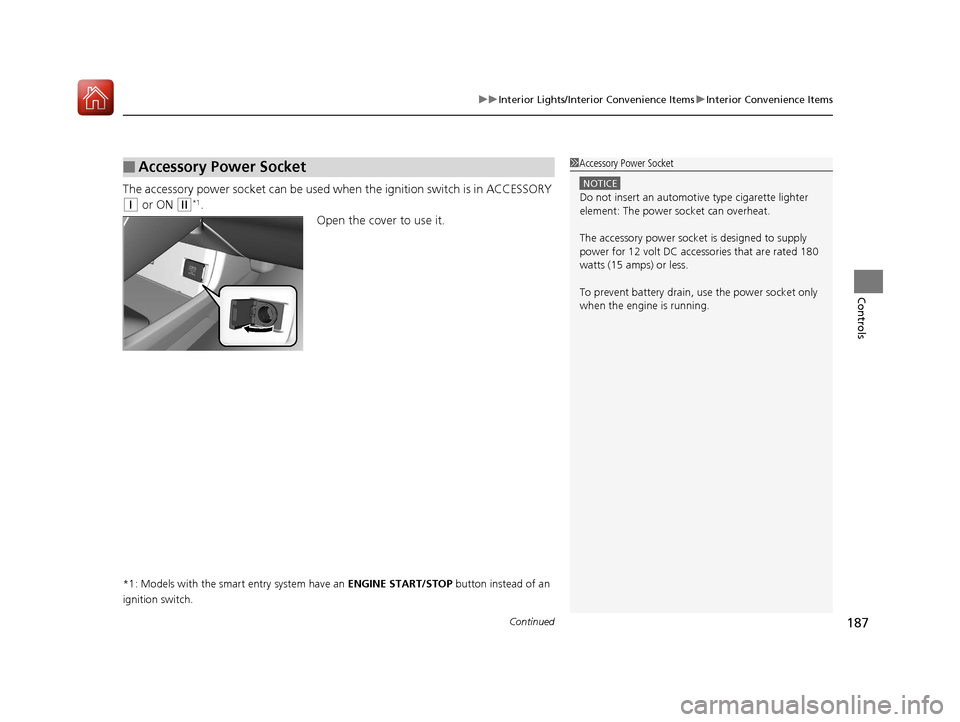
The accessory power socket can be used wh en the ignition switch is in ACCESSORY
(q or ON (w*1.
Open the cover to use it.
*1: Models with the smart entry system have an ENGINE START/STOP button instead of an
ignition switch.
■Accessory Power Socket1 Accessory Power Socket
NOTICE
Do not insert an automotive type cigarette lighter
element: The power socket can overheat.
The accessory power socket is designed to supply
power for 12 volt DC access ories that are rated 180
watts (15 amps) or less.
To prevent battery drain, use the power socket only
when the engine is running.
17 CIVIC 4D HCM (KA KC KL)-31TBA6100.book 187 ページ 2016年8月31日 水曜日 午後6時5分
Page 192 of 601
Continued191
uuInterior Lights/Interior Convenience Items uInterior Convenience Items
Controls
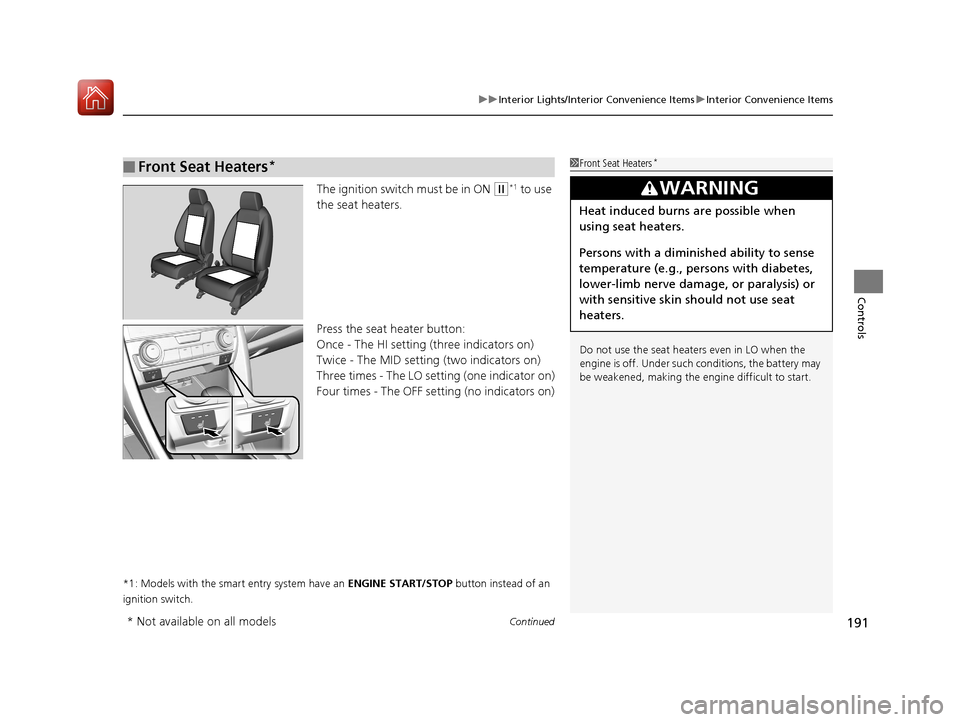
The ignition switch must be in ON (w*1 to use
the seat heaters.
Press the seat heater button:
Once - The HI setting (three indicators on)
Twice - The MID setting (two indicators on)
Three times - The LO setting (one indicator on)
Four times - The OFF setting (no indicators on)
*1: Models with the smart entry system have an ENGINE START/STOP button instead of an
ignition switch.
■Front Seat Heaters*1 Front Seat Heaters*
Do not use the seat heaters even in LO when the
engine is off. Under such conditions, the battery may
be weakened, making the engine difficult to start.
3WARNING
Heat induced burns are possible when
using seat heaters.
Persons with a diminished ability to sense
temperature (e.g., persons with diabetes,
lower-limb nerve damage, or paralysis) or
with sensitive skin should not use seat
heaters.
* Not available on all models
17 CIVIC 4D HCM (KA KC KL)-31TBA6100.book 191 ページ 2016年8月31日 水曜日 午後6時5分
Page 193 of 601
uuInterior Lights/Interior Convenience Items uInterior Convenience Items
192
Controls
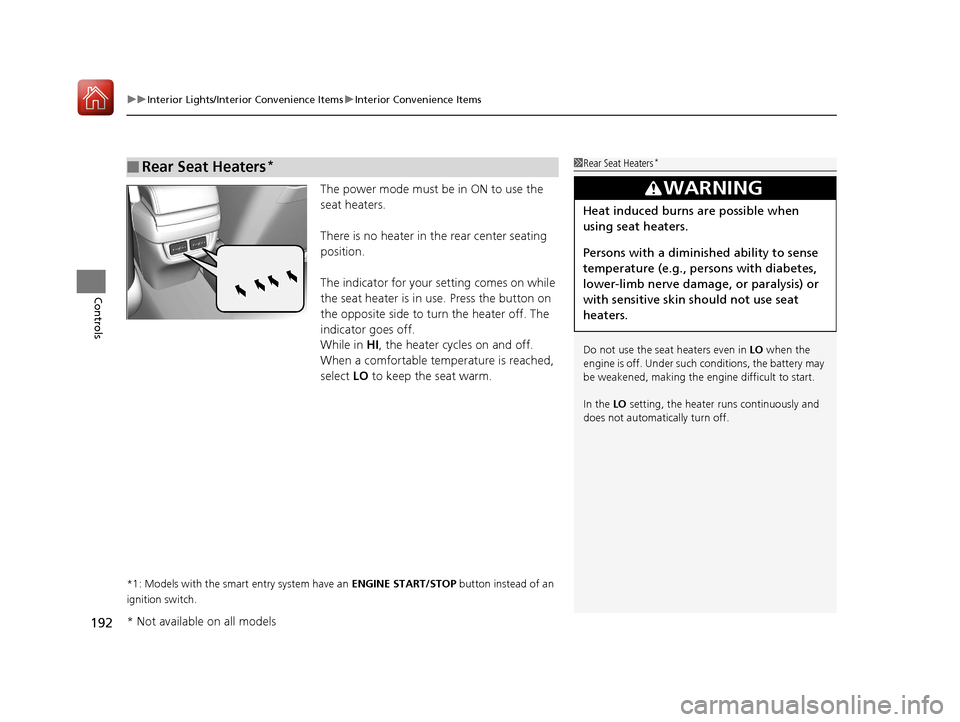
The power mode must be in ON to use the
seat heaters.
There is no heater in the rear center seating
position.
The indicator for your setting comes on while
the seat heater is in use. Press the button on
the opposite side to turn the heater off. The
indicator goes off.
While in HI, the heater cycles on and off.
When a comfortable temperature is reached,
select LO to keep the seat warm.
*1: Models with the smart entry system have an ENGINE START/STOP button instead of an
ignition switch.
■Rear Seat Heaters*1 Rear Seat Heaters*
Do not use the seat heaters even in LO when the
engine is off. Under such conditions, the battery may
be weakened, making the engine difficult to start.
In the LO setting, the heater runs continuously and
does not automatically turn off.
3WARNING
Heat induced burns are possible when
using seat heaters.
Persons with a diminished ability to sense
temperature (e.g., persons with diabetes,
lower-limb nerve damage, or paralysis) or
with sensitive skin should not use seat
heaters.
* Not available on all models
17 CIVIC 4D HCM (KA KC KL)-31TBA6100.book 192 ページ 2016年8月31日 水曜日 午後6時5分
Page 206 of 601
205
uuAudio System uUSB Port(s)
Features
USB Port(s)
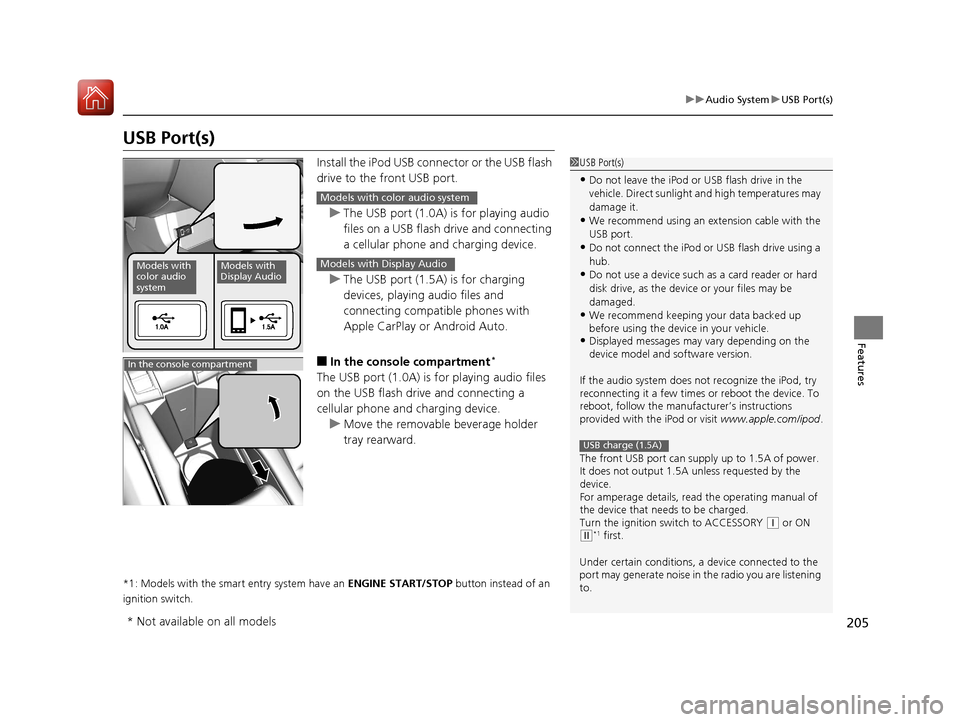
Install the iPod USB connector or the USB flash
drive to the front USB port.
u The USB port (1.0A) is for playing audio
files on a USB flash drive and connecting
a cellular phone and charging device.
u The USB port (1.5A) is for charging
devices, playing audio files and
connecting compatib le phones with
Apple CarPlay or Android Auto.
■In the consol e compartment*
The USB port (1.0A) is for playing audio files
on the USB flash drive and connecting a
cellular phone and charging device.
u Move the removable beverage holder
tray rearward.
*1: Models with the smart entry system have an ENGINE START/STOP button instead of an
ignition switch.
1 USB Port(s)
•Do not leave the iPod or USB flash drive in the
vehicle. Direct sunlight and high temperatures may
damage it.
•We recommend using an ex tension cable with the
USB port.
•Do not connect the iPod or USB flash drive using a
hub.
•Do not use a device such as a card reader or hard
disk drive, as the device or your files may be
damaged.
•We recommend k eeping your data backed up
before using the device in your vehicle.
•Displayed messages may vary depending on the
device model and software version.
If the audio system does not recognize the iPod, try
reconnecting it a few times or reboot the device. To
reboot, follow the manufac turer’s instructions
provided with the iPod or visit www.apple.com/ipod.
The front USB port can suppl y up to 1.5A of power.
It does not output 1.5A unless requested by the
device.
For amperage details, read the operating manual of
the device that ne eds to be charged.
Turn the ignition switch to ACCESSORY
( q or ON (w*1 first.
Under certain condi tions, a device connected to the
port may generate noise in the radio you are listening
to.
USB charge (1.5A)
Models with
color audio
systemModels with
Display Audio
Models with color audio system
Models with Display Audio
In the console compartment
* Not available on all models
17 CIVIC 4D HCM (KA KC KL)-31TBA6100.book 205 ページ 2016年8月31日 水曜日 午後6時5分
Page 207 of 601
206
uuAudio System uAudio System Theft Protection
Features
Audio System Theft Protection
The audio system is disabled when it is di sconnected from the power source, such as
when the battery is disconnected or goes dead. In certain conditions, the system
may display a code entry screen. If this occurs, reactivate the audio system.
■Reactivating th e audio system
1. Turn the ignition switch to ON
(w*1.
2. Turn on the audio system.
3. Press and hold the audio system power button for more than two seconds.
u The audio system is reac tivated when the audio co ntrol unit establishes a
connection with the vehicle control unit. If the control unit fails to recognize
the audio unit, you must go to a dealer and have the audio unit checked.
*1: Models with the smart entry system have an ENGINE START/STOP button instead of an
ignition switch.
17 CIVIC 4D HCM (KA KC KL)-31TBA6100.book 206 ページ 2016年8月31日 水曜日 午後6時5分
Page 230 of 601
229
Features
Audio System Basic Operation
To use the audio system function, the ignition swit ch must be in ACCESSORY (q or
ON
(w*1.
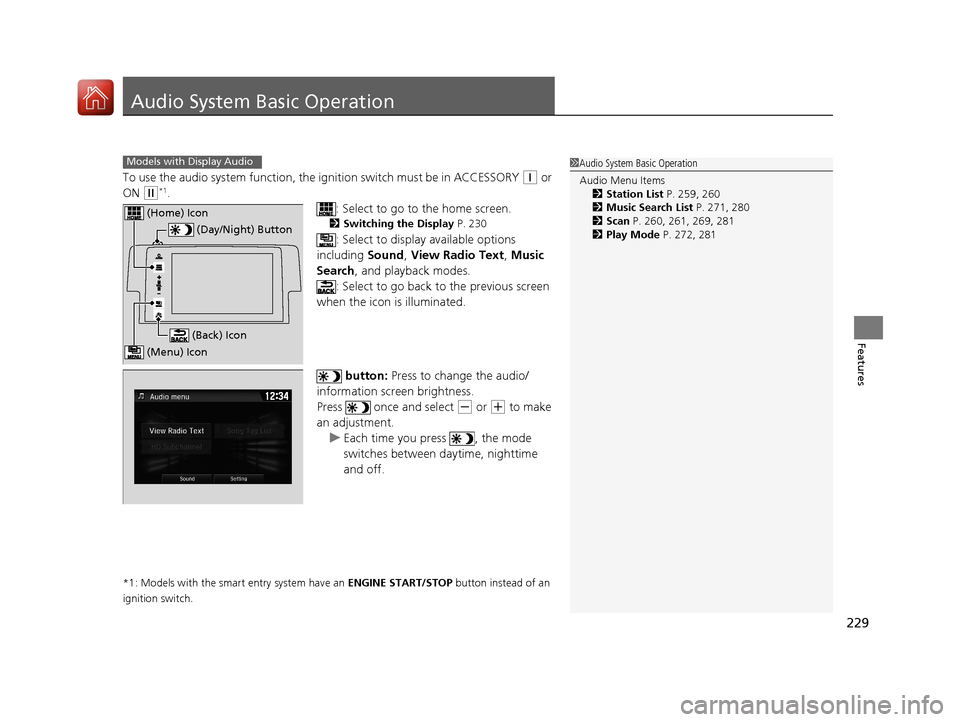
: Select to go to the home screen.
2Switching the Display P. 230
: Select to display available options
including Sound, View Radio Text , Music
Search , and playback modes.
: Select to go back to the previous screen
when the icon is illuminated.
button: Press to change the audio/
information screen brightness.
Press once and select
(- or (+ to make
an adjustment. u Each time you press , the mode
switches between da ytime, nighttime
and off.
*1: Models with the smart entry system have an ENGINE START/STOP button instead of an
ignition switch.
1 Audio System Basic Operation
Audio Menu Items
2 Station List P. 259, 260
2 Music Search List P. 271, 280
2 Scan P. 260, 261, 269, 281
2 Play Mode P. 272, 281Models with Display Audio
(Day/Night) Button
(Home) Icon
(Back) Icon
(Menu) Icon
17 CIVIC 4D HCM (KA KC KL)-31TBA6100.book 229 ページ 2016年8月31日 水曜日 午後6時5分
Page 316 of 601
Continued315
uuCustomized Features u
Features
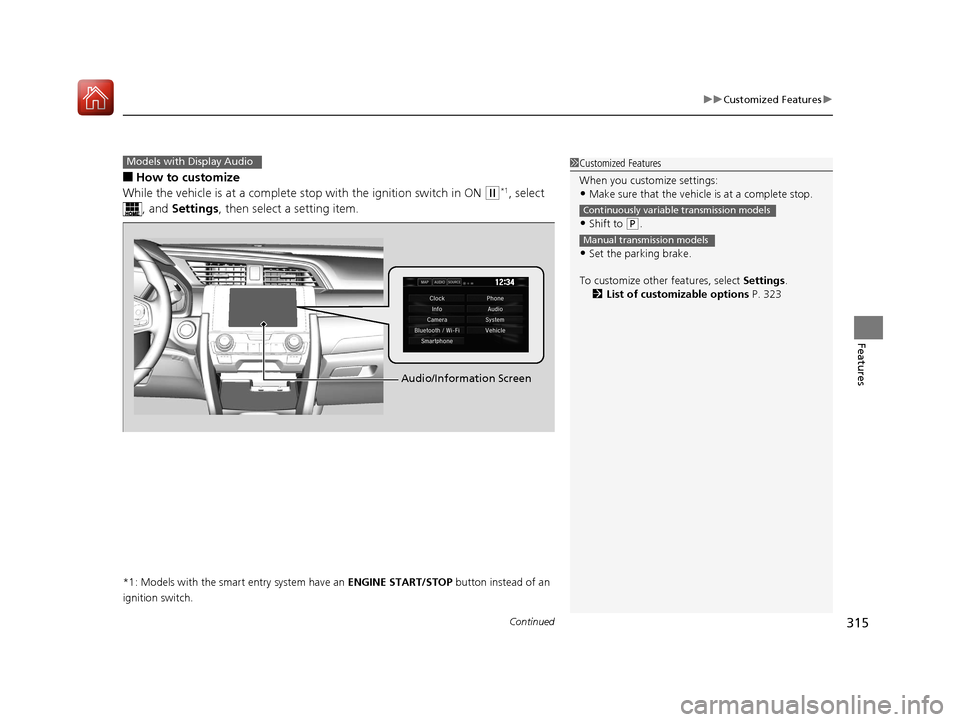
■How to customize
While the vehicle is at a complete st op with the ignition switch in ON
(w*1, select
, and Settings , then select a setting item.
*1: Models with the smart entry system have an ENGINE START/STOP button instead of an
ignition switch.
Models with Display Audio1 Customized Features
When you customize settings:
•Make sure that the vehicle is at a complete stop.
•Shift to (P.
•Set the parking brake.
To customize other features, select Settings.
2 List of customizable options P. 323
Continuously variable transmission models
Manual transmission models
Audio/Information Screen
17 CIVIC 4D HCM (KA KC KL)-31TBA6100.book 315 ページ 2016年8月31日 水曜日 午後6時5分
Page 334 of 601
333
uuCustomized Features u
Continued
Features
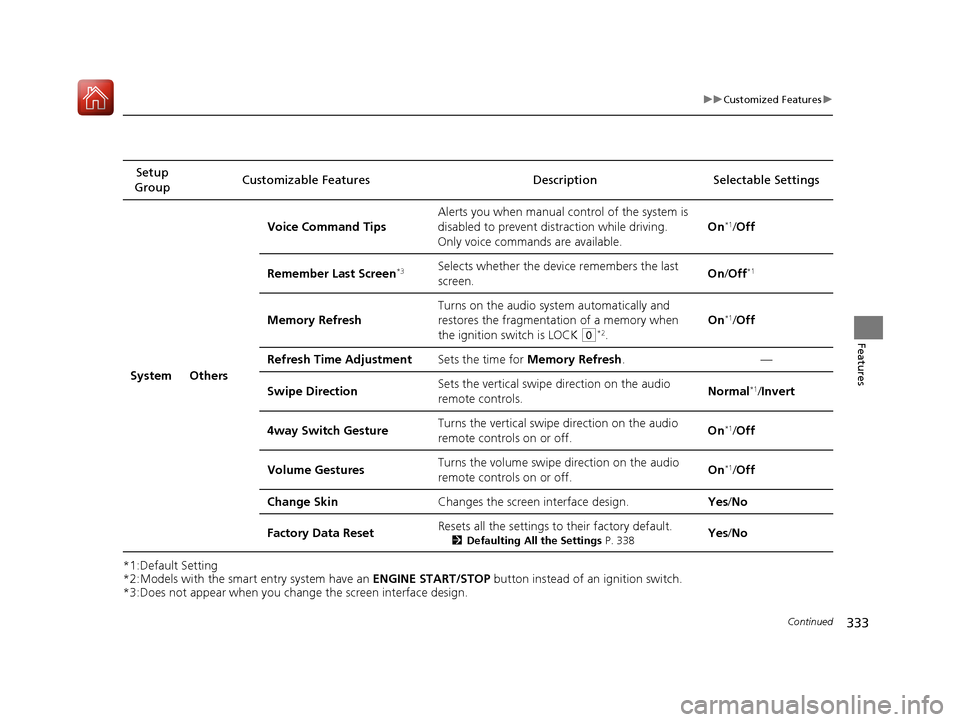
*1:Default Setting
*2:Models with the smart entry system have an ENGINE START/STOP button instead of an ignition switch.
*3:Does not appear when you chan ge the screen interface design.
Setup
Group Customizable Features Description
Selectable Settings
System Others Voice Command Tips
Alerts you when manual c
ontrol of the system is
disabled to prevent distraction while driving.
Only voice comman ds are available. On
*1/
Off
Remember Last Screen
*3Selects whether the device remembers the last
screen. On
/Off*1
Memory Refresh Turns on the audio system automatically and
restores the fragmentation of a memory when
the ignition switch is LOCK
(0*2.On
*1/
Off
Refresh Time Adjustment Sets the time for Memory Refresh . —
Swipe Direction Sets the vertical swipe
direction on the audio
remote controls. Normal
*1/
Invert
4way Switch Gesture Turns the vertical swipe direction on the audio
remote controls on or off. On
*1/
Off
Volume Gestures Turns the volume swipe
direction on the audio
remote controls on or off. On
*1/
Off
Change Skin Changes the screen interface design. Yes/No
Factory Data Reset Resets all the settings to their factory default.
2
Defaulting All the Settings P. 338Yes/No
17 CIVIC 4D HCM (KA KC KL)-31TBA6100.book 333 ページ 2016年8月31日 水曜日 午後6時5分
Page 366 of 601
365
uuBluetooth ® HandsFreeLink ®*uHFL Menus
Continued
Features
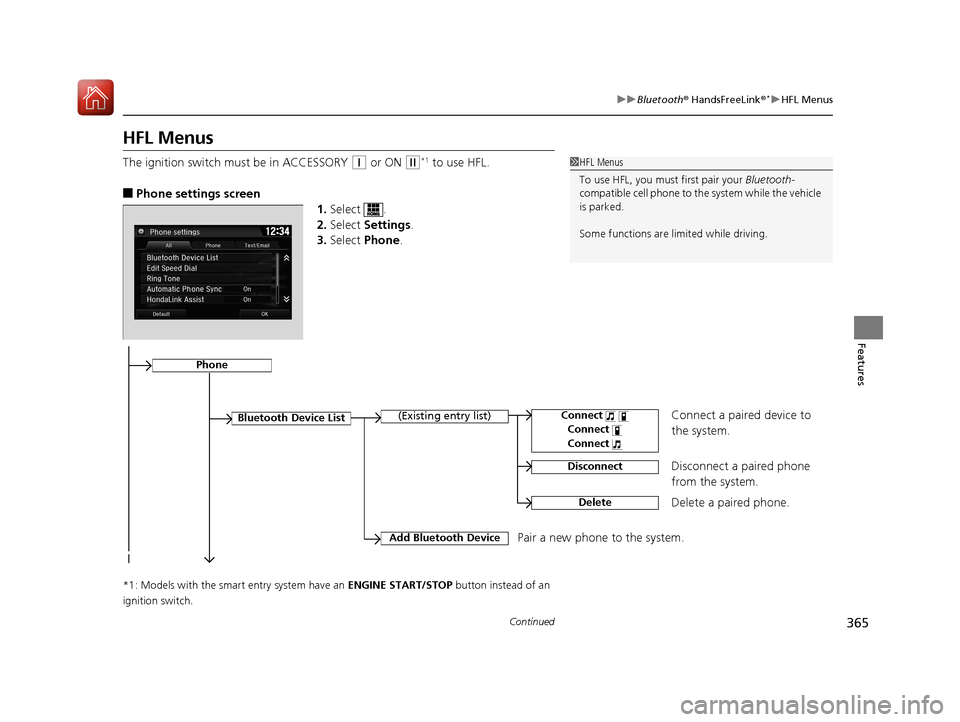
HFL Menus
The ignition switch mu st be in ACCESSORY (q or ON (w*1 to use HFL.
■Phone settings screen
1.Select .
2. Select Settings .
3. Select Phone .
*1: Models with the smart entry system have an ENGINE START/STOP button instead of an
ignition switch.
1 HFL Menus
To use HFL, you must first pair your Bluetooth-
compatible cell phone to th e system while the vehicle
is parked.
Some functions are limited while driving.
Disconnect a paired phone
from the system.
Bluetooth Device List(Existing entry list)
Disconnect
DeleteDelete a paired phone.
Add Bluetooth DevicePair a new phone to the system.
Phone
Connect a paired device to
the system.Connect
Connect
Connect
17 CIVIC 4D HCM (KA KC KL)-31TBA6100.book 365 ページ 2016年8月31日 水曜日 午後6時5分