key battery HONDA CIVIC 2017 10.G Owners Manual
[x] Cancel search | Manufacturer: HONDA, Model Year: 2017, Model line: CIVIC, Model: HONDA CIVIC 2017 10.GPages: 601, PDF Size: 32.51 MB
Page 101 of 601
100
uuIndicators uDriver Information Interface Wa rning and Information Messages*
Instrument Panel
MessageConditionExplanation
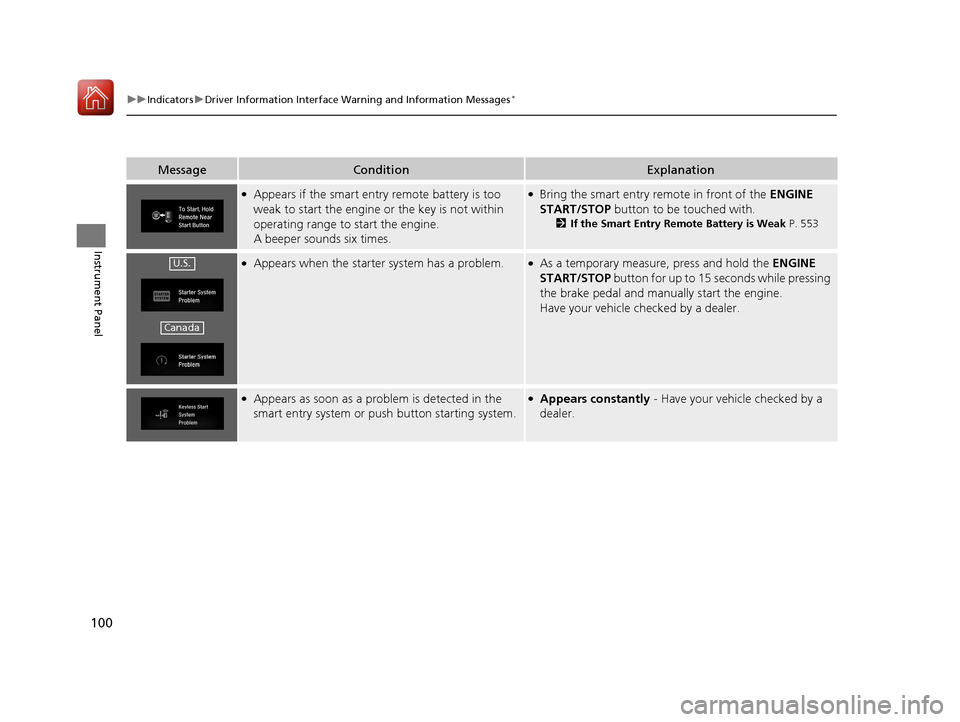
●Appears if the smart entry remote battery is too
weak to start the engine or the key is not within
operating range to start the engine.
A beeper sounds six times.●Bring the smart entry remote in front of the ENGINE
START/STOP button to be touched with.
2If the Smart Entry Remote Battery is Weak P. 553
●Appears when the starter system has a problem.●As a temporary measure, press and hold the ENGINE
START/STOP button for up to 15 seconds while pressing
the brake pedal and manua lly start the engine.
Have your vehicle checked by a dealer.
●Appears as soon as a problem is detected in the
smart entry system or pus h button starting system.●Appears constantly - Have your vehicle checked by a
dealer.
U.S.
Canada
17 CIVIC 4D HCM (KA KC KL)-31TBA6100.book 100 ページ 2016年8月31日 水曜日 午後6時5分
Page 131 of 601
130
Controls
Locking and Unlocking the Doors
Key Types and Functions
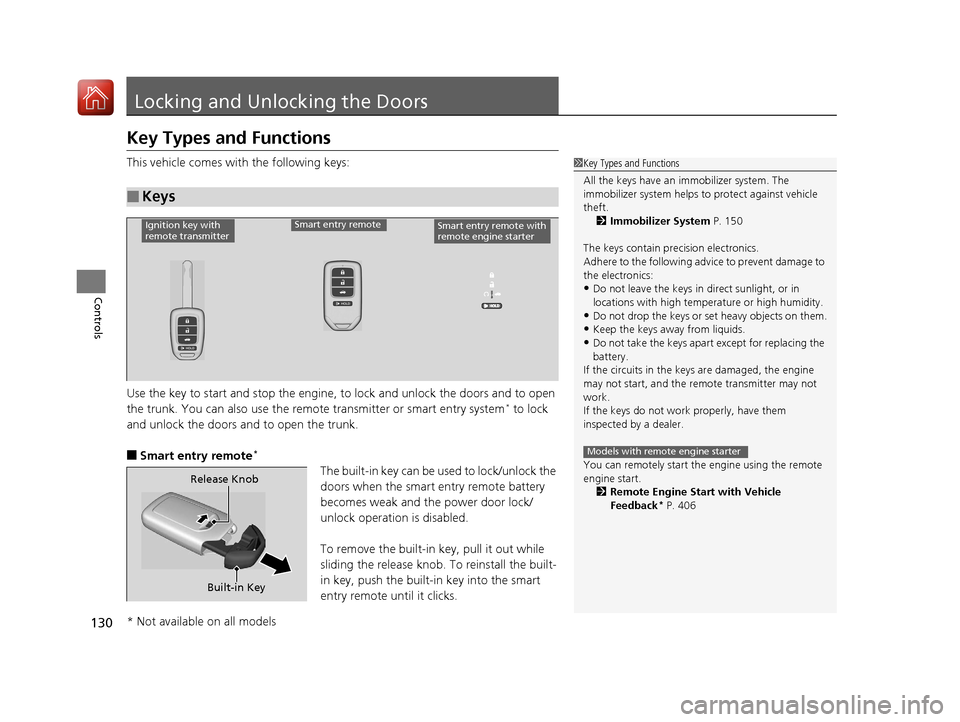
This vehicle comes with the following keys:
Use the key to start and stop the engine, to lock and unlock the doors and to open
the trunk. You can also use the remote transmitter or smart entry system
* to lock
and unlock the doors and to open the trunk.
■Smart entry remote*
The built-in key can be us ed to lock/unlock the
doors when the smart entry remote battery
becomes weak and th e power door lock/
unlock operation is disabled.
To remove the built-in key, pull it out while
sliding the release knob. To reinstall the built-
in key, push the built-in key into the smart
entry remote until it clicks.
■Keys
1 Key Types and Functions
All the keys have an immobilizer system. The
immobilizer system helps to protect against vehicle
theft. 2 Immobilizer System P. 150
The keys contain precision electronics.
Adhere to the following advi ce to prevent damage to
the electronics:
•Do not leave the keys in direct sunlight, or in
locations with high temperature or high humidity.
•Do not drop the keys or set heavy objects on them.
•Keep the keys away from liquids.
•Do not take the keys apart except for replacing the
battery.
If the circuits in the keys are damaged, the engine
may not start, and the remote transmitter may not
work.
If the keys do not work properly, have them
inspected by a dealer.
You can remotely start the engine using the remote
engine start.
2 Remote Engine Start with Vehicle
Feedback
* P. 406
Models with remote engine starter
Ignition key with
remote transmitterSmart entry remoteSmart entry remote with
remote engine starter
Built-in Key
Release Knob
* Not available on all models
17 CIVIC 4D HCM (KA KC KL)-31TBA6100.book 130 ページ 2016年8月31日 水曜日 午後6時5分
Page 140 of 601
139
uuLocking and Unlocking the Doors uLocking/Unlocking the Doors from the Outside
Controls
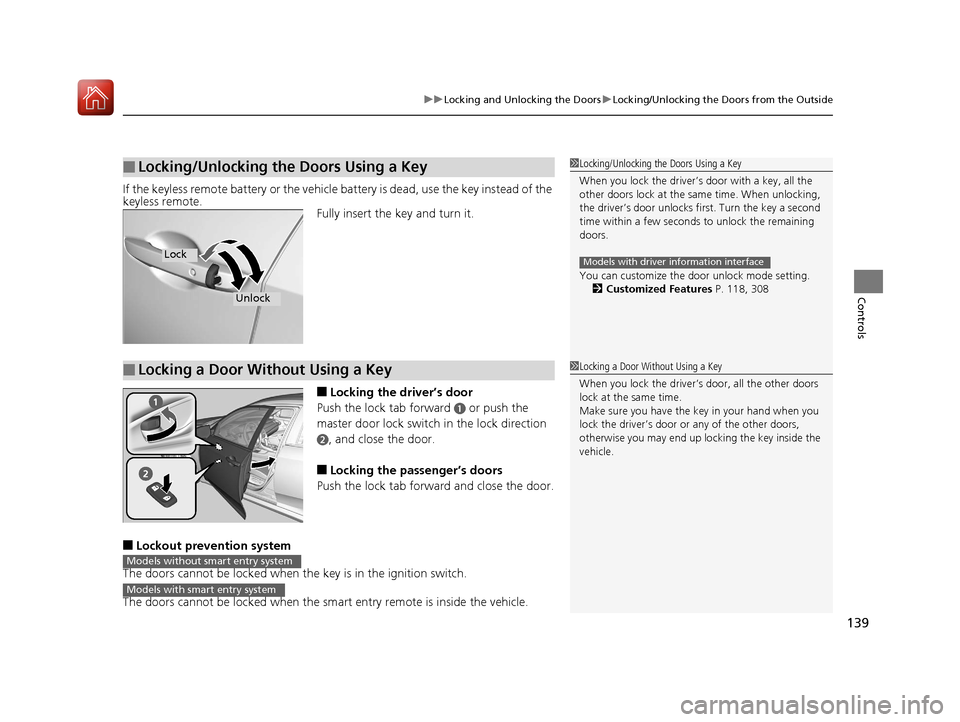
If the keyless remote battery or the vehicle battery is dead, use the key instead of the
keyless remote.
Fully insert the key and turn it.
■Locking the driver’s door
Push the lock tab forward
a or push the
master door lock switch in the lock direction
b, and close the door.
■Locking the passenger’s doors
Push the lock tab forward and close the door.
■Lockout prevention system
The doors cannot be locked when the key is in the ignition switch.
The doors cannot be locked when the sm art entry remote is inside the vehicle.
■Locking/Unlocking the Doors Using a Key1Locking/Unlocking the Doors Using a Key
When you lock the driver’s door with a key, all the
other doors lock at the same time. When unlocking,
the driver’s door unlocks first. Turn the key a second
time within a few seconds to unlock the remaining
doors.
You can customize the door unlock mode setting.
2 Customized Features P. 118, 308
Models with driver information interfaceLock
Unlock
■Locking a Door Without Using a Key1Locking a Door Without Using a Key
When you lock the driver’s door, all the other doors
lock at the same time.
Make sure you have the key in your hand when you
lock the driver’s door or any of the other doors,
otherwise you may end up lo cking the key inside the
vehicle.
Models without smart entry system
Models with smart entry system
17 CIVIC 4D HCM (KA KC KL)-31TBA6100.book 139 ページ 2016年8月31日 水曜日 午後6時5分
Page 151 of 601
150
Controls
Security System
Immobilizer System
The immobilizer system prevents a key that has not been pre-registered from
starting the engine. Each key contains el ectronic transmitters that use electronic
signals to verify the key.
Pay attention to the following when inserti ng the key into the ignition switch or
pressing the ENGINE START/STOP button:
• Do not allow objects that emit strong radio waves near the ignition switch or the
ENGINE START/STOP button.
• Make sure the key is not covered by or touching a metal object.
• Do not bring a key from anot her vehicle’s immobilizer system near the ignition
switch or the ENGINE START/STOP button.
• Do not put the key near magnetic items. Electronic devices, such as televisions
and audio systems emit strong magnetic fields. Note that even a key chain can
become magnetic.
Security System Alarm
The security system alarm activates wh en the trunk, hood or doors are forcibly
opened. The alarm does not go off if the trunk or doors are opened with the key,
remote transmitter or smart entry system
*.
However, the alarm activates if a door is opened with the key and then the shift lever
is moved out of
(P (continuously variable transmission models) or the hood is
opened before the ignition switch is turned to ON (w*1.
■When the security system alarm activates
The horn sounds intermittently and all the exterior lights flash.
■To deactivate the security system alarm
Unlock the vehicle using remote transmitter, or smart entry system*. The system,
along with the horn and flashing lights, is deactivated.
*1: Models with the smart entry system have an ENGINE START/STOP button instead of an
ignition switch.
1 Immobilizer System
NOTICE
Leaving the key in the vehicl e can result in theft or
accidental movement of the vehicle.
Always take the key with you whenever you leave the
vehicle unattended.
Do not alter the system or add other devices to it.
Doing so may damage the system and make your
vehicle inoperable.
Canadian models only: Apply and hold the brake
pedal before turning the vehicle on the first time after
the battery has been disconnected.
1 Security System Alarm
The security alarm continues for a maximum of two
minutes until the security system deactivates.
* Not available on all models
17 CIVIC 4D HCM (KA KC KL)-31TBA6100.book 150 ページ 2016年8月31日 水曜日 午後6時5分
Page 152 of 601
Continued151
uuSecurity System uSecurity System Alarm
Controls
■Setting the security system alarm
The security system alarm automatically sets when the following conditions have
been met:
• The ignition switch is in LOCK
(0*1, and the key has been removed from the
ignition switch.
• The hood and trunk are closed.
• All doors are locked with the key, the remote transmitter, or smart entry system
*.
■When the security system alarm sets
The security system alarm indicator in the instrument panel blinks. When the
blinking interval changes after about 15 se conds, the security system alarm is set.
■To cancel the security system alarm
The security system is canc eled when the vehicle is unlocked using the remote
transmitter, smart entry system
*, or the ignition swit ch is turned to ON (w*1. The
security system indicator go es off at the same time.
*1: Models with the smart entry system have an ENGINE START/STOP button instead of an
ignition switch.
1 Security System Alarm
Do not set the security system alarm when someone
is in the vehicle or a window is open. The system can
accidentally activate when:
•Unlocking the door with the lock tab.•Opening the trunk with th e trunk release button on
the driver’s door or th e emergency trunk opener.
•Opening the hood with the hood release.
•Moving the shift lever out of (P.
If the battery goes dead after you have set the
security system alarm, the security alarm may go off
once the battery is re charged or replaced.
If this occurs, deactivate the security system alarm by
unlocking a door using the remote transmitter or
smart entry system
*.
Do not alter the system or add other devices to it.
Doing so may damage the system and make your
vehicle inoperable.
Continuously variable transmission models
* Not available on all models
17 CIVIC 4D HCM (KA KC KL)-31TBA6100.book 151 ページ 2016年8月31日 水曜日 午後6時5分
Page 163 of 601
162
uuOperating the Switches Around the Steering Wheel uTurn Signals
Controls
Turn Signals
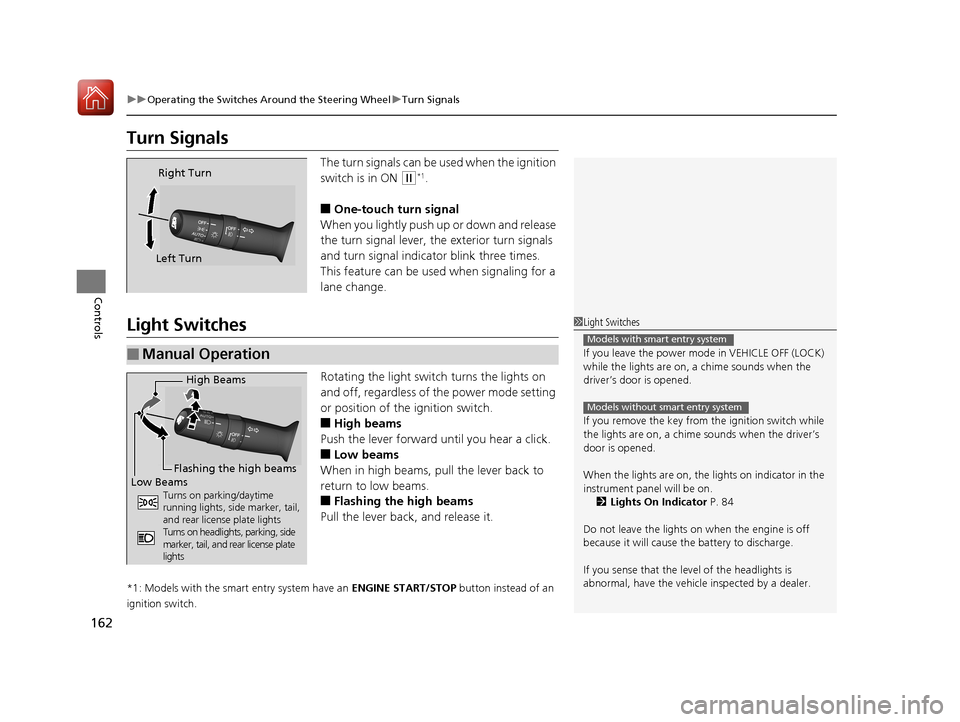
The turn signals can be used when the ignition
switch is in ON
(w*1.
■One-touch turn signal
When you lightly push up or down and release
the turn signal lever, th e exterior turn signals
and turn signal indicator blink three times.
This feature can be used when signaling for a
lane change.
Light Switches
Rotating the light switch turns the lights on
and off, regardless of the power mode setting
or position of the ignition switch.
■High beams
Push the lever forward until you hear a click.
■Low beams
When in high beams, pull the lever back to
return to low beams.
■Flashing the high beams
Pull the lever back, and release it.
*1: Models with the smart entry system have an ENGINE START/STOP button instead of an
ignition switch.
Right Turn
Left Turn
■Manual Operation
1 Light Switches
If you leave the power mode in VEHICLE OFF (LOCK)
while the lights are on, a chime sounds when the
driver’s door is opened.
If you remove the key from the ignition switch while
the lights are on, a chime sounds when the driver’s
door is opened.
When the lights are on, the lights on indicator in the
instrument pane l will be on.
2 Lights On Indicator P. 84
Do not leave the lights on when the engine is off
because it will cause the battery to discharge.
If you sense that the le vel of the headlights is
abnormal, have the vehicl e inspected by a dealer.
Models with smart entry system
Models without smart entry system
High Beams
Flashing the high beams
Low Beams
Turns on parking/daytime
running lights, side marker, tail,
and rear license plate lights
Turns on headlights, parking, side
marker, tail, and rear license plate
lights
17 CIVIC 4D HCM (KA KC KL)-31TBA6100.book 162 ページ 2016年8月31日 水曜日 午後6時5分
Page 534 of 601
533Continued
Maintenance
Remote Transmitter Care
Replacing the Button Battery
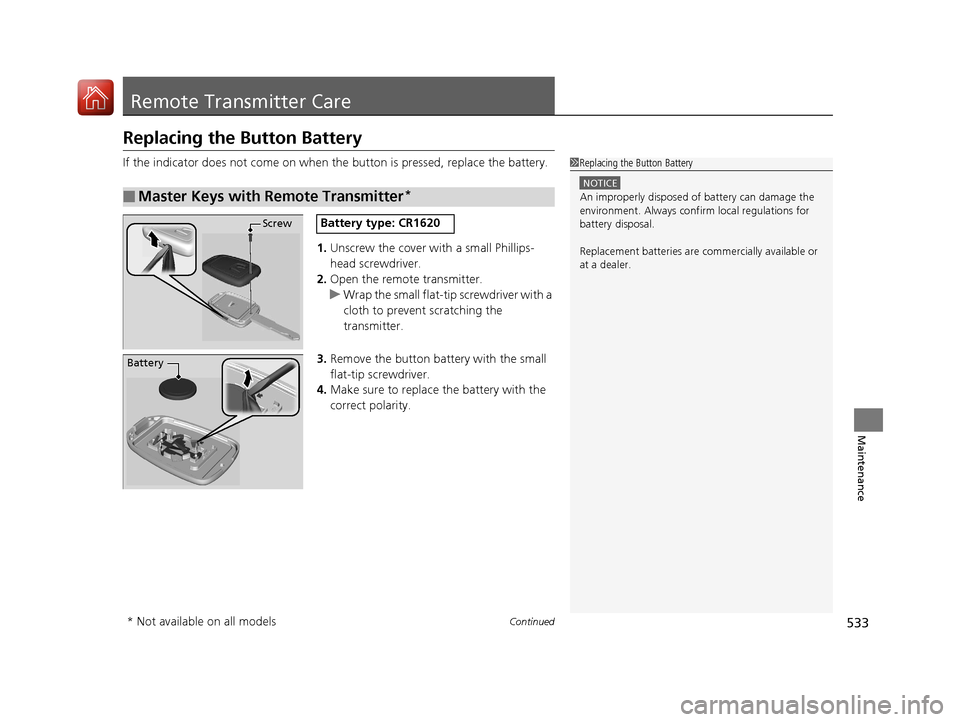
If the indicator does not come on when the button is pressed, replace the battery.
1. Unscrew the cover with a small Phillips-
head screwdriver.
2. Open the remote transmitter.
u Wrap the small flat-tip screwdriver with a
cloth to prevent scratching the
transmitter.
3. Remove the button battery with the small
flat-tip screwdriver.
4. Make sure to replace the battery with the
correct polarity.
■Master Keys with Remote Transmitter*
1Replacing the Button Battery
NOTICE
An improperly disposed of battery can damage the
environment. Always conf irm local regulations for
battery disposal.
Replacement batteries are commercially available or
at a dealer.
ScrewBattery type: CR1620
Battery
* Not available on all models
17 CIVIC 4D HCM (KA KC KL)-31TBA6100.book 533 ページ 2016年8月31日 水曜日 午後6時5分
Page 535 of 601
534
uuRemote Transmitter Care uReplacing the Button Battery
Maintenance
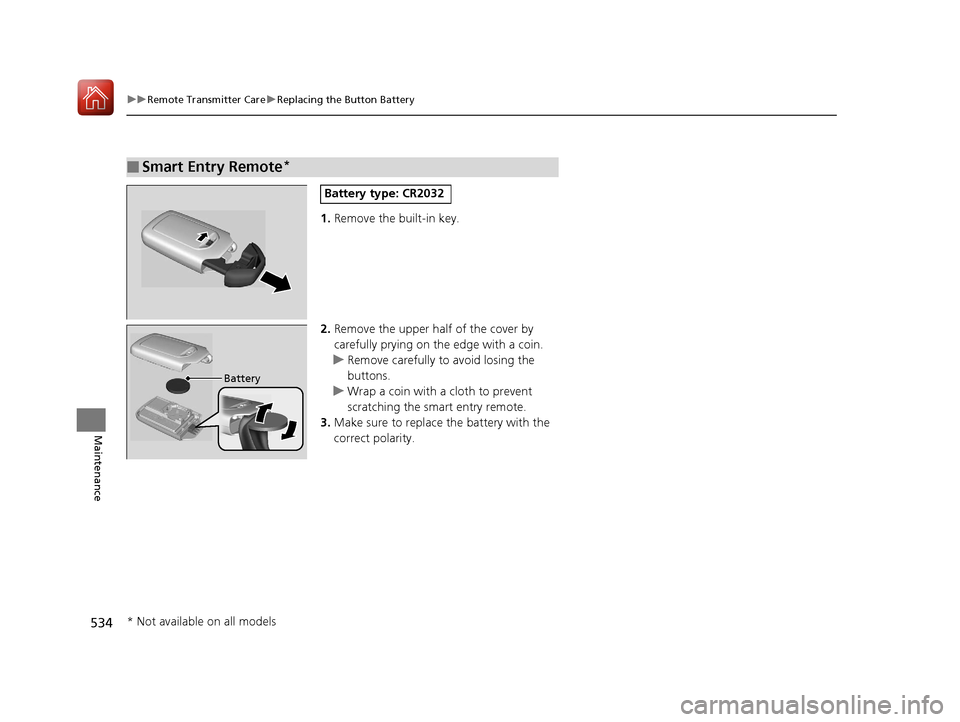
1. Remove the built-in key.
2. Remove the upper half of the cover by
carefully prying on the edge with a coin.
u Remove carefully to avoid losing the
buttons.
u Wrap a coin with a cloth to prevent
scratching the smart entry remote.
3. Make sure to replace the battery with the
correct polarity.
■Smart Entry Remote*
Battery type: CR2032
Battery
* Not available on all models
17 CIVIC 4D HCM (KA KC KL)-31TBA6100.book 534 ページ 2016年8月31日 水曜日 午後6時5分
Page 592 of 601
591
Index
Controls.................................................... 127
Coolant (Engine) ...................................... 505
Adding the Coolant ................................ 506
Overheating ............................................ 559
Creeping (Continuously Variable
Transmission) .......................................... 410
Cruise Control .......................................... 417
Indicator ................................................... 86
Cup Holders .............................................. 185
Customer Service Information ................ 588
Customized Features ....................... 118, 308
D
Daytime Running Lights .......................... 165
Dead Battery ............................................ 555
Defaulting All the Settings ...................... 338
Defrosting the Windshield and
Windows ......................................... 194, 199
Devices that Emit Radio Waves ............... 581
Dimming
Headlights .............................................. 162
Rearview Mirror ...................................... 171
Dipstick (Engine Oil) ................................ 499
Directional Signals (Turn Signal) ............. 162
Display Button .......................................... 230
Display Setup .................................... 217, 252
Display/Information Button .................... 113
Door Mirrors ............................................. 172 Doors
......................................................... 130
Auto Door Locking .................................. 143
Auto Door Unlocking ............................... 143
Door and Trunk Open Indicator ........... 37, 82
Door Open Message ............................ 37, 94
Keys ........................................................ 130
Locking/Unlocking the Doors from the Inside............................................... 140
Locking/Unlocking the Doors from the Outside............................................ 133
DOT Tire Quality Grading ........................ 525
Driver Information Interface ................... 113
Driving ....................................................... 395
Braking .................................................... 457
Continuously Variable Transmission ......... 410
Cruise Control ......................................... 417
Shifting Gear ........................................... 413
Shifting Position ...................................... 411
Starting the Engine .......................... 402, 404
Dust and Pollen Filter ............................... 535
E
Eco Assist® System ........................................ 9
ECON Button ............................................. 416
Elapsed Time ............................................. 115
Electric Power Steering (EPS) System ........ 82
Indicator ............................................ 82, 565
Electronic Stability Control (ESC) ............. 447Emergency
................................................ 571
Emergency Engine Stop ........................... 554
Emergency Trunk Opener ................ 149, 573
Emissions Testing (Readiness Codes) ....... 583
Engine
Coolant ................................................... 505
Jump Starting .......................................... 555
Oil ........................................................... 498
Starting ........................................... 402, 404
Switch Buzzer.......................................... 157
Engine Coolant ......................................... 505
Adding the Coolant................................. 506
Overheating ............................................ 559
Temperature Gauge ................................ 109
Engine Oil ................................................. 498
Adding .................................................... 501
Checking................................................. 499
Displaying Maintenance Minder Information ................................... 485, 490
Low Oil Pressure Indicator ................. 78, 561
Recommended Engine Oil ....................... 498
ENGINE START/STOP Button .................... 158
EPS (Electric Power Steering) System ...... 565
Exhaust Gas Hazard (Carbon Monoxide) ................................................. 72
Exterior Care (Cleaning) ........................... 538
Exterior Mirrors ........................................ 172
17 CIVIC 4D HCM (KA KC KL)-31TBA6100.book 591 ページ 2016年8月31日 水曜日 午後6時5分
Page 595 of 601
594
Index
L
Lane Keeping Assist System (LKAS)......... 440
LaneWatchTM............................................. 450
Language (HFL) ................................. 340, 364
LATCH (Child Seats) .................................... 65
Lights ................................................. 162, 510
Automatic ............................................... 163
Bulb Replacement .................................... 510
Daytime Running Lights ........................... 165
Fog Lights ................................................ 165
High Beam Indicator .................................. 84
Interior .................................................... 181
Light Switches ......................................... 162
Lights On Indicator .................................... 84
Turn Signals ............................................. 162
Load Limits ................................................ 399
Locking/Unlocking .................................... 130
Auto Door Locking/Unlocking .................. 143
Childproof Door Locks ............................. 142
From Inside .............................................. 140
From Outside ........................................... 133
Keys ........................................................ 130
Using a Key ............................................. 139
Low Battery Charge .................................. 561
Low Fuel Indicator ...................................... 80
Low Oil Pressure Indicator ................. 78, 561
Low Smart Entry Remote Signal Strength ................................................... 132
Lower Anchors ............................................ 65
Lubricant Specifications Chart ......... 576, 578
Luggage (Maximum Load Limit) .............. 399
M
Maintenance............................................. 481
Adding the Coolant................................. 506
Battery .................................................... 531
Brake/Clutch Fluid ................................... 508
Cleaning ................................................. 536
Climate Control System ........................... 535
Coolant ................................................... 505
Heating System ....................................... 535
Maintenance Minder
TM............................ 485
Oil ........................................................... 499
Precautions ............................................. 482
Remote Transmitter ................................. 533
Replacing Light Bulbs .............................. 510
Safety...................................................... 483
Service Items ................................... 487, 492
Tires ........................................................ 522
Transmission Fluid ................................... 507
Under the Hood ...................................... 495
Malfunction Indicator Lamp .............. 79, 562
Manual Transmission ............................... 413
Map Lights ................................................ 182
Maximum Load Limit ............................... 399
Meters, Gauges ......................................... 108
Mirrors ...................................................... 171
Adjusting ................................................ 171
Door ....................................................... 172
Exterior ................................................... 172
Interior Rearview ..................................... 171
Modifications (and Accessories) .............. 541
Moonroof ................................................. 156 MP3
................................................... 223, 279
Multi-View Rear Camera ......................... 474
N
Numbers (Identification)......................... 580
O
Odometer......................................... 110, 114
Oil (Engine) .............................................. 498
Adding ................................................... 501
Checking ................................................ 499
Displaying Mainte nance Minder
Information ................................... 485, 490
Low Oil Pressure Indicator ................. 78, 561
Recommended Engine Oil ....................... 498
Viscosity.................................................. 498
Open Source Licenses .............................. 306
Opening
Trunk ...................................................... 573
Opening/Closing Hood ...................................................... 497
Moonroof ............................................... 156
Power Windows...................................... 153
Trunk ...................................................... 147
Outside Temperature Display ......... 112, 116
Overheating ............................................. 559
17 CIVIC 4D HCM (KA KC KL)-31TBA6100.book 594 ページ 2016年8月31日 水曜日 午後6時5分