instrument panel HONDA CIVIC 2017 10.G Repair Manual
[x] Cancel search | Manufacturer: HONDA, Model Year: 2017, Model line: CIVIC, Model: HONDA CIVIC 2017 10.GPages: 601, PDF Size: 32.51 MB
Page 169 of 601
168
uuOperating the Switches Around the Steering Wheel uBrightness Control
Controls
Brightness Control
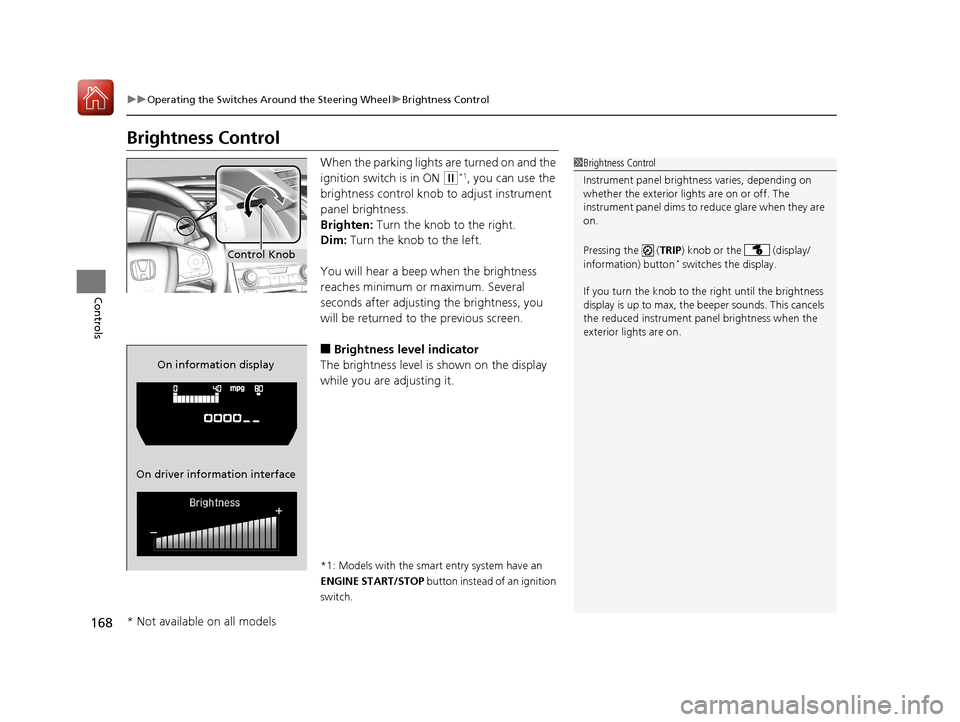
When the parking lights are turned on and the
ignition switch is in ON
(w*1, you can use the
brightness control knob to adjust instrument
panel brightness.
Brighten: Turn the knob to the right.
Dim: Turn the knob to the left.
You will hear a beep when the brightness
reaches minimum or maximum. Several
seconds after adjusting the brightness, you
will be returned to the previous screen.
■Brightness level indicator
The brightness level is shown on the display
while you are adjusting it.
*1: Models with the smart entry system have an
ENGINE START/STOP button instead of an ignition
switch.
1 Brightness Control
Instrument panel brightne ss varies, depending on
whether the exterior lights are on or off. The
instrument panel dims to reduce glare when they are
on.
Pressing the ( TRIP) knob or the (display/
information) button
* switches the display.
If you turn the knob to the right until the brightness
display is up to max, the beeper sounds. This cancels
the reduced instrument panel brightness when the
exterior lights are on.Control Knob
On information display
On driver information interface
* Not available on all models
17 CIVIC 4D HCM (KA KC KL)-31TBA6100.book 168 ページ 2016年8月31日 水曜日 午後6時5分
Page 171 of 601
170
uuOperating the Switches Around the Steering Wheel uAdjusting the Steering Wheel
Controls
Adjusting the Steering Wheel
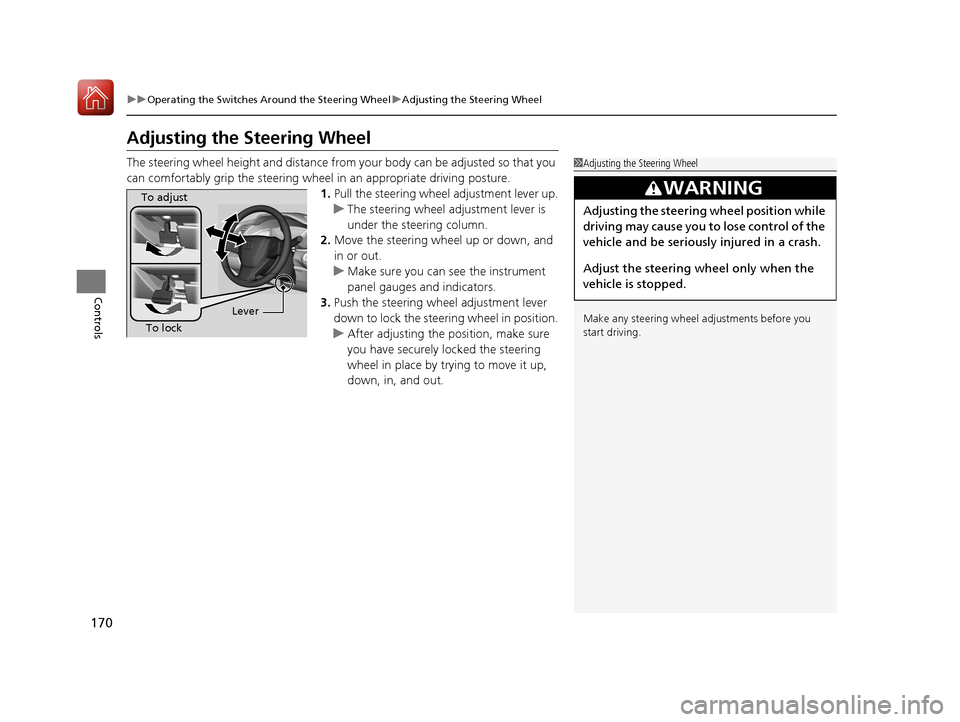
The steering wheel height and distance from your body can be adjusted so that you
can comfortably grip the steering wheel in an appropriate driving posture.
1.Pull the steering wheel adjustment lever up.
u The steering wheel adjustment lever is
under the steering column.
2. Move the steering wheel up or down, and
in or out.
u Make sure you can see the instrument
panel gauges and indicators.
3. Push the steering wheel adjustment lever
down to lock the steering wheel in position.
u After adjusting the position, make sure
you have securely locked the steering
wheel in place by trying to move it up,
down, in, and out.1Adjusting the Steering Wheel
Make any steering wheel adjustments before you
start driving.
3WARNING
Adjusting the steering wheel position while
driving may cause you to lose control of the
vehicle and be seriously injured in a crash.
Adjust the steering wheel only when the
vehicle is stopped.
To adjust
To lock Lever
17 CIVIC 4D HCM (KA KC KL)-31TBA6100.book 170 ページ 2016年8月31日 水曜日 午後6時5分
Page 232 of 601
Continued231
uuAudio System Basic Operation uAudio/Information Screen
Features
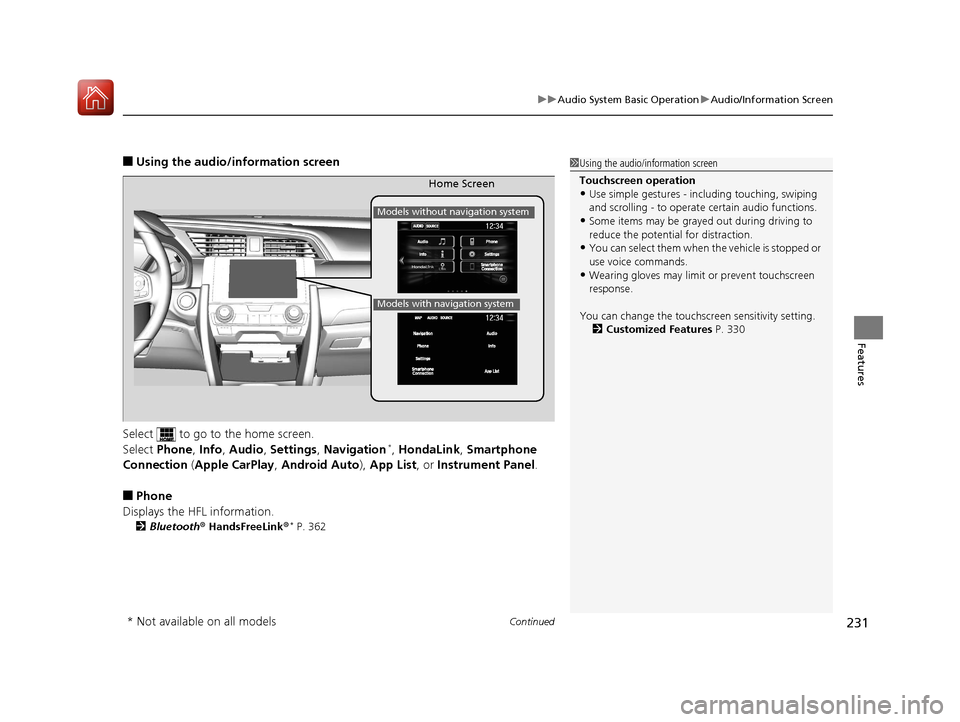
■Using the audio/in formation screen
Select to go to the home screen.
Select Phone , Info , Audio , Settings , Navigation
*, HondaLink , Smartphone
Connection (Apple CarPlay, Android Auto), App List , or Instrument Panel .
■Phone
Displays the HFL information.
2 Bluetooth ® HandsFreeLink ®* P. 362
1Using the audio/in formation screen
Touchscreen operation
•Use simple gestures - in cluding touching, swiping
and scrolling - to operate certain audio functions.
•Some items may be grayed out during driving to
reduce the potential for distraction.
•You can select them when the vehicle is stopped or
use voice commands.
•Wearing gloves may limit or prevent touchscreen
response.
You can change the touchs creen sensitivity setting.
2 Customized Features P. 330
Home Screen
Models without navigation system
Models with navigation system
* Not available on all models
17 CIVIC 4D HCM (KA KC KL)-31TBA6100.book 231 ページ 2016年8月31日 水曜日 午後6時5分
Page 234 of 601
233
uuAudio System Basic Operation uAudio/Information Screen
Continued
Features
■HondaLink
Connects with your smartphone*1 to play personalized music, information, and
social media streams.
2 HondaLink ® P. 284
■Smartphone Connection
Connects with your smartphone*1 and allows some apps on your smartphone to be
used on the audio system.
2 Apple CarPlay P. 292
2 Android Auto P. 295
■App List
Adds or removes apps or widgets on the home screen.
2 Home Screen P. 241
■Instrument Panel
Selects from three customizable settings for the driver information interface.
*1: Available on specific phones only. Check handsfreelink.honda.com for U.S. and
www.handsfreelink.ca for Canada for compatible phones and hondalink.com for U.S. and
honda.ca/hondalink for Canada for feature details.
17 CIVIC 4D HCM (KA KC KL)-31TBA6100.book 233 ページ 2016年8月31日 水曜日 午後6時5分
Page 236 of 601
Continued235
uuAudio System Basic Operation uAudio/Information Screen
Features
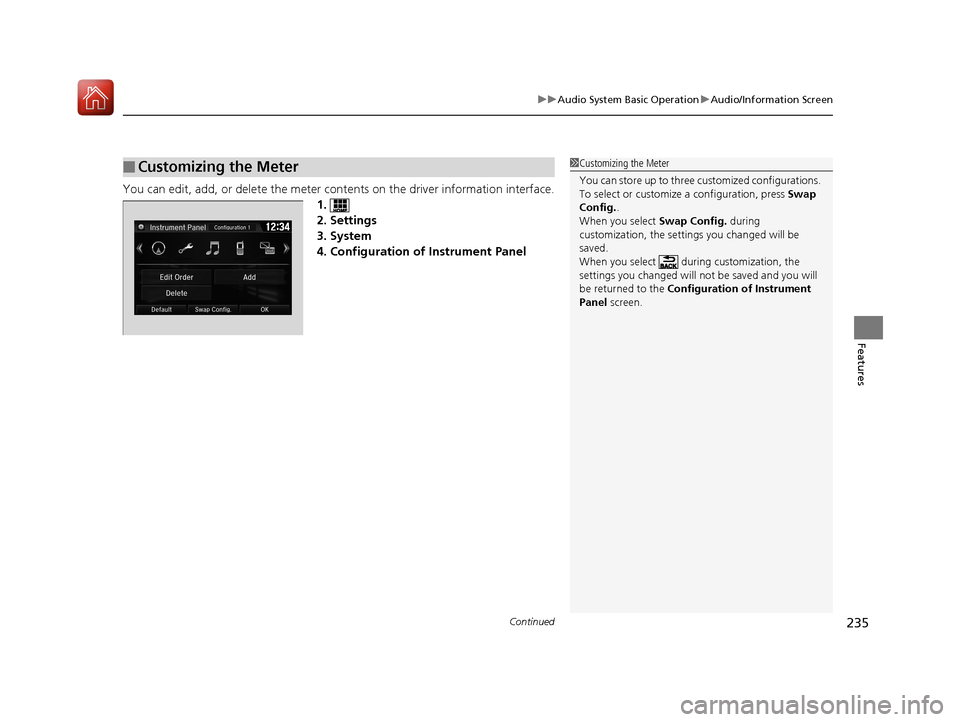
You can edit, add, or delete the meter cont ents on the driver information interface.
1.
2. Settings
3. System
4. Configuration of Instrument Panel
■Customizing the Meter1 Customizing the Meter
You can store up to three cu stomized configurations.
To select or customize a configuration, press Swap
Config. .
When you select Swap Config. during
customization, the settings you changed will be
saved.
When you select during customization, the
settings you changed will not be saved and you will
be returned to the Configuration of Instrument
Panel screen.
17 CIVIC 4D HCM (KA KC KL)-31TBA6100.book 235 ページ 2016年8月31日 水曜日 午後6時5分
Page 237 of 601
uuAudio System Basic Operation uAudio/Information Screen
236
Features
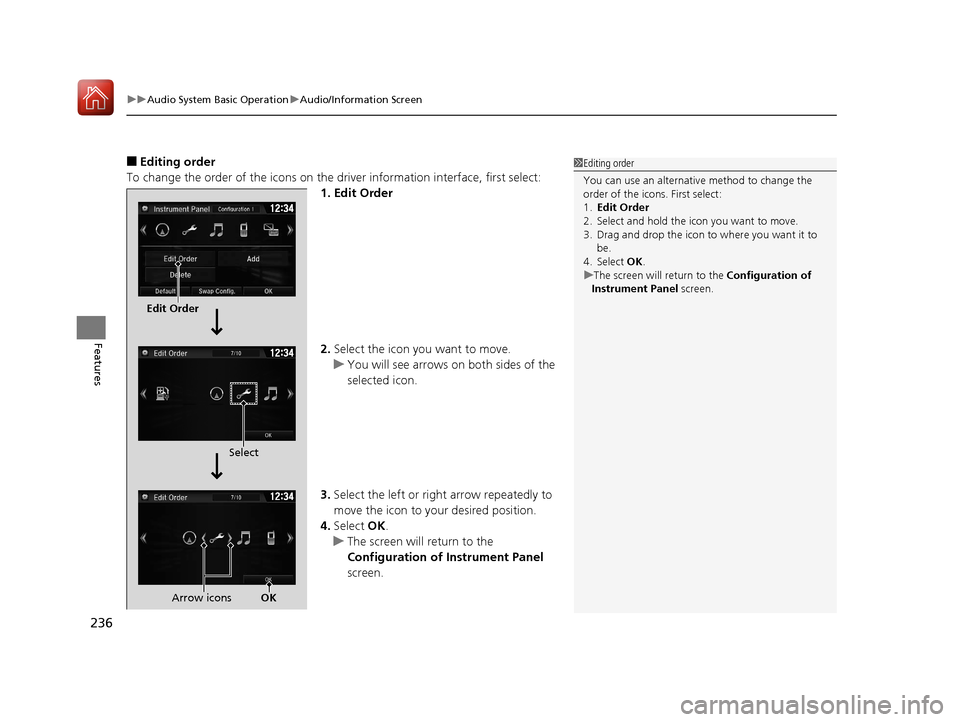
■Editing order
To change the order of the icons on the driver information interface, first select:
1. Edit Order
2. Select the icon you want to move.
u You will see arrows on both sides of the
selected icon.
3. Select the left or right arrow repeatedly to
move the icon to your desired position.
4. Select OK.
u The screen will return to the
Configuration of Instrument Panel
screen.1 Editing order
You can use an alternative method to change the
order of the icons. First select:
1. Edit Order
2. Select and hold the icon you want to move.
3. Drag and drop the icon to where you want it to be.
4. Select OK .
u The screen will return to the Configuration of
Instrument Panel screen.
Edit Order
Select
Arrow icons OK
17 CIVIC 4D HCM (KA KC KL)-31TBA6100.book 236 ページ 2016年8月31日 水曜日 午後6時5分
Page 238 of 601
Continued237
uuAudio System Basic Operation uAudio/Information Screen
Features
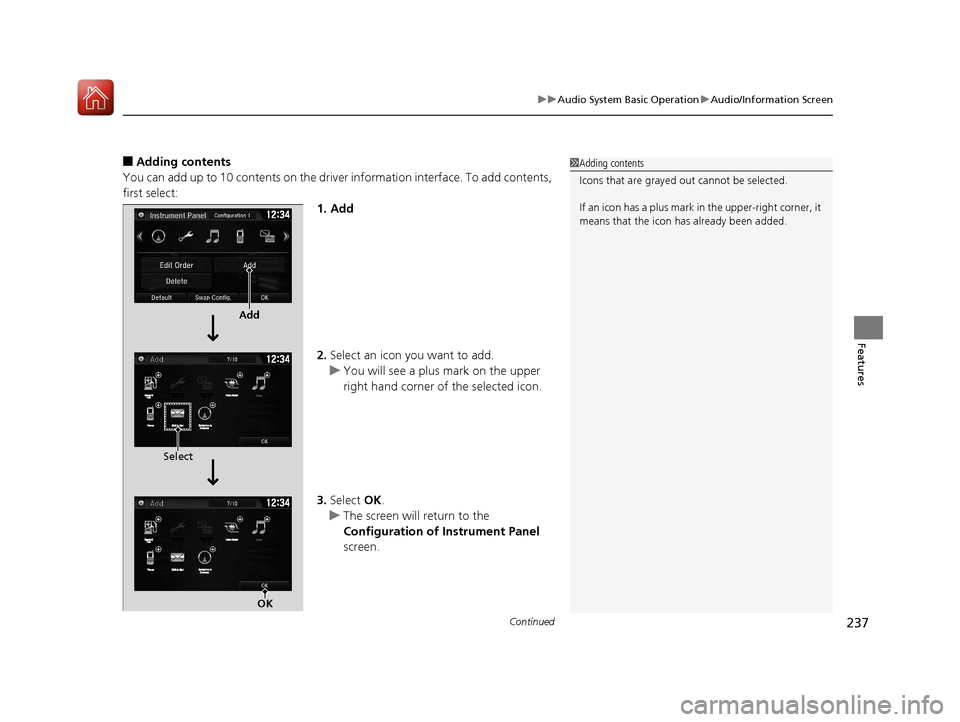
■Adding contents
You can add up to 10 contents on the driver information interface. To add contents,
first select: 1. Add
2.Select an icon you want to add.
u You will see a plus mark on the upper
right hand corner of the selected icon.
3. Select OK.
u The screen will return to the
Configuration of Instrument Panel
screen.1 Adding contents
Icons that are grayed out cannot be selected.
If an icon has a plus mark in the upper-right corner, it
means that the icon ha s already been added.
Add
Select
OK
17 CIVIC 4D HCM (KA KC KL)-31TBA6100.book 237 ページ 2016年8月31日 水曜日 午後6時5分
Page 239 of 601
uuAudio System Basic Operation uAudio/Information Screen
238
Features
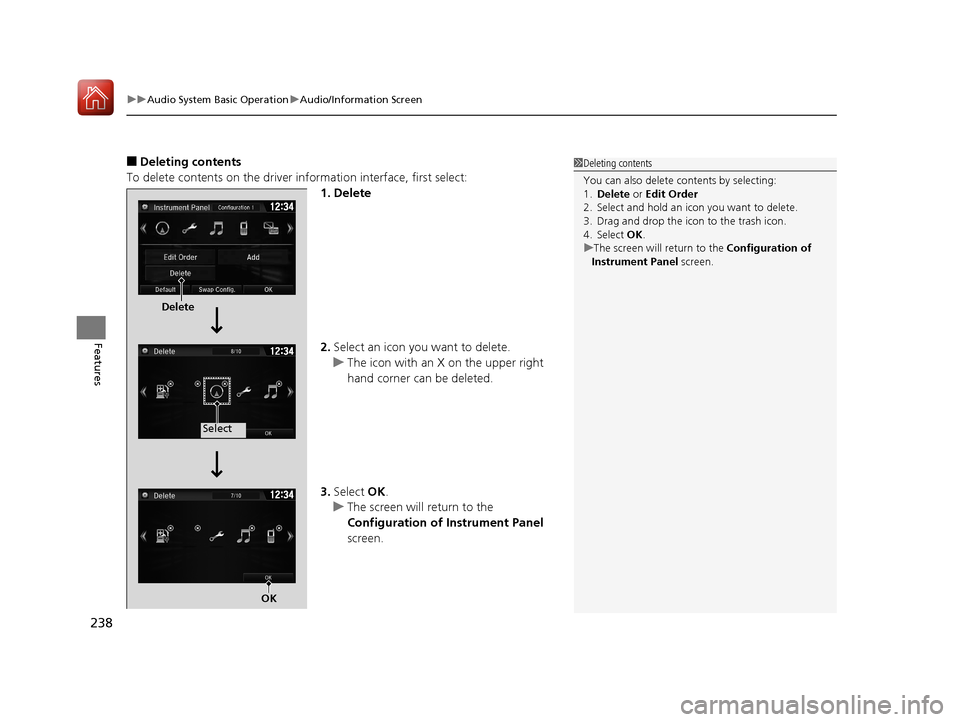
■Deleting contents
To delete contents on the driver information interface, first select:
1. Delete
2.Select an icon you want to delete.
u The icon with an X on the upper right
hand corner can be deleted.
3. Select OK.
u The screen will return to the
Configuration of Instrument Panel
screen.1 Deleting contents
You can also delete c ontents by selecting:
1. Delete or Edit Order
2. Select and hold an icon you want to delete.
3. Drag and drop the icon to the trash icon.
4. Select OK .
u The screen will return to the Configuration of
Instrument Panel screen.
Delete
Select
OK
17 CIVIC 4D HCM (KA KC KL)-31TBA6100.book 238 ページ 2016年8月31日 水曜日 午後6時5分
Page 246 of 601
Continued245
uuAudio System Basic Operation uAudio/Information Screen
Features
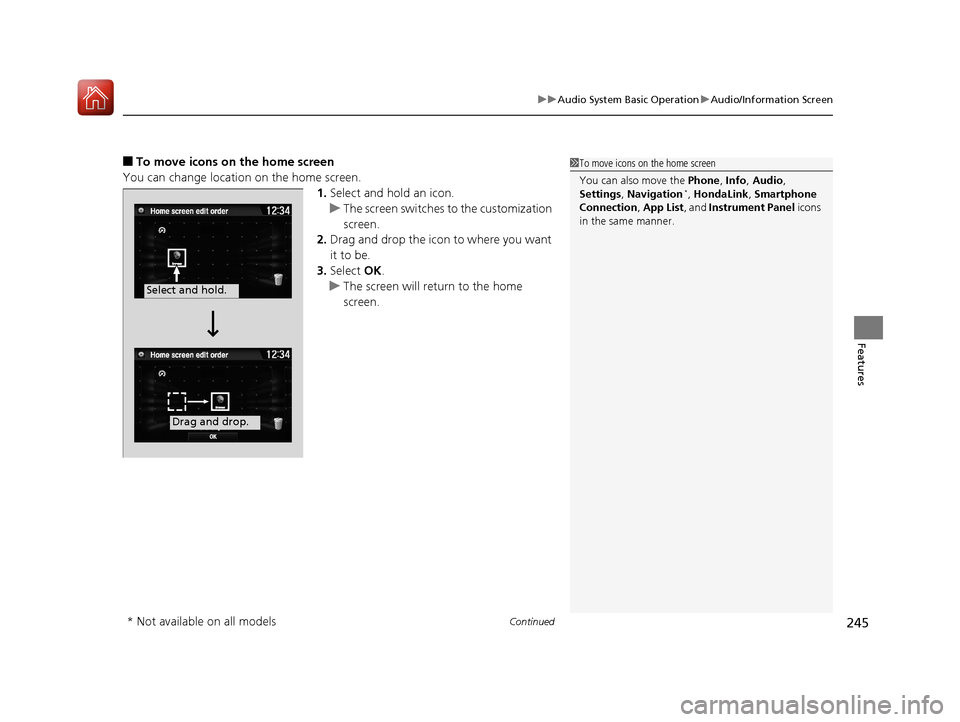
■To move icons on the home screen
You can change location on the home screen. 1.Select and hold an icon.
u The screen switches to the customization
screen.
2. Drag and drop the icon to where you want
it to be.
3. Select OK.
u The screen will return to the home
screen.1To move icons on the home screen
You can also move the Phone, Info, Audio ,
Settings , Navigation
*, HondaLink , Smartphone
Connection , App List , and Instrument Panel icons
in the same manner.
Select and hold.
Drag and drop.
* Not available on all models
17 CIVIC 4D HCM (KA KC KL)-31TBA6100.book 245 ページ 2016年8月31日 水曜日 午後6時5分
Page 247 of 601
uuAudio System Basic Operation uAudio/Information Screen
246
Features
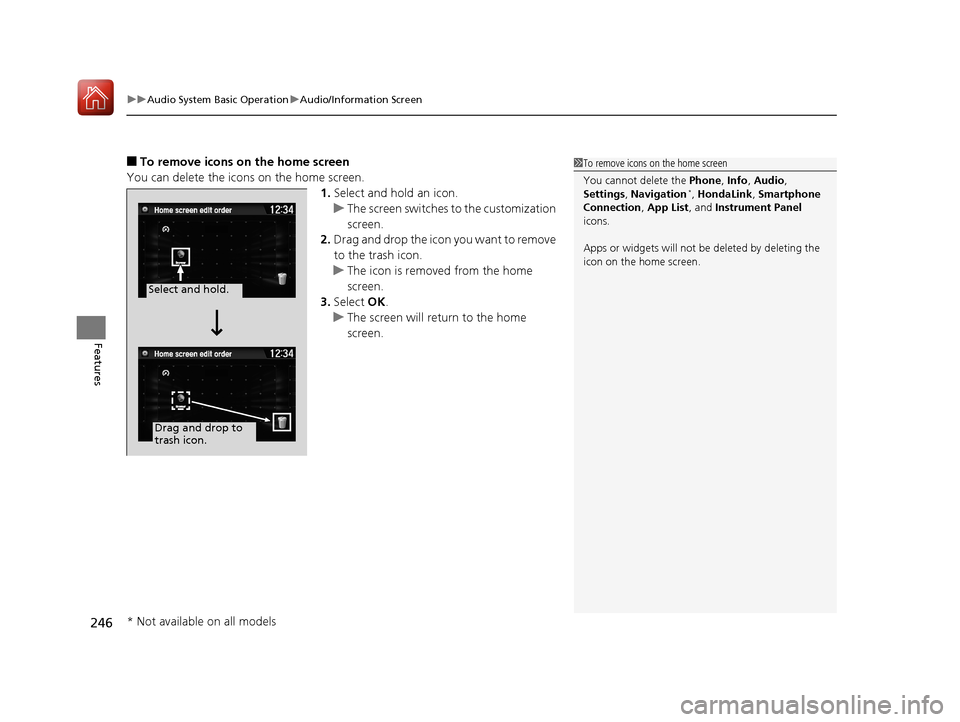
■To remove icons on the home screen
You can delete the icons on the home screen. 1.Select and hold an icon.
u The screen switches to the customization
screen.
2. Drag and drop the icon you want to remove
to the trash icon.
u The icon is removed from the home
screen.
3. Select OK.
u The screen will return to the home
screen.1To remove icons on the home screen
You cannot delete the Phone, Info, Audio ,
Settings , Navigation
*, HondaLink , Smartphone
Connection , App List, and Instrument Panel
icons.
Apps or widgets will not be deleted by deleting the
icon on the home screen.
Select and hold.
Drag and drop to
trash icon.
* Not available on all models
17 CIVIC 4D HCM (KA KC KL)-31TBA6100.book 246 ページ 2016年8月31日 水曜日 午後6時5分