stop start HONDA CIVIC 2017 10.G Repair Manual
[x] Cancel search | Manufacturer: HONDA, Model Year: 2017, Model line: CIVIC, Model: HONDA CIVIC 2017 10.GPages: 601, PDF Size: 32.51 MB
Page 230 of 601
229
Features
Audio System Basic Operation
To use the audio system function, the ignition swit ch must be in ACCESSORY (q or
ON
(w*1.
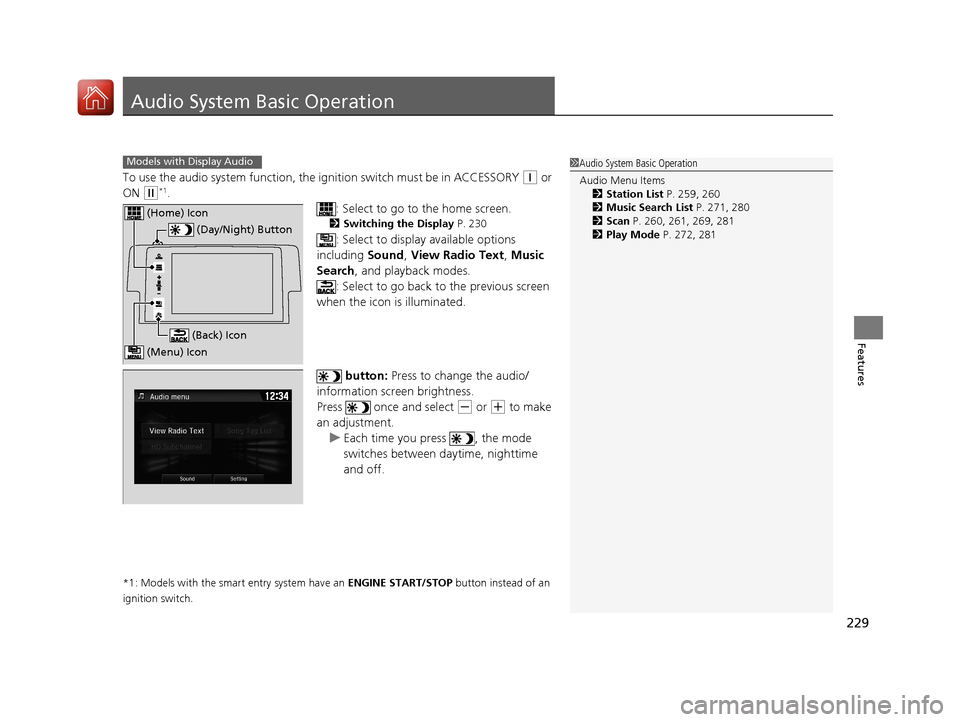
: Select to go to the home screen.
2Switching the Display P. 230
: Select to display available options
including Sound, View Radio Text , Music
Search , and playback modes.
: Select to go back to the previous screen
when the icon is illuminated.
button: Press to change the audio/
information screen brightness.
Press once and select
(- or (+ to make
an adjustment. u Each time you press , the mode
switches between da ytime, nighttime
and off.
*1: Models with the smart entry system have an ENGINE START/STOP button instead of an
ignition switch.
1 Audio System Basic Operation
Audio Menu Items
2 Station List P. 259, 260
2 Music Search List P. 271, 280
2 Scan P. 260, 261, 269, 281
2 Play Mode P. 272, 281Models with Display Audio
(Day/Night) Button
(Home) Icon
(Back) Icon
(Menu) Icon
17 CIVIC 4D HCM (KA KC KL)-31TBA6100.book 229 ページ 2016年8月31日 水曜日 午後6時5分
Page 254 of 601
253
uuAudio System Basic Operation uDisplay Setup
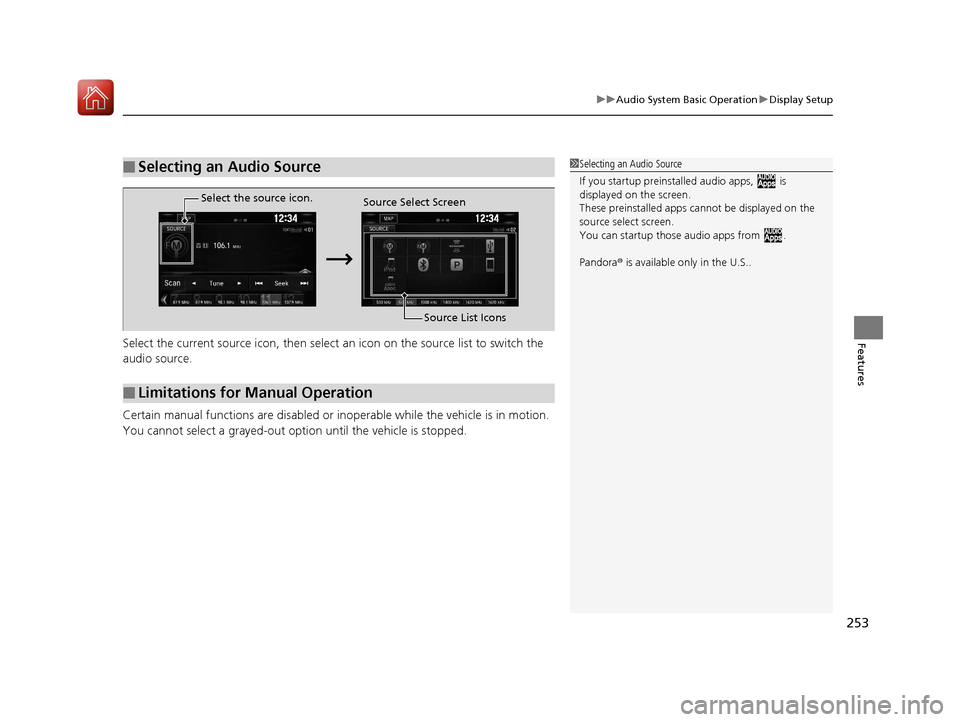
FeaturesSelect the current source icon, then select an icon on the source list to switch the
audio source.
Certain manual functions are disabled or inoperable while the vehicle is in motion.
You cannot select a grayed-out option until the vehicle is stopped.
■Selecting an Audio Source1 Selecting an Audio Source
If you startup preinstalled audio apps, is
displayed on the screen.
These preinstalled apps ca nnot be displayed on the
source select screen.
You can startup thos e audio apps from .
Pandora ® is available only in the U.S..
■Limitations for Manual Operation
Select the source icon.
Source Select Screen
Source List Icons
17 CIVIC 4D HCM (KA KC KL)-31TBA6100.book 253 ページ 2016年8月31日 水曜日 午後6時5分
Page 302 of 601
301
uuAudio Error Messages uAndroid/Apps
Features
Android/Apps
If an error occurs while using the audio system or apps, you may see the following
error messages. If you cannot clear the error message, contact a dealer.
*1:****part is variable characters, and will change depending upon where an error
occurs.
Error Message*1Solution
Unfortunately, **** has
stopped.Error has occurred within app, select OK on the screen to close the app.
**** is not responding.
Would you like to close it?
App is not responding.
Select Wait if you can wait for a response from app a little longer. If it does not respond even if you keep
waiting, select OK to close the app and start it up. If the error message continues, perform Factory Data
Reset .
2Defaulting All the Settings P. 338
Models with Display Audio
17 CIVIC 4D HCM (KA KC KL)-31TBA6100.book 301 ページ 2016年8月31日 水曜日 午後6時5分
Page 316 of 601
Continued315
uuCustomized Features u
Features
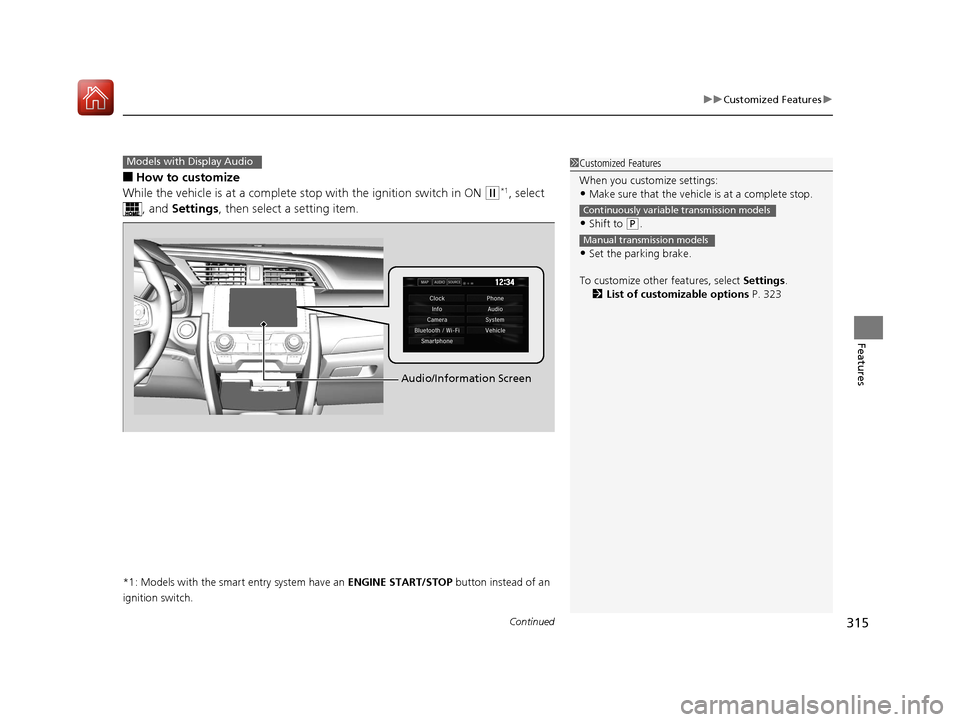
■How to customize
While the vehicle is at a complete st op with the ignition switch in ON
(w*1, select
, and Settings , then select a setting item.
*1: Models with the smart entry system have an ENGINE START/STOP button instead of an
ignition switch.
Models with Display Audio1 Customized Features
When you customize settings:
•Make sure that the vehicle is at a complete stop.
•Shift to (P.
•Set the parking brake.
To customize other features, select Settings.
2 List of customizable options P. 323
Continuously variable transmission models
Manual transmission models
Audio/Information Screen
17 CIVIC 4D HCM (KA KC KL)-31TBA6100.book 315 ページ 2016年8月31日 水曜日 午後6時5分
Page 334 of 601
333
uuCustomized Features u
Continued
Features
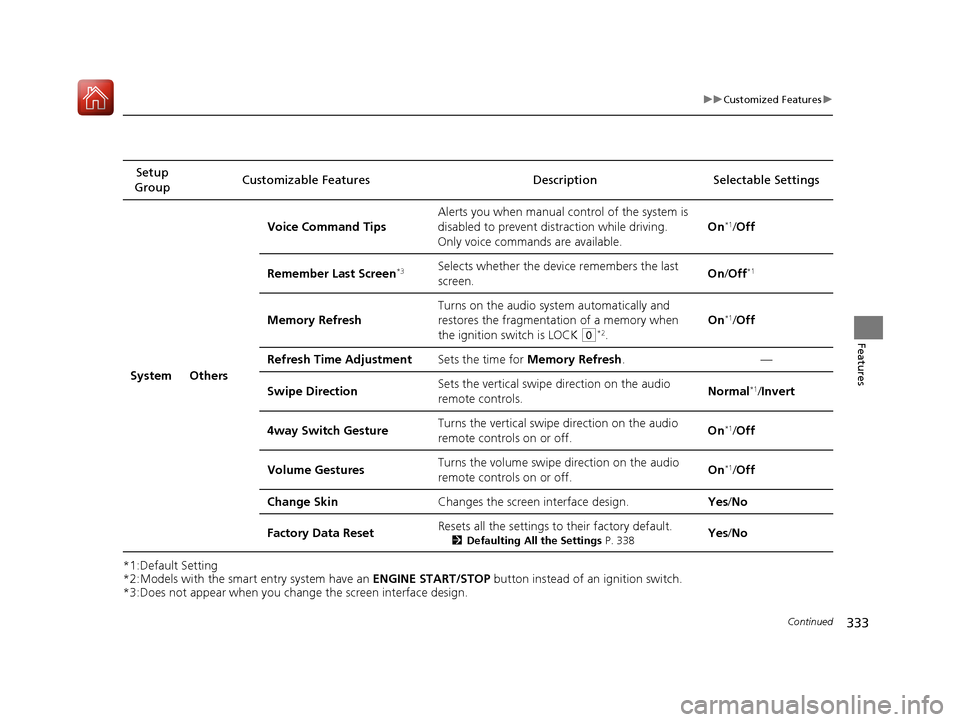
*1:Default Setting
*2:Models with the smart entry system have an ENGINE START/STOP button instead of an ignition switch.
*3:Does not appear when you chan ge the screen interface design.
Setup
Group Customizable Features Description
Selectable Settings
System Others Voice Command Tips
Alerts you when manual c
ontrol of the system is
disabled to prevent distraction while driving.
Only voice comman ds are available. On
*1/
Off
Remember Last Screen
*3Selects whether the device remembers the last
screen. On
/Off*1
Memory Refresh Turns on the audio system automatically and
restores the fragmentation of a memory when
the ignition switch is LOCK
(0*2.On
*1/
Off
Refresh Time Adjustment Sets the time for Memory Refresh . —
Swipe Direction Sets the vertical swipe
direction on the audio
remote controls. Normal
*1/
Invert
4way Switch Gesture Turns the vertical swipe direction on the audio
remote controls on or off. On
*1/
Off
Volume Gestures Turns the volume swipe
direction on the audio
remote controls on or off. On
*1/
Off
Change Skin Changes the screen interface design. Yes/No
Factory Data Reset Resets all the settings to their factory default.
2
Defaulting All the Settings P. 338Yes/No
17 CIVIC 4D HCM (KA KC KL)-31TBA6100.book 333 ページ 2016年8月31日 水曜日 午後6時5分
Page 366 of 601
365
uuBluetooth ® HandsFreeLink ®*uHFL Menus
Continued
Features
HFL Menus
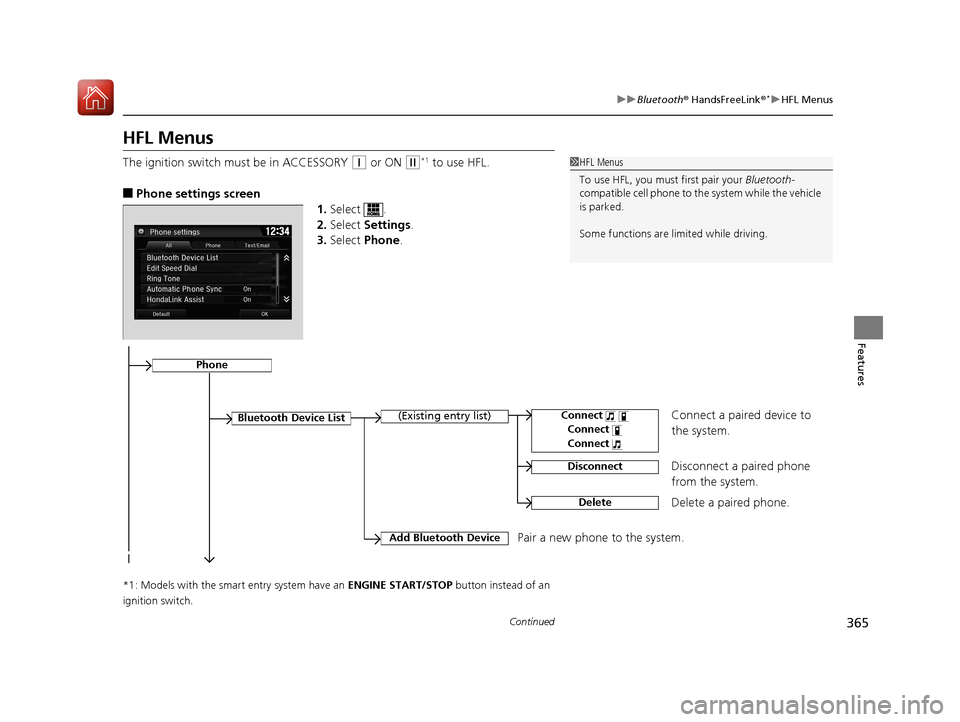
The ignition switch mu st be in ACCESSORY (q or ON (w*1 to use HFL.
■Phone settings screen
1.Select .
2. Select Settings .
3. Select Phone .
*1: Models with the smart entry system have an ENGINE START/STOP button instead of an
ignition switch.
1 HFL Menus
To use HFL, you must first pair your Bluetooth-
compatible cell phone to th e system while the vehicle
is parked.
Some functions are limited while driving.
Disconnect a paired phone
from the system.
Bluetooth Device List(Existing entry list)
Disconnect
DeleteDelete a paired phone.
Add Bluetooth DevicePair a new phone to the system.
Phone
Connect a paired device to
the system.Connect
Connect
Connect
17 CIVIC 4D HCM (KA KC KL)-31TBA6100.book 365 ページ 2016年8月31日 水曜日 午後6時5分
Page 388 of 601
Continued387
uuBluetooth ® HandsFreeLink ®*uHFL Menus
Features
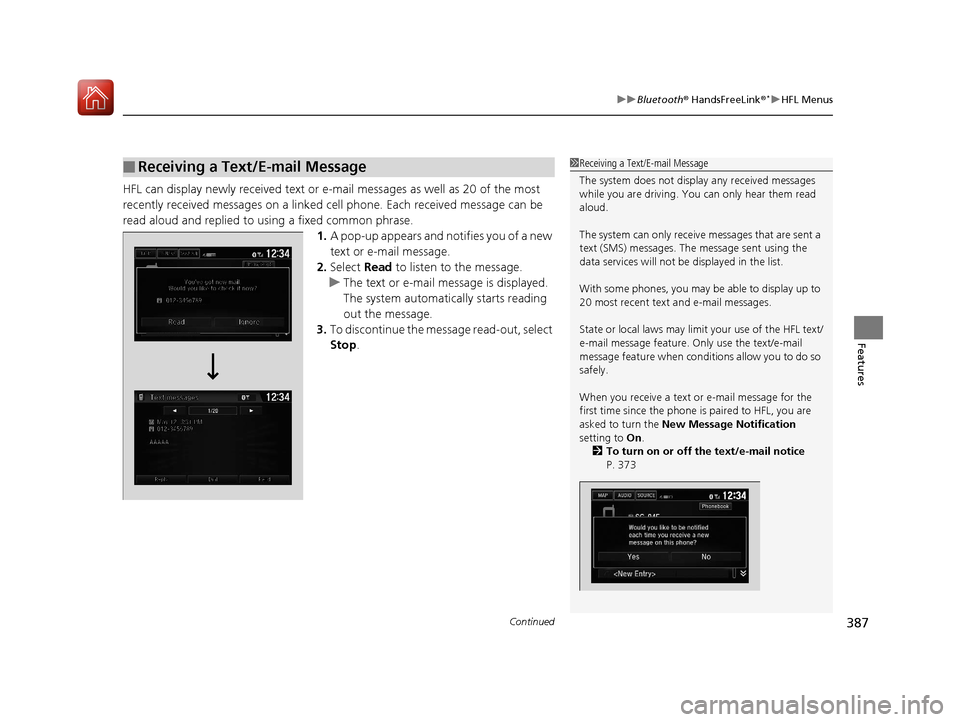
HFL can display newly received text or e-mail messages as well as 20 of the most
recently received messages on a linked cell phone. Each received message can be
read aloud and replied to using a fixed common phrase.
1.A pop-up appears and notifies you of a new
text or e-mail message.
2. Select Read to listen to the message.
u The text or e-mail message is displayed.
The system automatica lly starts reading
out the message.
3. To discontinue the mess age read-out, select
Stop .
■Receiving a Text/E-mail Message1Receiving a Text/E-mail Message
The system does not display any received messages
while you are driving. You can only hear them read
aloud.
The system can only receive messages that are sent a
text (SMS) messages. The message sent using the
data services will not be displayed in the list.
With some phones, you may be able to display up to
20 most recent text and e-mail messages.
State or local laws may limi t your use of the HFL text/
e-mail message feature. Only use the text/e-mail
message feature when conditions allow you to do so
safely.
When you receive a text or e-mail message for the
first time since the phone is paired to HFL, you are
asked to turn the New Message Notification
setting to On .
2 To turn on or off the text/e-mail notice
P. 373
17 CIVIC 4D HCM (KA KC KL)-31TBA6100.book 387 ページ 2016年8月31日 水曜日 午後6時5分
Page 392 of 601
Continued391
uuBluetooth ® HandsFreeLink ®*uHFL Menus
Features
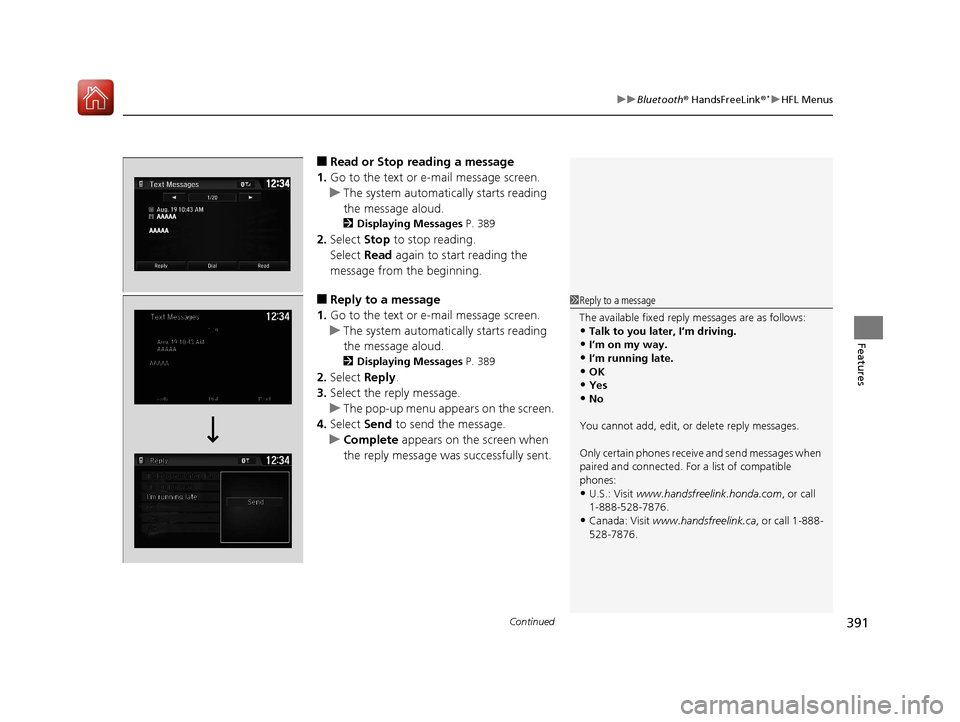
■Read or Stop reading a message
1. Go to the text or e-mail message screen.
u The system automatica lly starts reading
the message aloud.
2 Displaying Messages P. 389
2.Select Stop to stop reading.
Select Read again to start reading the
message from the beginning.
■Reply to a message
1. Go to the text or e-mail message screen.
u The system automatica lly starts reading
the message aloud.
2 Displaying Messages P. 389
2.Select Reply.
3. Select the reply message.
u The pop-up menu appears on the screen.
4. Select Send to send the message.
u Complete appears on the screen when
the reply message was successfully sent.
1 Reply to a message
The available fixed reply messages are as follows:
•Talk to you later, I’m driving.•I’m on my way.
•I’m running late.
•OK•Yes
•No
You cannot add, edit, or delete reply messages.
Only certain phones receiv e and send messages when
paired and connected. For a list of compatible
phones:
•U.S.: Visit www.handsfreelink.honda.com , or call
1-888-528-7876.
•Canada: Visit www.handsfreelink.ca , or call 1-888-
528-7876.
17 CIVIC 4D HCM (KA KC KL)-31TBA6100.book 391 ページ 2016年8月31日 水曜日 午後6時5分
Page 396 of 601
395
Driving
This chapter discusses driving, refueling, and information on items such as accessories.
Before Driving
Driving Preparation .......................... 396
Maximum Load Limit........................ 399
Towing a Trailer ................................ 401
When Driving Starting the Engine .................. 402, 404
Precautions While Driving................. 409
Continuously Variable Transmission*... 410
Shifting .................................... 411, 413
ECON Button ................................... 416
Cruise Control
*................................ 417
Front Sensor Camera*...................... 420 Adaptive Cruise Control (ACC) with Low
Speed Follow (LSF)
*....................... 422Road Departure Mitigation (RDM) System*...... 436Lane Keeping Assist System (LKAS)*.... 440
Vehicle Stabilit y Assist (VSA®), aka Electronic
Stability Control (ESC), System........... 447
LaneWatchTM*.................................. 450Tire Pressure Monitoring System (TPMS) ...... 452Tire Pressure Monitoring System (TPMS) -
Required Federal Explanation ......... 455
Braking Brake System ................................... 457
Anti-lock Brake System (ABS) ........... 463 Brake Assist System ......................... 464
Collision Mitigation Braking System
TM
(CMBSTM)*..................................... 465
Parking Your Vehicle When Stopped ................................ 473
Multi-View Rear Camera .................. 474
Refueling Fuel Information .............................. 476
How to Refuel ................................. 477
Fuel Economy and CO
2 Emissions
Improving Fuel Economy and Reducing
CO
2 Emissions ................................ 479
Turbo Engine Vehicle*
Handling Precautions ....................... 480
* Not available on all models
17 CIVIC 4D HCM (KA KC KL)-31TBA6100.book 395 ページ 2016年8月31日 水曜日 午後6時5分
Page 404 of 601
403
uuWhen Driving uStarting the Engine
Driving
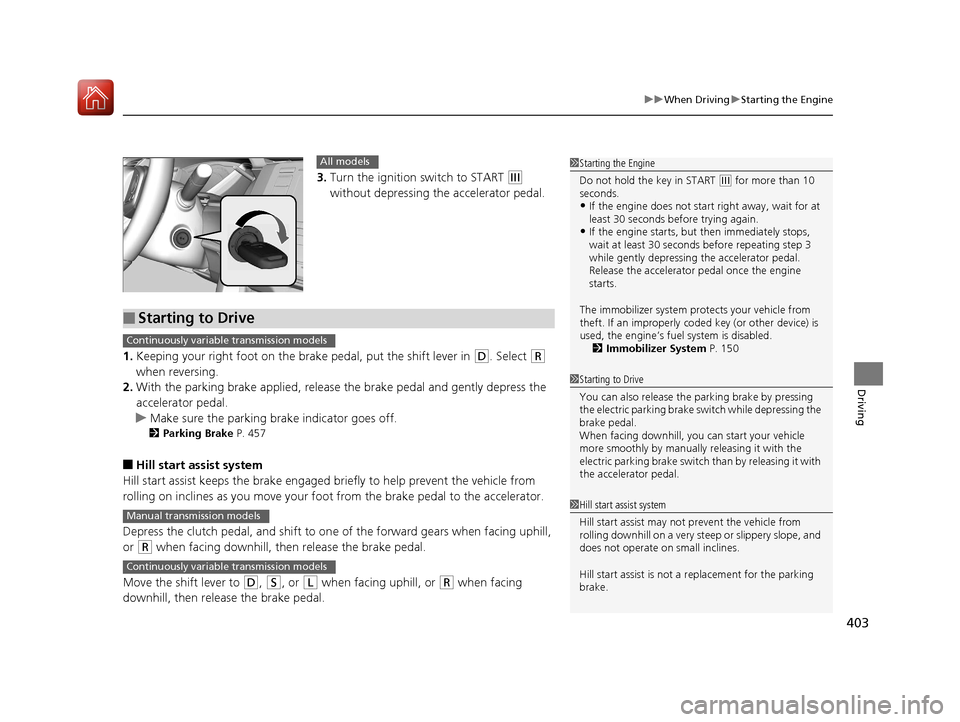
3. Turn the ignition switch to START (e
without depressing the accelerator pedal.
1. Keeping your right foot on the br ake pedal, put the shift lever in
(D. Select (R
when reversing.
2. With the parking brake applied, release the brake pedal and gently depress the
accelerator pedal.
u Make sure the parking brake indicator goes off.
2 Parking Brake P. 457
■Hill start assist system
Hill start assist keeps the brake engaged br iefly to help prevent the vehicle from
rolling on inclines as you move your foot from the brake pedal to the accelerator.
Depress the clutch pedal, and shift to on e of the forward gears when facing uphill,
or
(R when facing downhill, th en release the brake pedal.
Move the shift lever to
(D, (S, or (L when facing uphill, or (R when facing
downhill, then release the brake pedal.
1 Starting the Engine
Do not hold the key in START
(e for more than 10
seconds.
•If the engine does not start right away, wait for at
least 30 seconds before trying again.
•If the engine starts, but then immediately stops,
wait at least 30 seconds before repeating step 3
while gently depressing the accelerator pedal.
Release the accelerator pedal once the engine
starts.
The immobilizer system pr otects your vehicle from
theft. If an improperly code d key (or other device) is
used, the engine’s fuel system is disabled.
2 Immobilizer System P. 150
All models
■Starting to Drive
1Starting to Drive
You can also release the parking brake by pressing
the electric parking brake sw itch while depressing the
brake pedal.
When facing downhill, y ou can start your vehicle
more smoothly by manually releasing it with the
electric parking brake switch than by releasing it with
the accelerator pedal.
Continuously variable transmission models
1 Hill start assist system
Hill start assist may not prevent the vehicle from
rolling downhill on a very st eep or slippery slope, and
does not operate on small inclines.
Hill start assist is not a replacement for the parking
brake.Manual transmission models
Continuously variable transmission models
17 CIVIC 4D HCM (KA KC KL)-31TBA6100.book 403 ページ 2016年8月31日 水曜日 午後6時5分