Oil HONDA CIVIC 2022 User Guide
[x] Cancel search | Manufacturer: HONDA, Model Year: 2022, Model line: CIVIC, Model: HONDA CIVIC 2022Pages: 700, PDF Size: 13.98 MB
Page 563 of 700
562
Driving
Parking Your Vehicle
When Stopped
1.Depress the brake pedal firmly.
2. With the brake pedal depressed, pull up th e electric parking brake switch slowly,
but fully.
3. Put the transmission into
(P.
4. Turn off the engine.
u The parking brake and brake system indicator (red) goes off in about 30
seconds.
1Parking Your Vehicle
3WARNING
The vehicle can roll aw ay if left unattended
without confirming that Park is engaged.
A vehicle that rolls away could cause a crash
resulting in seriou s injury or death.
Always keep your foot on the brake pedal
until you have confirmed that
( P is shown
on the shift posi tion indicator.
1When Stopped
NOTICE
The following can dama ge the transmission:•Depressing the accelerator and brake pedals
simultaneously.
•Holding the vehicle in place when facing uphill by
depressing the accelerator pedal.
•Putting the transmission into ( P before the vehicle
stops completely.
Do not park your vehicle near flammable objects,
such as dry grass, oil, or timber.
Heat from the exhaust can cause a fire.
Page 579 of 700
578
Driving
Fuel Economy and CO2 Emissions
Improving Fuel Economy and Reducing CO2
Emissions
Achieving fuel economy and reducing CO2 emissions is dependent on several
factors, including driving conditions, load weight, idling time, driving habits, and
vehicle condition. Depending on these and other factors, you may not achieve the
rated fuel economy of this vehicle.
You can optimize your fuel economy with proper maintenance of your vehicle.
Always maintain your vehicle in accord ance with the messages displayed on the
driver information interface.
• Use engine oil with the viscosity recommended.
2 Recommended Engine Oil P. 598
•Maintain the specified tire pressure.
• Do not load the vehicl e with excess cargo.
• Keep your vehicle clean. A buildup of snow or mud on your vehicle's underside
adds weight and increases wind resistance.
■Maintenance and Fuel Economy
1Improving Fuel Economy and Reducing CO2 Emissions
Direct calculation is the recommended method to
determine actual fuel consumed while driving.
In Canada, posted fuel economy numbers are
established following a simulated test. For more
information on how this test is performed, please visit
https://www.nrcan.gc.ca and search for “fuel
consumption testing” in the search field at the top of
the page.
Miles driven Gallons of
fuel Miles per
Gallon
100 Liters of
fuel Kilometers
driven L per 100 km
Page 580 of 700
579
Driving
Turbo Engine Vehicle*
Handling Precautions
The turbocharger is a high-precision device to obtain greater horsepower by
delivering a large volume of compressed air in to the engine using a turbine driven by
the engine’s exhaust gas pressure.
• When the engine is cold just after sta rting, avoid revving the engine or sudden
acceleration.
• Always replace the engine oil and engine oil filter according to the Maintenance
Minder
TM. The turbine rotates at very high speeds over 100,000 rpm and its
temperature reaches over 1,292°F (700°C). It is lubricated and cooled by engine
oil. If you fail to replace the engine oil and filter at the scheduled distance or
interval, deteriorated engine oil may cause failure such as sticking and abnormal
noise of the turbine bearing.
1 Turbo Engine Vehicle*
The scheduled maintenance intervals for replacing
the filter is indicated on the driver information
interface. Follow the information on replacement
timing. 2 Maintenance Minder
TM P. 585
The Engine temperature too hot. Do not drive.
Allow engine to cool. or Engine temperature
near limit. Avoid heavy acceleration and high
speed. message may appear on the driver
information interface when you restart the engine
after driving under high load conditions such as at
high speed or in hilly terrain.
This is normal. The message goes off after you idle or
drive the vehicle for about one minute.
The temperature gauge pointer is at the mark
when you restart the engi ne after driving under high
load conditions such as at high speed or in hilly
terrain. This is normal. The gauge goes down after
you idle or drive the vehi cle for about one minute.
Models with B-type meter
H
* Not available on all models
Page 582 of 700
581
Maintenance
This chapter discusses basic maintenance.
Before Performing MaintenanceInspection and Maintenance ............ 582
Safety When Performing Maintenance .... 583Parts and Fluids Used in Maintenance Service ........................................... 584
Maintenance Minder
TM..................... 585
Maintenance Under the Hood
Maintenance Items Under the Hood .... 595Opening the Hood ........................... 597
Recommended Engine Oil ................ 598
Oil Check ......................................... 599
Adding Engine Oil ............................ 601
Changing the Engine Oil and Oil Filter..... 602
Engine Coolant ................................ 605
Transmission Fluid ............................ 607
Brake Fluid ....................................... 608
Refilling Window Wa sher Fluid......... 609
Replacing Light Bulbs ....................... 610
Checking and Maintaining Wiper Blades.... 615Checking and Maintaining Tires
Checking Tires ................................. 617
Tire and Loading Information Label ... 618
Tire Labeling .................................... 618
DOT Tire Quality Gradi ng (U.S. Vehicles) .... 620Wear Indicators................................ 622
Tire Service Life ................................ 622 Tire and Wheel Replacement ........... 623
Tire Rotation .................................... 624
Winter Tires ..................................... 625
Battery ............................................... 627
Remote Transmitter Care Replacing the Remote Battery .......... 629
Climate Control System Maintenance .... 630Cleaning
Interior Care .................................... 631
Exterior Care.................................... 633
Accessories and Modifications Accessories ...................................... 636
Modifications................................... 637
Page 583 of 700
582
Maintenance
Before Performing Maintenance
Inspection and Maintenance
For your safety, perform all listed inspections and maintenance to keep your vehicle
in good condition. If you become aware of an y abnormality (noise, smell, insufficient
brake fluid, oil residue on the ground, etc.), have your vehicle inspected by a dealer.
(Note, however, that service at a dealer is not mandatory to keep your warranties in
effect.)
■Routine inspections
Perform inspections before long distance tri ps, when washing the vehicle, or when
refueling.
2 Maintenance P. 31
■Periodic inspections
• Check the brake fluid level monthly.
2 Brake Fluid P. 608
•Check the tire pressure monthly. Examin e the tread for wear and foreign objects.
2Checking and Maintaining Tires P. 617
•Check the operation of the exterior lights monthly.
2 Replacing Light Bulbs P. 610
•Check the condition of the wiper bl ades at least every six months.
2Checking and Maintaining Wiper Blades P. 615
■Types of Inspection and Maintenance
1Inspection and Maintenance
Maintenance, replacement, or repair of
emissions control devices and systems may be
done by any automotive repair establishment or
individuals using parts that are “certified” to
EPA standards.
According to state and fede ral regulations, failure to
perform maintenance on the maintenance main
items marked with # will not void your emissions
warranties. However, all ma intenance services should
be performed in accordan ce with the intervals
indicated by the driver information interface.
2 Maintenance Service Items P. 590
If you want to perform complex maintenance tasks
that require more skills a nd tools, you can purchase a
subscription to the Service Express website at
www.techinfo.honda.com .
2 Authorized Manuals P. 688
If you want to perform ma intenance yourself, make
sure that you have the necessary tools and skills first.
After performing maintenanc e, update the records in
the separate maintenance booklet.
U.S. models
Page 586 of 700
585
Maintenance
Maintenance MinderTM
If the engine oil life is less than 15%, you will see the Maintenance Minder messages
appear on the driver information interfac e every time you set the power mode to
ON. The messages notify you when to change the engine oil, or when to bring your
vehicle to a dealer for indicated maintenance services.
Page 587 of 700
586
uuMaintenance MinderTMuTo Use Maintenance MinderTM
Maintenance
To Use Maintenance MinderTM
Maintenance items, which should be serviced at the same time that you replace the
engine oil, appear on the driver information interface.
You can view them on the engine oil life screen at any time.
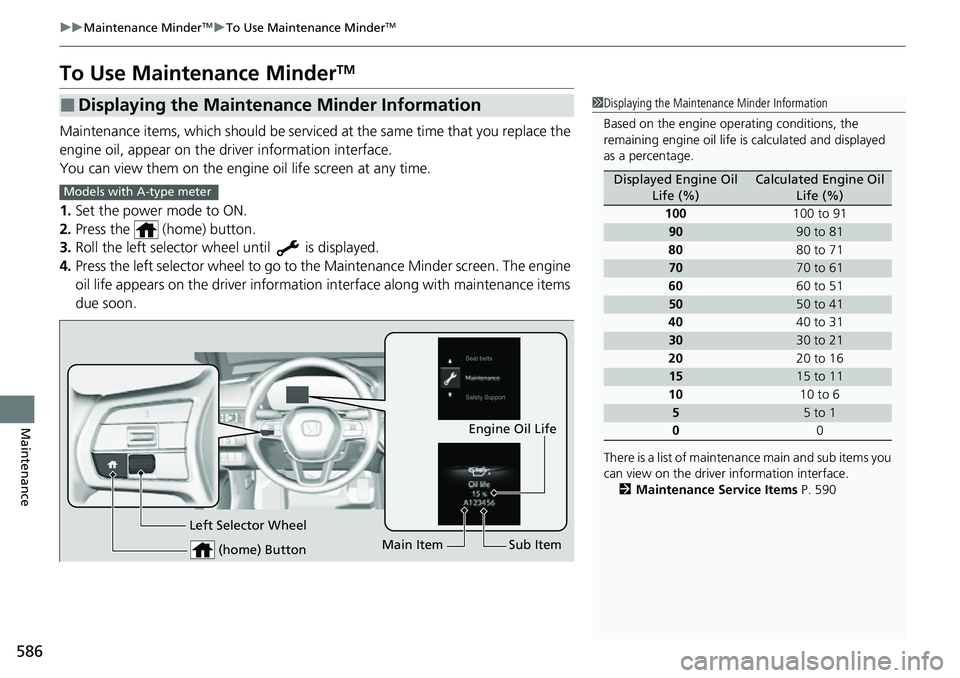
1. Set the power mode to ON.
2. Press the (home) button.
3. Roll the left selector wheel until is displayed.
4. Press the left selector wheel to go to the Maintenance Minder screen. The engine
oil life appears on the driver information interface along with maintenance items
due soon.
■Displaying the Maintenance Minder Information1 Displaying the Maintena nce Minder Information
Based on the engine ope rating conditions, the
remaining engine oi l life is calculated and displayed
as a percentage.
There is a list of maintena nce main and sub items you
can view on the driver information interface.
2 Maintenance Service Items P. 590
Displayed Engine Oil
Life (%)Calculated Engine Oil Life (%)
100 100 to 91
9090 to 81
80 80 to 71
7070 to 61
60 60 to 51
5050 to 41
40 40 to 31
3030 to 21
20 20 to 16
1515 to 11
10 10 to 6
55 to 1
0 0
Models with A-type meter
(home) Button
Engine Oil Life
Main Item Sub Item
Left Selector Wheel
Page 588 of 700
587
uuMaintenance MinderTMuTo Use Maintenance MinderTM
Continued
Maintenance
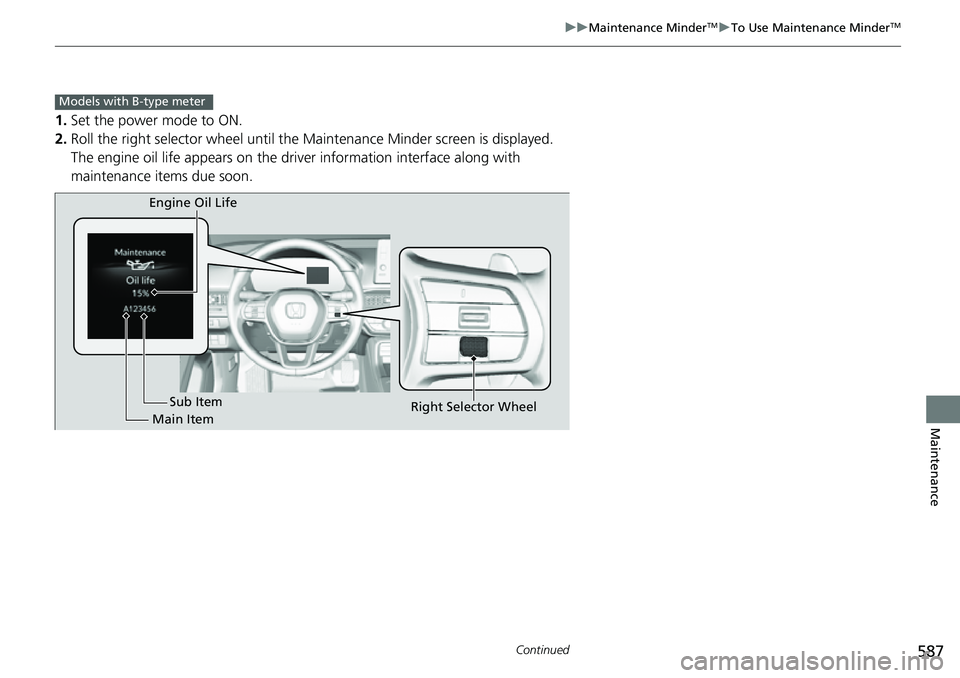
1. Set the power mode to ON.
2. Roll the right selector wheel until the Maintenance Minder screen is displayed.
The engine oil life appears on the driv er information interface along with
maintenance items due soon.
Models with B-type meter
Engine Oil Life
Main Item Sub Item
Right Selector Wheel
Page 589 of 700
588
uuMaintenance MinderTMuTo Use Maintenance MinderTM
Maintenance
*1:Models with A-type meter
*2:Models with B-type meter
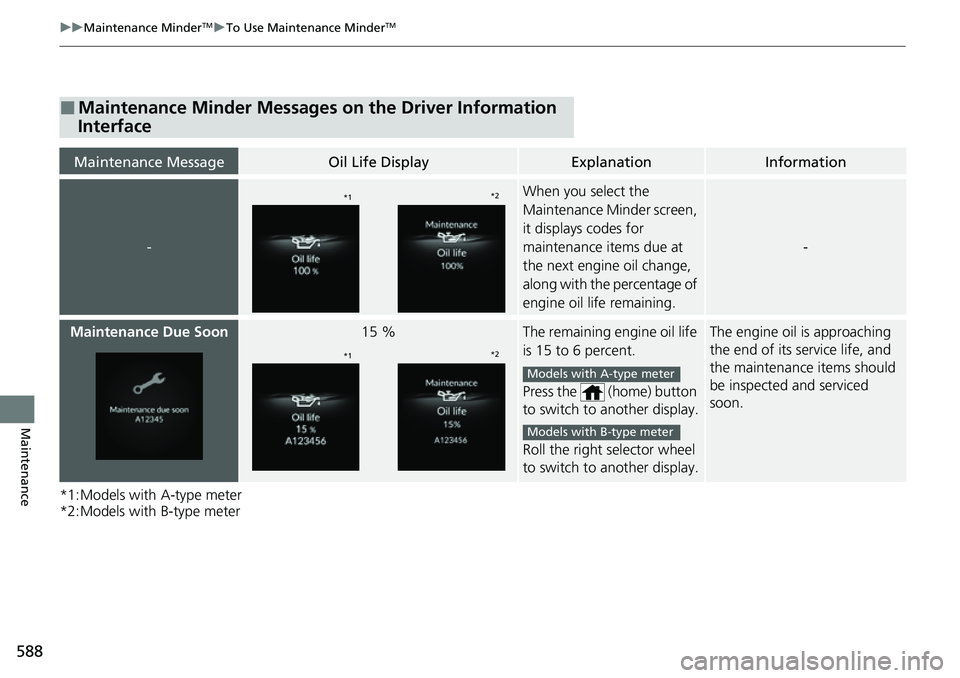
■Maintenance Minder Messages on the Driver Information
Interface
Maintenance MessageOil Life DisplayExplanationInformation
-
When you select the
Maintenance Minder screen,
it displays codes for
maintenance items due at
the next engine oil change,
along with the percentage of
engine oil life remaining.
-
Maintenance Due Soon15 %The remaining engine oil life
is 15 to 6 percent.
Press the (home) button
to switch to another display.
Roll the right selector wheel
to switch to another display.The engine oil is approaching
the end of its service life, and
the maintenance items should
be inspected and serviced
soon.
*1*2
*1*2
Models with A-type meter
Models with B-type meter
Page 590 of 700
589
uuMaintenance MinderTMuTo Use Maintenance MinderTM
Continued
Maintenance
*1:Models with A-type meter
*2:Models with B-type meter
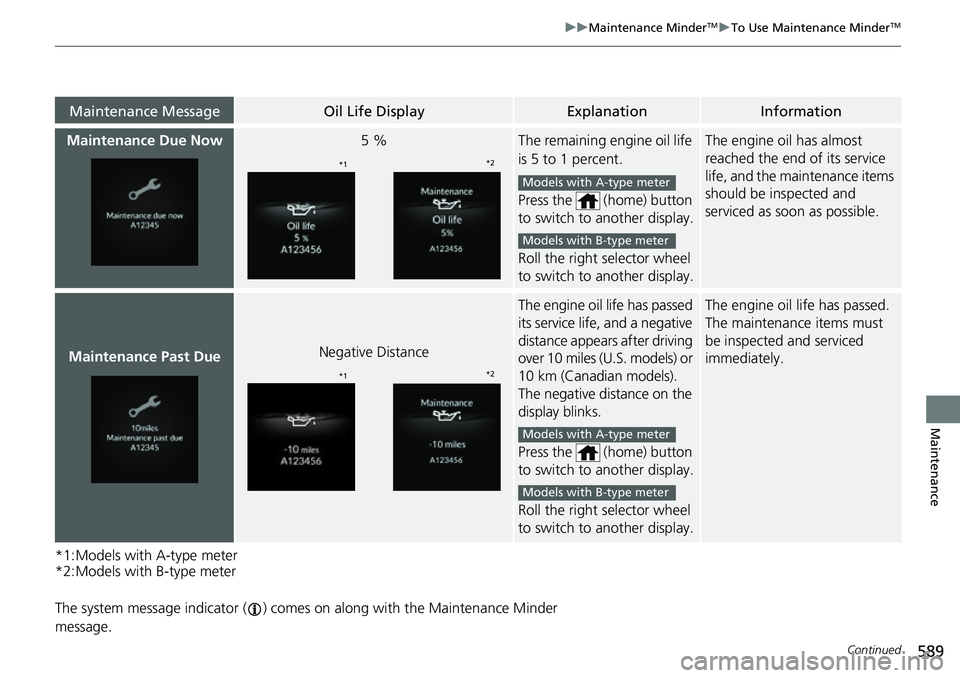
The system message indicator ( ) comes on along with the Maintenance Minder
message.
Maintenance MessageOil Life DisplayExplanationInformation
Maintenance Due Now5 %The remaining engine oil life
is 5 to 1 percent.
Press the (home) button
to switch to another display.
Roll the right selector wheel
to switch to another display.The engine oil has almost
reached the end of its service
life, and the maintenance items
should be inspected and
serviced as s oon as possible.
Maintenance Past DueNegative Distance
The engine oil life has passed
its service life, and a negative
distance appear s after driving
over 10 miles (U.S. models) or
10 km (Canadian models).
The negative distance on the
display blinks.
Press the (home) button
to switch to another display.
Roll the right selector wheel
to switch to another display.The engine oil life has passed.
The maintenance items must
be inspected and serviced
immediately.
*1 *2
Models with A-type meter
Models with B-type meter
*1*2
Models with A-type meter
Models with B-type meter