service HONDA CIVIC 2022 Owners Manual
[x] Cancel search | Manufacturer: HONDA, Model Year: 2022, Model line: CIVIC, Model: HONDA CIVIC 2022Pages: 700, PDF Size: 13.98 MB
Page 3 of 700
The data belongs to the vehicle owner and may not be accessed by
anyone else except as legally required or with the permission of the
vehicle owner.
Service Diagnostic Recorders
This vehicle is equipped with se rvice-related devices that record
information about powertrain perfo rmance. The data can be used
to verify emissions law requirem ents and/or help technicians
diagnose and solve service problems . It may also be combined with
data from other sources for research purposes, but it remains
confidential. Some diagnostic and maintenance information is
uploaded to Honda upon vehicle start up.
Vehicle Data Recordings
This vehicle records the following information as data when the
Collision Mitigation Braking SystemTM (CMBSTM) is operated. ●
Op
erational status of each function of the CMBS TM
● Accelerator /
brake
pedal operation
● Vehicle speed
● Information such as distance and relative speed of the target
i
dentified by the CMBS TM
activated H
onda may obtain and use th
e recorded data for the purpose of
technical
diagnosis and research and developmen t of Honda
v
ehicles.
T
he CMBS TM
does not record images or audio inside the vehicle.
S
pecial tools are required to review or remove data recorded by
C
MBS TM
.
Disclosure of data
Honda will not disclose or provide the acquired data to third parties
with data recorded by CMBS
TM except in the following cases: ●
Wh e
n the
owner of the vehicle consents
● When
required by law, court order, or similar legally
e
nforceable request
● When the data has been processed to de-identify/anonymize
the vehicles/users,
such a
s when aggregate data is provided to
research institutions
California Perchlorate Contamination Prevention Act
The airbags, seat belt tensioners , and CR type batteries in this
vehicle may contain perchlorate materials - special handling may
apply. See www.dtsc.ca.gov/hazardouswaste/perchlorate/
As you read this manual, you will find information that is preceded
by a symbol. This information is intended to help you avoid
damage to your vehicle, other property, or the environment.
NOTICE
Page 4 of 700
System Updates Terms and Conditions*
General
Your vehicle has an application that allows your Display Audio to
automatically search for Honda software updates that are specific
to your Display Audio and its connected devices (initially every one
(1) week via Wi-Fi or every four (4) weeks via Telematics Control
Unit (TCU)
*, queries may occur more or less frequently due to
internet outages, retries, direct user action, WAP push from the
server or a change in query pol icy on the Honda servers). This
application periodically transmits to our servers a limited amount of
vehicle and device information (V ehicle Identification Number
(VIN), the Model Type (MT) Identi fication Number, Hardware and
Software Part Number, Serial Number , Software Version, preferred
language, Internet Protocol (IP) address, Transaction Log (alert or
update viewing, update download and installation, software
status), etc.). When the application finds an update from the server,
the application initially asks permission to download and install the
update. You may elect to automati cally download and install these
updates in your settings, or, you may elect to manually update the
system.
When your Display Audio searches our servers for updates or alerts,
we will automatically provide you with the opportunity to update
your devices or transmit the update or alert directly to your Display
Audio. We will also maintain a log of the updates or alerts that are
installed on our servers.
Your Personal Data
Should the aforementioned info rmation transmitted to Honda
constitute personal information in y our region, please note that this
information will be treated in stri ct accordance with the rules and
regulations outlined in this notice as well as applicable data
protection law. The terms of our privacy policy are
incorporated into these terms by
reference and your use of system updates will be subject to the
privacy policy. Our privacy policy se ts out information about how we
and any named third parties will pr ocess any personal data we collect
from you or that you provide to us, via the application.
See the Honda website for further details.
U.S.: www.honda.com
Canada: www.honda.ca
Honda collects, uses and stores your personal data for the reasons
set out below:
Where necessary for Honda's legitimate interests, as listed below, and
where our interests are not overridde n by your data protection rights.
●to deliver the system updates and related services to you;●to allow us to improve and optimize the system updates
products and services;
●to respond to user questions an d complaints; and for internal
record keeping.
Protecting our legitimate business interests and legal rights
includes, but is not limited to, use in connection with compliance,
regulatory, auditing, legal claims (including disclosure of such
information in connection with legal process or litigation) and other
ethics and compliance reporting requirements.
Honda will also convert personal data into anonymous data and
use it (normally on an aggregated st atistical basis) for uses such as
market research and analysis, to improve the system updates, to
analyze trends, and to assess the success of software update
releases. Aggregated personal in formation does not personally
identify you or any other use of the system updates.
Honda may share this data with Honda's worldwide support
organization or affiliated Honda companies or other third parties
engaged by Honda for the purposes of rendering support services
in connection with system support.
* Not available on all models
Page 5 of 700
Software End User License Agreement
Your vehicle comes equipped with software, which is governed by
the End User License Agreement in Owner’s Manual, and which
contains a binding arbitration clau se. Please refer to the End User
License Agreement for the terms and conditions governing your
use of the installed software, as we ll as the applications, services,
functions, and content provided through the software. Your use of
the installed software wi ll serve as your consent to the terms and
conditions of the End User License Agreement.
You may opt out within 30 days of your initial use of the Software
by sending a signed, written noti ce to HONDA at American Honda
Motor Co., Inc., Honda Automobile Customer Service, Mail Stop
CHI-5, 1919 Torrance Blvd., Torrance, CA 90501-2746.
Privacy Notice
This vehicle may share location a nd usage information. To manage
this setting, visit www.hondalink.com/vehicle-data-choices.
To learn more about how we collect and use Personal
Information, please read our Pr ivacy Policy, accessible at
www.honda.com .
Page 8 of 700
Contents
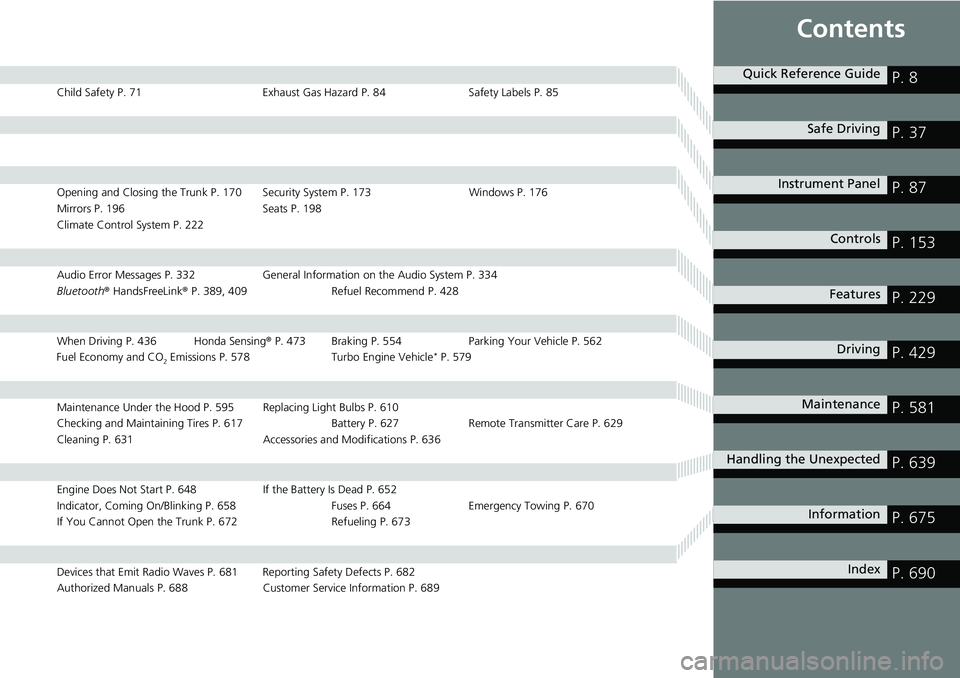
Child Safety P. 71Exhaust Gas Hazard P. 84Safety Labels P. 85
Opening and Closing the Trunk P. 170 Security System P. 173 Windows P. 176
Mirrors P. 196 Seats P. 198
Climate Control System P. 222
Audio Error Messages P. 332 General Information on the Audio System P. 334
Bluetooth ® HandsFreeLink ® P. 389, 409 Refuel Recommend P. 428
When Driving P. 436 Honda Sensing ® P. 473 Braking P. 554 Parki ng Your Vehicle P. 562
Fuel Economy and CO
2 Emissions P. 578 Turbo Engine Vehicle* P. 579
Maintenance Under the Hood P. 595 Replacing Light Bulbs P. 610
Checking and Maintaining Tires P. 617 Batt ery P. 627 Remote Transmitter Care P. 629
Cleaning P. 631 Accessories and Modifications P. 636
Engine Does Not Start P. 648 If the Battery Is Dead P. 652
Indicator, Coming On/Blinking P. 658 Fuses P. 664Emergency Towing P. 670
If You Cannot Open the Trunk P. 672 Refueling P. 673
Devices that Emit Radio Waves P. 681 Reporting Safety Defects P. 682
Authorized Manuals P. 688 Customer Service Information P. 689
Quick Reference GuideP. 8
Safe DrivingP. 37
Instrument PanelP. 87
ControlsP. 153
FeaturesP. 229
DrivingP. 429
MaintenanceP. 581
Handling the UnexpectedP. 639
InformationP. 675
IndexP. 690
Page 33 of 700
32
Quick Reference Guide
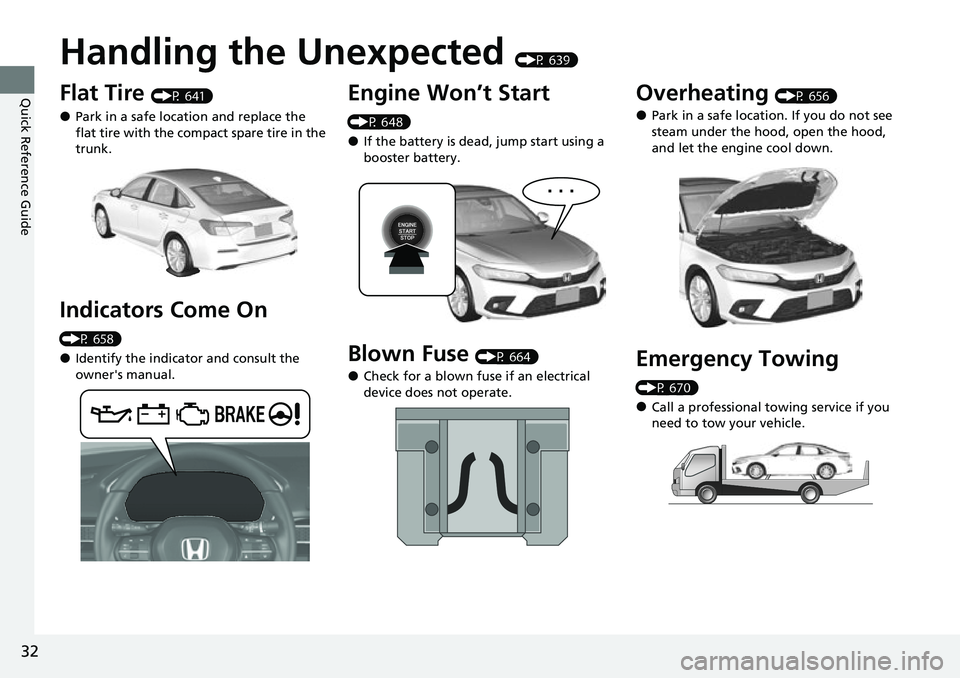
Handling the Unexpected (P 639)
Flat Tire (P 641)
●Park in a safe location and replace the
flat tire with the compact spare tire in the
trunk.
Indicators Come On
(P 658)
●Identify the indicator and consult the
owner's manual.
Engine Won’t Start
(P 648)
●If the battery is dead, jump start using a
booster battery.
Blown Fuse (P 664)
●Check for a blown fuse if an electrical
device does not operate.
Overheating (P 656)
●Park in a safe location. If you do not see
steam under the hood, open the hood,
and let the engine cool down.
Emergency Towing
(P 670)
●Call a professional towing service if you
need to tow your vehicle.
Page 71 of 700
70
uuAirbags uAirbag Care
Safe Driving
Airbag Care
You do not need to, and should not, perform any maintenance on or replace any
airbag system components yourself. However, you should have your vehicle
inspected by a dealer in the following situations:
■When the airbags have deployed
If an airbag has inflated, th e control unit and other related parts must be replaced.
Similarly, once an automatic seat belt te nsioner has been activated, it must be
replaced.
■When the vehicl e has been in a moderate-to-severe collision
Even if the airbags did not inflate, have your dealer inspect the following: the driver’s
seat position sensor, weight sensors in the passenger’s seat, the seat belt tensioners
for the front seats and outer rear seats, an d each seat belt that was worn during the
crash.
■Do not remove or modify a front seat without consulting a dealer
This would likely disable or affect the prop er operation of the driver’s seat position
sensor or the weight sensors in the passenger ’s seat. If it is necessary to remove or
modify a front seat to accommodate a pe rson with disabilities, contact a Honda
dealer, or for U.S. vehicles, American H onda Automobile Customer Service at 1-800-
999-1009 and for Canadian vehicles, Hond a Canada Customer Relations at 1-888-
9-HONDA-9.
1 Airbag Care
We recommend against the use of salvaged airbag
system components, includi ng the airbag, tensioners,
sensors, and control unit.
Page 132 of 700
131
uuGauges and Driver Information Interface uDriver Information Interface
Continued
Instrument Panel
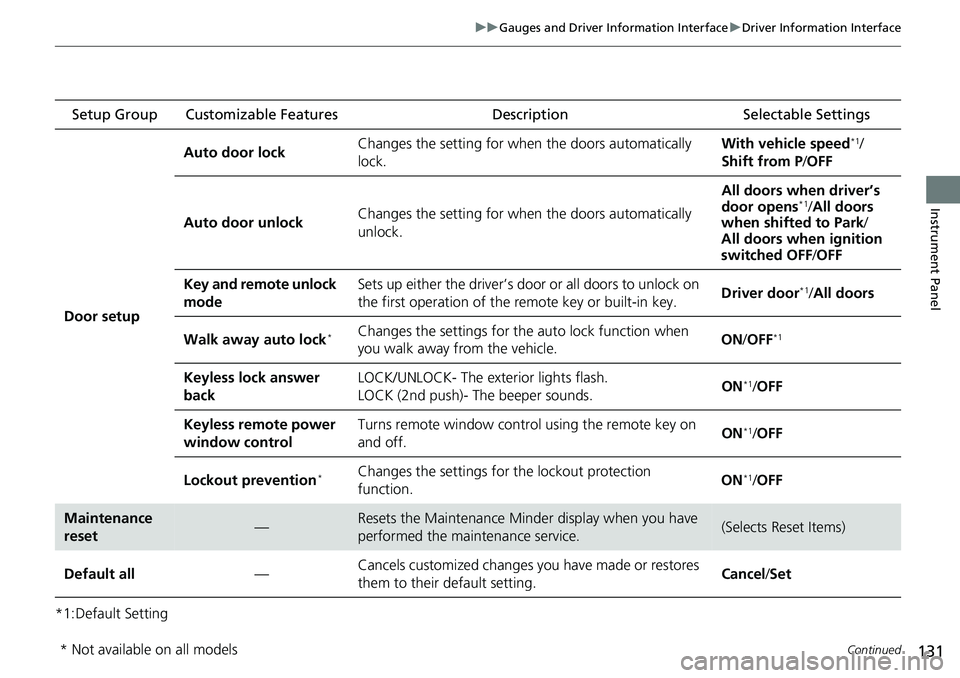
*1:Default Setting Setup Group Customizable Features
Description Selectable Settings
Door setup Auto door lock
Changes the setting for when the doors automatically
lock. With vehicle speed
*1/
Shift from P /OFF
Auto door unlock Changes the setting for when the doors automatically
unlock. All doors when driver’s
door opens
*1/
All doors
when shifted to Park /
All doors when ignition
switched OFF /OFF
Key and remote unlock
mode Sets up either the driver’s door or all doors to unlock on
the first operation of the remote key or built-in key.
Driver door
*1/
All doors
Walk away auto lock
*Changes the settings for the auto lock function when
you walk away from the vehicle. ON
/OFF*1
Keyless lock answer
back LOCK/UNLOCK- The exterior lights flash.
LOCK (2nd push)- The beeper sounds.
ON*1/
OFF
Keyless remote power
window control Turns remote window contro
l using the remote key on
and off. ON
*1/
OFF
Lockout prevention
*Changes the settings for the lockout protection
function. ON*1/
OFF
Maintenance
reset—Resets the Maintenance Minder display when you have
performed the maintenance service.(Selects Reset Items)
Default all —Cancels customized changes you have made or restores
them to their default setting. Cancel
/Set
* Not available on all models
Page 231 of 700
230
Features
Audio System
About Your Audio System
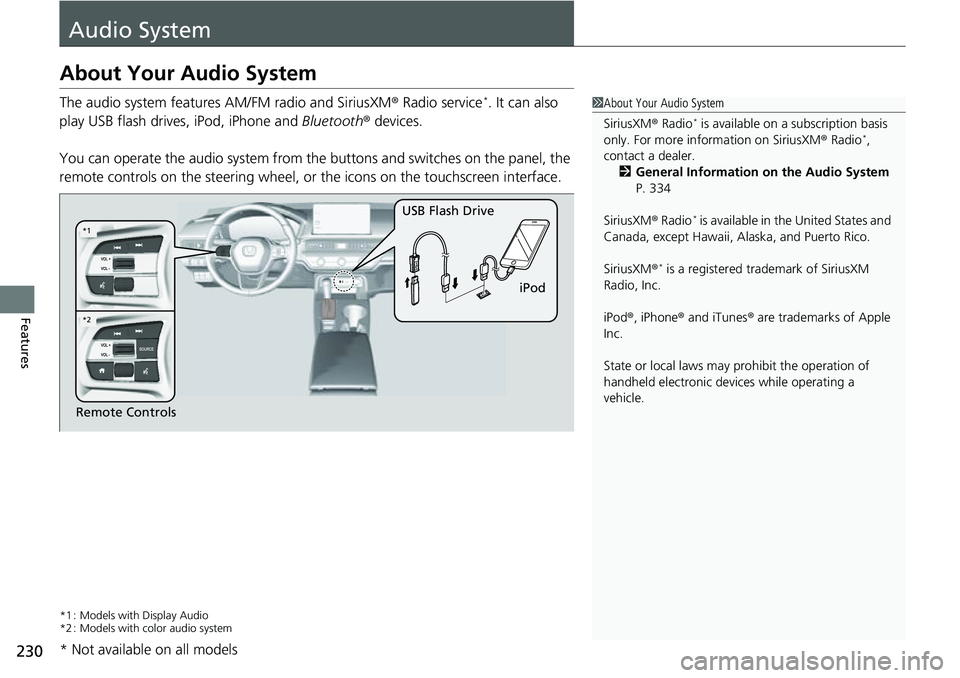
The audio system features AM/FM radio and SiriusXM® Radio service*. It can also
play USB flash drives, iPod, iPhone and Bluetooth® devices.
You can operate the audio system from the buttons and switches on the panel, the
remote controls on the steering wheel, or the icons on the touchscreen interface.
*1 : Models with Display Audio
*2 : Models with color audio system
1 About Your Audio System
SiriusXM ® Radio
* is available on a subscription basis
only. For more information on SiriusXM ® Radio*,
contact a dealer.
2 General Information on the Audio System
P. 334
SiriusXM ® Radio
* is available in the United States and
Canada, except Ha waii, Alaska, and Puerto Rico.
SiriusXM ®
* is a registered tra demark of SiriusXM
Radio, Inc.
iPod ®, iPhone ® and iTunes ® are trademarks of Apple
Inc.
State or local laws may pr ohibit the operation of
handheld electronic devices while operating a
vehicle.
Remote Controls iPod
USB Flash Drive
*2
*1
* Not available on all models
Page 256 of 700
Continued255
uuAudio System Basic Operation uApple CarPlay
Features
■Phone
Access the contact list, make phone ca lls, or listen to voice mail.
■Messages
Check and reply to text messages, or have messages read to you.
■Music
Play music stored on your iPhone.
■Maps
Display Apple Maps and use the navigation function just as you would on your
iPhone.
1 Apple CarPlay
Apple CarPlay Operating Requirements &
Limitations
Apple CarPlay requi res a compatible iPhone with an
active cellular connecti on and data plan. Your
carrier’s rate plans will apply.
Changes in operating systems, hardware, software,
and other technology integral to providing Apple
CarPlay functionality, as well as new or revised
governmental regulations, may result in a decrease or
cessation of Apple CarPlay functionality and services.
Honda cannot and does not pr ovide any warranty or
guarantee of future Appl e CarPlay performance or
functionality.
It is possible to use 3r d party apps if they are
compatible with Apple CarPlay. Refer to the Apple
homepage for information on compatible apps.
To adjust the ring tone volume, the guidance volume
of the navigation or Siri, or the audio volume, turn
the VOL / AUDIO (Volume/Power) knob while the
sound you want to adjust is playing.
Page 260 of 700
Continued259
uuAudio System Basic Operation uAndroid Auto
Features
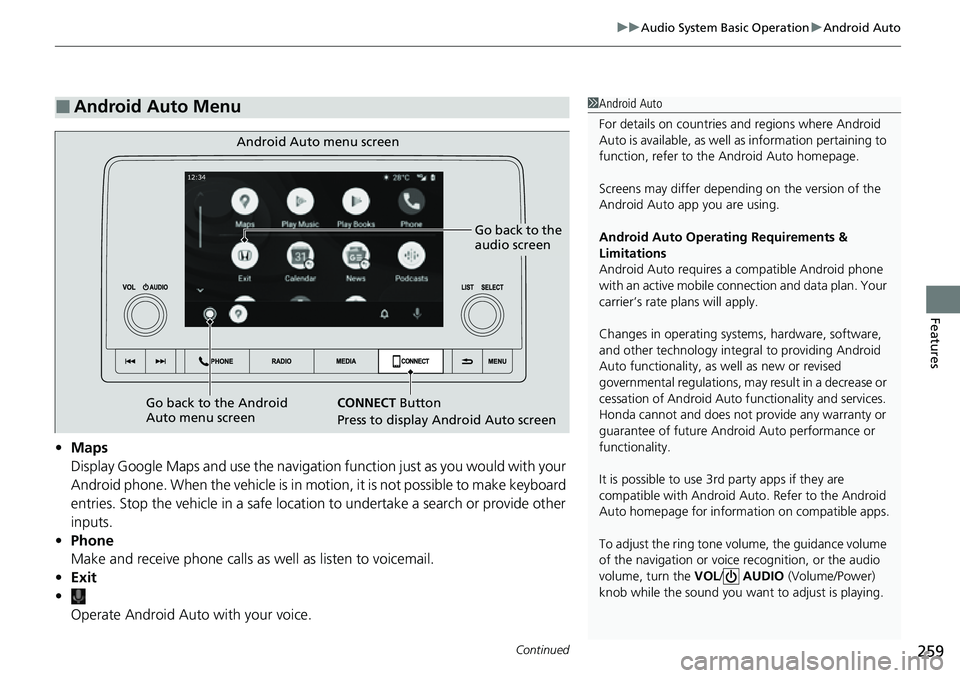
• Maps
Display Google Maps and use the navigation function just as you would with your
Android phone. When the vehicle is in motion, it is not possible to make keyboard
entries. Stop the vehicle in a safe location to undertake a search or provide other
inputs.
• Phone
Make and receive phone calls as well as listen to voicemail.
• Exit
• Operate Android Auto with your voice.
■Android Auto Menu1Android Auto
For details on c ountries and regions where Android
Auto is available, as well as information pertaining to
function, refer to the Android Auto homepage.
Screens may differ depending on the version of the
Android Auto app you are using.
Android Auto Operating Requirements &
Limitations
Android Auto requires a compatible Android phone
with an active mobile connection and data plan. Your
carrier’s rate plans will apply.
Changes in operating systems, hardware, software,
and other technology integral to providing Android
Auto functionality, as well as new or revised
governmental regulations, may result in a decrease or
cessation of Android Auto functionality and services.
Honda cannot and does not pr ovide any warranty or
guarantee of future Android Auto performance or
functionality.
It is possible to use 3r d party apps if they are
compatible with Android Auto. Refer to the Android
Auto homepage for informat ion on compatible apps.
To adjust the ring tone volume, the guidance volume
of the navigation or voice recognition, or the audio
volume, turn the VOL / AUDIO (Volume/Power)
knob while the sound you want to adjust is playing.
Go back to the
audio screen
CONNECT Button
Press to display Android Auto screen
Android Auto menu screen
Go back to the Android
Auto menu screen