steering HONDA CIVIC 2022 User Guide
[x] Cancel search | Manufacturer: HONDA, Model Year: 2022, Model line: CIVIC, Model: HONDA CIVIC 2022Pages: 700, PDF Size: 13.98 MB
Page 55 of 700
54
uuAirbags uTypes of Airbags
Safe Driving
Types of Airbags
Your vehicle is equipped with four types of airbags:
• Front airbags: Airbags in front of the driver ’s and front passenger’s seats.
• Knee airbags: Airbags under the steering column and under the glove box.
• Side airbags: Airbags in the driver's and front passenger's outer seat-backs and
next to the outer rear seating positions.
• Side curtain airbags: Airbags above the side windows.
Each is discussed in the following pages.
Front Airbags (SRS)
The front SRS airbags inflate in a moderate-to -severe frontal collision to help protect
the head and chest of the driver and/or front passenger.
SRS (Supplemental Restraint System) indica tes that the airbags are designed to
supplement seat belts, not replace them. Seat belts are the occupant's primary
restraint system.
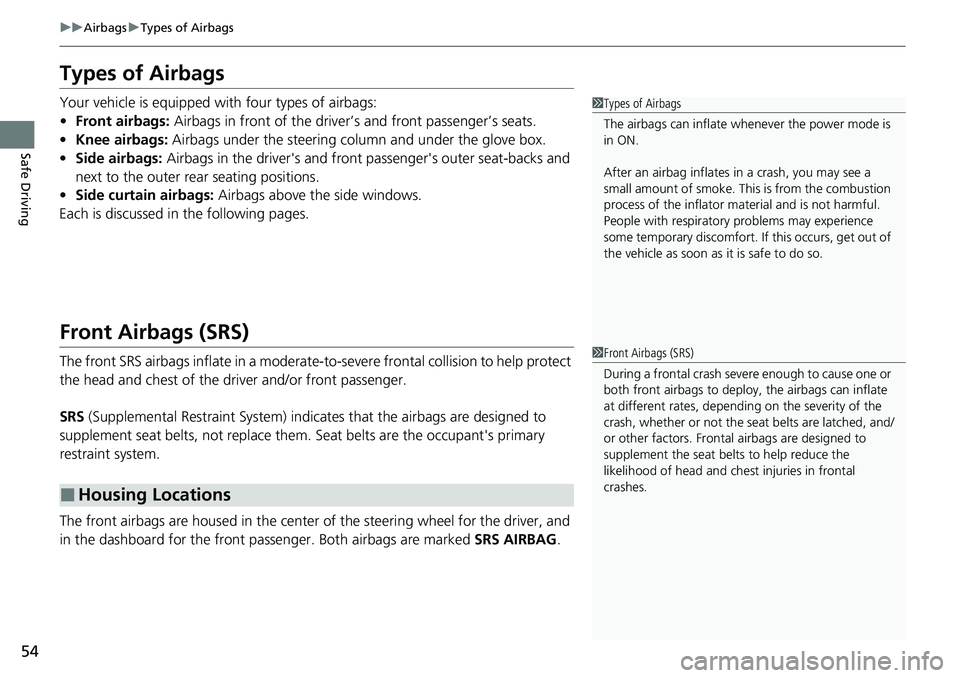
The front airbags are housed in the center of the steering wheel for the driver, and
in the dashboard for the front pass enger. Both airbags are marked SRS AIRBAG.
■Housing Locations
1Types of Airbags
The airbags can inflate whenever the power mode is
in ON.
After an airbag inflates in a crash, you may see a
small amount of smoke. This is from the combustion
process of the infl ator material and is not harmful.
People with respiratory pr oblems may experience
some temporary discomfort. If this occurs, get out of
the vehicle as soon as it is safe to do so.
1 Front Airbags (SRS)
During a frontal crash severe enough to cause one or
both front airbags to deploy, the airbags can inflate
at different rates, dependi ng on the severity of the
crash, whether or not the se at belts are latched, and/
or other factors. Frontal airbags are designed to
supplement the seat belts to help reduce the
likelihood of head and chest injuries in frontal
crashes.
Page 58 of 700
Continued57
uuAirbags uFront Airbags (SRS)
Safe DrivingThe airbags have advanced features to he lp reduce the likelihood of airbag related
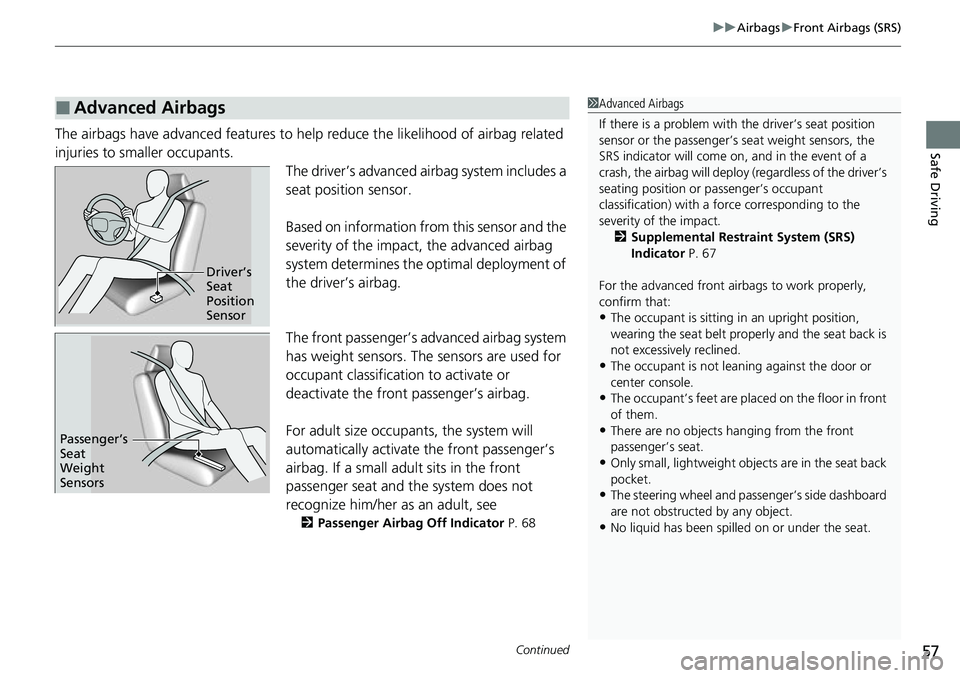
injuries to smaller occupants. The driver’s advanced airbag system includes a
seat position sensor.
Based on information from this sensor and the
severity of the impact, the advanced airbag
system determines the optimal deployment of
the driver’s airbag.
The front passenger’s ad vanced airbag system
has weight sensors. The sensors are used for
occupant classification to activate or
deactivate the front passenger’s airbag.
For adult size occupant s, the system will
automatically activate the front passenger’s
airbag. If a small adult sits in the front
passenger seat and the system does not
recognize him/her as an adult, see
2 Passenger Airbag Off Indicator P. 68
■Advanced Airbags1Advanced Airbags
If there is a problem with the driver’s seat position
sensor or the passenger’s s eat weight sensors, the
SRS indicator will come on, and in the event of a
crash, the airbag will deploy (regardless of the driver’s
seating position or passenger’s occupant
classification) with a force corresponding to the
severity of the impact. 2 Supplemental Restraint System (SRS)
Indicator P. 67
For the advanced front airbags to work properly,
confirm that:
•The occupant is sitting in an upright position,
wearing the seat belt prope rly and the seat back is
not excessively reclined.
•The occupant is not leaning against the door or
center console.
•The occupant’s feet are plac ed on the floor in front
of them.
•There are no objects ha nging from the front
passenger’s seat.
•Only small, lightweight objec ts are in the seat back
pocket.
•The steering wheel and passenger’s side dashboard
are not obstructed by any object.
•No liquid has been spille d on or under the seat.
Driver’s
Seat
Position
Sensor
Passenger’s
Seat
Weight
Sensors
Page 60 of 700
59
uuAirbags uKnee Airbags
Continued
Safe Driving
Knee Airbags
The knee SRS airbags inflate in a moderate -to-severe frontal collision to help keep
the driver and/or front passenger in the pr oper position and to help maximize the
benefit provided by the vehicle’s other safety features.
SRS (Supplemental Restraint System) indica tes that the airbag is designed to
supplement seat belts, not replace them . Seat belts are the occupant’s primary
restraint system.
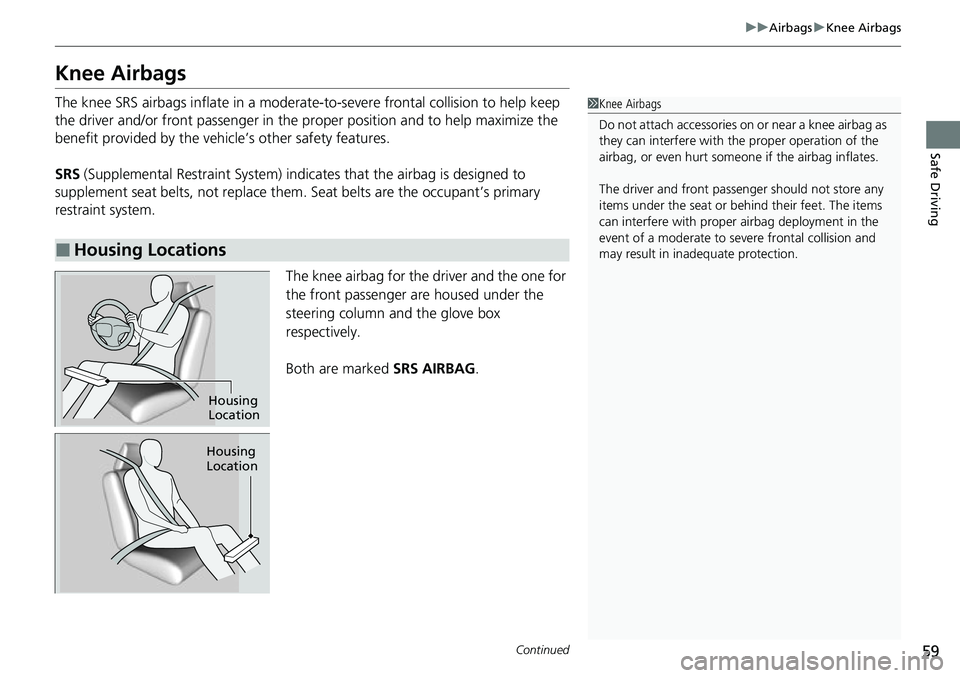
The knee airbag for the driver and the one for
the front passenger are housed under the
steering column and the glove box
respectively.
Both are marked SRS AIRBAG.
■Housing Locations
1Knee Airbags
Do not attach accessories on or near a knee airbag as
they can interfere with the proper operation of the
airbag, or even hurt someone if the airbag inflates.
The driver and fr ont passenger should not store any
items under the seat or be hind their feet. The items
can interfere with proper airbag deployment in the
event of a moderate to se vere frontal collision and
may result in inadequate protection.
Housing
Location
Housing
Location
Page 89 of 700
88
Instrument Panel
Indicators
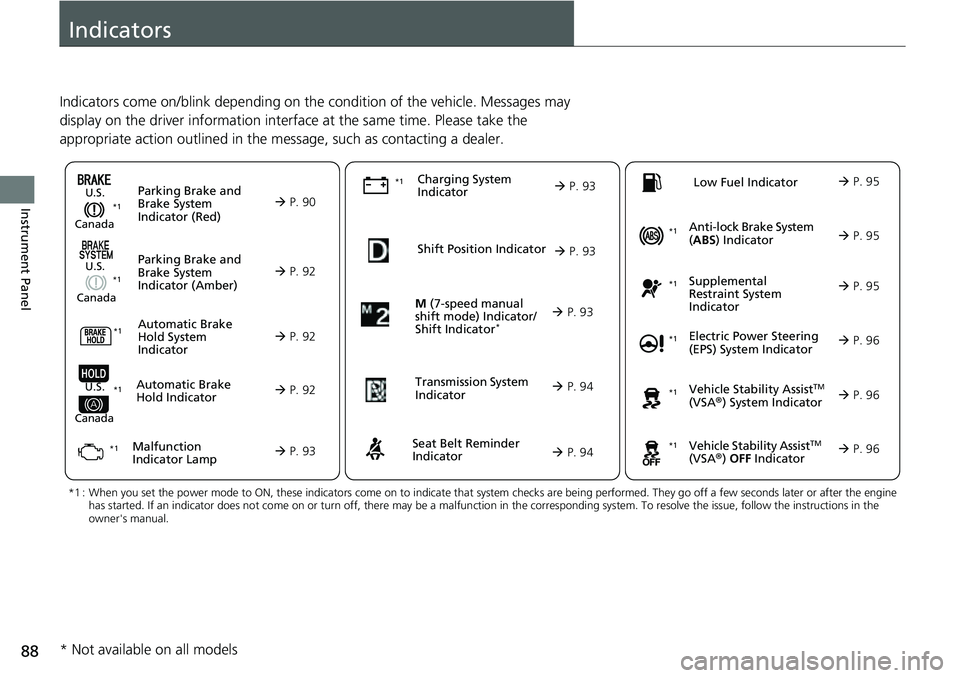
Indicators come on/blink depending on the condition of the vehicle. Messages may
display on the driver information interface at the same time. Please take the
appropriate action outlined in the message, such as contacting a dealer.
M (7-speed manual
shift mode) Indicator/
Shift Indicator
* P. 93
Parking Brake and
Brake System
Indicator (Red)
Parking Brake and
Brake System
Indicator (Amber)U.S.
Canada
U.S.
Canada
Automatic Brake
Hold System
Indicator
Automatic Brake
Hold IndicatorU.S.
Canada
*1 : When you set the power mode to ON, these indicators come on to indicate that system checks are being performed. They go off a few seconds later or after the engine
has started. If an indicator does not come on or turn off, ther e may be a malfunction in the corresponding system. To resolve the issue, follow the instructions in the
owner's manual.
P. 90*1
Malfunction
Indicator Lamp Charging System
IndicatorSeat Belt Reminder
Indicator
Low Fuel Indicator
P. 92
P. 92
P.
92
P. 93
P. 93*1
*1 *1
Shift Position Indicator
P. 93
Trans
mission System
Indicat
or
P. 94
P. 94
P. 95
*1
*1
Anti-lock Brake System
(ABS ) Indicator
Vehicle Stability AssistTM
(VSA®) System Indicator
Vehicle Stability Assist
TM
(VSA®) OFF Indicator
Supplemental
Restraint System
Indicator
Electric Power Steering
(EPS) System Indicator
*1
P. 95
P. 95
P. 96*1
*1
*1
P. 96
*1 P. 96
* Not available on all models
Page 97 of 700
96
uuIndicators u
Instrument Panel
IndicatorNameOn/BlinkingExplanation
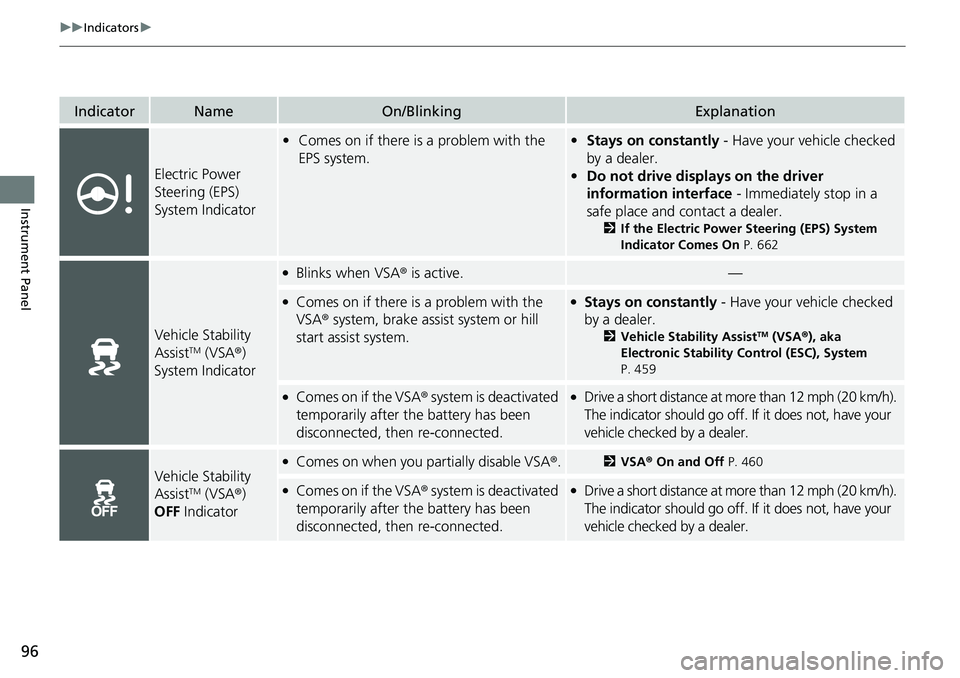
Electric Power
Steering (EPS)
System Indicator
•Comes on if there is a problem with the
EPS system.•Stays on constantly - Have your vehicle checked
by a dealer.
• Do not drive displays on the driver
information interface - Immediately stop in a
safe place and contact a dealer.
2 If the Electric Power Steering (EPS) System
Indicator Comes On P. 662
Vehicle Stability
AssistTM (VSA®)
System Indicator
●Blinks when VSA ® is active.—
●Comes on if there is a problem with the
VSA® system, brake assist system or hill
start assist system.●Stays on constantly - Have your vehicle checked
by a dealer.
2 Vehicle Stability AssistTM (VSA ®), aka
Electronic Stability Control (ESC), System
P. 459
●Comes on if the VSA ® system is deactivated
temporarily after the battery has been
disconnected, then re-connected.●Drive a short distance at mo re than 12 mph (20 km/h).
The indicator should go off. If it does not, have your
vehicle checked by a dealer.
Vehicle Stability
AssistTM (VSA ®)
OFF Indicator
●Comes on when you partially disable VSA ®.2VSA ® On and Off P. 460
●Comes on if the VSA ® system is deactivated
temporarily after the battery has been
disconnected, then re-connected.●Drive a short distance at mo re than 12 mph (20 km/h).
The indicator should go off. If it does not, have your
vehicle checked by a dealer.
Page 120 of 700
Continued119
uuGauges and Driver Information Interface uDriver Information Interface
Instrument Panel
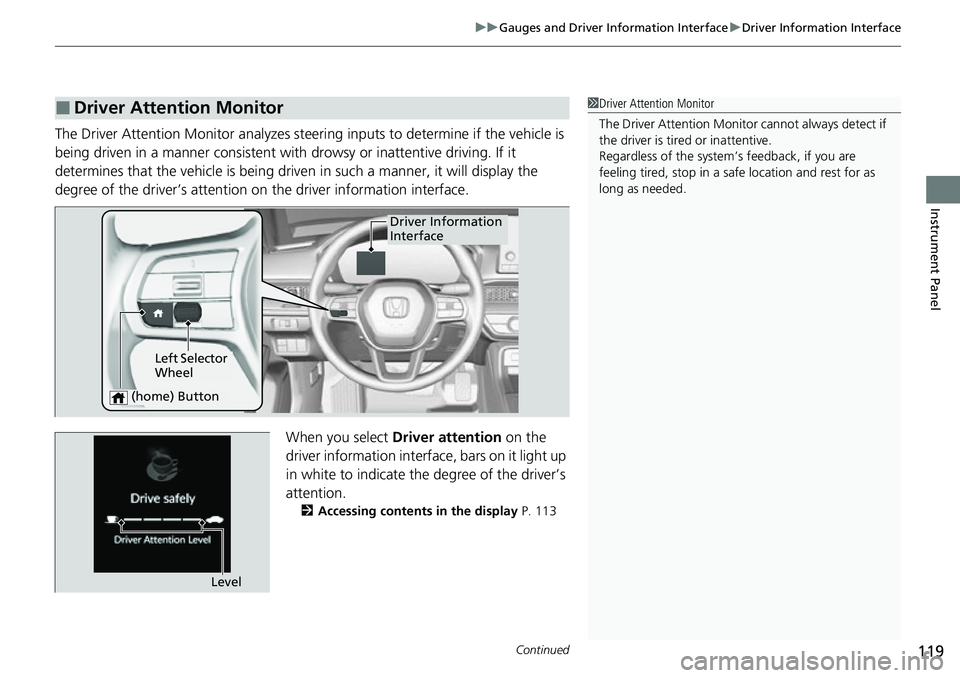
The Driver Attention Monitor analyzes steering inputs to determine if the vehicle is
being driven in a manner consistent with drowsy or inattentive driving. If it
determines that the vehicle is being driven in such a manner, it will display the
degree of the driver’s attention on the driver information interface.
When you select Driver attention on the
driver information interface , bars on it light up
in white to indicate the degree of the driver’s
attention.
2 Accessing contents in the display P. 113
■Driver Attention Monitor1Driver Attention Monitor
The Driver Attenti on Monitor cannot always detect if
the driver is tired or inattentive.
Regardless of the system’s feedback, if you are
feeling tired, stop in a safe location and rest for as
long as needed.
Driver Information
Interface
Left Selector
Wheel
(home) Button
Level
Page 121 of 700
120
uuGauges and Driver Information Interface uDriver Information Interface
Instrument Panel
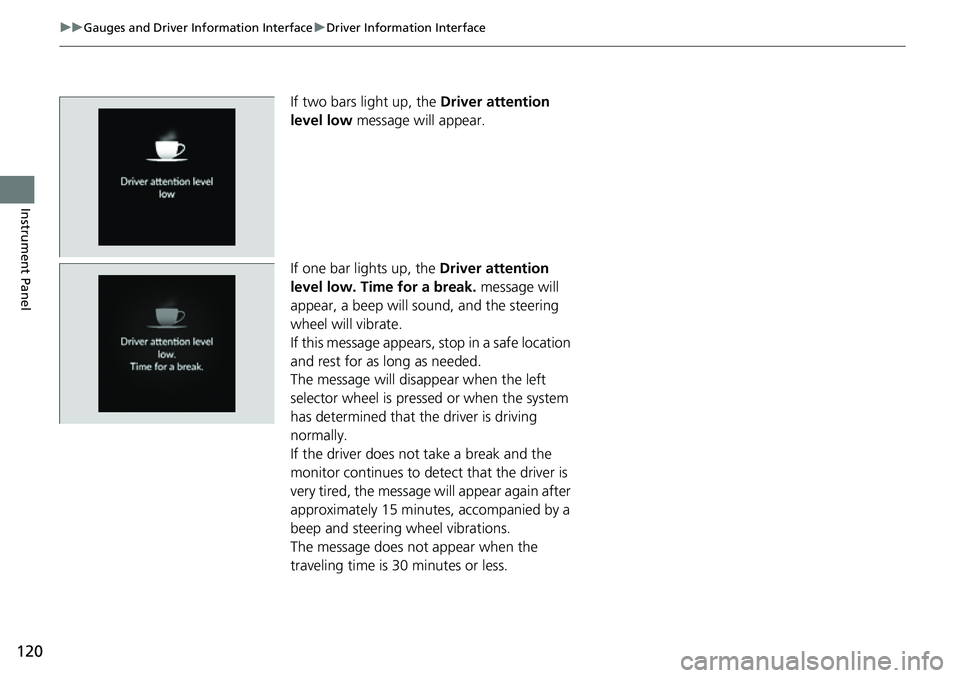
If two bars light up, the Driver attention
level low message will appear.
If one bar lights up, the Driver attention
level low. Time for a break. message will
appear, a beep will sound, and the steering
wheel will vibrate.
If this message appears, stop in a safe location
and rest for as long as needed.
The message will disappear when the left
selector wheel is pressed or when the system
has determined that the driver is driving
normally.
If the driver does not take a break and the
monitor continues to detect that the driver is
very tired, the message will appear again after
approximately 15 minutes, accompanied by a
beep and steering wheel vibrations.
The message does not appear when the
traveling time is 30 minutes or less.
Page 122 of 700
Continued121
uuGauges and Driver Information Interface uDriver Information Interface
Instrument Panel
■The Driver Attention Monitor resets when:
• The engine is turned off.
• The driver unfastens the seat belt and ope ns the door while the vehicle is stopped.
■For the Driver Attention Monitor to function:
• The vehicle must be traveling above 25 mph (40 km/h).
• The electric power steering (EPS) system indicator must be off.
■Depending on driving conditions or other factors, the Driver Attention
Monitor may not function in the following circumstances:
• The steering assist function of the Lane K eeping Assist System (LKAS) is active.
2Lane Keeping Assist System (LKAS) P. 516
•The condition of the road is poor, e.g. the surface is unpaved or bumpy.
• It is windy.
• The driver is frequently op erating the vehicle in an assertive manner such as
changing lanes or accelerating.
■Customizing
You can change the Driver Atte ntion Monitor settings. Select Tactile and audible
alert , Tactile alert or OFF.
2Settings P. 126
1For the Driver Attention Monitor to function:
The bars on the driver information interface remain
grayed out unless the Driv er Attention Monitor is
functioning.
Page 146 of 700
145
uuGauges and Driver Information Interface uDriver Information Interface (Right Side Area)
Continued
Instrument Panel
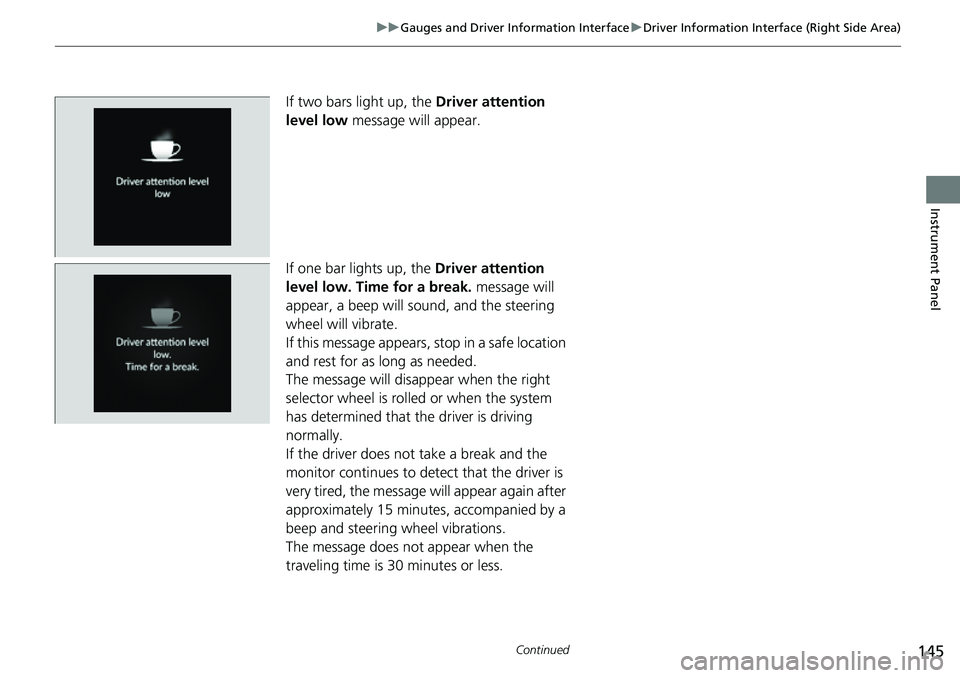
If two bars light up, the Driver attention
level low message will appear.
If one bar lights up, the Driver attention
level low. Time for a break. message will
appear, a beep will sound, and the steering
wheel will vibrate.
If this message appears, stop in a safe location
and rest for as long as needed.
The message will disappear when the right
selector wheel is rolled or when the system
has determined that the driver is driving
normally.
If the driver does not take a break and the
monitor continues to detect that the driver is
very tired, the message will appear again after
approximately 15 minutes, accompanied by a
beep and steering wheel vibrations.
The message does not appear when the
traveling time is 30 minutes or less.
Page 147 of 700
uuGauges and Driver Information Interface uDriver Information Interface (Right Side Area)
146
Instrument Panel
■The Driver Attention Monitor resets when:
• The engine is turned off.
• The driver unfastens the seat belt and op ens the door while the vehicle is stopped.
■For the Driver Attention Monitor to function:
• The vehicle must be traveling above 25 mph (40 km/h).
• The electric power steering (EPS) system indicator must be off.
■Depending on driving conditions or other factors, the Driver Attention
Monitor may not function in the following circumstances:
• The steering assist function of the Lane Keeping Assist System (LKAS) is active.
2Lane Keeping Assist System (LKAS) P. 516
•The condition of the road is poor, e.g. the surface is unpaved or bumpy.
• It is windy.
• The driver is frequently op erating the vehicle in an assertive manner such as
changing lanes or accelerating.
■Customizing
You can change the Driver Attention Monitor settings. Select Tactile And Audible
Alert , Tactile Alert , or OFF.
2Customized Features P. 363
1For the Driver Attention Monitor to function:
The bars on the driver information interface remain
grayed out unless the Driv er Attention Monitor is
functioning.