ECO mode HONDA CIVIC 2022 Owner's Manual
[x] Cancel search | Manufacturer: HONDA, Model Year: 2022, Model line: CIVIC, Model: HONDA CIVIC 2022Pages: 700, PDF Size: 13.98 MB
Page 101 of 700
100
uuIndicators u
Instrument Panel
*1:Models without drive mode switch
*2:Models with drive mode switch
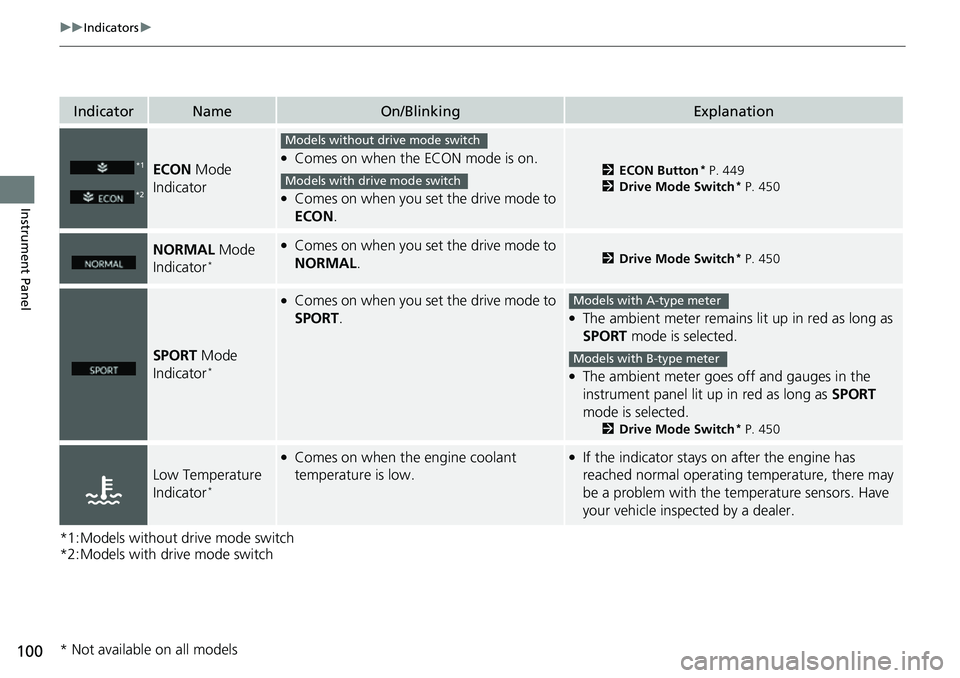
IndicatorNameOn/BlinkingExplanation
ECON Mode
Indicator●Comes on when the ECON mode is on.
●Comes on when you set the drive mode to
ECON .
2ECON Button* P. 449
2 Drive Mode Switch* P. 450
NORMAL Mode
Indicator*
●Comes on when you set the drive mode to
NORMAL .2Drive Mode Switch* P. 450
SPORT Mode
Indicator*
●Comes on when you set the drive mode to
SPORT .●The ambient meter remains lit up in red as long as
SPORT mode is selected.
●The ambient meter goes off and gauges in the
instrument panel lit up in red as long as SPORT
mode is selected.
2 Drive Mode Switch* P. 450
Low Temperature
Indicator*
●Comes on when the engine coolant
temperature is low.●If the indicator stays on after the engine has
reached normal operating temperature, there may
be a problem with the temperature sensors. Have
your vehicle inspected by a dealer.
*1
*2
Models without drive mode switch
Models with drive mode switch
Models with A-type meter
Models with B-type meter
* Not available on all models
Page 102 of 700
101
uuIndicators u
Continued
Instrument Panel
IndicatorNameOn/BlinkingExplanation
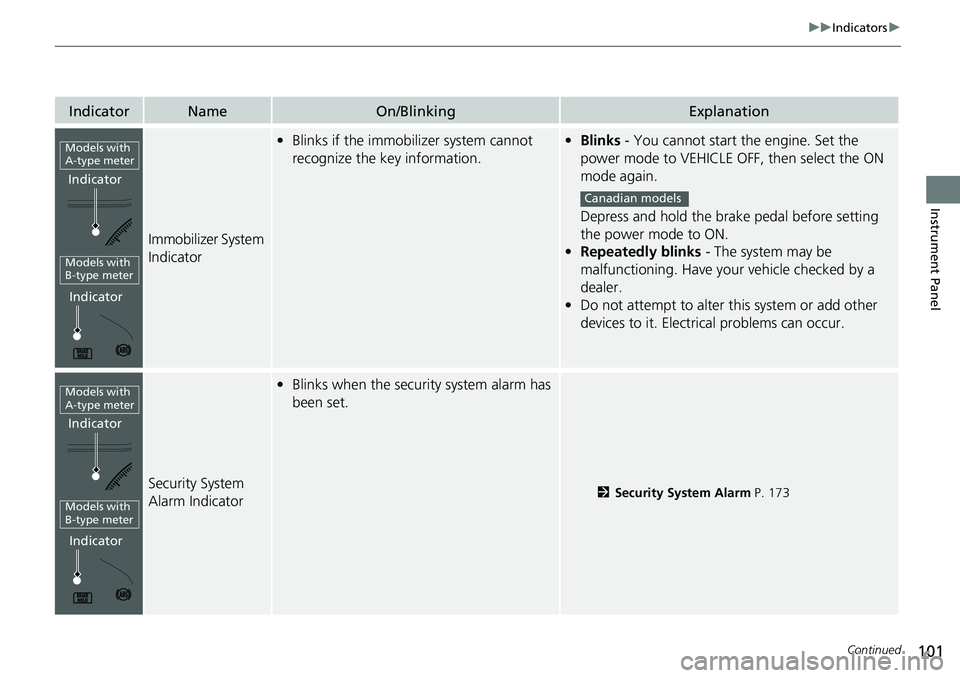
Immobilizer System
Indicator
•Blinks if the immobilizer system cannot
recognize the key information.•Blinks - You cannot start the engine. Set the
power mode to VEHICLE OFF, then select the ON
mode again.
Depress and hold the brake pedal before setting
the power mode to ON.
• Repeatedly blinks - The system may be
malfunctioning. Have your vehicle checked by a
dealer.
• Do not attempt to alter this system or add other
devices to it. Electrical problems can occur.
Security System
Alarm Indicator
•Blinks when the security system alarm has
been set.
2 Security System Alarm P. 173
Indicator
Models with
A-type meter
Indicator
Models with
B-type meter
Canadian models
Indicator
Models with
A-type meter
Indicator
Models with
B-type meter
Page 112 of 700
Continued111
uuGauges and Driver Information Interface uGauges
Instrument Panel
Shows the outside temperature in Fahr enheit (U.S.) or Celsius (Canada).
■Adjusting the outside temperature display
Adjust the temperature reading by up to ±5°F or ±3°C if the temperature reading
seems incorrect.
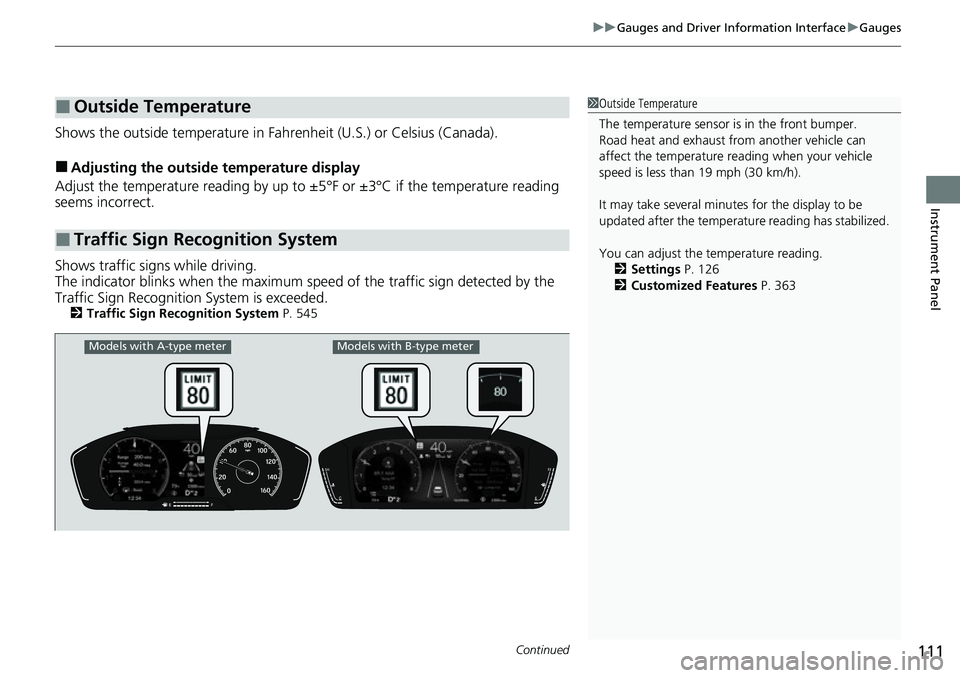
Shows traffic signs while driving.
The indicator blinks when th e maximum speed of the traffic sign detected by the
Traffic Sign Recognition System is exceeded.
2 Traffic Sign Recognition System P. 545
■Outside Temperature
■Traffic Sign Recognition System
1Outside Temperature
The temperature sensor is in the front bumper.
Road heat and exhaust from another vehicle can
affect the temperature reading when your vehicle
speed is less than 19 mph (30 km/h).
It may take several minutes for the display to be
updated after the temperature reading has stabilized.
You can adjust the temperature reading.
2 Settings P. 126
2 Customized Features P. 363
Models with A-type meterModels with B-type meter
Page 114 of 700
113
uuGauges and Driver Information Interface uDriver Information Interface
Continued
Instrument Panel
Driver Information Interface
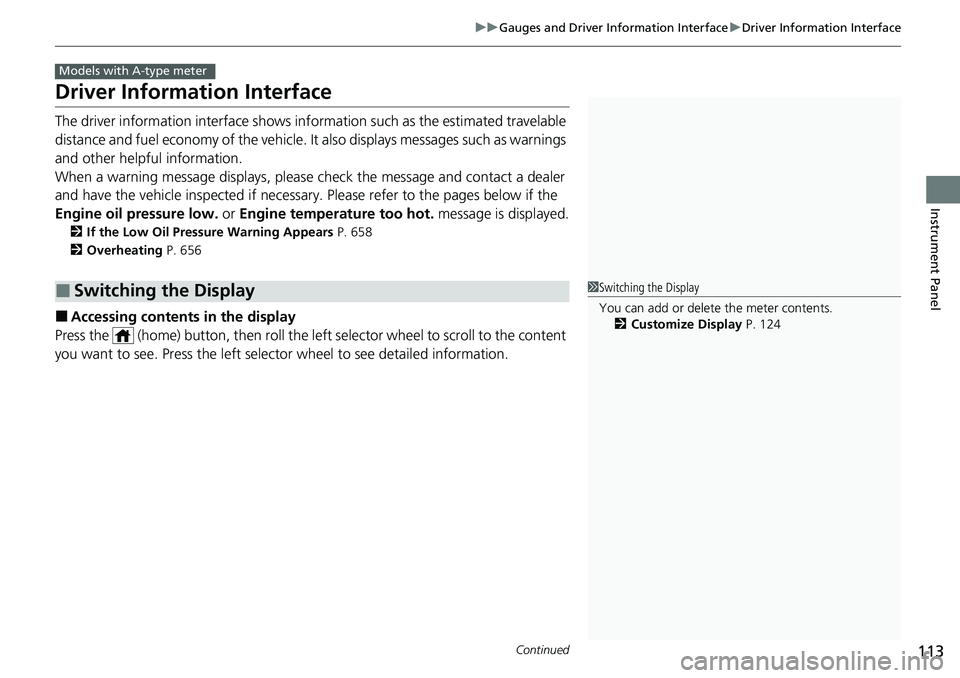
The driver information interface shows information such as the estimated travelable
distance and fuel economy of the vehicle. It also displays messages such as warnings
and other helpful information.
When a warning message displays, please check the message and contact a dealer
and have the vehicle inspected if necessary . Please refer to the pages below if the
Engine oil pressure low. or Engine temperature too hot. message is displayed.
2If the Low Oil Pressure Warning Appears P. 658
2 Overheating P. 656
■Accessing contents in the display
Press the (home) button, then roll the le ft selector wheel to scroll to the content
you want to see. Press the left sele ctor wheel to see detailed information.
■Switching the Display
Models with A-type meter
1Switching the Display
You can add or delete the meter contents.
2 Customize Display P. 124
Page 139 of 700
138
uuGauges and Driver Information Interface uDriver Information Interface (Right Side Area)
Instrument Panel
Driver Information Inte rface (Right Side Area)
The driver information interface shows in formation such as the estimated travelable
distance and fuel economy of the vehicle. It also displays messages such as warnings
and other helpful information.
When a warning message displays, please check the message and contact a dealer
and have the vehicle inspected if necessary . Please refer to the pages below if the
Engine oil pressure low. or Engine temperature too hot. message is displayed.
2If the Low Oil Pressure Warning Appears P. 658
2 Overheating P. 656
Models with B-type meter
Page 159 of 700
158
uuLocking and Unlocking the Doors uLow Remote Key Signal Strength
Controls
Low Remote Key Signal Strength
The vehicle transmits radio waves to locate the remote key when locking/unlocking*
the doors and fuel fill door, opening* the trunk, or starting the engine.
In the following cases, locking/unlocking
* the doors, opening* the trunk, or starting
the engine may be inhibited or operation may be unstable:
• Strong radio waves are being tra nsmitted by nearby equipment.
• You are carrying the remote key together with telecommunic ations equipment,
laptop computers, cell phone s, or wireless devices.
• A metallic object is touching or covering the remote key.
1Low Remote Key Signal Strength
Communication between the remote key and the
vehicle consumes the remote key's battery.
Battery life is about two years, but this varies
depending on re gularity of use.
The battery is consumed whenever the remote key is
receiving strong radio waves. Avoid placing it near
electrical appliances such as televisions and personal
computers.
* Not available on all models
Page 160 of 700
159
uuLocking and Unlocking the Doors uLocking/Unlocking the Doors from the Outside
Continued
Controls
Locking/Unlocking the Doors from the Outside
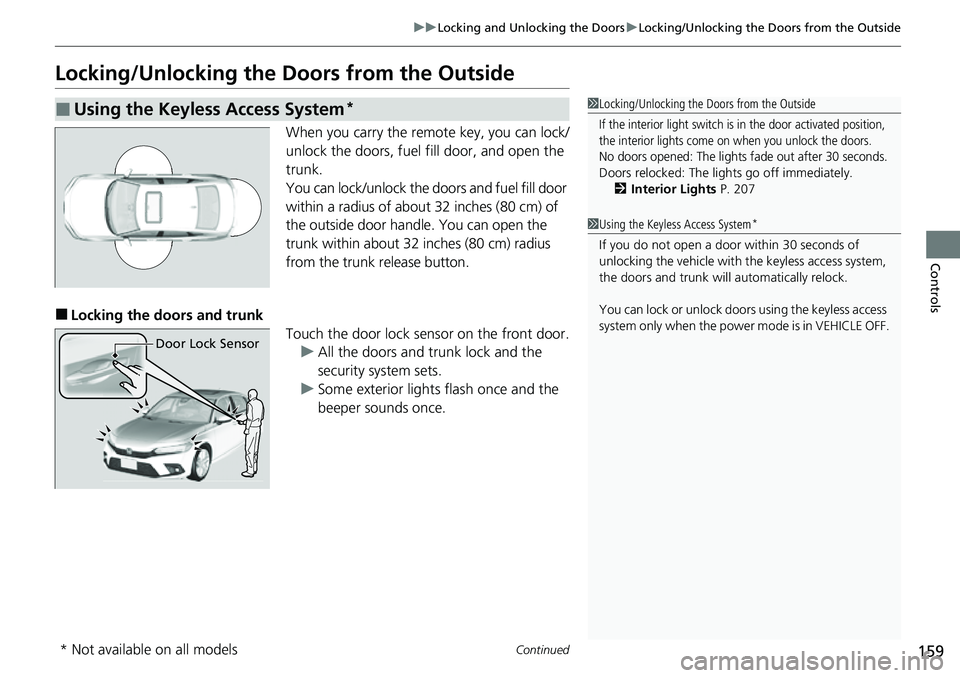
When you carry the remote key, you can lock/
unlock the doors, fuel fill door, and open the
trunk.
You can lock/unlock the doors and fuel fill door
within a radius of about 32 inches (80 cm) of
the outside door handle. You can open the
trunk within about 32 inches (80 cm) radius
from the trunk release button.
■Locking the doors and trunk
Touch the door lock sensor on the front door.u All the doors and trunk lock and the
security system sets.
u Some exterior lights flash once and the
beeper sounds once.
■Using the Keyless Access System*1Locking/Unlocking the Doors from the Outside
If the interior light switch is in the door activated position,
the interior lights come on when you unlock the doors.
No doors opened: The lights fade out after 30 seconds.
Doors relocked: The li ghts go off immediately.
2 Interior Lights P. 207
1Using the Keyless Access System*
If you do not open a door within 30 seconds of
unlocking the vehicle with the keyless access system,
the doors and trunk will automatically relock.
You can lock or unlock doors using the keyless access
system only when the power mode is in VEHICLE OFF.
Door Lock Sensor
* Not available on all models
Page 161 of 700
uuLocking and Unlocking the Doors uLocking/Unlocking the Doors from the Outside
160
Controls
■Unlocking the doors and trunk
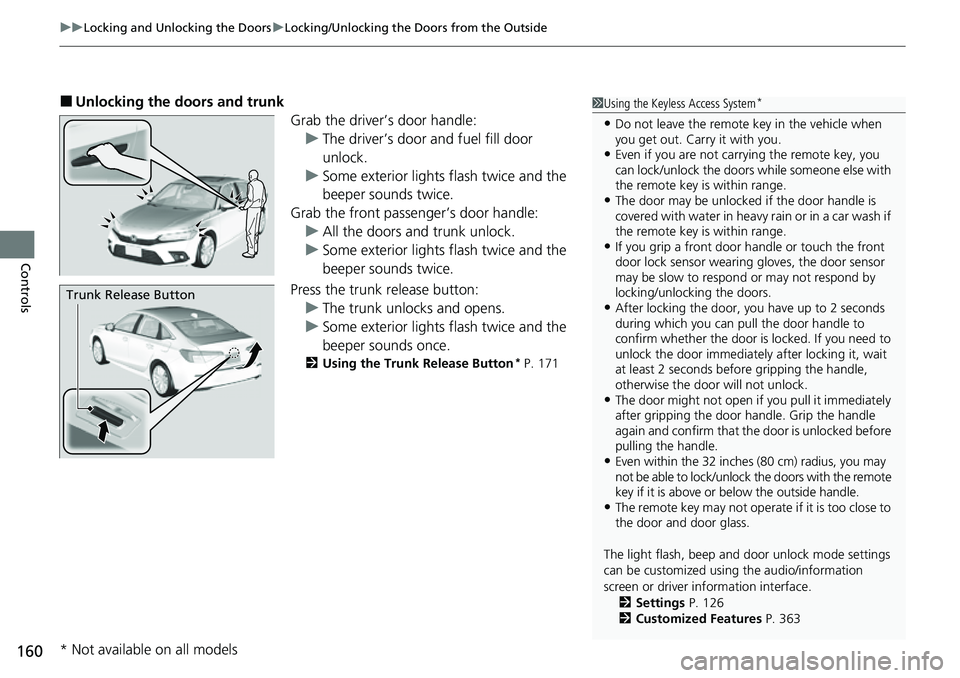
Grab the driver’s door handle:u The driver’s door and fuel fill door
unlock.
u Some exterior lights flash twice and the
beeper sounds twice.
Grab the front passenger’s door handle: u All the doors and trunk unlock.
u Some exterior lights flash twice and the
beeper sounds twice.
Press the trunk release button: u The trunk unlocks and opens.
u Some exterior lights flash twice and the
beeper sounds once.
2 Using the Trunk Release Button* P. 171
1Using the Keyless Access System*
•Do not leave the remote key in the vehicle when
you get out. Carry it with you.
•Even if you are not carr ying the remote key, you
can lock/unlock the doors while someone else with
the remote key is within range.
•The door may be unlocked if the door handle is
covered with water in heavy rain or in a car wash if
the remote key is within range.
•If you grip a front door handle or touch the front
door lock sensor wearing gloves, the door sensor
may be slow to respon d or may not respond by
locking/unlocking the doors.
•After locking the door, you have up to 2 seconds
during which you can pull the door handle to
confirm whether the door is locked. If you need to
unlock the door immediately after locking it, wait
at least 2 seconds befo re gripping the handle,
otherwise the door will not unlock.
•The door might not open if you pull it immediately
after gripping the door handle. Grip the handle
again and confirm that th e door is unlocked before
pulling the handle.
•Even within the 32 inches (80 cm) radius, you may
not be able to lock/unlock the doors with the remote
key if it is above or below the outside handle.
•The remote key may not operate if it is too close to
the door and door glass.
The light flash, beep and door unlock mode settings
can be customized using the audio/information
screen or driver information interface.
2 Settings P. 126
2 Customized Features P. 363
Trunk Release Button
* Not available on all models
Page 163 of 700
uuLocking and Unlocking the Doors uLocking/Unlocking the Doors from the Outside
162
Controls
To temporarily deactivate the function:
1. Set the power mode to OFF.
2. Open the driver’s door.
3. Using the master door lock switch, operate
the lock as follows:
Lock Unlock Lock Unlock.
u The beeper sounds and the function is
deactivated.
To restore the function:
• Set the power mode to ON.
• Lock the vehicle without using the auto lock
function.
• With the remote key on you, move out of
the auto lock function operation range.
• Open any door.1Locking the doors and trunk (Walk away auto lock ®)
The auto lock function does not operate when any of
the following conditions are met.
•The remote key is inside the vehicle.
•A door or the hood is not closed.•The power mode is set to any mode other than
OFF.
•The remote key is not loca ted within a radius of
about 5 feet (1.5 m) from the vehicle when you get
out of the vehicle and close the doors.
Auto lock function operation stop beeper
After the auto lock function has been activated, the
auto lock operation stop beeper sounds for
approximately two seconds in the following cases.
•The remote key is put inside the vehicle through a
window.
•You are located too close to the vehicle.
•The remote key is put inside the trunk.
If the warning beeper sounds, check that you are
carrying the remote key. Then, open/close a door and
confirm the auto lock ac tivation beeper sounds once.
Page 164 of 700
Continued163
uuLocking and Unlocking the Doors uLocking/Unlocking the Doors from the Outside
Controls
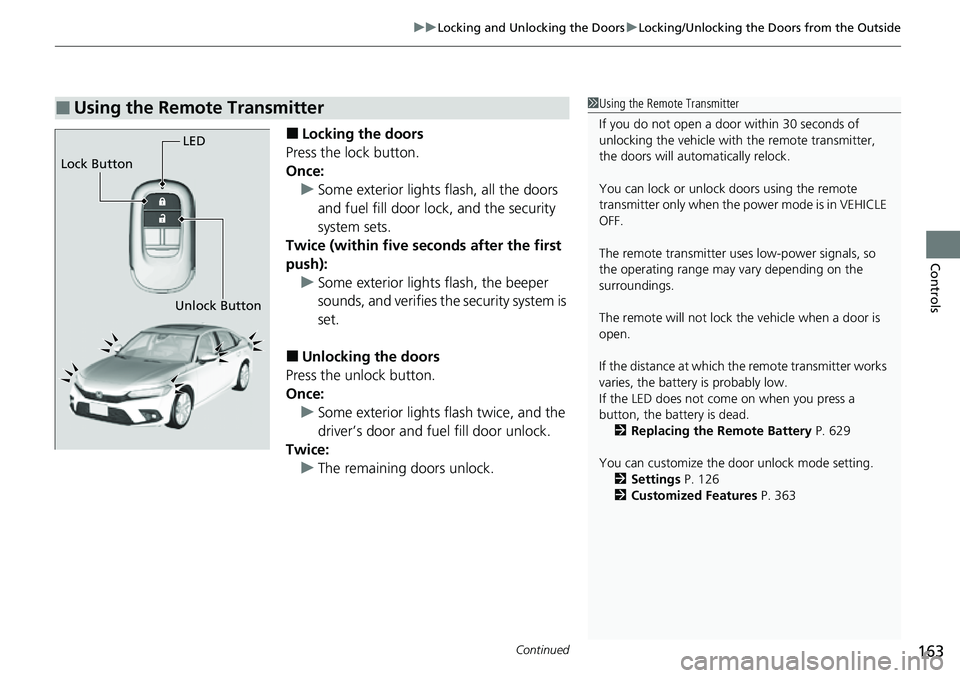
■Locking the doors
Press the lock button.
Once: u Some exterior lights flash, all the doors
and fuel fill door lock , and the security
system sets.
Twice (within five se conds after the first
push): u Some exterior lights flash, the beeper
sounds, and verifies th e security system is
set.
■Unlocking the doors
Press the unlock button.
Once: u Some exterior lights flash twice, and the
driver’s door and fuel fill door unlock.
Twice: u The remaining doors unlock.
■Using the Remote Transmitter1Using the Remote Transmitter
If you do not open a door within 30 seconds of
unlocking the vehicle with the remote transmitter,
the doors will automatically relock.
You can lock or unlock doors using the remote
transmitter only when the power mode is in VEHICLE
OFF.
The remote transmitter us es low-power signals, so
the operating range may vary depending on the
surroundings.
The remote will not lock th e vehicle when a door is
open.
If the distance at which the remote transmitter works
varies, the batter y is probably low.
If the LED does not come on when you press a
button, the battery is dead. 2 Replacing the Remote Battery P. 629
You can customize the door unlock mode setting. 2 Settings P. 126
2 Customized Features P. 363
LED
Unlock Button
Lock Button