steering wheel HONDA CIVIC 2022 Workshop Manual
[x] Cancel search | Manufacturer: HONDA, Model Year: 2022, Model line: CIVIC, Model: HONDA CIVIC 2022Pages: 700, PDF Size: 13.98 MB
Page 462 of 700
461
uuWhen Driving uAgile Handling Assist
Driving
Agile Handling Assist
Lightly brakes the front wheels, as needed , when you turn the steering wheel, and
helps support the vehicle’s stability and performance during cornering.1 Agile Handling Assist
The agile handling assist ca nnot enhance stability in
all driving situations. You still need to drive and
corner at speeds appropriate for the conditions and
always leave a sufficient margin of safety.
When the VSA ® system indicator comes on and stays
on while driving, the agil e handling assist does not
activate.
You may hear a sound coming from the engine
compartment while the agile handling assist is
activated. This is normal.
Page 463 of 700
462
uuWhen Driving uTire Pressure Monitoring System (TPMS)
Driving
Tire Pressure Monitoring System (TPMS)
Instead of directly measuring the pressu re in each tire, the TPMS on this vehicle
monitors and compares the rolling radius and rotational characteristics of each
wheel and tire while you are driving to determine if one or more tires are
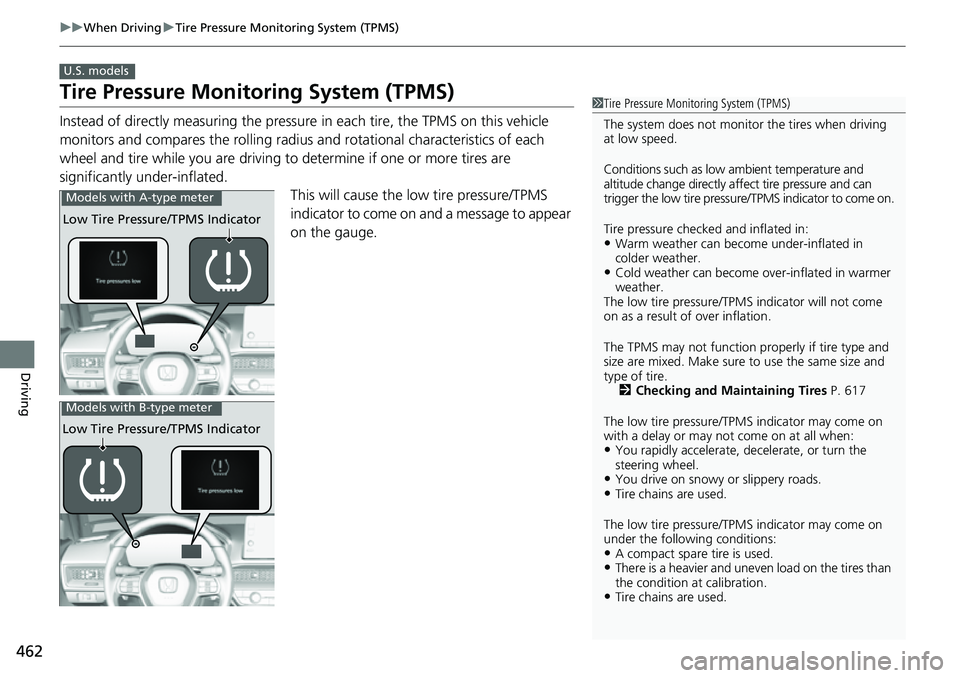
significantly under-inflated. This will cause the low tire pressure/TPMS
indicator to come on and a message to appear
on the gauge.
U.S. models
1 Tire Pressure Monitoring System (TPMS)
The system does not monitor the tires when driving
at low speed.
Conditions such as low ambient temperature and
altitude change directly a ffect tire pressure and can
trigger the low tire pressure/TPMS indicator to come on.
Tire pressure checked and inflated in:
•Warm weather can beco me under-inflated in
colder weather.
•Cold weather can become over-inflated in warmer
weather.
The low tire pressure/TPMS indicator will not come
on as a result of over inflation.
The TPMS may not function pr operly if tire type and
size are mixed. Make sure to use the same size and
type of tire. 2 Checking and Maintaining Tires P. 617
The low tire pressure/TPMS indicator may come on
with a delay or may not come on at all when:
•You rapidly accelerate, decelerate, or turn the
steering wheel.
•You drive on snowy or slippery roads.•Tire chains are used.
The low tire pressure/TPMS indicator may come on
under the following conditions:
•A compact spare tire is used.•There is a heavier and uneve n load on the tires than
the condition at calibration.
•Tire chains are used.
Low Tire Pressure/TPMS Indicator
Models with A-type meter
Low Tire Pressure/TPMS Indicator
Models with B-type meter
Page 477 of 700
476
uuHonda Sensing ®u Collision Mitigation Braking SystemTM (CMBSTM)
Driving
Collision Mitigati on Braking SystemTM (CMBSTM)
The system can assist you when it determine s there is a possibility of your vehicle
colliding with a vehicle ahead from behind, an oncoming vehicle in front, a
pedestrian, or someone riding a bicycle (moving bicycle).
The CMBS
TM is designed to alert you when the potential for a collision is determined,
as well as assist in reducing speed, avoiding collisions, and reducing collision
severity.
1 Collision Mitigation Braking SystemTM (CMBSTM)
Important Safety Reminder
The CMBS
TM is designed to reduce the severity of an
unavoidable collision. It does not prevent collisions
nor stop the vehicle automati cally. It is still your
responsibility to operate th e brake pedal and steering
wheel appropriately acco rding to the driving
conditions.
The CMBS
TM may not activate or may not detect a
vehicle in front of y our vehicle under certain
conditions:
2 CMBS
TM Conditions and Limitations P. 481
You can read about handling information for the
camera equipped with this system. 2 Front Wide View Camera P. 551
When the CMBS
TM is activated, it will continue to
operate even if the accele rator pedal is partially
depressed. However, it w ill be canceled if the
accelerator pedal is fully depressed.
Page 478 of 700
Continued477
uuHonda Sensing ®u Collision Mitigation Braking SystemTM (CMBSTM)
Driving
■How the system works
The CMBS
TM will be canceled when your vehicle stops or the system determines
there no longer is the potential for a collision.
The CMBS
TM may also be canceled when a dr iver operates the steering wheel and
the brake or accelerator pe dal to avoid a collision.
1How the system works
The camera in the CMBS
TM is also designed to detect
pedestrians.
However, this pedestrian detection feature may not
activate or may not detect a pedestrian in front of
your vehicle under certain conditions.
Refer to the ones indicating the pedestrian detection
limitations from the list. 2 CMBS
TM Conditions and Limitations P. 481
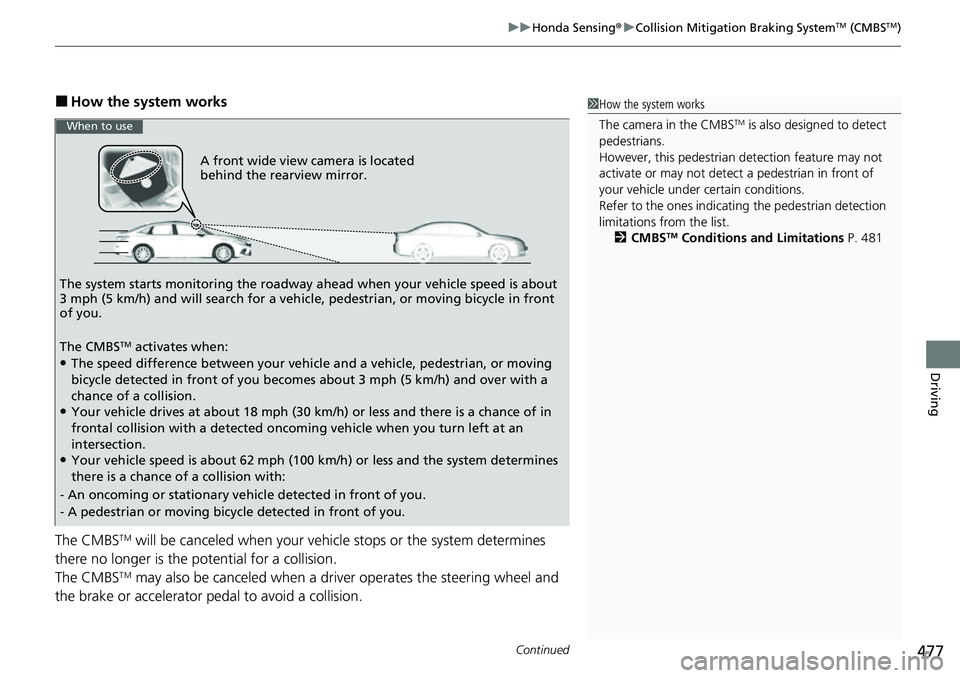
A front wide view camera is located
behind the rearview mirror.
The system starts monitoring the roadway ah ead when your vehicle speed is about
3 mph (5 km/h) and will search for a vehicl e, pedestrian, or moving bicycle in front
of you.
The CMBS
TM activates when:●The speed difference between your vehicle and a vehicle, pedestrian, or moving
bicycle detected in front of you becomes about 3 mph (5 km/h) and over with a
chance of a collision.
●Your vehicle drives at about 18 mph (30 km/h) or less and there is a chance of in
frontal collision with a detected oncoming vehicle when you turn left at an
intersection.
●Your vehicle speed is about 62 mph (100 km/h) or less and the system determines
there is a chance of a collision with:
- An oncoming or stationary vehicle detected in front of you.
- A pedestrian or moving bicycle detected in front of you.
When to use
Page 485 of 700
484
uuHonda Sensing ®u Collision Mitigation Braking SystemTM (CMBSTM)
Driving
■Examples of other limitations on detection or system operation
• When the vehicle ahead of you is a motorcycle, wheelch air, or other specially-
shaped vehicle.
• When a vehicle is lower in the rear than the front such as trucks that are not
carrying a load, or a narrow vehicle.
• When the vehicle ahead of you, oncoming vehicle, pedestrian or moving bicycle
is not in front of the vehicle.
• The speed difference between your vehi cle and the vehicle ahead of you,
oncoming vehicle, pedestrian or moving bicycle is significantly large.
• When the vehicle or moving bicycle in front of you slows suddenly.
• When the driver operates the brake pedal and steering wheel to avoid a collision.
• When you approach the vehicle ahead of you, oncoming vehicle, pedestrians or
moving bicycles while accelerating rapidl y or operating the steering wheel (except
when turning left at an intersection etc.)
*1
• When the moving bicycle is a child-sized bicycle, folding bicycle, three-wheeler or
other bicycle with small tires, or a long bicycle like a tandem bicycle.
• When the camera cannot correctly identify the shape of the vehicle ahead of you,
oncoming vehicle, pedestrian, or moving bicycle.
• When the minimum ground clearance of a vehicle ahead of you is extremely high.
*1 : When there is a possibility of a frontal collision with the oncoming vehicle while turning left, the CMBSTM
is activated. However, it may not be acti vated if you suddenly turn the steering wheel.
Page 493 of 700
uuHonda Sensing ®u Low Speed Braking Control*
492
Driving
Conditions for assistive driving power suppression.
• When the accelerator is no longer depressed.
• When the accelerator is depressed for approximately four seconds.
• When the brake pedal is depressed.
• When the steering wheel is tu rned and a collision avoided.
Conditions for assistive braking cancellation.
• A certain amount of time ha s passed since activation.
The system may not operate correct ly in the following conditions:
■Examples of obstacles the sonar sensor cannot detect
• Obstacles that do not refl ect sound waves well, such as people, snow, cloth,
sponges, etc.
• Thin obstacles such as fences, bicycles, sign posts, etc.
• Short or small obstacles.
• Obstacles immediately in front of the bumper.
• Moving objects or obstacles that suddenly enter the road.
• Obstacles that are not pe rpendicular to the ground.
■Conditions for Cancellation
■Low Speed Braking Control System Conditions and Limitations
1Conditions for Cancellation
After Low Speed Braking Control has activated once,
it will not activate again for the same obstacle.
They can be activated again after driving for a certain
distance after last activation.
Low Speed Braking Control ac tivates separately when
moving forward and reversing. (For example, if it
activates when moving forwar d, it can be activated
again immediately if reversing.)
However, if assistive braking has been activated, in
order to activate assistiv e driving power suppression
again, it is necessary to drive for a certain distance to
reset the system.
Page 494 of 700
493
uuHonda Sensing ®u Low Speed Braking Control*
Driving
■Examples of situations where the sonar sensor cannot detect obstacles
• The sonar sensor is dirty (cover ed by snow, water, mud, etc.).
• The vehicle is too hot or cold.
• The steering wheel is turned sharply when approaching the obstacle at an angle.
■Examples of other cases where the system may not work correctly
• The vehicle is tilted due to heavy load or su spension modifications.
• An abnormal tire or wheel condition (inco rrect sizes, varied sizes or construction,
improperly inflated, co mpact spare tire, etc.).
• Bad weather conditions such as heav y rain, fog, snow, sandstorms, etc.
• The ambient temperature/humidity is too high or low.
• When going down a very steep slope.
• When close to other vehicles with sonar sensors or other objects that emit
ultrasonic waves.
■Situations where the system may acti vate even without risk of a collision
• When passing through short or narrow gates.
• When driving on uneven surfaces, grassy areas, or places with steps.
• When a sloped pillar or wall is protruding from a high position.
• When there are obstacles next to the road.
• When driving toward flags, curtains, tre e branches, railroad crossing bars, etc.
• When driving on flooded roads.
Page 496 of 700
Continued495
uuHonda Sensing ®u Adaptive Cruise Control (ACC) with Low Speed Follow
Driving
■How to activate the system1Adaptive Cruise Control (ACC) with Low Speed Follow
You can read about handling information for the
camera equipped with this system.
2 Front Wide View Camera P. 551
ACC with Low Speed Follow may not work properly
under certain conditions.
2 ACC with Low Speed Follow Conditions
and Limitations P. 504
When not using ACC with Low Speed Follow: Turn
off adaptive cruise by pressing the button.
Do not use ACC with Low Speed Follow under the
following conditions:
•Driving in continuous stop and go traffic.
•On roads with sharp turns.•On roads with toll collection facilities or other
objects between lanes of traffic, or in parking
areas, or faci lities with driv e through access.
•On roads with bad weather (rain, fog, snow, etc.).
It prevents the system fr om detecting the distance
between your vehicle a nd vehicle ahead of you
properly.
•On roads with slippery or icy surfaces. The wheels
may spin out and your vehi cle may lose the control
on the condition.
•On roads with steep uphill or steep downhill slopes.
•On roads with undulating slopes.
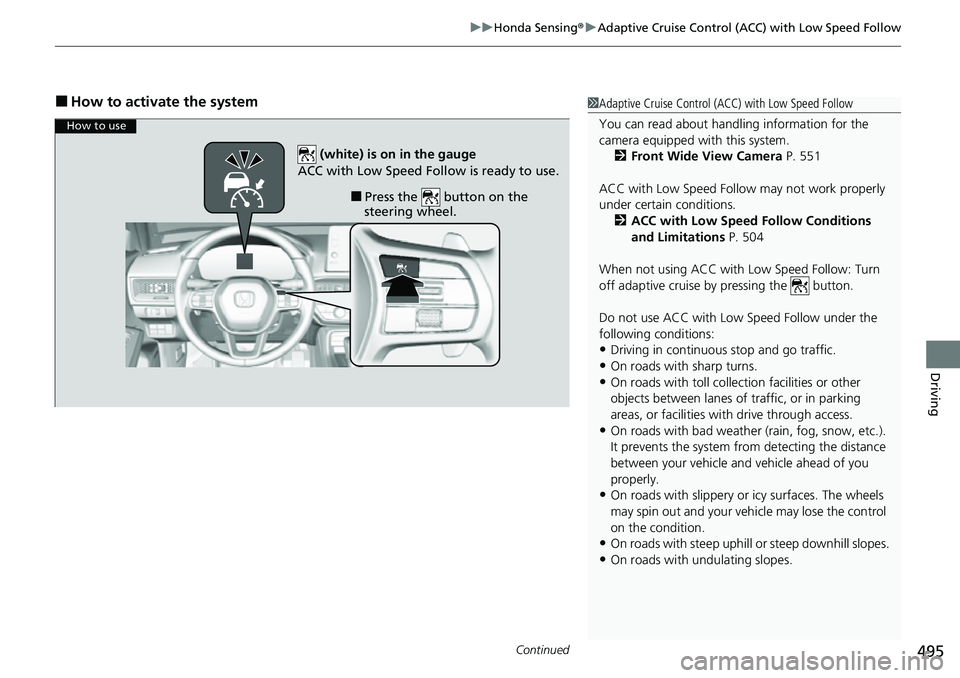
How to use
■Press the button on the
steering wheel.
(white) is on in the gauge
ACC with Low Speed Follow is ready to use.
Page 502 of 700
Continued501
uuHonda Sensing ®u Adaptive Cruise Control (ACC) with Low Speed Follow
Driving
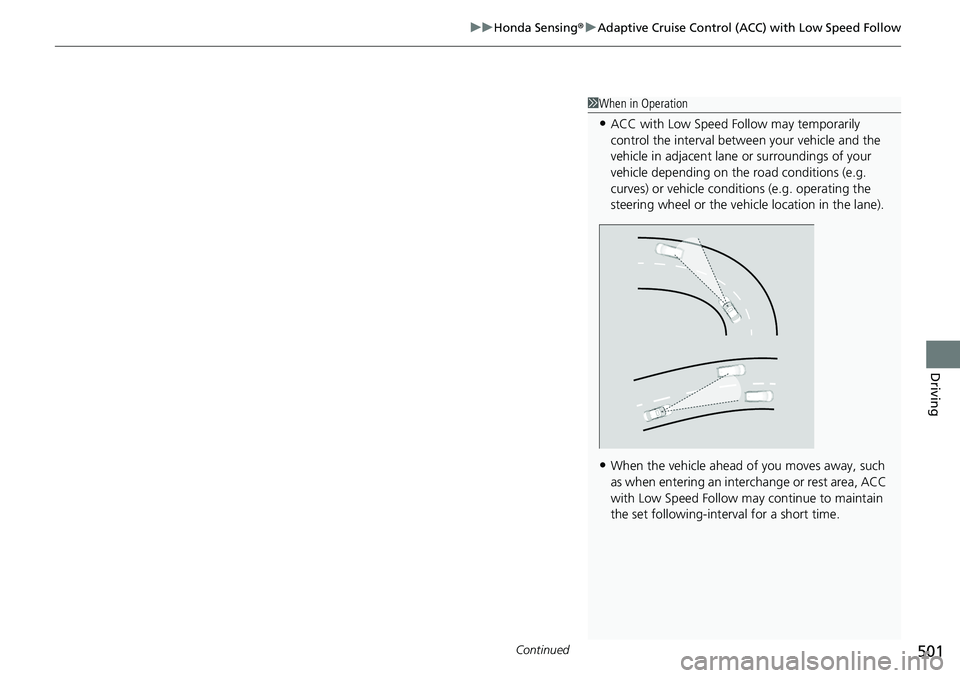
1When in Operation
•ACC with Low Speed Follow may temporarily
control the interval between your vehicle and the
vehicle in adjacent lane or surroundings of your
vehicle depending on the road conditions (e.g.
curves) or vehicle condi tions (e.g. operating the
steering wheel or the vehicle location in the lane).
•When the vehicle ahead of you moves away, such
as when entering an interchange or rest area, ACC
with Low Speed Follow may continue to maintain
the set following-interval for a short time.
Page 509 of 700
uuHonda Sensing ®u Adaptive Cruise Control (ACC) with Low Speed Follow
508
Driving
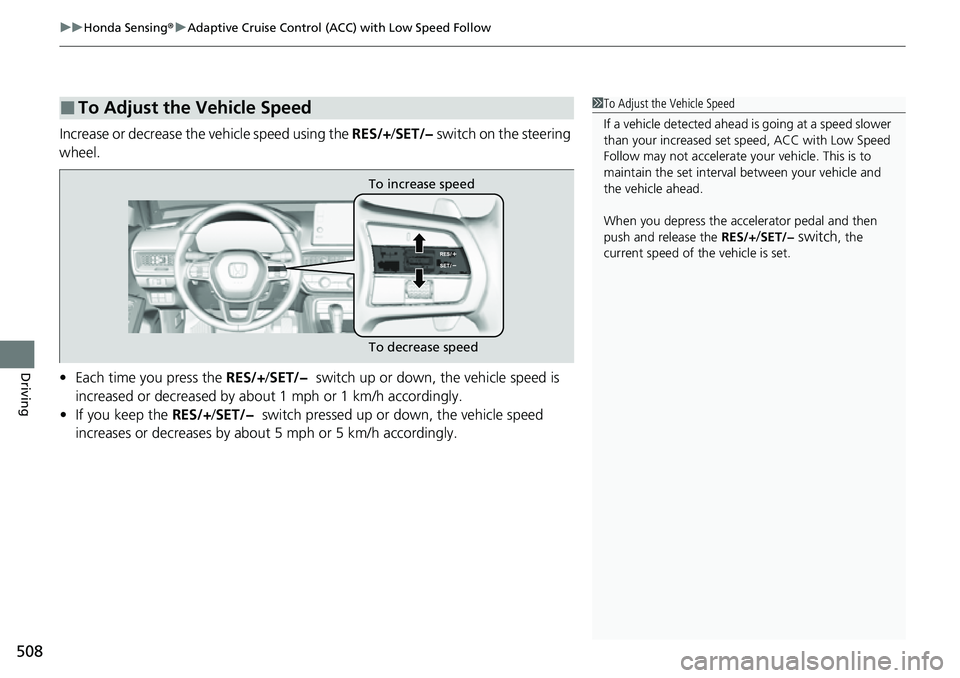
Increase or decrease the vehicle speed using the RES/+/SET/− switch on the steering
wheel.
• Each time you press the RES/+/SET/− switch up or down, the vehicle speed is
increased or decreased by about 1 mph or 1 km/h accordingly.
• If you keep the RES/+/SET/− switch pressed up or down, the vehicle speed
increases or decreases by about 5 mph or 5 km/h accordingly.
■To Adjust the Vehicle Speed1 To Adjust the Vehicle Speed
If a vehicle detected ahead is going at a speed slower
than your increased set speed, ACC with Low Speed
Follow may not accelerate y our vehicle. This is to
maintain the set interval between your vehicle and
the vehicle ahead.
When you depress the accelerator pedal and then
push and release the RES/+
/SET/− switch, the
current speed of the vehicle is set.
To increase speed
To decrease speed