fog light HONDA CIVIC 2022 Owners Manual
[x] Cancel search | Manufacturer: HONDA, Model Year: 2022, Model line: CIVIC, Model: HONDA CIVIC 2022Pages: 700, PDF Size: 13.98 MB
Page 10 of 700
9
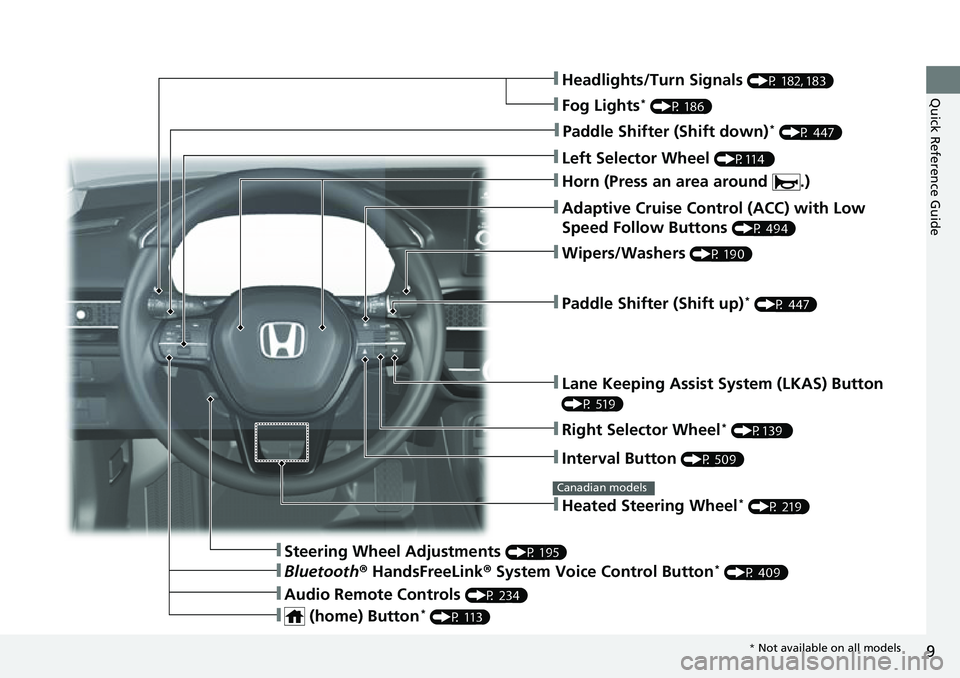
Quick Reference Guide❚Headlights/Turn Signals (P 182, 183)
❚Fog Lights* (P 186)
❚Paddle Shifter (Shift down)* (P 447)
❚Left Selector Wheel (P114 )
❚Adaptive Cruise Control (ACC) with Low
Speed Follow Buttons
(P 494)
❚Paddle Shifter (Shift up)* (P 447)
❚Lane Keeping Assist System (LKAS) Button
(P 519)
❚Interval Button (P 509)
❚Steering Wheel Adjustments (P 195)
❚Heated Steering Wheel* (P 219)
Canadian models
❚Wipers/Washers (P 190)
❚Right Selector Wheel* (P139 )
❚Bluetooth® HandsFreeLink ® System Voice Control Button* (P 409)
❚Audio Remote Controls (P 234)
❚ (home) Button* (P 113)
❚Horn (Press an area around .)
* Not available on all models
Page 13 of 700
Visual Index
12
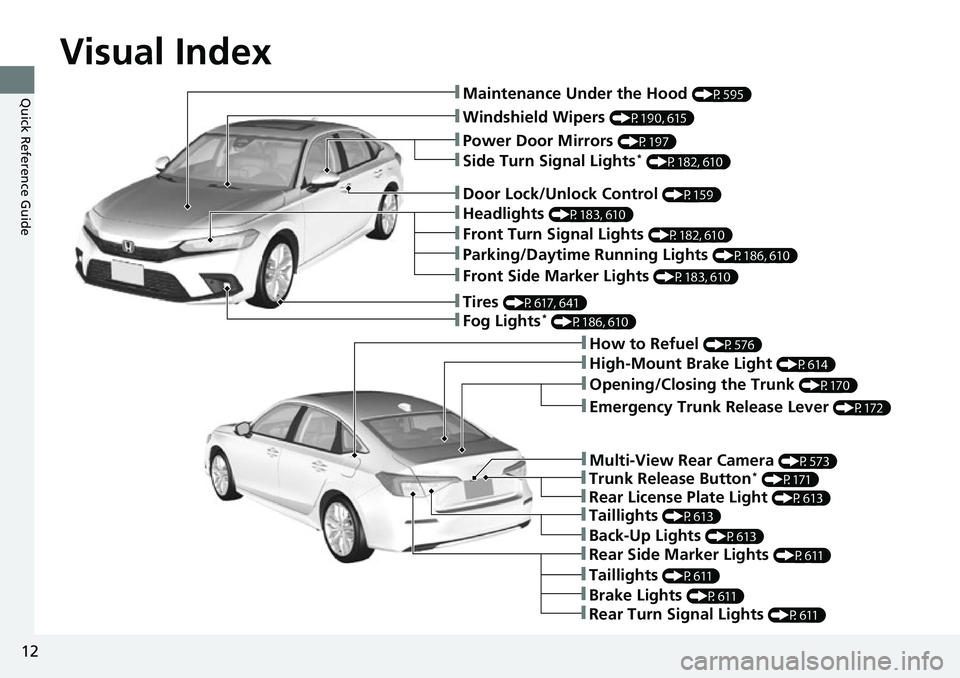
Quick Reference Guide❚Maintenance Under the Hood (P595)
❚Windshield Wipers (P190, 615)
❚Tires (P617, 641)
❚Fog Lights* (P186, 610)
❚Power Door Mirrors (P197)
❚How to Refuel (P576)
❚High-Mount Brake Light (P614)
❚Emergency Trunk Release Lever (P172)
❚Opening/Closing the Trunk (P170)
❚Door Lock/Unlock Control (P159)
❚Side Turn Signal Lights* (P182, 610)
❚Headlights (P183, 610)
❚Front Turn Signal Lights (P182, 610)
❚Front Side Marker Lights (P183, 610)
❚Taillights (P613)
❚Brake Lights (P611)
❚Rear Turn Signal Lights (P611)
❚Rear Side Marker Lights (P611)
❚Taillights (P611)
❚Parking/Daytime Running Lights (P186, 610)
❚Multi-View Rear Camera (P573)
❚Trunk Release Button* (P171)
❚Rear License Plate Light (P613)
❚Back-Up Lights (P613)
Page 90 of 700
89
uuIndicators u
Continued
Instrument Panel
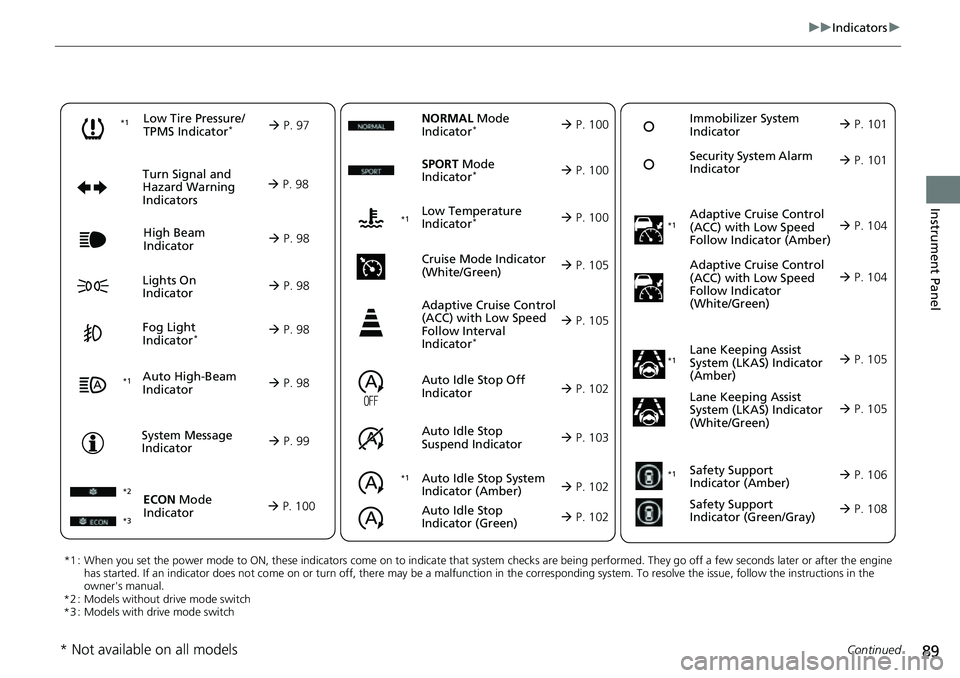
*1 : When you set the power mode to ON, these indicators come on to indicate that system checks are being performed. They go off a few seconds later or after the engine
has started. If an indicator does not come on or turn off, ther e may be a malfunction in the corresponding system. To resolve the issue, follow the instructions in the
owner's manual.
*2 : Models without drive mode switch
*3 : Models with drive mode switch
Auto High-Beam
Indicator
Low Tire Pressure/
TPMS Indicator*
Turn Signal and
Hazard Warning
Indicators
Lights On
Indicator High Beam
Indicator
Fog Light
Indicator*
System Message
Indicator Adaptive Cruise Control
(ACC) with Low Speed
Follow Indicator (Amber)
Lane Keeping Assist
System (LKAS) Indicator
(Amber)
Safety Support
Indicator (Green/Gray)
P. 97
Au
to Idle Stop System
Indica
tor (Amber)
P. 102
P. 98
P. 98
P. 104
*1
P. 98
P. 98
P. 98 Immobilizer System
Indicator
P.
101
Se
curity System Alarm
Indicator
P.
101
P. 99
P. 105
P. 108
*1
Adaptive Cruise Control
(ACC) with Low Speed
Follow Indicator
(White/Green) P. 104
*1
Lane Keeping Assist
System (LKAS) Indicator
(White/Green)
P. 105
*1 *1Safety Support
Indicator (Amber)
P. 106
*1
NORMAL Mode
Indicator* P. 100
Auto Idle Stop Off
Indicator
P. 102
Auto
Idle Stop
Suspen
d Indicator P. 103
ECON Mode
Indicator
P. 100
*3
SPORT Mode
Indicator* P. 100
Low Temperature
Indicator* P. 100
Cruise Mode Indicator
(Whi
te/Green)
P. 105
Adaptive Cruise Control
(ACC) with Low Speed
Follow Interval
Indicator
*
P. 105
*2 *1
Auto Idle Stop
Indicator (Green)
P. 102
* Not available on all models
Page 99 of 700
98
uuIndicators u
Instrument Panel
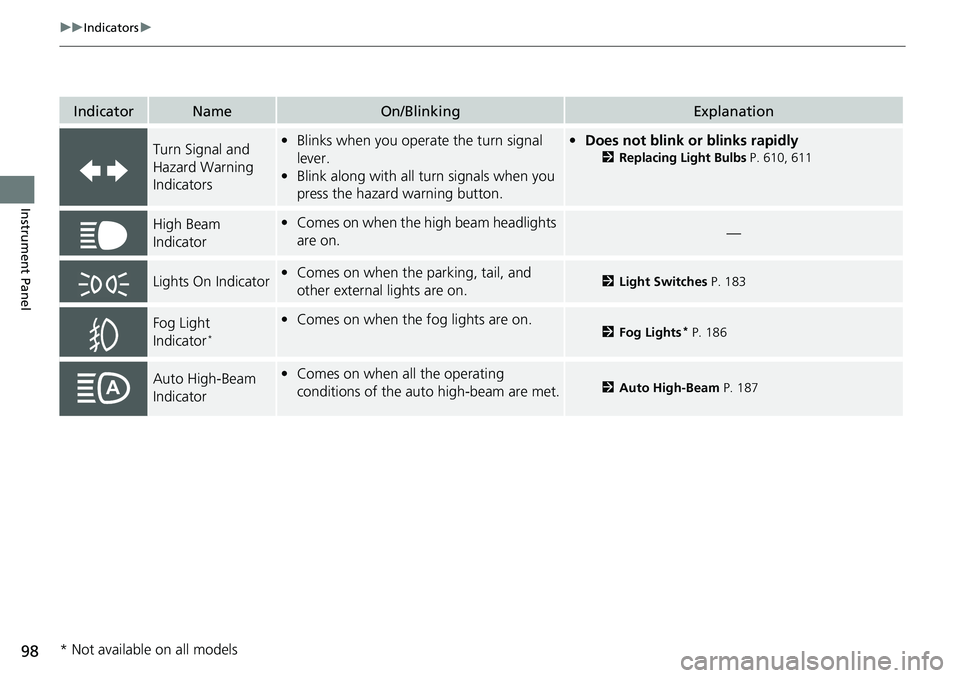
IndicatorNameOn/BlinkingExplanation
Turn Signal and
Hazard Warning
Indicators•Blinks when you operate the turn signal
lever.
• Blink along with all turn signals when you
press the hazard warning button.• Does not blink or blinks rapidly
2 Replacing Light Bulbs P. 610, 611
High Beam
Indicator•Comes on when the high beam headlights
are on.—
Lights On Indicator•Comes on when the parking, tail, and
other external lights are on.2 Light Switches P. 183
Fog Light
Indicator*
•Comes on when the fog lights are on.2 Fog Lights* P. 186
Auto High-Beam
Indicator•Comes on when all the operating
conditions of the au to high-beam are met.2Auto High-Beam P. 187
* Not available on all models
Page 154 of 700
153
Controls
This chapter explains how to operate the various controls necessary for driving.
Clock.................................................. 154
Locking and Unlocking the Doors Key .................................................. 156
Low Remote Key Signal Strength...... 158
Locking/Unlocking the Doors from the Outside .......................................... 159
Locking/Unlocking the Doors from the
Inside ............................................. 166
Childproof Door Locks ..................... 168
Auto Door Locking/Unlocking .......... 169
Opening and Closing the Trunk ....... 170
Security System Immobilizer System .......................... 173
Security System Alarm ...................... 173 Windows
........................................... 176
Moonroof*........................................ 179
Operating the Switches Around the Steering Wheel ENGINE START/STOP Button............. 180
Turn Signals ..................................... 182
Light Switches.................................. 183
Fog Lights
*...................................... 186
Daytime Running Lights ................... 186
Auto High-Beam .............................. 187
Wipers and Washers ........................ 190
Rear Defogger/Heat ed Door Mirror
*
Button ........................................... 192 Brightness Control ........................... 193
Brightness Control ........................... 194
Adjusting the Steering Wheel .......... 195
Mirrors
Interior Rearview Mirror ................... 196
Power Door Mirrors ......................... 197
Seats .................................................. 198
Interior Convenience Items .............. 207
Climate Control System Using Automatic Climate Control .... 222
Automatic Climate Control Sensors......227
Models with A-type meter
Models with B-type meter
* Not available on all models
Page 185 of 700
uuOperating the Switches Around the Steering Wheel uLight Switches
184
Controls
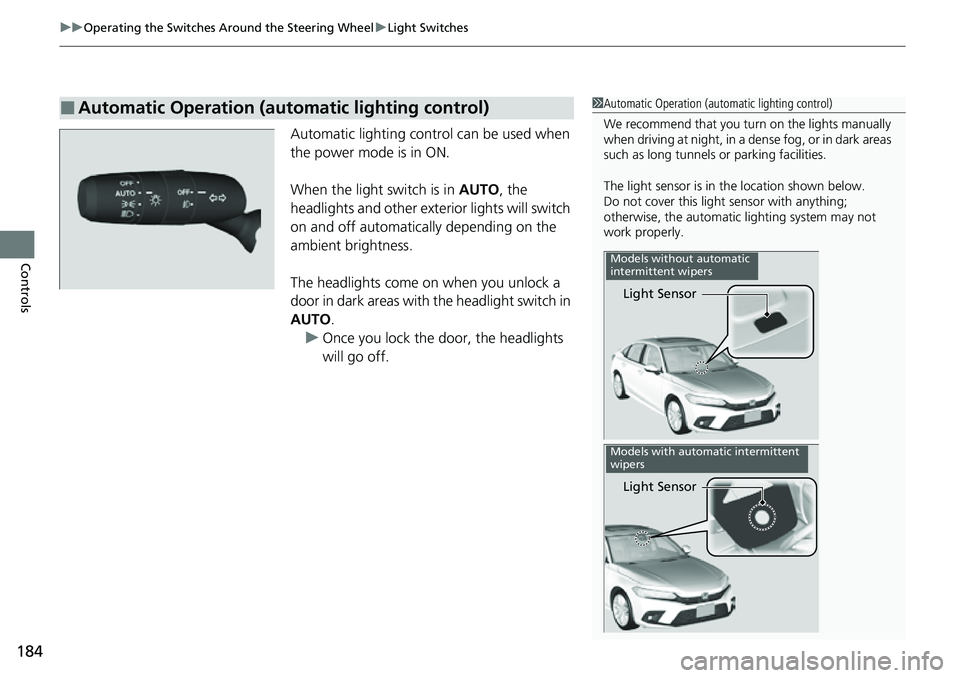
Automatic lighting control can be used when
the power mode is in ON.
When the light switch is in AUTO, the
headlights and other exterior lights will switch
on and off automatically depending on the
ambient brightness.
The headlights come on when you unlock a
door in dark areas with the headlight switch in
AUTO .
u Once you lock the door, the headlights
will go off.
■Automatic Operation (automatic lighting control)1Automatic Operation (aut omatic lighting control)
We recommend that you tu rn on the lights manually
when driving at night, in a de nse fog, or in dark areas
such as long tunnels or parking facilities.
The light sensor is in the location shown below.
Do not cover this light sensor with anything;
otherwise, the automatic lighting system may not
work properly.
Light Sensor
Models without automatic
intermittent wipers
Light Sensor
Models with automatic intermittent
wipers
Page 187 of 700
186
uuOperating the Switches Around the Steering Wheel uFog Lights*
Controls
Fog Lights*
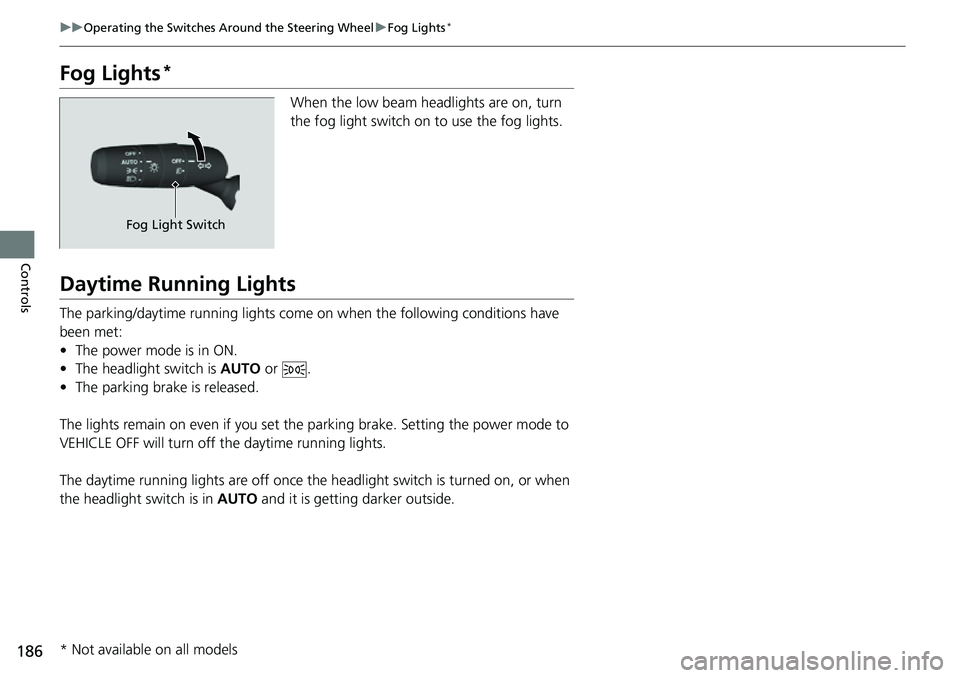
When the low beam headlights are on, turn
the fog light switch on to use the fog lights.
Daytime Running Lights
The parking/daytime running lights come on when the following conditions have
been met:
• The power mode is in ON.
• The headlight switch is AUTO or .
• The parking brake is released.
The lights remain on even if you set the parking brake. Setting the power mode to
VEHICLE OFF will turn off the daytime running lights.
The daytime running lights are off once the headlight switch is turned on, or when
the headlight switch is in AUTO and it is getting darker outside.
Fog Light Switch
* Not available on all models
Page 189 of 700
uuOperating the Switches Around the Steering Wheel uAuto High-Beam
188
Controls
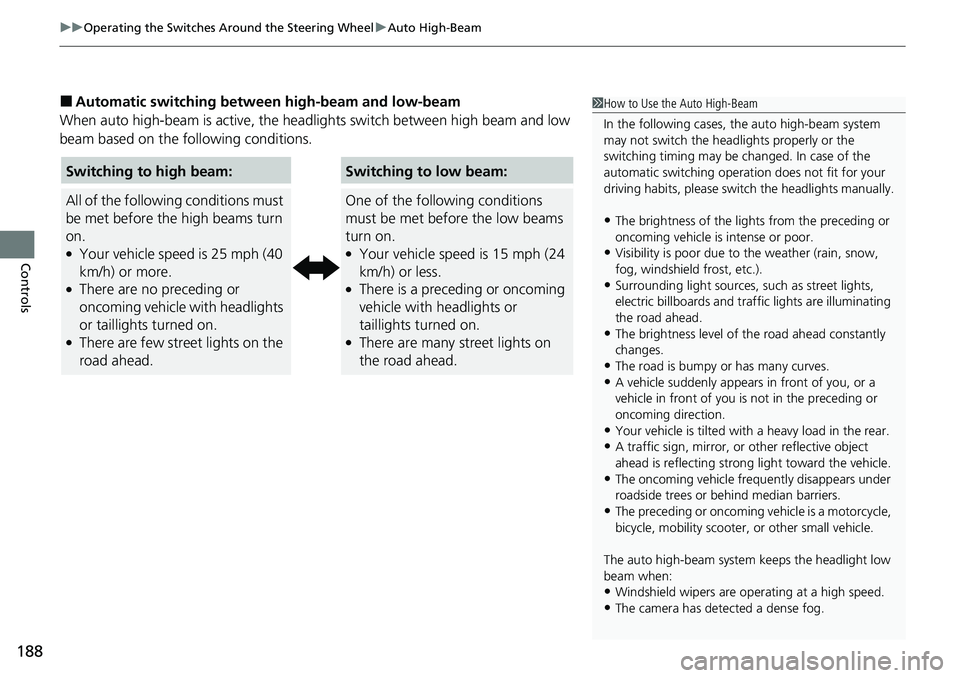
■Automatic switching between high-beam and low-beam
When auto high-beam is ac tive, the headlights switch between high beam and low
beam based on the following conditions.1 How to Use the Auto High-Beam
In the following cases, th e auto high-beam system
may not switch the head lights properly or the
switching timing may be ch anged. In case of the
automatic switching operati on does not fit for your
driving habits, please swit ch the headlights manually.
•The brightness of the lights from the preceding or
oncoming vehicle is intense or poor.
•Visibility is poor due to the weather (rain, snow,
fog, windshield frost, etc.).
•Surrounding light sources, such as street lights,
electric billboards and traf fic lights are illuminating
the road ahead.
•The brightness level of th e road ahead constantly
changes.
•The road is bumpy or has many curves.•A vehicle suddenly appears in front of you, or a
vehicle in front of you is not in the preceding or
oncoming direction.
•Your vehicle is tilted with a heavy load in the rear.•A traffic sign, mirror, or other reflective object
ahead is reflecting strong light toward the vehicle.
•The oncoming vehicle freq uently disappears under
roadside trees or be hind median barriers.
•The preceding or oncoming vehicle is a motorcycle,
bicycle, mobility scooter, or other small vehicle.
The auto high-beam system keeps the headlight low
beam when:
•Windshield wipers are op erating at a high speed.
•The camera has detected a dense fog.
Switching to high beam:
All of the following conditions must
be met before the high beams turn
on.
●Your vehicle speed is 25 mph (40
km/h) or more.
●There are no preceding or
oncoming vehicle with headlights
or taillights turned on.
●There are few street lights on the
road ahead.
Switching to low beam:
One of the following conditions
must be met before the low beams
turn on.
●Your vehicle speed is 15 mph (24
km/h) or less.
●There is a preceding or oncoming
vehicle with headlights or
taillights turned on.
●There are many street lights on
the road ahead.
Page 437 of 700
436
Driving
When Driving
Starting the Engine
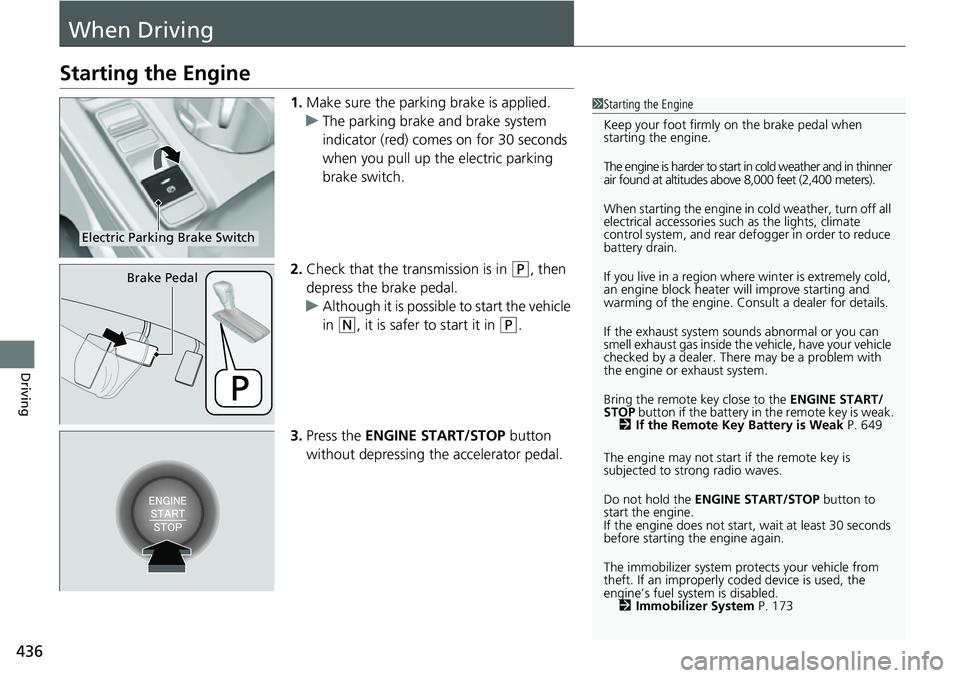
1.Make sure the parking brake is applied.
u The parking brake and brake system
indicator (red) comes on for 30 seconds
when you pull up the electric parking
brake switch.
2. Check that the tr ansmission is in
(P, then
depress the brake pedal.
u Although it is possible to start the vehicle
in
(N, it is safer to start it in (P.
3. Press the ENGINE START/STOP button
without depressing the accelerator pedal.
1Starting the Engine
Keep your foot firmly on the brake pedal when
starting the engine.
The engine is harder to start in cold weather and in thinner
air found at altitudes above 8,000 feet (2,400 meters).
When starting the engine in cold weather, turn off all
electrical accessories such as the lights, climate
control system, and rear de fogger in order to reduce
battery drain.
If you live in a region where winter is extremely cold,
an engine block heater will improve starting and
warming of the engine. Consult a dealer for details.
If the exhaust system sounds abnormal or you can
smell exhaust gas inside the vehicle, have your vehicle
checked by a dealer. There may be a problem with
the engine or exhaust system.
Bring the remote key close to the ENGINE START/
STOP button if the battery in the remote key is weak.
2 If the Remote Key Battery is Weak P. 649
The engine may not start if the remote key is
subjected to strong radio waves.
Do not hold the ENGINE START/STOP button to
start the engine.
If the engine does not start, wait at least 30 seconds
before starting the engine again.
The immobilizer system pr otects your vehicle from
theft. If an improperly c oded device is used, the
engine’s fuel system is disabled. 2 Immobilizer System P. 173
Electric Parking Brake Switch
Brake Pedal
Page 473 of 700
472
uuWhen Driving uBlind Spot Information System*
Driving
The blind spot information system alert indicator may not come on under the
following conditions:
• There is a large speed difference betwee n your vehicle and the vehicle in the
adjacent lane.
• A vehicle is parked in a side lane.
• An object not detected by the radar se nsors approaches or passes your vehicle.
• The vehicle driving in the adjacent lane is a motorcycle or other small vehicle.
The blind spot information system may not operate correctly under the following
conditions:
• Making a turn at an intersection.
• Objects (guard rails, poles, trees, etc.) are detected.
• An object that does not reflect radio wave s well or a motorcycle, is in the alert
zone.
• Driving on a curved road.
• A vehicle is moving from a far lane to the adjacent lane.
• The system picks up signal interference such as other radar sensors from another
vehicle or strong radio wave transmitted from a facility nearby.
• The rear bumper or the area around the radar sensors is covered by dirt, mud,
snow, ice, etc.
• The rear bumper or the area around the radar sensors has been damaged or
deformed.
• In bad weather (heavy rain, snow, and fog).
• Making a short turn or driving on a bumpy road that slightly tilts the vehicle.
■Blind Spot Information System Conditions and Limitations