oil type HONDA CIVIC 2022 Owners Manual
[x] Cancel search | Manufacturer: HONDA, Model Year: 2022, Model line: CIVIC, Model: HONDA CIVIC 2022Pages: 700, PDF Size: 13.98 MB
Page 114 of 700
113
uuGauges and Driver Information Interface uDriver Information Interface
Continued
Instrument Panel
Driver Information Interface
The driver information interface shows information such as the estimated travelable
distance and fuel economy of the vehicle. It also displays messages such as warnings
and other helpful information.
When a warning message displays, please check the message and contact a dealer
and have the vehicle inspected if necessary . Please refer to the pages below if the
Engine oil pressure low. or Engine temperature too hot. message is displayed.
2If the Low Oil Pressure Warning Appears P. 658
2 Overheating P. 656
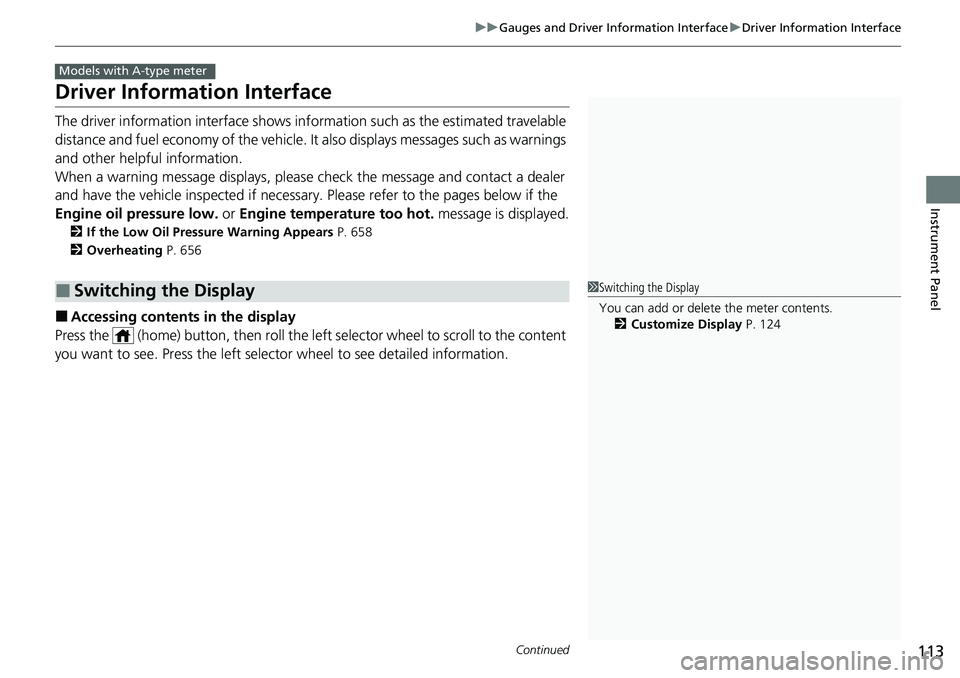
■Accessing contents in the display
Press the (home) button, then roll the le ft selector wheel to scroll to the content
you want to see. Press the left sele ctor wheel to see detailed information.
■Switching the Display
Models with A-type meter
1Switching the Display
You can add or delete the meter contents.
2 Customize Display P. 124
Page 139 of 700
138
uuGauges and Driver Information Interface uDriver Information Interface (Right Side Area)
Instrument Panel
Driver Information Inte rface (Right Side Area)
The driver information interface shows in formation such as the estimated travelable
distance and fuel economy of the vehicle. It also displays messages such as warnings
and other helpful information.
When a warning message displays, please check the message and contact a dealer
and have the vehicle inspected if necessary . Please refer to the pages below if the
Engine oil pressure low. or Engine temperature too hot. message is displayed.
2If the Low Oil Pressure Warning Appears P. 658
2 Overheating P. 656
Models with B-type meter
Page 580 of 700
579
Driving
Turbo Engine Vehicle*
Handling Precautions
The turbocharger is a high-precision device to obtain greater horsepower by
delivering a large volume of compressed air in to the engine using a turbine driven by
the engine’s exhaust gas pressure.
• When the engine is cold just after sta rting, avoid revving the engine or sudden
acceleration.
• Always replace the engine oil and engine oil filter according to the Maintenance
Minder
TM. The turbine rotates at very high speeds over 100,000 rpm and its
temperature reaches over 1,292°F (700°C). It is lubricated and cooled by engine
oil. If you fail to replace the engine oil and filter at the scheduled distance or
interval, deteriorated engine oil may cause failure such as sticking and abnormal
noise of the turbine bearing.
1 Turbo Engine Vehicle*
The scheduled maintenance intervals for replacing
the filter is indicated on the driver information
interface. Follow the information on replacement
timing. 2 Maintenance Minder
TM P. 585
The Engine temperature too hot. Do not drive.
Allow engine to cool. or Engine temperature
near limit. Avoid heavy acceleration and high
speed. message may appear on the driver
information interface when you restart the engine
after driving under high load conditions such as at
high speed or in hilly terrain.
This is normal. The message goes off after you idle or
drive the vehicle for about one minute.
The temperature gauge pointer is at the mark
when you restart the engi ne after driving under high
load conditions such as at high speed or in hilly
terrain. This is normal. The gauge goes down after
you idle or drive the vehi cle for about one minute.
Models with B-type meter
H
* Not available on all models
Page 583 of 700
582
Maintenance
Before Performing Maintenance
Inspection and Maintenance
For your safety, perform all listed inspections and maintenance to keep your vehicle
in good condition. If you become aware of an y abnormality (noise, smell, insufficient
brake fluid, oil residue on the ground, etc.), have your vehicle inspected by a dealer.
(Note, however, that service at a dealer is not mandatory to keep your warranties in
effect.)
■Routine inspections
Perform inspections before long distance tri ps, when washing the vehicle, or when
refueling.
2 Maintenance P. 31
■Periodic inspections
• Check the brake fluid level monthly.
2 Brake Fluid P. 608
•Check the tire pressure monthly. Examin e the tread for wear and foreign objects.
2Checking and Maintaining Tires P. 617
•Check the operation of the exterior lights monthly.
2 Replacing Light Bulbs P. 610
•Check the condition of the wiper bl ades at least every six months.
2Checking and Maintaining Wiper Blades P. 615
■Types of Inspection and Maintenance
1Inspection and Maintenance
Maintenance, replacement, or repair of
emissions control devices and systems may be
done by any automotive repair establishment or
individuals using parts that are “certified” to
EPA standards.
According to state and fede ral regulations, failure to
perform maintenance on the maintenance main
items marked with # will not void your emissions
warranties. However, all ma intenance services should
be performed in accordan ce with the intervals
indicated by the driver information interface.
2 Maintenance Service Items P. 590
If you want to perform complex maintenance tasks
that require more skills a nd tools, you can purchase a
subscription to the Service Express website at
www.techinfo.honda.com .
2 Authorized Manuals P. 688
If you want to perform ma intenance yourself, make
sure that you have the necessary tools and skills first.
After performing maintenanc e, update the records in
the separate maintenance booklet.
U.S. models
Page 587 of 700
586
uuMaintenance MinderTMuTo Use Maintenance MinderTM
Maintenance
To Use Maintenance MinderTM
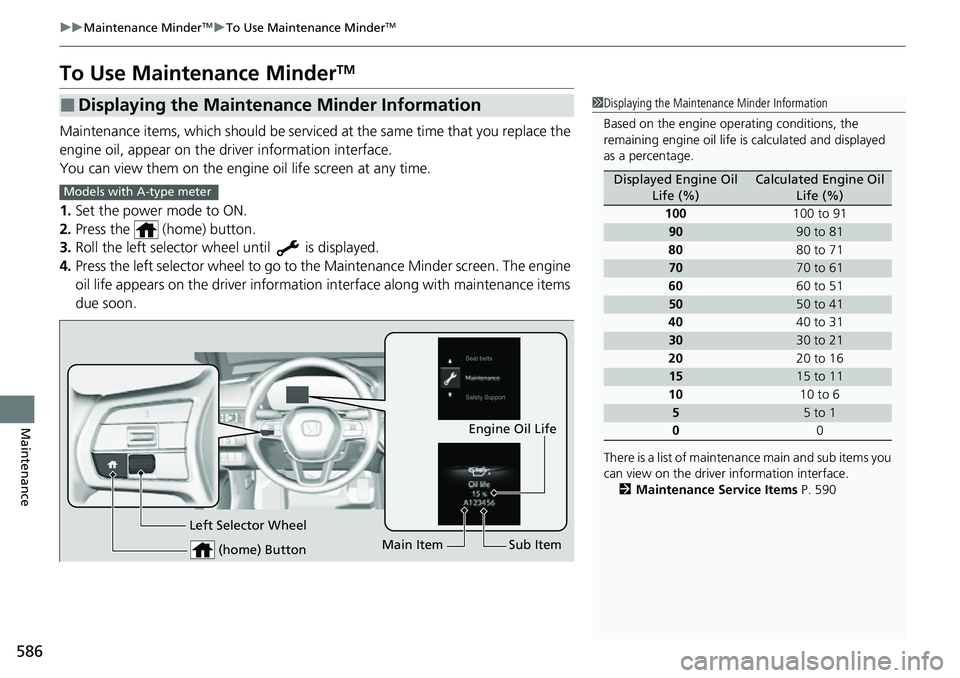
Maintenance items, which should be serviced at the same time that you replace the
engine oil, appear on the driver information interface.
You can view them on the engine oil life screen at any time.
1. Set the power mode to ON.
2. Press the (home) button.
3. Roll the left selector wheel until is displayed.
4. Press the left selector wheel to go to the Maintenance Minder screen. The engine
oil life appears on the driver information interface along with maintenance items
due soon.
■Displaying the Maintenance Minder Information1 Displaying the Maintena nce Minder Information
Based on the engine ope rating conditions, the
remaining engine oi l life is calculated and displayed
as a percentage.
There is a list of maintena nce main and sub items you
can view on the driver information interface.
2 Maintenance Service Items P. 590
Displayed Engine Oil
Life (%)Calculated Engine Oil Life (%)
100 100 to 91
9090 to 81
80 80 to 71
7070 to 61
60 60 to 51
5050 to 41
40 40 to 31
3030 to 21
20 20 to 16
1515 to 11
10 10 to 6
55 to 1
0 0
Models with A-type meter
(home) Button
Engine Oil Life
Main Item Sub Item
Left Selector Wheel
Page 588 of 700
587
uuMaintenance MinderTMuTo Use Maintenance MinderTM
Continued
Maintenance
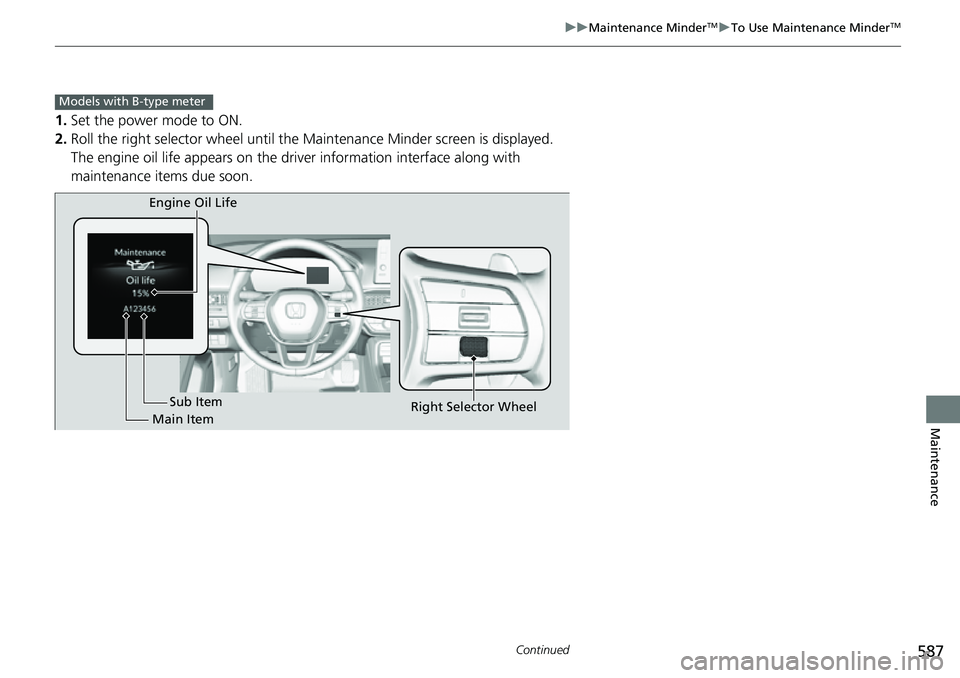
1. Set the power mode to ON.
2. Roll the right selector wheel until the Maintenance Minder screen is displayed.
The engine oil life appears on the driv er information interface along with
maintenance items due soon.
Models with B-type meter
Engine Oil Life
Main Item Sub Item
Right Selector Wheel
Page 589 of 700
588
uuMaintenance MinderTMuTo Use Maintenance MinderTM
Maintenance
*1:Models with A-type meter
*2:Models with B-type meter
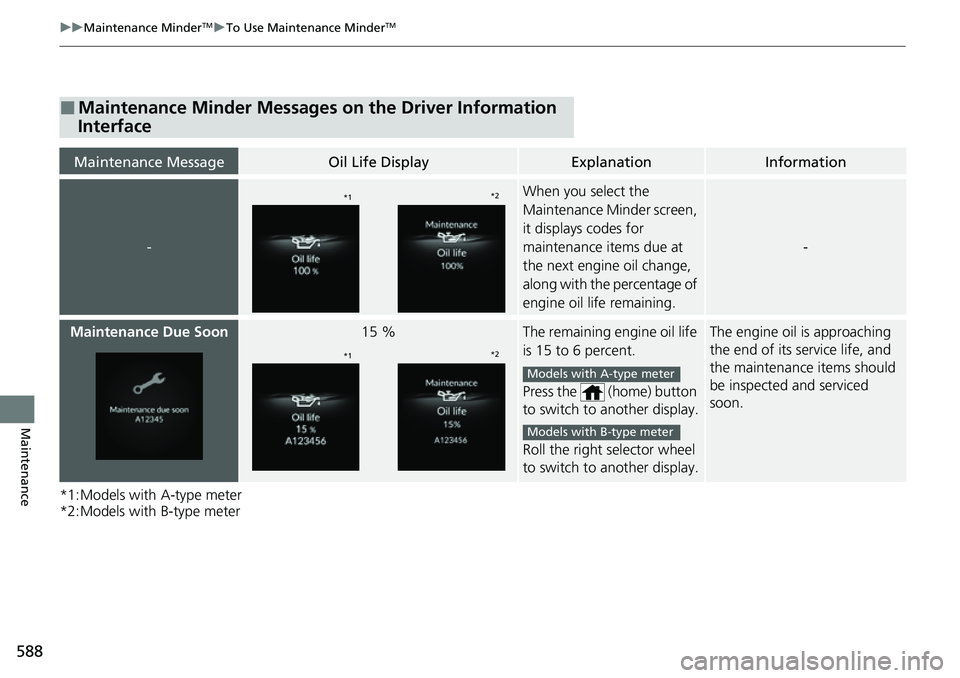
■Maintenance Minder Messages on the Driver Information
Interface
Maintenance MessageOil Life DisplayExplanationInformation
-
When you select the
Maintenance Minder screen,
it displays codes for
maintenance items due at
the next engine oil change,
along with the percentage of
engine oil life remaining.
-
Maintenance Due Soon15 %The remaining engine oil life
is 15 to 6 percent.
Press the (home) button
to switch to another display.
Roll the right selector wheel
to switch to another display.The engine oil is approaching
the end of its service life, and
the maintenance items should
be inspected and serviced
soon.
*1*2
*1*2
Models with A-type meter
Models with B-type meter
Page 590 of 700
589
uuMaintenance MinderTMuTo Use Maintenance MinderTM
Continued
Maintenance
*1:Models with A-type meter
*2:Models with B-type meter
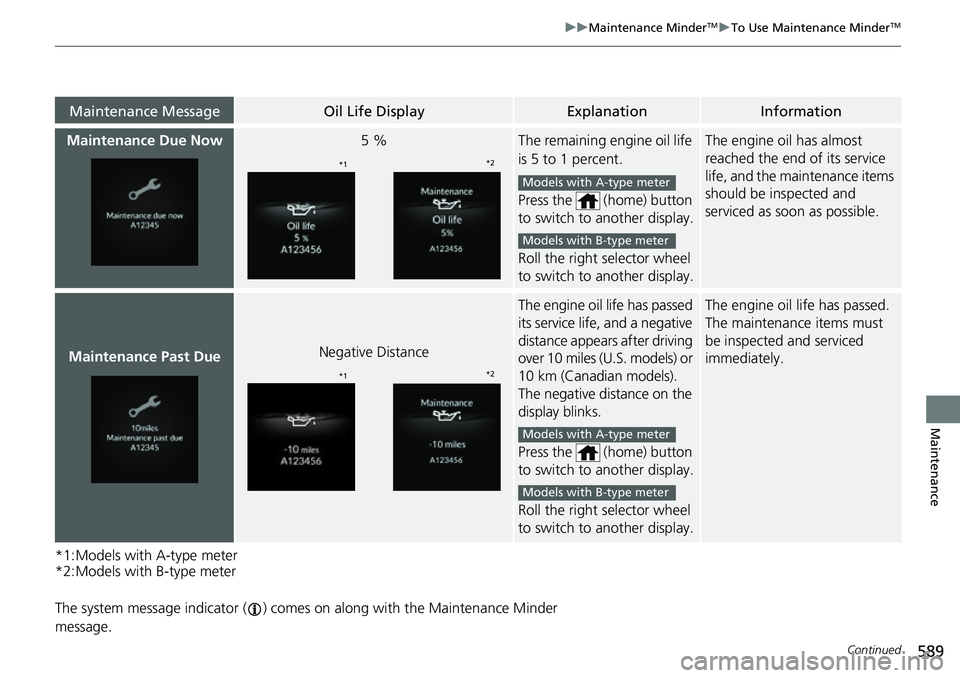
The system message indicator ( ) comes on along with the Maintenance Minder
message.
Maintenance MessageOil Life DisplayExplanationInformation
Maintenance Due Now5 %The remaining engine oil life
is 5 to 1 percent.
Press the (home) button
to switch to another display.
Roll the right selector wheel
to switch to another display.The engine oil has almost
reached the end of its service
life, and the maintenance items
should be inspected and
serviced as s oon as possible.
Maintenance Past DueNegative Distance
The engine oil life has passed
its service life, and a negative
distance appear s after driving
over 10 miles (U.S. models) or
10 km (Canadian models).
The negative distance on the
display blinks.
Press the (home) button
to switch to another display.
Roll the right selector wheel
to switch to another display.The engine oil life has passed.
The maintenance items must
be inspected and serviced
immediately.
*1 *2
Models with A-type meter
Models with B-type meter
*1*2
Models with A-type meter
Models with B-type meter
Page 599 of 700
598
uuMaintenance Under the Hood uRecommended Engine Oil
Maintenance
Recommended Engine Oil
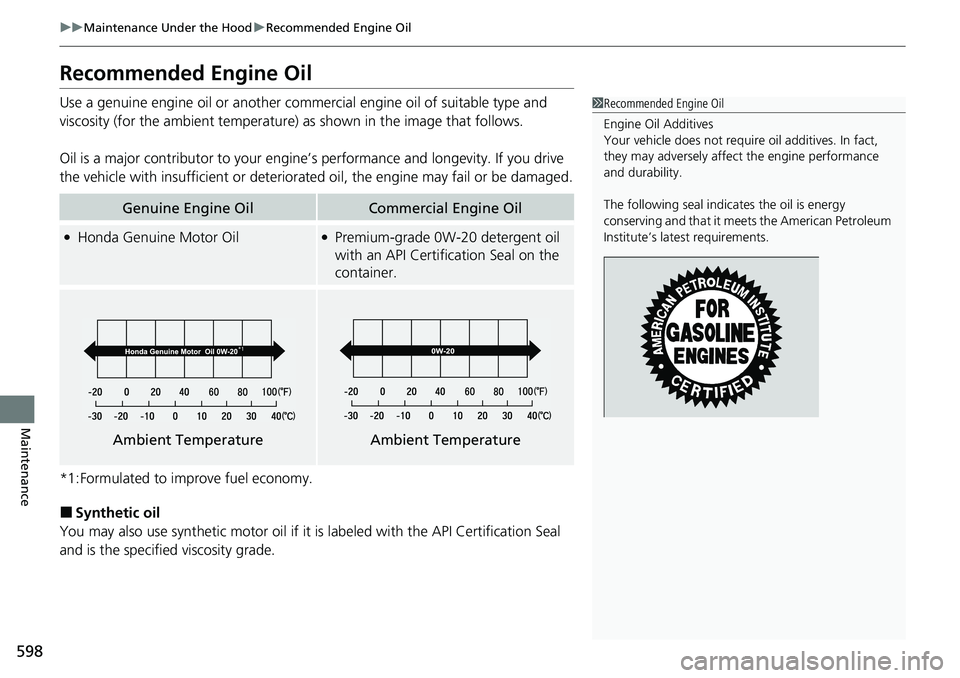
Use a genuine engine oil or another commercial engine oil of suitable type and
viscosity (for the ambient temperature) as shown in the image that follows.
Oil is a major contributor to your engine ’s performance and longevity. If you drive
the vehicle with insufficient or deteriorat ed oil, the engine may fail or be damaged.
*1:Formulated to improve fuel economy.
■Synthetic oil
You may also use synthetic motor oil if it is labeled with the API Certification Seal
and is the specified viscosity grade.
Genuine Engine OilCommercial Engine Oil
●Honda Genuine Motor Oil●Premium-grade 0W-20 detergent oil
with an API Certification Seal on the
container.
1 Recommended Engine Oil
Engine Oil Additives
Your vehicle does not require oil additives. In fact,
they may adversely affect the engine performance
and durability.
The following seal indicates the oil is energy
conserving and that it meets the American Petroleum
Institute’s late st requirements.
Ambient TemperatureAmbient Temperature
Page 635 of 700
uuCleaning uExterior Care
634
Maintenance
A good coat of automotive body wax helps protect your vehicle’s paint from the
elements. Wax will wear off over time and expose your vehicle’s paint to the
elements, so reapply as necessary.
If you get gasoline, oil, engine coolant, or battery fluid on resin coated parts, they
may be stained or the coating may peel. Prom ptly wipe it away using a soft cloth and
clean water.
Wipe using a glass cleaner.
Aluminum is susceptible to deterioration caused by salt and other road
contaminants. When necessary, as early as possible use a sponge and mild detergent
to wipe away these contaminants. Do no t use a stiff brush or harsh chemicals
(including some commercial wheel cleaners). These can damage the protective finish
on aluminum alloy wheels, resulting in corrosion. Depending on the type of finish,
the wheels also may lose their luster or appear burnished. To avoid water stains,
wipe the wheels dry with a cloth while they are still wet.
■Applying Wax
■Maintaining the Bumpers and Other Resin Coated Parts
■Cleaning the Window
■Maintaining Aluminum Wheels*
1 Applying Wax
NOTICE
Chemical solvents and st rong cleaners can damage
the paint, metal, and plasti c on your vehicle. Wipe
away spills immediately.
1 Maintaining the Bumpers an d Other Resin Coated Parts
Ask a dealer about the corr ect coating material when
you want to repair the painted surface of the parts
made of resin.
* Not available on all models