display HONDA CIVIC 2023 Owners Manual
[x] Cancel search | Manufacturer: HONDA, Model Year: 2023, Model line: CIVIC, Model: HONDA CIVIC 2023Pages: 840, PDF Size: 26.53 MB
Page 633 of 840
631
uuHonda Sensing ®u Traffic Jam Assist*
Continued
Driving
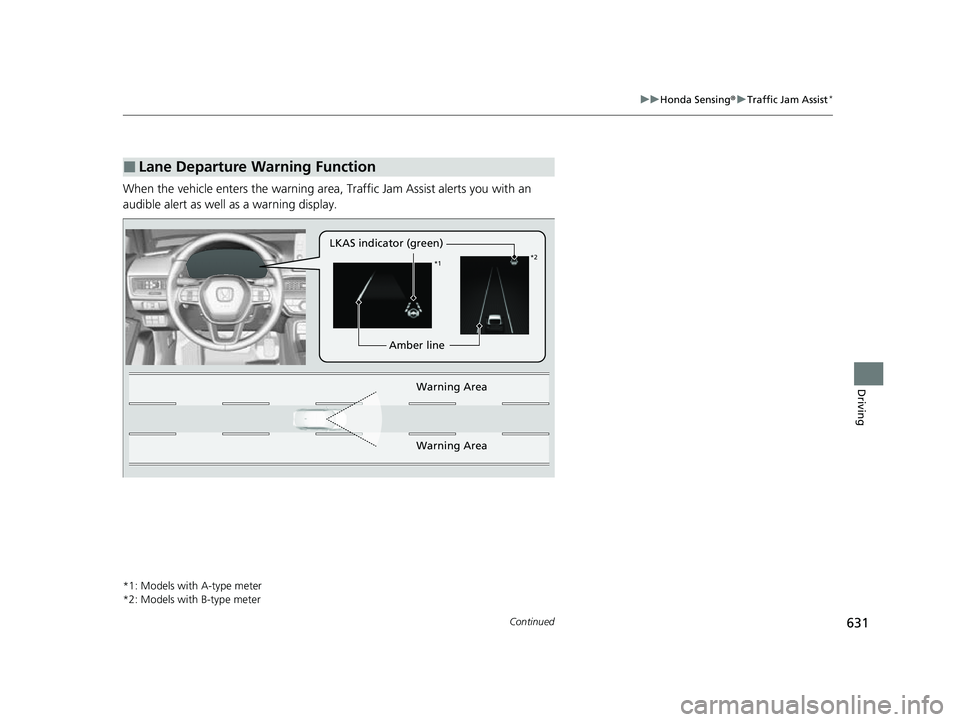
When the vehicle enters the warning area, Traffic Jam Assist alerts you with an
audible alert as well as a warning display.
*1: Models with A-type meter
*2: Models with B-type meter
■Lane Departure Warning Function
LKAS indicator (green)
Amber line
Warning Area
Warning Area
*1 *2
23 CIVIC HATCHBACK TYPE R-31T406100_03.book 631 ページ 2022年6月23日 木曜日 午後9時28分
Page 634 of 840
uuHonda Sensing ®u Traffic Jam Assist*
632
Driving
Traffic Jam Assist is activated when all of the following conditions exist:
• LKAS is activated.
• The lane in which you are driving has dete ctable lane markers on both sides, and
your vehicle is in the center of the lane.
• The vehicle is traveling between about 0 and 45mph (0 and 72km/h).
• You are driving on a straight or slightly curved road.
• The driver is gripping the steering wheel.
• The shift position is in
(D, (S* or (L*.
Do not use Traffic Jam Assist in any of the following situations:
• You are traveling on a ro ad with sharp curves.
u The system may not allow your vehicle to respond in a manner best suited for
the road conditions.
• You are entering a toll booth, interchange, service area, or parking area.
• You are driving in adverse weat her (rain, fog, snow, etc.).
• The surface of the road is slippery; for ex ample, it is icy or covered with snow.
u The tires may slip, causing you to lose control of the vehicle.
■Traffic Jam Assist Activation1Traffic Jam Assist Activation
Refer to the following pa ge for proper handling of
the LKAS:
2 Lane Keeping Assist System (LKAS) P. 618
Refer to the following page for steering buttons and
displays: 2 Operation Switches for the Adaptive
Cruise Control (ACC) with Low Speed
Follow
*/Adaptive Cruise Control (ACC)*/
Lane Keeping Assist System (LKAS)/Traffic
Jam Assist
* P. 552
* Not available on all models
23 CIVIC HATCHBACK TYPE R-31T406100_03.book 632 ページ 2022年6月23日 木曜日 午後9時28分
Page 649 of 840
647
uuHonda Sensing ®u Traffic Sign Recognition System
Continued
Driving
Traffic Sign Recognition System
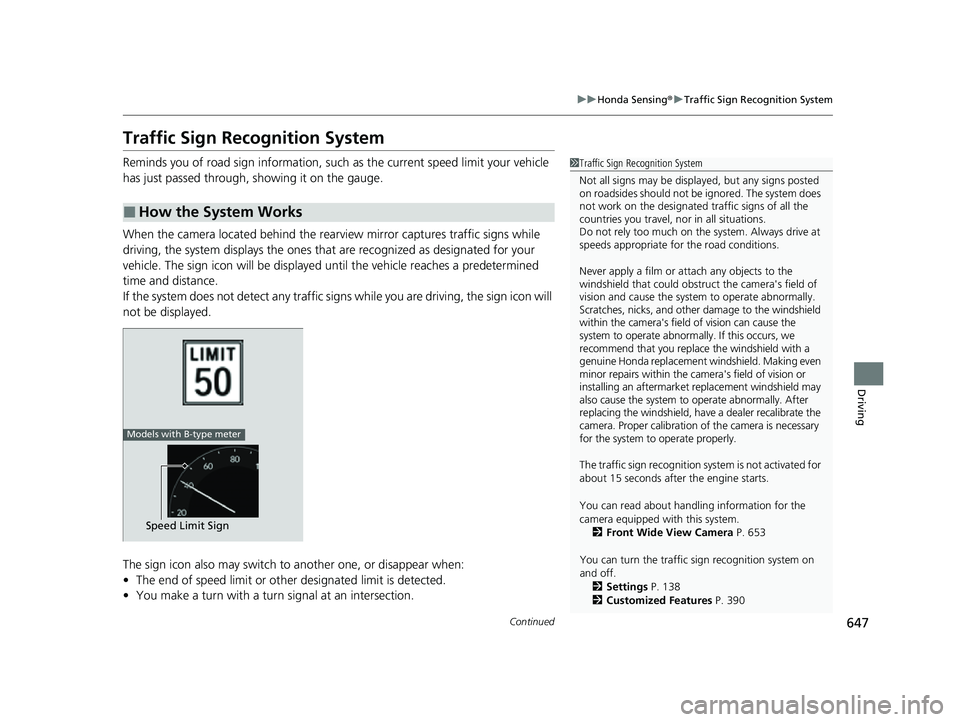
Reminds you of road sign information, such as the current speed limit your vehicle
has just passed through, showing it on the gauge.
When the camera located behind the rear view mirror captures traffic signs while
driving, the system displays the ones that are recognized as designated for your
vehicle. The sign icon will be displayed un til the vehicle reaches a predetermined
time and distance.
If the system does not detect any traffic signs while you are driving, the sign icon will
not be displayed.
The sign icon also may switch to another one, or disappear when:
• The end of speed limit or other designated limit is detected.
• You make a turn with a turn signal at an intersection.
■How the System Works
1Traffic Sign Recognition System
Not all signs may be displa yed, but any signs posted
on roadsides should not be ignored. The system does
not work on the designated traffic signs of all the
countries you travel, nor in all situations.
Do not rely too much on the system. Always drive at
speeds appropriate fo r the road conditions.
Never apply a film or attach any objects to the
windshield that could obstruc t the camera's field of
vision and cause the system to operate abnormally.
Scratches, nicks, and othe r damage to the windshield
within the camera's field of vision can cause the
system to operate abnormally. If this occurs, we
recommend that you replace the windshield with a
genuine Honda replacement windshield. Making even
minor repairs within the ca mera's field of vision or
installing an aftermarket replacement windshield may
also cause the system to operate abnormally. After
replacing the windshi eld, have a dealer recalibrate the
camera. Proper calibration of the camera is necessary
for the system to operate properly.
The traffic sign recognition sy stem is not activated for
about 15 seconds after the engine starts.
You can read about handling information for the
camera equipped with this system. 2 Front Wide View Camera P. 653
You can turn the traffic sign recognition system on
and off.
2 Settings P. 138
2 Customized Features P. 390
Speed Limit Sign
Models with B-type meter
23 CIVIC HATCHBACK TYPE R-31T406100_03.book 647 ページ 2022年6月23日 木曜日 午後9時28分
Page 650 of 840
uuHonda Sensing ®u Traffic Sign Recognition System
648
Driving
1Traffic Sign Recognition System
To help reduce the likel ihood that high interior
temperatures will cause the camera's sensing system
to shut off, when parking, find a shady area or face
the front of the vehicle away from the sun. If you use
a reflective sun shade, do not allow it to cover the
camera housing.
Covering the camera can concentrate heat on it.
If your vehicle exceeds the detected speed limit, an
icon representing the speed limit sign for the current
area will blink in the display. 2 Settings P. 138
2 Customized Features P. 390
The system's ability to accurately notify the driver of
the speed limit is depend ent on certain conditions
such as the units displayed on the traffic sign as well
as the speed and direction of travel of the vehicle. In
some cases, the system may display false warnings or
other inaccurate information. 2 Traffic Sign Recognition System Conditions
and Limitations P. 649
The unit for speed limits (mph or km/h) varies from
country to country. Just after entering a country
whose unit differs to the one of the country from
which you came, Traffic Sign Recognition System
may not work correctly. 2 Settings P. 138
2 Speed/Distance Units P. 137, 169
2 Customized Features P. 390
23 CIVIC HATCHBACK TYPE R-31T406100_03.book 648 ページ 2022年6月23日 木曜日 午後9時28分
Page 653 of 840
651
uuHonda Sensing ®u Traffic Sign Recognition System
Continued
Driving
The traffic sign recognition system may not operate correctly, such as displaying
signs that do not adhere to the actual regu lations for the roadway or do not exist at
all in the following cases.
u A speed limit sign may display at a higher or lower speed than the actual speed
limit.
• There is a supplementary sign with further information such as weather, time,
vehicle type, school zone, etc.
• Figures on the sign are hard to read (electric signs, numbers on the sign are
blurred, etc.).
• The sign is in the vicinity of the lane you are driving in , even though it is not for
the lane, such as a speed limit sign situated at an exit or an intersection between
the side road an d the main road.
• There are things that look similar in co lor or shape to recognized objects (similar
sign, electric sign, signboard, structure, etc.).
23 CIVIC HATCHBACK TYPE R-31T406100_03.book 651 ページ 2022年6月23日 木曜日 午後9時28分
Page 654 of 840
652
uuHonda Sensing ®u Traffic Sign Recognition System
Driving
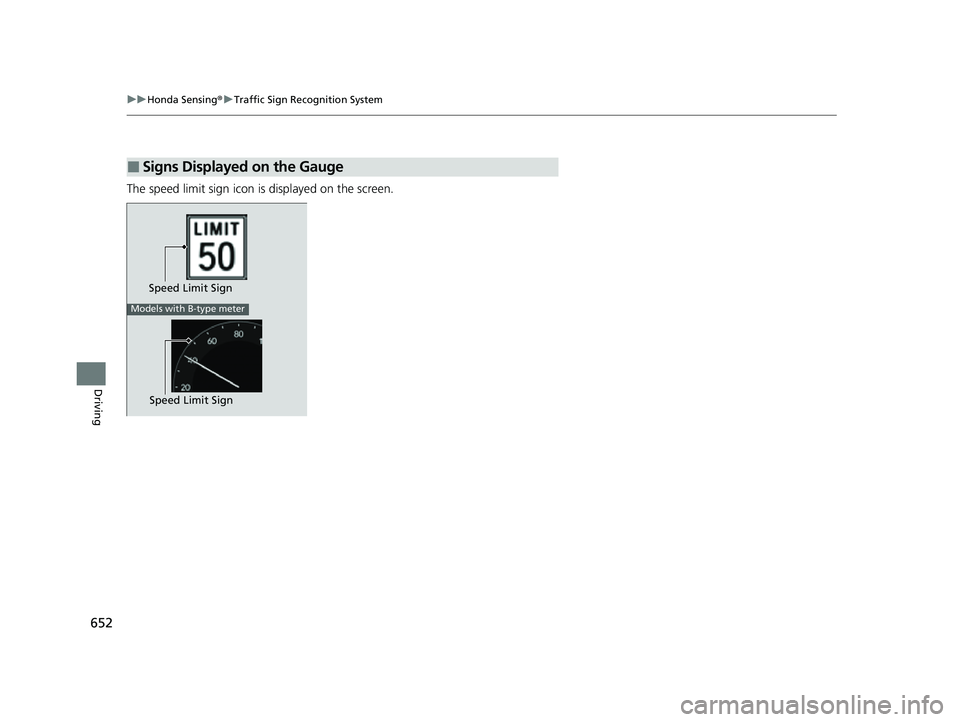
The speed limit sign icon is displayed on the screen.
■Signs Displayed on the Gauge
Speed Limit Sign
Models with B-type meter
Speed Limit Sign
23 CIVIC HATCHBACK TYPE R-31T406100_03.book 652 ページ 2022年6月23日 木曜日 午後9時28分
Page 680 of 840
uuParking Your Vehicle uCross Traffic Monitor*
678
Driving
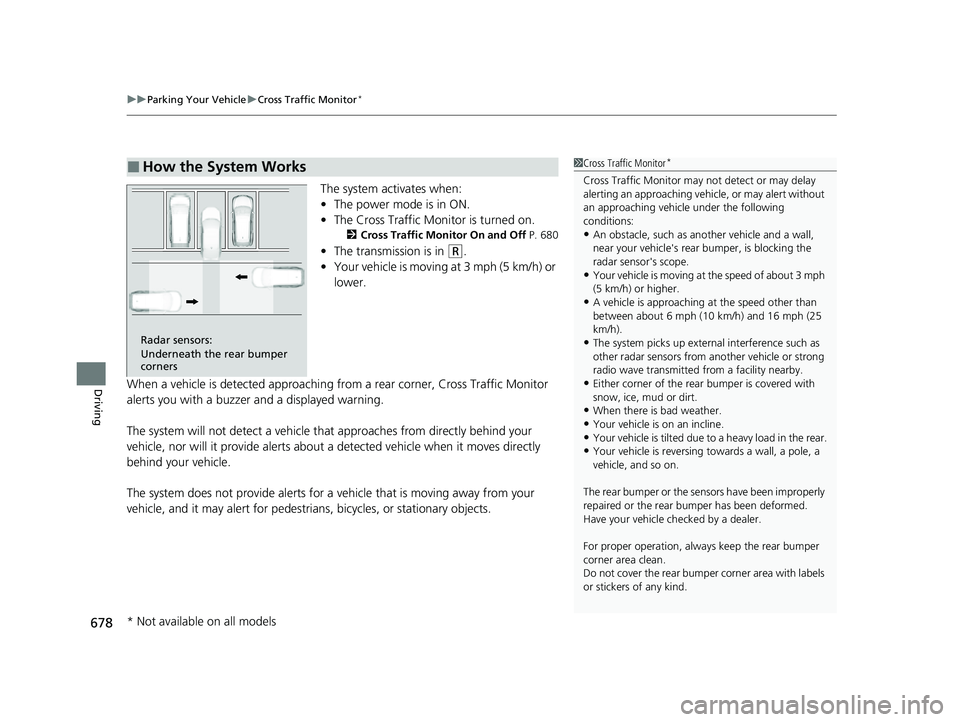
The system activates when:
• The power mode is in ON.
• The Cross Traffic Monitor is turned on.
2 Cross Traffic Monitor On and Off P. 680
•The transmission is in (R.
• Your vehicle is moving at 3 mph (5 km/h) or
lower.
When a vehicle is detected approaching from a rear corner, Cross Traffic Monitor
alerts you with a buzzer and a displayed warning.
The system will not detect a vehicle that approaches from directly behind your
vehicle, nor will it provide alerts about a detected vehicle when it moves directly
behind your vehicle.
The system does not provide alerts for a vehicle that is moving away from your
vehicle, and it may alert for pedestri ans, bicycles, or stationary objects.
■How the System Works1Cross Traffic Monitor*
Cross Traffic Monitor may not detect or may delay
alerting an approaching vehi cle, or may alert without
an approaching vehicle under the following
conditions:
•An obstacle, such as a nother vehicle and a wall,
near your vehicle's rear bumper, is blocking the
radar sensor's scope.
•Your vehicle is moving at the speed of about 3 mph
(5 km/h) or higher.
•A vehicle is approaching at the speed other than
between about 6 mph (10 km/h) and 16 mph (25
km/h).
•The system picks up external interference such as
other radar sensors from an other vehicle or strong
radio wave transmitted fr om a facility nearby.
•Either corner of the rear bumper is covered with
snow, ice, mud or dirt.
•When there is bad weather.
•Your vehicle is on an incline.
•Your vehicle is tilt ed due to a heavy load in the rear.•Your vehicle is reversing towards a wall, a pole, a
vehicle, and so on.
The rear bumper or the sens ors have been improperly
repaired or the rear bum per has been deformed.
Have your vehicle checked by a dealer.
For proper operation, always keep the rear bumper
corner area clean.
Do not cover the rear bumper corner area with labels
or stickers of any kind.
Radar sensors:
Underneath the rear bumper
corners
* Not available on all models
23 CIVIC HATCHBACK TYPE R-31T406100_03.book 678 ページ 2022年6月23日 木曜日 午後9時28分
Page 681 of 840
Continued679
uuParking Your Vehicle uCross Traffic Monitor*
Driving
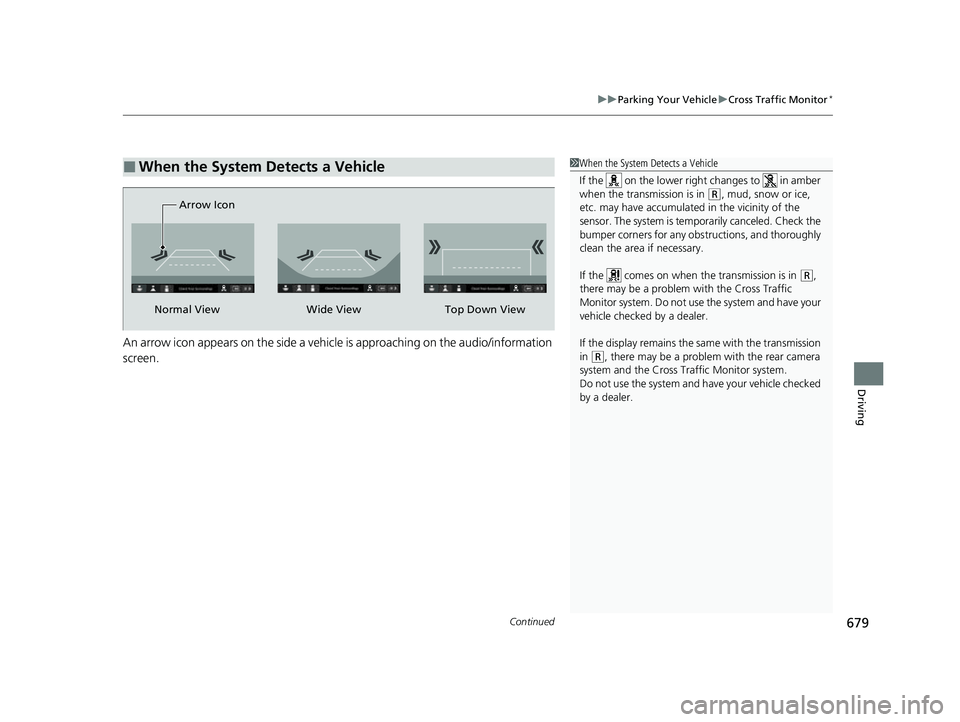
An arrow icon appears on the side a vehicl e is approaching on the audio/information
screen.
■When the System Detects a Vehicle1 When the System Detects a Vehicle
If the on the lower right changes to in amber
when the transmission is in
(R, mud, snow or ice,
etc. may have accumulated in the vicinity of the
sensor. The system is temp orarily canceled. Check the
bumper corners for any obs tructions, and thoroughly
clean the area if necessary.
If the comes on when the transmission is in
( R,
there may be a problem with the Cross Traffic
Monitor system. Do not use the system and have your
vehicle checked by a dealer.
If the display remains the same with the transmission
in
( R, there may be a problem with the rear camera
system and the Cross Traffic Monitor system.
Do not use the system and have your vehicle checked
by a dealer.
Wide View
Normal View Arrow IconTop Down View
23 CIVIC HATCHBACK TYPE R-31T406100_03.book 679 ページ 2022年6月23日 木曜日 午後9時28分
Page 683 of 840
681Continued
Driving
Multi-View Rear Camera
About Your Multi-View Rear Camera
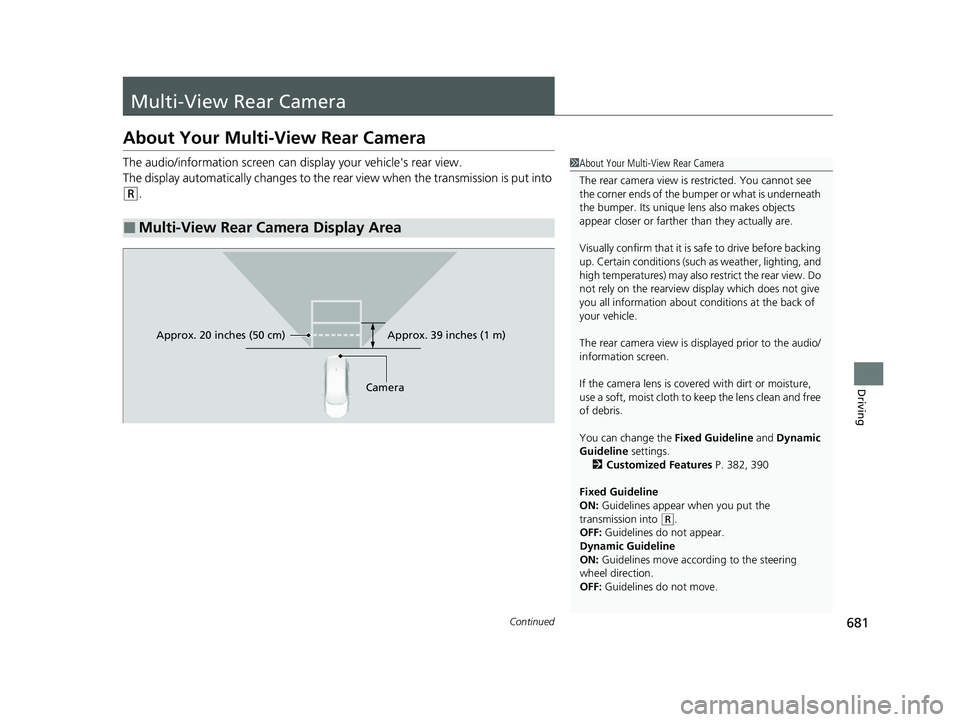
The audio/information screen can display your vehicle's rear view.
The display automatically changes to the rear view when the transmission is put into
(R.
■Multi-View Rear Camera Display Area
1About Your Multi-View Rear Camera
The rear camera view is restricted. You cannot see
the corner ends of the bumper or what is underneath
the bumper. Its unique le ns also makes objects
appear closer or farther than they actually are.
Visually confirm that it is safe to drive before backing
up. Certain conditions (such as weather, lighting, and
high temperatures) may also restrict the rear view. Do
not rely on the rearview display which does not give
you all information about conditions at the back of
your vehicle.
The rear camera view is di splayed prior to the audio/
information screen.
If the camera lens is cove red with dirt or moisture,
use a soft, moist cloth to keep the lens clean and free
of debris.
You can change the Fixed Guideline and Dynamic
Guideline settings. 2 Customized Features P. 382, 390
Fixed Guideline
ON: Guidelines appear when you put the
transmission into
( R.
OFF: Guidelines do not appear.
Dynamic Guideline
ON: Guidelines move according to the steering
wheel direction.
OFF: Guidelines do not move.
Approx. 39 inches (1 m)
Camera
Approx. 20 inches (50 cm)
23 CIVIC HATCHBACK TYPE R-31T406100_03.book 681 ページ 2022年6月23日 木曜日 午後9時28分
Page 684 of 840
uuMulti-View Rear Camera uAbout Your Multi-View Rear Camera
682
Driving
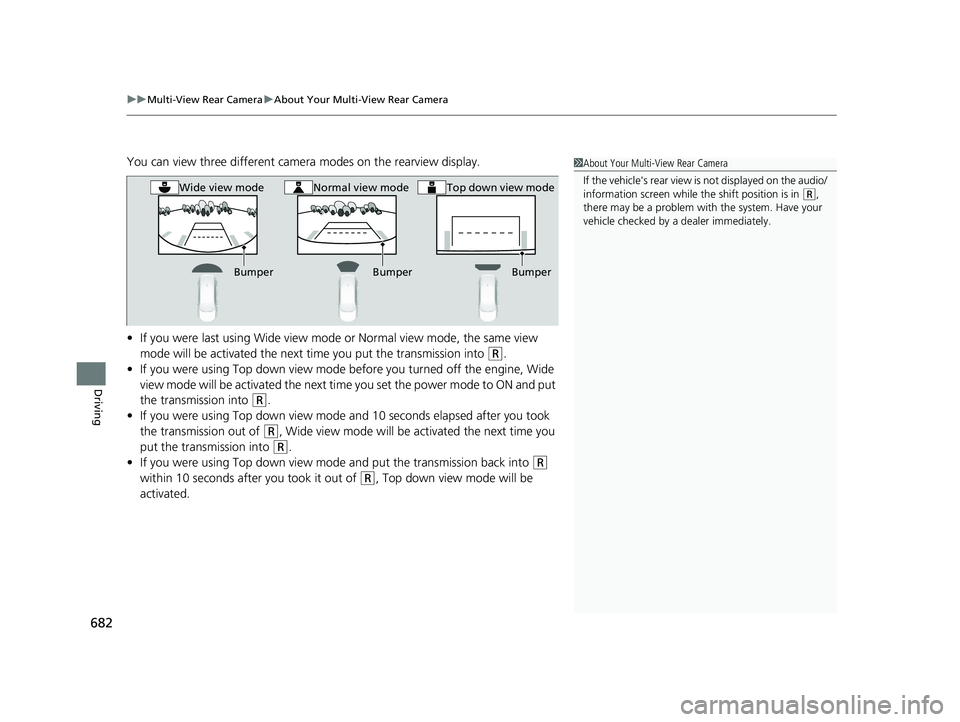
You can view three different camera modes on the rearview display.
• If you were last using Wide view mode or Normal view mode, the same view
mode will be activated the next time you put the transmission into
(R.
• If you were using Top down view mode before you turned off the engine, Wide
view mode will be activated the next time you set the power mode to ON and put
the transmission into
(R.
• If you were using Top down view mode and 10 seconds elapsed after you took
the transmission out of
(R, Wide view mode will be activated the next time you
put the transmission into
(R.
• If you were using Top down view mode and put the transmission back into
(R
within 10 seconds after you took it out of
(R, Top down view mode will be
activated.
1 About Your Multi-View Rear Camera
If the vehicle's rear view is not displayed on the audio/
information screen while the shift position is in
( R,
there may be a problem with the system. Have your
vehicle checked by a dealer immediately.
Bumper BumperBumper
Wide view modeNormal view modeTop down view mode
23 CIVIC HATCHBACK TYPE R-31T406100_03.book 682 ページ 2022年6月23日 木曜日 午後9時28分