Parking sensor system HONDA CIVIC 2023 User Guide
[x] Cancel search | Manufacturer: HONDA, Model Year: 2023, Model line: CIVIC, Model: HONDA CIVIC 2023Pages: 840, PDF Size: 26.53 MB
Page 673 of 840
671
uuParking Your Vehicle uParking Sensor System*
Continued
Driving
Parking Sensor System*
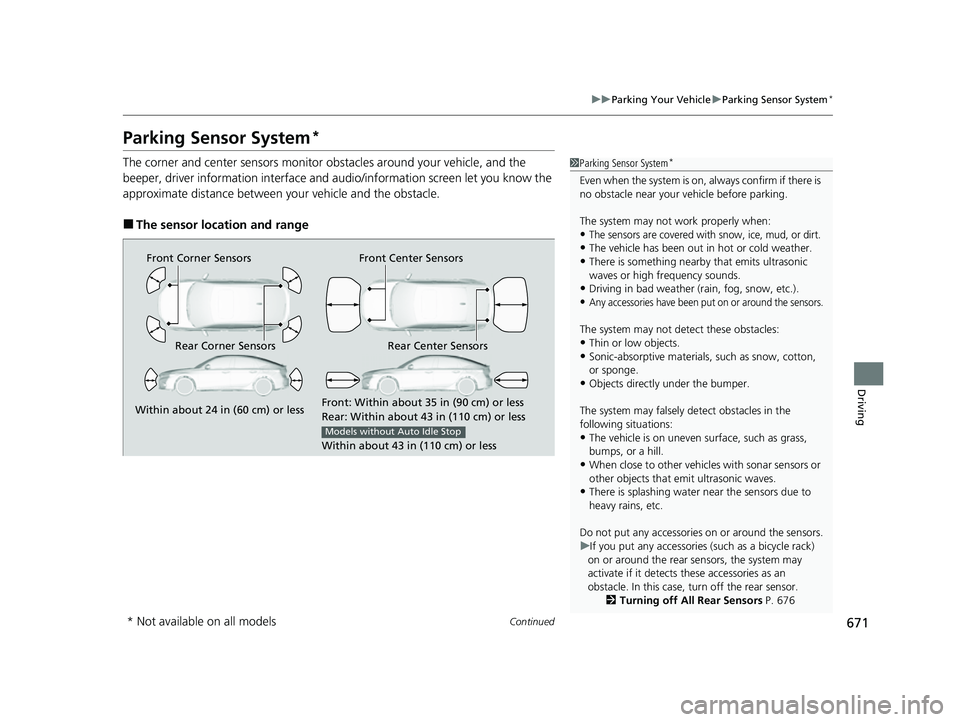
The corner and center sensors monitor ob stacles around your vehicle, and the
beeper, driver information interface and a udio/information screen let you know the
approximate distance between your vehicle and the obstacle.
■The sensor location and range
1 Parking Sensor System*
Even when the system is on, always confirm if there is
no obstacle near your ve hicle before parking.
The system may not work properly when:
•The sensors are covered with snow, ice, mud, or dirt.
•The vehicle has been out in hot or cold weather.
•There is something nearby that emits ultrasonic
waves or high frequency sounds.
•Driving in bad weather (rain, fog, snow, etc.).
•Any accessories have been put on or around the sensors.
The system may not detect these obstacles:
•Thin or low objects.•Sonic-absorptive materials, such as snow, cotton,
or sponge.
•Objects directly under the bumper.
The system may falsely de tect obstacles in the
following situations:
•The vehicle is on uneven su rface, such as grass,
bumps, or a hill.
•When close to other vehicl es with sonar sensors or
other objects that em it ultrasonic waves.
•There is splashing water near the sensors due to
heavy rains, etc.
Do not put any accessories on or around the sensors.
u If you put any accessories (such as a bicycle rack)
on or around the rear sensors, the system may
activate if it detects these accessories as an
obstacle. In this case, turn off the rear sensor. 2Turning off All Rear Sensors P. 676
Front Corner Sensors
Rear Corner Sensors Rear Center Sensors Front Center Sensors
Within about 24 in (60 cm) or less
Front: Within about 35 in (90 cm) or less
Rear: Within
abo
ut 43 in (110 cm) or less
Within about 43 in (110 cm) or less
Models without Auto Idle Stop
* Not available on all models
23 CIVIC HATCHBACK TYPE R-31T406100_03.book 671 ページ 2022年6月23日 木曜日 午後9時28分
Page 674 of 840
uuParking Your Vehicle uParking Sensor System*
672
Driving
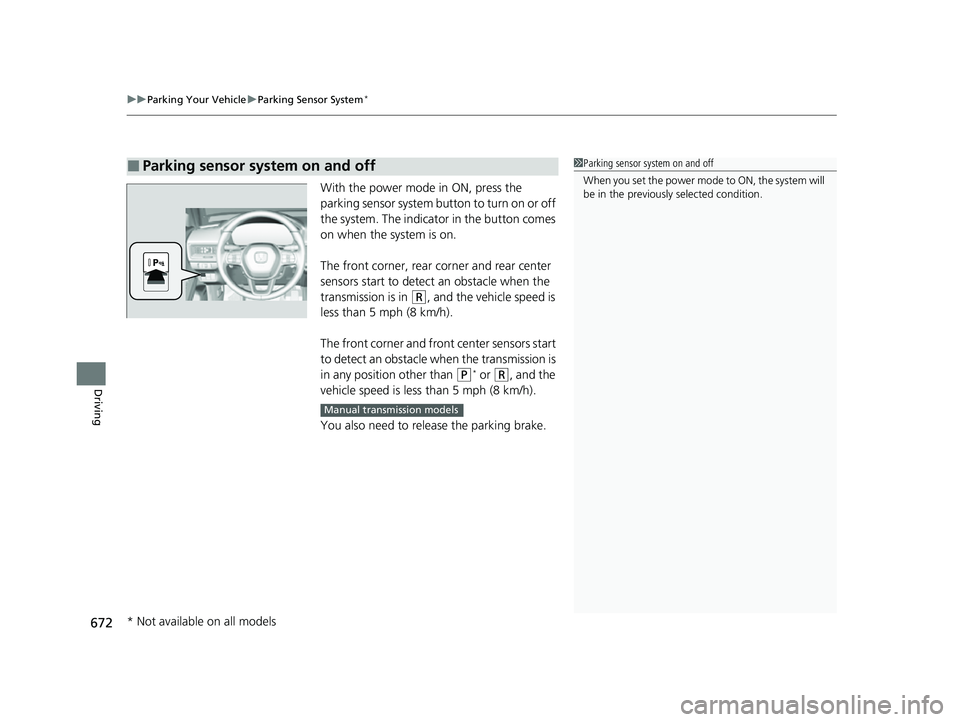
With the power mode in ON, press the
parking sensor system button to turn on or off
the system. The indicato r in the button comes
on when the system is on.
The front corner, rear corner and rear center
sensors start to detect an obstacle when the
transmission is in
(R, and the vehicle speed is
less than 5 mph (8 km/h).
The front corner and front center sensors start
to detect an obstacle wh en the transmission is
in any position other than
(P* or (R, and the
vehicle speed is less than 5 mph (8 km/h).
You also need to release the parking brake.
■Parking sensor system on and off1 Parking sensor system on and off
When you set the power mode to ON, the system will
be in the previously selected condition.
Manual transmission models
* Not available on all models
23 CIVIC HATCHBACK TYPE R-31T406100_03.book 672 ページ 2022年6月23日 木曜日 午後9時28分
Page 675 of 840
673
uuParking Your Vehicle uParking Sensor System*
Continued
Driving
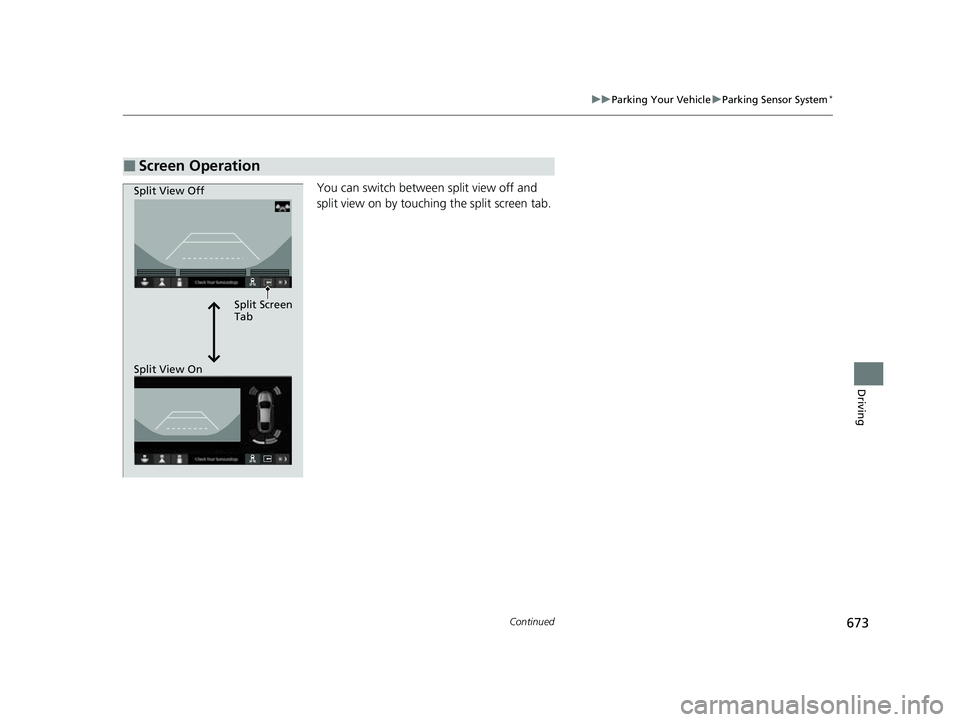
You can switch between split view off and
split view on by touchi ng the split screen tab.
■Screen Operation
Split Screen
Tab
Split View Off
Split View On
23 CIVIC HATCHBACK TYPE R-31T406100_03.book 673 ページ 2022年6月23日 木曜日 午後9時28分
Page 676 of 840
674
uuParking Your Vehicle uParking Sensor System*
Driving
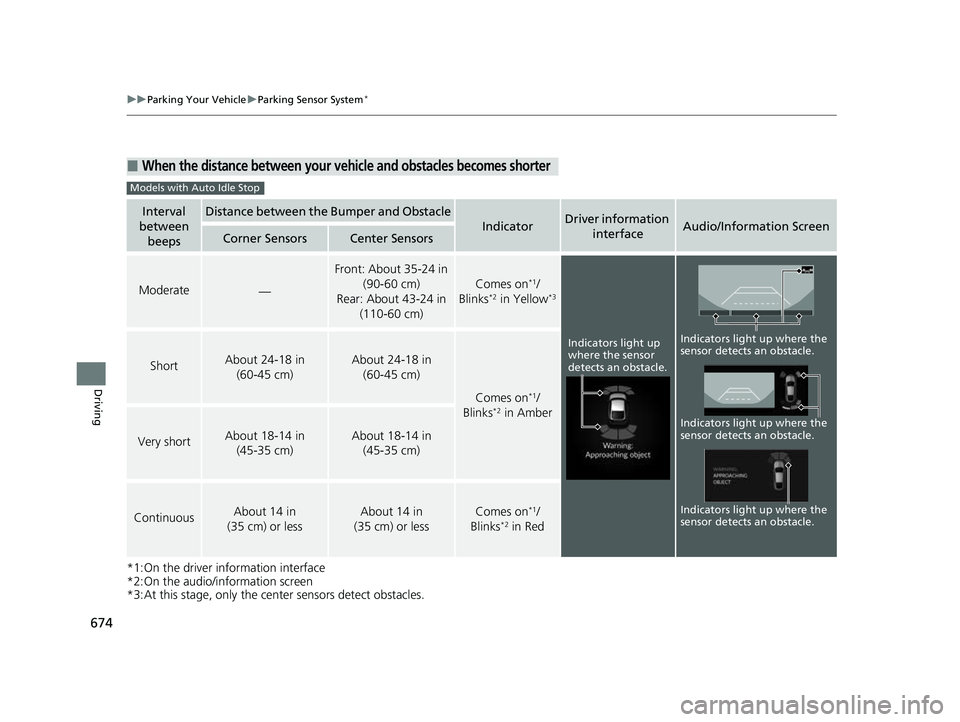
*1:On the driver information interface
*2:On the audio/information screen
*3:At this stage, only the center sensors detect obstacles.
■When the distance between your ve hicle and obstacles becomes shorter
Interval
between beepsDistance between the Bumper and Obstacle
IndicatorDriver information
interfaceAudio/Information ScreenCorner SensorsCenter Sensors
Moderate—
Front: About 35-24 in (90-60 cm)
Rear: About 43-24 in (110-60 cm)
Comes on*1/
Blinks*2 in Yellow*3
ShortAbout 24-18 in (60-45 cm) About 24-18 in (60-45 cm)
Comes on*1/
Blinks*2 in Amber
Very shortAbout 18-14 in (45-35 cm) About 18-14 in (45-35 cm)
ContinuousAbout 14 in
(35 cm) or lessAbout 14 in
(35 cm) or lessComes on*1/
Blinks*2 in Red
Models with Auto Idle Stop
Indicators light up
where the sensor
detects an obstacle.
Indicators light up where the
sensor detects an obstacle.
Indicators light up where the
sensor detects an obstacle. Indicators light up where the
sensor detects an obstacle.
23 CIVIC HATCHBACK TYPE R-31T406100_03.book 674 ページ 2022年6月23日 木曜日 午後9時28分
Page 677 of 840
675
uuParking Your Vehicle uParking Sensor System*
Continued
Driving
*1: On the driver information interface
*2: On the audio/information screen
*3: At this stage, only the center sensors detect obstacles.
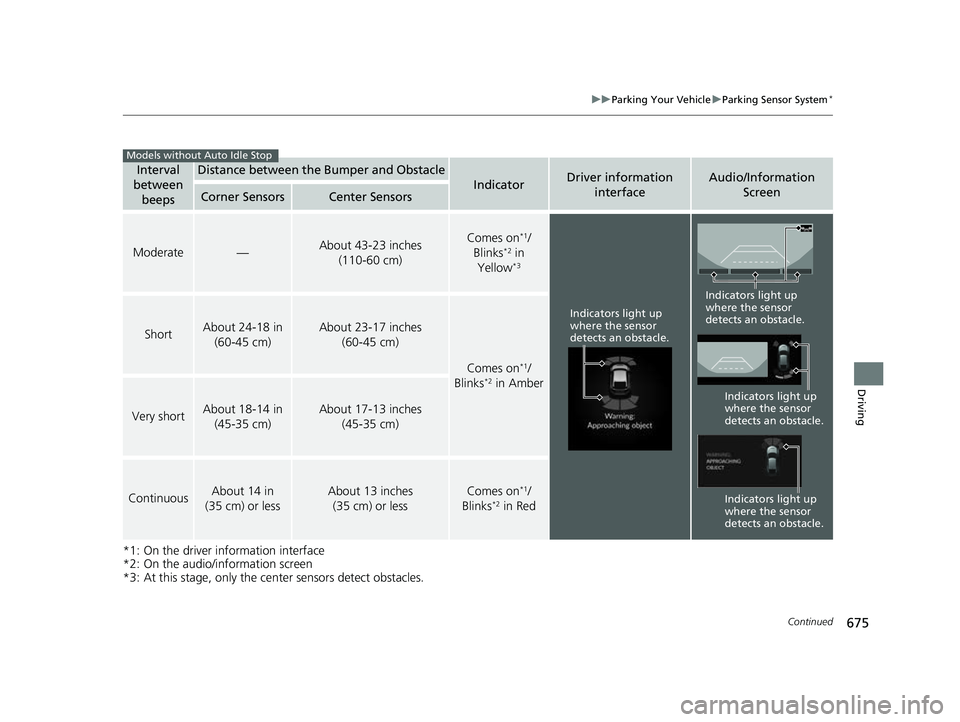
Interval
between
beepsDistance between the Bumper and Obstacle
IndicatorDriver information interfaceAudio/Information Screen
Corner SensorsCenter Sensors
Moderate—About 43-23 inches
(110-60 cm)Comes on*1/
Blinks*2 in
Yellow*3
ShortAbout 24-18 in (60-45 cm)About 23-17 inches (60-45 cm)
Comes on*1/
Blinks*2 in Amber
Very shortAbout 18-14 in (45-35 cm)About 17-13 inches (45-35 cm)
ContinuousAbout 14 in
(35 cm) or lessAbout 13 inches (35 cm) or lessComes on*1/
Blinks*2 in Red
Models without Auto Idle Stop
Indicators light up
where the sensor
detects an obstacle.
Indicators light up
where the sensor
detects an obstacle.
Indicators light up
where the sensor
detects an obstacle.
Indicators light up
where the sensor
detects an obstacle.
23 CIVIC HATCHBACK TYPE R-31T406100_03.book 675 ページ 2022年6月23日 木曜日 午後9時28分
Page 678 of 840
uuParking Your Vehicle uParking Sensor System*
676
Driving
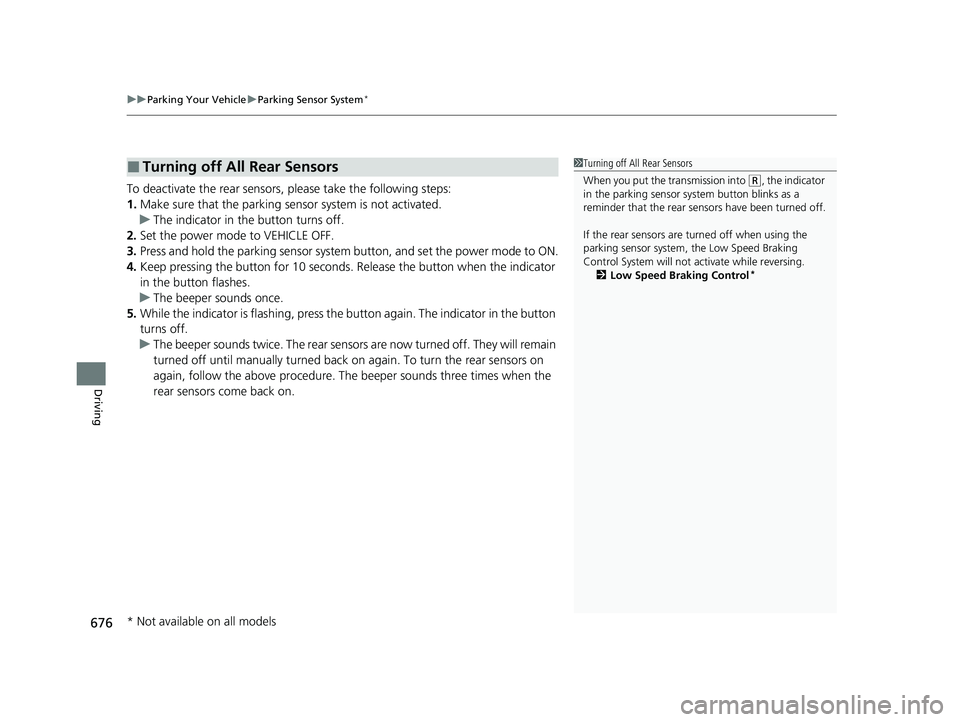
To deactivate the rear sensors, please take the following steps:
1. Make sure that the parking sensor system is not activated.
u The indicator in th e button turns off.
2. Set the power mode to VEHICLE OFF.
3. Press and hold the parking sensor system button, and set the power mode to ON.
4. Keep pressing the button for 10 seconds. Release the button when the indicator
in the button flashes.
u The beeper sounds once.
5. While the indicator is flashi ng, press the button again. The indicator in the button
turns off.
u The beeper sounds twice. The rear sensors are now turned off. They will remain
turned off until manually turned back on again. To turn th e rear sensors on
again, follow the above procedure. The beeper sounds three times when the
rear sensors come back on.
■Turning off All Rear Sensors1 Turning off All Rear Sensors
When you put the transmission into
(R, the indicator
in the parking sensor system button blinks as a
reminder that the rear sens ors have been turned off.
If the rear sensors are turned off when using the
parking sensor system, the Low Speed Braking
Control System will not ac tivate while reversing.
2 Low Speed Braking Control
*
* Not available on all models
23 CIVIC HATCHBACK TYPE R-31T406100_03.book 676 ページ 2022年6月23日 木曜日 午後9時28分
Page 679 of 840
677
uuParking Your Vehicle uCross Traffic Monitor*
Continued
Driving
Cross Traffic Monitor*
Monitors the rear corner areas using the radar sensors when reversing, and alerts
you if a vehicle approaching from a rear corner is detected.
The system is convenient when you are backing out of a parking space.1Cross Traffic Monitor*
The parking sensor system's alerting buzzer overrides
the Cross Traffic Monitor buzzer when the sensors
are detecting obstacles at the closest range.
3CAUTION
Cross Traffic Monitor cannot detect all
approaching vehicles and may not detect
an approaching vehicle at all.
Failure to visually confirm that it is safe to
back up the vehicle before doing so may
result in a collision.
Do not solely rely on the system when
reversing; always also use your mirrors, and
look behind and to the sides of your vehicle
before reversing.
* Not available on all models
23 CIVIC HATCHBACK TYPE R-31T406100_03.book 677 ページ 2022年6月23日 木曜日 午後9時28分
Page 680 of 840
uuParking Your Vehicle uCross Traffic Monitor*
678
Driving
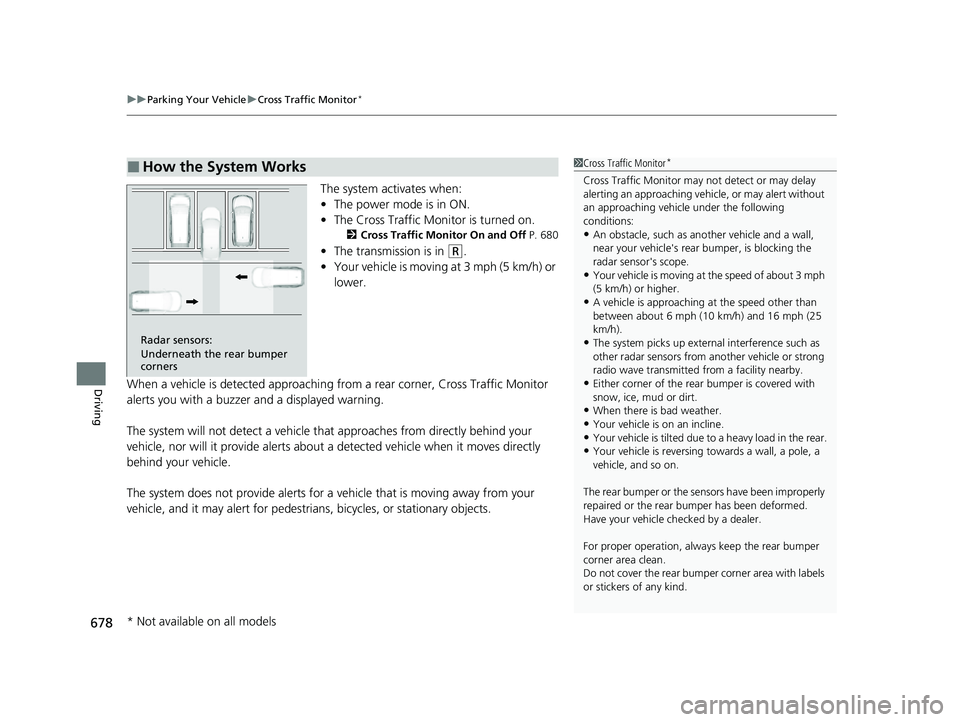
The system activates when:
• The power mode is in ON.
• The Cross Traffic Monitor is turned on.
2 Cross Traffic Monitor On and Off P. 680
•The transmission is in (R.
• Your vehicle is moving at 3 mph (5 km/h) or
lower.
When a vehicle is detected approaching from a rear corner, Cross Traffic Monitor
alerts you with a buzzer and a displayed warning.
The system will not detect a vehicle that approaches from directly behind your
vehicle, nor will it provide alerts about a detected vehicle when it moves directly
behind your vehicle.
The system does not provide alerts for a vehicle that is moving away from your
vehicle, and it may alert for pedestri ans, bicycles, or stationary objects.
■How the System Works1Cross Traffic Monitor*
Cross Traffic Monitor may not detect or may delay
alerting an approaching vehi cle, or may alert without
an approaching vehicle under the following
conditions:
•An obstacle, such as a nother vehicle and a wall,
near your vehicle's rear bumper, is blocking the
radar sensor's scope.
•Your vehicle is moving at the speed of about 3 mph
(5 km/h) or higher.
•A vehicle is approaching at the speed other than
between about 6 mph (10 km/h) and 16 mph (25
km/h).
•The system picks up external interference such as
other radar sensors from an other vehicle or strong
radio wave transmitted fr om a facility nearby.
•Either corner of the rear bumper is covered with
snow, ice, mud or dirt.
•When there is bad weather.
•Your vehicle is on an incline.
•Your vehicle is tilt ed due to a heavy load in the rear.•Your vehicle is reversing towards a wall, a pole, a
vehicle, and so on.
The rear bumper or the sens ors have been improperly
repaired or the rear bum per has been deformed.
Have your vehicle checked by a dealer.
For proper operation, always keep the rear bumper
corner area clean.
Do not cover the rear bumper corner area with labels
or stickers of any kind.
Radar sensors:
Underneath the rear bumper
corners
* Not available on all models
23 CIVIC HATCHBACK TYPE R-31T406100_03.book 678 ページ 2022年6月23日 木曜日 午後9時28分
Page 681 of 840
Continued679
uuParking Your Vehicle uCross Traffic Monitor*
Driving
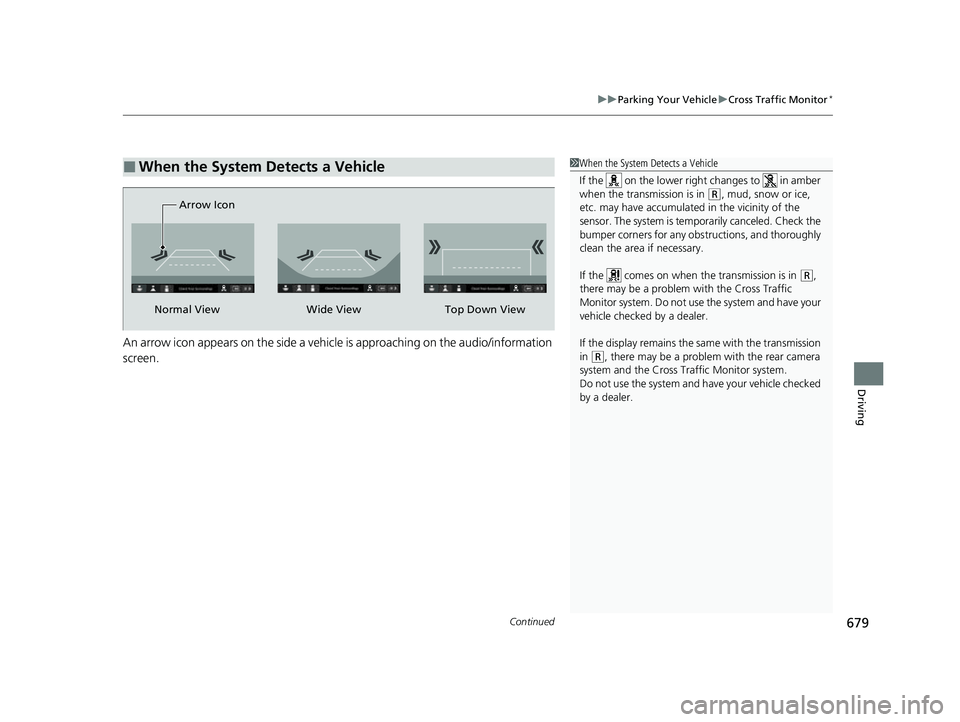
An arrow icon appears on the side a vehicl e is approaching on the audio/information
screen.
■When the System Detects a Vehicle1 When the System Detects a Vehicle
If the on the lower right changes to in amber
when the transmission is in
(R, mud, snow or ice,
etc. may have accumulated in the vicinity of the
sensor. The system is temp orarily canceled. Check the
bumper corners for any obs tructions, and thoroughly
clean the area if necessary.
If the comes on when the transmission is in
( R,
there may be a problem with the Cross Traffic
Monitor system. Do not use the system and have your
vehicle checked by a dealer.
If the display remains the same with the transmission
in
( R, there may be a problem with the rear camera
system and the Cross Traffic Monitor system.
Do not use the system and have your vehicle checked
by a dealer.
Wide View
Normal View Arrow IconTop Down View
23 CIVIC HATCHBACK TYPE R-31T406100_03.book 679 ページ 2022年6月23日 木曜日 午後9時28分
Page 832 of 840
830
Index
Auto High-Beam....................................... 210
Indicator .................................................. 106
Auto Idle Stop ................................... 514, 520
OFF Button ...................................... 515, 521
Automatic Brake Hold .............................. 662
Indicator .......................................... 100, 662
Automatic Brake Hold System Indicator .......................................... 100, 662
Automatic Lighting .................................. 207
Average Fuel Economy ..................... 128, 158
Average Speed .................................. 130, 160
B
Battery....................................................... 747
Charging System Indicator ............... 101, 796
If the Battery Is Dead ............................... 786
Maintenance (Checking the Battery) ........ 747
Maintenance (Replacing).......................... 749
Belts (Seat) .................................................. 48
Beverage Holders ...................................... 235
Blind Spot Information System ................ 547
Bluetooth ® Audio ............................. 275, 334
Bluetooth ® HandsFreeLink ®........... 444, 464
Booster Seats (For Children) ....................... 91
Brake System ............................................. 657
Anti-lock Brake System (ABS) ................... 667
Automatic Brake Hold.............................. 662
Brake Assist System ................................. 668
Fluid ........................................................ 726
Foot Brake ............................................... 661 Indicator (Amber) ............................ 100, 799
Indicator (Red) ..................... 98, 99, 797, 799
Parking Brake .......................................... 657
Braking Pressure Meter ............................ 164
Brightness Control
(Instrument Panel) .......................... 217, 218
Built-in Key ............................................... 177
Bulb Replacement .................................... 728
Brake Light, Taillight, Rear Side Marker
Light, and Rear Turn Signal Light Bulbs .. 729
Fog Lights ............................................... 728
Front Side Marker Lights.......................... 728
Front Turn Signal Lights ........................... 728
Headlights ............................................... 728
High-Mount Brake Light .......................... 732
Parking/Daytime Running Lights .............. 728
Rear License Plate Light ........................... 731
Side Turn Signal/Emergency Indicator Lights .................................................... 728
Taillight and Back-Up Light Bulbs............. 731
Bulb Specifications ................................... 814
C
Carbon Monoxide Gas ............................... 92
Cargo Area Cover ..................................... 239
Cargo Hook ............................................... 238
Carrying Cargo ................................. 487, 489
Certification Label .................................... 816
Changing Bulbs ........................................ 728
Charging System Indicator ............... 101, 796Child Safety
................................................ 77
Childproof Door Locks ............................ 190
Child Seat ................................................... 77
Booster Seats ............................................ 91
Child Seat for Infants ................................ 79
Child Seat for Small Children .................... 80
Installing a Child Seat with a Lap/ Shoulder Seat Belt ................................... 85
Larger Children ......................................... 90
Rear-facing Child Seat............................... 79
Selecting a Child Seat ............................... 81
Using a Tether .......................................... 87
Childproof Door Locks ............................. 190
Cleaning the Exterior ............................... 753
Cleaning the Interior ............................... 751
Climate Control System ........................... 249
Changing the Mode........................ 249, 250
Defrosting the Windshield and Windows .............................................. 251
Dust and Pollen Filter .............................. 750
Recirculation/Fresh Air Mode................... 250
Sensors ................................................... 254
Synchronization Mode ............................ 253
Using Automatic Climate Control............ 249
CMBSTM (Collision Mitigation Braking
SystemTM) ................................................ 555
Coat Hooks ............................................... 237
Collision Mitigation Braking System
TM
(CMBSTM) ................................................. 555
Compact Spare Tire .......................... 761, 815
Console Compartment ............................. 234
23 CIVIC HATCHBACK TYPE R-31T406100_03.book 830 ページ 2022年6月23日 木曜日 午後9時28分