cruise HONDA CIVIC 2023 User Guide
[x] Cancel search | Manufacturer: HONDA, Model Year: 2023, Model line: CIVIC, Model: HONDA CIVIC 2023Pages: 840, PDF Size: 26.53 MB
Page 537 of 840
535
uuWhen Driving uVehicle Stability AssistTM (VSA ®), aka Electronic Stability Control (ESC), System
Continued
Driving
Vehicle Stability AssistTM (VSA ®), aka Electronic
Stability Control (ESC), System
VSA ® helps stabilize the vehicle during cornering if the vehicle turns more or less
than what was intended. It also assists in maintaining traction on slippery surfaces.
It does so by regulating engine outp ut and selectively applying the brakes.
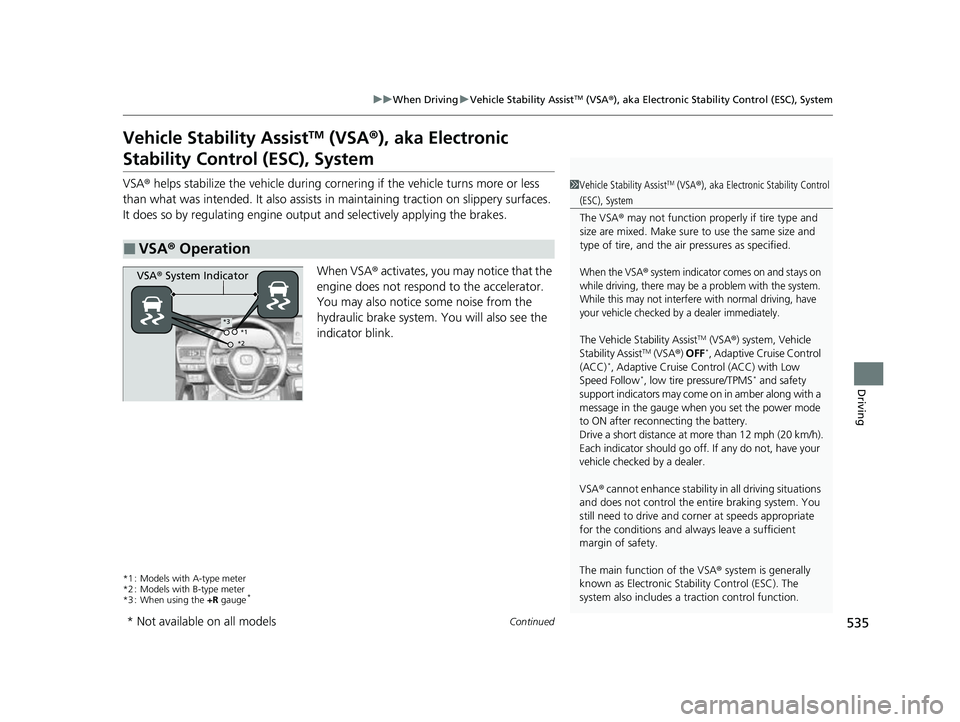
When VSA ® activates, you may notice that the
engine does not respond to the accelerator.
You may also notice some noise from the
hydraulic brake system. You will also see the
indicator blink.
*1 : Models with A-type meter
*2 : Models with B-type meter
*3 : When using the +R gauge
*
■VSA ® Operation
1 Vehicle Stability AssistTM (VSA® ), aka Electronic Stability Control
(ESC), System
The VSA ® may not function properl y if tire type and
size are mixed. Make sure to use the same size and
type of tire, and the air pressures as specified.
When the VSA® system indicator comes on and stays on
while driving, there may be a problem with the system.
While this may not interfere with normal driving, have
your vehicle checked by a dealer immediately.
The Vehicle Stability AssistTM (VSA ®) system, Vehicle
Stability AssistTM (VSA ®) OFF*, Adaptive Cruise Control
(ACC)*, Adaptive Cruise Control (ACC) with Low
Speed Follow*, low tire pressure/TPMS* and safety
support indicators may come on in amber along with a
message in the gauge when you set the power mode
to ON after reconn ecting the battery.
Drive a short distance at more than 12 mph (20 km/h).
Each indicator should go off. If any do not, have your
vehicle checked by a dealer.
VSA ® cannot enhance stability in all driving situations
and does not control the entire braking system. You
still need to drive and corner at speeds appropriate
for the conditions and alwa ys leave a sufficient
margin of safety.
The main function of the VSA ® system is generally
known as Electronic Stability Control (ESC). The
system also includes a traction control function.
VSA® System Indicator
*1
*2*3
* Not available on all models
23 CIVIC HATCHBACK TYPE R-31T406100_03.book 535 ページ 2022年6月23日 木曜日 午後9時28分
Page 539 of 840
537
uuWhen Driving uVehicle Stability AssistTM (VSA ®), aka Electronic Stability Control (ESC), System
Driving
■When in +R Drive mode
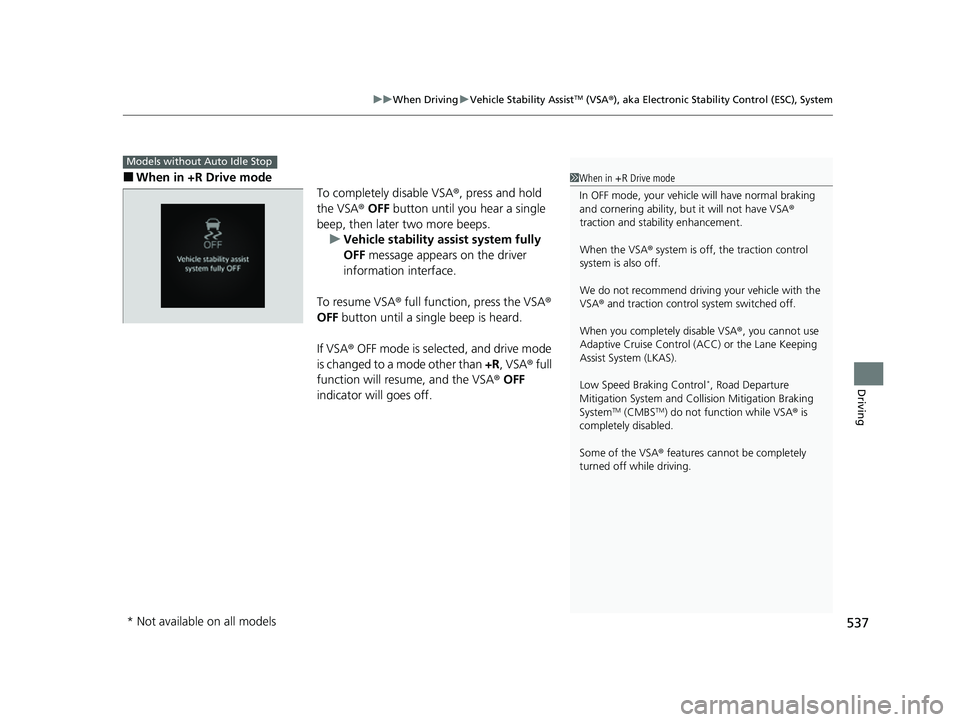
To completely disable VSA®, press and hold
the VSA® OFF button until you hear a single
beep, then later two more beeps. u Vehicle stability assist system fully
OFF message appears on the driver
information interface.
To resume VSA® full function, press the VSA ®
OFF button until a single beep is heard.
If VSA ® OFF mode is selected, and drive mode
is changed to a mode other than +R, VSA ® full
function will resume, and the VSA ® OFF
indicator will goes off.
Models without Auto Idle Stop
1 When in +R Drive mode
In OFF mode, your vehicle will have normal braking
and cornering ability, bu t it will not have VSA®
traction and stability enhancement.
When the VSA ® system is off, the traction control
system is also off.
We do not recommend driving your vehicle with the
VSA ® and traction control system switched off.
When you completely disable VSA® , you cannot use
Adaptive Cruise Control ( ACC) or the Lane Keeping
Assist System (LKAS).
Low Speed Braking Control
*, Road Departure
Mitigation System and Co llision Mitigation Braking
System
TM (CMBSTM) do not function while VSA ® is
completely disabled.
Some of the VSA ® features cannot be completely
turned off while driving.
* Not available on all models
23 CIVIC HATCHBACK TYPE R-31T406100_03.book 537 ページ 2022年6月23日 木曜日 午後9時28分
Page 543 of 840
Continued541
uuWhen Driving uTire Pressure Monitoring System (TPMS)*
Driving
You must start TPMS calibration every time you:
• Adjust the pressure in one or more tires.
• Rotate the tires.
• Replace one or more tires.
Before calibrating the TPMS:
• Set the cold tire pressure in all four tires.
2 Checking Tires P. 736
Make sure:
•The vehicle is at a complete stop.
• The power mode is in ON.
• The transmission is in
(P.
• The shift lever is in
(N.
1Tire Pressure Monitoring System (TPMS)*
The Vehicle Stability AssistTM (VSA ®) system, Vehicle
Stability AssistTM (VSA ®) OFF*, Adaptive Cruise
Control (ACC)*, Adaptive Cruise Control (ACC) with
Low Speed Follow*, low tire pressure/TPMS and
safety support indicators may come on in amber
along with a message in the gauge when you set the
power mode to ON after reconnecting the battery.
Drive a short distance at more than 12 mph (20 km/h).
Each indicator should go off. If any do not, have your
vehicle checked by a dealer.
■TPMS Calibration1 TPMS Calibration
TPMS cannot be calibrated if a compact spare tire
* is
installed.
The calibration process requires approximately 30
minutes of cumulative dr iving at speeds between
31-62 mph (50-100 km/h).
During this period, if power mode is set to ON and
the vehicle is not moved within 45 seconds, you may
notice the low tire pressure/TPMS indicator comes on
briefly. This is normal and indicates that the
calibration process is not yet complete.
If the tire chains
* are installed, remove them before
calibrating the TPMS.
If the low tire pressure/TPMS indicator comes on even
when the properly inflated specified regular tires are
installed, have your vehicle checked by a dealer.
We recommend that the tires be replaced with the
same brand, model, and size as the originals. Ask a
dealer for details.
Continuously variable transmission models
Manual transmission models
* Not available on all models
23 CIVIC HATCHBACK TYPE R-31T406100_03.book 541 ページ 2022年6月23日 木曜日 午後9時28分
Page 550 of 840
uuWhen Driving uBlind Spot Information System*
548
Driving
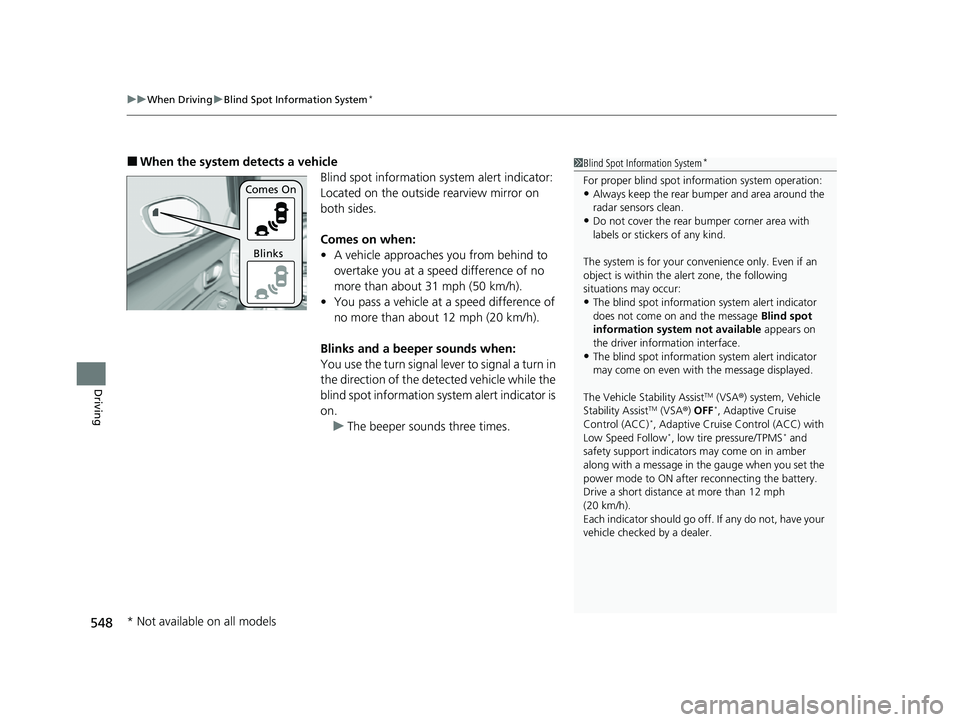
■When the system detects a vehicle
Blind spot information system alert indicator:
Located on the outside rearview mirror on
both sides.
Comes on when:
•A vehicle approaches you from behind to
overtake you at a speed difference of no
more than about 31 mph (50 km/h).
• You pass a vehicle at a speed difference of
no more than abou t 12 mph (20 km/h).
Blinks and a beeper sounds when:
You use the turn signal lever to signal a turn in
the direction of the detected vehicle while the
blind spot information system alert indicator is
on. u The beeper sounds three times.1Blind Spot Information System*
For proper blind spot information system operation:•Always keep the rear bumper and area around the
radar sensors clean.
•Do not cover the rear bumper corner area with
labels or sticke rs of any kind.
The system is for your convenience only. Even if an
object is within the alert zone, the following
situations may occur:
•The blind spot informatio n system alert indicator
does not come on and the message Blind spot
information system not available appears on
the driver information interface.
•The blind spot informatio n system alert indicator
may come on even with the message displayed.
The Vehicle Stability Assist
TM (VSA ®) system, Vehicle
Stability AssistTM (VSA ®) OFF*, Adaptive Cruise
Control (ACC)*, Adaptive Cruise Control (ACC) with
Low Speed Follow*, low tire pressure/TPMS* and
safety support indicators may come on in amber
along with a message in the gauge when you set the
power mode to ON after reconnecting the battery.
Drive a short distance at more than 12 mph
(20 km/h).
Each indicator should go off. If any do not, have your
vehicle checked by a dealer.
Comes On
Blinks
* Not available on all models
23 CIVIC HATCHBACK TYPE R-31T406100_03.book 548 ページ 2022年6月23日 木曜日 午後9時28分
Page 553 of 840
551Continued
Driving
Honda Sensing®
Honda Sensing® is a driver support system which employs the use of two distinctly
different kinds of sensors: the sonar sens ors located in the front and rear bumpers,
and the front grille, and a front wide view camera mounted to the interior side of
the windshield, behind the rearview mirror.
Honda Sensing ® is a driver support system which employs the use of a front wide
view camera mounted to the interior side of the windshield, behind the rearview
mirror.
Honda Sensing ® has the following functions.
■The functions which do not requir e switch operations to activate
• Collision Mitigation Braking SystemTM (CMBSTM) 2 P. 555
• Low Speed Braking Control* 2 P. 567
• Low Speed Braking Control* 2 P. 573
• Road Departure Mitigation System 2 P. 639
• Traffic Sign Recognition System 2 P. 647
■The functions wh ich require switch operations to activate
• Adaptive Cruise Control (ACC) with Low Speed Follow* 2 P. 578
• Adaptive Cruise Control (ACC)* 2 P. 598
• Lane Keeping Assist System (LKAS) 2 P. 618
• Traffic Jam Assist* 2 P. 630
Models with Low Speed Braking Control
Models without Low Speed Braking Control
* Not available on all models
23 CIVIC HATCHBACK TYPE R-31T406100_03.book 551 ページ 2022年6月23日 木曜日 午後9時28分
Page 554 of 840
552
uuHonda Sensing ®u
Driving
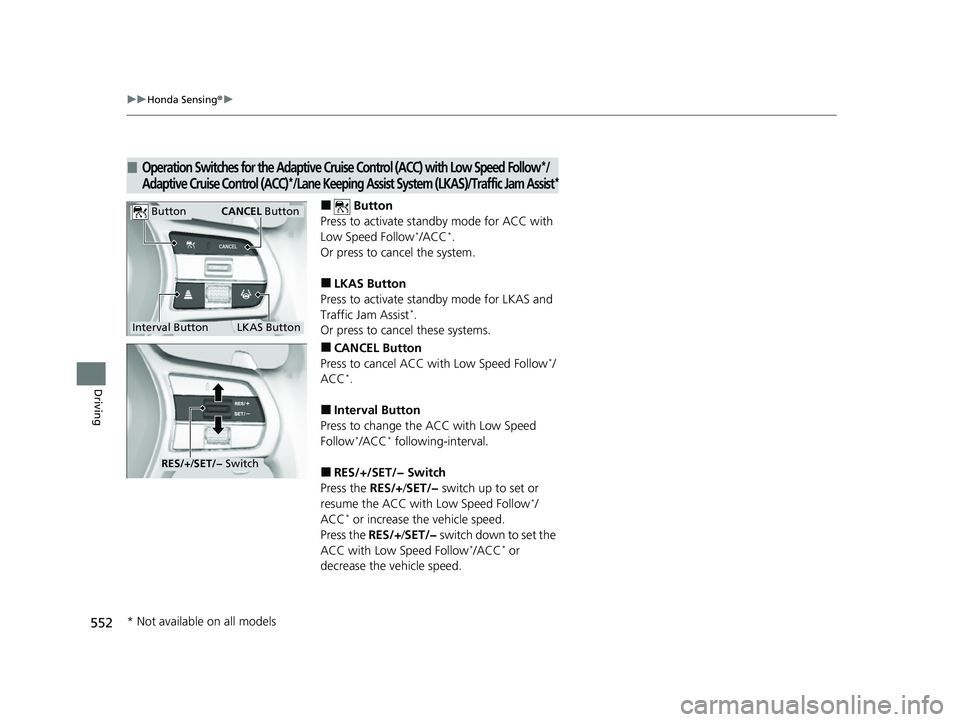
■ Button
Press to activate standby mode for ACC with
Low Speed Follow
*/ACC*.
Or press to cancel the system.
■LKAS Button
Press to activate standby mode for LKAS and
Traffic Jam Assist
*.
Or press to cancel these systems.
■CANCEL Button
Press to cancel ACC with Low Speed Follow*/
ACC*.
■Interval Button
Press to change the ACC with Low Speed
Follow
*/ACC* following-interval.
■RES/+/SET/− Switch
Press the RES/+/SET/− switch up to set or
resume the ACC with Low Speed Follow
*/
ACC* or increase the vehicle speed.
Press the RES/+/SET/− switch down to set the
ACC with Low Speed Follow
*/ACC* or
decrease the vehicle speed.
■Operation Switches for the Adaptive Cruise Control (ACC) with Low Speed Follow*/
Adaptive Cruise Control (ACC)*/Lane Keeping Assist Syste m (LKAS)/Traffic Jam Assist*
Interval Button
Button
LKAS Button
CANCEL Button
RES/+/SET/− Switch
* Not available on all models
23 CIVIC HATCHBACK TYPE R-31T406100_03.book 552 ページ 2022年6月23日 木曜日 午後9時28分
Page 555 of 840
553
uuHonda Sensing ®u
Continued
Driving
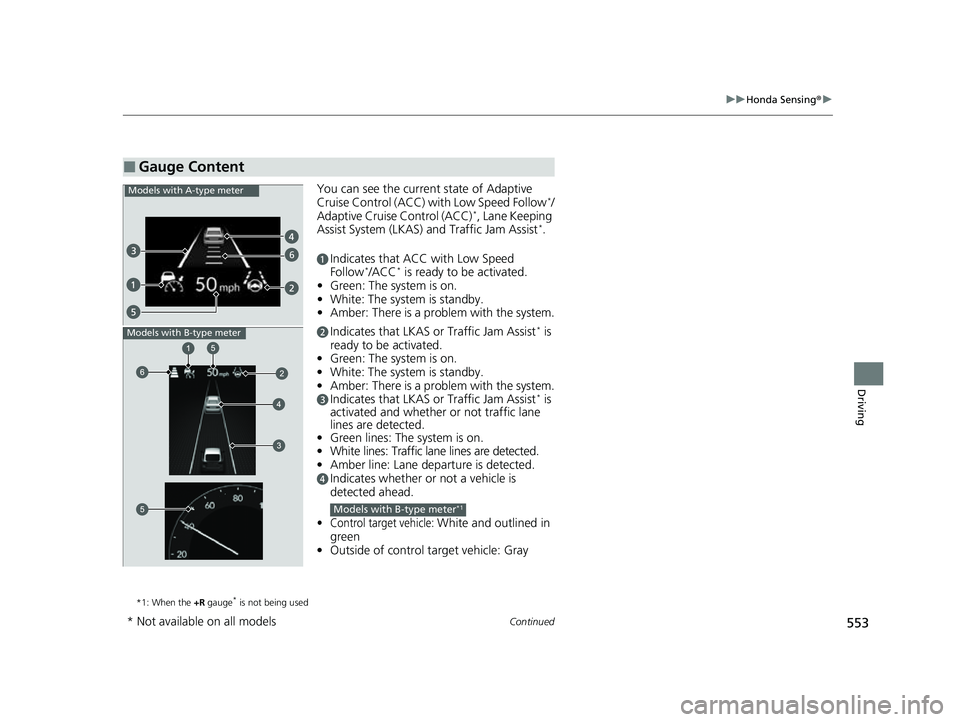
You can see the current state of Adaptive
Cruise Control (ACC) with Low Speed Follow*/
Adaptive Cruise Control (ACC)*, Lane Keeping
Assist System (LKAS) and Traffic Jam Assist*.
aIndicates that ACC with Low Speed
Follow*/ACC* is ready to be activated.
• Green: The system is on.
• White: The system is standby.
• Amber: There is a prob lem with the system.
bIndicates that LKAS or Traffic Jam Assist* is
ready to be activated.
• Green: The system is on.
• White: The system is standby.
• Amber: There is a prob lem with the system.
cIndicates that LKAS or Traffic Jam Assist* is
activated and whether or not traffic lane
lines are detected.
• Green lines: The system is on.
• White lines: Traffic lane lines are detected.
• Amber line: Lane departure is detected.
dIndicates whether or not a vehicle is
detected ahead.
•Control target vehicle: White and outlined in
green
• Outside of control target vehicle: Gray
*1: When the +R gauge* is not being used
■Gauge Content
6
Models with A-type meter
Models with B-type meter
Models with B-type meter*1
* Not available on all models
23 CIVIC HATCHBACK TYPE R-31T406100_03.book 553 ページ 2022年6月23日 木曜日 午後9時28分
Page 561 of 840
Continued559
uuHonda Sensing ®u Collision Mitigation Braking SystemTM (CMBSTM)
Driving
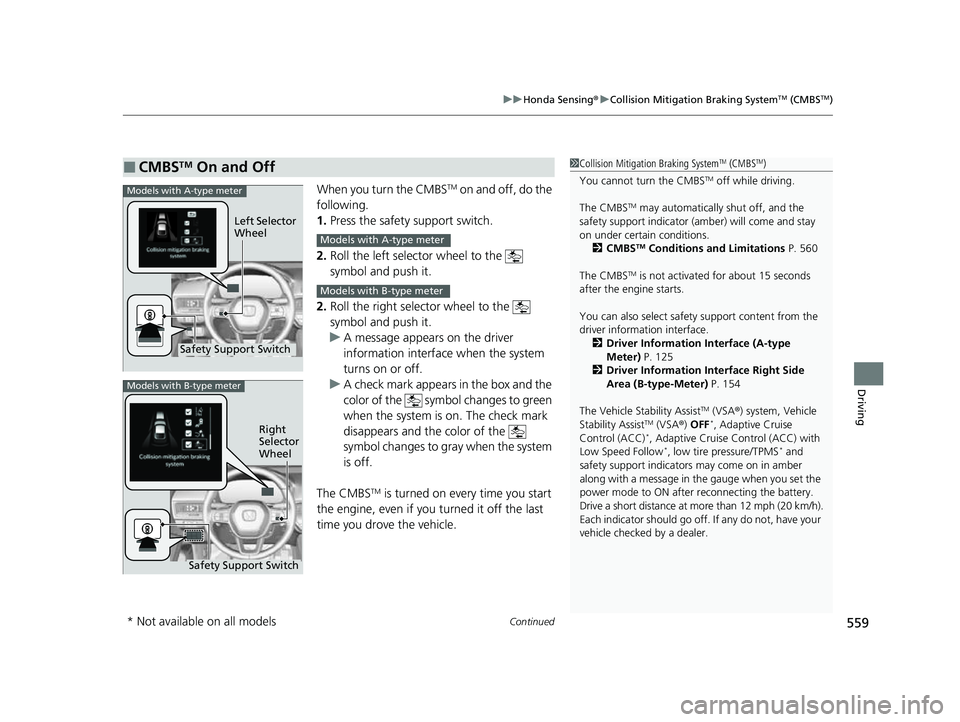
When you turn the CMBSTM on and off, do the
following.
1. Press the safety support switch.
2. Roll the left selector wheel to the
symbol and push it.
2. Roll the right selector wheel to the
symbol and push it.
u A message appears on the driver
information interface when the system
turns on or off.
u A check mark appears in the box and the
color of the symbol changes to green
when the system is on. The check mark
disappears and the color of the
symbol changes to gray when the system
is off.
The CMBS
TM is turned on every time you start
the engine, even if you turned it off the last
time you drove the vehicle.
■CMBSTM On and Off1 Collision Mitigation Braking SystemTM (CMBSTM)
You cannot turn the CMBS
TM off while driving.
The CMBS
TM may automatically shut off, and the
safety support indicator (amb er) will come and stay
on under certain conditions. 2 CMBS
TM Conditions and Limitations P. 560
The CMBS
TM is not activated for about 15 seconds
after the engine starts.
You can also sele ct safety support content from the
driver information interface.
2 Driver Information Interface (A-type
Meter) P. 125
2 Driver Information Interface Right Side
Area (B-type-Meter) P. 154
The Vehicle Stability Assist
TM (VSA ®) system, Vehicle
Stability AssistTM (VSA ®) OFF*, Adaptive Cruise
Control (ACC)*, Adaptive Cruise Control (ACC) with
Low Speed Follow*, low tire pressure/TPMS* and
safety support indicators may come on in amber
along with a message in the gauge when you set the
power mode to ON after reconnecting the battery.
Drive a short distance at more than 12 mph (20 km/h).
Each indicator should go off. If any do not, have your
vehicle checked by a dealer.
Safety Support Switch Left Selector
Wheel
Models with A-type meter
Models with A-type meter
Models with B-type meter
Models with B-type meter
Right
Selector
Wheel
Safety Support Switch
* Not available on all models
23 CIVIC HATCHBACK TYPE R-31T406100_03.book 559 ページ 2022年6月23日 木曜日 午後9時28分
Page 580 of 840
578
uuHonda Sensing ®u Adaptive Cruise Control (ACC) with Low Speed Follow*
Driving
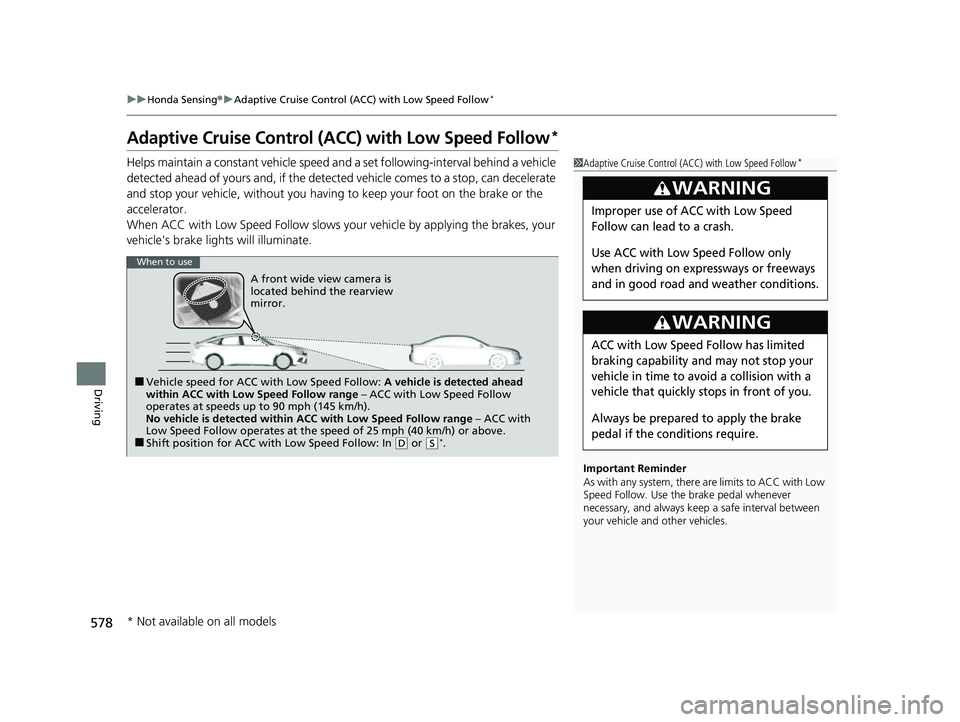
Adaptive Cruise Control (A CC) with Low Speed Follow*
Helps maintain a constant vehicle speed a nd a set following-interval behind a vehicle
detected ahead of yours and, if the detect ed vehicle comes to a stop, can decelerate
and stop your vehicle, without you having to keep your foot on the brake or the
accelerator.
When ACC with Low Speed Follow slows y our vehicle by applying the brakes, your
vehicle's brake lights will illuminate.1 Adaptive Cruise Control (ACC) with Low Speed Follow*
Important Reminder
As with any system, there are limits to ACC with Low
Speed Follow. Use the brake pedal whenever
necessary, and always keep a safe interval between
your vehicle and other vehicles.
3WARNING
Improper use of ACC with Low Speed
Follow can lead to a crash.
Use ACC with Low Speed Follow only
when driving on expressways or freeways
and in good road and weather conditions.
3WARNING
ACC with Low Speed Follow has limited
braking capability and may not stop your
vehicle in time to avoid a collision with a
vehicle that quickly stops in front of you.
Always be prepared to apply the brake
pedal if the conditions require.
When to use
■Vehicle speed for ACC wi th Low Speed Follow: A vehicle is detected ahead
within ACC with Low Speed Follow range – ACC with Low Speed Follow
operates at speeds up to 90 mph (145 km/h).
No vehicle is detected within ACC with Low Speed Follow range – ACC with
Low Speed Follow operates at the speed of 25 mph (40 km/h) or above.
■Shift position for ACC with Low Speed Follow: In ( D or (S*.
A front wide view camera is
located behind the rearview
mirror.
* Not available on all models
23 CIVIC HATCHBACK TYPE R-31T406100_03.book 578 ページ 2022年6月23日 木曜日 午後9時28分
Page 581 of 840
Continued579
uuHonda Sensing ®u Adaptive Cruise Control (ACC) with Low Speed Follow*
Driving
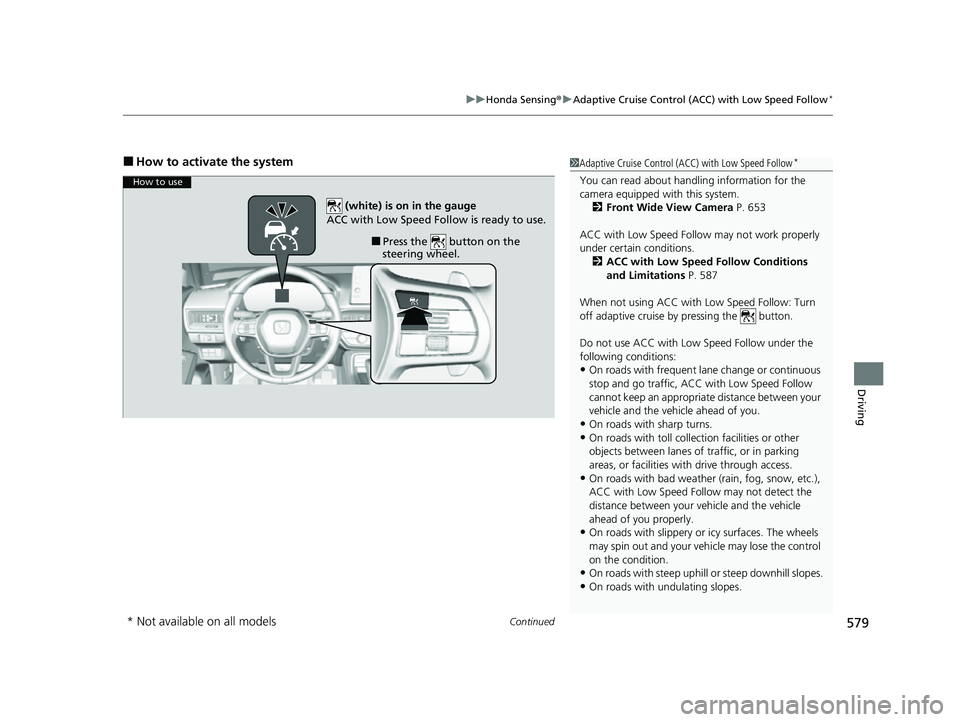
■How to activate the system1Adaptive Cruise Control (ACC) with Low Speed Follow*
You can read about handling information for the
camera equipped with this system.
2 Front Wide View Camera P. 653
ACC with Low Speed Follow may not work properly
under certain conditions.
2 ACC with Low Speed Follow Conditions
and Limitations P. 587
When not using ACC with Low Speed Follow: Turn
off adaptive cruise by pressing the button.
Do not use ACC with Low Speed Follow under the
following conditions:
•On roads with frequent la ne change or continuous
stop and go traffic, ACC with Low Speed Follow
cannot keep an appropriate distance between your
vehicle and the vehicle ahead of you.
•On roads with sharp turns.
•On roads with toll collection facilities or other
objects between lanes of traffic, or in parking
areas, or faci lities with driv e through access.
•On roads with bad weather (rain, fog, snow, etc.),
ACC with Low Speed Follow may not detect the
distance between your vehicle and the vehicle
ahead of you properly.
•On roads with slippery or icy surfaces. The wheels
may spin out and your vehi cle may lose the control
on the condition.
•On roads with steep uphill or steep downhill slopes.
•On roads with undulating slopes.
How to use
■Press the button on the
steering wheel.
(white) is on in the gauge
ACC with Low Speed Follow is ready to use.
* Not available on all models
23 CIVIC HATCHBACK TYPE R-31T406100_03.book 579 ページ 2022年6月23日 木曜日 午後9時28分