pairing phone HONDA CIVIC 2023 User Guide
[x] Cancel search | Manufacturer: HONDA, Model Year: 2023, Model line: CIVIC, Model: HONDA CIVIC 2023Pages: 840, PDF Size: 26.53 MB
Page 452 of 840
450
uuBluetooth ® HandsFreeLink ®u HFL Menus
Features
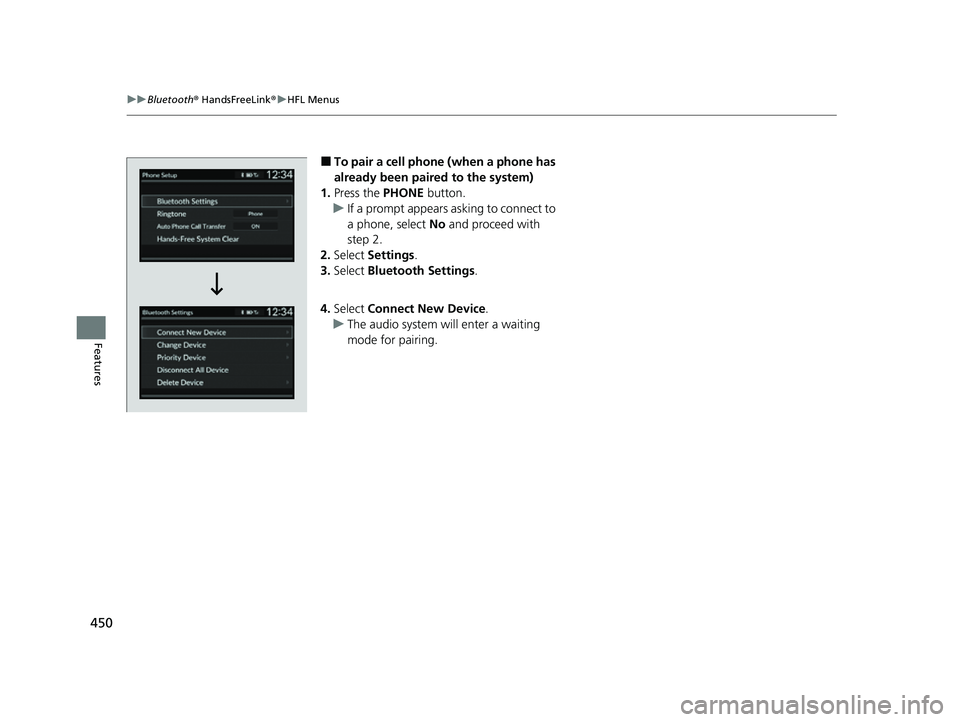
■To pair a cell phone (when a phone has
already been paired to the system)
1. Press the PHONE button.
u If a prompt appears asking to connect to
a phone, select No and proceed with
step 2.
2. Select Settings .
3. Select Bluetooth Settings .
4. Select Connect New Device .
u The audio system will enter a waiting
mode for pairing.
23 CIVIC HATCHBACK TYPE R-31T406100_03.book 450 ページ 2022年6月23日 木曜日 午後9時28分
Page 453 of 840
451
uuBluetooth ® HandsFreeLink ®u HFL Menus
Continued
Features
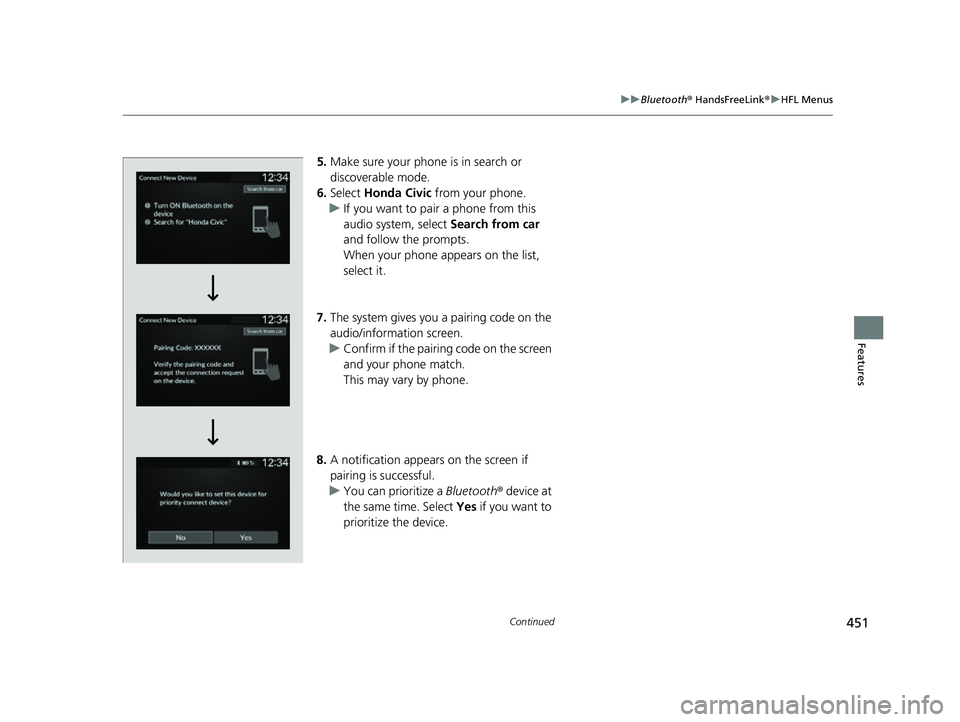
5. Make sure your phone is in search or
discoverable mode.
6. Select Honda Civic from your phone.
u If you want to pair a phone from this
audio system, select Search from car
and follow the prompts.
When your phone appears on the list,
select it.
7. The system gives you a pairing code on the
audio/information screen.
u Confirm if the pairing code on the screen
and your phone match.
This may vary by phone.
8. A notification appears on the screen if
pairing is successful.
u You can prioritize a Bluetooth® device at
the same time. Select Yes if you want to
prioritize the device.
23 CIVIC HATCHBACK TYPE R-31T406100_03.book 451 ページ 2022年6月23日 木曜日 午後9時28分
Page 466 of 840
464
Features
Bluetooth® HandsFreeLink ®
Bluetooth® HandsFreeLink ® (HFL) allows you to place and receive phone calls using
your vehicle's audio system, without handling your cell phone.
Using HFL
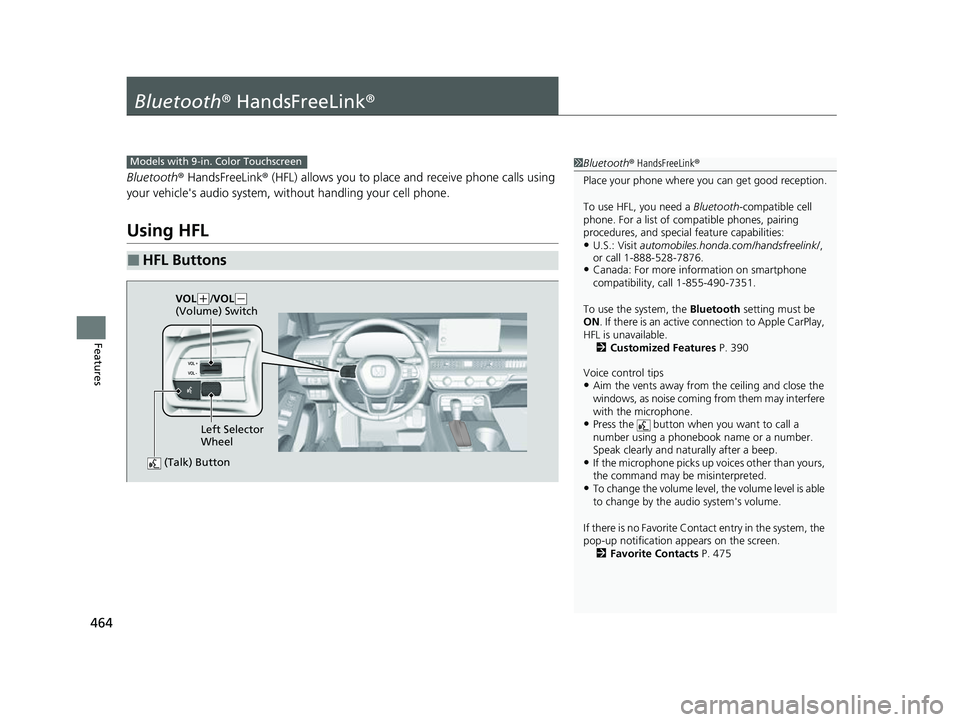
■HFL Buttons
1 Bluetooth ® HandsFreeLink ®
Place your phone where y ou can get good reception.
To use HFL, you need a Bluetooth-compatible cell
phone. For a list of compatible phones, pairing
procedures, and special feature capabilities:
•U.S.: Visit automobiles.honda.com /handsfreelink/,
or call 1-888-528-7876.
•Canada: For more info rmation on smartphone
compatibility, call 1-855-490-7351.
To use the system, the Bluetooth setting must be
ON . If there is an active c onnection to Apple CarPlay,
HFL is unavailable. 2 Customized Features P. 390
Voice control tips
•Aim the vents away from the ceiling and close the
windows, as noise coming from them may interfere
with the microphone.
•Press the button when you want to call a
number using a phonebook name or a number.
Speak clearly and naturally after a beep.
•If the microphone picks up vo ices other than yours,
the command may be misinterpreted.
•To change the volume level, the volume level is able
to change by the audio system's volume.
If there is no Favorite Contact entry in the system, the
pop-up notification appears on the screen. 2 Favorite Contacts P. 475
Models with 9-in. Color Touchscreen
(Talk) Button
Left Selector
Wheel
VOL
(
+/VOL(-
(Volume) Switch
23 CIVIC HATCHBACK TYPE R-31T406100_03.book 464 ページ 2022年6月23日 木曜日 午後9時28分
Page 471 of 840
Continued469
uuBluetooth ® HandsFreeLink ®u HFL Menus
Features
■Bluetooth ® setup
You can turn Bluetooth® function on and off.
1. Press the button.
2. Select General Settings .
3. Select Connections .
4. Select Bluetooth .
5. Select Options.
6. Select Bluetooth , then select ON.
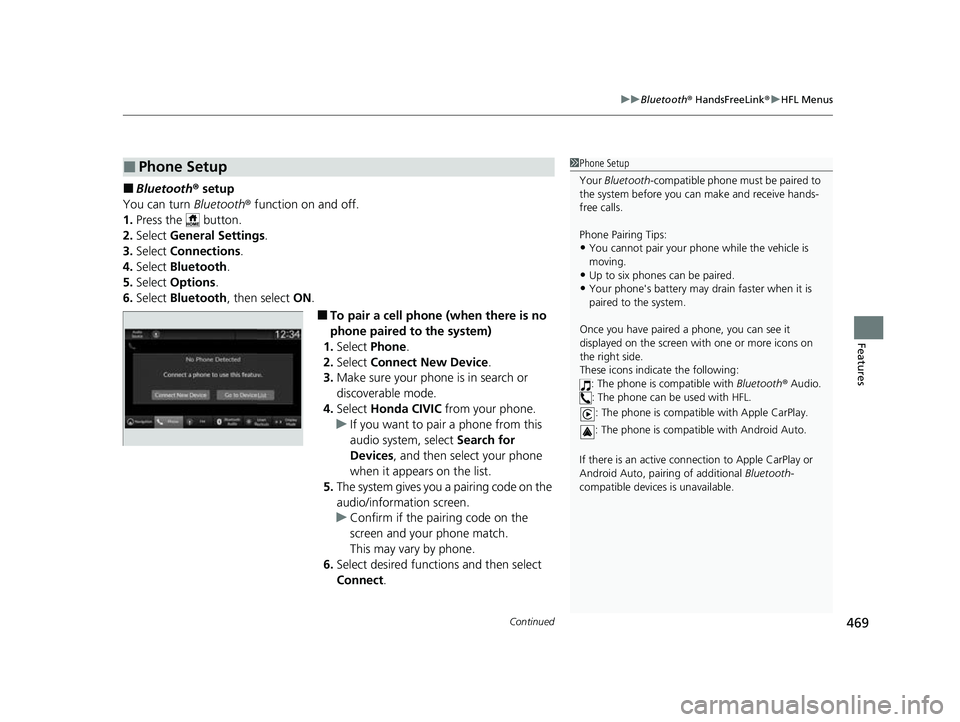
■To pair a cell phone (when there is no
phone paired to the system)
1. Select Phone .
2. Select Connect New Device .
3. Make sure your phone is in search or
discoverable mode.
4. Select Honda CIVIC from your phone.
u If you want to pair a phone from this
audio system, select Search for
Devices , and then select your phone
when it appears on the list.
5. The system gives you a pairing code on the
audio/information screen.
u Confirm if the pairing code on the
screen and your phone match.
This may vary by phone.
6. Select desired functions and then select
Connect .
■Phone Setup1Phone Setup
Your Bluetooth -compatible phone must be paired to
the system before you ca n make and receive hands-
free calls.
Phone Pairing Tips:
•You cannot pair your phone while the vehicle is
moving.
•Up to six phones can be paired.
•Your phone's battery may dr ain faster when it is
paired to the system.
Once you have paired a phone, you can see it
displayed on the screen with one or more icons on
the right side.
These icons indicate the following: : The phone is compatible with Bluetooth ® Audio.
: The phone can be used with HFL.
: The phone is compatib le with Apple CarPlay.
: The phone is compatible with Android Auto.
If there is an active connection to Appl e CarPlay or
Android Auto, pairing of additional Bluetooth-
compatible devices is unavailable.
23 CIVIC HATCHBACK TYPE R-31T406100_03.book 469 ページ 2022年6月23日 木曜日 午後9時28分
Page 472 of 840
470
uuBluetooth ® HandsFreeLink ®u HFL Menus
Features
7. A notification appears on the screen if
pairing is successful.
8. Select OK.
u A confirmation message for phone data
collection appears.
9. Select ON or OFF .
u A confirmation message for HondaLink
Assist appears.
10. Select Yes or No.
23 CIVIC HATCHBACK TYPE R-31T406100_03.book 470 ページ 2022年6月23日 木曜日 午後9時28分