fuel HONDA CIVIC 2023 Owner's Manual
[x] Cancel search | Manufacturer: HONDA, Model Year: 2023, Model line: CIVIC, Model: HONDA CIVIC 2023Pages: 840, PDF Size: 26.53 MB
Page 148 of 840
146
uuGauges and Driver Information Interface uDriver Information Interface (A-type Meter)
Instrument Panel
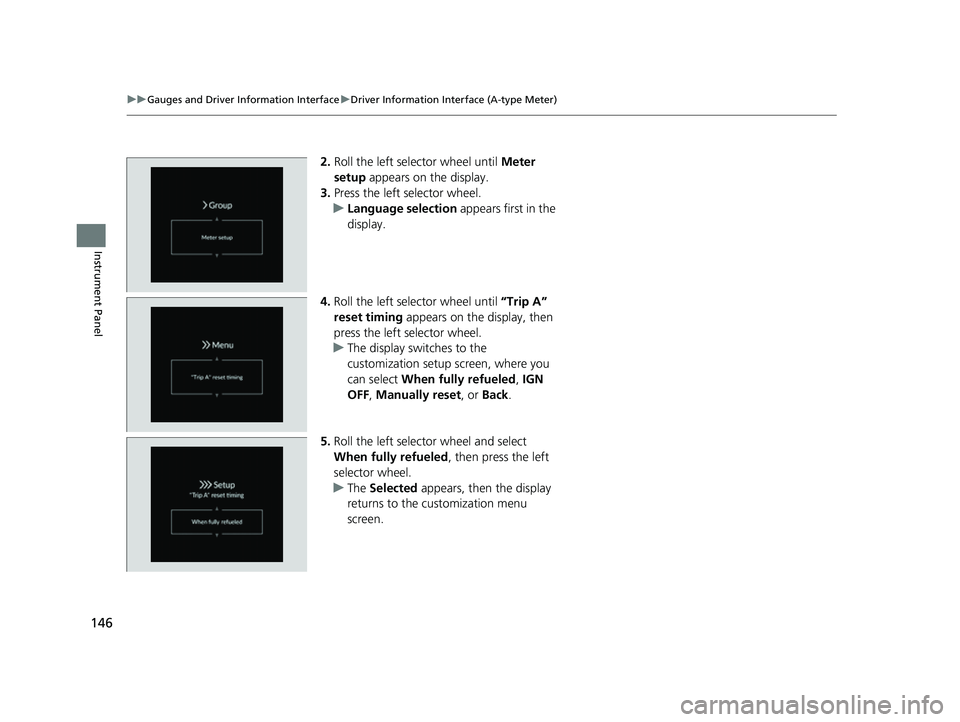
2. Roll the left selector wheel until Meter
setup appears on the display.
3. Press the left selector wheel.
u Language selection appears first in the
display.
4. Roll the left selector wheel until “Trip A”
reset timing appears on the display, then
press the left selector wheel.
u The display switches to the
customization setup screen, where you
can select When fully refueled , IGN
OFF , Manually reset , or Back.
5. Roll the left selector wheel and select
When fully refueled , then press the left
selector wheel.
u The Selected appears, then the display
returns to the customization menu
screen.
23 CIVIC HATCHBACK TYPE R-31T406100_03.book 146 ページ 2022年6月23日 木曜日 午後9時28分
Page 156 of 840
154
uuGauges and Driver Information Interface uDriver Information Interface Right Side Area (B-type-Meter)
Instrument Panel
Driver Information Inte rface Right Side Area
(B-type-Meter)
The driver information interface shows information such as the estimated travelable
distance and fuel economy of the vehicle. It also displays messages such as warnings
and other helpful information.
When a warning message displays, please check the message and contact a dealer
and have the vehicle inspected if necessary . Please refer to the pages below if the
Engine oil pressure low or Engine temperature too hot message is displayed.
2If the Engine oil pressure low Warning Appears P. 795
2 Overheating P. 791
23 CIVIC HATCHBACK TYPE R-31T406100_03.book 154 ページ 2022年6月23日 木曜日 午後9時28分
Page 157 of 840
155
uuGauges and Driver Information Interface uDriver Information Interface Right Side Area (B-type-Meter)
Continued
Instrument Panel
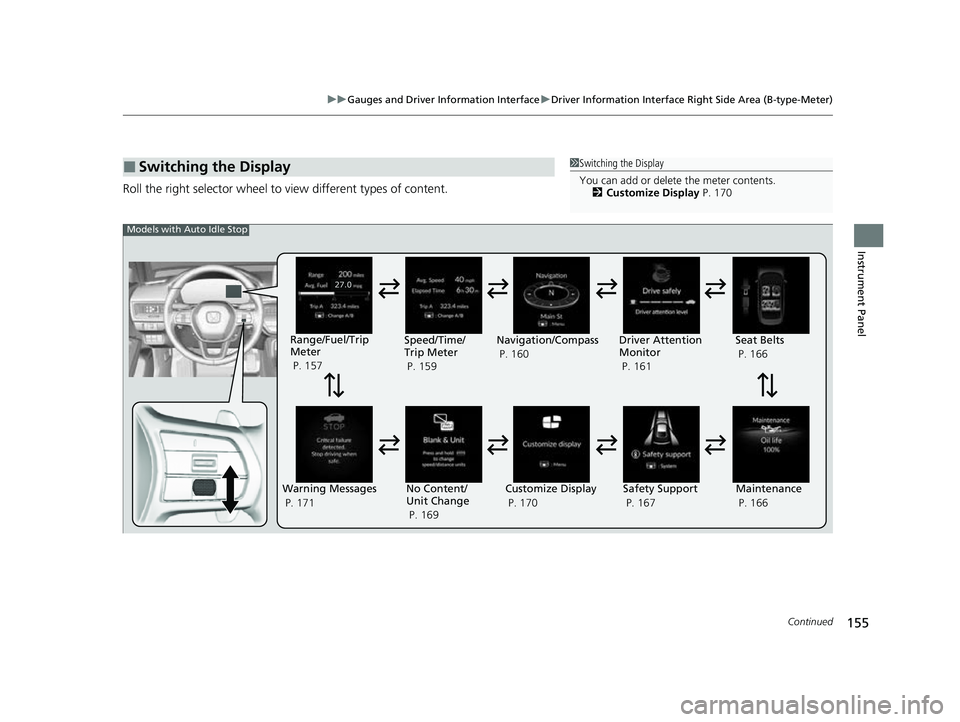
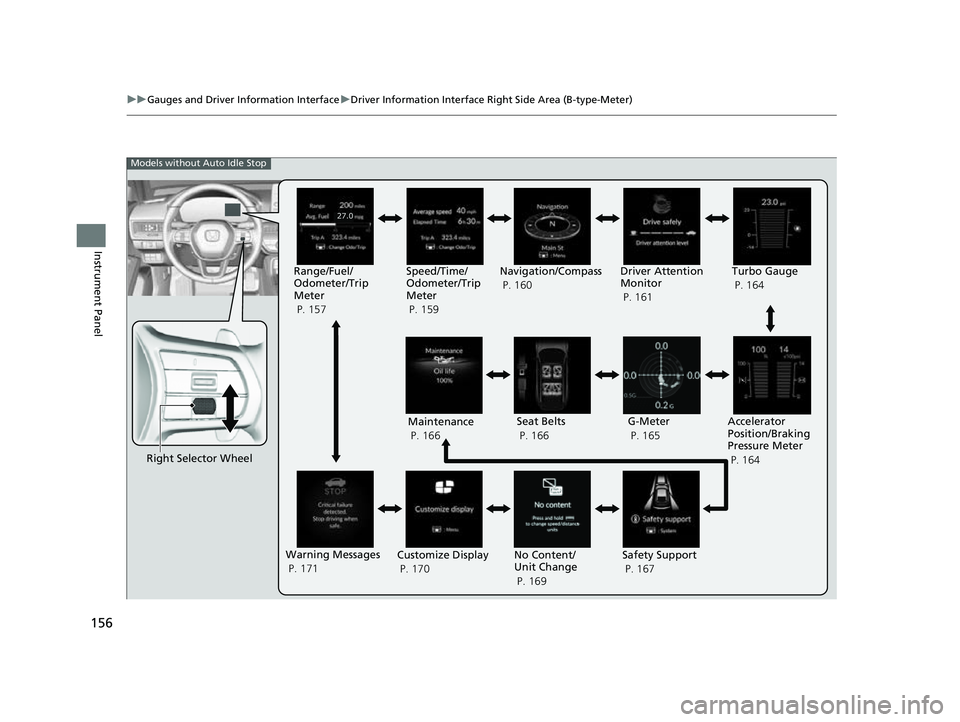
Roll the right selector wheel to view different types of content.
■Switching the Display1Switching the Display
You can add or delete the meter contents.
2 Customize Display P. 170
Warning Messages
P. 171Range/Fuel/Trip
Meter
P. 157
No Content/
Unit Change
P. 169 Driver Attention
Monitor
P. 161
Navigation/Compass
P. 160
Speed/Time/
Trip Meter
P. 159
Customize Display
P. 170 Maintenance
P. 166
Safety Support
P. 167 Seat Belts
P. 166
Models with Auto Idle Stop
23 CIVIC HATCHBACK TYPE R-31T406100_03.book 155 ページ 2022年6月23日 木曜日 午後9時28分
Page 158 of 840
156
uuGauges and Driver Information Interface uDriver Information Interface Right Side Area (B-type-Meter)
Instrument Panel
Right Selector Wheel Driver Attention
Monitor
P. 161
G-Meter
P. 165
Accelerator
Position/Braking
Pressure Meter
P. 164
Models without Auto Idle Stop
Maintenance
P. 166 Seat Belts
P. 166
Warning Messages
P. 171 Customize Display
P. 170 No Content/
Unit Change
P. 169Safety Support
P. 167
Range/Fuel/
Odometer/Trip
Meter
P. 157
Speed/Time/
Odometer/Trip
Meter
P. 159Navigation/Compass
P. 160
Turbo Gauge
P. 164
23 CIVIC HATCHBACK TYPE R-31T406100_03.book 156 ページ 2022年6月23日 木曜日 午後9時28分
Page 159 of 840
157
uuGauges and Driver Information Interface uDriver Information Interface Right Side Area (B-type-Meter)
Continued
Instrument Panel
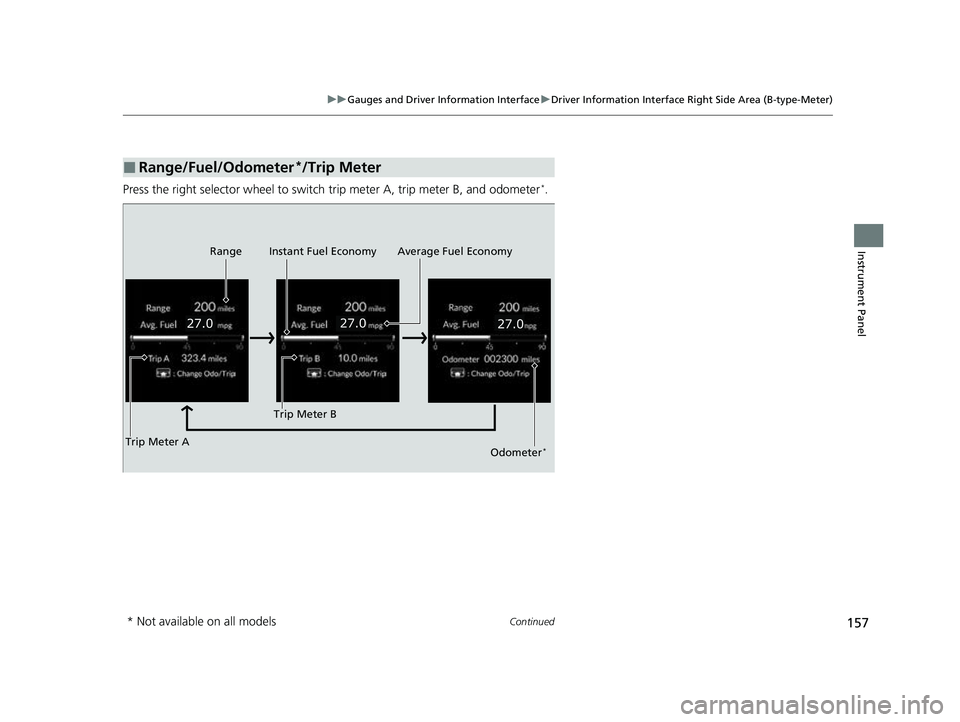
Press the right selector wheel to switch trip meter A, trip meter B, and odometer*.
■Range/Fuel/Odometer*/Trip Meter
Trip Meter A Range Average Fuel Economy
Instant Fuel Economy
Trip Meter BOdometer*
* Not available on all models
23 CIVIC HATCHBACK TYPE R-31T406100_03.book 157 ページ 2022年6月23日 木曜日 午後9時28分
Page 160 of 840
uuGauges and Driver Information Interface uDriver Information Interface Right Side Area (B-type-Meter)
158
Instrument Panel
■Odometer*
Shows the total number of miles or kilome ters that your vehicle has accumulated.
■Trip meter
Shows the total number of miles or kilomete rs driven since the last reset. Meters A
and B can be used to measure two separate trips.
Resetting a trip meter
To reset the trip meter, display it, press and hold the right selector wheel and then
select Reset.
u The trip meter is reset to 0.0.
■Range
Shows the estimated distance you can trave l on the remaining fuel. This estimated
distance is based on the ve hicle's current fuel economy.
■Average fuel economy
Shows the estimated average fuel economy of each trip meter in mpg or l/100 km.
The display is updated at set intervals. Wh en a trip meter is reset, the average fuel
economy is also reset.
■Instant fuel economy
Shows the instant fuel economy as a bar graph in mpg or l/100 km.
1Range
The driving range displayed is only an estimate and
may differ to the actual distance the vehicle can
travel.
1 Average fuel economy
You can change when to reset the average fuel
economy.
2 Customized Features P. 390
* Not available on all models
23 CIVIC HATCHBACK TYPE R-31T406100_03.book 158 ページ 2022年6月23日 木曜日 午後9時28分
Page 178 of 840
176
Controls
Locking and Unlocking the Doors
Key
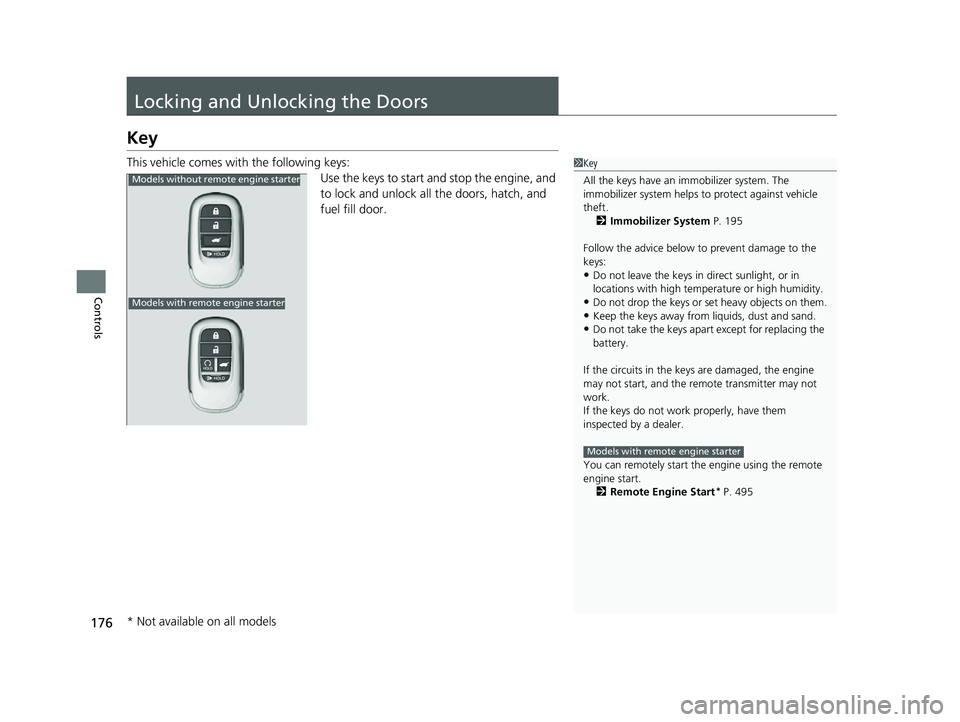
This vehicle comes with the following keys:Use the keys to start and stop the engine, and
to lock and unlock all the doors, hatch, and
fuel fill door.1Key
All the keys have an immobilizer system. The
immobilizer system helps to protect against vehicle
theft. 2 Immobilizer System P. 195
Follow the advice below to prevent damage to the
keys:
•Do not leave the keys in direct sunlight, or in
locations with high temperature or high humidity.
•Do not drop the keys or set heavy objects on them.•Keep the keys away from liquids, dust and sand.
•Do not take the keys apart except for replacing the
battery.
If the circuits in the keys are damaged, the engine
may not start, and the remote transmitter may not
work.
If the keys do not work properly, have them
inspected by a dealer.
You can remotely start the engine using the remote
engine start.
2 Remote Engine Start
* P. 495
Models with remote engine starter
Models without remo te engine starter
Models with remote engine starter
* Not available on all models
23 CIVIC HATCHBACK TYPE R-31T406100_03.book 176 ページ 2022年6月23日 木曜日 午後9時28分
Page 180 of 840
178
uuLocking and Unlocking the Doors uLow Keyless Remote Signal Strength
Controls
Low Keyless Remote Signal Strength
The vehicle transmits radio waves to lo cate the keyless remote when locking/
unlocking* the doors and hatch, fuel fill door or to start the engine.
In the following cases, locking/unlocking
* the doors and hatch, or starting the
engine may be inhibited or operation may be unstable:
• Strong radio waves are being tra nsmitted by nearby equipment.
• You are carrying the keyless remote together with telecommunications
equipment, laptop computers, ce ll phones, or wireless devices.
• A metallic object is touching or covering the keyless remote.
1Low Keyless Remote Signal Strength
Communication between the keyless remote and the
vehicle consumes the ke yless remote's battery.
Battery life is about two years, but this varies
depending on regularity of use.
The battery is consumed whenever the keyless
remote is receivi ng strong radio wave s. Avoid placing
it near electrical appliances such as televisions and
personal computers.
* Not available on all models
23 CIVIC HATCHBACK TYPE R-31T406100_03.book 178 ページ 2022年6月23日 木曜日 午後9時28分
Page 181 of 840
179
uuLocking and Unlocking the Doors uLocking/Unlocking the Doors from the Outside
Continued
Controls
Locking/Unlocking the Doors from the Outside
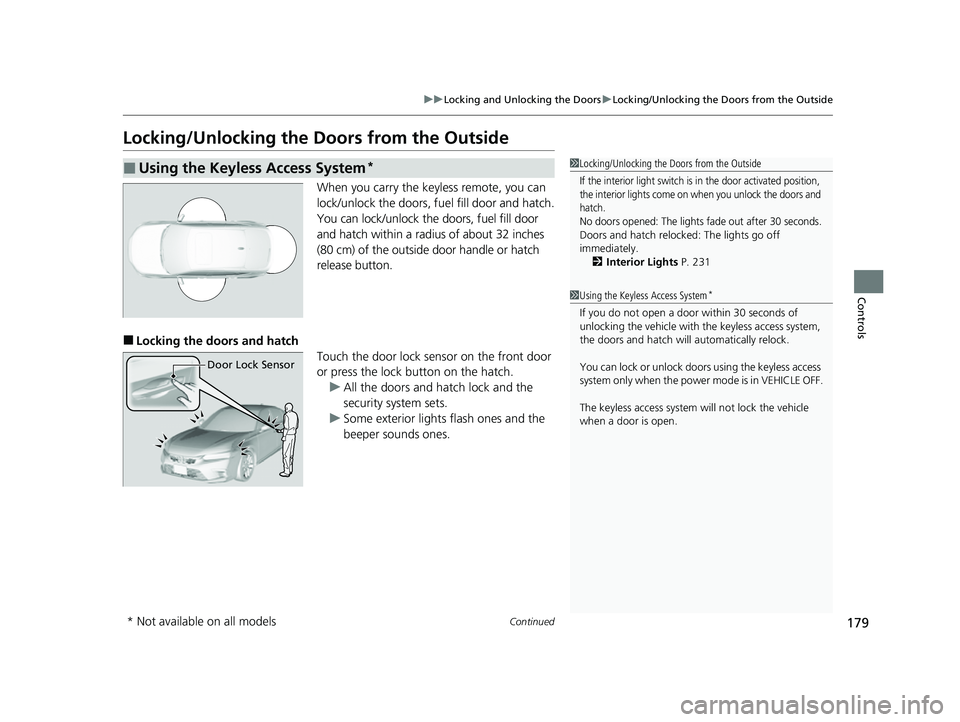
When you carry the keyless remote, you can
lock/unlock the doors, fuel fill door and hatch.
You can lock/unlock the doors, fuel fill door
and hatch within a radius of about 32 inches
(80 cm) of the outside door handle or hatch
release button.
■Locking the doors and hatch
Touch the door lock sensor on the front door
or press the lock button on the hatch.u All the doors and hatch lock and the
security system sets.
u Some exterior lights flash ones and the
beeper sounds ones.
■Using the Keyless Access System*1 Locking/Unlocking the Doors from the Outside
If the interior light switch is in the door activated position,
the interior lights come on when you unlock the doors and
hatch.
No doors opened: The lights fade out after 30 seconds.
Doors and hatch reloc ked: The lights go off
immediately.
2 Interior Lights P. 231
1Using the Keyless Access System*
If you do not open a door within 30 seconds of
unlocking the vehicle with the keyless access system,
the doors and hatch will automatically relock.
You can lock or unlock doors using the keyless access
system only when the power mode is in VEHICLE OFF.
The keyless access system will not lock the vehicle
when a door is open.
Door Lock Sensor
* Not available on all models
23 CIVIC HATCHBACK TYPE R-31T406100_03.book 179 ページ 2022年6月23日 木曜日 午後9時28分
Page 183 of 840
Continued181
uuLocking and Unlocking the Doors uLocking/Unlocking the Doors from the Outside
Controls
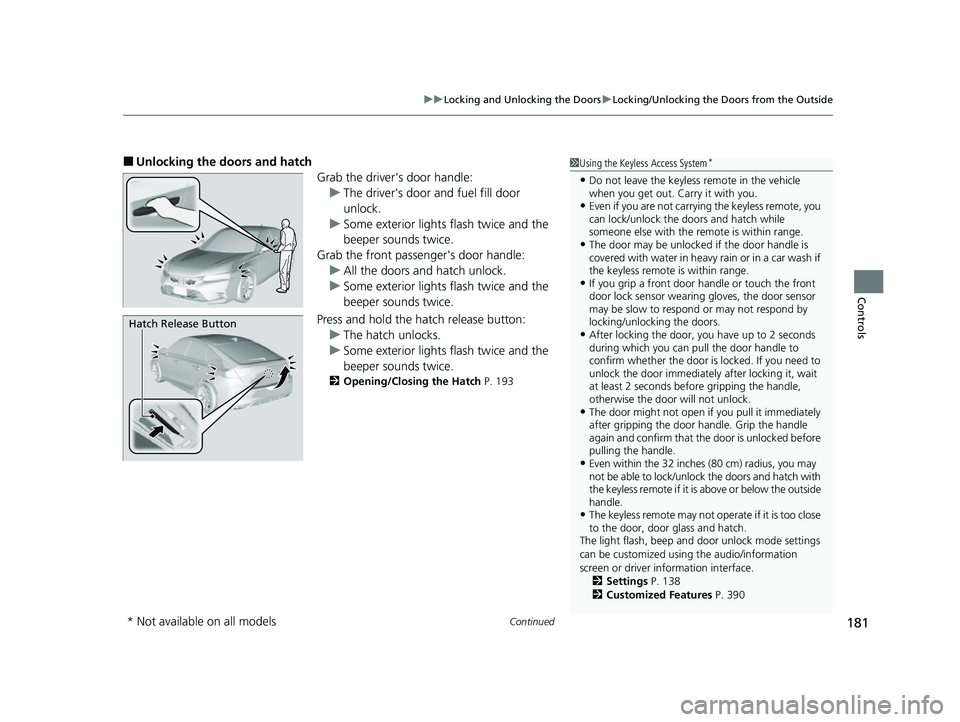
■Unlocking the doors and hatch
Grab the driver's door handle:u The driver's door and fuel fill door
unlock.
u Some exterior lights flash twice and the
beeper sounds twice.
Grab the front passenger's door handle: u All the doors and hatch unlock.
u Some exterior lights flash twice and the
beeper sounds twice.
Press and hold the hatch release button:
u The hatch unlocks.
u Some exterior lights flash twice and the
beeper sounds twice.
2 Opening/Closing the Hatch P. 193
1Using the Keyless Access System*
•Do not leave the keyless remote in the vehicle
when you get out. Carry it with you.
•Even if you are not carrying the keyless remote, you
can lock/unlock the do ors and hatch while
someone else with the remote is within range.
•The door may be unlocked if the door handle is
covered with water in heavy rain or in a car wash if
the keyless remote is within range.
•If you grip a front door handle or touch the front
door lock sensor wearing gloves, the door sensor
may be slow to respon d or may not respond by
locking/unlocking the doors.
•After locking the door, you have up to 2 seconds
during which you can pull the door handle to
confirm whether the door is locked. If you need to
unlock the door immediately after locking it, wait
at least 2 seconds befo re gripping the handle,
otherwise the door will not unlock.
•The door might not open if you pull it immediately
after gripping the door handle. Grip the handle
again and confirm that th e door is unlocked before
pulling the handle.
•Even within the 32 inches (80 cm) radius, you may
not be able to lock/unlock the doors and hatch with
the keyless remote if it is above or below the outside
handle.
•The keyless remote may not operate if it is too close
to the door, door glass and hatch.
The light flash, beep and door unlock mode settings
can be customized using the audio/information
screen or driver information interface. 2 Settings P. 138
2 Customized Features P. 390
Hatch Release Button
* Not available on all models
23 CIVIC HATCHBACK TYPE R-31T406100_03.book 181 ページ 2022年6月23日 木曜日 午後9時28分