bluetooth HONDA CIVIC 2023 Owner's Guide
[x] Cancel search | Manufacturer: HONDA, Model Year: 2023, Model line: CIVIC, Model: HONDA CIVIC 2023Pages: 840, PDF Size: 26.53 MB
Page 355 of 840
353
uuAudio System Basic Operation uAndroid AutoTM
Continued
Features
Android AutoTM
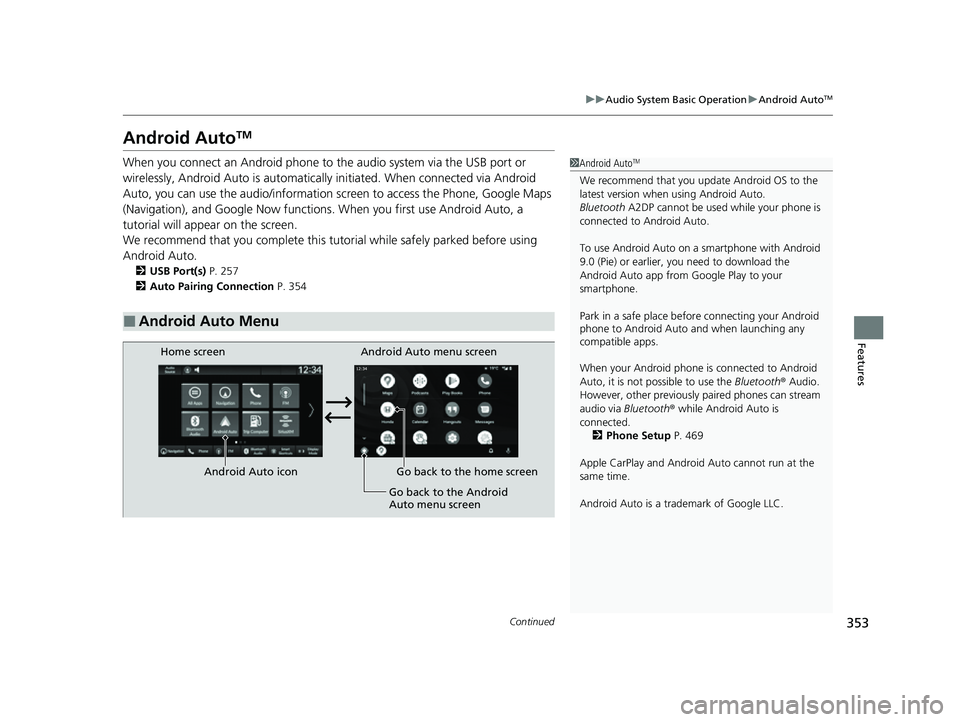
When you connect an Android phone to the audio system via the USB port or
wirelessly, Android Auto is automatically initiated. When connected via Android
Auto, you can use the audio/information screen to access the Phone, Google Maps
(Navigation), and Google Now functions. When you first use Android Auto, a
tutorial will appear on the screen.
We recommend that you comple te this tutorial while safely parked before using
Android Auto.
2 USB Port(s) P. 257
2 Auto Pairing Connection P. 354
■Android Auto Menu
1Android AutoTM
We recommend that you upda te Android OS to the
latest version when using Android Auto.
Bluetooth A2DP cannot be used while your phone is
connected to Android Auto.
To use Android Auto on a smartphone with Android
9.0 (Pie) or earl ier, you need to download the
Android Auto app from Google Play to your
smartphone.
Park in a safe place befo re connecting your Android
phone to Android Auto and when launching any
compatible apps.
When your Android phone is connected to Android
Auto, it is not possible to use the Bluetooth® Audio.
However, other previously paired phones can stream
audio via Bluetooth ® while Android Auto is
connected. 2 Phone Setup P. 469
Apple CarPlay and Android Auto cannot run at the
same time.
Android Auto is a trademark of Google LLC.
Android Auto menu screen
Home screen
Android Auto icon Go back to the home screen Go back to the Android
Auto menu screen
23 CIVIC HATCHBACK TYPE R-31T406100_03.book 353 ページ 2022年6月23日 木曜日 午後9時28分
Page 357 of 840
Continued355
uuAudio System Basic Operation uAndroid AutoTM
Features
1. Connect the Android phone to the USB port using the USB cable.
2 USB Port(s) P. 257
uThe confirmation screen will be displayed.
2. Select Yes.
u If you do not want to connect Android Auto, select No.
You may change the cons ent settings under the Smartphone Connection settings
menu.
■Connect Android Auto wirelessly on the home screen
1. Press the button.
2. Select Smartphone Connection .
3. Select + Connect New Device .
4. Pair the Android phone to the vehicle's Bluetooth® HandsFreeLink ® (HFL) system.
2Phone Setup P. 469
5.Select Yes.
u If your Android phone asks to accept for connecting Android Auto, accept for
connection. A confirmation message for HondaLink Assist appears.
6. Select Yes or No .
■Connecting Android Auto Using the USB Cable to the USB Port
■Connect Android Auto Wirelessly
1Connecting Android Auto Using the USB Cable to the USB Port
Only initialize Android Au to when you are safely
parked. When Android Auto first detects your phone,
you will need to set up your phone so that auto
pairing is possibl e. Refer to the instruction manual
that came with your phone.
You can use the following procedure to disconnect or
delete the devices connecting Android Auto after you
have completed the initial setup:
Select General Settings
Smartphone Connection Android Auto
Select device
Use of user and vehicle information
The use and handling of user and vehicle information
transmitted to/from your phone by Android Auto is
governed by the Google's Privacy Policy.
23 CIVIC HATCHBACK TYPE R-31T406100_03.book 355 ページ 2022年6月23日 木曜日 午後9時28分
Page 358 of 840
356
uuAudio System Basic Operation uAndroid AutoTM
Features
■Connect Android Auto wirelessly on the Android Auto device list
1. Press the button.
2. Select General Settings .
3. Select Smartphone Connection .
4. Select Android Auto .
5. Select + Connect New Device .
6. Pair the Android phone to the vehicle's Bluetooth® HandsFreeLink ® (HFL) system.
2Phone Setup P. 469
7.Select Yes.
u If your Android phone asks to accept for connecting Android Auto, accept for
connection. A confirmation message for HondaLink Assist appears.
8. Select Yes or No.
■Connect Android Auto wirelessly on the Bluetooth® device list
1. Press the button.
2. Select General Settings .
3. Select Connections .
4. Select Bluetooth .
5. Select + Connect New Device .
6. Pair the Android phone to the vehicle's Bluetooth® HandsFreeLink ® (HFL) system.
2Phone Setup P. 469
7.Check the box on Android Auto.
u If you select Android Auto , you cannot select Audio and Phone.
8. Select Connect .
9. Select Yes.
u If your Android phone asks to accept for connecting Android Auto, accept for
connection. A confirmation messag e for HondaLink Assist appears.
10. Select Yes or No.
23 CIVIC HATCHBACK TYPE R-31T406100_03.book 356 ページ 2022年6月23日 木曜日 午後9時28分
Page 359 of 840
357
uuAudio System Basic Operation uAndroid AutoTM
Continued
Features
■Connect Android Auto wireless ly with the steering wheel
1. Press and hold the (talk) button on the steering wheel.
2. Pair the Android phone to the vehicle's Bluetooth® HandsFreeLink ® (HFL) system.
2Phone Setup P. 469
3.Check the box on Android Auto.
u If you select Android Auto , you cannot select Audio and Phone .
4. Select Connect .
5. Select Yes.
u If your Android phone asks to accept for connecting Android Auto, accept for
connection. A confirmation message for HondaLink Assist appears.
6. Select Yes or No .
■Connect Android Auto wirelessly at start-up (when there is no phone
paired to the system)
1. Set the power mode to ACCESSORY or ON.
2. Select OK.
u If there is no registered device, the Bluetooth® pairing screen will be displayed.
u If you check the box with Do not show this again, this screen will not be
displayed.
3. Pair the Android phone to the vehicle's Bluetooth® HandsFreeLink ® (HFL) system.
2Phone Setup P. 469
4.Check the box on Android Auto.
u If you select Android Auto , you cannot select Audio and Phone .
5. Select Connect .
6. Select Yes.
u If your Android phone asks to accept for connecting Android Auto, accept for
connection. A confirmation message for HondaLink Assist appears.
7. Select Yes or No .
23 CIVIC HATCHBACK TYPE R-31T406100_03.book 357 ページ 2022年6月23日 木曜日 午後9時28分
Page 380 of 840
378
uuGeneral Information on the Audio System uLicense Information
Features
License Information
The Bluetooth ® word mark and logos are register ed trademarks owned by Bluetooth
SIG, Inc. and any use of such marks by PANASONIC CORPORATION is under license.
Other trademarks and trade names are those of their respective owners.
The Bluetooth ® word mark and logos are register ed trademarks owned by Bluetooth
SIG, Inc. and any use of such marks by MITSUBISHI ELECTRIC is under license.
Other trademarks and trade names are those of their respective owners.
https://www.bluetooth.c om/develop-with-bluetooth/marketing-branding/
This product is protected by certain intelle ctual property rights of Microsoft. Use or
distribution of such technology outside of this product is prohibited without a
license from Microsoft.
■Bluetooth
■Windows Media
23 CIVIC HATCHBACK TYPE R-31T406100_03.book 378 ページ 2022年6月23日 木曜日 午後9時28分
Page 385 of 840
383
uuCustomized Features u
Continued
Features
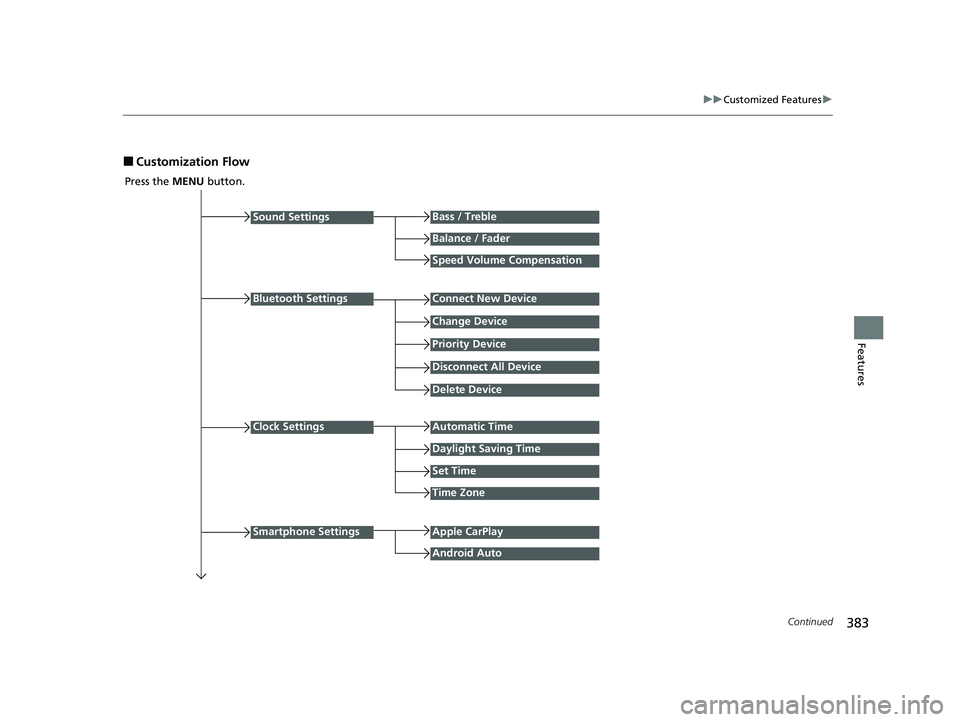
■Customization Flow
Press the MENU button.
Sound Settings
Bluetooth Settings
Bass / Treble
Balance / Fader
Speed Volume Compensation
Connect New Device
Change Device
Priority Device
Clock Settings
Smartphone Settings
Disconnect All Device
Delete Device
Automatic Time
Set Time
Time Zone
Apple CarPlay
Android Auto
Daylight Saving Time
23 CIVIC HATCHBACK TYPE R-31T406100_03.book 383 ページ 2022年6月23日 木曜日 午後9時28分
Page 387 of 840
385
uuCustomized Features u
Continued
Features
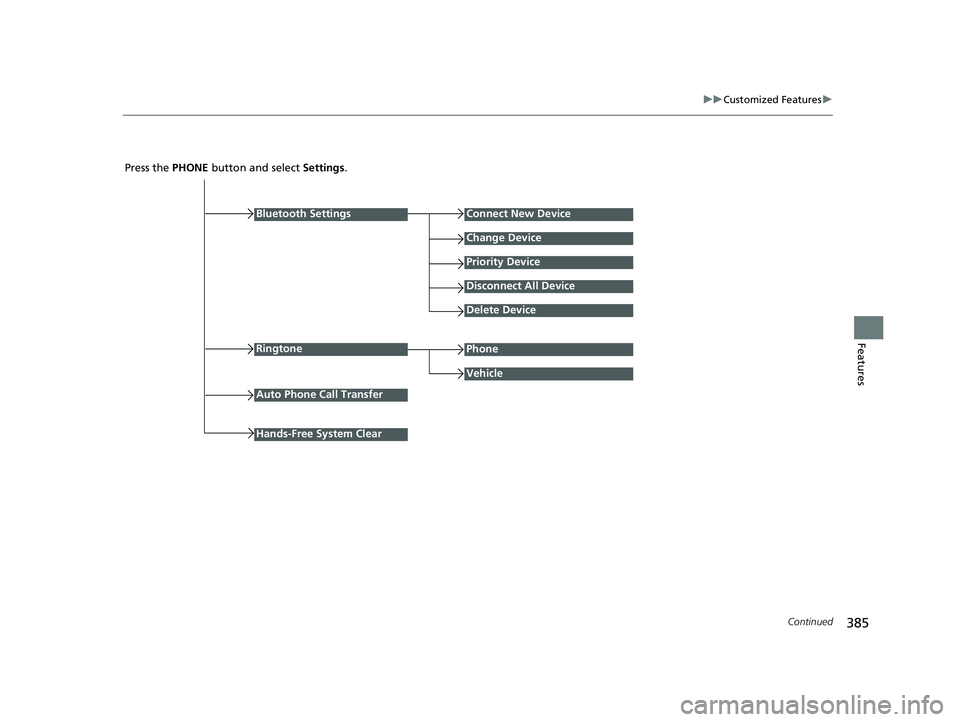
Press the PHONE button and select Settings .
Bluetooth Settings
Ringtone
Connect New Device
Change Device
Priority Device
Disconnect All Device
Delete Device
Vehicle
Auto Phone Call Transfer
Phone
Hands-Free System Clear
23 CIVIC HATCHBACK TYPE R-31T406100_03.book 385 ページ 2022年6月23日 木曜日 午後9時28分
Page 388 of 840
386
uuCustomized Features u
Features
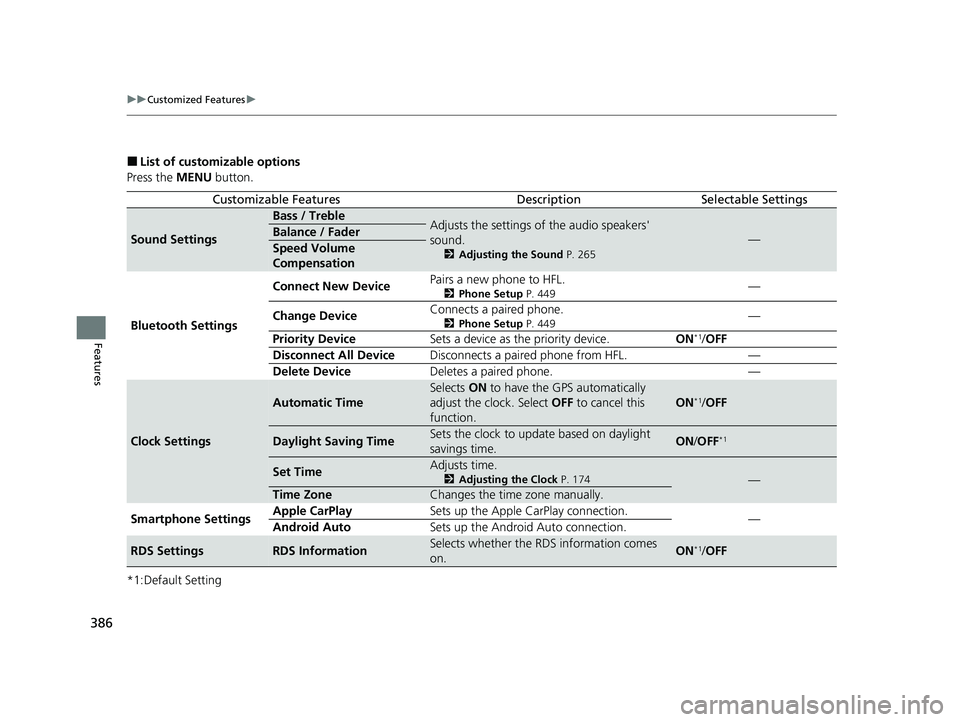
■List of customizable options
Press the MENU button.
*1:Default Setting
Customizable FeaturesDescriptionSelectable Settings
Sound Settings
Bass / TrebleAdjusts the settings of the audio speakers'
sound.
2 Adjusting the Sound P. 265
—Balance / Fader
Speed Volume
Compensation
Bluetooth Settings Connect New Device
Pairs a new phone to HFL.
2
Phone Setup P. 449—
Change Device Connects a paired phone.
2
Phone Setup P. 449—
Priority Device Sets a device as the priority device. ON
*1/OFF
Disconnect All Device Disconnects a paired phone from HFL. —
Delete Device Deletes a paired phone. —
Clock Settings
Automatic Time
Selects ON to have the GPS automatically
adjust the clock. Select OFF to cancel this
function.
ON*1/ OFF
Daylight Saving TimeSets the clock to update based on daylight
savings time.ON /OFF*1
Set TimeAdjusts time.
2 Adjusting the Clock P. 174—
Time ZoneChanges the time zone manually.
Smartphone Settings Apple CarPlay
Sets up the Apple CarPlay connection.
—
Android Auto Sets up the Android Auto connection.
RDS SettingsRDS InformationSelects whether the RDS information comes
on.ON*1/OFF
23 CIVIC HATCHBACK TYPE R-31T406100_03.book 386 ページ 2022年6月23日 木曜日 午後9時28分
Page 390 of 840
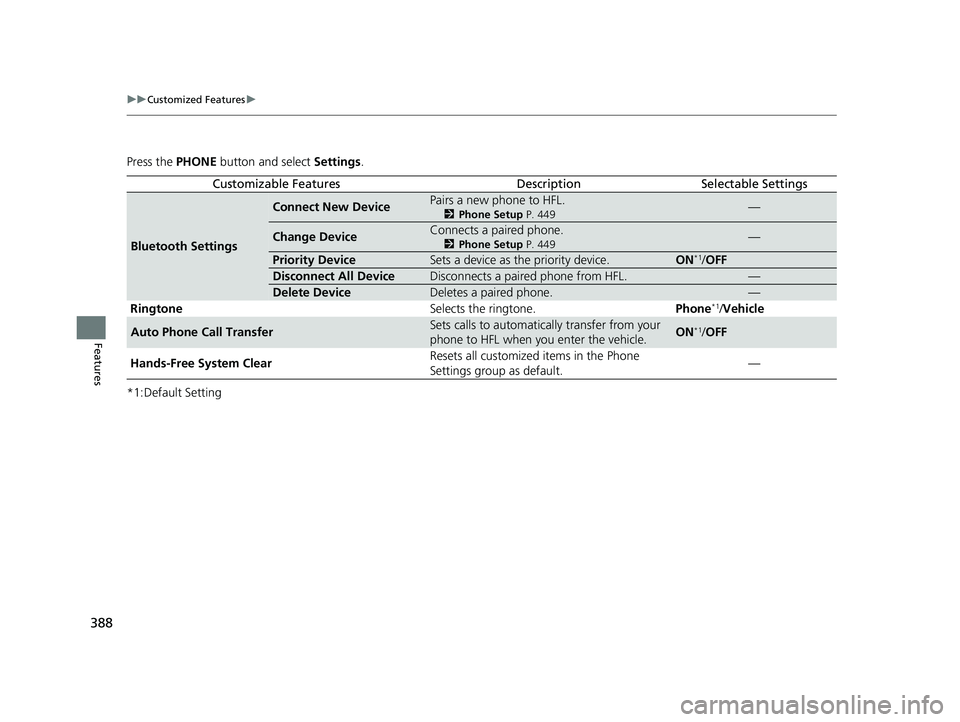
388
uuCustomized Features u
Features
Press the PHONE button and select Settings.
*1:Default Setting
Customizable FeaturesDescriptionSelectable Settings
Bluetooth Settings
Connect New DevicePairs a new phone to HFL.
2 Phone Setup P. 449—
Change DeviceConnects a paired phone.
2Phone Setup P. 449—
Priority DeviceSets a device as the priority device.ON*1/OFF
Disconnect All DeviceDisconnects a paired phone from HFL.—
Delete DeviceDeletes a paired phone.—
Ringtone Selects the ringtone.Phone*1/Vehicle
Auto Phone Call TransferSets calls to automatically transfer from your
phone to HFL when you enter the vehicle.ON*1/ OFF
Hands-Free System Clear Resets all customized
items in the Phone
Settings group as default. —
23 CIVIC HATCHBACK TYPE R-31T406100_03.book 388 ページ 2022年6月23日 木曜日 午後9時28分
Page 395 of 840
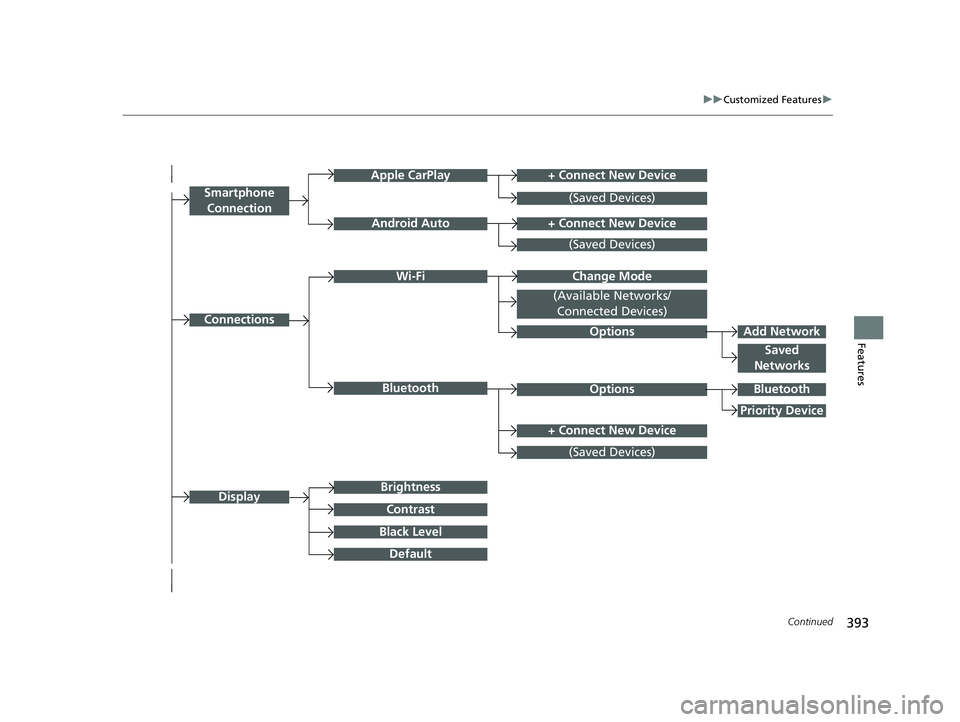
393
uuCustomized Features u
Continued
Features
+ Connect New DeviceApple CarPlay
ConnectionsOptions
Options
Saved
Networks
Brightness
Smartphone
Connection
Display
Android Auto
Wi-Fi
Bluetooth
Black Level
Default
Contrast
(Saved Devices)
+ Connect New Device
(Saved Devices)
Change Mode
(Available Networks/ Connected Devices)
+ Connect New Device
(Saved Devices)
Bluetooth
Priority Device
Add Network
23 CIVIC HATCHBACK TYPE R-31T406100_03.book 393 ページ 2022年6月23日 木曜日 午後9時28分