instrument panel HONDA CIVIC 2023 Manual Online
[x] Cancel search | Manufacturer: HONDA, Model Year: 2023, Model line: CIVIC, Model: HONDA CIVIC 2023Pages: 840, PDF Size: 26.53 MB
Page 172 of 840
uuGauges and Driver Information Interface uDriver Information Interface Right Side Area (B-type-Meter)
170
Instrument Panel
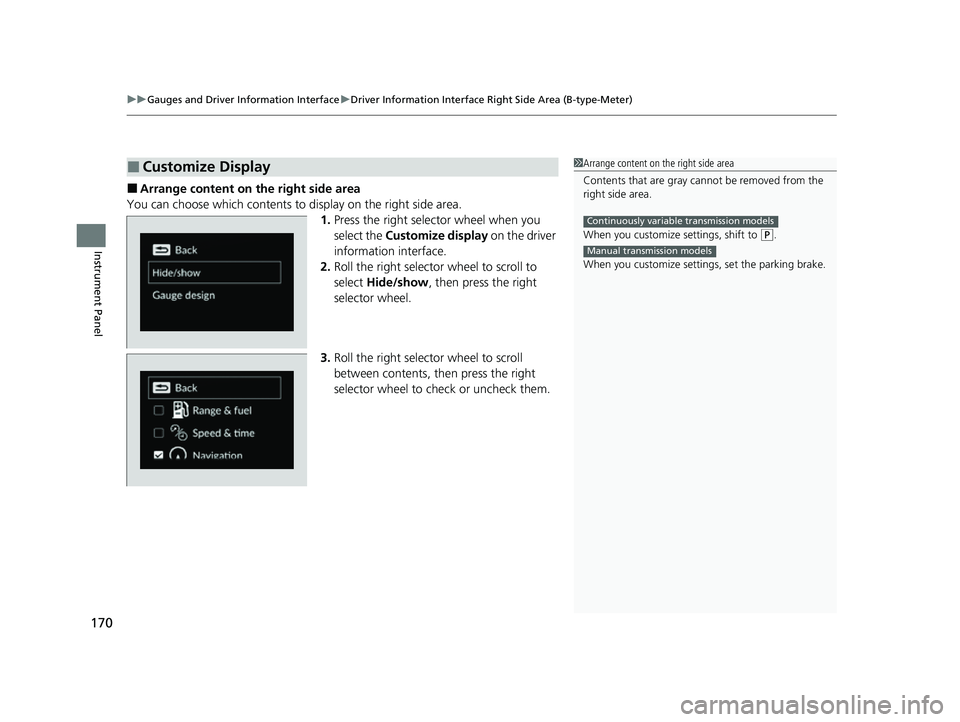
■Arrange content on the right side area
You can choose which contents to display on the right side area. 1.Press the right selector wheel when you
select the Customize display on the driver
information interface.
2. Roll the right selector wheel to scroll to
select Hide/show , then press the right
selector wheel.
3. Roll the right selector wheel to scroll
between contents, th en press the right
selector wheel to check or uncheck them.
■Customize Display1 Arrange content on the right side area
Contents that are gray ca nnot be removed from the
right side area.
When you customize settings, shift to
( P.
When you customize setti ngs, set the parking brake.
Continuously variable transmission models
Manual transmission models
23 CIVIC HATCHBACK TYPE R-31T406100_03.book 170 ページ 2022年6月23日 木曜日 午後9時28分
Page 173 of 840
171
uuGauges and Driver Information Interface uDriver Information Interface Right Side Area (B-type-Meter)
Instrument Panel
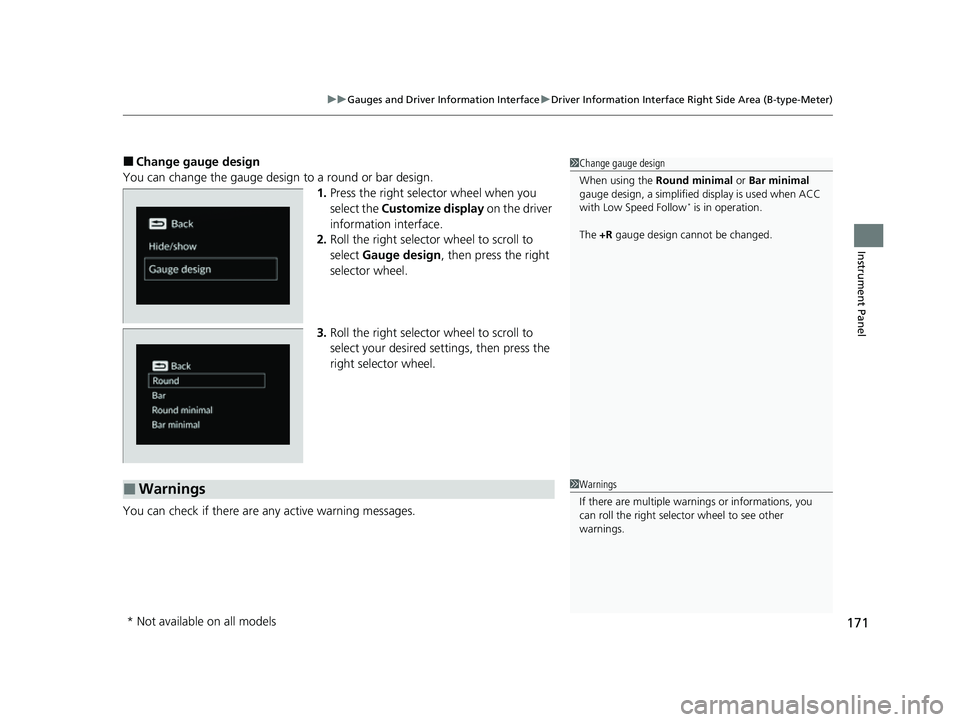
■Change gauge design
You can change the gauge design to a round or bar design. 1.Press the right selector wheel when you
select the Customize display on the driver
information interface.
2. Roll the right selector wheel to scroll to
select Gauge design , then press the right
selector wheel.
3. Roll the right selector wheel to scroll to
select your desired settings, then press the
right selector wheel.
You can check if there are any active warning messages.1 Change gauge design
When using the Round minimal or Bar minimal
gauge design, a simplified display is used when ACC
with Low Speed Follow
* is in operation.
The +R gauge design cannot be changed.
■Warnings1Warnings
If there are multiple warn ings or informations, you
can roll the right selector wheel to see other
warnings.
* Not available on all models
23 CIVIC HATCHBACK TYPE R-31T406100_03.book 171 ページ 2022年6月23日 木曜日 午後9時28分
Page 198 of 840
uuSecurity System uSecurity System Alarm
196
Controls
■When the security sy stem alarm activates
The horn sounds intermittently, and some exterior lights flash.
■To deactivate the security system alarm
Unlock the vehicle using the key, remote transmitter or keyless access system*, or
power mode is in ON. The system, along with the horn and flashing lights, is
deactivated.
■Setting the security system alarm
The security system alarm automatically sets when the following conditions have
been met:
• The power mode is set to VEHICLE OFF.
• The hood is closed.
• All doors and hatch are locked from outs ide with the remote transmitter, or
keyless access system
*.
■When the security system alarm sets
The security system alarm indicator in the instrument panel blinks and the blinking
interval changes after about 15 seconds.
■To cancel the security system alarm
The security system alarm is canceled when the vehicle is unlocked using the remote
transmitter or keyless access system
*, or when the power mode is set to ON. The
security system alarm indicator goes off at the same time.
1 Security System Alarm
Do not set the security system alarm when someone
is in the vehicle or a window is open. The system can
accidentally activate when:
•Unlocking the door with the lock tab.•Opening the hood with the hood release.
•Taking the transmission out of ( P.
If the battery goes dead after you have set the
security system alarm, the security alarm may go off
once the battery is re charged or replaced.
If this occurs, deactivate the security system alarm by
unlocking a door using the remote transmitter or
keyless access system
*.
Continuously variable transmission models
* Not available on all models
23 CIVIC HATCHBACK TYPE R-31T406100_03.book 196 ページ 2022年6月23日 木曜日 午後9時28分
Page 206 of 840
uuOperating the Switches Around the Steering Wheel uENGINE START/STOP Button
204
Controls
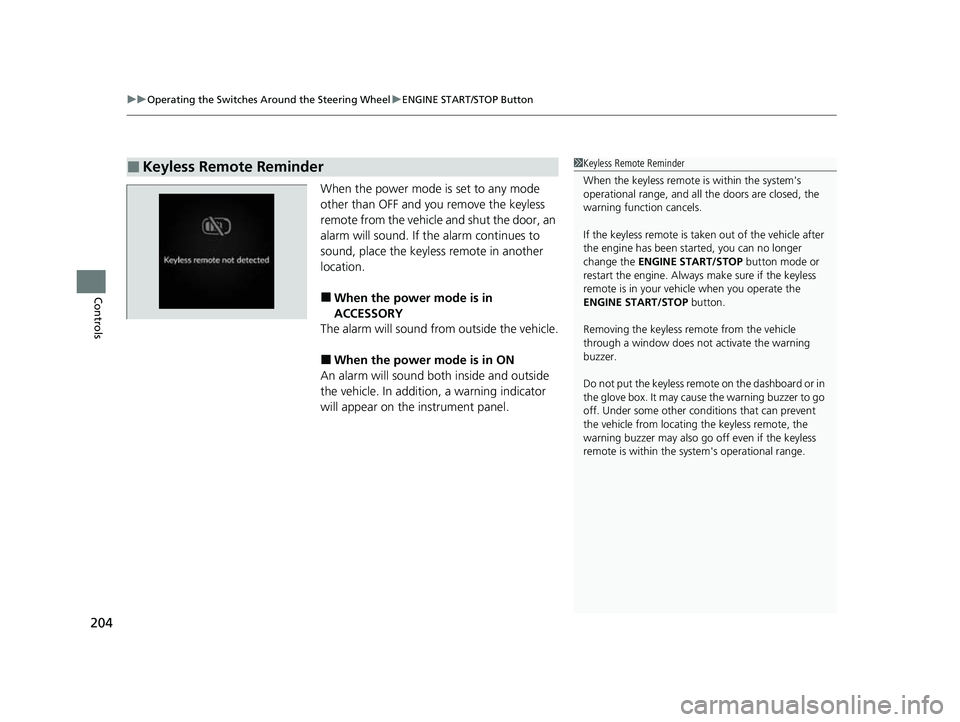
When the power mode is set to any mode
other than OFF and yo u remove the keyless
remote from the vehicle and shut the door, an
alarm will sound. If th e alarm continues to
sound, place the keyless remote in another
location.
■When the power mode is in
ACCESSORY
The alarm will sound from outside the vehicle.
■When the power mode is in ON
An alarm will sound both inside and outside
the vehicle. In addition, a warning indicator
will appear on the instrument panel.
■Keyless Remote Reminder1 Keyless Remote Reminder
When the keyless remote is within the system's
operational range, and all the doors are closed, the
warning function cancels.
If the keyless remote is taken out of the vehicle after
the engine has been st arted, you can no longer
change the ENGINE START/STOP button mode or
restart the engine. Always make sure if the keyless
remote is in your vehi cle when you operate the
ENGINE START/STOP button.
Removing the keyless remote from the vehicle
through a window does not activate the warning
buzzer.
Do not put the keyless remo te on the dashboard or in
the glove box. It may cause the warning buzzer to go
off. Under some other cond itions that can prevent
the vehicle from locating the keyless remote, the
warning buzzer may also go off even if the keyless
remote is within the system's operational range.
23 CIVIC HATCHBACK TYPE R-31T406100_03.book 204 ページ 2022年6月23日 木曜日 午後9時28分
Page 207 of 840
205
uuOperating the Switches Around the Steering Wheel uTurn Signals
Controls
Turn Signals
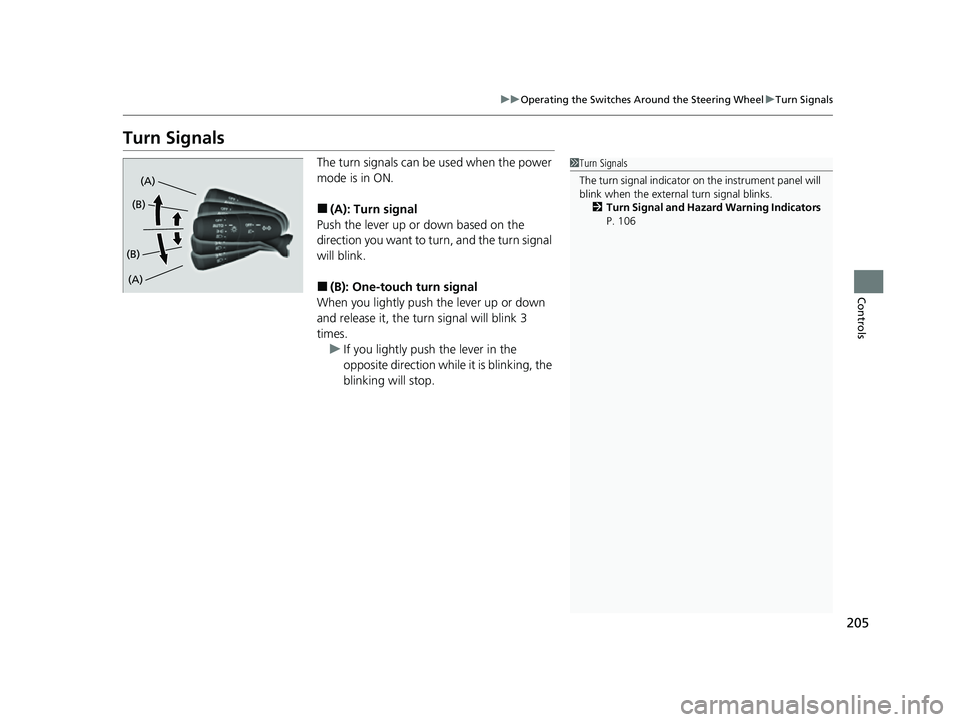
The turn signals can be used when the power
mode is in ON.
■(A): Turn signal
Push the lever up or down based on the
direction you want to turn, and the turn signal
will blink.
■(B): One-touc h turn signal
When you lightly push the lever up or down
and release it, the turn signal will blink 3
times.
u If you lightly push the lever in the
opposite direction while it is blinking, the
blinking will stop.
1Turn Signals
The turn signal indicator on the instrument panel will
blink when the external turn signal blinks.
2 Turn Signal and Hazard Warning Indicators
P. 106
(A)
(A) (B)
(B)
23 CIVIC HATCHBACK TYPE R-31T406100_03.book 205 ページ 2022年6月23日 木曜日 午後9時28分
Page 210 of 840
uuOperating the Switches Around the Steering Wheel uLight Switches
208
Controls
The headlights automatically come on when the wipers are used several times within
a certain number of intervals wi th the headlight switch in AUTO.
The headlights automatically go off a few minutes later if the wipers are stopped.
The headlights, all other exterior lights, an d the instrument panel lights turn off 15
seconds after you set the power mode to VE HICLE OFF, take the keyless remote with
you, and close th e driver's door.
If you set the power mode to VEHICLE OFF with the headlight switch on, but do not
open the door, the lights turn off after 10 minutes (3 minutes, if the switch is in the
AUTO position).
The lights turn on again when you unlock or open the driver's door. If you unlock
the door, but do not open it within 15 seconds, the lights go off. If you open the
driver's door, you will hear a reminder chime alerting you that the lights are on.
■Headlight Integration with Wipers
■Automatic Lighting Off Feature
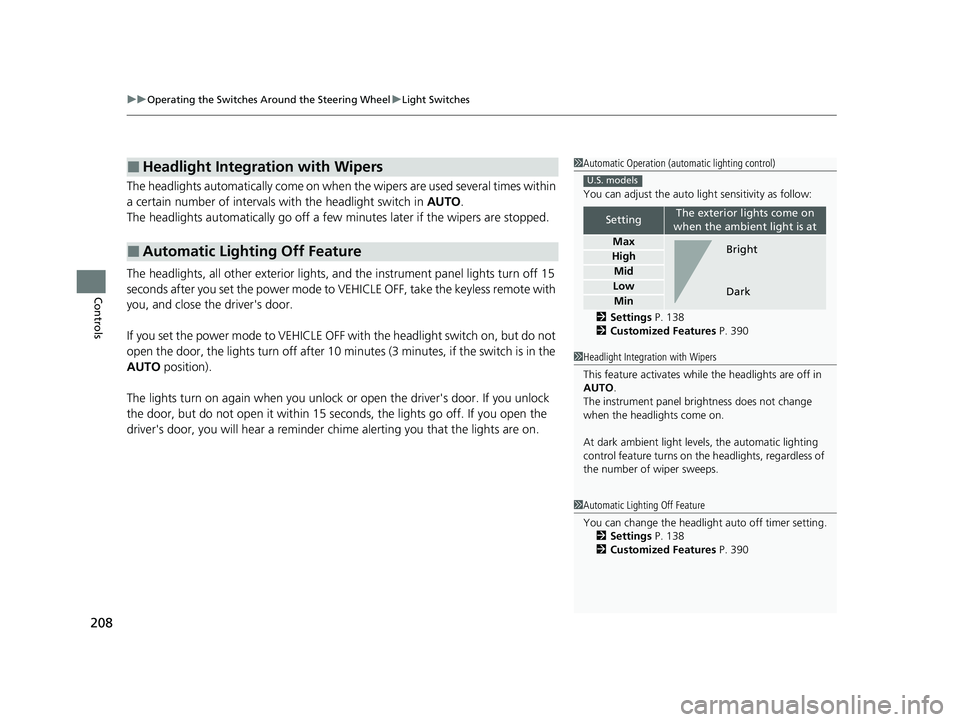
1Automatic Operation (aut omatic lighting control)
You can adjust the auto li ght sensitivity as follow:
2 Settings P. 138
2 Customized Features P. 390
SettingThe exterior lights come on
when the ambient light is at
Max
High
Mid
Low
Min
U.S. models
Bright
Dark
1 Headlight Integration with Wipers
This feature activates while the headlights are off in
AUTO .
The instrument panel br ightness does not change
when the headlights come on.
At dark ambient light levels, the automatic lighting
control feature turns on the headlights, regardless of
the number of wiper sweeps.
1 Automatic Lighting Off Feature
You can change the headlight auto off timer setting.
2 Settings P. 138
2 Customized Features P. 390
23 CIVIC HATCHBACK TYPE R-31T406100_03.book 208 ページ 2022年6月23日 木曜日 午後9時28分
Page 219 of 840
217
uuOperating the Switches Around the Steering Wheel uBrightness Control
Controls
Brightness Control
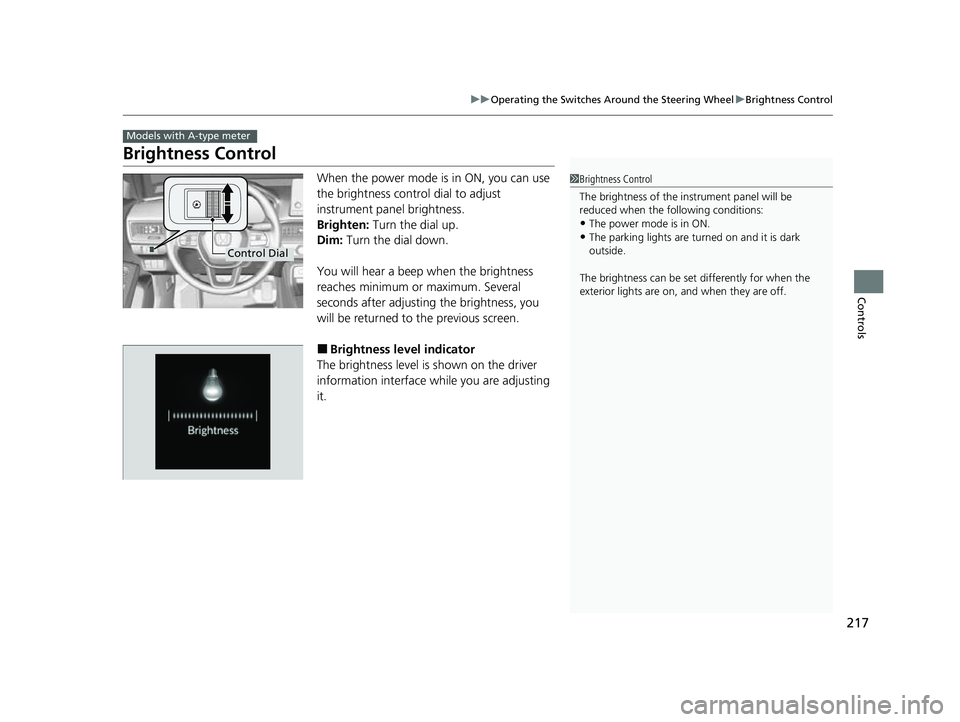
When the power mode is in ON, you can use
the brightness control dial to adjust
instrument panel brightness.
Brighten: Turn the dial up.
Dim: Turn the dial down.
You will hear a beep when the brightness
reaches minimum or maximum. Several
seconds after adjusting the brightness, you
will be returned to the previous screen.
■Brightness level indicator
The brightness level is shown on the driver
information interface while you are adjusting
it.
Models with A-type meter
1 Brightness Control
The brightness of the in strument panel will be
reduced when the following conditions:
•The power mode is in ON.
•The parking lights are turn ed on and it is dark
outside.
The brightness can be set differently for when the
exterior lights are on, and when they are off.
Control Dial
23 CIVIC HATCHBACK TYPE R-31T406100_03.book 217 ページ 2022年6月23日 木曜日 午後9時28分
Page 220 of 840
218
uuOperating the Switches Around the Steering Wheel uBrightness Control
Controls
Brightness Control
The brightness of the gauge is automatically
adjusted depending on the ambient
brightness.
• The brightness becomes darker when the
ambient light is dark.
• The brightness become s brighter when the
ambient light is bright.
■Adjusting the brightness manually
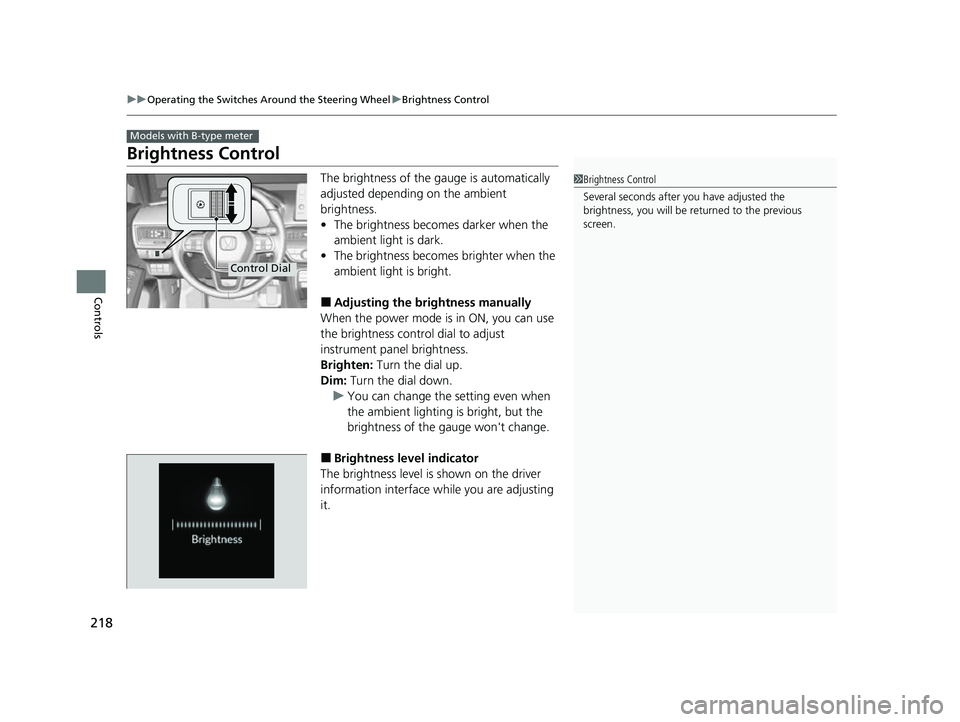
When the power mode is in ON, you can use
the brightness control dial to adjust
instrument panel brightness.
Brighten: Turn the dial up.
Dim: Turn the dial down.
u You can change the setting even when
the ambient lighting is bright, but the
brightness of the gauge won't change.
■Brightness level indicator
The brightness level is shown on the driver
information interface wh ile you are adjusting
it.
Models with B-type meter
1 Brightness Control
Several seconds after you have adjusted the
brightness, you will be re turned to the previous
screen.
Control Dial
23 CIVIC HATCHBACK TYPE R-31T406100_03.book 218 ページ 2022年6月23日 木曜日 午後9時28分
Page 221 of 840
219
uuOperating the Switches Around the Steering Wheel uAdjusting the Steering Wheel
Controls
Adjusting the Steering Wheel
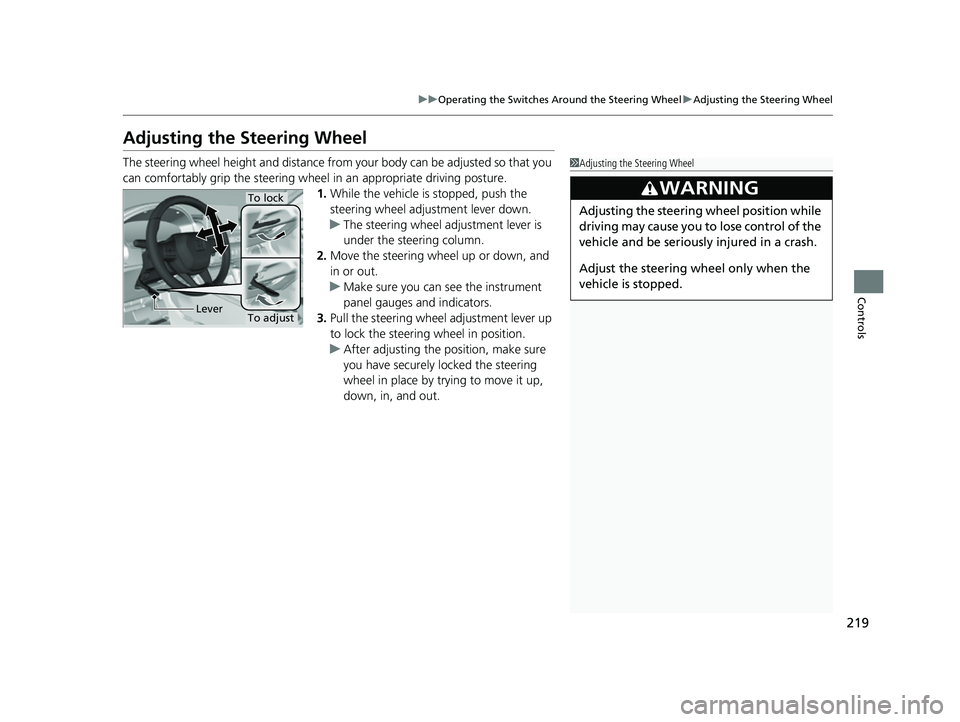
The steering wheel height and distance from your body can be adjusted so that you
can comfortably grip the steering wheel in an appropriate driving posture.
1. While the vehicle is stopped, push the
steering wheel adjustment lever down.
u The steering wheel adjustment lever is
under the steering column.
2. Move the steering wheel up or down, and
in or out.
u Make sure you can see the instrument
panel gauges and indicators.
3. Pull the steering wheel adjustment lever up
to lock the steering wheel in position.
u After adjusting the position, make sure
you have securely locked the steering
wheel in place by trying to move it up,
down, in, and out.1Adjusting the Steering Wheel
3WARNING
Adjusting the steering wheel position while
driving may cause you to lose control of the
vehicle and be seriously injured in a crash.
Adjust the steering wh eel only when the
vehicle is stopped.
To adjust
To lock
Lever
23 CIVIC HATCHBACK TYPE R-31T406100_03.book 219 ページ 2022年6月23日 木曜日 午後9時28分
Page 409 of 840
407
uuCustomized Features u
Continued
Features
*1:Default Setting
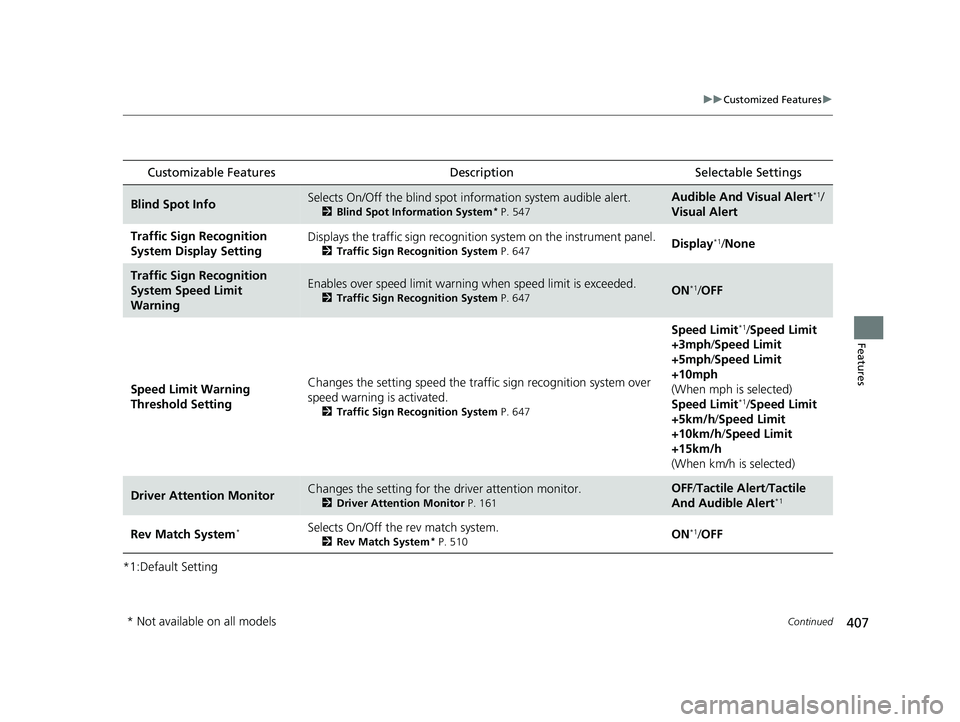
Customizable Features Description Selectable Settings
Blind Spot InfoSelects On/Off the blind spot information system audible alert.
2Blind Spot Information System* P. 547
Audible And Visual Alert*1/
Visual Alert
Traffic Sign Recognition
System Display SettingDisplays the traffic sign recognition system on the instrument panel.
2Traffic Sign Recognition System P. 647Display*1/None
Traffic Sign Recognition
System Speed Limit
WarningEnables over speed limit warning when speed limit is exceeded.
2Traffic Sign Recognition System P. 647ON*1/OFF
Speed Limit Warning
Threshold Setting Changes the setting speed the traffi
c sign recognition system over
speed warning is activated.
2 Traffic Sign Recognition System P. 647
Speed Limit*1/Speed Limit
+3mph /Speed Limit
+5mph /Speed Limit
+10mph
(When mph is selected)
Speed Limit
*1/ Speed Limit
+5km/h /Speed Limit
+10km/h /Speed Limit
+15km/h
(When km/h is selected)
Driver Attention MonitorChanges the setting for the driver attention monitor.
2Driver Attention Monitor P. 161
OFF/Tactile Alert/ Tactile
And Audible Alert*1
Rev Match System*Selects On/Off the rev match system.
2Rev Match System* P. 510ON*1/OFF
* Not available on all models
23 CIVIC HATCHBACK TYPE R-31T406100_03.book 407 ページ 2022年6月23日 木曜日 午後9時28分