stop HONDA CIVIC 2023 Owners Manual
[x] Cancel search | Manufacturer: HONDA, Model Year: 2023, Model line: CIVIC, Model: HONDA CIVIC 2023Pages: 840, PDF Size: 26.53 MB
Page 6 of 840
Software End User License Agreement
Your vehicle comes equipped with software, which is governed by
the End User License Agreement in Owner's Manual, and which
contains a binding arbitration clau se. Please refer to the End User
License Agreement for the terms and conditions governing your
use of the installed software, as well as the applications, services,
functions, and content provided through the software. Your use of
the installed software will serve as your consent to the terms and
conditions of the End Us er License Agreement.
You may opt out within 30 days of your initial use of the Software
by sending a signed, written notice to HONDA at American Honda
Motor Co., Inc., Honda Automobile Customer Service, Mail Stop
CHI-5, 1919 Torrance Blvd., Torrance, CA 90501-2746.
Privacy Notice
This vehicle may share location an d usage information. To manage
this setting, visit www.hondalink.com/vehicle-data-choices .
To learn more about how we collect and use Personal
Information, please read our Privacy Policy, accessible at
www.honda.com .
23 CIVIC HATCHBACK TYPE R-31T406100_03.book 4 ページ 2022年6月23日 木曜日 午後9時28分
Page 10 of 840
8
Quick Reference Guide
Quick Reference Guide
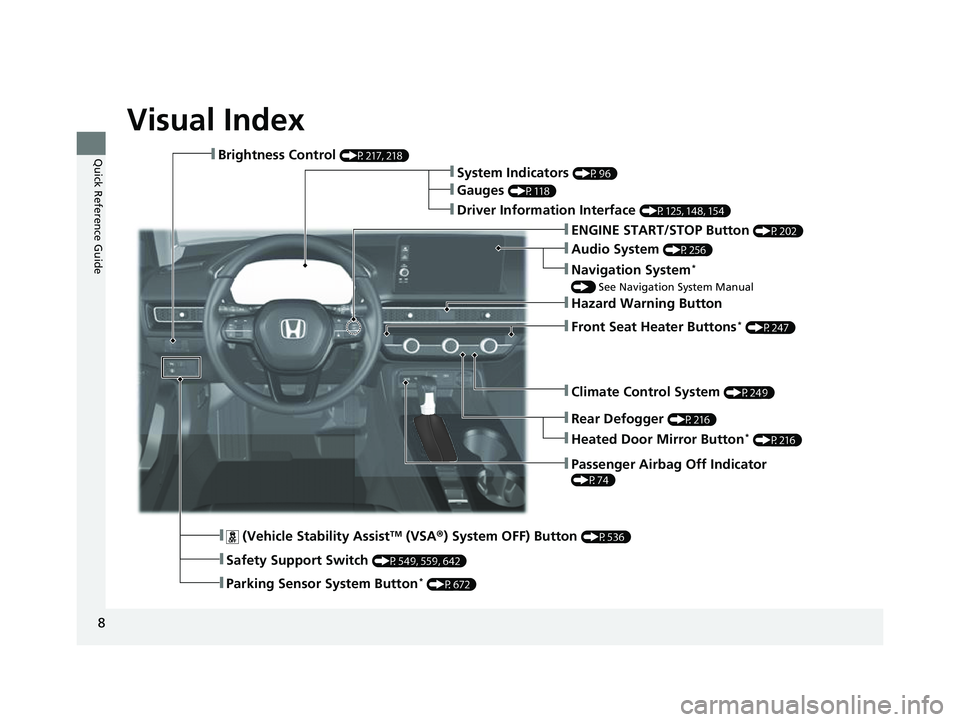
Visual Index
❚Climate Control System (P249)
❚Rear Defogger (P216)
❚Heated Door Mirror Button* (P216)
❚Hazard Warning Button
❚Passenger Airbag Off Indicator
(P74)
❚Audio System (P256)
❚Navigation System*
() See Navigation System Manual
❚Front Seat Heater Buttons* (P247)
❚ (Vehicle Stability AssistTM (VSA ®) System OFF) Button (P536)
❚Safety Support Switch (P549, 559, 642)
❚Parking Sensor System Button* (P672)
❚Brightness Control (P217, 218)
❚System Indicators (P96)
❚Gauges (P118)
❚Driver Information Interface (P125, 148, 154)
❚ENGINE START/STOP Button (P202)
23 CIVIC HATCHBACK TYPE R-31T406100_03.book 8 ページ 2022年6月23日 木曜日 午後9時28分
Page 12 of 840
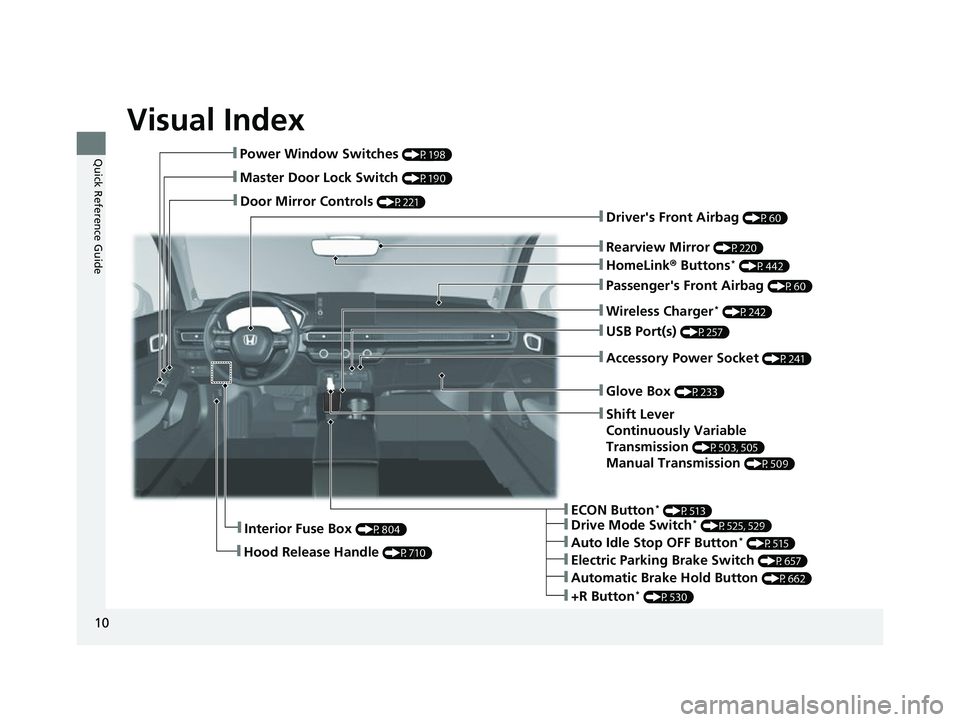
Visual Index
10
Quick Reference Guide❚Power Window Switches (P198)
❚Master Door Lock Switch (P190)
❚Door Mirror Controls (P221)
❚Interior Fuse Box (P804)
❚Hood Release Handle (P710)
❚Driver's Front Airbag (P60)
❚Rearview Mirror (P220)
❚HomeLink® Buttons* (P442)
❚Passenger's Front Airbag (P60)
❚Wireless Charger* (P242)
❚USB Port(s) (P257)
❚Accessory Power Socket (P241)
❚Glove Box (P233)
❚Shift Lever
Continuously Variable
Transmission
(P503, 505)
Manual Transmission (P509)
❚ECON Button* (P513)
❚Electric Parking Brake Switch (P657)
❚Drive Mode Switch* (P525, 529)
❚Auto Idle Stop OFF Button* (P515)
❚Automatic Brake Hold Button (P662)
❚+R Button* (P530)
23 CIVIC HATCHBACK TYPE R-31T406100_03.book 10 ページ 2022年6月23日 木曜日 午後9時28分
Page 15 of 840
13
Quick Reference Guide
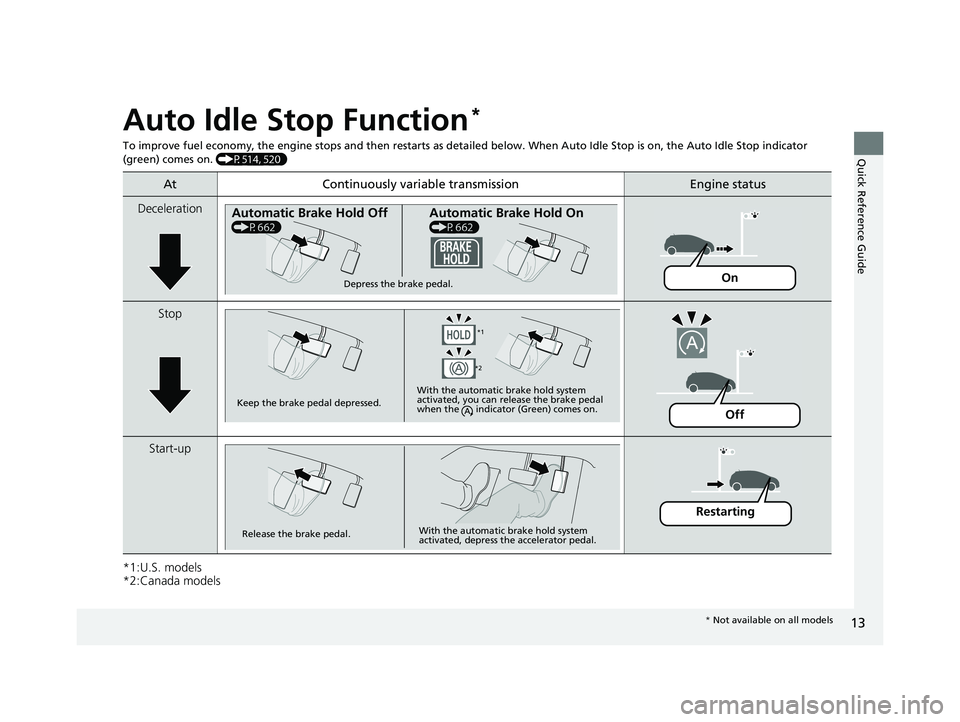
Auto Idle Stop Function*
To improve fuel economy, the engine stops and then restarts as detailed below. When Auto Idle Stop is on, the Auto Idle Stop in dicator
(green) comes on. (P514, 520)
*1:U.S. models
*2:Canada models
At Continuously variable transmissionEngine status
Deceleration
Stop
Start-up
Automatic Brake Hold Off
(P662)
Automatic Brake Hold On
(P662)
Depress the brake pedal.On
Keep the brake pedal depressed. With the automatic brake hold system
activated, you can release the brake pedal
when the indicator (Green) comes on.
*1
*2
Off
Release the brake pedal. With the automatic brake hold system
activated, depress the accelerator pedal.
Restarting
*
Not available on all models
23 CIVIC HATCHBACK TYPE R-31T406100_03.book 13 ページ 2022年6月23日 木曜日 午後9時28分
Page 16 of 840
14
Quick Reference Guide
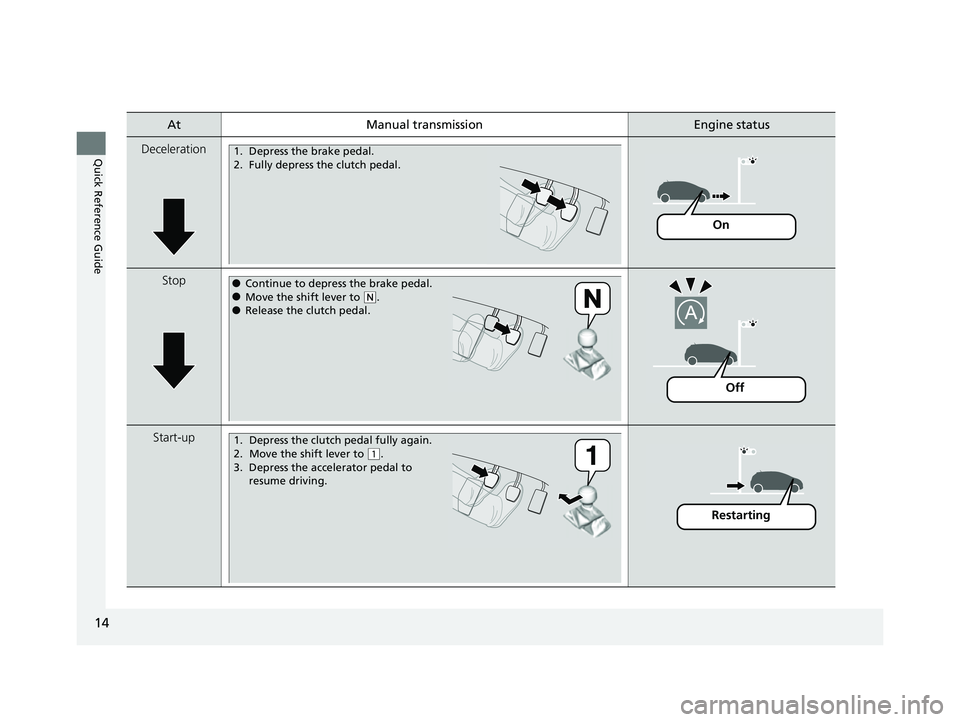
AtManual transmissionEngine status
Deceleration
Stop
Start-up
1. Depress the brake pedal.
2. Fully depress the clutch pedal.
On
●Continue to depress the brake pedal.●Move the shift lever to (N.●Release the clutch pedal.
Off
1. Depress the clutch pedal fully again.
2. Move the shift lever to
( 1.
3. Depress the accelerator pedal to resume driving.
Restarting
23 CIVIC HATCHBACK TYPE R-31T406100_03.book 14 ページ 2022年6月23日 木曜日 午後9時28分
Page 21 of 840
19
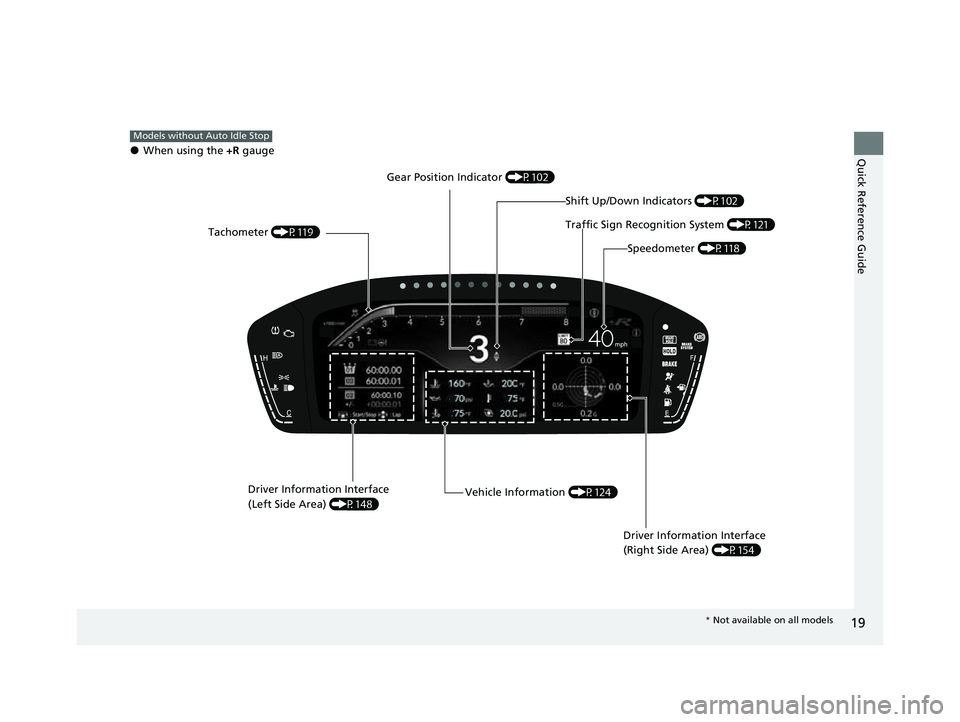
Quick Reference Guide●When using the +R gauge
Models without Auto Idle Stop
Tachometer (P119)
Speedometer (P118)
Driver Information Interface
(Left Side Area) (P148)
Vehicle Information (P124)
Driver Information Interface
(Right Side Area) (P154)
Traffic Sign Recognition System (P121)
Gear Position Indicator
(P102)
Shift Up/Down Indicators (P102)
* Not available on all models
23 CIVIC HATCHBACK TYPE R-31T406100_03.book 19 ページ 2022年6月23日 木曜日 午後9時28分
Page 22 of 840
20
Quick Reference Guide
Controls (P173)
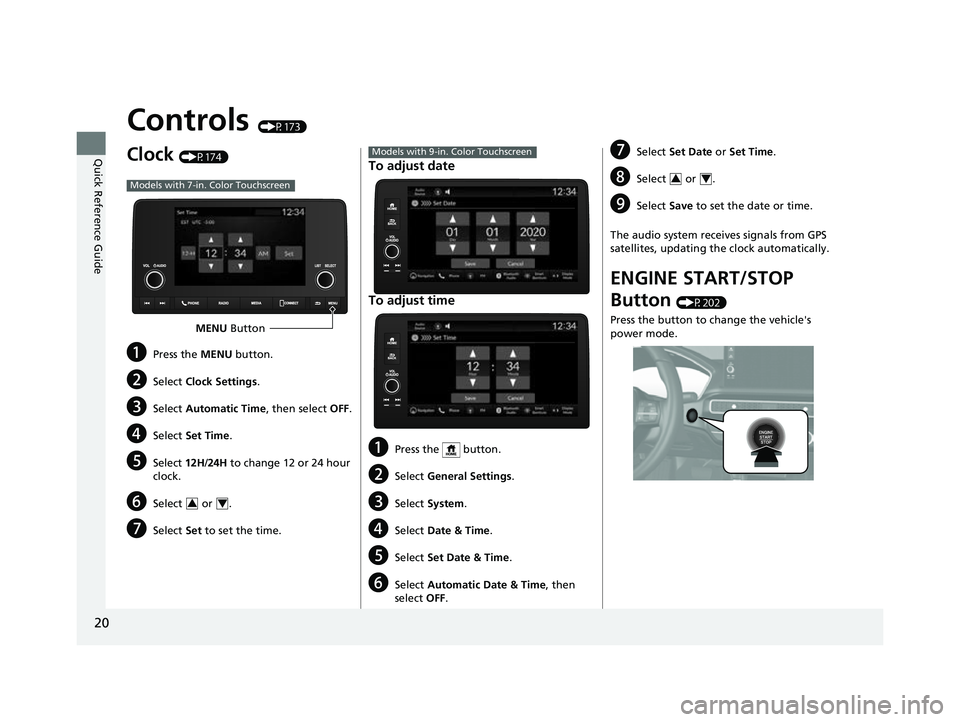
Clock (P174)
aPress the MENU button.
bSelect Clock Settings .
cSelect Automatic Time , then select OFF.
dSelect Set Time .
eSelect 12H/24H to change 12 or 24 hour
clock.
fSelect or .
gSelect Set to set the time.
Models with 7-in. Color Touchscreen
MENU Button
34
To adjust date
To adjust time
aPress the button.
bSelect General Settings .
cSelect System .
dSelect Date & Time .
eSelect Set Date & Time .
fSelect Automatic Date & Time , then
select OFF.
Models with 9-in. Color TouchscreengSelect Set Date or Set Time .
hSelect or .
iSelect Save to set the date or time.
The audio system receives signals from GPS
satellites, updating the clock automatically.
ENGINE START/STOP
Button
(P202)
Press the button to change the vehicle's
power mode.
34
23 CIVIC HATCHBACK TYPE R-31T406100_03.book 20 ページ 2022年6月23日 木曜日 午後9時28分
Page 35 of 840
33
Quick Reference Guide
Fuel recommendation: Unleaded premium gasoline, pump octane number 91 or higher
Fuel tank capacity:
12.4 US gal (47.0 L)
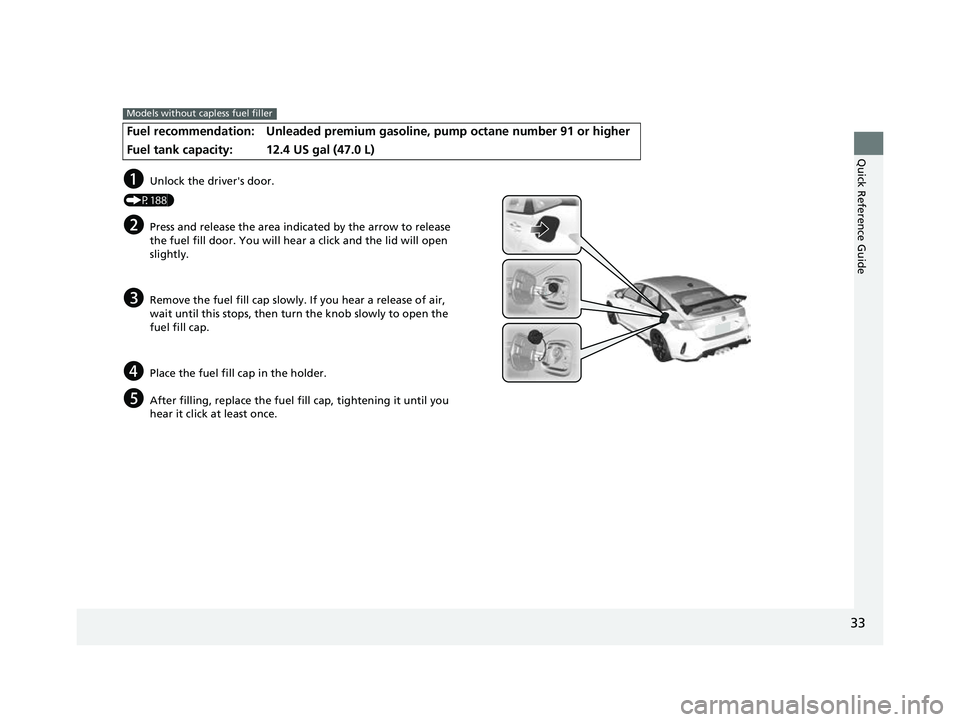
Models without capless fuel filler
aUnlock the driver's door.
(P188)
bPress and release the area indicated by the arrow to release
the fuel fill door. You will hear a click and the lid will open
slightly.
cRemove the fuel fill cap slowly. If you hear a release of air,
wait until this stops, then turn the knob slowly to open the
fuel fill cap.
dPlace the fuel fill cap in the holder.
eAfter filling, replace the fuel fill cap, tightening it until you
hear it click at least once.
23 CIVIC HATCHBACK TYPE R-31T406100_03.book 33 ページ 2022年6月23日 木曜日 午後9時28分
Page 36 of 840
34
Quick Reference Guide
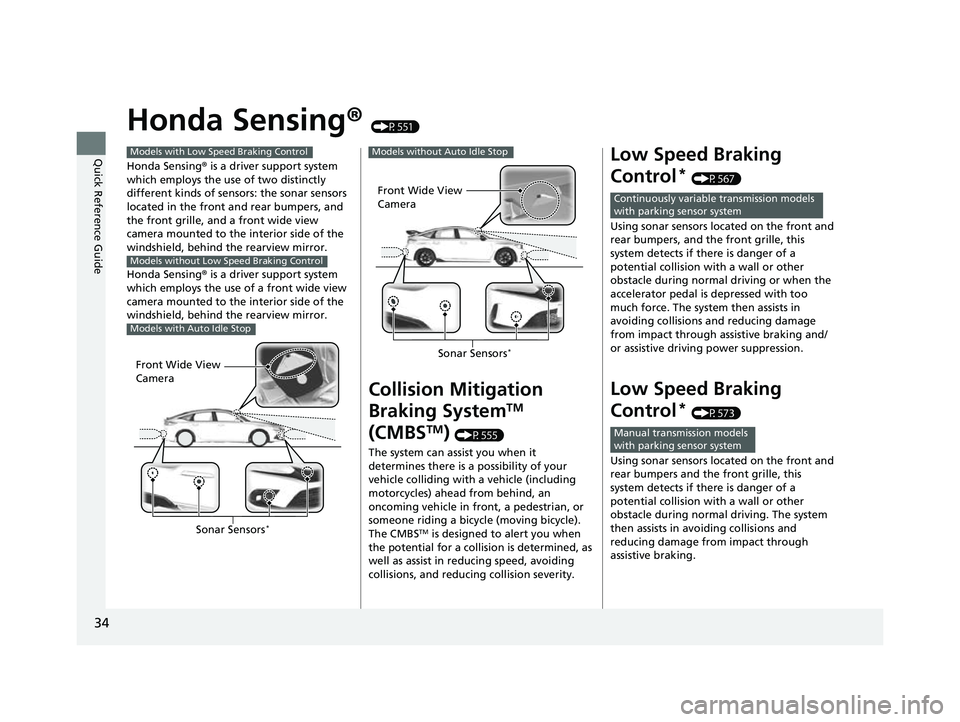
Honda Sensing® (P551)
Honda Sensing ® is a driver support system
which employs the use of two distinctly
different kinds of sensors: the sonar sensors
located in the front and rear bumpers, and
the front grille, and a front wide view
camera mounted to the interior side of the
windshield, behind the rearview mirror.
Honda Sensing ® is a driver support system
which employs the use of a front wide view
camera mounted to the interior side of the
windshield, behind the rearview mirror.
Models with Low Speed Braking Control
Models without Low Speed Braking Control
Models with Auto Idle Stop
Front Wide View
Camera
Sonar Sensors*
Collision Mitigation
Braking System
TM
(CMBS
TM) (P555)
The system can assist you when it
determines there is a possibility of your
vehicle colliding with a vehicle (including
motorcycles) ahead from behind, an
oncoming vehicle in front, a pedestrian, or
someone riding a bicycle (moving bicycle).
The CMBS
TM is designed to alert you when
the potential for a collision is determined, as
well as assist in reducing speed, avoiding
collisions, and reducing collision severity.
Models without Auto Idle Stop
Front Wide View
Camera
Sonar Sensors*
Low Speed Braking
Control
* (P567)
Using sonar sensors lo cated on the front and
rear bumpers, and the front grille, this
system detects if there is danger of a
potential collision with a wall or other
obstacle during normal driving or when the
accelerator pedal is depressed with too
much force. The system then assists in
avoiding collisions and reducing damage
from impact through assistive braking and/
or assistive driving power suppression.
Low Speed Braking
Control
* (P573)
Using sonar sensors lo cated on the front and
rear bumpers and the front grille, this
system detects if there is danger of a
potential collision with a wall or other
obstacle during normal driving. The system
then assists in avoiding collisions and
reducing damage from impact through
assistive braking.
Continuously variable transmission models
with parking sensor system
Manual transmission models
with parking sensor system
23 CIVIC HATCHBACK TYPE R-31T406100_03.book 34 ページ 2022年6月23日 木曜日 午後9時28分
Page 37 of 840
35
Quick Reference Guide
Adaptive Cruise Control
(ACC) with Low Speed
Follow
* (P578)
Helps maintain a constant vehicle speed and
a set following-interval behind a vehicle
detected ahead of yours and, if the detected
vehicle comes to a stop, can decelerate and
stop your vehicle, without you having to
keep your foot on the brake or the
accelerator.
Adaptive Cruise Control
(ACC)
* (P598)
Helps maintain a constant vehicle speed and
a set following-interval behind a vehicle
detected ahead of yours, without you
having to keep your foot on the brake or
the accelerator.
Lane Keeping Assist
System (LKAS)
(P618)
Provides steering input to help keep the
vehicle in the middle of a detected lane and
provides tactile and visual alerts if the
vehicle is detected drifting out of its lane.
Traffic Jam Assist* (P630)
The Traffic Jam Assist system uses a camera
mounted to the upper portion of the
windshield to detect and monitor left and
right white (or yellow) traffic lane lines.
Based on inputs from the camera, the
system can apply steering torque to keep
your vehicle in the center of the detected
lane.
Road Departure
Mitigation System
(P 639)
Alerts and helps assist you when the system
detects a possibility of your vehicle crossing
over detected lane markings, or
approaching the outer edge of the
pavement (into grass or gravel border) or a
detected oncoming vehicle.
Traffic Sign Recognition
System
(P647)
Reminds you of road sign information, such
as the current speed limit your vehicle has
just passed through, showing it on the
gauge.
* Not available on all models
23 CIVIC HATCHBACK TYPE R-31T406100_03.book 35 ページ 2022年6月23日 木曜日 午後9時28分