dashboard HONDA CIVIC COUPE 1998 User Guide
[x] Cancel search | Manufacturer: HONDA, Model Year: 1998, Model line: CIVIC COUPE, Model: HONDA CIVIC COUPE 1998Pages: 251, PDF Size: 2.04 MB
Page 45 of 251
Additional Information About Your SRS
SRS Components
Your Supplemental Restraint System (SRS) includes:
Two frontal airbags. The driver'sairbag is stored in the center of
the steering wheel; the front
passenger's airbag is stored in thedashboard. Both are marked
"SRS".
Sensors that can detect a severe
frontal collision. A sophisticated electronic system
that continually monitors thesensors, control unit, the airbag
activators, and all related wiring
when the ignition is ON (II). An indicator light on the
instrument panel to alert you to a
possible problem with the system (see page 45). Emergency backup power in case
your vehicle's electrical system is disconnected in a crash.
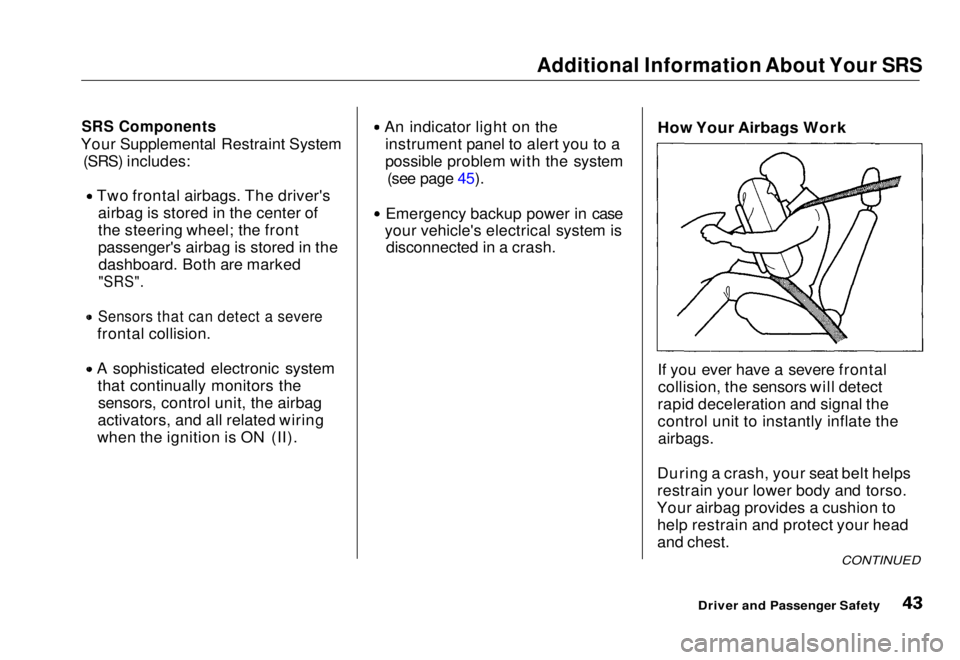
How Your Airbags Work
If you ever have a severe frontal
collision, the sensors will detect
rapid deceleration and signal the
control unit to instantly inflate the
airbags.
During a crash, your seat belt helps
restrain your lower body and torso.
Your airbag provides a cushion to help restrain and protect your head
and chest.
CONTINUED
Driver and Passenger SafetyMain Menu Table of Contents s t
Page 60 of 251
Controls Near the Steering Wheel
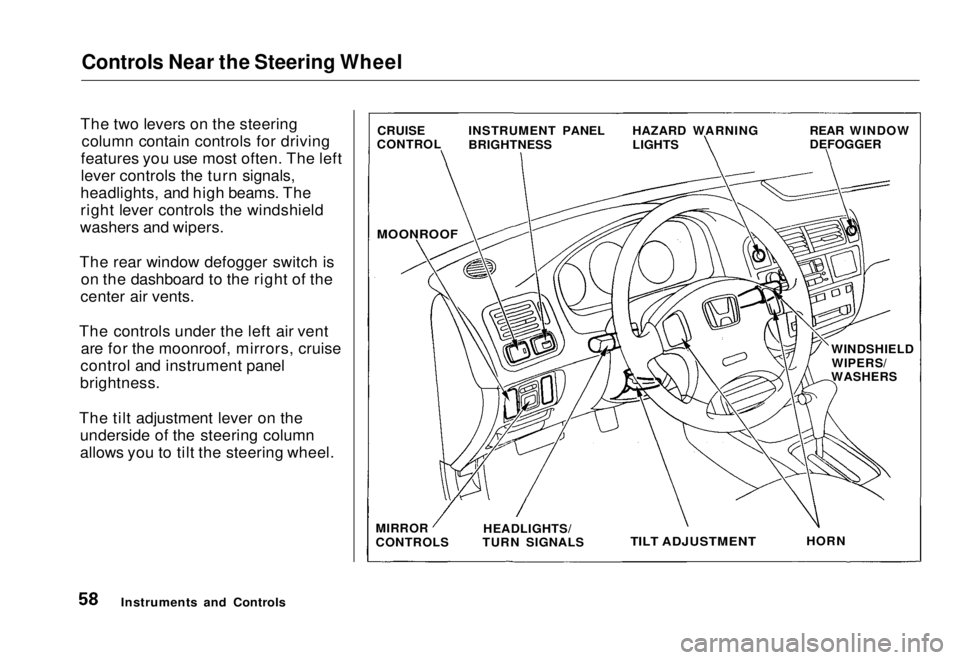
The two levers on the steering column contain controls for driving
features you use most often. The left
lever controls the turn signals,
headlights, and high beams. The
right lever controls the windshield
washers and wipers.
The rear window defogger switch is on the dashboard to the right of the
center air vents.
The controls under the left air vent are for the moonroof, mirrors, cruise
control and instrument panel
brightness.
The tilt adjustment lever on the underside of the steering column
allows you to tilt the steering wheel.
Instruments and Controls CRUISE
CONTROL INSTRUMENT PANEL
BRIGHTNESS HAZARD WARNING
LIGHTS REAR WINDOW
DEFOGGER
MOONROOF
WINDSHIELDWIPERS/
WASHERS
MIRROR
CONTROLS HEADLIGHTS/
TURN SIGNALS
TILT ADJUSTMENT
HORNMain Menu Table of Contents s t
Page 62 of 251
Controls Near the Steering Wheel
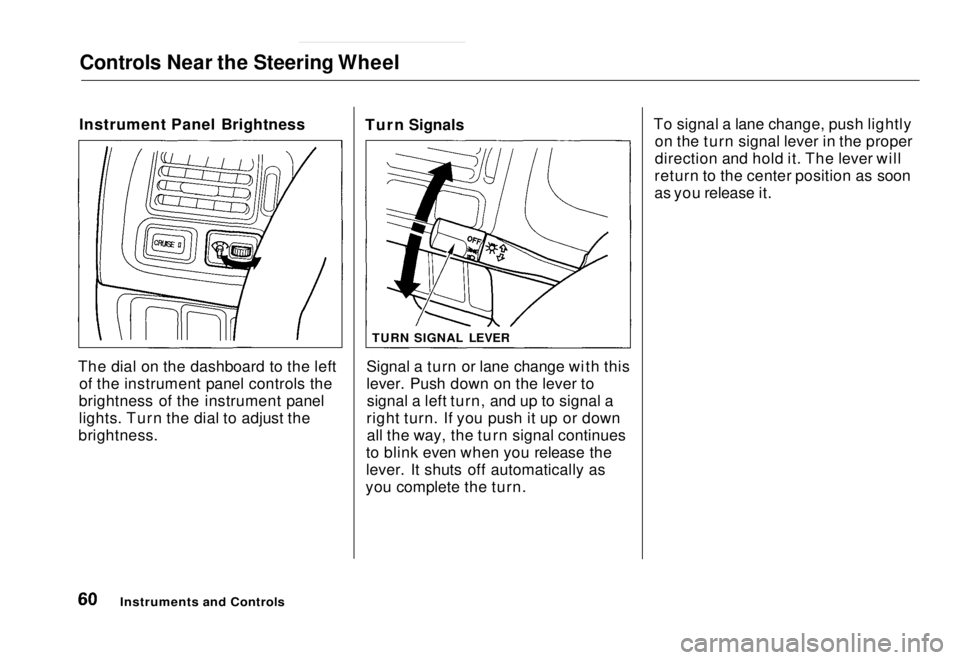
Instrument Panel Brightness
The dial on the dashboard to the left of the instrument panel controls the
brightness of the instrument panel
lights. Turn the dial to adjust the
brightness. Turn Signals
Signal a turn or lane change with this
lever. Push down on the lever tosignal a left turn, and up to signal a
right turn. If you push it up or down all the way, the turn signal continues
to blink even when you release the
lever. It shuts off automatically as
you complete the turn. To signal a lane change, push lightly
on the turn signal lever in the proper
direction and hold it. The lever will
return to the center position as soon
as you release it.
Instruments and Controls
TURN SIGNAL LEVERMain Menu Table of Contents s t
Page 81 of 251
Moonroof, Mirrors
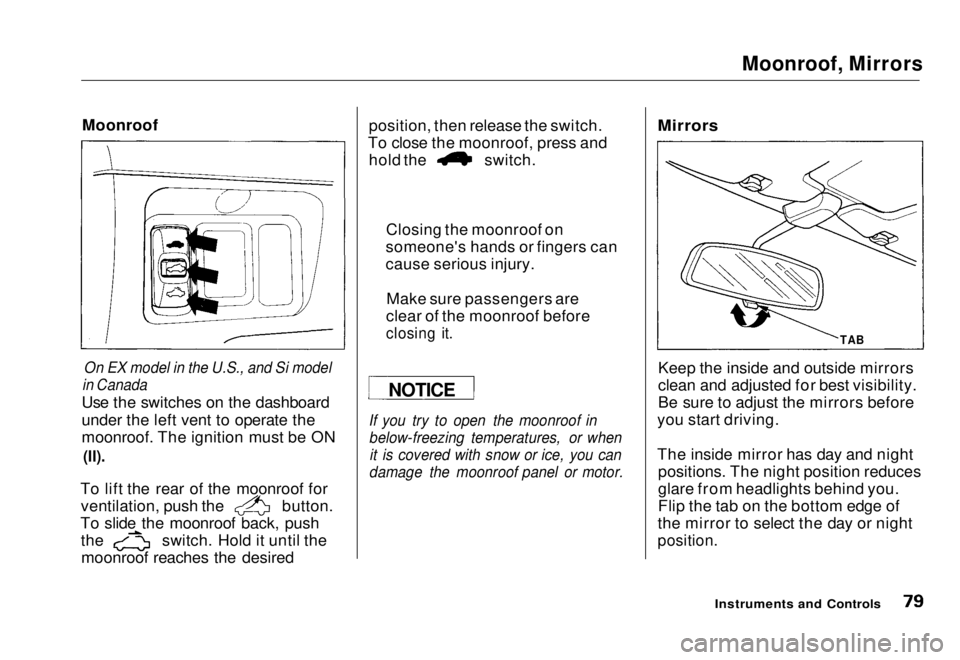
Moonroof
On EX model in the U.S., and Si model
in Canada
Use the switches on the dashboard
under the left vent to operate the
moonroof. The ignition must be ON
(II).
To lift the rear of the moonroof for ventilation, push the button.
To slide the moonroof back, push the switch. Hold it until the
moonroof reaches the desired position, then release the switch.
To close the moonroof, press and hold the switch.
If you try to open the moonroof in below-freezing temperatures, or whenit is covered with snow or ice, you can
damage the moonroof panel or motor.
Mirrors
Keep the inside and outside mirrors
clean and adjusted for best visibility.
Be sure to adjust the mirrors before
you start driving.
The inside mirror has day and night positions. The night position reduces
glare from headlights behind you.
Flip the tab on the bottom edge of
the mirror to select the day or night
position.
Instruments and Controls
NOTICE
Closing the moonroof on
someone's hands or fingers can
cause serious injury.
Make sure passengers are
clear of the moonroof before
closing it.
TABMain Menu Table of Contents s t
Page 82 of 251
Mirrors, Parking Brake
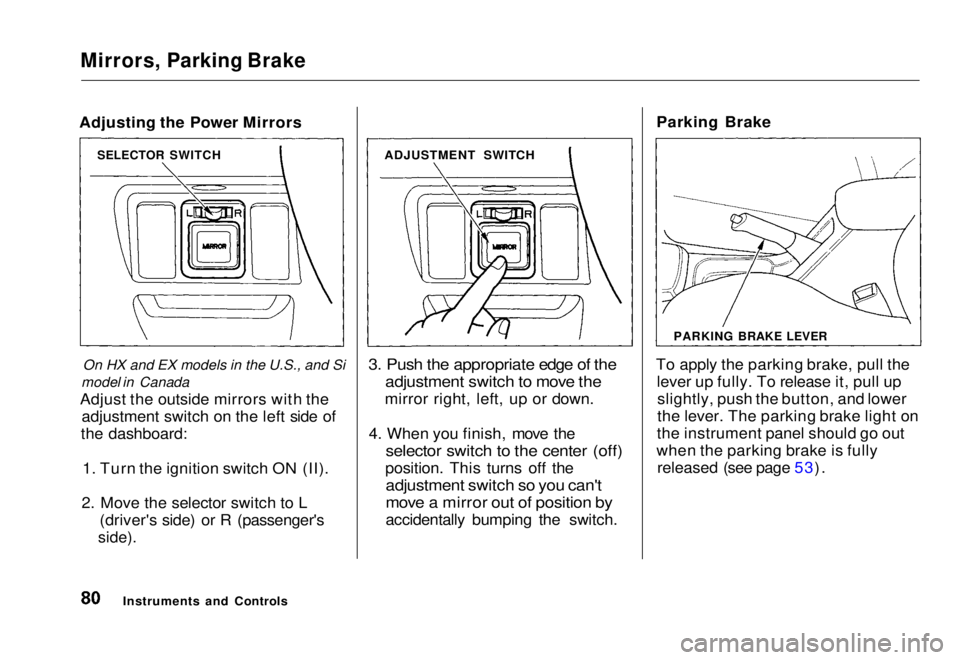
Adjusting the Power Mirrors
On HX and EX models in the U.S., and Si
model in Canada
Adjust the outside mirrors with the adjustment switch on the left side of
the dashboard:
1. Turn the ignition switch ON (II).
2. Move the selector switch to L (driver's side) or R (passenger's
side).
3. Push the appropriate edge of the
adjustment switch to move the
mirror right, left, up or down.
4. When you finish, move the
selector switch to the center (off)
position. This turns off the
adjustment switch so you can't
move a mirror out of position by
accidentally bumping the switch. Parking Brake
To apply the parking brake, pull the lever up fully. To release it, pull upslightly, push the button, and lower
the lever. The parking brake light on
the instrument panel should go out
when the parking brake is fully released (see page 53).
Instruments and Controls
SELECTOR SWITCH
ADJUSTMENT SWITCH
PARKING BRAKE LEVERMain Menu Table of Contents s t
Page 89 of 251
Heating and Cooling
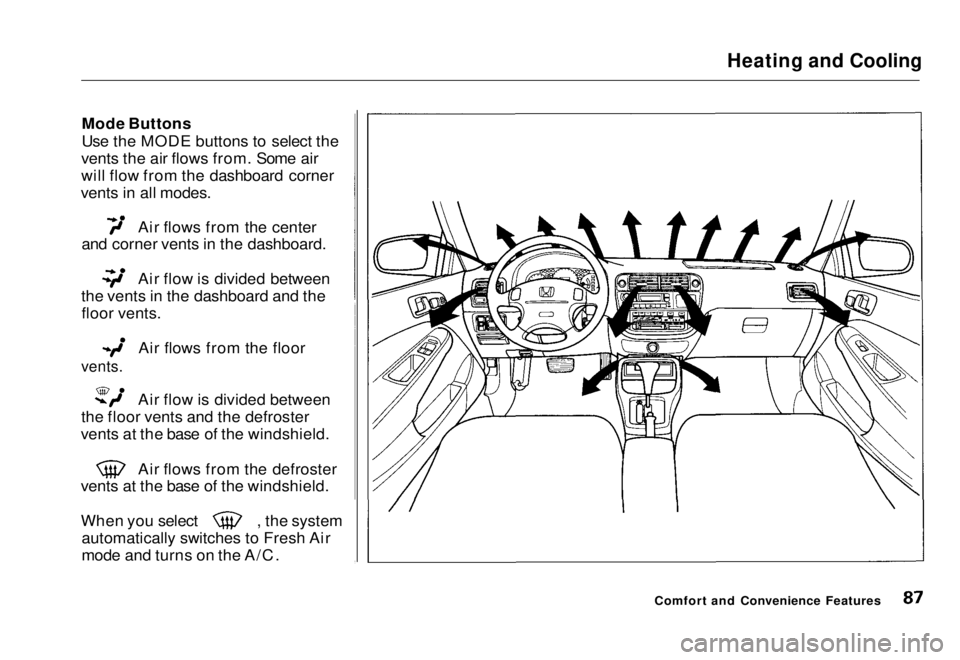
Mode Buttons
Use the MODE buttons to select the
vents the air flows from. Some air
will flow from the dashboard corner
vents in all modes. Air flows from the center
and corner vents in the dashboard. Air flow is divided between
the vents in the dashboard and the floor vents.
Air flows from the floor
vents.
Air flow is divided between
the floor vents and the defroster
vents at the base of the windshield. Air flows from the defroster
vents at the base of the windshield. When you select , the system
automatically switches to Fresh Air
mode and turns on the A/C.
Comfort and Convenience FeaturesMain Menu Table of Contents s t
Page 90 of 251
Heating and Cooling
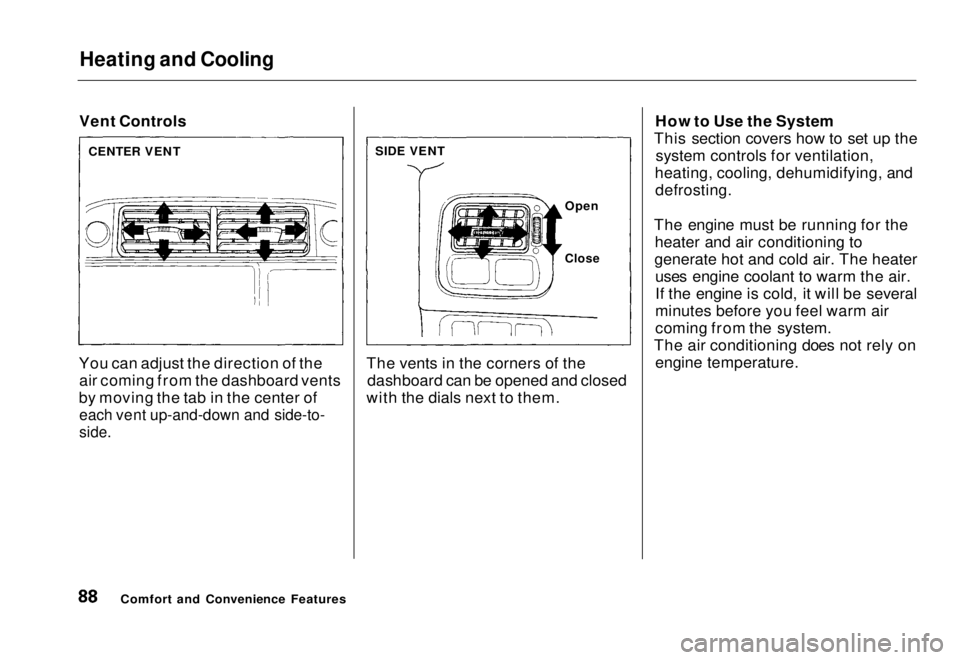
Vent Controls
You can adjust the direction of the air coming from the dashboard vents
by moving the tab in the center of
each vent up-and-down and side-to-
side.
The vents in the corners of the
dashboard can be opened and closed
with the dials next to them. How to Use the System
This section covers how to set up the system controls for ventilation,
heating, cooling, dehumidifying, and defrosting.
The engine must be running for the heater and air conditioning to
generate hot and cold air. The heater uses engine coolant to warm the air.
If the engine is cold, it will be several
minutes before you feel warm air
coming from the system.
The air conditioning does not rely on engine temperature.
Comfort and Convenience Features
CENTER VENT
SIDE VENT
Open
CloseMain Menu Table of Contents s t
Page 112 of 251
Service Station Procedures
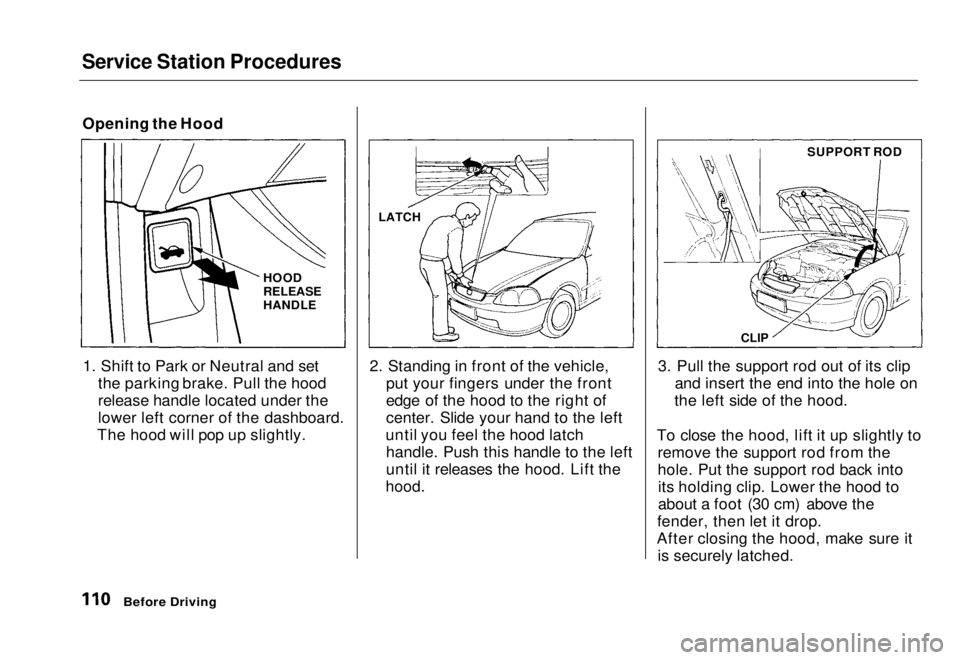
Opening the Hood
1. Shift to Park or Neutral and set the parking brake. Pull the hood
release handle located under the
lower left corner of the dashboard.
The hood will pop up slightly. 2. Standing in front of the vehicle,
put your fingers under the front
edge of the hood to the right of
center. Slide your hand to the left
until you feel the hood latch handle. Push this handle to the left
until it releases the hood. Lift the
hood.
3. Pull the support rod out of its clip
and insert the end into the hole on
the left side of the hood.
To close the hood, lift it up slightly to remove the support rod from the
hole. Put the support rod back intoits holding clip. Lower the hood to
about a foot (30 cm) above the
fender, then let it drop.
After closing the hood, make sure it is securely latched.
Before Driving
LATCH
HOOD
RELEASE
HANDLE
CLIP
SUPPORT RODMain Menu Table of Contents s t
Page 117 of 251

Accessories and Modifications
Modifications Do not remove any original
equipment or modify your vehicle in
any way that would alter its design or
operation. This could make your
vehicle unsafe and illegal to drive.
For example, do not make any
modifications that would change the
ride height of your vehicle, or install
wheels and tires with a different overall diameter.
Such modifications can adversely
affect handling, and interfere with
the operation of the vehicle's anti-
lock brakes and other systems. In addition, any modifications that
decrease ground clearance increase
the chance of undercarriage parts striking a curb, speed bump, or other
raised object, which could cause
your airbags to deploy.
Do not modify your steering wheelor any other part of your
Supplemental Restraint System.
Modifications could make the system ineffective. Additional Safety Precaution
Do not attach or place objects on theairbag covers. Any object attached to
or placed on the covers marked "SRS,"
in the center of the steering wheel and on top of the dashboard, could
interfere with the proper operation of the airbags. Or, if the airbags
inflate, the objects could be
propelled inside the vehicle and hurt
someone.
Before DrivingMain Menu Table of Contents s t
Page 222 of 251
Fuses
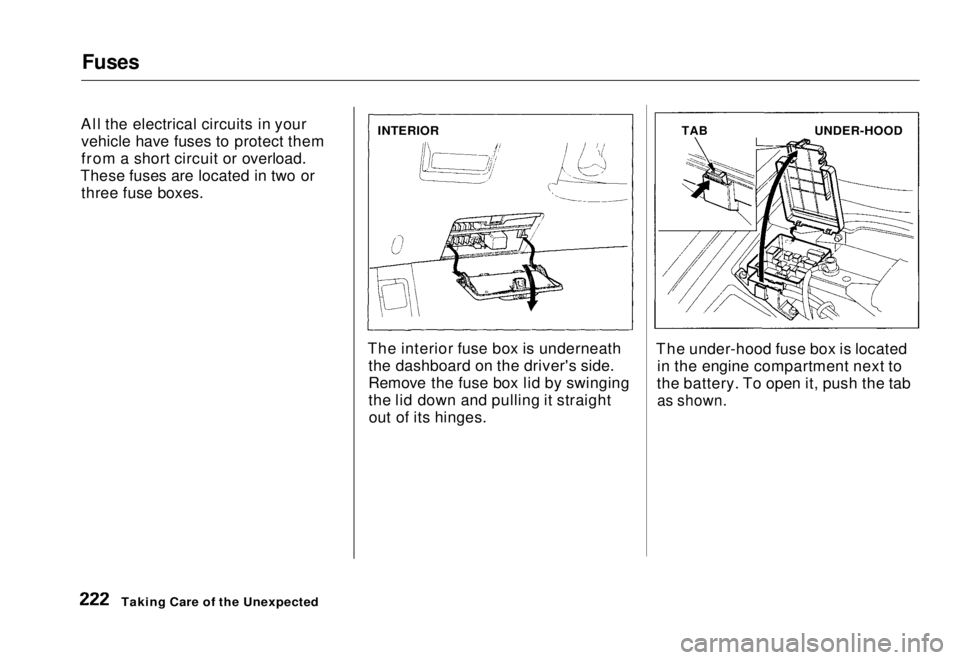
All the electrical circuits in your vehicle have fuses to protect them
from a short circuit or overload.
These fuses are located in two or three fuse boxes.
The interior fuse box is underneaththe dashboard on the driver's side.
Remove the fuse box lid by swinging
the lid down and pulling it straightout of its hinges. The under-hood fuse box is located
in the engine compartment next to
the battery. To open it, push the tab
as shown.
Taking Care of the Unexpected
INTERIOR
TAB
UNDER-HOODMain Menu Table of Contents s t