light HONDA CIVIC COUPE 1998 Owner's Manual
[x] Cancel search | Manufacturer: HONDA, Model Year: 1998, Model line: CIVIC COUPE, Model: HONDA CIVIC COUPE 1998Pages: 251, PDF Size: 2.04 MB
Page 70 of 251
Keys and Locks
LOCK (0) — You can insert or
remove the key only in this position.
To switch from ACCESSORY to LOCK, you must push the key in
slightly as you turn it. If your vehicle
has an automatic transmission, it
must also be in Park. The anti-theft
lock will lock the steering column
when you remove the key. If the front wheels are turned, the
anti-theft lock may sometimes make
it difficult to turn the key from
LOCK to ACCESSORY. Firmly turn
the steering wheel to the left or to
the right as you turn the key. ACCESSORY (I) — In this position,
you can operate the audio system and the accessory power socket.
ON (II) — This is the normal key
position when driving. All features
and accessories on the vehicle are
usable. Several of the lights on the
instrument panel come on as a test
when you turn the ignition switch
from ACCESSORY to ON (see page 51).
START (III) — Use this position
only to start the engine. The switch
returns to ON (II) when you let go of
the key.
You will hear a reminder beeper if
you leave the key in the ignition switch in the LOCK (0) or
ACCESSORY (I) position and open the driver's door. Remove the key to
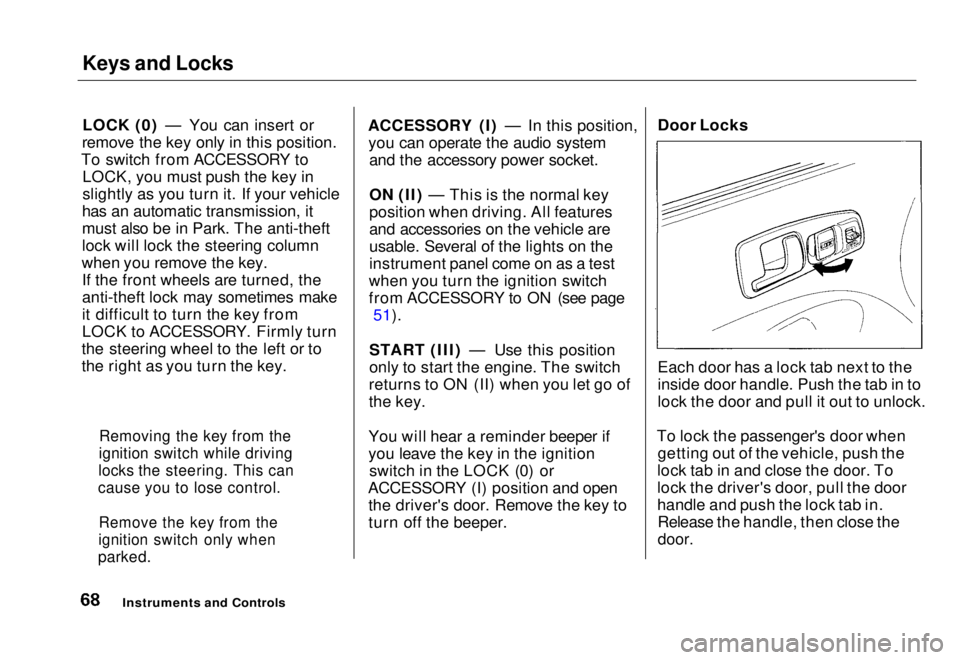
turn off the beeper. Door Locks
Each door has a lock tab next to the
inside door handle. Push the tab in to
lock the door and pull it out to unlock.
To lock the passenger's door when getting out of the vehicle, push the
lock tab in and close the door. To
lock the driver's door, pull the door
handle and push the lock tab in. Release the handle, then close the
door.
Instruments and Controls
Removing the key from the
ignition switch while driving
locks the steering. This can
cause you to lose control.
Remove the key from the
ignition switch only when
parked.Main Menu Table of Contents s t
Page 72 of 251
Keys and Locks
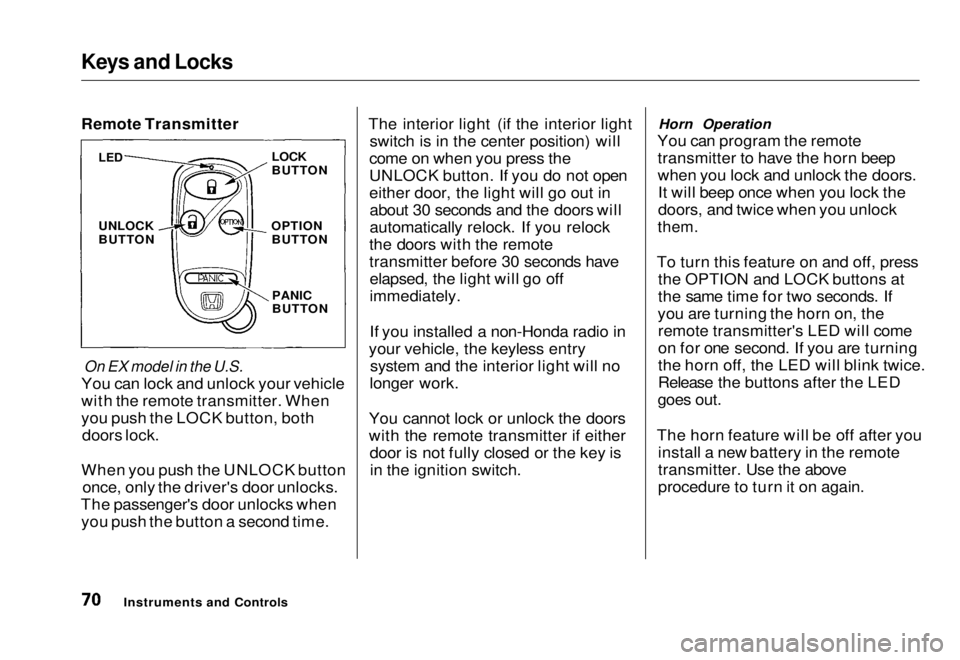
Remote Transmitter
On EX model in the U.S.
You can lock and unlock your vehicle
with the remote transmitter. When
you push the LOCK button, both doors lock.
When you push the UNLOCK button once, only the driver's door unlocks.
The passenger's door unlocks when you push the button a second time. The interior light (if the interior light
switch is in the center position) will
come on when you press the
UNLOCK button. If you do not open
either door, the light will go out in about 30 seconds and the doors will
automatically relock. If you relock
the doors with the remote
transmitter before 30 seconds have elapsed, the light will go off
immediately.
If you installed a non-Honda radio in
your vehicle, the keyless entry system and the interior light will no
longer work.
You cannot lock or unlock the doors
with the remote transmitter if either door is not fully closed or the key isin the ignition switch. Horn Operation
You can program the remote transmitter to have the horn beep
when you lock and unlock the doors.It will beep once when you lock the
doors, and twice when you unlock
them.
To turn this feature on and off, press the OPTION and LOCK buttons at
the same time for two seconds. If
you are turning the horn on, the remote transmitter's LED will come
on for one second. If you are turning
the horn off, the LED will blink twice.
Release the buttons after the LED
goes out.
The horn feature will be off after you install a new battery in the remote
transmitter. Use the above
procedure to turn it on again.
Instruments and Controls
LED
UNLOCK
BUTTON
LOCK
BUTTON
OPTION BUTTON
PANIC
BUTTONMain Menu Table of Contents s t
Page 80 of 251
Power Windows
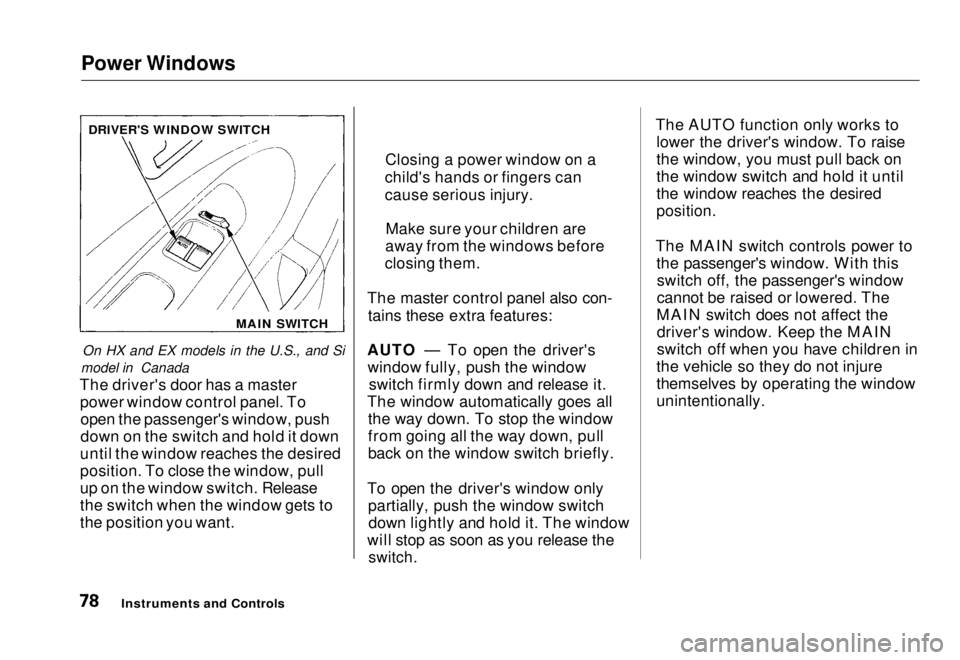
On HX and EX models in the U.S., and Si
model in Canada
The driver's door has a master power window control panel. Toopen the passenger's window, push
down on the switch and hold it down
until the window reaches the desired
position. To close the window, pull
up on the window switch. Release
the switch when the window gets to
the position you want. The master control panel also con-
tains these extra features:
AUTO — To open the driver's window fully, push the window switch firmly down and release it.
The window automatically goes all the way down. To stop the window
from going all the way down, pull
back on the window switch briefly.
To open the driver's window only partially, push the window switchdown lightly and hold it. The window
will stop as soon as you release the
switch.
The AUTO function only works to
lower the driver's window. To raise
the window, you must pull back on
the window switch and hold it until
the window reaches the desired
position.
The MAIN switch controls power to the passenger's window. With thisswitch off, the passenger's window
cannot be raised or lowered. The
MAIN switch does not affect the driver's window. Keep the MAIN
switch off when you have children in
the vehicle so they do not injure
themselves by operating the window
unintentionally.
Instruments and Controls
DRIVER'S WINDOW SWITCH
MAIN SWITCH
Closing a power window on a
child's hands or fingers can
cause serious injury.
Make sure your children are
away from the windows before
closing them.Main Menu Table of Contents s t
Page 81 of 251
Moonroof, Mirrors
Moonroof
On EX model in the U.S., and Si model
in Canada
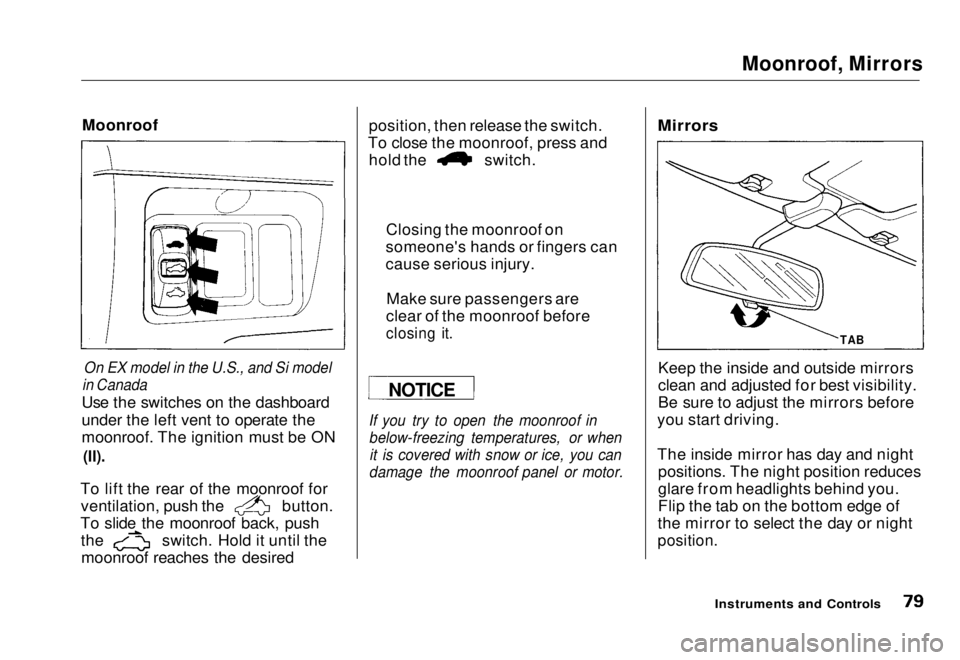
Use the switches on the dashboard
under the left vent to operate the
moonroof. The ignition must be ON
(II).
To lift the rear of the moonroof for ventilation, push the button.
To slide the moonroof back, push the switch. Hold it until the
moonroof reaches the desired position, then release the switch.
To close the moonroof, press and hold the switch.
If you try to open the moonroof in below-freezing temperatures, or whenit is covered with snow or ice, you can
damage the moonroof panel or motor.
Mirrors
Keep the inside and outside mirrors
clean and adjusted for best visibility.
Be sure to adjust the mirrors before
you start driving.
The inside mirror has day and night positions. The night position reduces
glare from headlights behind you.
Flip the tab on the bottom edge of
the mirror to select the day or night
position.
Instruments and Controls
NOTICE
Closing the moonroof on
someone's hands or fingers can
cause serious injury.
Make sure passengers are
clear of the moonroof before
closing it.
TABMain Menu Table of Contents s t
Page 82 of 251
Mirrors, Parking Brake
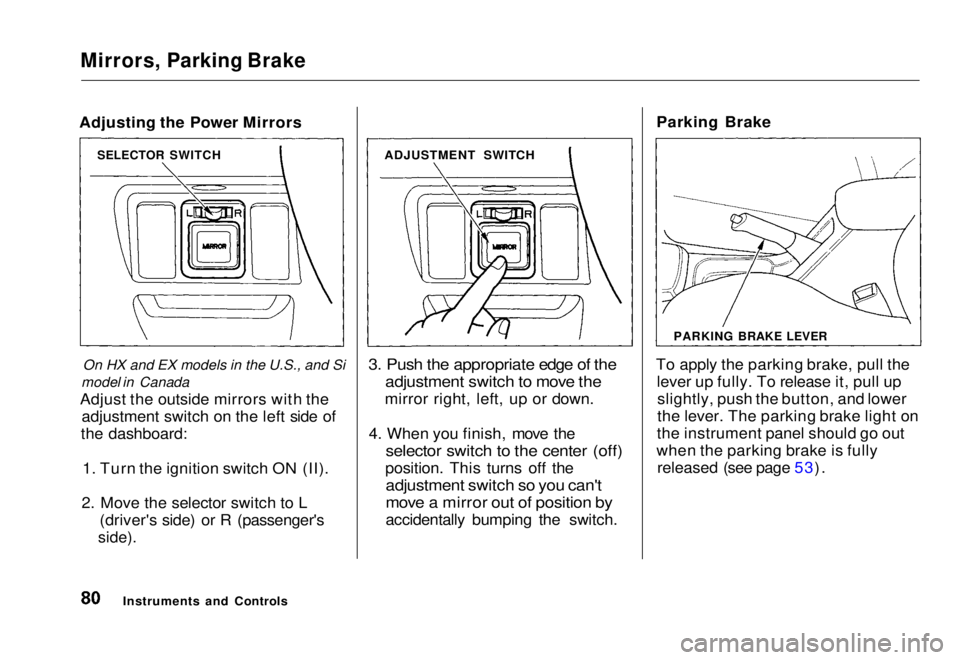
Adjusting the Power Mirrors
On HX and EX models in the U.S., and Si
model in Canada
Adjust the outside mirrors with the adjustment switch on the left side of
the dashboard:
1. Turn the ignition switch ON (II).
2. Move the selector switch to L (driver's side) or R (passenger's
side).
3. Push the appropriate edge of the
adjustment switch to move the
mirror right, left, up or down.
4. When you finish, move the
selector switch to the center (off)
position. This turns off the
adjustment switch so you can't
move a mirror out of position by
accidentally bumping the switch. Parking Brake
To apply the parking brake, pull the lever up fully. To release it, pull upslightly, push the button, and lower
the lever. The parking brake light on
the instrument panel should go out
when the parking brake is fully released (see page 53).
Instruments and Controls
SELECTOR SWITCH
ADJUSTMENT SWITCH
PARKING BRAKE LEVERMain Menu Table of Contents s t
Page 85 of 251
Accessory Power Socket, Ashtrays
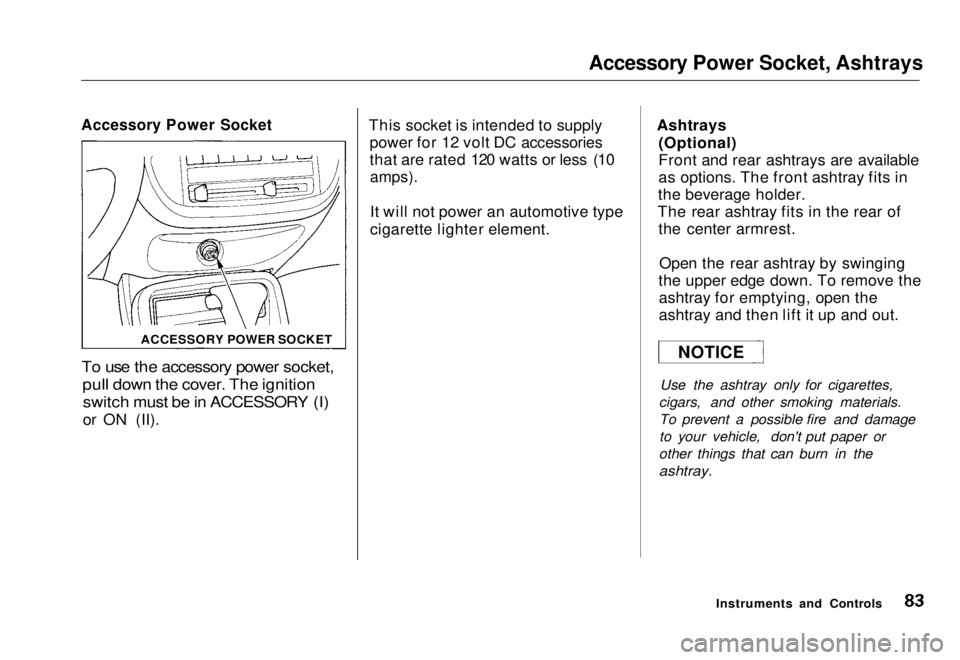
Accessory Power Socket
To use the accessory power socket,
pull down the cover. The ignition
switch must be in ACCESSORY (I)
or ON (II). This socket is intended to supply
power for 12 volt DC accessories
that are rated 120 watts or less (10
amps).
It will not power an automotive type
cigarette lighter element. Ashtrays
(Optional)
Front and rear ashtrays are available
as options. The front ashtray fits in
the beverage holder.
The rear ashtray fits in the rear of the center armrest.
Open the rear ashtray by swinging
the upper edge down. To remove the ashtray for emptying, open the
ashtray and then lift it up and out.
Use the ashtray only for cigarettes,
cigars, and other smoking materials. To prevent a possible fire and damage
to your vehicle, don't put paper or
other things that can burn in the
ashtray.
Instruments and Controls
ACCESSORY POWER SOCKET
NOTICEMain Menu Table of Contents s t
Page 86 of 251
Interior Light
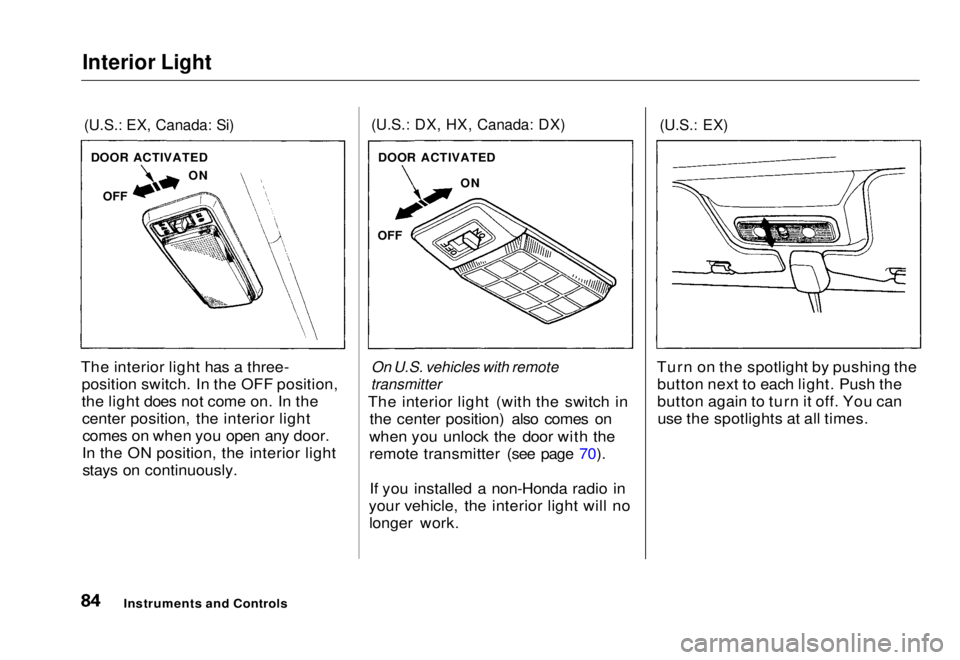
(U.S.: EX, Canada: Si)
The interior light has a three- position switch. In the OFF position,
the light does not come on. In thecenter position, the interior lightcomes on when you open any door.
In the ON position, the interior light stays on continuously.
(U.S.: DX, HX, Canada: DX)
On U.S. vehicles with remote
transmitter
The interior light (with the switch in the center position) also comes on
when you unlock the door with the
remote transmitter (see page 70).
If you installed a non-Honda radio in
your vehicle, the interior light will no longer work.
(U.S.: EX)
Turn on the spotlight by pushing the button next to each light. Push the
button again to turn it off. You canuse the spotlights at all times.
Instruments and Controls
DOOR ACTIVATED
OFF ON
DOOR ACTIVATED
ON
OFFMain Menu Table of Contents s t
Page 88 of 251
Heating and Cooling
Proper use of the Heating and
Cooling system can make the
interior dry and comfortable, and
keep the windows clear for best
visibility.
If your vehicle does not have air
conditioning, it can be installed at
any time. Your dealer will install a
Genuine Honda air conditioning
system that meets Honda's high
quality standards and is designed to
exactly fit your vehicle. Please
contact your dealer for more
information.
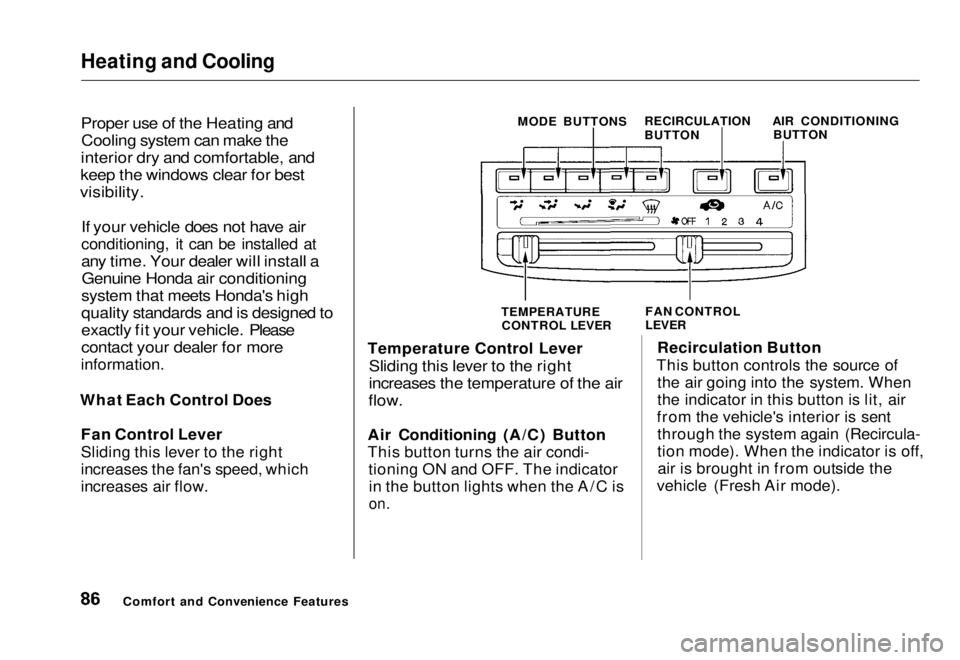
What Each Control Does Fan Control Lever
Sliding this lever to the right
increases the fan's speed, which
increases air flow.
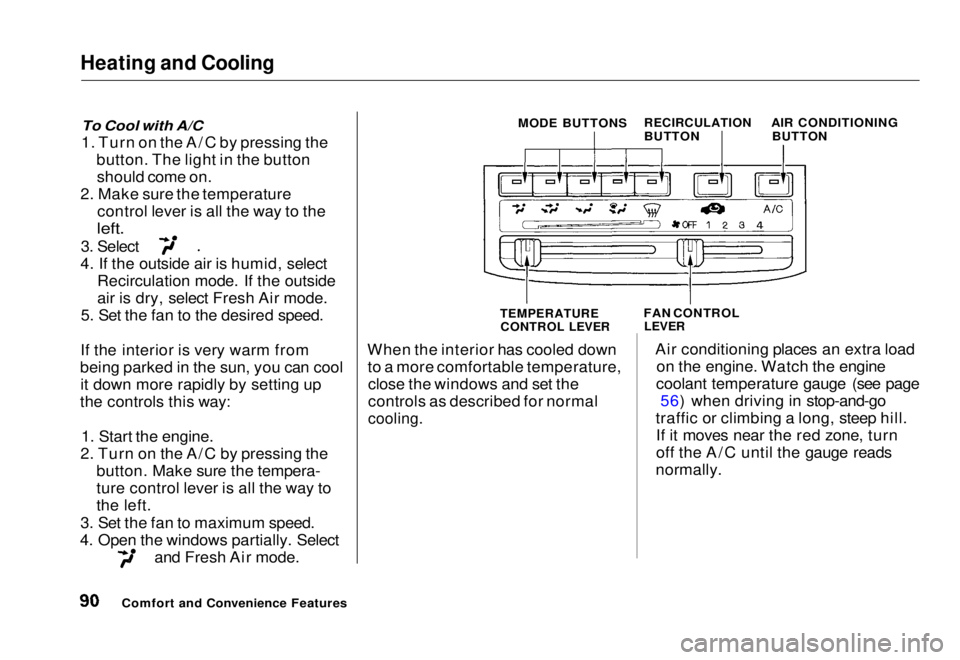
Comfort and Convenience Features MODE BUTTONS
RECIRCULATION
BUTTON AIR CONDITIONING
BUTTON
TEMPERATURE
CONTROL LEVER FAN CONTROL
LEVER
Temperature Control Lever
Sliding this lever to the right
increases the temperature of the air
flow.
Air Conditioning (A/C) Button
This button turns the air condi- tioning ON and OFF. The indicatorin the button lights when the A/C is
on.
Recirculation Button
This button controls the source of the air going into the system. When
the indicator in this button is lit, air
from the vehicle's interior is sent through the system again (Recircula-
tion mode). When the indicator is off,air is brought in from outside the
vehicle (Fresh Air mode).Main Menu Table of Contents s t
Page 92 of 251
Heating and Cooling
To Cool with A/C
1. Turn on the A/C by pressing the button. The light in the buttonshould come on.
2. Make sure the temperature control lever is all the way to the
left.
3. Select
4. If the outside air is humid, select Recirculation mode. If the outside
air is dry, select Fresh Air mode.
5. Set the fan to the desired speed.
If the interior is very warm from
being parked in the sun, you can cool it down more rapidly by setting up
the controls this way:
1. Start the engine.
2. Turn on the A/C by pressing the button. Make sure the tempera-
ture control lever is all the way to
the left.
3. Set the fan to maximum speed.
4. Open the windows partially. Select and Fresh Air mode. When the interior has cooled down
to a more comfortable temperature,close the windows and set the
controls as described for normal
cooling.
Air conditioning places an extra load
on the engine. Watch the engine
coolant temperature gauge (see page 56) when driving in stop-and-go
traffic or climbing a long, steep hill. If it moves near the red zone, turn
off the A/C until the gauge reads
normally.
Comfort and Convenience Features MODE BUTTONS
RECIRCULATION
BUTTON AIR CONDITIONING
BUTTON
TEMPERATURE CONTROL LEVER
FAN CONTROL
LEVERMain Menu Table of Contents s t
Page 102 of 251
Audio System
Operating the Cassette Player
Standard on Si model in Canada
The cassette system features Dolby
B* noise reduction, automatic
sensing of chromium-dioxide (CrO2)
tape, and autoreverse for continuous
play.
* Dolby noise reduction manufactured under
license from Dolby Laboratories Licensing Corpo-
ration. "DOLBY" and the double-D symbol
are trademarks of Dolby Laboratories
Licensing Corporation.
Make sure the tape opening on the
cassette is facing to the right, then
insert the cassette most of the way
into the slot. The system will pull it
in the rest of the way, and begin to
play.
The tape direction indicator will light to show you which side of the
cassette is playing. The
indicates
the side you inserted facing upward
is now playing. If you want to play the other side, press the PROG
button.
Dolby B noise reduction turns on
when you insert a cassette. If the tape was not recorded with Dolby Bnoise reduction, turn it off by
pressing the NR button.
When the system reaches the end of the tape, it will automatically reversedirection and play the other side. If
you want to remove the cassette
from the drive, press the EJECT
button.
If you turn the system off while a
tape is playing, either with the PWR/
VOL knob or by turning off the ignition, the cassette will remain in
the drive. When you turn the system
back on, the tape will begin playing
where it left off.
To switch to the radio or optional CD changer while listening to a tape, press the AM/FM or CD/TAPE
button. To change back to the cassette player, press the CD/TAPE
button.
Tape Search Functions
With a cassette playing, you can use the FF, REW, TMS, or REPEAT
function to find a desired program.FF/REW — Fast Forward and
Rewind mov e
the tape rapidly. Press
and release the REW side of the
TUNE/SEEK bar to rewind the tape, or the FF side to fast forward. Press
the PLAY button to take the system
out of rewind or fast forward. If the system reaches the end of the tape
while in fast forward or rewind, it automatically stops that function,
reverses direction, and begins to play.
Comfort and Convenience FeaturesMain Menu Table of Contents s t