light HONDA CIVIC COUPE 1998 Workshop Manual
[x] Cancel search | Manufacturer: HONDA, Model Year: 1998, Model line: CIVIC COUPE, Model: HONDA CIVIC COUPE 1998Pages: 251, PDF Size: 2.04 MB
Page 192 of 251
Lights
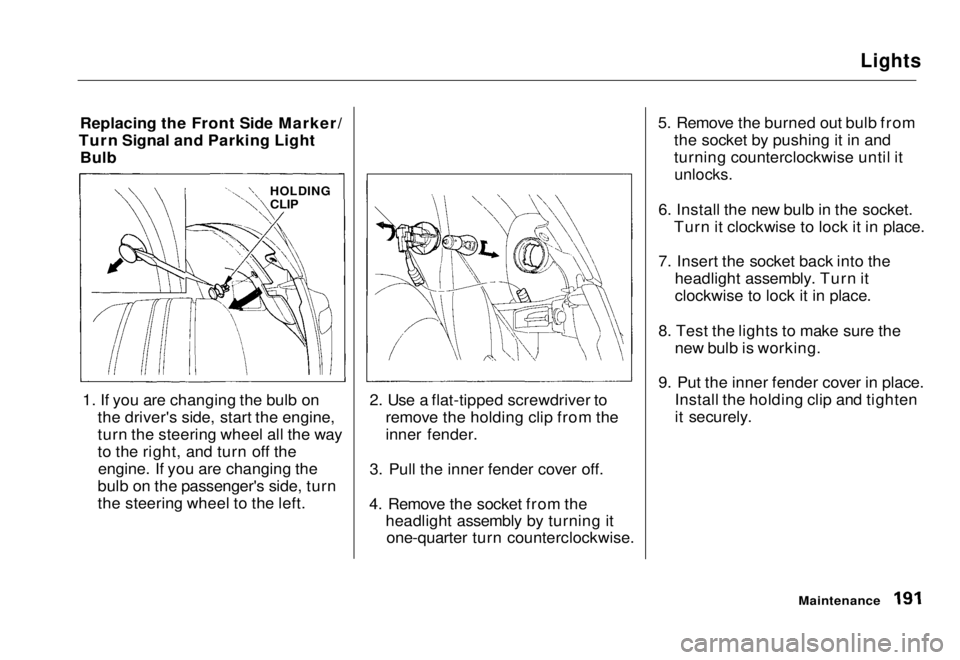
Replacing the Front Side Marker/
Turn Signal and Parking Light Bulb
1. If you are changing the bulb on the driver's side, start the engine,
turn the steering wheel all the way
to the right, and turn off theengine. If you are changing the
bulb on the passenger's side, turn
the steering wheel to the left. 2. Use a flat-tipped screwdriver to
remove the holding clip from the
inner fender.
3. Pull the inner fender cover off.
4. Remove the socket from the headlight assembly by turning itone-quarter turn counterclockwise. 5. Remove the burned out bulb from
the socket by pushing it in and
turning counterclockwise until it
unlocks.
6. Install the new bulb in the socket. Turn it clockwise to lock it in place.
7. Insert the socket back into the headlight assembly. Turn it
clockwise to lock it in place.
8. Test the lights to make sure the new bulb is working.
9. Put the inner fender cover in place. Install the holding clip and tighten
it securely.
Maintenance
HOLDING
CLIPMain Menu Table of Contents s t
Page 193 of 251
Lights
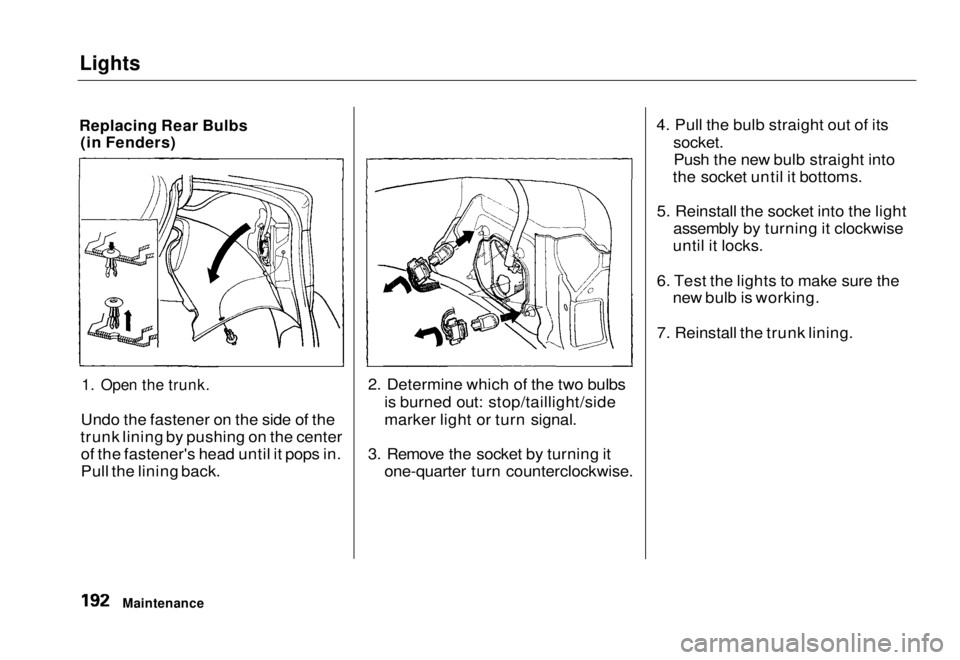
Replacing Rear Bulbs (in Fenders)
1. Open the trunk.
Undo the fastener on the side of the
trunk lining by pushing on the center of the fastener's head until it pops in.
Pull the lining back. 2. Determine which of the two bulbs
is burned out: stop/taillight/side
marker light or turn signal.
3. Remove the socket by turning it one-quarter turn counterclockwise. 4. Pull the bulb straight out of its
socket.
Push the new bulb straight into
the socket until it bottoms.
5. Reinstall the socket into the light assembly by turning it clockwise
until it locks.
6. Test the lights to make sure the new bulb is working.
7. Reinstall the trunk lining.
MaintenanceMain Menu Table of Contents s t
Page 194 of 251
Lights
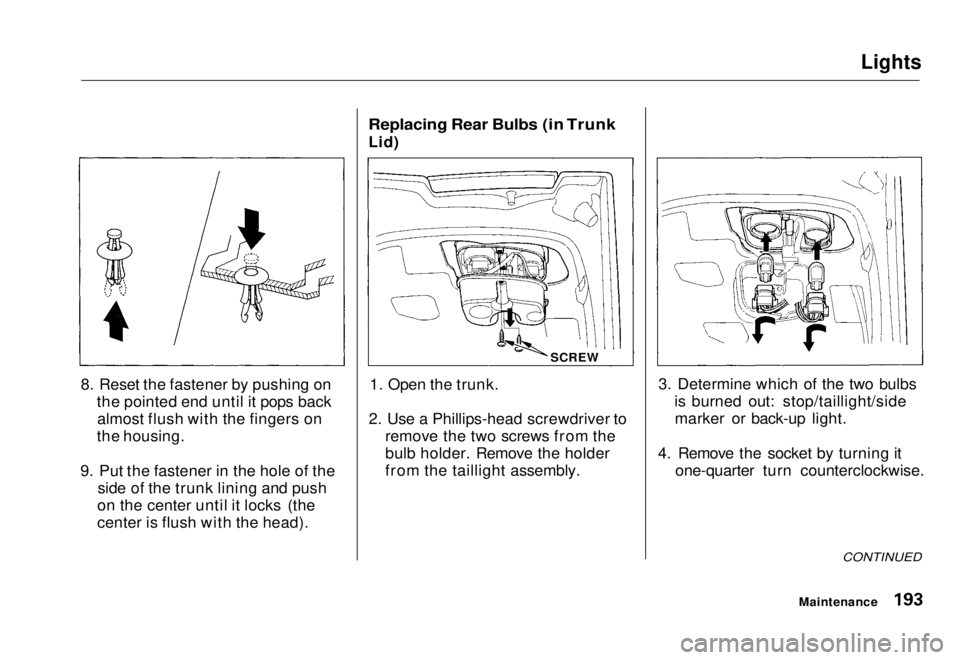
8. Reset the fastener by pushing on the pointed end until it pops backalmost flush with the fingers on
the housing.
9. Put the fastener in the hole of the side of the trunk lining and push
on the center until it locks (the
center is flush with the head).
Replacing Rear Bulbs (in Trunk
Lid)
1. Open the trunk.
2. Use a Phillips-head screwdriver to remove the two screws from the
bulb holder. Remove the holder
from the taillight assembly. 3. Determine which of the two bulbs
is burned out: stop/taillight/sidemarker or back-up light.
4. Remove the socket by turning it one-quarter turn counterclockwise.
CONTINUED
Maintenance
SCREWMain Menu Table of Contents s t
Page 195 of 251
Lights
5. Pull the bulb straight out of its
socket.
Push the new bulb straight into
the socket until it bottoms.
6. Insert the socket back into the light assembly. Turn it clockwise
to lock it in place.
7. Test the lights to make sure the new bulb is working.
8. Reinstall the bulb holder assembly. Install the screw and tighten it
securely.
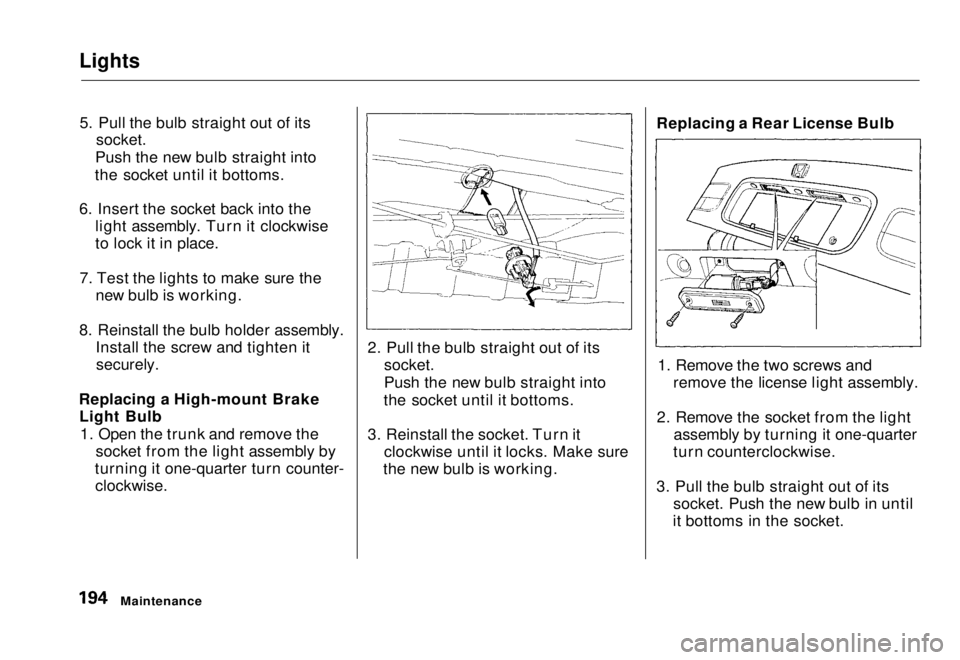
Replacing a High-mount Brake Light Bulb
1. Open the trunk and remove the socket from the light assembly by
turning it one-quarter turn counter-
clockwise.
2. Pull the bulb straight out of its
socket.
Push the new bulb straight into
the socket until it bottoms.
3. Reinstall the socket. Turn it clockwise until it locks. Make sure
the new bulb is working. Replacing a Rear License Bulb
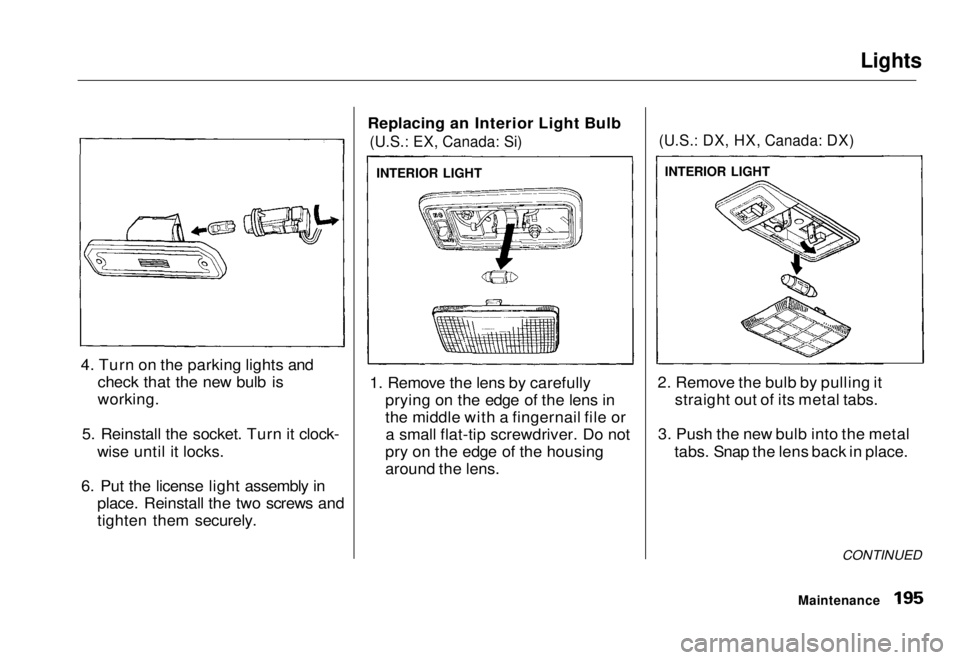
1. Remove the two screws and remove the license light assembly.
2. Remove the socket from the light assembly by turning it one-quarter
turn counterclockwise.
3. Pull the bulb straight out of its socket. Push the new bulb in until
it bottoms in the socket.
MaintenanceMain Menu Table of Contents s t
Page 196 of 251
Lights
4. Turn on the parking lights and check that the new bulb is
working.
5. Reinstall the socket. Turn it clock- wise until it locks.
6. Put the license light assembly in place. Reinstall the two screws and
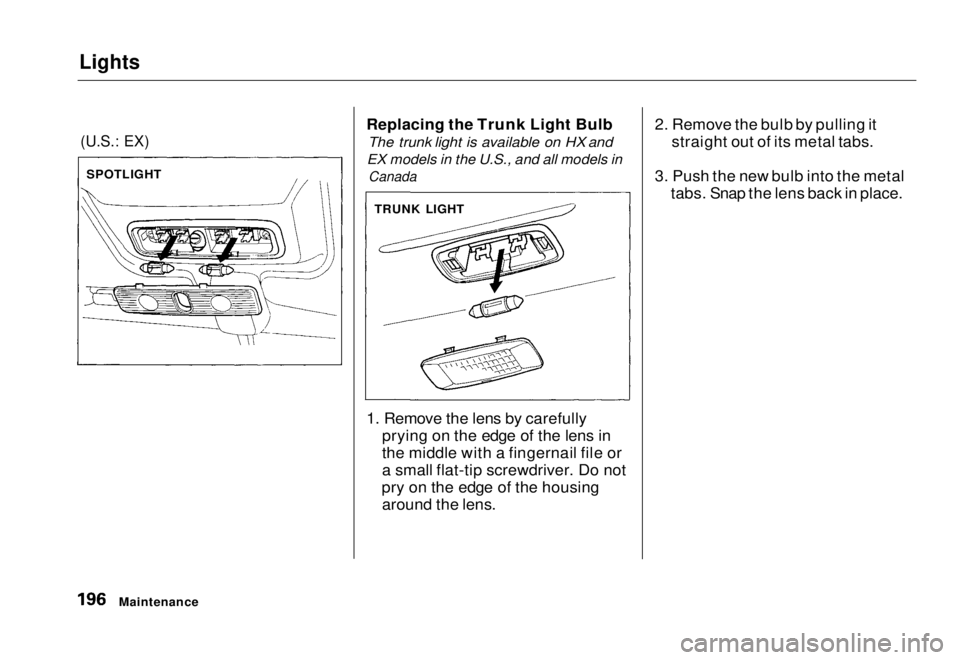
tighten them securely. Replacing an Interior Light Bulb
(U.S.: EX, Canada: Si)
1. Remove the lens by carefully prying on the edge of the lens in
the middle with a fingernail file ora small flat-tip screwdriver. Do not
pry on the edge of the housing
around the lens.
(U.S.: DX, HX, Canada: DX)
2. Remove the bulb by pulling it straight out of its metal tabs.
3. Push the new bulb into the metal tabs. Snap the lens back in place.
CONTINUED
Maintenance
INTERIOR LIGHT
INTERIOR LIGHTMain Menu Table of Contents s t
Page 197 of 251
Lights
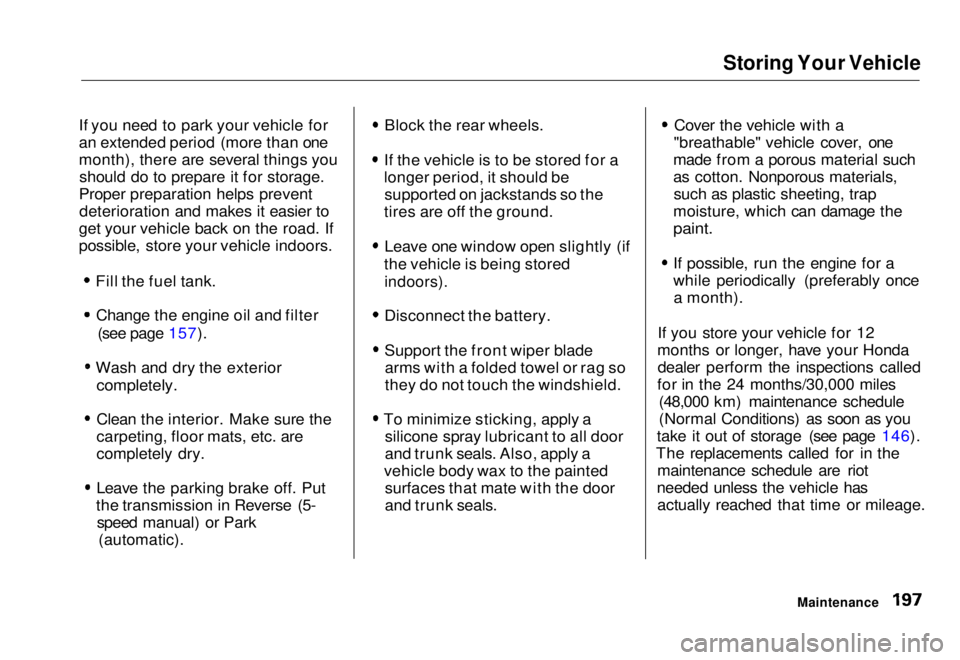
(U.S.: EX)
Replacing the Trunk Light Bulb
The trunk light is available on HX and
EX models in the U.S., and all models in
Canada
1. Remove the lens by carefully prying on the edge of the lens in
the middle with a fingernail file or
a small flat-tip screwdriver. Do not
pry on the edge of the housing around the lens. 2. Remove the bulb by pulling it
straight out of its metal tabs.
3. Push the new bulb into the metal tabs. Snap the lens back in place.
Maintenance
SPOTLIGHT
TRUNK LIGHTMain Menu Table of Contents s t
Page 198 of 251
Storing Your Vehicle
If you need to park your vehicle for
an extended period (more than one
month), there are several things you should do to prepare it for storage.
Proper preparation helps prevent deterioration and makes it easier to
get your vehicle back on the road. If
possible, store your vehicle indoors.
Fill the fuel tank.Change the engine oil and filter (see page 157).
Wash and dry the exterior
completely.
Clean the interior. Make sure the
carpeting, floor mats, etc. are
completely dry.
Leave the parking brake off. Put
the transmission in Reverse (5- speed manual) or Park (automatic). Block the rear wheels.
If the vehicle is to be stored for a
longer period, it should be supported on jackstands so the
tires are off the ground.
Leave one window open slightly (if
the vehicle is being stored
indoors).
Disconnect the battery.
Support the front wiper bladearms with a folded towel or rag so
they do not touch the windshield.
To minimize sticking, apply a silicone spray lubricant to all door
and trunk seals. Also, apply a
vehicle body wax to the painted surfaces that mate with the door
and trunk seals. Cover the vehicle with a
"breathable" vehicle cover, one
made from a porous material such
as cotton. Nonporous materials, such as plastic sheeting, trap
moisture, which can damage the
paint.
If possible, run the engine for a
while periodically (preferably once a month).
If you store your vehicle for 12
months or longer, have your Honda dealer perform the inspections called
for in the 24 months/30,000 miles (48,000 km) maintenance schedule
(Normal Conditions) as soon as you
take it out of storage (see page 146).
The replacements called for in the maintenance schedule are riot
needed unless the vehicle has actually reached that time or mileage.
MaintenanceMain Menu Table of Contents s t
Page 200 of 251
Exterior Care
Washing
Frequent washing helps preserve
your vehicle's beauty. Dirt and grit can scratch the paint, while tree sap
and bird droppings can permanently
ruin the finish.
Wash your vehicle in a shady area, not in direct sunlight. If the vehicle is
parked in the sun, move it into the shade and let the exterior cool down
before you start.
Only use the solvents and cleaners
recommended in this Owner's
Manual.
Chemical solvents and strong cleaners
can damage the paint, metal, and
plastic on your vehicle.
Rinse the vehicle thoroughly with
cool water to remove loose dirt. Fill a bucket with cool water. Mix
in a mild detergent, such as
dishwashing liquid or a product
made especially for vehicle
washing.
Wash the vehicle using the water and detergent solution and a soft-
bristle brush, sponge, or soft cloth.
Start at the top and work your way down. Rinse frequently.
Check the body for road tar, treesap, etc. Remove these stains with
tar remover or turpentine. Rinse it off immediately so it does not
harm the finish. Remember to re-
wax these areas, even if the rest of the vehicle does not need waxing.
When you have washed and rinsed the whole exterior, dry it with a
chamois or soft towel. Letting itair-dry will cause dulling and water
spots.
As you dry the vehicle, inspect it for
chips and scratches that could allow
corrosion to start. Repair them with
touch-up paint (see page 201).
Waxing Always wash and dry the wholevehicle before waxing it. You should
wax your vehicle, including the metal
trim, whenever water sits on the surface in large patches. It should
form into beads or droplets after
waxing.
You should use a quality liquid or paste wax. Apply it according to the
instructions on the container. In
general, there are two types of
products:
Waxes — A wax coats the finish and protects it from damage by exposure
to sunlight, air pollution, etc. Youshould use a wax on your Honda
when it is new.
Appearance Care
NOTICEMain Menu Table of Contents s t
Page 207 of 251
Changing a Flat Tire
If you have a flat tire while driving, stop in a safe place to change it.
Stopping in traffic or on the shoulder
of a busy road is dangerous. Drive
slowly along the shoulder until you
get to an exit or an area to stop that is far away from the traffic lanes.
1. Park the vehicle on firm, levelground away from traffic. Turn on
the hazard warning lights and turn
the ignition switch to LOCK (0).
2. Put the transmission in Park (automatic) or Reverse (manual).
Apply the parking brake. Have all of the passengers get out of the
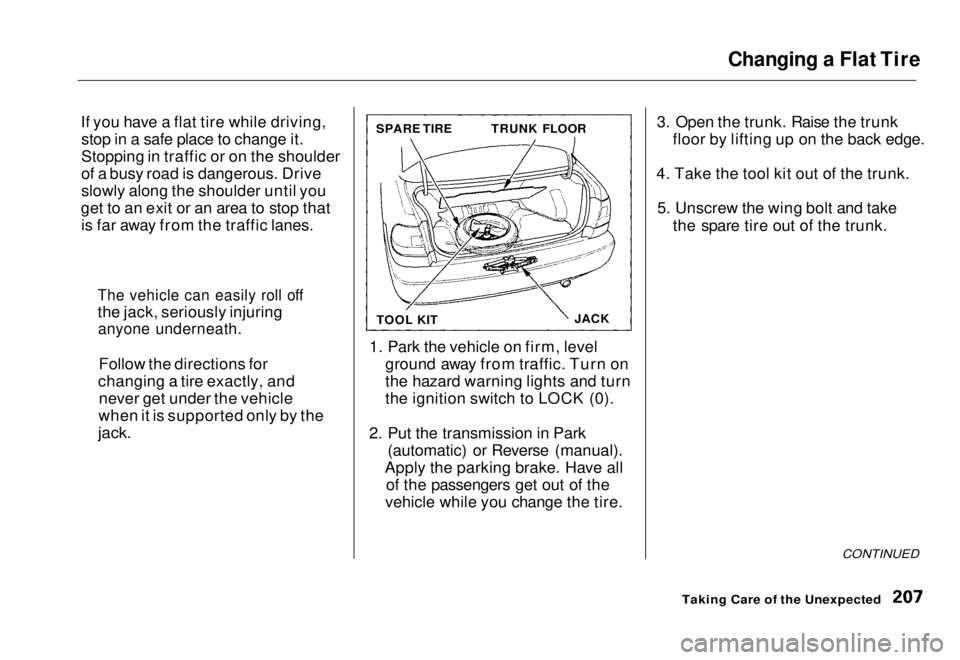
vehicle while you change the tire. 3. Open the trunk. Raise the trunk
floor by lifting up on the back edge.
4. Take the tool kit out of the trunk. 5. Unscrew the wing bolt and take the spare tire out of the trunk.
CONTINUED
Taking Care of the Unexpected
The vehicle can easily roll off
the jack, seriously injuring
anyone underneath.
Follow the directions for
changing a tire exactly, and never get under the vehicle
when it is supported only by the
jack.
SPARE TIRE
TRUNK FLOOR
TOOL KIT JACKMain Menu Table of Contents s t
Page 212 of 251
If Your Engine Won't Start
Diagnosing why your engine won't
start falls into two areas, depending
on what you hear when you turn the
key to START (III):
You hear nothing, or almostnothing. The engine's starter
motor does not operate at all, or
operates very slowly.
You can hear the starter motor operating normally, or the starter
motor sounds like it is spinning
faster than normal, but the engine does not start up and run. Nothing Happens or the Starter
Motor Operates Very Slowly
When you turn the ignition switch to START (III), you do not hear the
normal noise of the engine trying to
start. You may hear a clicking sound
or series of clicks, or nothing at all.
Check these things:
Check the transmission interlock.
If you have a manual transmission,
the clutch pedal must be pushed
all the way to the floor or the
starter will not operate. With an
automatic transmission, it must be
in Park or Neutral.
Turn the ignition switch to ON (II).
Turn on the headlights and check their brightness. If the headlights
are very dim or don't light at all,
the battery is discharged. See
Jump Starting on page 213.
Turn the ignition switch to START
(III). If the headlights do not dim,
check the condition of the fuses. If
the fuses are OK, there is proba-
bly something wrong with the
electrical circuit for the ignition switch or starter motor. You will
need a qualified technician to determine the problem. (See
Emergency Towing on page 227).
If the headlights dim noticeably or
go out when you try to start the engine, either the battery is dis-
charged or the connections are
corroded. Check the condition of
the battery and terminal connec-
tions (see page 173). You can
then try jump starting the vehicle
from a booster battery (see page 213).
Taking Care of the UnexpectedMain Menu Table of Contents s t