change time HONDA CIVIC COUPE 1998 Owners Manual
[x] Cancel search | Manufacturer: HONDA, Model Year: 1998, Model line: CIVIC COUPE, Model: HONDA CIVIC COUPE 1998Pages: 251, PDF Size: 2.04 MB
Page 2 of 251
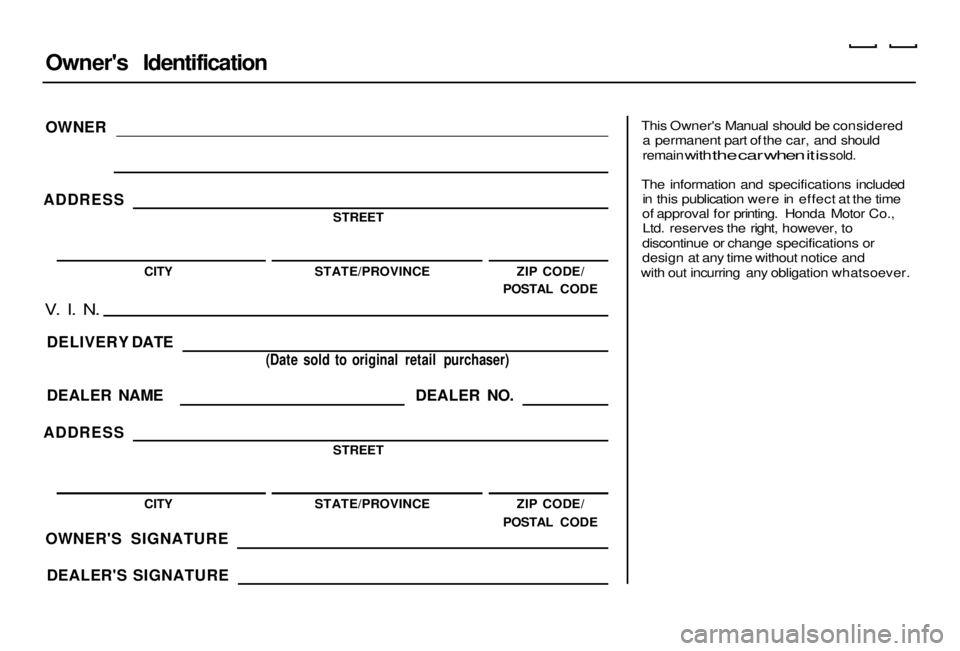
Owner's Identification
OWNER
ADDRESS
STREET
CITY
STATE/PROVINCE ZIP CODE/
POSTAL CODE
V. I. N.
DELIVERY DATE
DEALER NAME
ADDRESS
(Date sold to original retail purchaser)
DEALER NO.
STREET
CITY
OWNER'S SIGNATURE
DEALER'S SIGNATURE STATE/PROVINCE
ZIP CODE/
POSTAL CODE
This Owner's Manual should be considered
a permanent part of the car, and should
remain
with
the car when it is
sold.
The information and specifications included in this publication were in effect at the time
of approval for printing. Honda Motor Co., Ltd. reserves the right, however, to
discontinue or change specifications or
design at any time without notice and
with out incurring any obligation whatsoever.Main Menu s t Main Menu s t
Page 61 of 251
Controls Near the Steering Wheel
Headlights
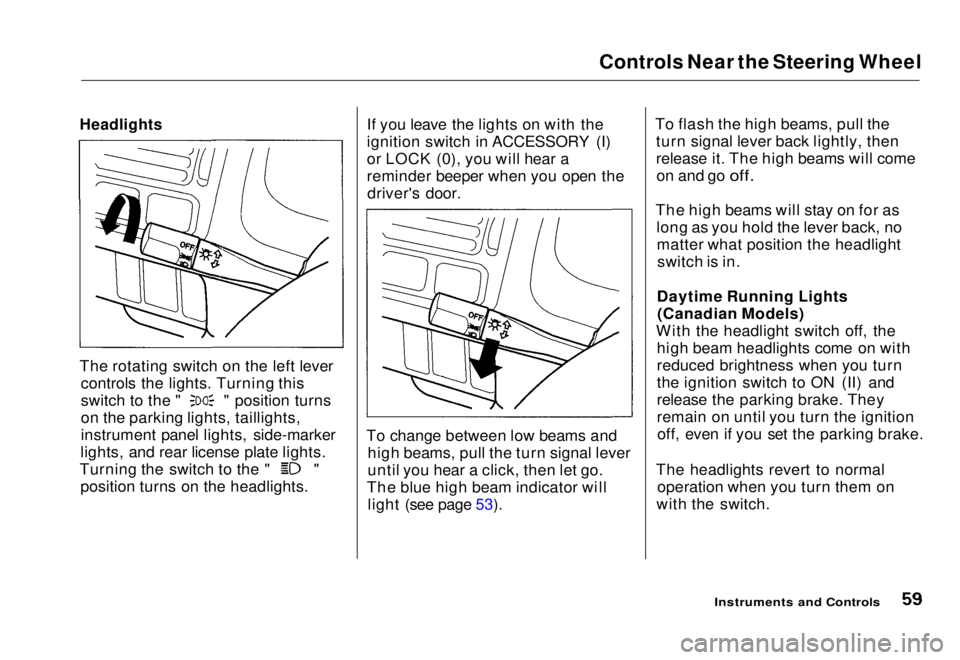
The rotating switch on the left lever controls the lights. Turning this switch to the " " position turns
on the parking lights, taillights,
instrument panel lights, side-marker
lights, and rear license plate lights. Turning the switch to the " "
position turns on the headlights. If you leave the lights on with the
ignition switch in ACCESSORY (I)
or LOCK (0), you will hear a
reminder beeper when you open the
driver's door.
To change between low beams and high beams, pull the turn signal lever
until you hear a click, then let go.
The blue high beam indicator will light (see page 53). To flash the high beams, pull the
turn signal lever back lightly, then
release it. The high beams will comeon and go
off.
The high beams will stay on for as long as you hold the lever back, nomatter what position the headlightswitch is in.
Daytime Running Lights (Canadian Models)
With the headlight switch off, the high beam headlights come on with
reduced brightness when you turn
the ignition switch to ON (II) and
release the parking brake. They
remain on until you turn the ignitionoff, even if you set the parking brake.
The headlights revert to normal operation when you turn them on
with the switch.
Instruments and ControlsMain Menu Table of Contents s t
Page 74 of 251
Keys and Locks
Reinstall the 0-ring. Align the
mark on the cover with the mark on the transmitter,
then set the cover in place and turn it
clockwise.
After the battery is changed, the transmitter must be synchronized
with the main unit. With the doors and trunk lid closed, press either theLOCK or UNLOCK button six times.
Test the transmitter by locking and unlocking the doors several times. Transmitter Care
Avoid severe shock to the trans- mitter, such as dropping or throwing
it. Also, protect it from extreme hotor cold temperatures.
Clean the transmitter case with a
soft cloth. Do not use strong
cleaners or solvents that could harm
the case. Immersing the transmitter in any liquid will harm the trans-
mitter and cause it to not function
properly.
Use the ring on the transmitter to
attach it to your main key ring. You
could damage the transmitter if you
try to use its ring as a key ring. If you lose a transmitter, you will
need to have the replacement
programmed to your vehicle's
system by your Honda dealer. Any
other transmitters you have will also
need to be reprogrammed.
As required by the FCC: This device complies with Part 15 of the
FCC rules. Operation is subject to the
following two conditions: (1) This device may not cause harmful interference, and (2) this device must accept any
interference received, including
interference that may cause undesired operation.
Changes or modifications not expressly
approved by the party responsible for
compliance could void the user's
authority to operate the equipment.
Instruments and ControlsMain Menu Table of Contents s t
Page 98 of 251
Audio System
Adjusting the Sound
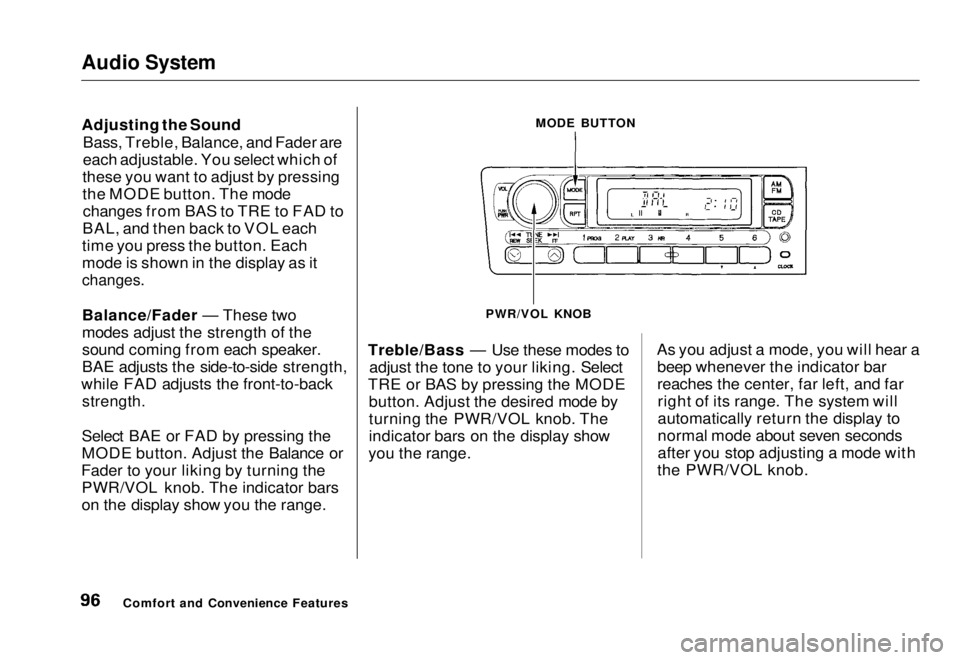
Bass, Treble, Balance, and Fader are
each adjustable. You select which of
these you want to adjust by pressing
the MODE button. The mode changes from BAS to TRE to FAD to
BAL, and then back to VOL each
time you press the button. Each
mode is shown in the display as it
changes.
Balance/Fader — These two
modes adjust the strength of the
sound coming from each speaker.
BAE adjusts the side-to-side strength,
while FAD adjusts the front-to-back
strength.
Select BAE or FAD by pressing the
MODE button. Adjust the Balance or
Fader to your liking by turning the PWR/VOL knob. The indicator bars
on the display show you the range. Treble/Bass — Use these modes to
adjust the tone to your liking. Select
TRE or BAS by pressing the MODE button. Adjust the desired mode by
turning the PWR/VOL knob. The
indicator bars on the display show
you the range. As you adjust a mode, you will hear a
beep whenever the indicator bar
reaches the center, far left, and farright of its range. The system will
automatically return the display to
normal mode about seven seconds
after you stop adjusting a mode with
the PWR/VOL knob.
Comfort and Convenience Features MODE BUTTON
PWR/VOL KNOBMain Menu Table of Contents s t
Page 101 of 251
Audio System
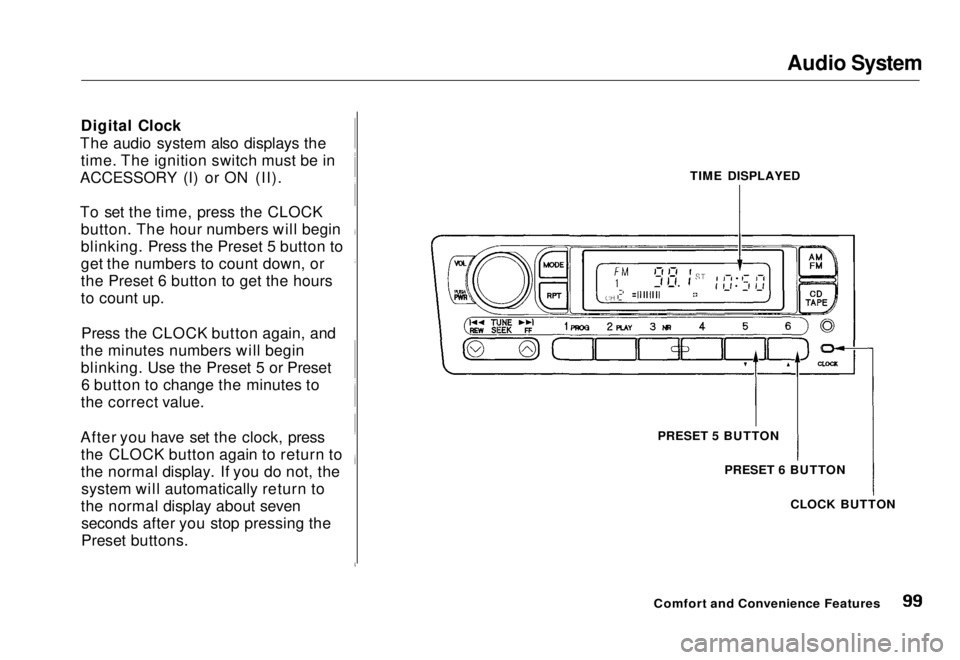
Digital Clock
The audio system also displays the time. The ignition switch must be in
ACCESSORY (I) or ON (II).
To set the time, press the CLOCK button. The hour numbers will begin
blinking. Press the Preset 5 button to
get the numbers to count down, or
the Preset 6 button to get the hours
to count up.
Press the CLOCK button again, and
the minutes numbers will begin blinking. Use the Preset 5 or Preset6 button to change the minutes to
the correct value.
After you have set the clock, press the CLOCK button again to return to
the normal display. If you do not, thesystem will automatically return to
the normal display about seven seconds after you stop pressing the
Preset buttons. TIME DISPLAYED
PRESET 5 BUTTON PRESET 6 BUTTON
CLOCK BUTTON
Comfort and Convenience FeaturesMain Menu Table of Contents s t
Page 138 of 251
The Braking System
You will feel a pulsation in the brakepedal when the ABS activates, and
you may hear some noise. This is normal, it is the ABS rapidly
pumping the brakes.
Activation varies with the amount of traction your tires have. On drypavement, you will need to press on
the brake pedal very hard before you activate the ABS. However, you may
feel the ABS activate immediately if
you are trying to stop on snow or ice.
Important Safety Reminders
ABS does not reduce the time or distance it takes to stop the
vehicle, it only helps with steering control during braking. You shouldalways maintain a safe following
distance from other vehicles.
ABS will not prevent a skid that results from changing direction
abruptly, such as trying to take acorner too fast or making a sudden
lane change. Always drive at a safe,
prudent speed for the road and
weather conditions.
ABS cannot prevent a loss of stability. Always steer moderately
when you are braking hard. Severe or sharp steering wheel movement
can still cause your vehicle to veer
into oncoming traffic or off the road. A vehicle with ABS may require a
longer distance to stop on loose or
uneven surfaces, such as gravel orsnow, than a vehicle without anti-
lock. Slow down and allow a greater distance between vehicles under
those conditions.
DrivingMain Menu Table of Contents s t
Page 158 of 251
Engine Oil
Changing the Oil and Filter
Always change the oil and filter according to the time and distance (miles/kilometers) recommenda-
tions in the maintenance schedule.
The oil and filter collect contami- nants that can damage your engine if
they are not removed regularly.
Changing the oil and filter requires
special tools and access from
underneath the vehicle. The vehicle should be raised on a service station-
type hydraulic lift for this service.
Unless you have the knowledge and
proper equipment, you should have
this maintenance done by a skilled
mechanic.
1. Run the engine until it reaches
normal operating temperature,
then shut it off.
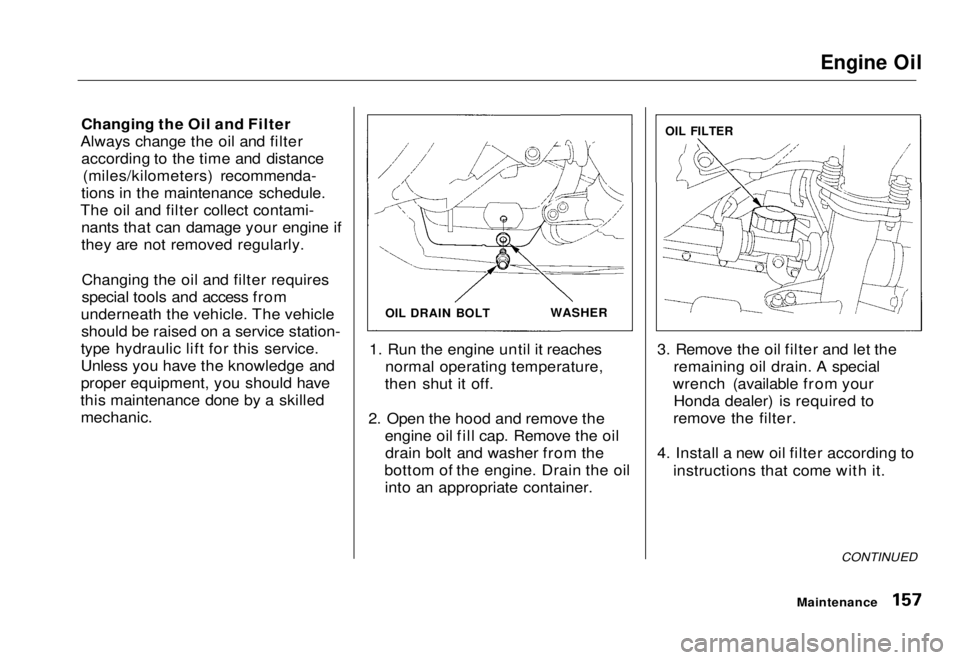
2. Open the hood and remove the engine oil fill cap. Remove the oildrain bolt and washer from the
bottom of the engine. Drain the oil into an appropriate container. 3. Remove the oil filter and let the
remaining oil drain. A special
wrench (available from your Honda dealer) is required to
remove the filter.
4. Install a new oil filter according to instructions that come with it.
CONTINUED
Maintenance
OIL DRAIN BOLT
WASHER
OIL FILTERMain Menu Table of Contents s t
Page 166 of 251
Transmission Fluid
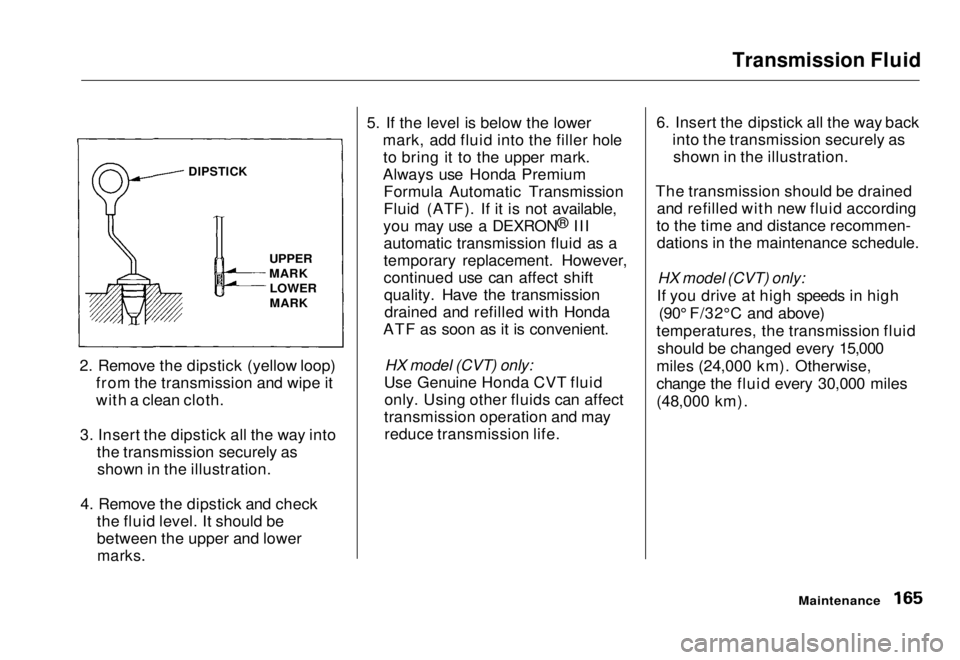
2. Remove the dipstick (yellow loop) from the transmission and wipe it
with a clean cloth.
3. Insert the dipstick all the way into the transmission securely asshown in the illustration.
4. Remove the dipstick and check the fluid level. It should be
between the upper and lower
marks.
5. If the level is below the lower
mark, add fluid into the filler holeto bring it to the upper mark.
Always use Honda Premium Formula Automatic Transmission
Fluid (ATF). If it is not available,
you may use a DEXRON ®
III
automatic transmission fluid as a
temporary replacement. However,
continued use can affect shift quality. Have the transmissiondrained and refilled with Honda
ATF as soon as it is convenient.
HX model (CVT) only:
Use Genuine Honda CVT fluid only. Using other fluids can affect
transmission operation and may reduce transmission life. 6. Insert the dipstick all the way back
into the transmission securely asshown in the illustration.
The transmission should be drained and refilled with new fluid according
to the time and distance recommen- dations in the maintenance schedule.
HX model (CVT) only:
If you drive at high speeds in high (90° F/32°C and above)
temperatures, the transmission fluid should be changed every 15,000
miles (24,000 km). Otherwise,
change the fluid every 30,000 miles
(48,000 km).
Maintenance
DIPSTICK
UPPER
MARK
LOWER
MARKMain Menu Table of Contents s t
Page 198 of 251
Storing Your Vehicle
If you need to park your vehicle for
an extended period (more than one
month), there are several things you should do to prepare it for storage.
Proper preparation helps prevent deterioration and makes it easier to
get your vehicle back on the road. If
possible, store your vehicle indoors.
Fill the fuel tank.Change the engine oil and filter (see page 157).
Wash and dry the exterior
completely.
Clean the interior. Make sure the
carpeting, floor mats, etc. are
completely dry.
Leave the parking brake off. Put
the transmission in Reverse (5- speed manual) or Park (automatic). Block the rear wheels.
If the vehicle is to be stored for a
longer period, it should be supported on jackstands so the
tires are off the ground.
Leave one window open slightly (if
the vehicle is being stored
indoors).
Disconnect the battery.
Support the front wiper bladearms with a folded towel or rag so
they do not touch the windshield.
To minimize sticking, apply a silicone spray lubricant to all door
and trunk seals. Also, apply a
vehicle body wax to the painted surfaces that mate with the door
and trunk seals. Cover the vehicle with a
"breathable" vehicle cover, one
made from a porous material such
as cotton. Nonporous materials, such as plastic sheeting, trap
moisture, which can damage the
paint.
If possible, run the engine for a
while periodically (preferably once a month).
If you store your vehicle for 12
months or longer, have your Honda dealer perform the inspections called
for in the 24 months/30,000 miles (48,000 km) maintenance schedule
(Normal Conditions) as soon as you
take it out of storage (see page 146).
The replacements called for in the maintenance schedule are riot
needed unless the vehicle has actually reached that time or mileage.
MaintenanceMain Menu Table of Contents s t