audio HONDA CIVIC COUPE 1998 Owners Manual
[x] Cancel search | Manufacturer: HONDA, Model Year: 1998, Model line: CIVIC COUPE, Model: HONDA CIVIC COUPE 1998Pages: 251, PDF Size: 2.04 MB
Page 1 of 251
 to navigate through\
this reference.
For a printed owners manual, click on authorized manuals or")
1998 Civic Coupe Online Reference Owner's Manual
Use these links (and links throughout this manual) to navigate through\
this reference.
For a printed owner's manual, click on authorized manuals or go to www.h\
elminc.com.
Contents
Introduction ........................................................................\
........................ .........................................
i
A Few Words About Safety........................................................................\
.........................................ii
Driver and Passenger Safety ........................................................................\
......................................3
Proper use and care of your vehicle's seat belts, and Supplemental Restr\
aint System.
Instruments and Controls........................................................................\
.........................................49
Instrume nt panel indicator and gauge, and how to use dashboard and steering colu\
mn controls.
Comfort and Convenience Features ........................................................................\
...................... 85
How to operate the climate control system, the audio system, and other c\
onvenience features.
Before Driving........................................................................\
......................................................... 107
What gasoline to use, how to break-in your new vehicle, and how to load luggage and other cargo.
Driving ........................................................................\
..................................................................... 119
The proper way to start the engine, shift the transmission, and park, pl\
us towing a trailer.
Maintenance........................................................................\
.............................................................141
The Maintenance Schedule shows you when you need to take you r vehicle to the dealer.
Appearance Care........................................................................\
......................................................199
Tips on cleaning and protecting your vehicle. Things to look for if your\
vehicle ever needs body repairs.
Taking Care of the Unexpected........................................................................\
..............................205
This section covers several problems motorists sometimes experience, an d how to handle them.
Technical Information........................................................................\
.............................................229
ID numbers, dimensions, capacities, and technical information.
Warranty and Customer Relations (U.S. and Canada)................................................................243
A summary of the warranties covering your new Acura, and how to contact \
us.
Authorized Manuals (U.S. only)........................................................................\
..............................249
How to order manuals and other technical literature.
Index........................................................................\
............................................................................. I
A summary of information you need when you pull up to the fuel pump. Service Information Summary Owner's Identification
Page 52 of 251
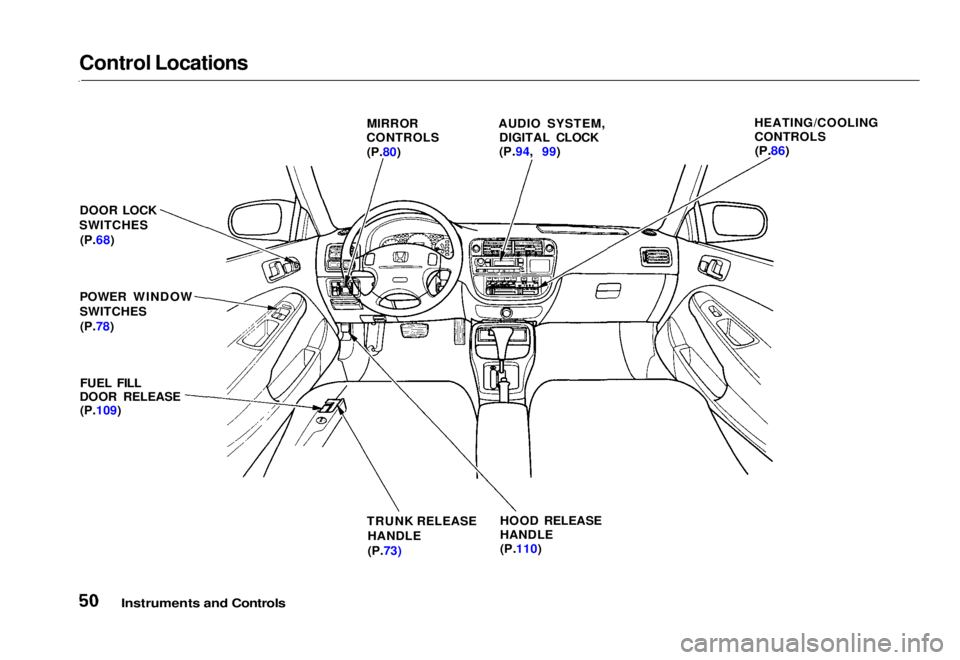
Control Locations
Instruments and Controls
MIRROR
CONTROLS
(P.80) AUDIO SYSTEM,
DIGITAL CLOCK
(P.94, 99) HEATING/COOLING
CONTROLS
(P.86)
DOOR LOCK
SWITCHES (P.68)
POWER WINDOW
SWITCHES (P.78)
FUEL FILL
DOOR RELEASE (P.109)
TRUNK RELEASE
HANDLE
(P.73) HOOD RELEASE
HANDLE
(P.110)Main Menu Table of Contents s t
Page 70 of 251
Keys and Locks
LOCK (0) — You can insert or
remove the key only in this position.
To switch from ACCESSORY to LOCK, you must push the key in
slightly as you turn it. If your vehicle
has an automatic transmission, it
must also be in Park. The anti-theft
lock will lock the steering column
when you remove the key. If the front wheels are turned, the
anti-theft lock may sometimes make
it difficult to turn the key from
LOCK to ACCESSORY. Firmly turn
the steering wheel to the left or to
the right as you turn the key. ACCESSORY (I) — In this position,
you can operate the audio system and the accessory power socket.
ON (II) — This is the normal key
position when driving. All features
and accessories on the vehicle are
usable. Several of the lights on the
instrument panel come on as a test
when you turn the ignition switch
from ACCESSORY to ON (see page 51).
START (III) — Use this position
only to start the engine. The switch
returns to ON (II) when you let go of
the key.
You will hear a reminder beeper if
you leave the key in the ignition switch in the LOCK (0) or
ACCESSORY (I) position and open the driver's door. Remove the key to
turn off the beeper. Door Locks
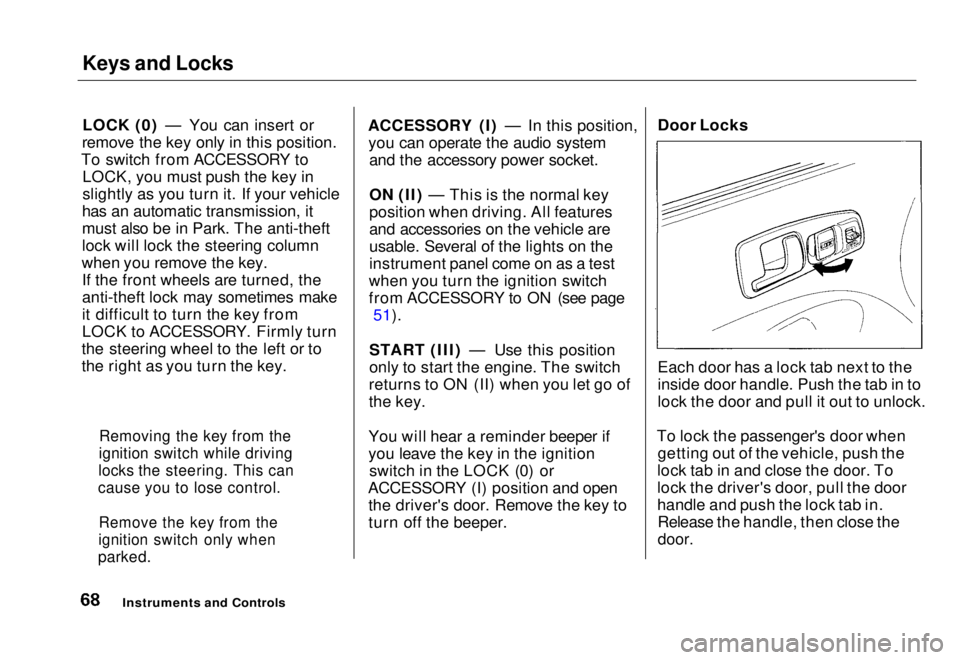
Each door has a lock tab next to the
inside door handle. Push the tab in to
lock the door and pull it out to unlock.
To lock the passenger's door when getting out of the vehicle, push the
lock tab in and close the door. To
lock the driver's door, pull the door
handle and push the lock tab in. Release the handle, then close the
door.
Instruments and Controls
Removing the key from the
ignition switch while driving
locks the steering. This can
cause you to lose control.
Remove the key from the
ignition switch only when
parked.Main Menu Table of Contents s t
Page 87 of 251
Comfort and Convenience Features
The heating and air conditioning* systems in your Honda provide a
comfortable driving environment in
all weather conditions.
The standard audio system has many features. This section de-
scribes those features and how to
use them. (If you selected an optional audio system, refer to the
operating instructions that came
with it.)
* Air conditioning is standard on the
EX model in the U.S. It is optional on
other models.
Heating and Cooling........................ 86
What Each Control Does............ 86How to Use the System............... 88
To Turn Everything Off............. 93
Audio System................................... 94 Operating the Radio.................... 94
Adjusting the Sound.................... 96 Radio Frequencies....................... 97
Radio Reception........................... 97
Digital Clock................................. 99Operating the Cassette Player...................................... 100
Tape Search Functions............. 100 Caring for the Cassette Player...................................... 102
Operating the Optional
CD Player/Changer.............. 103
Protecting Compact Discs........ 105
CD Changer Error Indications.............................. 106
Comfort and Convenience FeaturesMain Menu s t
Page 96 of 251
Audio System
AM/FM Stereo Audio System
Your Honda's audio system provides clear reception on both AM and FM
bands, while the preset buttons allow
you to easily select your favorite stations.
A cassette player, CD player or CD changer is available as optional
equipment. The cassette player is
standard on the Si model in Canada.
Operating the Radio
The ignition switch must be in
ACCESSORY (I) or ON (II) to operate the audio system. Turn the
system on by pressing the PWR/
VOL knob or the AM/FM button.
Adjust the volume by turning the
knob.
The band and frequency that the radio was last tuned to is displayed.
To change bands, press the AM/FM button. On the FM band, ST will bedisplayed if the station is broadcast-
ing in stereo. Stereo reproduction on
AM is not available.
You can use any of three methods to find radio stations on the selected
band: TUNE, SEEK, or the Preset
buttons.
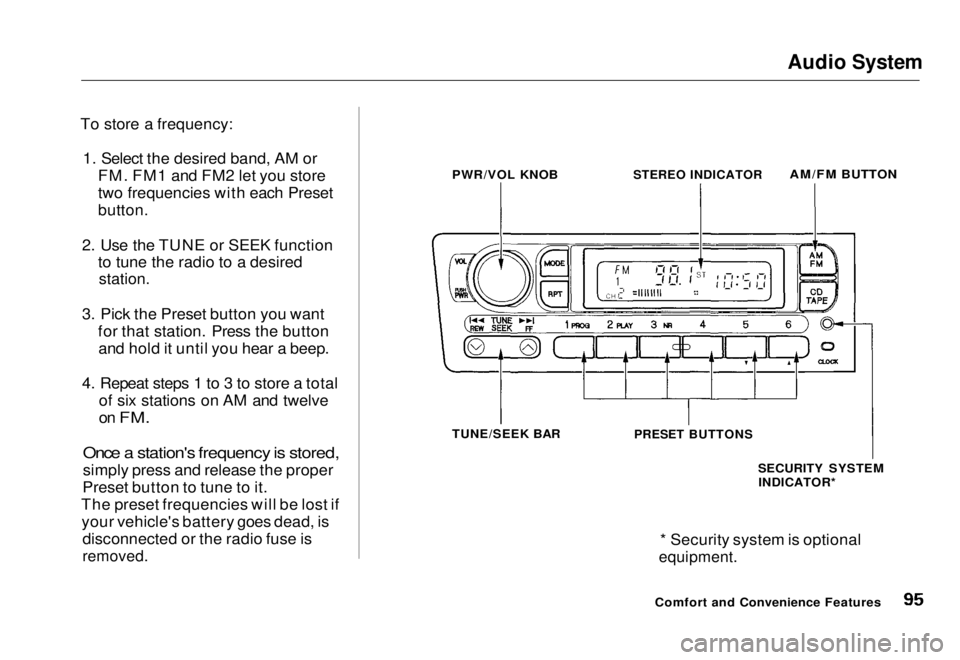
TUNE — Use the TUNE/SEEK bar to tune the radio to a desired frequency. Press the right side ( )
to tune to a higher frequency, or the left side ( ) to tune to a lower
frequency. The frequency numbers
will start to change rapidly. Release the bar when the display reaches thedesired frequency. To change the
frequency in small increments, press and release the TUNE/SEEK bar
quickly.
SEEK — The SEEK function searches the band for a station with
a strong signal. To activate it, press
the TUNE/SEEK bar until you hear a beep, then release it. Depending on
which side of the bar you press, the system scans upward or downward
from the current frequency. It stops
when it finds a station with a strong
signal.
Preset — You can store the fre- quencies of your favorite radio
stations in the six preset buttons.
Each button will store one frequency
on the AM band, and two on the FM
band.
Comfort and Convenience FeaturesMain Menu Table of Contents s t
Page 97 of 251
Audio System
To store a frequency: 1. Select the desired band, AM or FM. FM1 and FM2 let you store
two frequencies with each Preset
button.
2. Use the TUNE or SEEK function to tune the radio to a desired
station.
3. Pick the Preset button you want for that station. Press the buttonand hold it until you hear a beep.
4. Repeat steps 1 to 3 to store a total of six stations on AM and twelve
on
FM.
Once a station's frequency is stored,
simply press and release the proper
Preset button to tune to it.
The preset frequencies will be lost if your vehicle's battery goes dead, is disconnected or the radio fuse is
removed.
* Security system is optional
equipment.
Comfort and Convenience Features
PWR/VOL KNOB
STEREO INDICATOR
AM/FM BUTTON
TUNE/SEEK BAR
PRESET BUTTONS
SECURITY SYSTEMINDICATOR*Main Menu Table of Contents s t
Page 98 of 251
Audio System
Adjusting the Sound
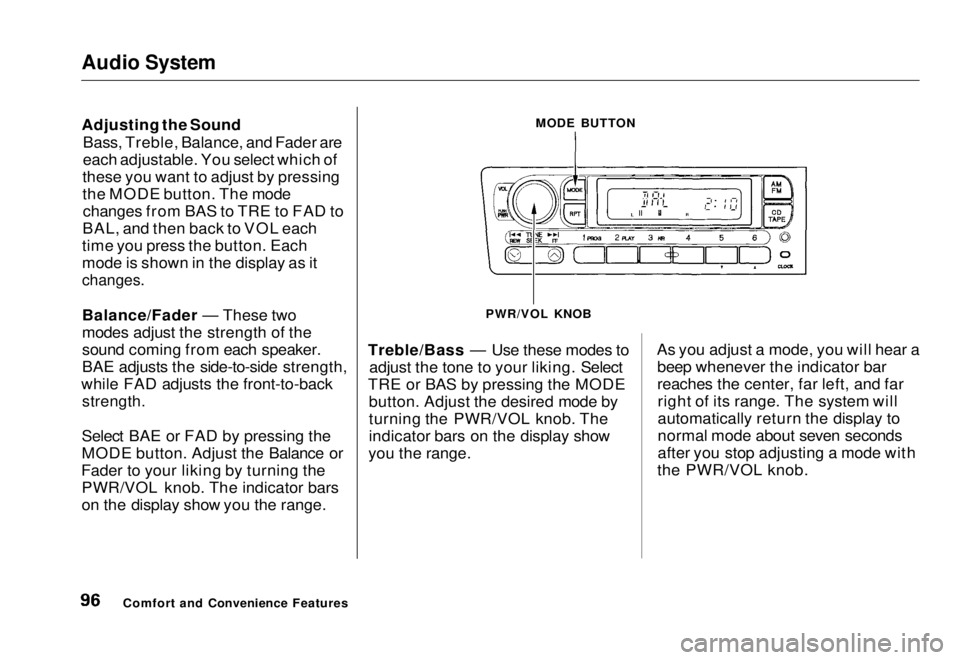
Bass, Treble, Balance, and Fader are
each adjustable. You select which of
these you want to adjust by pressing
the MODE button. The mode changes from BAS to TRE to FAD to
BAL, and then back to VOL each
time you press the button. Each
mode is shown in the display as it
changes.
Balance/Fader — These two
modes adjust the strength of the
sound coming from each speaker.
BAE adjusts the side-to-side strength,
while FAD adjusts the front-to-back
strength.
Select BAE or FAD by pressing the
MODE button. Adjust the Balance or
Fader to your liking by turning the PWR/VOL knob. The indicator bars
on the display show you the range. Treble/Bass — Use these modes to
adjust the tone to your liking. Select
TRE or BAS by pressing the MODE button. Adjust the desired mode by
turning the PWR/VOL knob. The
indicator bars on the display show
you the range. As you adjust a mode, you will hear a
beep whenever the indicator bar
reaches the center, far left, and farright of its range. The system will
automatically return the display to
normal mode about seven seconds
after you stop adjusting a mode with
the PWR/VOL knob.
Comfort and Convenience Features MODE BUTTON
PWR/VOL KNOBMain Menu Table of Contents s t
Page 99 of 251
Audio System
Radio Frequencies
Your Honda's radio can receive the complete AM and FM bands.
Those bands cover these frequen-
cies:
AM band: 530 to 1,710 kilohertz
FM band:
87.7 to 107.9 megahertz
Radio stations on the AM band are
assigned frequencies at least ten
kilohertz apart (530, 540, 550).
Stations on the FM band are assigned frequencies at least 0.2
megahertz apart (87.9, 88.1, 88.3).
Stations must use these exact
frequencies. It is fairly common for stations to round-off the frequency in
their advertising, so your radio could display a frequency of 100.9 even
though the announcer may identify
the station as "FM101." Radio Reception
How well your Honda's radio
receives stations is dependent on
many factors, such as the distance
from the station's transmitter, nearby large objects, and atmos-
pheric conditions.
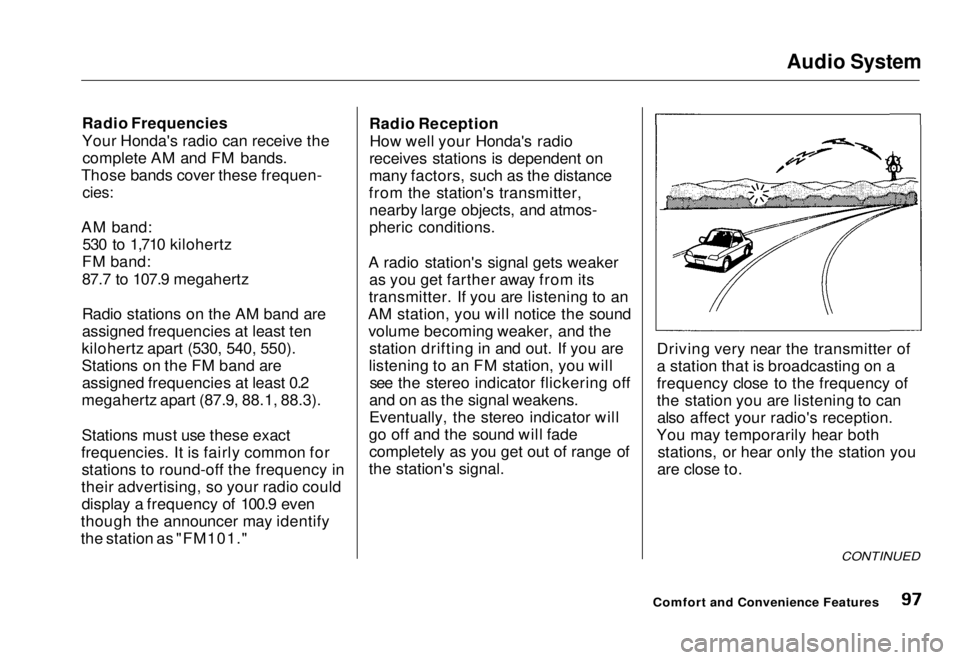
A radio station's signal gets weaker as you get farther away from its
transmitter. If you are listening to an
AM station, you will notice the sound volume becoming weaker, and the station drifting in and out. If you are
listening to an FM station, you will see the stereo indicator flickering off
and on as the signal weakens.
Eventually, the stereo indicator will
go off and the sound will fade completely as you get out of range of
the station's signal. Driving very near the transmitter of
a station that is broadcasting on a
frequency close to the frequency of
the station you are listening to can
also affect your radio's reception.
You may temporarily hear both stations, or hear only the station you
are close to.
CONTINUED
Comfort and Convenience FeaturesMain Menu Table of Contents s t
Page 100 of 251
Audio System
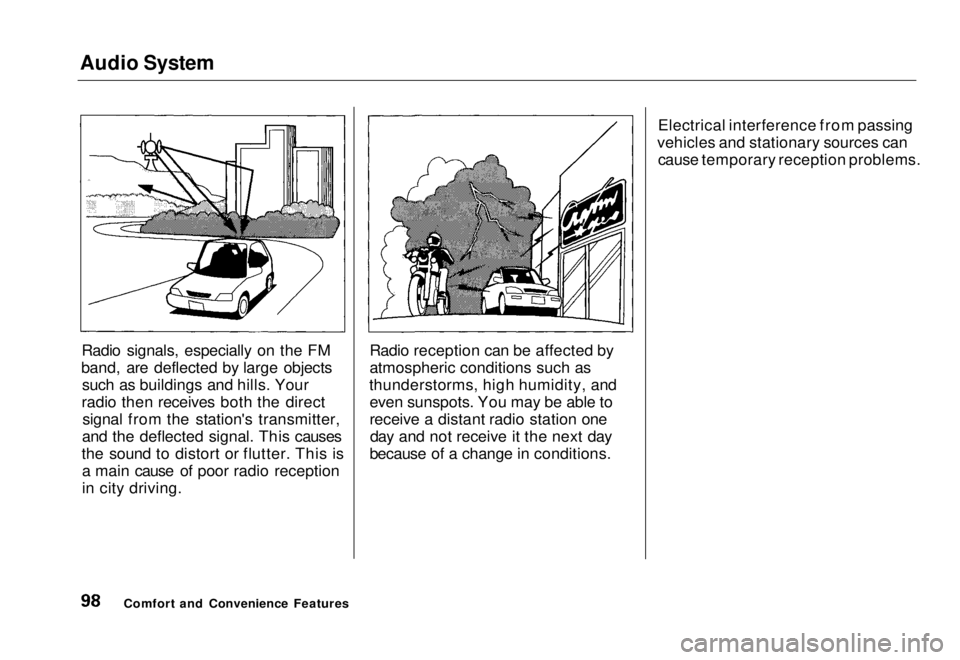
Radio signals, especially on the FM
band, are deflected by large objects such as buildings and hills. Your
radio then receives both the direct signal from the station's transmitter,
and the deflected signal. This causes
the sound to distort or flutter. This is a main cause of poor radio reception
in city driving. Radio reception can be affected by
atmospheric conditions such as
thunderstorms, high humidity, and even sunspots. You may be able to
receive a distant radio station oneday and not receive it the next day
because of a change in conditions. Electrical interference from passing
vehicles and stationary sources can cause temporary reception problems.
Comfort and Convenience FeaturesMain Menu Table of Contents s t
Page 101 of 251
Audio System
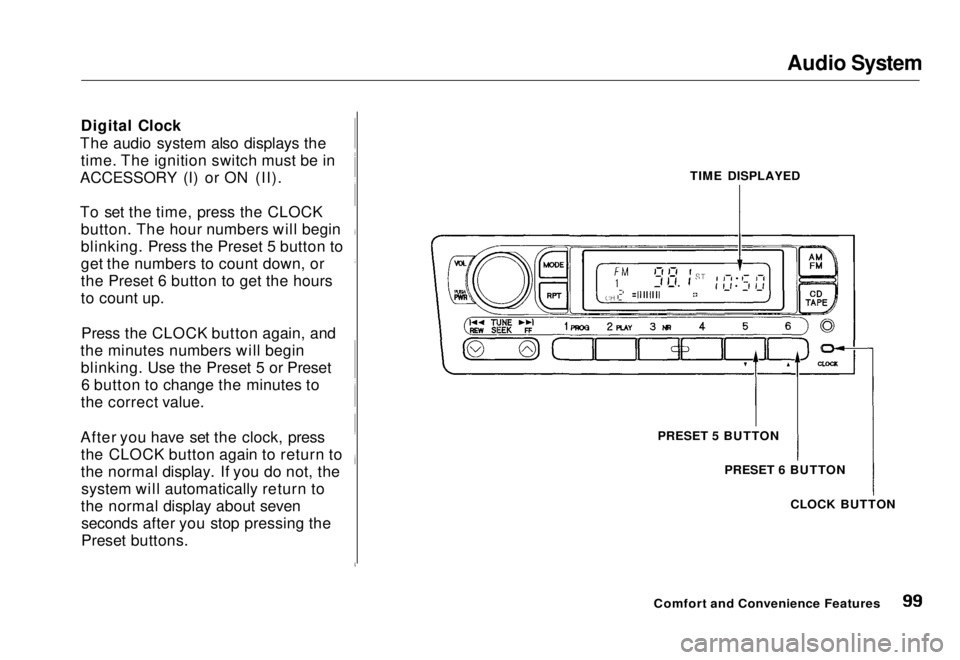
Digital Clock
The audio system also displays the time. The ignition switch must be in
ACCESSORY (I) or ON (II).
To set the time, press the CLOCK button. The hour numbers will begin
blinking. Press the Preset 5 button to
get the numbers to count down, or
the Preset 6 button to get the hours
to count up.
Press the CLOCK button again, and
the minutes numbers will begin blinking. Use the Preset 5 or Preset6 button to change the minutes to
the correct value.
After you have set the clock, press the CLOCK button again to return to
the normal display. If you do not, thesystem will automatically return to
the normal display about seven seconds after you stop pressing the
Preset buttons. TIME DISPLAYED
PRESET 5 BUTTON PRESET 6 BUTTON
CLOCK BUTTON
Comfort and Convenience FeaturesMain Menu Table of Contents s t