brake HONDA CIVIC COUPE 1999 User Guide
[x] Cancel search | Manufacturer: HONDA, Model Year: 1999, Model line: CIVIC COUPE, Model: HONDA CIVIC COUPE 1999Pages: 269, PDF Size: 2.42 MB
Page 126 of 269
Service Station Procedures
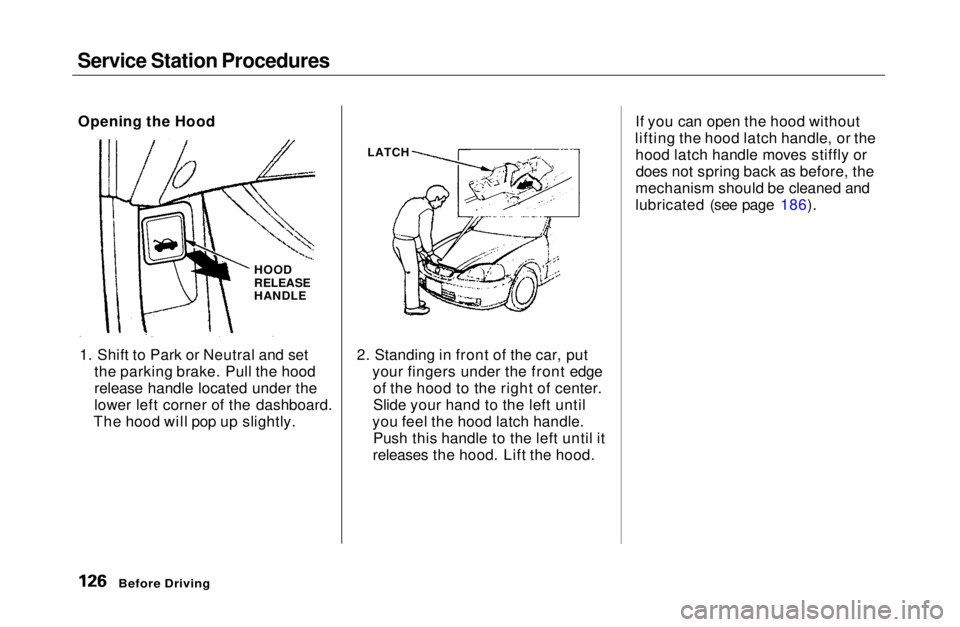
1. Shift to Park or Neutral and set the parking brake. Pull the hood
release handle located under the
lower left corner of the dashboard.
The hood will pop up slightly. 2. Standing in front of the car, put
your fingers under the front edgeof the hood to the right of center.
Slide your hand to the left until
you feel the hood latch handle. Push this handle to the left until it
releases the hood. Lift the hood. If you can open the hood without
lifting the hood latch handle, or the hood latch handle moves stiffly ordoes not spring back as before, the
mechanism should be cleaned and
lubricated (see page 186).
Before Driving
Opening the Hood
HOOD
RELEASE
HANDLE
LATCHMain Menu Table of Contents s t
Page 130 of 269
Accessories and Modifications
Modifying your car, or installingsome non-Honda accessories, can
make your car unsafe. Before you make any modifications or add anyaccessories, be sure to read the
following information.
Accessories
Your dealer has Genuine Honda accessories that allow you to
personalize your car. These accessories have been designed and
approved for your car, and are
covered by warranty.
Non-Honda accessories are usually designed for universal applications.
Although aftermarket accessories may fit on your car, they may not
meet factory specifications, and
could adversely affect your car's
handling and stability. (See "Modifications" on the page 131 for
additional information.) When properly installed, cellular
phones, alarms, two-way radios, and
low-powered audio systems shouldnot interfere with your car's
computer-controlled systems, such as the SRS and anti-lock brake
system.
However, if electronic accessories
are improperly installed, or exceed
your car's electrical system capacity, they can interfere with the operation of your car, or even cause the
airbags to deploy.
Before installing any accessory:
Make sure the accessory does notobscure any lights, or interfere
with proper car operation or
performance.
Be sure electronic accessories do
not overload electrical circuits (see page 239). Have the installer contact your
Honda dealer for assistance before
installing any electronic accessory.
If possible, have your dealer inspect
the final installation.
Before Driving
Improper accessories or
modifications can affect your
car's handling, stability and performance, and cause a
crash in which you can be hurt
or killed.
Follow all instructions in this
owner's manual regarding accessories and modifications.Main Menu Table of Contents s t
Page 131 of 269

Accessories and Modifications
Modifications Do not remove any original
equipment or modify your car in any
way that would alter its design or operation. This could make your car
unsafe and illegal to drive.
For example, do not make any
modifications that would change the
ride height of your car, or install
wheels and tires with a different overall diameter.
Such modifications can adversely
affect handling, and interfere with
the operation of the car's anti-lock
brakes and other systems. In addition, any modifications that
decrease ground clearance increase
the chance of undercarriage parts striking a curb, speed bump, or other
raised object, which could cause
your airbags to deploy.
Do not modify your steering wheelor any other part of your
Supplemental Restraint System.
Modifications could make the
system ineffective. Additional Safety Precaution
Do not attach or place objects on the
airbag covers. Any object attached to
or placed on the covers marked "SRS
AIRBAG," in the center of the steering wheel and on top of the
dashboard, could interfere with the
proper operation of the airbags. Or,
if the airbags inflate, the objects
could be propelled inside the car and
hurt someone.
Before DrivingMain Menu Table of Contents s t
Page 135 of 269
Driving
This section gives you tips on starting the engine under various
conditions, and how to operate the5-speed manual and automatic
transmissions. It also includes impor-
tant information on parking your car,
and the braking system. Preparing to Drive......................... 136
Starting the Engine........................ 137
Starting in Cold Weatherat High Altitude ..................... 137
5-speed Manual Transmission..... 138 Recommended Shift Points...... 139
Engine Speed Limiter............... 139
Automatic Transmission............... 140 Shift Lever Position Indicator.. 141
Shift Lever Positions................. 141
Engine Speed Limiter............... 144
Shift Lock Release..................... 144Continuously Variable Transmission (CVT)............. 145
Parking............................................ 149
Parking Tips............................... 149
The Braking System...................... 150 Brake Wear Indicators.............. 150
Brake System Design................ 151
Anti-lock Brakes........................ 151 Important SafetyReminders.......................... 152
ABS Indicator......................... 153
Driving in Bad Weather................ 154
Towing a Trailer............................ 155
DrivingMain Menu s t
Page 137 of 269

Starting the Engine
1. Apply the parking brake.
2. In cold weather, turn off all
electrical accessories to reduce
the drain on the battery.
3. Manual Transmission:
Push the clutch pedal down all the
way. START (III) does not function unless the clutch pedal is
depressed.
Automatic Transmission (Including
CVT):
Make sure the shift lever is in
Park. Press on the brake pedal.
4. Without touching the accelerator
pedal, turn the ignition key to the
START (III) position. If the enginedoes not start right away, do not
hold the key in START (III) for
more than 15 seconds at a time.
Pause for at least 10 seconds
before trying again.
5. If the engine does not start within
15 seconds, or starts but stalls
right away, repeat step 4 with the accelerator pedal pressed half-way
down. If the engine starts, release
pressure on the accelerator pedalso the engine does not race.
6. If the engine still does not start, press the accelerator pedal all the
way down and hold it there while starting in order to clear flooding.
As before, keep the ignition key in the START (III) position for nomore than 15 seconds. Return tostep 5 if the engine does not start.
If it starts, lift your foot off the
accelerator pedal so the engine does not race.
Starting in Cold Weather at High
Altitude (Above 8,000 feet/
2,400 meters)
An engine is harder to start in cold weather. The thinner air found at
high altitude above 8,000 feet (2,400 meters) adds to the problem.
Use the following procedure:
1. Turn off all electrical accessories to reduce the drain on the battery.
2. Push the accelerator pedal half- way to the floor and hold it there
while starting the engine. Do nothold the ignition key in START (III) for more than 15 seconds.
When the engine starts, release the accelerator pedal gradually as
the engine speeds up and smoothsout.
3. If the engine fails to start in step 2, push the accelerator pedal to the
floor and hold it there while you try to start the engine for no more
than 15 seconds. If the enginedoes not start, return to step 2.
DrivingMain Menu Table of Contents s t
Page 138 of 269
5-speed Manual Transmission
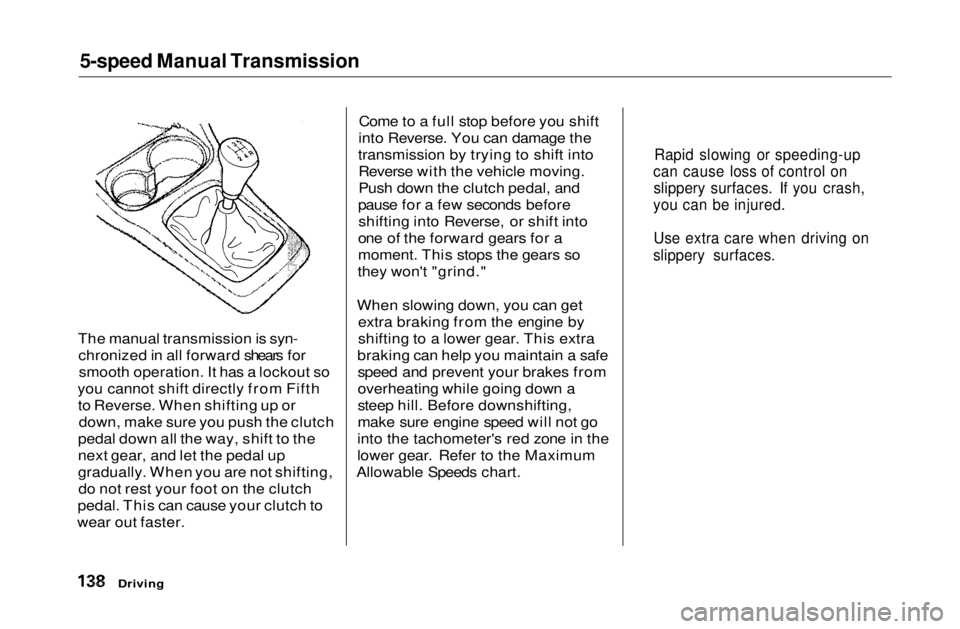
The manual transmission is syn- chronized in all forward shears forsmooth operation. It has a lockout so
you cannot shift directly from Fifth to Reverse. When shifting up or down, make sure you push the clutch
pedal down all the way, shift to the
next gear, and let the pedal up
gradually. When you are not shifting, do not rest your foot on the clutch
pedal. This can cause your clutch to
wear out faster. Come to a full stop before you shift
into Reverse. You can damage the
transmission by trying to shift into Reverse with the vehicle moving.
Push down the clutch pedal, and
pause for a few seconds before shifting into Reverse, or shift into
one of the forward gears for a
moment. This stops the gears so
they won't "grind."
When slowing down, you can get extra braking from the engine by
shifting to a lower gear. This extra
braking can help you maintain a safe speed and prevent your brakes from
overheating while going down a
steep hill. Before downshifting,
make sure engine speed will not go
into the tachometer's red zone in the
lower gear. Refer to the Maximum
Allowable Speeds chart.
Driving
Rapid slowing or speeding-up
can cause loss of control on slippery surfaces. If you crash,
you can be injured.
Use extra care when driving on
slippery surfaces.Main Menu Table of Contents s t
Page 141 of 269
Automatic Transmission
Shift Lever Position Indicator
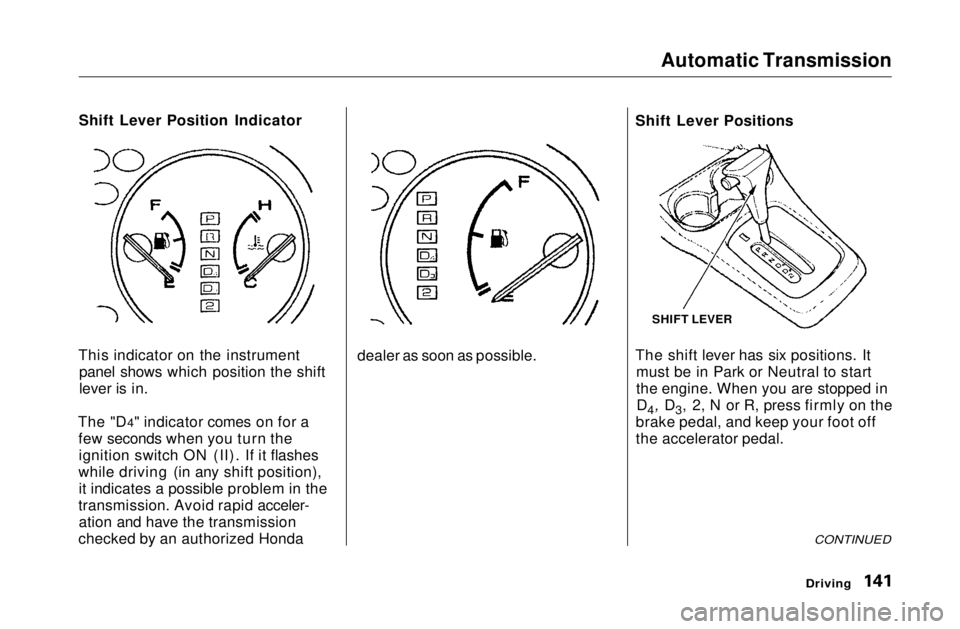
This indicator on the instrument panel shows which position the shift
lever is in.
The "D4" indicator comes on for a few seconds when you turn theignition switch ON (II). If it flashes
while driving (in any shift position), it indicates a possible problem in the
transmission. Avoid rapid acceler- ation and have the transmission
checked by an authorized Honda dealer as soon as possible.Shift Lever Positions
The shift lever has six positions. It
must be in Park or Neutral to start
the engine. When you are stopped inD4, D3, 2, N or R, press firmly on the
brake pedal, and keep your foot off
the accelerator pedal.
CONTINUED
Driving
SHIFT LEVERMain Menu Table of Contents s t
Page 142 of 269
Automatic Transmission
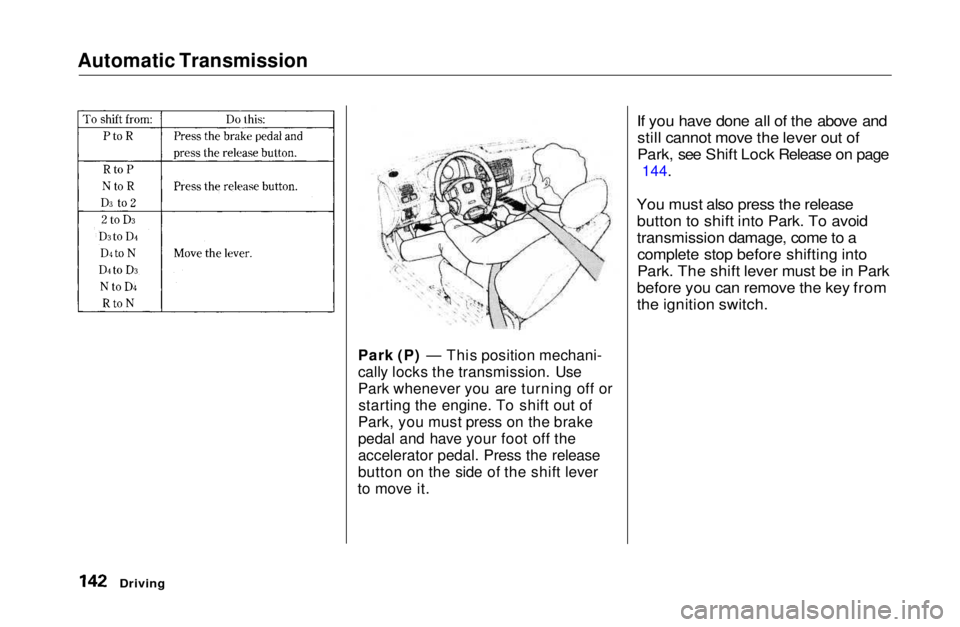
Park (P) — This position mechani-
cally locks the transmission. Use
Park whenever you are turning off orstarting the engine. To shift out of
Park, you must press on the brake
pedal and have your foot off the
accelerator pedal. Press the release
button on the side of the shift lever
to move it.
If you have done all of the above and
still cannot move the lever out of
Park, see Shift Lock Release on page
144.
You must also press the release button to shift into Park. To avoid
transmission damage, come to acomplete stop before shifting into
Park. The shift lever must be in Park
before you can remove the key from
the ignition switch.
DrivingMain Menu Table of Contents s t
Page 143 of 269

Automatic Transmission
Reverse (R) — To shift to Reverse
from Park, see the explanation under Park. To shift to Reverse from
Neutral, come to a complete stop and
then shift. Press the release button
before shifting into Reverse from
Neutral.
Neutral (N) — Use Neutral if youneed to restart a stalled engine, or if
it is necessary to stop briefly with
the engine idling. Shift to Park posi- tion if you need to leave the car forany reason. Press on the brake pedal
when you are moving the shift lever from Neutral to another gear.
Drive (D4) — Use this position for
your normal driving. The transmis- sion automatically selects a suitable
gear for your speed and acceleration.
You may notice the transmission shifting up at higher speeds when
the engine is cold. This helps the engine warm up faster. Drive (D3) —This position is similar
to D4, except only the first three
gears are selected. Use D3 to provide
engine braking when going down a
steep hill. D3 can also keep the
transmission from cycling between
third and fourth gears in stop-and-go
driving.
For faster acceleration when in D3 or
D4, you can get the transmission to automatically downshift by pushing
the accelerator pedal to the floor.
The transmission will shift down one or two gears, depending on your
speed.
Second (2) — To shift to Second,
press the release button on the side
of the shift lever. This position locks
the transmission in second gear. It does not downshift to first gear
when you come to a stop. Second
gives you more power when climbing,
and increased engine braking when
going down steep hills. Use second
gear when starting out on a slippery surface or in deep snow. It will help
reduce wheelspin.
DrivingMain Menu Table of Contents s t
Page 144 of 269
Automatic Transmission
Engine Speed Limiter
If you exceed the maximum speedfor the gear you are in, the enginespeed will enter into the tachometer's
red zone. If this occurs, you may
feel the engine cut in and out. This is
caused by a limiter in the engine's
computer controls. The engine will
run normally when you reduce the
RPM below the red zone.
Driving
Shift Lock Release
This allows you to move the shift lever out of Park if the normalmethod of pushing on the brake
pedal and pressing the release
button does not work.
1. Set the Parking brake.
2. Remove the key from the ignition
switch.
3. Put a cloth on the edge of the shift lock release slot cover next to theshift lever.
Use a small flat-tipped screwdriver or small metal plate (neither are
included in the tool kit) to remove
the cover. Carefully pry off the edge of the cover.Main Menu Table of Contents s t