lock HONDA CIVIC COUPE 1999 Owner's Guide
[x] Cancel search | Manufacturer: HONDA, Model Year: 1999, Model line: CIVIC COUPE, Model: HONDA CIVIC COUPE 1999Pages: 269, PDF Size: 2.42 MB
Page 79 of 269
Seat Adjustments, Folding Rear Seat
The front head restraints adjust for height. You need both hands to
adjust the restraint. Do not attempt
to adjust it while driving. To raise it, pull upward. To lower the restraint,
push the release button sideways and push the restraint down.
To remove a head restraint for cleaning or repair, pull it up as far as
it will go. Push the release button
and pull the restraint out of the seat-
back. Folding Rear Seat
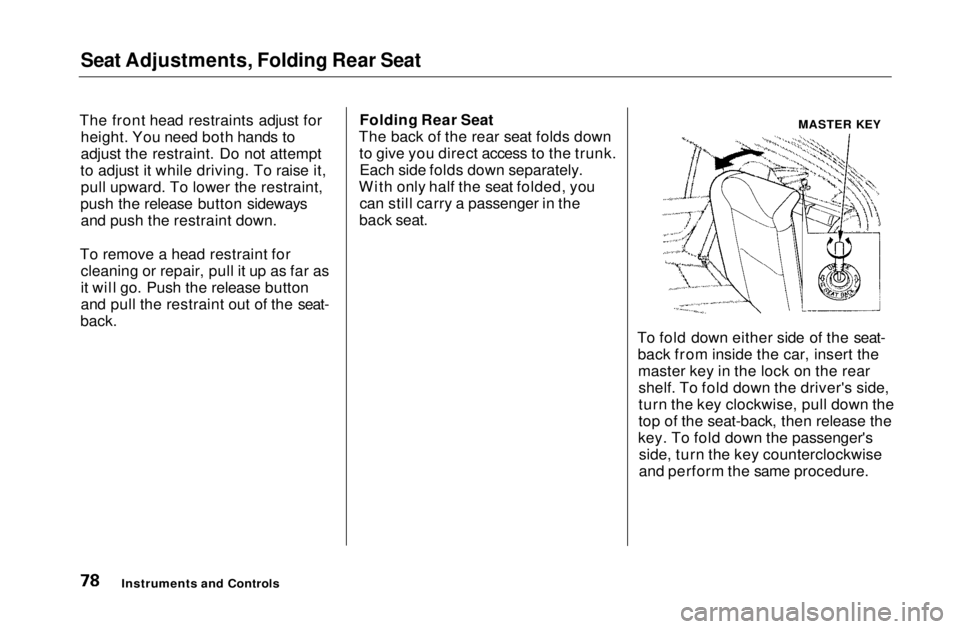
The back of the rear seat folds down to give you direct access to the trunk.Each side folds down separately.
With only half the seat folded, you can still carry a passenger in the
back seat.
To fold down either side of the seat-back from inside the car, insert themaster key in the lock on the rearshelf. To fold down the driver's side,
turn the key clockwise, pull down the
top of the seat-back, then release the
key. To fold down the passenger's side, turn the key counterclockwise
and perform the same procedure.
Instruments and Controls
MASTER KEYMain Menu Table of Contents s t
Page 80 of 269
Folding Rear Seat, Power Windows
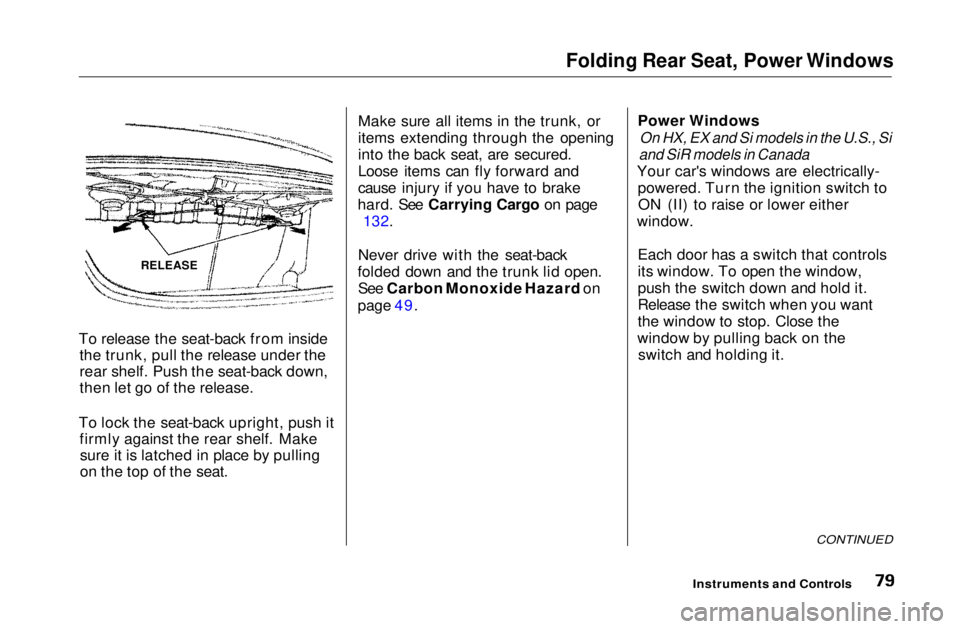
To release the seat-back from inside the trunk, pull the release under the
rear shelf. Push the seat-back down,
then let go of the release.
To lock the seat-back upright, push it firmly against the rear shelf. Makesure it is latched in place by pulling
on the top of the seat. Make sure all items in the trunk, or
items extending through the opening
into the back seat, are secured.
Loose items can fly forward and
cause injury if you have to brake
hard. See Carrying Cargo on page 132.
Never drive with the seat-back
folded down and the trunk lid open. See Carbon Monoxide Hazard on
page 49. Power Windows
On HX, EX and Si models in the U.S., Si
and SiR models in Canada
Your car's windows are electrically- powered. Turn the ignition switch toON (II) to raise or lower either
window.
Each door has a switch that controls
its window. To open the window,
push the switch down and hold it.
Release the switch when you want
the window to stop. Close the
window by pulling back on the switch and holding it.
CONTINUED
Instruments and Controls
RELEASEMain Menu Table of Contents s t
Page 87 of 269
Interior Light
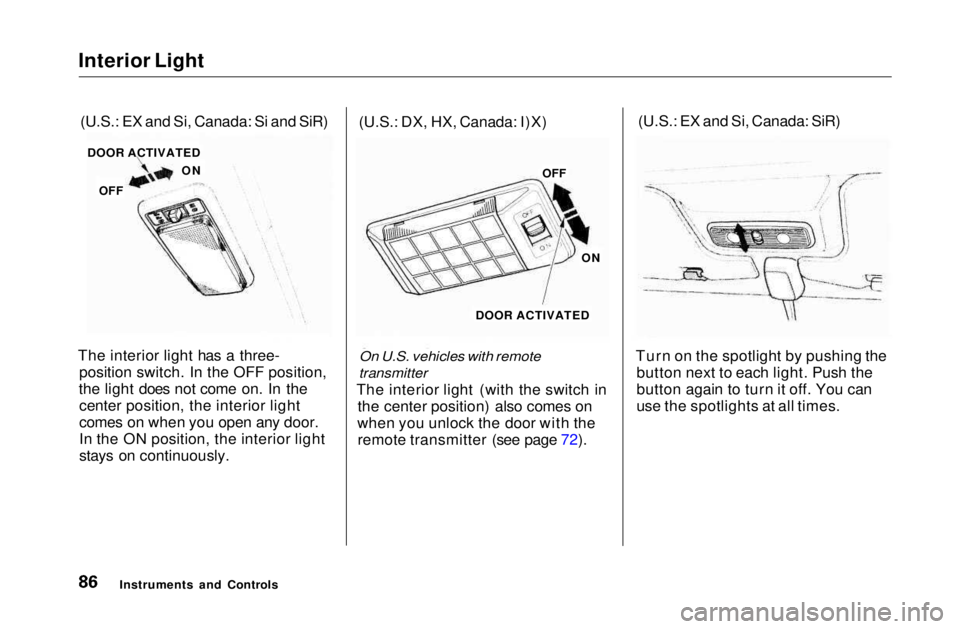
The interior light has a three- position switch. In the OFF position,
the light does not come on. In the center position, the interior light
comes on when you open any door.
In the ON position, the interior light
stays on continuously. (U.S.: DX, HX, Canada: I)X)
On U.S. vehicles with remote
transmitter
The interior light (with the switch in the center position) also comes on
when you unlock the door with the remote transmitter (see page 72). (U.S.: EX and Si, Canada: SiR)
Turn on the spotlight by pushing the button next to each light. Push the
button again to turn it off. You can
use the spotlights at all times.
Instruments and Controls
(U.S.: EX and Si, Canada: Si and SiR)
DOOR ACTIVATED
ON
OFF OFF
ON
DOOR ACTIVATEDMain Menu Table of Contents s t
Page 88 of 269
Comfort and Convenience Features
The heating and air conditioning*
systems in your Honda provide a
comfortable driving environment in
all weather conditions.
The standard audio system has
many features. This section de-
scribes those features and how to
use them. (If you selected an optional audio system, refer to the
operating instructions that came
with it.)
* Air conditioning is standard on the
EX and Si models in the U.S. and on
SiR model in Canada. It is optional on
other models.
Heating and Cooling........................ 88
What Each Control Does............ 88How to Use the System............... 90
To Turn Everything Off ............. 95
Audio System................................... 96 Operating the Radio.................... 96
Adjusting the Sound.................... 98 Digital Clock................................. 99Operating the Optional CD Player/Changer.............. 100
CD Changer Error Indications.............................. 102
AM/FM/CD Audio System..... 103 Operating the Radio.................. 104
Adjusting the Sound.................. 107 Digital Clock............................... 108
Operating the CD Player.......... 109
Protecting Compact Discs........ 112 CD Changer Error Indications.............................. 114
Operating the Cassette Player...................................... 115
Theft Protection........................ 119 Radio Frequencies..................... 120
Radio Reception......................... 120
Comfort and Convenience FeaturesMain Menu s t
Page 89 of 269
Heating and Cooling
Proper use of the Heating and
Cooling system can make the
interior dry and comfortable, and
keep the windows clear for best
visibility.
If your car does not have air
conditioning, it can be installed at
any time. Your dealer will install aGenuine Honda air conditioning
system that meets Honda's high
quality standards and is designed to
exactly fit your car. Please contact
your dealer for more information.
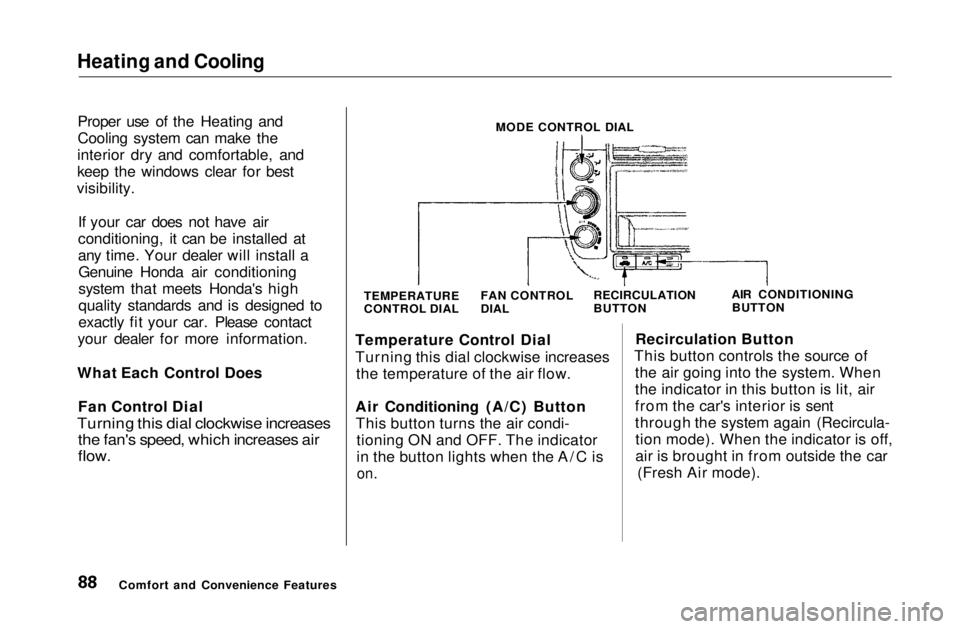
What Each Control Does Fan Control Dial
Turning this dial clockwise increases
the fan's speed, which increases air
flow.
MODE CONTROL DIAL
TEMPERATURE
CONTROL DIAL AIR CONDITIONING
BUTTON
Temperature Control Dial
Turning this dial clockwise increases the temperature of the air flow.
Air Conditioning (A/C) Button This button turns the air condi- tioning ON and OFF. The indicator
in the button lights when the A/C is
on.
Recirculation Button
This button controls the source of the air going into the system. When
the indicator in this button is lit, air
from the car's interior is sent
through the system again (Recircula-tion mode). When the indicator is off,
air is brought in from outside the car (Fresh Air mode).
Comfort and Convenience Features FAN CONTROL
DIAL
RECIRCULATION
BUTTONMain Menu Table of Contents s t
Page 100 of 269
Audio System
Digital Clock
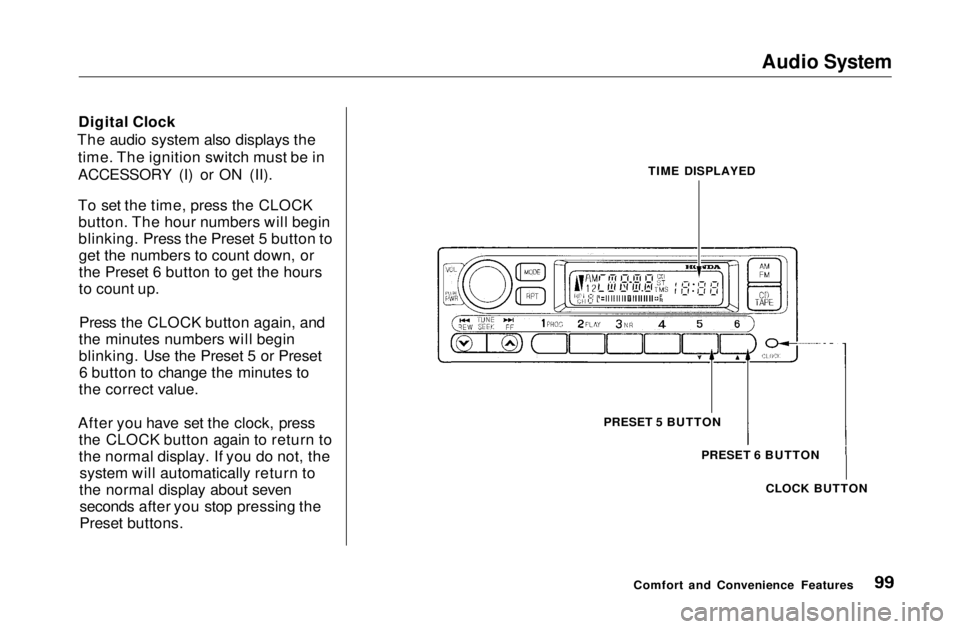
The audio system also displays the time. The ignition switch must be in
ACCESSORY (I) or ON (II).
To set the time, press the CLOCKbutton. The hour numbers will begin
blinking. Press the Preset 5 button toget the numbers to count down, or
the Preset 6 button to get the hours
to count up.
Press the CLOCK button again, and
the minutes numbers will begin
blinking. Use the Preset 5 or Preset 6 button to change the minutes to
the correct value.
After you have set the clock, press the CLOCK button again to return to
the normal display. If you do not, thesystem will automatically return to
the normal display about seven seconds after you stop pressing the
Preset buttons.
Comfort and Convenience FeaturesTIME DISPLAYED
PRESET 5 BUTTON PRESET 6 BUTTON
CLOCK BUTTONMain Menu Table of Contents s t
Page 109 of 269
Audio System
Audio System Lighting
You can use the instrument panelbrightness control dial to adjust the il-
lumination of the audio system (see
page 62). The audio system
illuminates when the parking lightsare on, even if the radio is turned off.
Digital Clock
The display of your audio system usually shows the time when the
ignition switch is in ACCESSORY (I)or ON (II). It shows operation mode
of radio, CD player, or optional CD
changer/cassette player when you
operate them, and goes back to the
time display after five seconds.
The display also goes back to the time display two seconds after you
turn the volume knob to adjust the
volume.
If an error occurs while operating
the CD player or optional CD changer, the display will show the
error code and will not switch to the time display until the error is
corrected (see page 133 and 134).
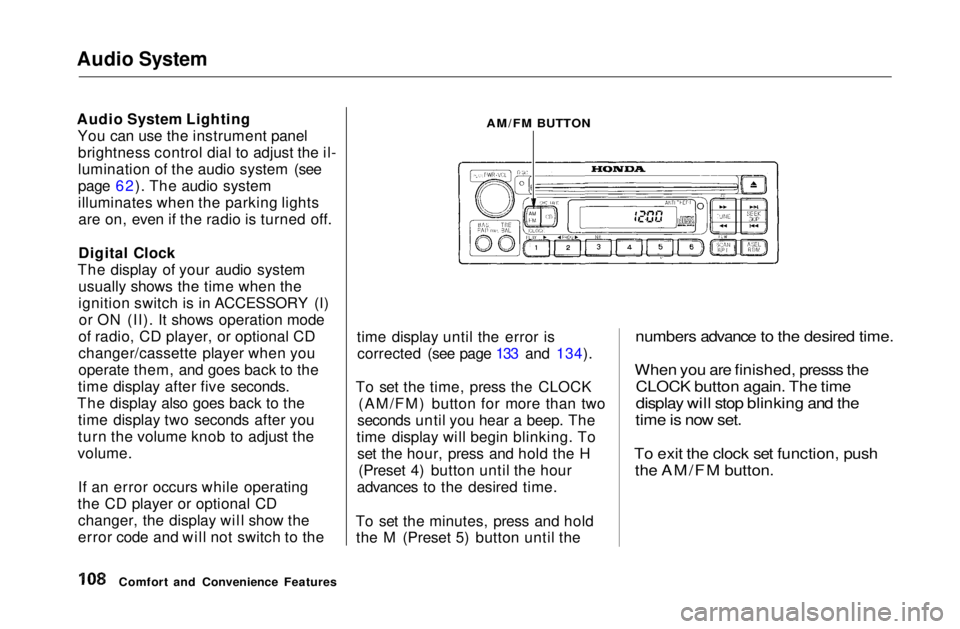
To set the time, press the CLOCK (AM/FM) button for more than two
seconds until you hear a beep. The
time display will begin blinking. To set the hour, press and hold the H (Preset 4) button until the hour
advances to the desired time.
To set the minutes, press and hold the M (Preset 5) button until the
numbers advance to the desired time.
When you are finished, presss the
CLOCK button again. The time
display will stop blinking and the
time is now set.
To exit the clock set function, push
the AM/FM button.
Comfort and Convenience Features
AM/FM BUTTONMain Menu Table of Contents s t
Page 130 of 269
Accessories and Modifications
Modifying your car, or installingsome non-Honda accessories, can
make your car unsafe. Before you make any modifications or add anyaccessories, be sure to read the
following information.
Accessories
Your dealer has Genuine Honda accessories that allow you to
personalize your car. These accessories have been designed and
approved for your car, and are
covered by warranty.
Non-Honda accessories are usually designed for universal applications.
Although aftermarket accessories may fit on your car, they may not
meet factory specifications, and
could adversely affect your car's
handling and stability. (See "Modifications" on the page 131 for
additional information.) When properly installed, cellular
phones, alarms, two-way radios, and
low-powered audio systems shouldnot interfere with your car's
computer-controlled systems, such as the SRS and anti-lock brake
system.
However, if electronic accessories
are improperly installed, or exceed
your car's electrical system capacity, they can interfere with the operation of your car, or even cause the
airbags to deploy.
Before installing any accessory:
Make sure the accessory does notobscure any lights, or interfere
with proper car operation or
performance.
Be sure electronic accessories do
not overload electrical circuits (see page 239). Have the installer contact your
Honda dealer for assistance before
installing any electronic accessory.
If possible, have your dealer inspect
the final installation.
Before Driving
Improper accessories or
modifications can affect your
car's handling, stability and performance, and cause a
crash in which you can be hurt
or killed.
Follow all instructions in this
owner's manual regarding accessories and modifications.Main Menu Table of Contents s t
Page 131 of 269
Accessories and Modifications
Modifications Do not remove any original
equipment or modify your car in any
way that would alter its design or operation. This could make your car
unsafe and illegal to drive.
For example, do not make any
modifications that would change the
ride height of your car, or install
wheels and tires with a different overall diameter.
Such modifications can adversely
affect handling, and interfere with
the operation of the car's anti-lock
brakes and other systems. In addition, any modifications that
decrease ground clearance increase
the chance of undercarriage parts striking a curb, speed bump, or other
raised object, which could cause
your airbags to deploy.
Do not modify your steering wheelor any other part of your
Supplemental Restraint System.
Modifications could make the
system ineffective. Additional Safety Precaution
Do not attach or place objects on the
airbag covers. Any object attached to
or placed on the covers marked "SRS
AIRBAG," in the center of the steering wheel and on top of the
dashboard, could interfere with the
proper operation of the airbags. Or,
if the airbags inflate, the objects
could be propelled inside the car and
hurt someone.
Before DrivingMain Menu Table of Contents s t
Page 133 of 269
Carrying Cargo
Load Limit
The maximum load for your car is
850
lbs
(395 kg).
This figure includes the total weight
of all occupants, cargo, and
accessories.
To figure out how much cargo you
can carry:
Add up the weight of all occupants.
Subtract the total from 850 Ibs
(395 kg).
The final number is the total weight
of cargo you can carry.
Carrying Items in the Passenger
Compartment Store or secure all items that could
be thrown around and hurt
someone during a crash. Do not put any items on top of the
rear shelf. They can block your
view and be thrown around the car during a crash. Be sure items placed on the floor
behind the front seats cannot roll under the seats and interfere with
the driver's ability to operate the
pedals, or with the properoperation of the seats. Keep the glove box closed while
driving. If the lid is open, a
passenger could injure their knees during a crash or sudden stop.
Before Driving
Overloading or improper
loading can affect handling and
stability and cause a crash in
which you can be hurt or killed.
Follow all load limits and other
loading guidelines in this
manual.Main Menu Table of Contents s t