maintenance HONDA CIVIC COUPE 2014 9.G Navigation Manual
[x] Cancel search | Manufacturer: HONDA, Model Year: 2014, Model line: CIVIC COUPE, Model: HONDA CIVIC COUPE 2014 9.GPages: 441
Page 215 of 441
214
uuAudio Error Messages uPandora ®
Features
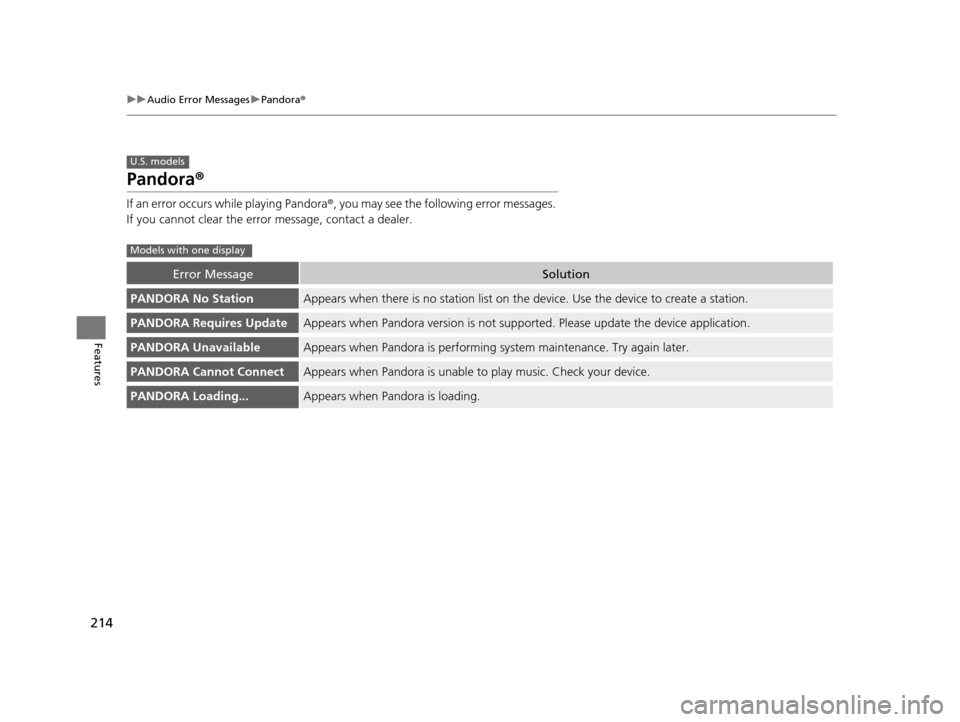
Pandora ®
If an error occurs while playing Pandora ®, you may see the following error messages.
If you cannot clear the error message, contact a dealer.
Error MessageSolution
PANDORA No StationAppears when there is no station list on th e device. Use the device to create a station.
PANDORA Requires UpdateAppears when Pandora version is not supporte d. Please update the device application.
PANDORA UnavailableAppears when Pandora is performing system maintenance. Try again later.
PANDORA Cannot ConnectAppears when Pandora is unable to play music. Check your device.
PANDORA Loading...Appears when Pandora is loading.
U.S. models
Models with one display
14 CIVIC 2D_SI-31TS86210.book 214 ページ 2014年1月29日 水曜日 午後8時9分
Page 293 of 441
292
Driving
Before Driving
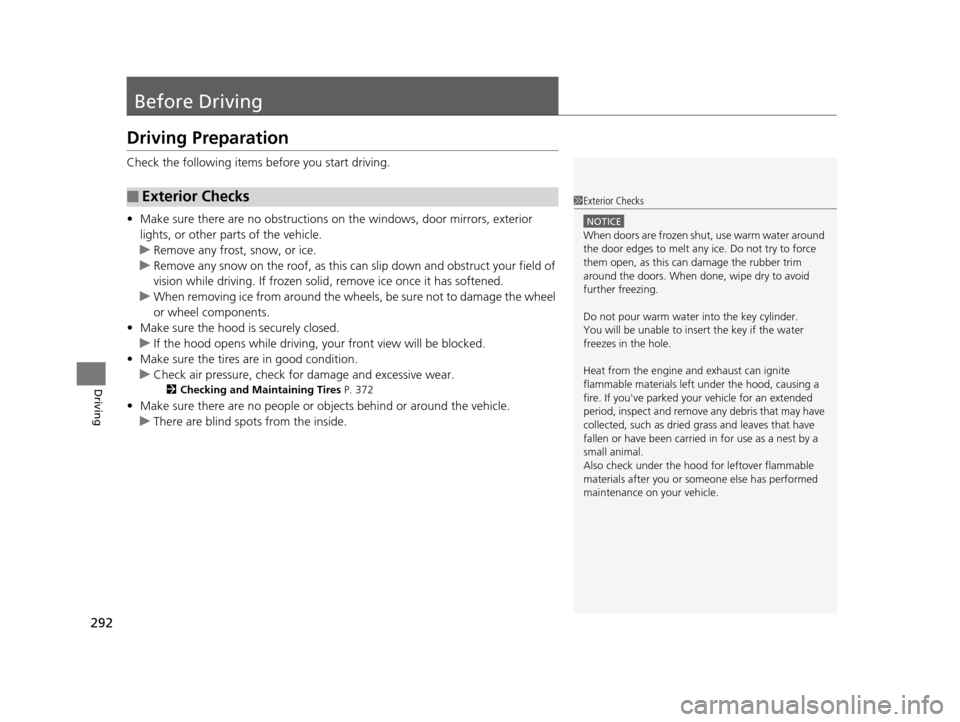
Driving Preparation
Check the following items before you start driving.
• Make sure there are no obstructions on the windows, door mirrors, exterior
lights, or other parts of the vehicle.
u Remove any frost, snow, or ice.
u Remove any snow on the roof, as this can slip down and obstruct your field of
vision while driving. If frozen solid , remove ice once it has softened.
u When removing ice from around the wheels, be sure not to damage the wheel
or wheel components.
• Make sure the hood is securely closed.
u If the hood opens while driving, your front view will be blocked.
• Make sure the tires are in good condition.
u Check air pressure, check for damage and excessive wear.
2 Checking and Maintaining Tires P. 372
•Make sure there are no people or ob jects behind or around the vehicle.
u There are blind spots from the inside.
■Exterior Checks1Exterior Checks
NOTICE
When doors are frozen s hut, use warm water around
the door edges to melt any ice. Do not try to force
them open, as this can damage the rubber trim
around the doors. When done, wipe dry to avoid
further freezing.
Do not pour warm water into the key cylinder.
You will be unable to insert the key if the water
freezes in the hole.
Heat from the engine and exhaust can ignite
flammable material s left under the hood, causing a
fire. If you've parked y our vehicle for an extended
period, inspect and remove any debris that may have
collected, such as dried grass and leaves that have
fallen or have been carried in for use as a nest by a
small animal.
Also check under the hood fo r leftover flammable
materials after you or so meone else has performed
maintenance on your vehicle.
14 CIVIC 2D_SI-31TS86210.book 292 ページ 2014年1月29日 水曜日 午後8時9分
Page 326 of 441
325
uuWhen Driving uTire Pressure Monitoring System (TPMS) - Required Federal Explanation
Driving
Please note that the TPMS is not a substitute for proper tire
maintenance, and it is the driver 's responsibility to maintain
correct tire pressure, even if un der-inflation has not reached the
level to trigger illumination of th e TPMS low tire pressure telltale.
Your vehicle has also been equi pped with a TPMS malfunction
indicator to indicate when the system is not operating properly.
The TPMS malfunction indicator is combined with the low tire
pressure telltale. When the syst em detects a malfunction, the
telltale will flash fo r approximately one minute and then remain
continuously illumina ted. This sequence will continue upon
subsequent vehicle start-ups as long as the malfunction exists.
When the malfunction indicator is illuminated, the system may
not be able to detect or signal low tire pressure as intended.
TPMS malfunctions may occur for a variety of reasons, including
the installation of replacement or alternate tires or wheels on the
vehicle that prevent the TPMS from functioning properly.
Always check the TPMS malfunction telltale after replacing one or
more tires or wheels on your vehicle to ensure that the
replacement or alternate tires and wheels allow the TPMS to
continue to function properly.
14 CIVIC 2D_SI-31TS86210.book 325 ページ 2014年1月29日 水曜日 午後8時9分
Page 336 of 441
335
Driving
Fuel Economy
Improving Fuel Economy
Fuel economy depends on several conditions, including driving conditions, your
driving habits, the condition of your vehicle, and loading. Depending on these and
other conditions, you may or may not achieve the rated fuel economy of this vehicle.
You can optimize your fuel economy with proper maintenance of your vehicle.
Always maintain your vehicle in accordance with the messages displayed on the i-
MID.
• Use the recommended viscosity engine oil, displaying the API Certification Seal.
• Maintain the specified tire pressure.
• Do not load the vehicle with excess cargo.
• Keep your vehicle clean. A buildup of snow or mud on your vehicle's underside
adds weight and increases wind resistance.
■Maintenance and Fuel Economy
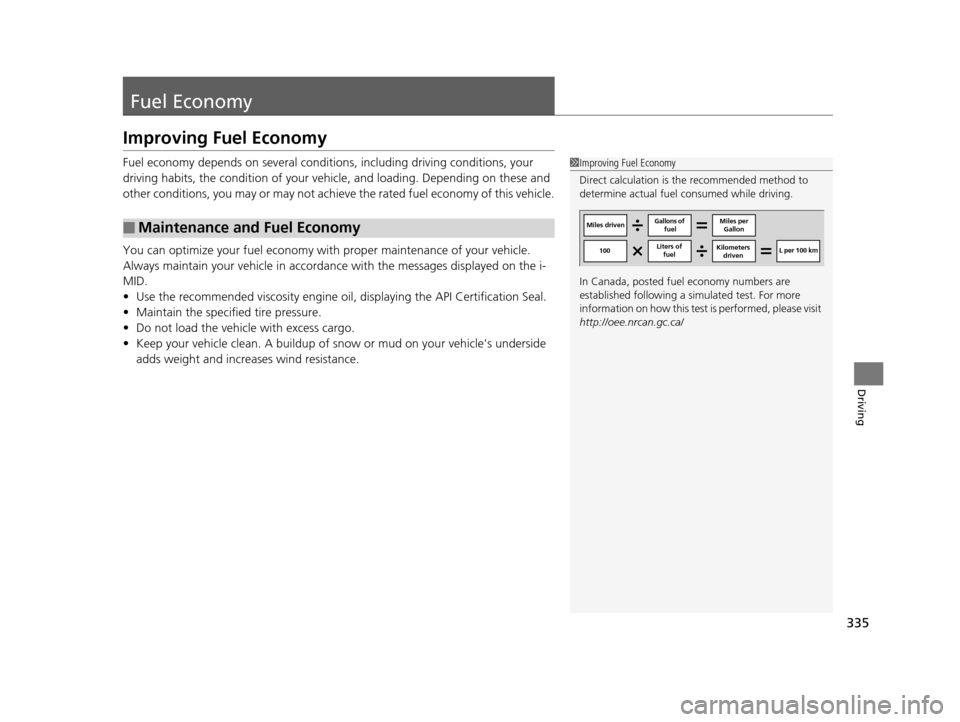
1Improving Fuel Economy
Direct calculation is the recommended method to
determine actual fuel consumed while driving.
In Canada, posted fuel economy numbers are
established following a simulated test. For more
information on how this test is performed, please visit
http://oee.nrcan.gc.ca/
Miles driven Gallons of
fuel Miles per
Gallon
100 L per 100 km
Liters of
fuel Kilometers
driven
14 CIVIC 2D_SI-31TS86210.book 335 ページ 2014年1月29日 水曜日 午後8時9分
Page 338 of 441
337
Maintenance
This chapter discusses basic maintenance.
Before Performing MaintenanceInspection and Maintenance ............ 338
Safety When Performing Maintenance..... 339Parts and Fluids Used in Maintenance Service ........................................... 340
Maintenance Minder
TM..................... 341
Maintenance Under the Hood
Maintenance Items Under the Hood ..... 345Opening the Hood ........................... 347
Recommended Engine Oil ................ 348
Oil Check ......................................... 349
Adding Engine Oil ............................ 351
Changing the Engine Oil and Oil Filter ..... 352
Engine Coolant ................................ 355
Transmission Fluid ............................ 357
Brake/Clutch Fluid ............................ 358
Refilling Window Wa sher Fluid......... 359
Replacing Light Bulbs ....................... 360
Checking and Maintaining Wiper
Blades .......................................... 370
Checking and Maintaining Tires
Checking Tires ................................. 372
Tire and Loading Information Label ...... 373Tire Labeling .................................... 373DOT Tire Quality Grading (U.S. Vehicles)....... 375Wear Indicators................................ 377 Tire Service Life ................................ 377
Tire and Wheel Replacement ........... 378
Tire Rotation .................................... 379
Winter Tires ..................................... 380
Battery ............................................... 381
Remote Transmitter Care
Replacing the Button Battery ........... 382
Heating and Cooling System
*/Climate
Control System* Maintenance ....... 384
Cleaning
Interior Care .................................... 385
Exterior Care.................................... 387
* Not available on all models
14 CIVIC 2D_SI-31TS86210.book 337 ページ 2014年1月29日 水曜日 午後8時9分
Page 339 of 441
338
Maintenance
Before Performing Maintenance
Inspection and Maintenance
For your safety, perform all listed inspections and maintenance to keep your vehicle
in good condition. If you become aware of any abnormality (noise, smell, insufficient
brake fluid, oil residue on the ground, etc.), have your vehicle inspected by a dealer.
(Note, however, that service at a dealer is not mandatory to keep your warranties in
effect.) Refer to the separate maintena nce booklet for detailed maintenance and
inspection information.
■Daily inspections
Perform inspections before long distance tri ps, when washing the vehicle, or when
refueling.
■Periodic inspections
• Check the continuously variable transmission fluid level monthly.
2 Continuously Variable Transmission (CVT) Fluid P. 357
•Check the brake fluid level monthly.
2 Brake/Clutch Fluid P. 358
•Check the tire pressure monthly. Examin e the tread for wear and foreign objects.
2Checking and Maintaining Tires P. 372
•Check the operation of the exterior lights monthly.
2 Replacing Light Bulbs P. 360
•Check the condition of the wiper bl ades at least every six months.
2Checking and Maintaining Wiper Blades P. 370
■Types of Inspection and Maintenance
1Inspection and Maintenance
Maintenance, replacement, or repair of
emissions control devices and systems may be
done by any automotive repair establishment or
individuals using parts that are “certified” to
EPA standards.
According to state and fede ral regulations, failure to
perform maintenance on the maintenance main
items marked with # will not void your emissions
warranties. However, all ma intenance services should
be performed in accordan ce with the intervals
indicated by the i-MID.
2 Maintenance Service Items P. 343
If you want to perform complex maintenance tasks
that require more skills a nd tools, you can purchase a
subscription to the Service Express website at
www.techinfo.honda.com .
2 Authorized Manuals P. 429
If you want to perform ma intenance yourself, make
sure that you have the necessary tools and skills first.
After performing ma intenance, update the records in
the separate maintenance booklet.
U.S. models
14 CIVIC 2D_SI-31TS86210.book 338 ページ 2014年1月29日 水曜日 午後8時9分
Page 340 of 441
339
uuBefore Performing Maintenance uSafety When Performing Maintenance
Maintenance
Safety When Performing Maintenance
Some of the most important safe ty precautions are given here.
However, we cannot warn you of every conceivable hazard that can arise in
performing maintenance. Only you can decide whether or not you should perform
a given task.
• To reduce the possibility of fire or explos ion, keep cigarettes, sparks, and flames
away from the battery and all fuel related parts.
• Never leave rags, towels, or other flammable objects under the hood.
u Heat from the engine and exhaust can ignite them causing a fire.
• To clean parts, use a co mmercially available degreas er or parts cleaner, not
gasoline.
• Wear eye protection and protective clothi ng when working with the battery or
compressed air.
• Engine exhaust contains carbon monoxide, which is poisonous and can kill you.
u Operate the engine only when there is sufficient ventilation.
• The vehicle must be in a stationary condition.
u Make sure your vehicle is parked on le vel ground, the parking brake is set, and
the engine is off.
• Be aware that hot parts can burn you.
u Make sure to let the engine and exhaust system cool thoroughly before
touching vehicle parts.
• Be aware that moving parts can injure you.
u Do not start the engine unless instruct ed, and keep your hands and limbs away
from moving parts.
■Maintenance Safety
■Vehicle Safety
1 Safety When Performing Maintenance
3WARNING
Improperly maintaining this vehicle or
failing to correct a pr oblem before driving
can cause a crash in which you can be
seriously hurt or killed.
Always follow the inspection and
maintenance recommendations according
to the schedules in this owner's manual.
3WARNING
Failure to properly follow maintenance
instructions and precautions can cause you
to be seriously hurt or killed.
Always follow the procedures and
precautions in this owner's manual.
14 CIVIC 2D_SI-31TS86210.book 339 ページ 2014年1月29日 水曜日 午後8時9分
Page 341 of 441
340
uuBefore Performing Maintenance uParts and Fluids Used in Maintenance Service
Maintenance
Parts and Fluids Used in Maintenance Service
The use of Honda genuine parts and fluids is recommended when maintaining and
servicing your vehicle. Honda genuine parts are manufactured according to the
same high quality standards used in Honda vehicles.
14 CIVIC 2D_SI-31TS86210.book 340 ページ 2014年1月29日 水曜日 午後8時9分
Page 342 of 441
341Continued
Maintenance
Maintenance MinderTM
If the engine oil life is less than 15%, you will see the Maintenance Minder messages
appear on the i-MID every time you turn the ignition switch to ON
(w*1. The
messages notify you when to change the engine oil, or when to bring your vehicle
to a dealer for indicated maintenance services.
To Use Maintenance MinderTM
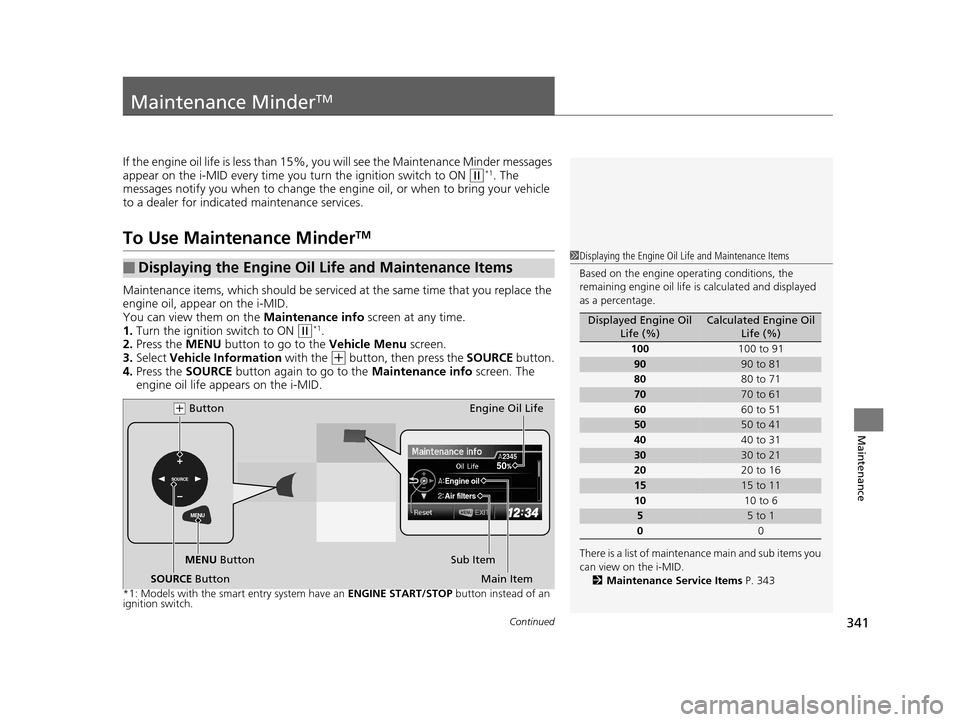
Maintenance items, which should be serviced at the same time that you replace the
engine oil, app ear on the i-MID.
You can view them on the Maintenance info screen at any time.
1. Turn the ignition switch to ON
(w*1.
2. Press the MENU button to go to the Vehicle Menu screen.
3. Select Vehicle Information with the
(+ button, then press the SOURCE button.
4. Press the SOURCE button again to go to the Maintenance info screen. The
engine oil life appears on the i-MID.
*1: Models with the smart entry system have an ENGINE START/STOP button instead of an
ignition switch.
■Displaying the Engine Oil Life and Maintenance Items1 Displaying the Engine Oil Life and Maintenance Items
Based on the engine ope rating conditions, the
remaining engine oi l life is calculated and displayed
as a percentage.
There is a list of maintena nce main and sub items you
can view on the i-MID. 2 Maintenance Service Items P. 343
Displayed Engine Oil
Life (%)Calculated Engine Oil Life (%)
100 100 to 91
9090 to 81
80 80 to 71
7070 to 61
60 60 to 51
5050 to 41
40 40 to 31
3030 to 21
20 20 to 16
1515 to 11
10 10 to 6
55 to 1
0 0MENU
SOURCE50
Engine oil
Air filters
2345
MENU Button
(+ Button
Sub ItemEngine Oil Life
Main Item
SOURCE Button
14 CIVIC 2D_SI-31TS86210.book 341 ページ 2014年1月29日 水曜日 午後8時9分
Page 343 of 441
342
uuMaintenance MinderTMuTo Use Maintenance MinderTM
Maintenance
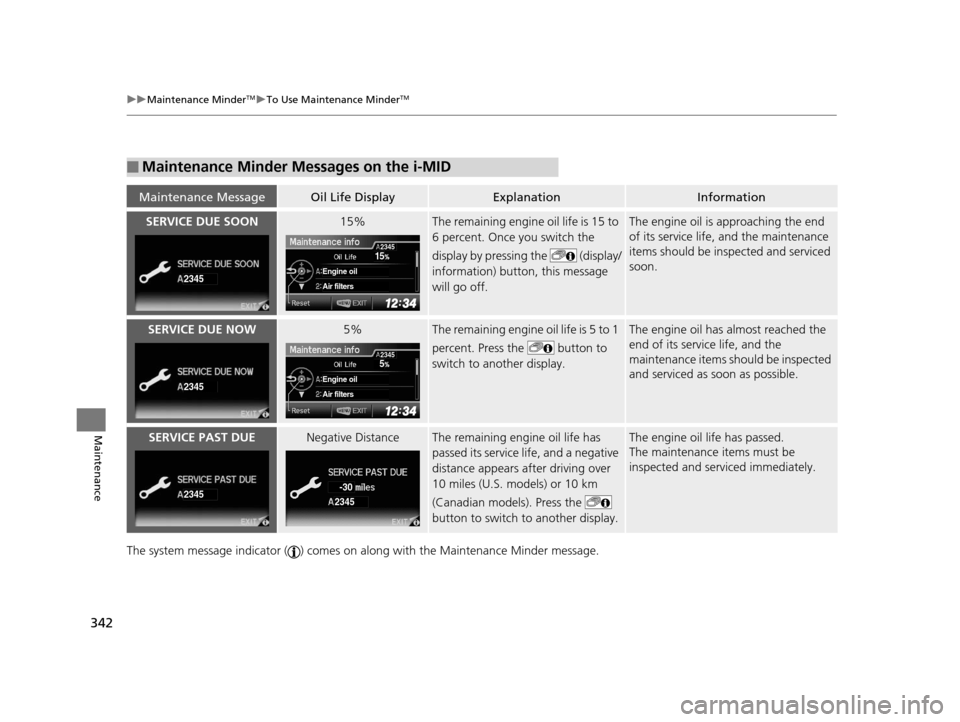
The system message indicator ( ) comes on al ong with the Maintenance Minder message.
■Maintenance Minder Messages on the i-MID
Maintenance MessageOil Life DisplayExplanationInformation
SERVICE DUE SOON15%The remaining engine oil life is 15 to
6 percent. Once you switch the
display by pressing the (display/
information) button, this message
will go off.The engine oil is approaching the end
of its service life, and the maintenance
items should be inspected and serviced
soon.
SERVICE DUE NOW5%The remaining engine oil life is 5 to 1
percent. Press the button to
switch to another display.The engine oil has almost reached the
end of its service life, and the
maintenance items should be inspected
and serviced as soon as possible.
SERVICE PAST DUENegative DistanceThe remaining engine oil life has
passed its service life, and a negative
distance appears after driving over
10 miles (U.S. models) or 10 km
(Canadian models). Press the
button to switch to another display.The engine oil life has passed.
The maintenance items must be
inspected and serviced immediately.
2345
15
Engine oil
Air filters
2345
2345
5
Engine oil
Air filters
2345
23452345
-30
14 CIVIC 2D_SI-31TS86210.book 342 ページ 2014年1月29日 水曜日 午後8時9分