reset HONDA CIVIC COUPE 2014 9.G Navigation Manual
[x] Cancel search | Manufacturer: HONDA, Model Year: 2014, Model line: CIVIC COUPE, Model: HONDA CIVIC COUPE 2014 9.GPages: 441
Page 165 of 441
164
uuAudio System uAudio Remote Controls
Features
Audio Remote Controls
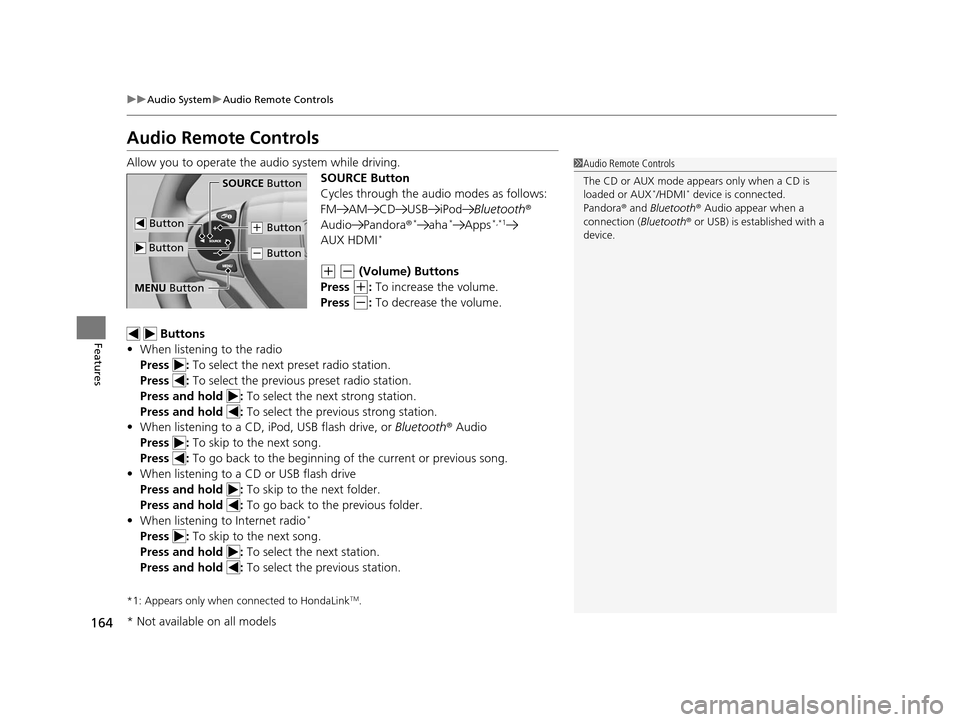
Allow you to operate the audio system while driving.
SOURCE Button
Cycles through the audio modes as follows:
FM AM CD USB iPodBluetooth®
Audio Pandora ®
*aha*Apps*,*1
AUX HDMI*
(+ (- (Volume) Buttons
Press
(+: To increase the volume.
Press
(-: To decrease the volume.
Buttons
• When listening to the radio
Press : To select the next preset radio station.
Press : To select the previous preset radio station.
Press and hold : To select the next strong station.
Press and hold : To select the previous strong station.
• When listening to a CD, iPod, USB flash drive, or Bluetooth® Audio
Press : To skip to the next song.
Press : To go back to the beginning of the current or previous song.
• When listening to a CD or USB flash drive
Press and hold : To skip to the next folder.
Press and hold : To go back to the previous folder.
• When listening to Internet radio
*
Press : To skip to the next song.
Press and hold : To select the next station.
Press and hold : To select the previous station.
*1: Appears only when connected to HondaLinkTM.
1Audio Remote Controls
The CD or AUX mode appears only when a CD is
loaded or AUX
*/HDMI* device is connected.
Pandora ® and Bluetooth ® Audio appear when a
connection (Bluetooth ® or USB) is established with a
device.SOURCE Button
(+ Button
(- Button
Button
Button
MENU Button
* Not available on all models
14 CIVIC 2D_SI-31TS86210.book 164 ページ 2014年1月29日 水曜日 午後8時9分
Page 166 of 441
165
uuAudio System uAudio Remote Controls
Features
Steering Wheel MENU Button
• When listening to the radio
Press and hold the MENU button: To select the radio station by Scan, Save
Preset, or Seek.
• When listening to a CD or USB flash drive
Press and hold the MENU button: To select the song by Scan, Repeat , or
Random .
• When listening to an iPod
Press and hold the MENU button: To select the song by Repeat or Shuffle .
• When listening to Internet radio
*
Press and hold the MENU button: To select Bookmark , or Play/Pause .
• When listening to a Bluetooth® Audio
Press and hold the MENU button: To select Pause or Play for the song.
1Audio Remote Controls
The MENU button is available only when the audio
mode is FM, AM, CD, USB, iPod, Pandora ®, Aha
TM, or
Bluetooth ® Audio.
Models with display audio system
* Not available on all models
14 CIVIC 2D_SI-31TS86210.book 165 ページ 2014年1月29日 水曜日 午後8時9分
Page 169 of 441
168
uuAudio System Basic Operation uPlaying AM/FM Radio
Features
Playing AM/FM Radio
002300
75°F miles
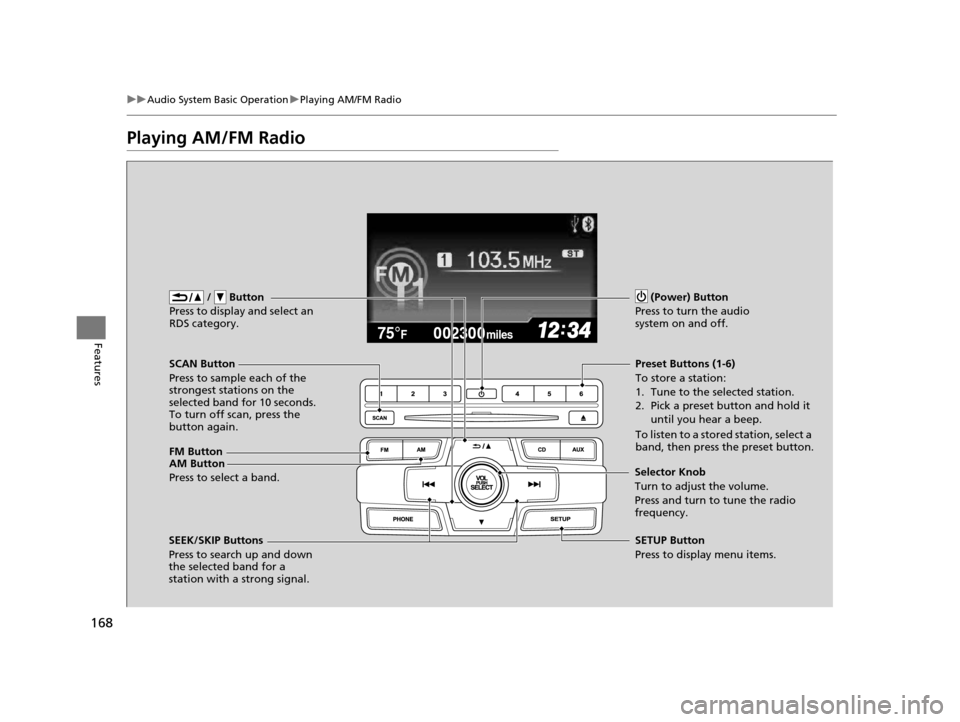
FM Button / Button
Press to display and select an
RDS category.
SCAN Button
Press to sample each of the
strongest stations on the
selected band for 10 seconds.
To turn off scan, press the
button again. (Power) Button
Press to turn the audio
system on and off.Preset Buttons (1-6)
To store a station:
1. Tune to the selected station.
2. Pick a preset button and hold it until you hear a beep.
To listen to a stored station, select a
band, then press the preset button.
SEEK/SKIP Buttons
Press to search up and down
the selected band for a
station with a strong signal. SETUP Button
Press to display menu items.
Selector Knob
Turn to adjust the volume.
Press and turn to tune the radio
frequency.
AM Button
Press to select a band.
14 CIVIC 2D_SI-31TS86210.book 168 ページ 2014年1月29日 水曜日 午後8時9分
Page 170 of 441
Continued169
uuAudio System Basic Operation uPlaying AM/FM Radio
Features
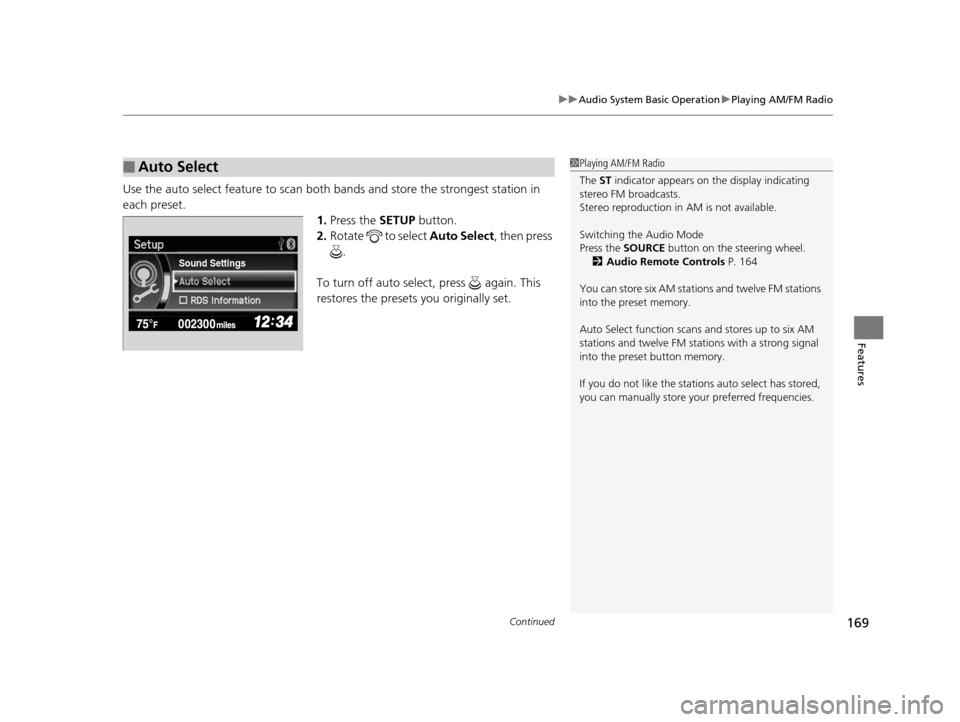
Use the auto select feature to scan both bands and store the strongest station in
each preset. 1.Press the SETUP button.
2. Rotate to select Auto Select, then press
.
To turn off auto select , press again. This
restores the presets you originally set.
■Auto Select1 Playing AM/FM Radio
The ST indicator appears on the display indicating
stereo FM broadcasts.
Stereo reproduction in AM is not available.
Switching the Audio Mode
Press the SOURCE button on the steering wheel.
2 Audio Remote Controls P. 164
You can store six AM stations and twelve FM stations
into the preset memory.
Auto Select function scans and stores up to six AM
stations and twelve FM stat ions with a strong signal
into the preset button memory.
If you do not like the stati ons auto select has stored,
you can manually store your preferred frequencies.
Sound Settings
14 CIVIC 2D_SI-31TS86210.book 169 ページ 2014年1月29日 水曜日 午後8時9分
Page 185 of 441
184
Features
Audio System Basic Operation
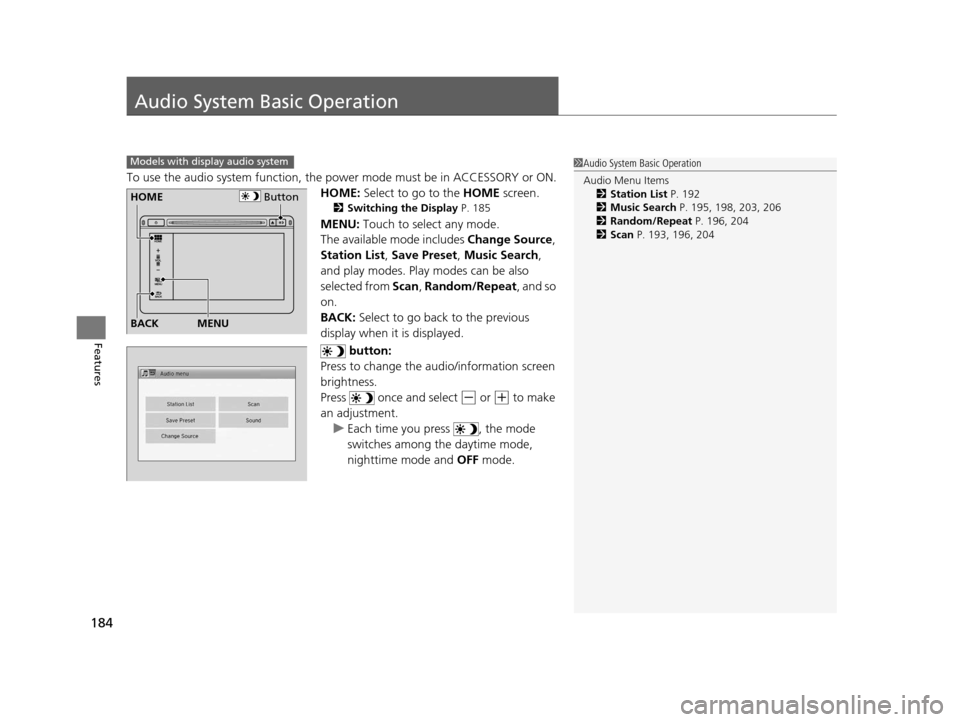
To use the audio system function, the power mode must be in ACCESSORY or ON.
HOME: Select to go to the HOME screen.
2Switching the Display P. 185
MENU: Touch to select any mode.
The available mode includes Change Source ,
Station List , Save Preset , Music Search,
and play modes. Play modes can be also
selected from Scan , Random/Repeat , and so
on.
BACK: Select to go back to the previous
display when it is displayed.
button:
Press to change the audio/information screen
brightness.
Press once and select
(- or (+ to make
an adjustment. u Each time you press , the mode
switches among the daytime mode,
nighttime mode and OFF mode.
Models with display audio system1Audio System Basic Operation
Audio Menu Items
2 Station List P. 192
2 Music Search P. 195, 198, 203, 206
2 Random/Repeat P. 196, 204
2 Scan P. 193, 196, 204
ButtonHOME
BACK
MENU
14 CIVIC 2D_SI-31TS86210.book 184 ページ 2014年1月29日 水曜日 午後8時9分
Page 193 of 441
uuAudio System Basic Operation uPlaying AM/FM Radio
192
Features
To store a station:
1. Tune to the selected station.
2. Select MENU .
3. Select Save Preset .
4. Select the preset number you want to store that station.
Provides text data information related to your selected RDS-capable FM station.
■To find an RDS station from Station List
1. Select MENU while listening to an FM station.
2. Select Station List .
3. Select a station.
■Manual update
Updates your available station list at any time.
1. Select MENU while listening to an FM station.
2. Select Station List .
3. Select Refresh .
■Preset Memory
■Radio Data System (RDS)
1Playing AM/FM Radio
The ST indicator appears on the display indicating
stereo FM broadcasts.
Stereo reproduction in AM is not available.
Switching the Audio Mode
Press the SOURCE button on the steering wheel or
select SOURCE on the list.
2 Audio Remote Controls P. 164
You can also switch the mode by selecting Change
Source on the MENU screen.
You can store 6 AM stations and 12 FM stations into
the preset memory.
1 Radio Data System (RDS)
When you select an RDS-capable FM station, the RDS
automatically turns on, and the frequency display
changes to the station name. However, when the
signals of that station become weak, the display
changes from the statio n name to the frequency.
14 CIVIC 2D_SI-31TS86210.book 192 ページ 2014年1月29日 水曜日 午後8時9分
Page 222 of 441
221
uuCustomized Features*u
Continued
Features
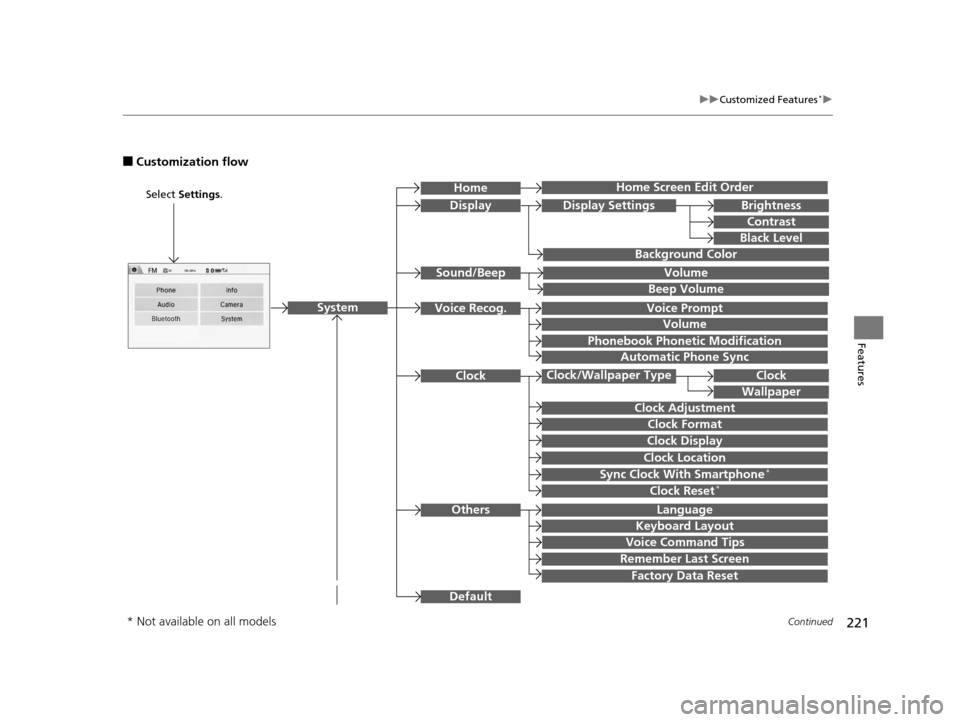
■Customization flow
Clock Format
Remember Last Screen
Factory Data Reset
Clock Adjustment
Select Settings .
Language
Default
Brightness
Contrast
Black Level
Clock
Wallpaper
Display
Home Screen Edit Order
Background Color
Volume
Sync Clock With Smartphone*Clock Location
Clock Display
Beep Volume
Keyboard Layout
Home
Sound/Beep
Display Settings
ClockClock/Wallpaper Type
System
Clock Reset*
Others
Phonebook Phonet ic Modification
Automatic Phone Sync
Voice Prompt
Volume
Voice Recog.
Voice Command Tips
* Not available on all models
14 CIVIC 2D_SI-31TS86210.book 221 ページ 2014年1月29日 水曜日 午後8時9分
Page 223 of 441
![HONDA CIVIC COUPE 2014 9.G Navigation Manual 222
uuCustomized Features*u
Features
Color
AudioSound
Audio Source Pop-up
[Your selected media] Cover Art*1
Display Adjustment*1
Aspect Ratio Adjustment*1
Change Bluetooth Audio Device*1
Bluetooth De](/img/13/5859/w960_5859-222.png "HONDA CIVIC COUPE 2014 9.G Navigation Manual 222
uuCustomized Features*u
Features
Color
AudioSound
Audio Source Pop-up
[Your selected media] Cover Art*1
Display Adjustment*1
Aspect Ratio Adjustment*1
Change Bluetooth Audio Device*1
Bluetooth De")
222
uuCustomized Features*u
Features
Color
AudioSound
Audio Source Pop-up
[Your selected media] Cover Art*1
Display Adjustment*1
Aspect Ratio Adjustment*1
Change Bluetooth Audio Device*1
Bluetooth Device List*1
Default
DisplayBrightness
Contrast
Black Level
Color
Tint
Clock Format
Clock Adjustment
Clock/Wallpaper TypeClock
Wallpaper
Sync Clock With Smartphone*
Clock Location
Clock Display
Info Screen Preference
Default
Info
Clock Reset*
Other
Clock
*1: May change depending on your currently
selected source.
* Not available on all models
14 CIVIC 2D_SI-31TS86210.book 222 ページ 2014年1月29日 水曜日 午後8時9分
Page 226 of 441
225
uuCustomized Features*u
Continued
Features
*1:Default SettingSetup
Group Customizable Features Desc
ription Selectable Settings
SystemClock
Clock/
Wallpaper
Type
ClockChanges the clock display type.Analog/Digital*1/
Small Digital /Off
Wallpaper
●Changes the wallpaper type.●Imports an image file for a new wallpaper.●Deletes an image file for a wallpaper.
2 Wallpaper Setup P. 187
Blank/Galaxy*1/
Metallic
Clock AdjustmentAdjusts Clock.
2 Clock P. 100—
Clock FormatSelects the digital clock display from 12H to 24H.12H*1/24H
Clock DisplaySelects whether the clock display comes on.On /Off*1
Clock LocationChanges the clock display layout.
Right upper*1/Left
upper /Right lower /
Left lower /Off
Sync Clock With
Smartphone*Selects whether the clock links to the device you
connect. On*1/ Off
Clock Reset*Cancels/Resets all cust omized items for clock
display as default. Yes /No
* Not available on all models
14 CIVIC 2D_SI-31TS86210.book 225 ページ 2014年1月29日 水曜日 午後8時9分
Page 227 of 441
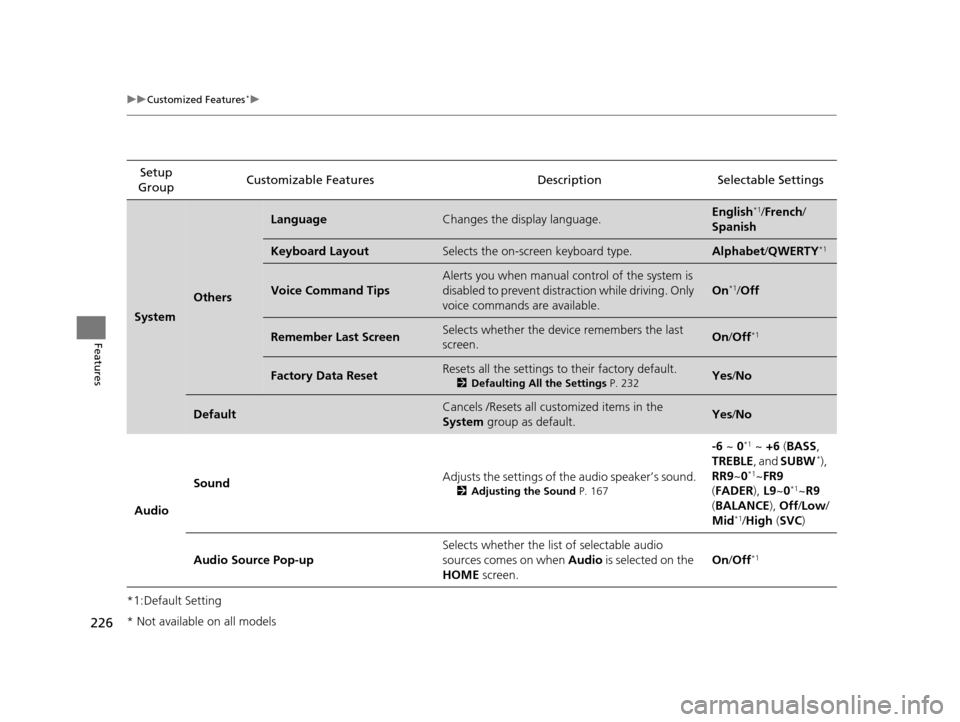
226
uuCustomized Features*u
Features
*1:Default SettingSetup
Group Customizable Features Descri
ption Selectable Settings
System
Others
LanguageChanges the display language.English*1/French /
Spanish
Keyboard LayoutSelects the on-screen keyboard type. Alphabet /QWERTY*1
Voice Command Tips
Alerts you when manual control of the system is
disabled to prevent distraction while driving. Only
voice commands are available.
On*1/ Off
Remember Last ScreenSelects whether the device remembers the last
screen.On /Off*1
Factory Data ResetResets all the settings to their factory default.
2 Defaulting All the Settings P. 232Yes/No
DefaultCancels /Resets all cust omized items in the
System group as default.Yes/No
Audio Sound
Adjusts the settings of
the audio speaker’s sound.
2Adjusting the Sound P. 167
-6 ~ 0*1 ~ +6 (BASS ,
TREBLE , and SUBW*),
RR9 ~0*1~FR9
( FADER ), L9~0*1~R9
( BALANCE ), Off /Low /
Mid
*1/ High (SVC )
Audio Source Pop-up Selects whether the list of selectable audio
sources comes on when
Audio is selected on the
HOME screen. On
/Off
*1
* Not available on all models
14 CIVIC 2D_SI-31TS86210.book 226 ページ 2014年1月29日 水曜日 午後8時9分