remote control HONDA CIVIC COUPE 2014 9.G Navigation Manual
[x] Cancel search | Manufacturer: HONDA, Model Year: 2014, Model line: CIVIC COUPE, Model: HONDA CIVIC COUPE 2014 9.GPages: 441
Page 165 of 441
164
uuAudio System uAudio Remote Controls
Features
Audio Remote Controls
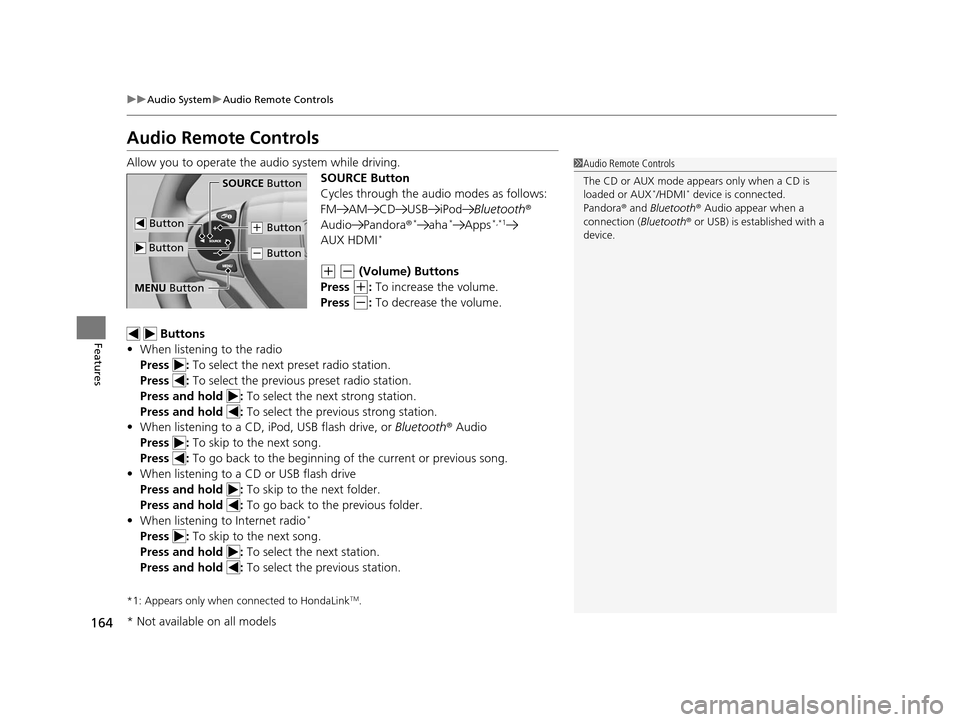
Allow you to operate the audio system while driving.
SOURCE Button
Cycles through the audio modes as follows:
FM AM CD USB iPodBluetooth®
Audio Pandora ®
*aha*Apps*,*1
AUX HDMI*
(+ (- (Volume) Buttons
Press
(+: To increase the volume.
Press
(-: To decrease the volume.
Buttons
• When listening to the radio
Press : To select the next preset radio station.
Press : To select the previous preset radio station.
Press and hold : To select the next strong station.
Press and hold : To select the previous strong station.
• When listening to a CD, iPod, USB flash drive, or Bluetooth® Audio
Press : To skip to the next song.
Press : To go back to the beginning of the current or previous song.
• When listening to a CD or USB flash drive
Press and hold : To skip to the next folder.
Press and hold : To go back to the previous folder.
• When listening to Internet radio
*
Press : To skip to the next song.
Press and hold : To select the next station.
Press and hold : To select the previous station.
*1: Appears only when connected to HondaLinkTM.
1Audio Remote Controls
The CD or AUX mode appears only when a CD is
loaded or AUX
*/HDMI* device is connected.
Pandora ® and Bluetooth ® Audio appear when a
connection (Bluetooth ® or USB) is established with a
device.SOURCE Button
(+ Button
(- Button
Button
Button
MENU Button
* Not available on all models
14 CIVIC 2D_SI-31TS86210.book 164 ページ 2014年1月29日 水曜日 午後8時9分
Page 166 of 441
165
uuAudio System uAudio Remote Controls
Features
Steering Wheel MENU Button
• When listening to the radio
Press and hold the MENU button: To select the radio station by Scan, Save
Preset, or Seek.
• When listening to a CD or USB flash drive
Press and hold the MENU button: To select the song by Scan, Repeat , or
Random .
• When listening to an iPod
Press and hold the MENU button: To select the song by Repeat or Shuffle .
• When listening to Internet radio
*
Press and hold the MENU button: To select Bookmark , or Play/Pause .
• When listening to a Bluetooth® Audio
Press and hold the MENU button: To select Pause or Play for the song.
1Audio Remote Controls
The MENU button is available only when the audio
mode is FM, AM, CD, USB, iPod, Pandora ®, Aha
TM, or
Bluetooth ® Audio.
Models with display audio system
* Not available on all models
14 CIVIC 2D_SI-31TS86210.book 165 ページ 2014年1月29日 水曜日 午後8時9分
Page 167 of 441
166
Features
Audio System Basic Operation
To use the audio system function, the ignition switch must be in ACCESSORY (q or
ON
(w*1.
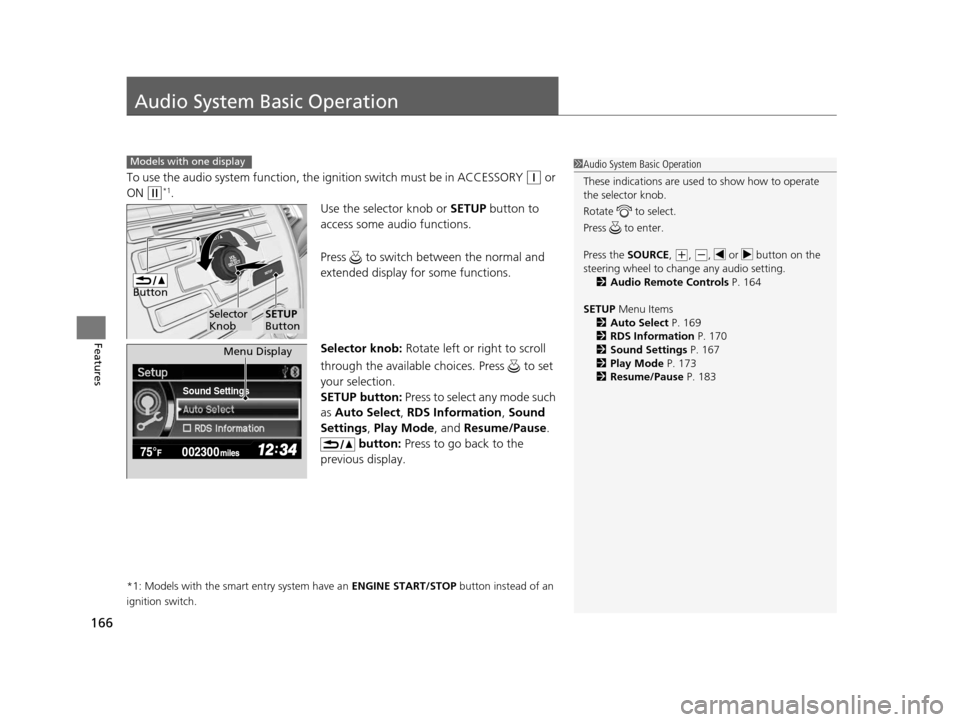
Use the selector knob or SETUP button to
access some audio functions.
Press to switch between the normal and
extended display fo r some functions.
Selector knob: Rotate left or right to scroll
through the available choices. Press to set
your selection.
SETUP button: Press to select any mode such
as Auto Select , RDS Information , Sound
Settings , Play Mode , and Resume/Pause .
button: Press to go back to the
previous display.
*1: Models with the smart entry system have an ENGINE START/STOP button instead of an
ignition switch.
Models with one display1 Audio System Basic Operation
These indications are used to show how to operate
the selector knob.
Rotate to select.
Press to enter.
Press the SOURCE,
(+, (-, or button on the
steering wheel to cha nge any audio setting.
2 Audio Remote Controls P. 164
SETUP Menu Items
2 Auto Select P. 169
2 RDS Information P. 170
2 Sound Settings P. 167
2 Play Mode P. 173
2 Resume/Pause P. 183
Button
Selector
KnobSETUP
Button
Sound Settings
Menu Display
14 CIVIC 2D_SI-31TS86210.book 166 ページ 2014年1月29日 水曜日 午後8時9分
Page 170 of 441
Continued169
uuAudio System Basic Operation uPlaying AM/FM Radio
Features
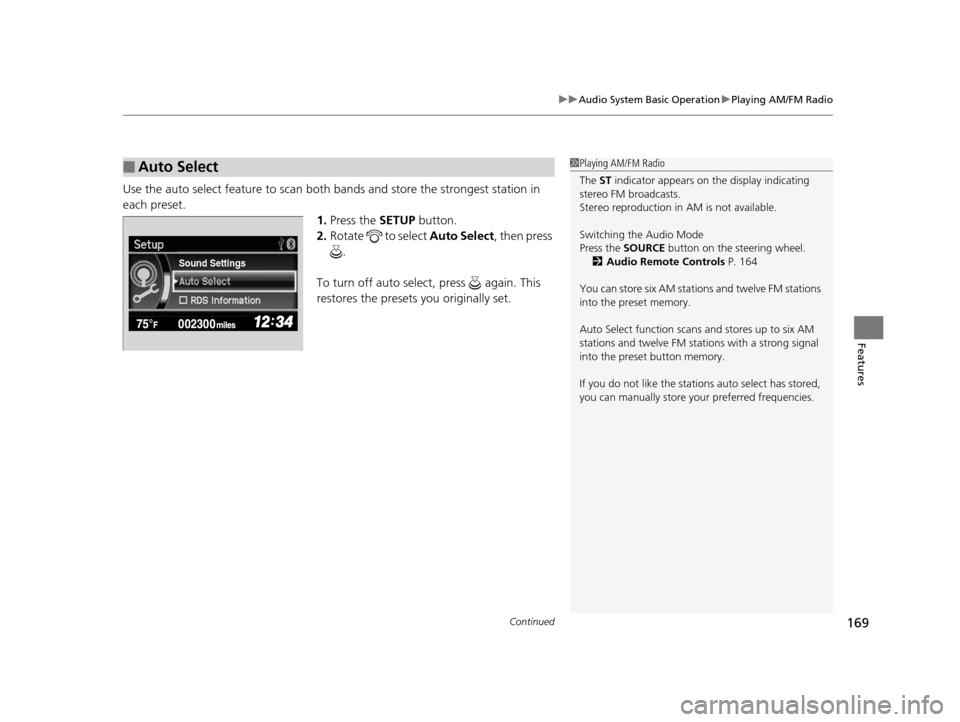
Use the auto select feature to scan both bands and store the strongest station in
each preset. 1.Press the SETUP button.
2. Rotate to select Auto Select, then press
.
To turn off auto select , press again. This
restores the presets you originally set.
■Auto Select1 Playing AM/FM Radio
The ST indicator appears on the display indicating
stereo FM broadcasts.
Stereo reproduction in AM is not available.
Switching the Audio Mode
Press the SOURCE button on the steering wheel.
2 Audio Remote Controls P. 164
You can store six AM stations and twelve FM stations
into the preset memory.
Auto Select function scans and stores up to six AM
stations and twelve FM stat ions with a strong signal
into the preset button memory.
If you do not like the stati ons auto select has stored,
you can manually store your preferred frequencies.
Sound Settings
14 CIVIC 2D_SI-31TS86210.book 169 ページ 2014年1月29日 水曜日 午後8時9分
Page 193 of 441
uuAudio System Basic Operation uPlaying AM/FM Radio
192
Features
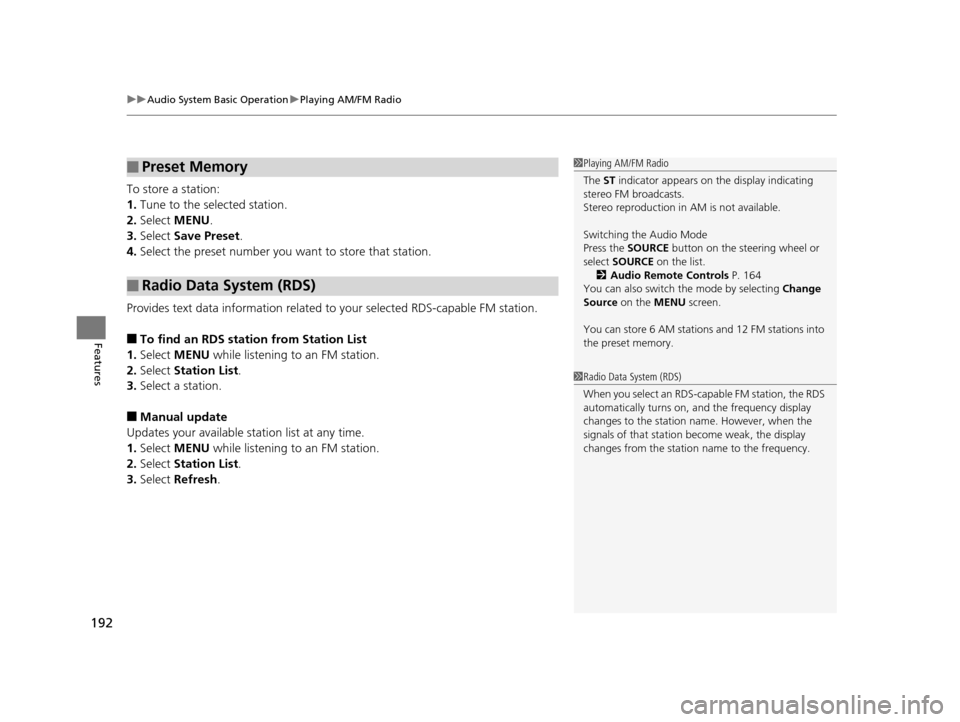
To store a station:
1. Tune to the selected station.
2. Select MENU .
3. Select Save Preset .
4. Select the preset number you want to store that station.
Provides text data information related to your selected RDS-capable FM station.
■To find an RDS station from Station List
1. Select MENU while listening to an FM station.
2. Select Station List .
3. Select a station.
■Manual update
Updates your available station list at any time.
1. Select MENU while listening to an FM station.
2. Select Station List .
3. Select Refresh .
■Preset Memory
■Radio Data System (RDS)
1Playing AM/FM Radio
The ST indicator appears on the display indicating
stereo FM broadcasts.
Stereo reproduction in AM is not available.
Switching the Audio Mode
Press the SOURCE button on the steering wheel or
select SOURCE on the list.
2 Audio Remote Controls P. 164
You can also switch the mode by selecting Change
Source on the MENU screen.
You can store 6 AM stations and 12 FM stations into
the preset memory.
1 Radio Data System (RDS)
When you select an RDS-capable FM station, the RDS
automatically turns on, and the frequency display
changes to the station name. However, when the
signals of that station become weak, the display
changes from the statio n name to the frequency.
14 CIVIC 2D_SI-31TS86210.book 192 ページ 2014年1月29日 水曜日 午後8時9分
Page 234 of 441
233Continued
Features
Bluetooth® HandsFreeLink ®
For models with the navigation system, see the Navigation System Manual for how
to operate the Bluetooth ® HandsFreeLink®.
Bluetooth ® HandsFreeLink ® (HFL) allows you to place and receive phone calls using
your vehicle's audio system, without handling your cell phone.
Using HFL
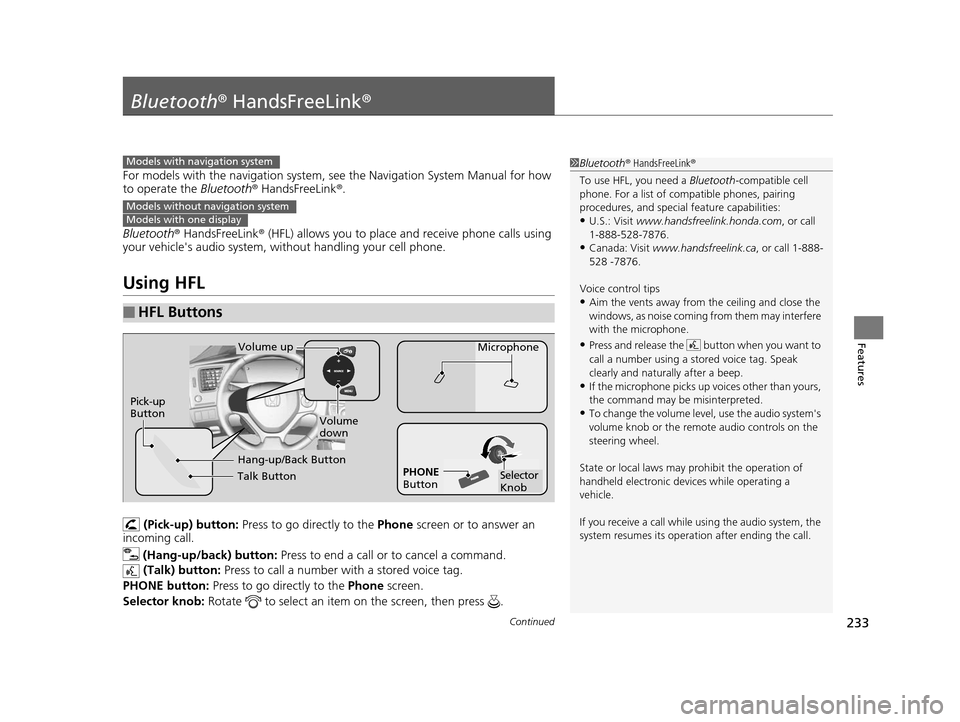
(Pick-up) button: Press to go directly to the Phone screen or to answer an
incoming call.
(Hang-up/back) button: Press to end a call or to cancel a command.
(Talk) button: Press to call a number with a stored voice tag.
PHONE button: Press to go directly to the Phone screen.
Selector knob: Rotate to select an item on the screen, then press .
■HFL Buttons
1Bluetooth ® HandsFreeLink ®
To use HFL, you need a Bluetooth-compatible cell
phone. For a list of compatible phones, pairing
procedures, and special feature capabilities:
•U.S.: Visit www.handsfreelink.honda.com , or call
1-888-528-7876.
•Canada: Visit www.handsfreelink.ca , or call 1-888-
528 -7876.
Voice control tips
•Aim the vents away from the ceiling and close the
windows, as noise coming fr om them may interfere
with the microphone.
•Press and release the button when you want to
call a number using a st ored voice tag. Speak
clearly and naturally after a beep.
•If the microphone picks up vo ices other than yours,
the command may be misinterpreted.
•To change the volume level, use the audio system's
volume knob or the remote audio controls on the
steering wheel.
State or local laws may pr ohibit the operation of
handheld electronic devices while operating a
vehicle.
If you receive a call while using the audio system, the
system resumes its operati on after ending the call.
Models with navigation system
Models without navigation systemModels with one display
Talk Button
Volume up
Microphone
Hang-up/Back Button
Pick-up
Button
Volume
down
Selector
Knob
PHONE
Button
14 CIVIC 2D_SI-31TS86210.book 233 ページ 2014年1月29日 水曜日 午後8時9分
Page 265 of 441
264
Features
Bluetooth® HandsFreeLink ®
For models with the navigation system, s ee the Navigation System Manual for how
to operate the Bluetooth® HandsFreeLink ®.
Bluetooth ® HandsFreeLink ® (HFL) allows you to place and receive phone calls using
your vehicle’s audio system, without handling your cell phone.
Using HFL
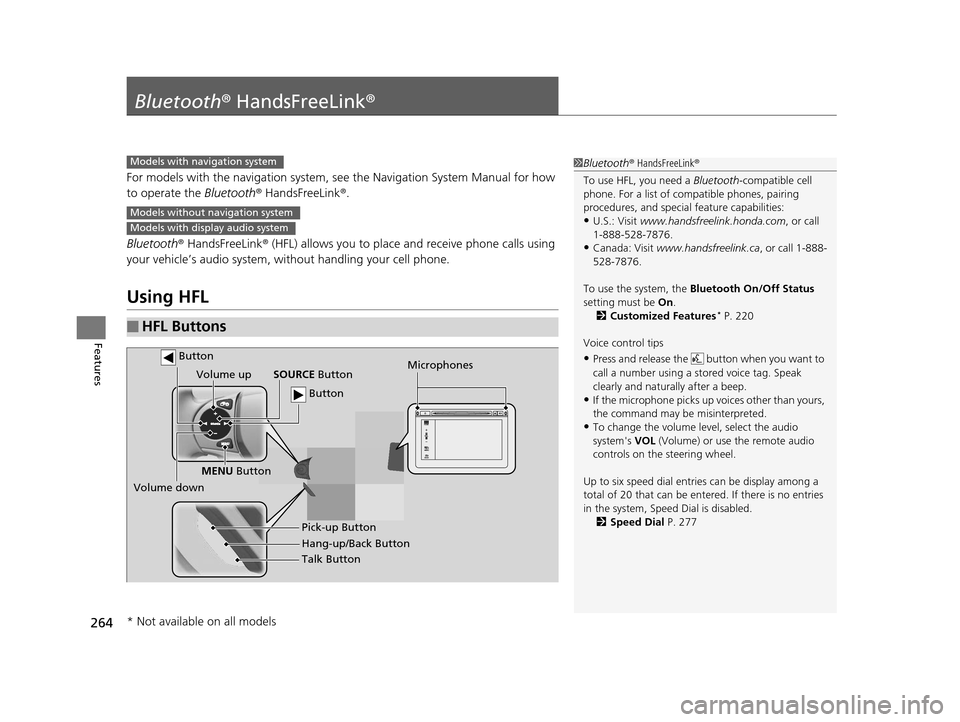
■HFL Buttons
1 Bluetooth ® HandsFreeLink ®
To use HFL, you need a Bluetooth-compatible cell
phone. For a list of compatible phones, pairing
procedures, and special feature capabilities:
•U.S.: Visit www.handsfreelink.honda.com , or call
1-888-528-7876.
•Canada: Visit www.handsfreelink.ca , or call 1-888-
528-7876.
To use the system, the Bluetooth On/Off Status
setting must be On.
2 Customized Features
* P. 220
Voice control tips
•Press and release the but ton when you want to
call a number using a st ored voice tag. Speak
clearly and naturally after a beep.
•If the microphone picks up vo ices other than yours,
the command may be misinterpreted.
•To change the volume level, select the audio
system's VOL (Volume) or use the remote audio
controls on the steering wheel.
Up to six speed dial entries can be display among a
total of 20 that can be entered. If there is no entries
in the system, Speed Dial is disabled. 2 Speed Dial P. 277
Models with navigation system
Models without navigation system
Models with display audio system
Talk Button
Volume up
Microphones
Hang-up/Back Button Pick-up Button
Volume down SOURCE
Button
MENU Button
Button
Button
* Not available on all models
14 CIVIC 2D_SI-31TS86210.book 264 ページ 2014年1月29日 水曜日 午後8時9分
Page 338 of 441
337
Maintenance
This chapter discusses basic maintenance.
Before Performing MaintenanceInspection and Maintenance ............ 338
Safety When Performing Maintenance..... 339Parts and Fluids Used in Maintenance Service ........................................... 340
Maintenance Minder
TM..................... 341
Maintenance Under the Hood
Maintenance Items Under the Hood ..... 345Opening the Hood ........................... 347
Recommended Engine Oil ................ 348
Oil Check ......................................... 349
Adding Engine Oil ............................ 351
Changing the Engine Oil and Oil Filter ..... 352
Engine Coolant ................................ 355
Transmission Fluid ............................ 357
Brake/Clutch Fluid ............................ 358
Refilling Window Wa sher Fluid......... 359
Replacing Light Bulbs ....................... 360
Checking and Maintaining Wiper
Blades .......................................... 370
Checking and Maintaining Tires
Checking Tires ................................. 372
Tire and Loading Information Label ...... 373Tire Labeling .................................... 373DOT Tire Quality Grading (U.S. Vehicles)....... 375Wear Indicators................................ 377 Tire Service Life ................................ 377
Tire and Wheel Replacement ........... 378
Tire Rotation .................................... 379
Winter Tires ..................................... 380
Battery ............................................... 381
Remote Transmitter Care
Replacing the Button Battery ........... 382
Heating and Cooling System
*/Climate
Control System* Maintenance ....... 384
Cleaning
Interior Care .................................... 385
Exterior Care.................................... 387
* Not available on all models
14 CIVIC 2D_SI-31TS86210.book 337 ページ 2014年1月29日 水曜日 午後8時9分
Page 432 of 441
Index
431
Index
Index
Numbers
7-Speed Manual Shift Mode................... 309
Operation ............................................... 310
A
ABS (Anti-lock Brake System) .................. 328
Accessories and Modifications ................ 336
Accessory Power Socket ........................... 150
Additives
Coolant .................................................. 355
Engine Oil ............................................... 348
Washer ................................................... 359
Adjusting Armrest .................................................. 144
Clock ...................................................... 100
Front Seats.............................................. 137
Head Restraints ....................................... 139
Mirrors.................................................... 135
Rear Seats ............................................... 143
Steering Wheel ....................................... 134
Temperature ............................................. 86
Air Conditioning System (Climate Control System) .................................................... 155
Changing the Mode................................ 156
Defrosting the Windshield and Windows .............................................. 156
Dust and Pollen Filter .............................. 384
Recirculation/Fresh Air Mode................... 156 Sensor ..................................................... 157
Using Automatic Climate Control ............ 155
Air Conditioning System (Heating and Cooling System) ...................................... 152
Cooling ................................................... 154
Defrosting the Windshield and Windows ............................................... 154
Dust and Pollen Filter ............................... 384
Heating ................................................... 153
Air Pressure ............................... 373, 419, 421
Airbags ........................................................ 37
Advanced Airbags ..................................... 43
After a Collision ......................................... 40
Airbag Care ............................................... 49
Event Data Recorder .................................. 22
Front Airbags (SRS) .................................... 40
Indicator .............................................. 47, 70
Passenger Airbag Off Indicator .................. 48
Sensors ...................................................... 37
Side Airbags .............................................. 44
Side Curtain Airbags .................................. 46
AM/FM Radio .................................... 168, 191
Anti-lock Brake System (ABS) .................. 328
Indicator .................................................... 69
Armrest ..................................................... 144
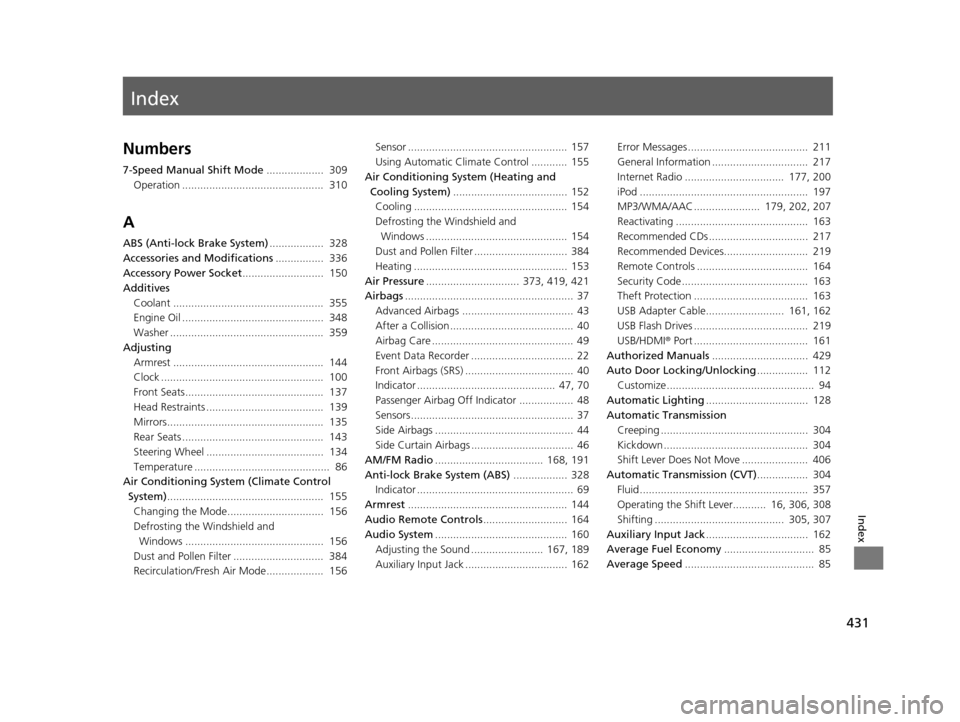
Audio Remote Controls ............................ 164
Audio System ............................................ 160
Adjusting the Sound ........................ 167, 189
Auxiliary Input Jack .................................. 162 Error Messages ........................................ 211
General Information ................................ 217
Internet Radio ................................. 177, 200
iPod ........................................................ 197
MP3/WMA/AAC ...................... 179, 202, 207
Reactivating ............................................ 163
Recommended CDs ................................. 217
Recommended Devices............................ 219
Remote Controls ..................................... 164
Security Code .......................................... 163
Theft Protection ...................................... 163
USB Adapter Cable.......................... 161, 162
USB Flash Drives ...................................... 219
USB/HDMI
® Port ...................................... 161
Authorized Manuals ................................ 429
Auto Door Locking/Unlocking ................. 112
Customize ................................................. 94
Automatic Lighting .................................. 128
Automatic Transmission
Creeping ................................................. 304
Kickdown ................................................ 304
Shift Lever Does Not Move ...................... 406
Automatic Transmission (CVT) ................. 304
Fluid ........................................................ 357
Operating the Shift Lever........... 16, 306, 308
Shifting ........................................... 305, 307
Auxiliary Input Jack .................................. 162
Average Fuel Economy .............................. 85
Average Speed ........................................... 85
14 CIVIC 2D_SI-31TS86210.book 431 ページ 2014年1月29日 水曜日 午後8時9分
Page 436 of 441
435
Index
Low Fuel ................................................... 69
Low Oil Pressure ............................... 67, 409
Low Temperature...................................... 70
Low Tire Pressure/TPMS ............ 72, 322, 324
Maintenance Minder............................... 341
Malfunction Indicator Lamp .............. 67, 410
Parking Brake and Brake System (Red) ............................................... 66, 411
REV..................................................... 75, 82
Seat Belt Reminder.............................. 31, 69
Security System Alarm............................... 74
Shift Lever Position.................................... 68
Smart Entry System ................................... 74
Supplemental Restraint System ........... 47, 70
System Message ....................................... 73
Transmission ............................................. 68
Trunk Open .............................................. 71
Turn Signal and Hazard Warning............... 73
Vehicle Stability Assist (VSA® )
System ............................................ 71, 318
VSA ® OFF.......................................... 71, 319
Information .............................................. 417
Instant Fuel Economy .......................... 81, 86
Instrument Panel ........................................ 65
Brightness Control .................................. 132
intelligent Multi-Information Display (i-MID) ....................................................... 83
Interior Lights ........................................... 145
Interior Rearview Mirror ......................... 135
i-VTEC and REV Indicators ......................... 82J
Jack (Wheel Nut Wrench)........................ 396
Jump Starting ........................................... 403
K
Key Number Tag ....................................... 103
Keyless Lockout Prevention ..................... 109
Keys ........................................................... 102
Lockout Prevention .................................. 109
Master Keys ............................................. 102
Number Tag ............................................ 103
Remote Transmitter ................................. 105
Types and Functions ................................ 102
Valet Key ................................................. 103
Won’t Turn ................................................ 20
Kickdown (Automatic Transmission) ....... 304
L
LaneWatchTM............................................. 320
Language (HFL) ................................. 234, 265
LATCH (Child Seats) .................................... 55
Lights ................................................. 127, 360
Automatic ............................................... 128
Bulb Replacement .................................... 360
Daytime Running Lights ........................... 130
Fog Lights ................................................ 130
High Beam Indicator .................................. 73 Interior .................................................... 145
Light Switches ......................................... 127
Lights On Indicator .................................... 73
Turn Signals ............................................ 127
Load Limits ................................................ 295
Locking/Unlocking the Doors .................. 102
Auto Door Locking/Unlocking.................. 112
From Inside ............................................. 110
From Outside .......................................... 105
Keys ........................................................ 102
Using a Key ............................................. 109
Lockout Prevention System ..................... 109
Low Battery Charge ................................. 409
Low Fuel Indicator ...................................... 69
Low Oil Pressure Indicator ................. 67, 409
Low Smart Entry Remote Signal Strength .................................................. 104
Lower Anchors ............................................ 55
Lubricant Specifications Chart ......... 419, 421
Luggage (Maximum Load Limit) ............. 295
M
Maintenance............................................. 337
Battery .................................................... 381
Brake/Clutch Fluid ................................... 358
Cleaning ................................................. 385
Climate Control System ........................... 384
Coolant ................................................... 355
14 CIVIC 2D_SI-31TS86210.book 435 ページ 2014年1月29日 水曜日 午後8時9分