warning lights HONDA CIVIC COUPE 2014 9.G Navigation Manual
[x] Cancel search | Manufacturer: HONDA, Model Year: 2014, Model line: CIVIC COUPE, Model: HONDA CIVIC COUPE 2014 9.GPages: 441
Page 10 of 441
9
Quick Reference Guide
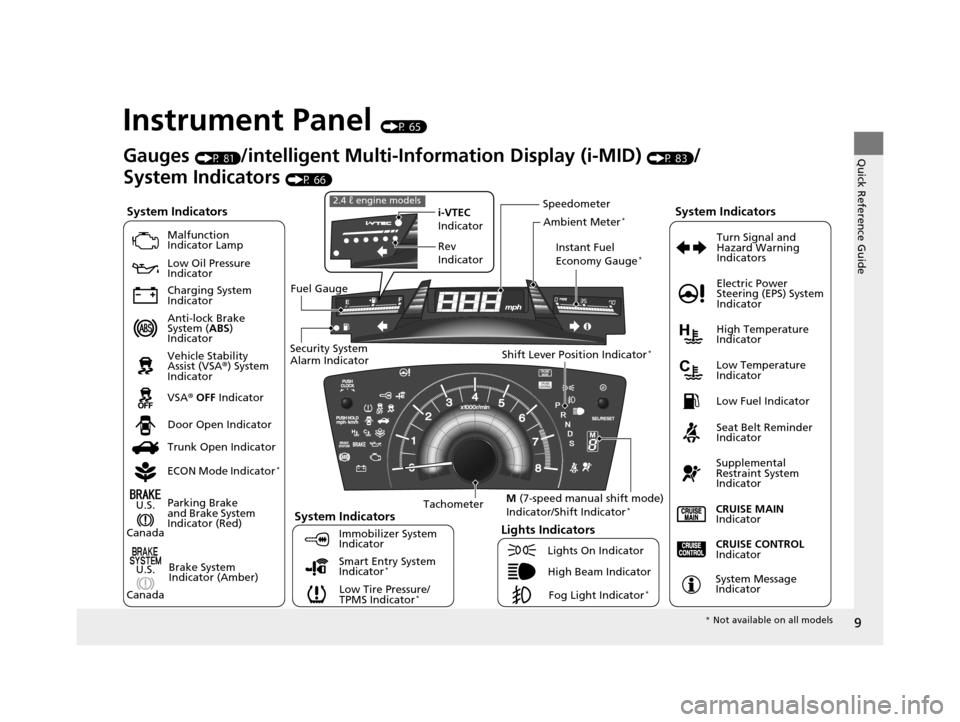
Instrument Panel (P 65)
System Indicators
Malfunction
Indicator Lamp
Low Oil Pressure
Indicator
Charging System
Indicator
Anti-lock Brake
System (ABS)
Indicator
Vehicle Stability
Assist (VSA ®) System
Indicator
VSA ® OFF Indicator
Low Tire Pressure/
TPMS Indicator
*
Electric Power
Steering (EPS) System
Indicator
Lights Indicators
Lights On Indicator
High Beam IndicatorFog Light Indicator
*
Immobilizer System
Indicator Seat Belt Reminder
Indicator
System Indicators
CRUISE CONTROL
Indicator
System Message
Indicator
Parking Brake
and Brake System
Indicator (Red)
Supplemental
Restraint System
Indicator
Door Open Indicator
CRUISE MAIN
Indicator
Tachometer Instant Fuel
Economy Gauge
*
Speedometer
Fuel Gauge
Security System
Alarm Indicator Shift Lever Position Indicator
*
Low Fuel Indicator
Gauges (P 81)/intelligent Multi-Information Display (i-MID) (P 83)/
System Indicators
(P 66)
Trunk Open Indicator
ECON Mode Indicator
*
Turn Signal and
Hazard Warning
Indicators
High Temperature
Indicator
Low Temperature
Indicator
i-VTEC
Indicator
Rev
Indicator
2.4 ℓ engine models
Ambient Meter*
Smart Entry System
Indicator*Brake System
Indicator (Amber)
System IndicatorsU.S.
Canada
U.S.
Canada M
(7-speed manual shift mode)
Indicator/Shift Indicator*
* Not available on all models
14 CIVIC 2D_SI-31TS86210.book 9 ページ 2014年1月29日 水曜日 午後8時9分
Page 74 of 441
73
uuIndicators u
Continued
Instrument Panel
*1:Models with the smart entry system have an ENGINE START/STOP button instead of an ignition switch.
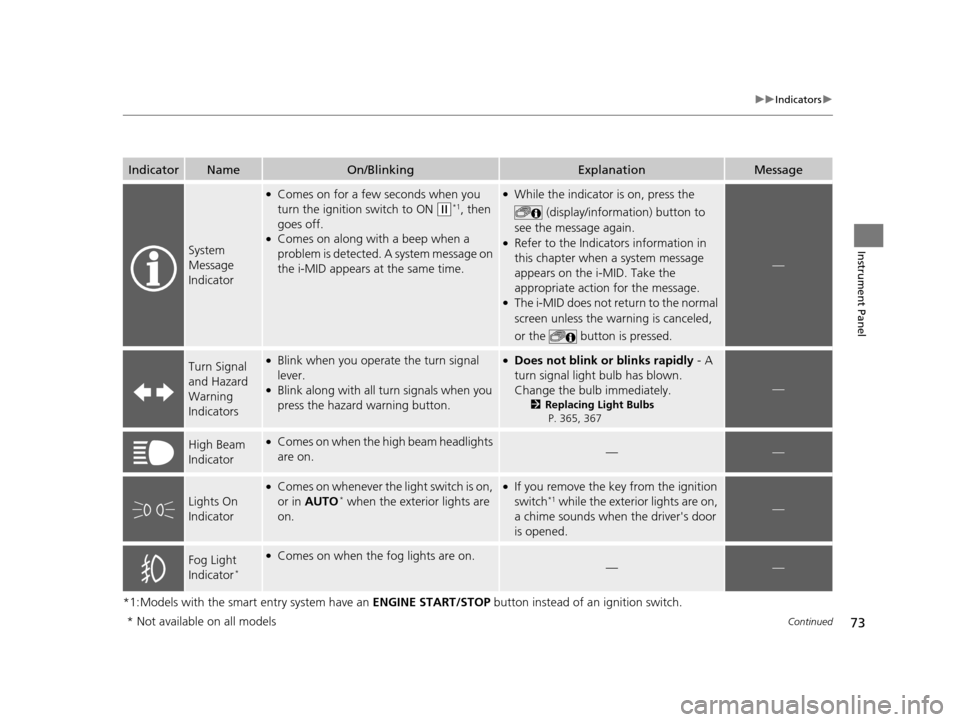
IndicatorNameOn/BlinkingExplanationMessage
System
Message
Indicator
●Comes on for a few seconds when you
turn the ignition switch to ON
(w*1, then
goes off.
●Comes on along with a beep when a
problem is detected. A system message on
the i-MID appears at the same time.
●While the indicator is on, press the
(display/information) button to
see the message again.
●Refer to the Indicators information in
this chapter when a system message
appears on the i-MID. Take the
appropriate action for the message.
●The i-MID does not return to the normal
screen unless the wa rning is canceled,
or the button is pressed.
—
Turn Signal
and Hazard
Warning
Indicators●Blink when you operate the turn signal
lever.
●Blink along with all turn signals when you
press the hazard warning button.
●Does not blink or blinks rapidly - A
turn signal light bulb has blown.
Change the bulb immediately.
2 Replacing Light Bulbs
P. 365, 367
—
High Beam
Indicator●Comes on when the high beam headlights
are on.——
Lights On
Indicator
●Comes on whenever the light switch is on,
or in AUTO* when the exterior lights are
on.
●If you remove the key from the ignition
switch*1 while the exteri or lights are on,
a chime sounds when the driver's door
is opened.—
Fog Light
Indicator*
●Comes on when the fog lights are on.——
* Not available on all models
14 CIVIC 2D_SI-31TS86210.book 73 ページ 2014年1月29日 水曜日 午後8時9分
Page 77 of 441
76
uuIndicators uintelligent Multi-Informat ion Display (i-MID) Warning and Information Messages
Instrument Panel
intelligent Multi-Information Display (i-MID) Warning and Information Messages
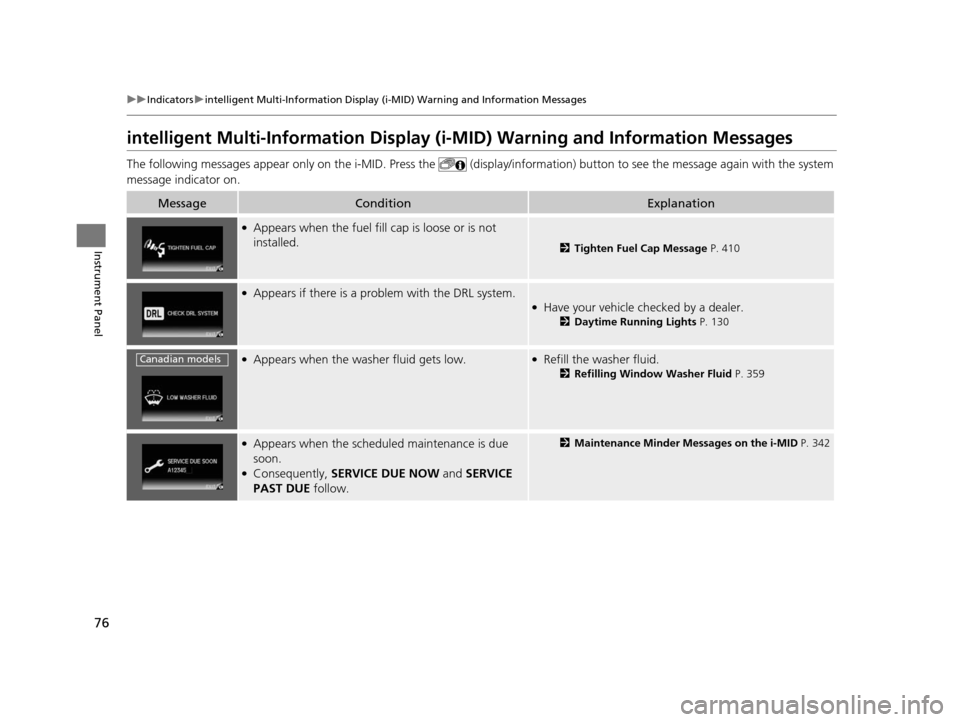
The following messages appear only on the i- MID. Press the (display/information) button to see the message again with the syst em
message indicator on.
MessageConditionExplanation
●Appears when the fuel fill cap is loose or is not
installed.
2 Tighten Fuel Cap Message P. 410
●Appears if there is a problem with the DRL system.●Have your vehicle checked by a dealer.
2Daytime Running Lights P. 130
●Appears when the washer fluid gets low.●Refill the washer fluid.
2Refilling Window Washer Fluid P. 359
●Appears when the scheduled maintenance is due
soon.
●Consequently, SERVICE DUE NOW and SERVICE
PAST DUE follow.
2Maintenance Minder Messages on the i-MID P. 342
Canadian models
14 CIVIC 2D_SI-31TS86210.book 76 ページ 2014年1月29日 水曜日 午後8時9分
Page 148 of 441
147
uuInterior Lights/Interior Convenience Items uInterior Convenience Items
Continued
Controls
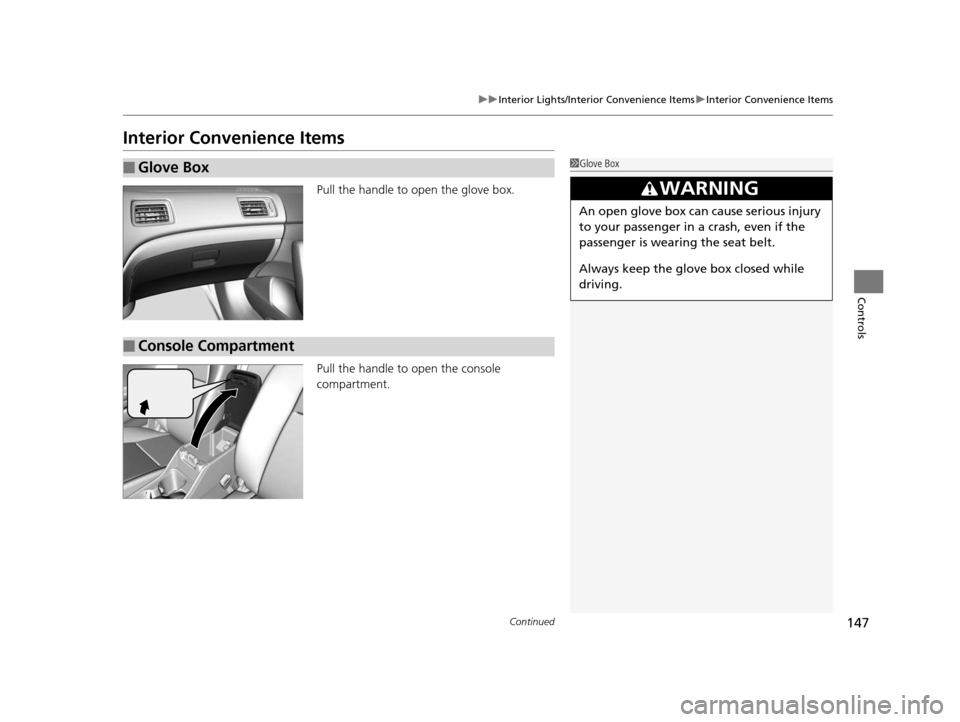
Interior Convenience Items
Pull the handle to open the glove box.
Pull the handle to open the console
compartment.
■Glove Box1Glove Box
3WARNING
An open glove box can cause serious injury
to your passenger in a crash, even if the
passenger is wearing the seat belt.
Always keep the glove box closed while
driving.
■Console Compartment
14 CIVIC 2D_SI-31TS86210.book 147 ページ 2014年1月29日 水曜日 午後8時9分
Page 152 of 441
151
uuInterior Lights/Interior Convenience Items uInterior Convenience Items
Controls
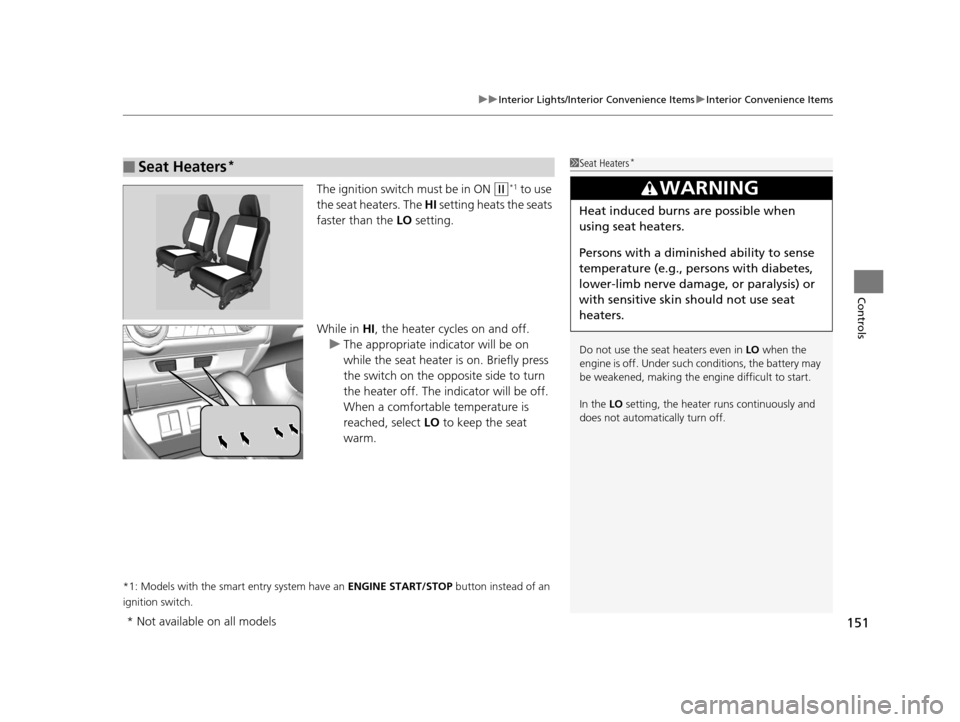
The ignition switch must be in ON (w*1 to use
the seat heaters. The HI setting heats the seats
faster than the LO setting.
While in HI , the heater cycles on and off.
u The appropriate indicator will be on
while the seat heater is on. Briefly press
the switch on the opposite side to turn
the heater off. The indicator will be off.
When a comfortable temperature is
reached, select LO to keep the seat
warm.
*1: Models with the smart entry system have an ENGINE START/STOP button instead of an
ignition switch.
■Seat Heaters*1 Seat Heaters*
Do not use the seat heaters even in LO when the
engine is off. Under such conditions, the battery may
be weakened, making the engine difficult to start.
In the LO setting, the heater runs continuously and
does not automatically turn off.
3WARNING
Heat induced burns are possible when
using seat heaters.
Persons with a diminished ability to sense
temperature (e.g., persons with diabetes,
lower-limb nerve damage, or paralysis) or
with sensitive skin should not use seat
heaters.
* Not available on all models
14 CIVIC 2D_SI-31TS86210.book 151 ページ 2014年1月29日 水曜日 午後8時9分
Page 394 of 441
393Continued
Handling the Unexpected
If a Tire Goes Flat
Changing a Flat Tire
If a tire goes flat while driving, grasp the steering wheel firmly, and brake gradually
to reduce speed. Then, stop in a safe plac e. Replace the flat tire with a compact
spare tire. Go to a dealer as soon as possib le to have the full-size tire repaired or
replaced.
1. Park the vehicle on firm, level, and non-slippery surface, and apply the parking
brake.
2. Put the shift lever in
(P.
2. Put the shift lever in
(R.
3. Turn on the hazard warning lights an d turn the ignition switch to LOCK
(0*1.
*1: Models with the smart entry system have an ENGINE START/STOP button instead of an
ignition switch.
1 Changing a Flat Tire
Periodically check the tire pressure of the compact
spare. It should be set to the specified pressure.
Specified Pressure: 60 psi (420 kPa, 4.2 kgf/cm
2)
When driving with the compact spare tire, keep the
vehicle speed under 50 mph (80 km/h). Replace with
a full-size tire as soon as possible.
The compact spare tire and wheel in your vehicle are
specifically for this model. Do not use them with
another vehicle. Do not us e another type of compact
spare tire or wheel with your vehicle.
Do not mount tire chains on a compact spare tire.
If a chain-mounted front tire goes flat, remove one of
the full-size rear tires and replace it with the compact
spare tire. Remove the flat front tire and replace it
with the full-size tire that was removed from the rear.
Mount the tire chains on the front tire.
Automatic transmission (CVT) models
Manual transmission models
All models
14 CIVIC 2D_SI-31TS86210.book 393 ページ 2014年1月29日 水曜日 午後8時9分
Page 404 of 441
403Continued
Handling the Unexpected
Jump Starting
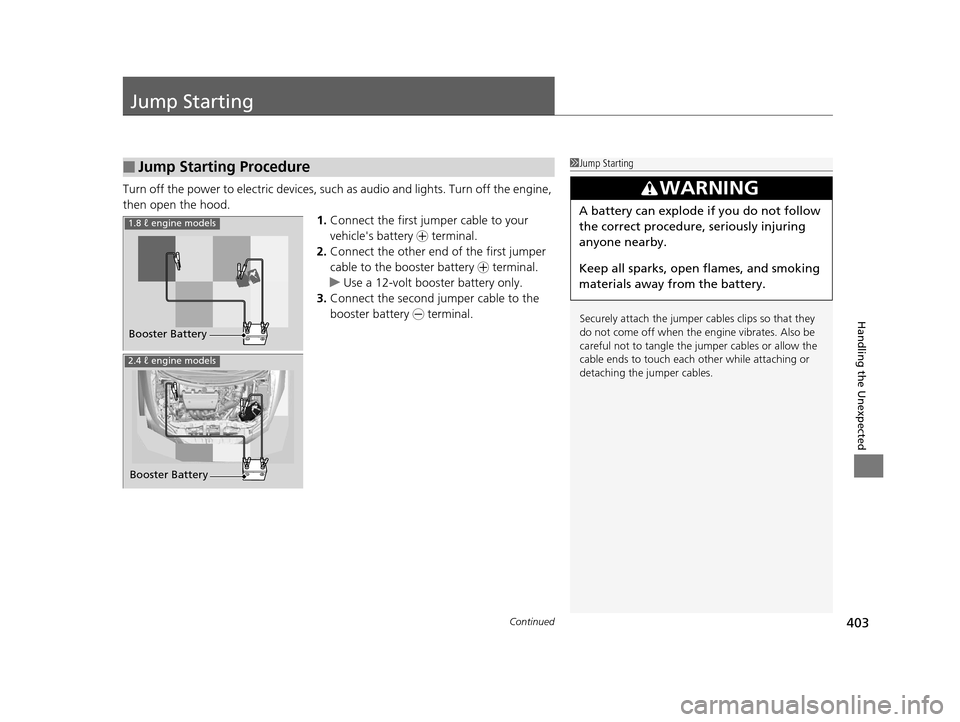
Turn off the power to electric devices, such as audio and lights. Turn off the engine,
then open the hood. 1.Connect the first jumper cable to your
vehicle's battery + terminal.
2. Connect the other end of the first jumper
cable to the booster battery + terminal.
u Use a 12-volt booster battery only.
3. Connect the second jumper cable to the
booster battery - terminal.
■Jump Starting Procedure1Jump Starting
Securely attach the jumper cables clips so that they
do not come off when the e ngine vibrates. Also be
careful not to tangle the ju mper cables or allow the
cable ends to touch each other while attaching or
detaching the jumper cables.
3WARNING
A battery can explode if you do not follow
the correct procedure, seriously injuring
anyone nearby.
Keep all sparks, open flames, and smoking
materials away from the battery.
Booster Battery
1.8 ℓ engine models
2.4 ℓ engine models
Booster Battery
14 CIVIC 2D_SI-31TS86210.book 403 ページ 2014年1月29日 水曜日 午後8時9分
Page 408 of 441
407Continued
Handling the Unexpected
Overheating
How to Handle Overheating
Overheating symptoms are as follows:
•The high temperature indicator comes on or the engine suddenly loses power.
• Steam or spray comes out of the engine compartment.
■First thing to do
1. Immediately park the vehicle in a safe place.
2. Turn off all accessories and turn on the hazard warning lights.
u No steam or spray present: Keep the engine running and open the hood.
u Steam or spray is present: Turn off the engine and wait until it subsides.
Then open the hood.
1 How to Handle Overheating
NOTICE
Continuing to drive with the high temperature
indicator on may da mage the engine.
3WARNING
Steam and spray from an overheated
engine can seriously scald you.
Do not open the hood if steam is coming
out.
14 CIVIC 2D_SI-31TS86210.book 407 ページ 2014年1月29日 水曜日 午後8時9分
Page 410 of 441
409
Handling the Unexpected
Indicator, Coming On/Blinking
If the Low Oil Pressure Indicator Comes On
■Reasons for the indicator to come on
Comes on when the engine oil pressure is low.
■What to do as soon as the indicator comes on
1. Immediately park the vehicle in a safe place.
2. If necessary, turn the hazard warning lights on.
■What to do after parking the vehicle
1. Stop the engine and let it sit for about one minute.
2. Open the hood and check the oil level.
u Add oil as necessary.
3. Start the engine and check th e low oil pressure indicator.
u The indicator goes off: Start driving again.
u The indicator does not go off within 10 seconds: Stop the engine
and contact a dealer for repairs immediately.
If the Charging System Indicator Comes On
■Reasons for the indicator to come on
Comes on when the battery is not being charged.
■What to do when th e indicator comes on
Turn off the heating and cooling system*/climate control system*, rear
defogger, and other electrical system s, and immediately contact a dealer
for repairs.
1 If the Low Oil Pressure Indicator Comes On
NOTICE
Running the engine with low oil pressure can cause
serious mechanical damage almost immediately.
1If the Charging System Indicator Comes On
If you need to stop temporarily, do not turn off the
engine. Restarting the engi ne may rapidly discharge
the battery.
* Not available on all models
14 CIVIC 2D_SI-31TS86210.book 409 ページ 2014年1月29日 水曜日 午後8時9分
Page 435 of 441
434
Index
Fuel Fill Door....................................... 17, 333
Fuses .......................................................... 413
Inspecting and Changing ......................... 415
Locations ......................................... 413, 414
G
Gasoline (Fuel) Economy ................................................. 335
Gauge ....................................................... 81
Information ............................................. 332
Instant Fuel Economy ........................... 81, 86
Low Fuel Indicator ..................................... 69
Refueling ................................................. 332
Gauges ......................................................... 81
Gear Shift Lever Positions
Automatic Transmission (CVT) ......... 305, 307
Manual Transmission ............................... 312
Glass (care) ................................................ 388
Glove Box .................................................. 147
H
Halogen Bulbs ........................................... 364
Handling the Unexpected ........................ 391
HandsFreeLink® (HFL)....................... 233, 264
Automatic Import of Ce llular Phonebook and
Call History .................................... 249, 276
Automatic Transferring ............................ 247
Caller’s ID Information ............................. 247
Displaying Messages ........................ 260, 285 HFL Buttons..................................... 233, 264
HFL Menus ...................................... 235, 266
HFL Status Display ........................... 234, 265
Limitations for Manual Operation ............ 234
Making a Call .................................. 253, 279
Options During a Call ...................... 258, 282
Phone Setup.................................... 240, 270
Receiving a Call ............................... 257, 282
Receiving a Text Message/E-mail...... 259, 283
Ring Tone................................................ 275
Selecting a Mail Account ......................... 284
Speed Dial ....................................... 250, 277
Text Message .................. 245, 259, 274, 283
To Clear the System ................................ 248
To Create a Security PIN .......................... 246
To Set Up a Text Message/E-mail
Options ......................................... 245, 274
Hazard Warning Button .............................. 2
Head Restraints ........................................ 139
Headlights ................................................. 127
Aiming .................................................... 360
Automatic Operation............................... 128
Dimming ......................................... 127, 130
Operating................................................ 127
Heaters (Seat) ........................................... 151
Heating and Cooling System ................... 152
Cooling ................................................... 154
Defrosting the Windshield and
Windows ............................................... 154
Dust and Pollen Filter............................... 384
Heating ................................................... 153 HFL (HandsFreeLink
®) ...................... 233, 264
High Beam Indicator .................................. 73
Hill Start Assist System ..................... 299, 302
I
Identification Numbers ............................ 422
Engine and Transmission ......................... 422
Vehicle Identification............................... 422
Ignition Switch ......................................... 122
Illumination Control ................................ 132
Knob ...................................................... 132
i-MID ........................................................... 83
Immobilizer System .................................. 116
Indicator ................................................... 74
Indicators .................................................... 66
Anti-lock Brake System (ABS) .................... 69
Brake System (Amber) ............................... 66
Charging System............................... 67, 409
CRUISE CONTROL ............................. 75, 316
CRUISE MAIN.................................... 75, 315
Door Open.......................................... 29, 71
ECON Mode ..................................... 75, 314
Electric Power Steering (EPS) System ............................................ 72, 411
Fog Light .................................................. 73
High Beam ................................................ 73
High Temperature ..................................... 70
Immobilizer System ................................... 74
i-VTEC ................................................ 75, 82
Lights On .................................................. 73
14 CIVIC 2D_SI-31TS86210.book 434 ページ 2014年1月29日 水曜日 午後8時9分