mirror HONDA CIVIC COUPE 2015 9.G User Guide
[x] Cancel search | Manufacturer: HONDA, Model Year: 2015, Model line: CIVIC COUPE, Model: HONDA CIVIC COUPE 2015 9.GPages: 441, PDF Size: 18.4 MB
Page 134 of 441
133
uuOperating the Switches Around the Steering Wheel uRear Defogger/Heated Door Mirror
* Button
Controls
Rear Defogger/Heated Door Mirror
* Button
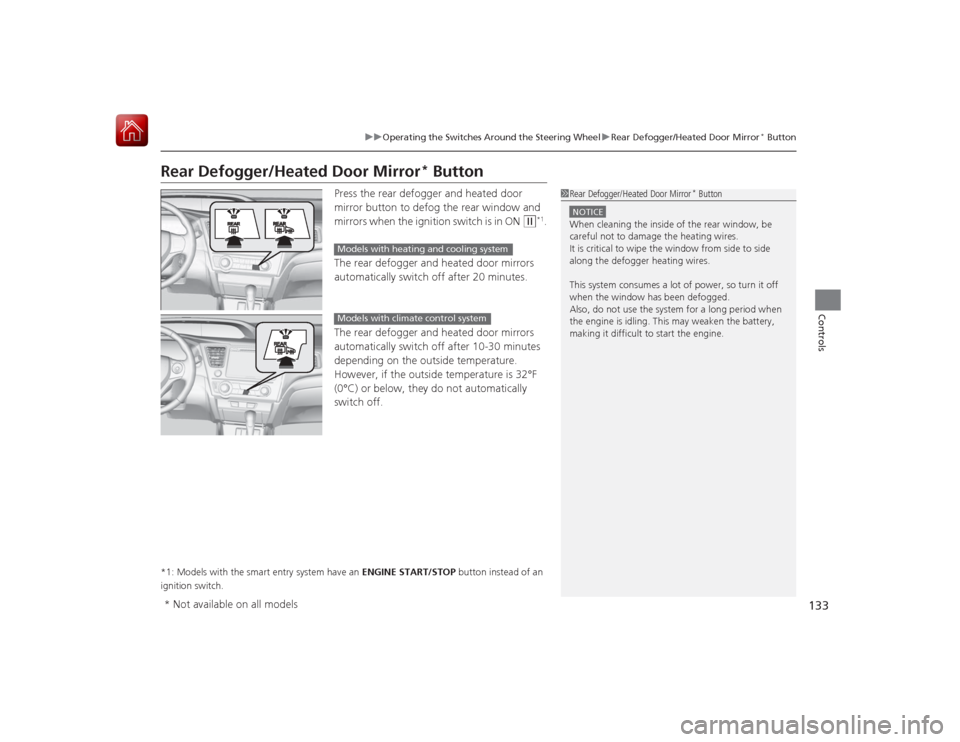
Press the rear defogger and heated door
mirror button to defog the rear window and
mirrors when the ignition switch is in ON
(w
*1.
The rear defogger and heated door mirrors
automatically switch off after 20 minutes.
The rear defogger and heated door mirrors
automatically switch off after 10-30 minutes
depending on the outside temperature.
However, if the outside temperature is 32°F
(0°C) or below, they do not automatically
switch off.
*1: Models with the smart entry system have an ENGINE START/STOP button instead of an
ignition switch.
1 Rear Defogger/Heated Door Mirror
* Button
NOTICEWhen cleaning the inside of the rear window, be
careful not to damage the heating wires.
It is critical to wipe the window from side to side
along the defogger heating wires.
This system consumes a lot of power, so turn it off
when the window has been defogged.
Also, do not use the system for a long period when
the engine is idling. This may weaken the battery,
making it difficult to start the engine.
Models with heating and cooling systemModels with climate control system
* Not available on all models
Page 136 of 441
135
Continued
Controls
Adjusting the MirrorsInterior Rearview MirrorAdjust the angle of the rearview mirror when you are sitting in the correct driving
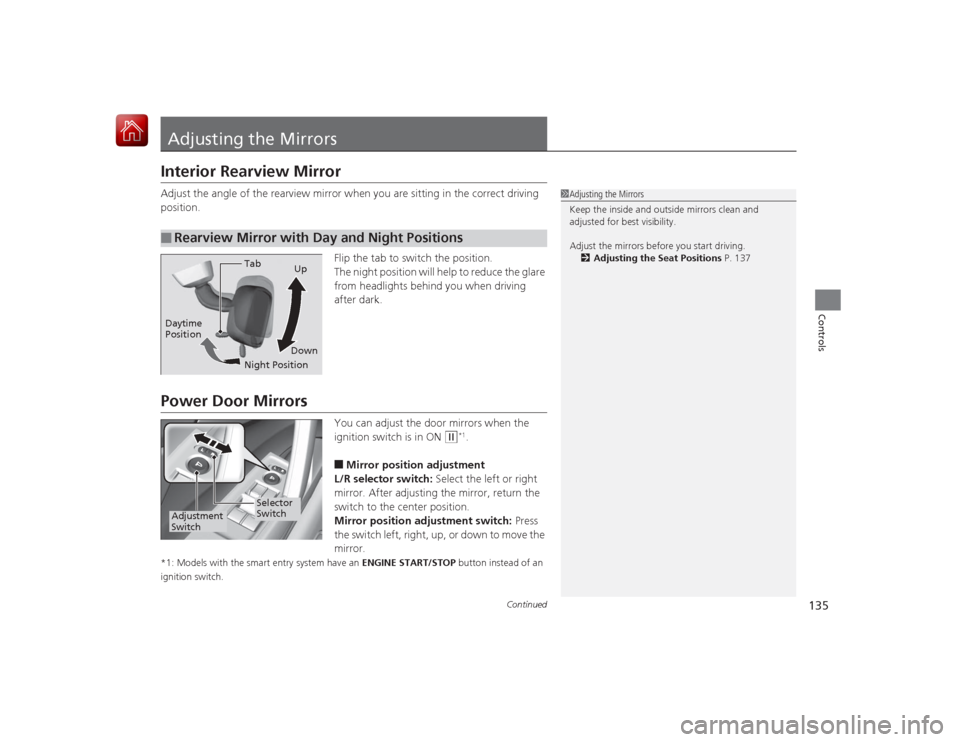
position.Flip the tab to switch the position.
The night position will help to reduce the glare
from headlights behind you when driving
after dark.Power Door Mirrors
You can adjust the door mirrors when the
ignition switch is in ON
(w
*1.
■Mirror position adjustment
L/R selector switch: Select the left or right
mirror. After adjusting the mirror, return the
switch to the center position.
Mirror position adjustment switch: Press
the switch left, right, up, or down to move the
mirror.
*1: Models with the smart entry system have an ENGINE START/STOP button instead of an
ignition switch.■
Rearview Mirror with Day and Night Positions
1 Adjusting the Mirrors
Keep the inside and outside mirrors clean and
adjusted for best visibility.
Adjust the mirrors before you start driving.
2 Adjusting the Seat Positions P. 137
Tab
Daytime
Position
Night PositionUp
Down
Selector
Switch
Adjustment
Switch
Page 137 of 441
uuAdjusting the Mirrors uPower Door Mirrors
136Controls
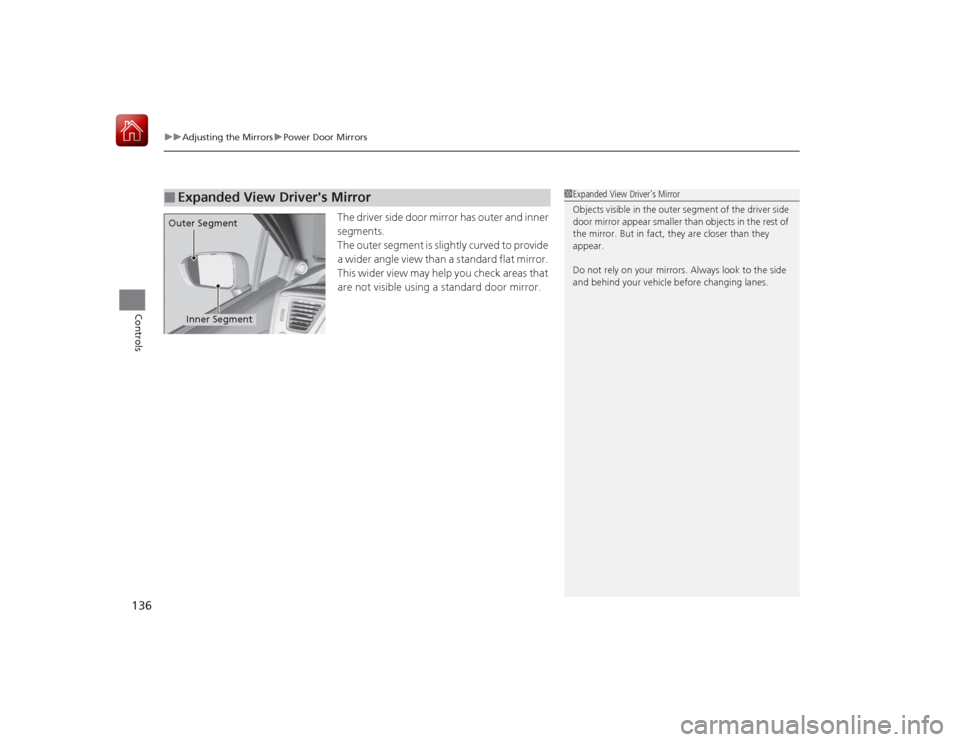
The driver side door mirror has outer and inner
segments.
The outer segment is slightly curved to provide
a wider angle view than a standard flat mirror.
This wider view may help you check areas that
are not visible using a standard door mirror.
■
Expanded View Driver's Mirror
1Expanded View Driver's Mirror
Objects visible in the outer segment of the driver side
door mirror appear smaller than objects in the rest of
the mirror. But in fact, they are closer than they
appear.
Do not rely on your mirrors. Always look to the side
and behind your vehicle before changing lanes.
Inner Segment
Outer Segment
Page 293 of 441
292Driving
Before DrivingDriving PreparationCheck the following items before you start driving.
•Make sure there are no obstructions on the windows, door mirrors, exterior
lights, or other parts of the vehicle.
u Remove any frost, snow, or ice.
u Remove any snow on the roof, as this can slip down and obstruct your field of
vision while driving. If frozen solid, remove ice once it has softened.
u When removing ice from around the wheels, be sure not to damage the wheel
or wheel components.
• Make sure the hood is securely closed.
u If the hood opens while driving, your front view will be blocked.
• Make sure the tires are in good condition.
u Check air pressure, check for damage and excessive wear.
2 Checking and Maintaining Tires P. 372
•Make sure there are no people or objects behind or around the vehicle.
u There are blind spots from the inside.■
Exterior Checks
1Exterior ChecksNOTICEWhen doors are frozen shut, use warm water around
the door edges to melt any ice. Do not try to force
them open, as this can damage the rubber trim
around the doors. When done, wipe dry to avoid
further freezing.
Do not pour warm water into the key cylinder.
You will be unable to inse rt the key if the water
freezes in the hole.
Heat from the engine and exhaust can ignite
flammable materials left under the hood, causing a
fire. If you've parked your vehicle for an extended
period, inspect and remove any debris that may have
collected, such as dried grass and leaves that have
fallen or have been carried in for use as a nest by a
small animal.
Also check under the hood for leftover flammable
materials after you or someone else has performed
maintenance on your vehicle.
Page 294 of 441
Continued
293
uuBefore Driving uDriving Preparation
Driving
• Store or secure all items on board properly.
u Carrying too much cargo, or improperly storing it, can affect your vehicle's
handling, stability, stopping distance, and tires, and make it unsafe.
2 Maximum Load Limit P. 295
•Do not pile items higher than the seat height.
u They can block your view and may be thrown forward in the event of sudden
braking.
• Do not place anything in the front seat footwells. Make sure to secure the floor
mat.
u An object or unsecured floor mat can interfere with your brake and accelerator
pedal operation while driving.
• If you have any animals on board, do not let them move around in the vehicle.
u They may interfere with driving and a crash could occur.
• Securely close and lock both doors and the trunk.
2 Locking/Unlocking the Doors from the Inside P. 110
•Adjust your seating position properly.
u Adjust the head restraint, too.
2 Adjusting the Seats P. 137
2 Adjusting the Head Restraints P. 139
•Adjust the mirrors and steering wheel properly for your driving.
u Adjust them while sitting in the proper driving position.
2 Adjusting the Mirrors P. 135
2 Adjusting the Steering Wheel P. 134
■
Interior Checks
1Interior Checks
The headlight aim is set by the factory, and does not
need to be adjusted. However, if you regularly carry
heavy items in the trunk, have the aiming readjusted
at a dealer or by a qualified technician.
Page 321 of 441
320
uuWhen Driving uLaneWatch
TM*
Driving
LaneWatch
TM
*
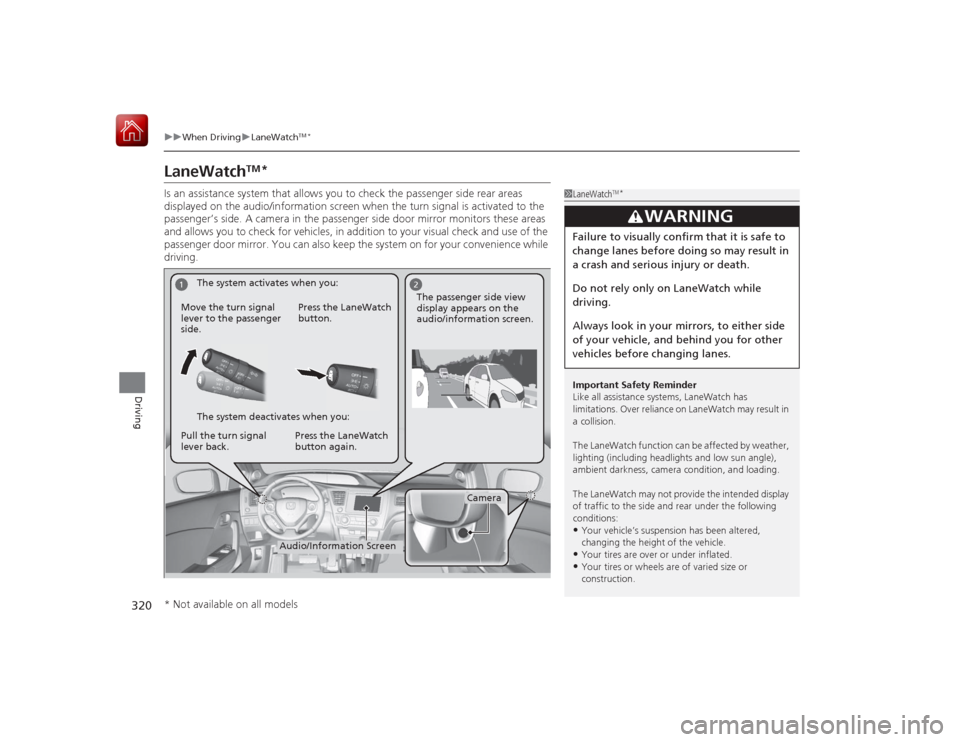
Is an assistance system that allows you to check the passenger side rear areas
displayed on the audio/information screen when the turn signal is activated to the
passenger’s side. A camera in the passenger side door mirror monitors these areas
and allows you to check for vehicles, in addition to your visual check and use of the
passenger door mirror. You can also keep the system on for your convenience while
driving.
1LaneWatch
TM*
Important Safety Reminder
Like all assistance systems, LaneWatch has
limitations. Over reliance on LaneWatch may result in
a collision.
The LaneWatch function can be affected by weather, lighting (including headlights and low sun angle),
ambient darkness, camera condition, and loading.
The LaneWatch may not provide the intended display
of traffic to the side and rear under the following
conditions:•Your vehicle’s suspension has been altered,
changing the height of the vehicle.•Your tires are over or under inflated.•Your tires or wheels ar e of varied size or
construction.
3
WARNING
Failure to visually confirm that it is safe to
change lanes before doing so may result in
a crash and serious in jury or death.
Do not rely only on LaneWatch while
driving.
Always look in your mirrors, to either side
of your vehicle, and behind you for other
vehicles before changing lanes.
1
2
Camera
Audio/Information Screen
Move the turn signal
lever to the passenger
side.
Press the LaneWatch
button.
Pull the turn signal
lever back. Press the LaneWatch
button again. The passenger side view
display appears on the
audio/information screen.
The system activates when you:
The system deactivates when you:
* Not available on all models
Page 322 of 441
321
uuWhen Driving uLaneWatch
TM*
Driving
■Customizing the LaneWatch settings
You can customize the following items using the audio/information screen.
• Show with Turn Signal : Selects whether LaneWatch monitor comes on when
you operate the turn signal light lever.
• Display Time after Turn Signal Off : Changes the length of time the LaneWatch
display stays on after you pull the turn signal lever back.
• Reference Lines : Selects whether the reference lines appear on the LaneWatch
monitor.
• Next Maneuver Pop up
*: Selects whether a turn direction screen of the
navigation system interrupts the LaneWatch display.
• Display : Allows for display adjustments of items, such as brightness, and tint.
This setting is part of the Audio setup group.
2Customized Features
* P. 220
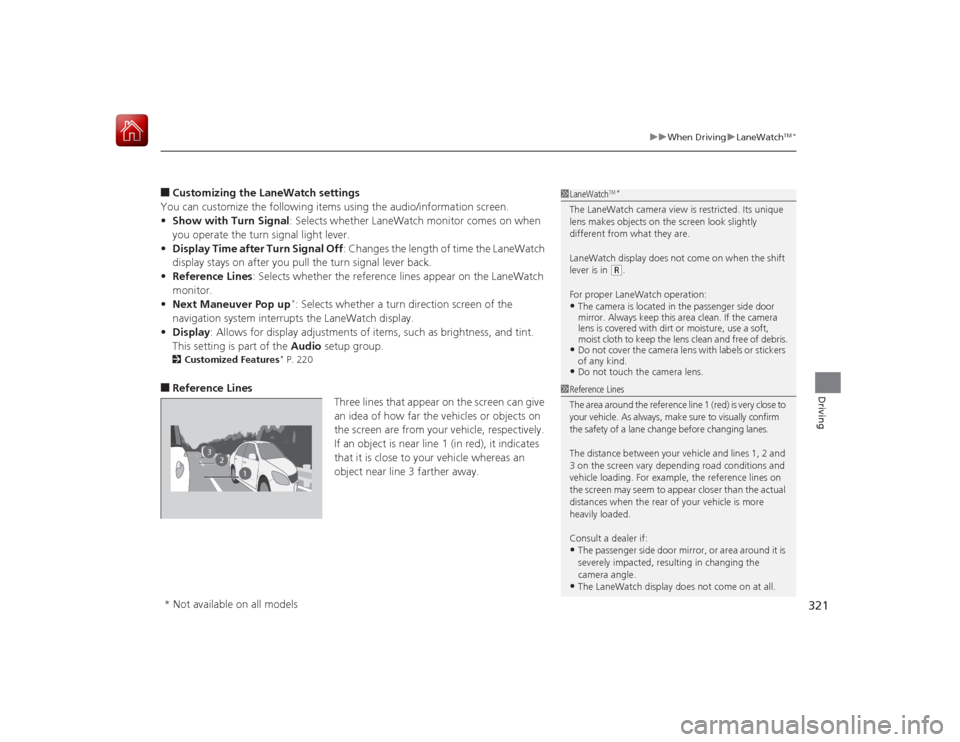
■Reference Lines
Three lines that appear on the screen can give
an idea of how far the vehicles or objects on
the screen are from your vehicle, respectively.
If an object is near line 1 (in red), it indicates
that it is close to your vehicle whereas an
object near line 3 farther away.
1 LaneWatch
TM*
The LaneWatch camera view is restricted. Its unique
lens makes objects on the screen look slightly
different from what they are.
LaneWatch display does not come on when the shift
lever is in
(R.
For proper LaneWatch operation:
•The camera is located in the passenger side door
mirror. Always keep this area clean. If the camera
lens is covered with dirt or moisture, use a soft,
moist cloth to keep the lens clean and free of debris.•Do not cover the camera lens with labels or stickers
of any kind.•Do not touch the camera lens.
2
3
1
1 Reference Lines
The area around the reference line 1 (red) is very close to
your vehicle. As always, make sure to visually confirm
the safety of a lane change before changing lanes.
The distance between your vehicle and lines 1, 2 and
3 on the screen vary depending road conditions and
vehicle loading. For example, the reference lines on
the screen may seem to appear closer than the actual
distances when the rear of your vehicle is more
heavily loaded.
Consult a dealer if:•The passenger side door mirror, or area around it is
severely impacted, resulting in changing the
camera angle.•The LaneWatch display does not come on at all.
* Not available on all models
Page 388 of 441
387
uuCleaning uExterior Care
Continued
Maintenance
Exterior CareDust off the vehicle body after you drive.
Regularly inspect your vehicle for scratches on painted surfaces. A scratch on a
painted surface can result in body rust. If you find a scratch, promptly repair it.
Wash the vehicle regularly. Wash more frequently when driving in the following
conditions:
• If driving on roads with road salt.
• If driving in coastal areas.
• If tar, soot, bird droppings, insects, or tree sap are stuck to painted surfaces.
Fold in the door mirrors. Make sure to follow the instructions indicated on the
automated car wash.
• Keep sufficient distance between the cleaning nozzle and the vehicle body.
• Take particular care around the windows. Standing too close may cause water to
enter the vehicle interior.
• Do not spray high pressure water directly into the engine compartment. Instead,
use low pressure water and a mild detergent.■
Washing the Vehicle
■
Using an Automated Car Wash
■
Using High Pressure Cleaners
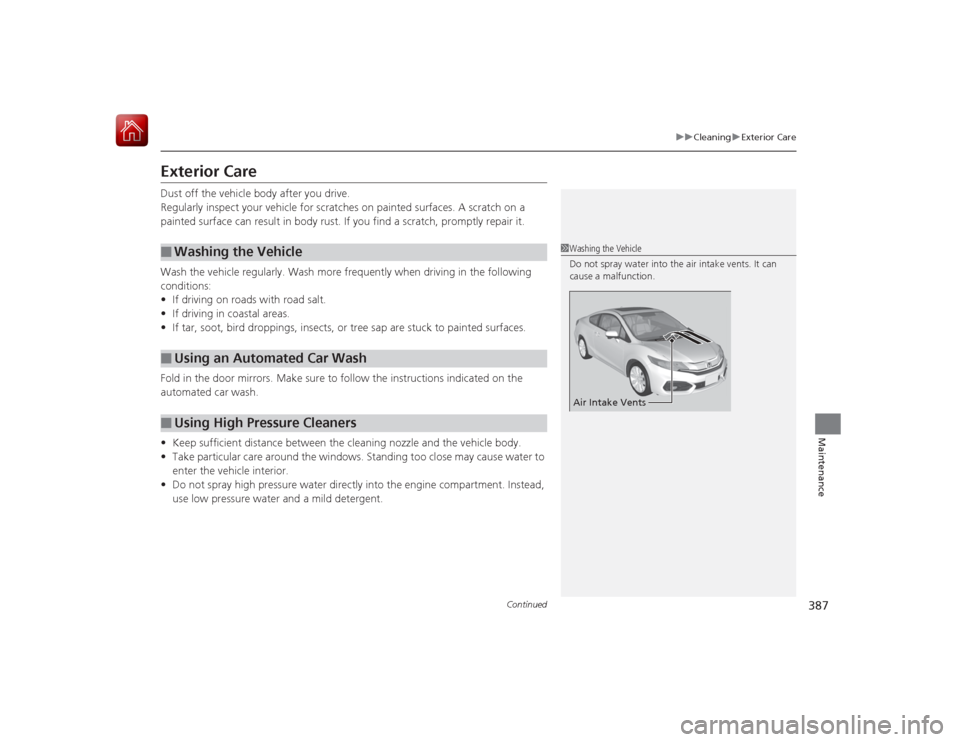
1Washing the Vehicle
Do not spray water into the air intake vents. It can
cause a malfunction.Air Intake Vents
Page 434 of 441
Index
433Index
Index
Numbers7-Speed Manual Shift Mode................... 309
Operation ............................................... 310AABS (Anti-lock Brake System) .................. 328
Accessories and Modifications ................ 336
Accessory Power Socket ........................... 150
Additives
Coolant .................................................. 355
Engine Oil ............................................... 348
Washer ................................................... 359
Adjusting Armrest .................................................. 144
Clock ...................................................... 100
Front Seats.............................................. 137
Head Restraints ....................................... 139
Mirrors.................................................... 135
Rear Seats ............................................... 143
Steering Wheel ....................................... 134
Temperature ............................................. 86
Air Conditioning Sys tem (Climate Control
System) .................................................... 155
Changing the Mode................................ 156
Defrosting the Windshield and Windows .............................................. 156
Dust and Pollen Filter .............................. 384
Recirculation/Fresh Air Mode................... 156
Sensor .................................................... 157
Using Automatic Climate Control............ 155 Air Conditioning System (Heating and
Cooling System) ...................................... 152
Cooling ................................................... 154
Defrosting the Windshield and Windows ............................................... 154
Dust and Pollen Filter ............................... 384
Heating ................................................... 153
Air Pressure ............................... 373, 421, 423
Airbags ........................................................ 37
Advanced Airbags ..................................... 43
After a Collision ......................................... 40
Airbag Care ............................................... 49
Event Data Recorder .................................... 0
Front Airbags (SRS) .................................... 40
Indicator .............................................. 47, 70
Passenger Airbag Off Indicator .................. 48
Sensors ...................................................... 37
Side Airbags .............................................. 44
Side Curtain Airbags .................................. 46
AM/FM Radio .................................... 168, 191
Anti-lock Brake System (ABS) .................. 328
Indicator .................................................... 69
Armrest ..................................................... 144
Audio Remote Controls ............................ 164
Audio System ............................................ 160
Adjusting the Sound ........................ 167, 189
Auxiliary Input Jack .................................. 162
Error Messages ........................................ 211
General Information ................................ 217
Internet Radio .................................. 177, 200
iPod ......................................................... 197 MP3/WMA/AAC ...................... 179, 202, 207
Reactivating ............................................ 163
Recommended CDs ................................. 217
Recommended Devices............................ 219
Remote Controls ..................................... 164
Security Code .......................................... 163
Theft Protection ...................................... 163
USB Adapter Cable.......................... 161, 162
USB Flash Drives ...................................... 219
USB/HDMI
® Port ...................................... 161
Authorized Manuals ................................ 431
Auto Door Locking/Unlocking ................. 112
Customize ................................................. 94
Automatic Lighting .................................. 128
Auxiliary Input Jack .................................. 162
Average Fuel Economy .............................. 85
Average Speed ........................................... 85
BBattery...................................................... 381
Charging System Indicator................. 67, 409
Jump Starting .......................................... 403
Maintenance (Checking the Battery) ........ 381
Maintenance (Replacing) ......................... 382
Belts (Seat) .................................................. 30
Beverage Holders ..................................... 149
Bluetooth ® Audio ............................. 182, 205
Bluetooth ® HandsFreeLink® ............. 233, 264
Booster Seats (For Children) ...................... 61
Page 435 of 441
434Index
Brake System............................................. 326
Anti-lock Brake System (ABS) ................... 328
Brake Assist System ................................. 329
Fluid ........................................................ 358
Foot Brake ............................................... 327
Indicator .................................................... 66
Indicator (Amber)....................................... 66
Indicator (Red) ......................................... 411
Parking Brake .......................................... 326
Brake System Indicator (Amber) ................ 66
Brightness Control (Instrument Panel) .... 132
Bulb Replacement ..................................... 360
Brake Lights, Taillights, Re ar Side Marker lights,
Back-Up Lights and Rear Turn Signal
Lights..................................................... 367
Fog Lights ................................................ 364
Front Turn Signal/Parking/Side Marker
Lights..................................................... 365
Headlights ............................................... 360
High-Mount Brake Light .......................... 369
Rear License Plate Light............................ 368
Bulb Specifications ............................ 420, 422CCarbon Monoxide Gas ................................ 62
Carrying Cargo .................................. 293, 295
CD Player ........................................... 171, 194
Center Pocket ............................................ 148
Certification Label .................................... 424
Changing Bulbs ......................................... 360 Charging System Indicator
................. 67, 409
Child Safety ................................................. 50
Emergency Trunk Opener ........................ 115
Child Seat .................................................... 50
Booster Seats ............................................ 61
Child Seat for Infants................................. 52
Child Seat for Small Children ..................... 53
Installing a Child Seat with a Lap/Shoulder Seat
Belt ......................................................... 57
Larger Children ......................................... 60
Rear-facing Child Seat ............................... 52
Selecting a Child Seat ................................ 54
Using a Tether ........................................... 59
Cleaning the Exterior ............................... 387
Cleaning the Interior ................................ 385
Climate Control System ............................ 155
Changing the Mode ................................ 155
Defrosting the Windshield and Windows ............................................... 156
Dust and Pollen Filter............................... 384
Recirculation/Fresh Air Mode ................... 156
Sensors ................................................... 157
Using Automatic Climate Control ............ 155
Clock .......................................................... 100
Clutch Fluid ............................................... 358
Coat Hook ................................................. 150
Compact Spare Tire .................. 393, 421, 423
Console Compartment ............................. 147
Continuously Variable Transmission Creeping ................................................. 304
Fluid ........................................................ 357 Kickdown ............................................... 304
Operating the Shift Lever .......... 18, 306, 308
Shift Lever Does Not Move ...................... 406
Shifting ........................................... 305, 307
Controls ...................................................... 99
Coolant (Engine) ...................................... 355
Adding to the Radiator ........................... 356
Adding to the Reserve Tank .................... 355
High Temperature Indicator ...................... 70
Low Temperature Indicator ....................... 70
Overheating ............................................ 407
Creeping (Continuously Variable Transmission) .......................................... 304
Cruise Control .......................................... 315
Indicator ................................................... 75
Cup Holders .............................................. 149
Customer Service Information ................ 432
Customized Features ......................... 87, 220
DDaytime Running Lights .......................... 130
Dead Battery ............................................ 403
Defrosting the Windshield and
Windows ......................................... 154, 156
Devices that Emit Radio Waves ............... 425
Dimming
Headlights .............................................. 127
Rearview Mirror ...................................... 135
Dipstick (Engine Oil) ................................ 349
Directional Signals (Turn Signal) ............. 127