display HONDA CIVIC COUPE 2016 10.G User Guide
[x] Cancel search | Manufacturer: HONDA, Model Year: 2016, Model line: CIVIC COUPE, Model: HONDA CIVIC COUPE 2016 10.GPages: 585, PDF Size: 17.41 MB
Page 23 of 585
22
Quick Reference Guide
Menu
(P 213)
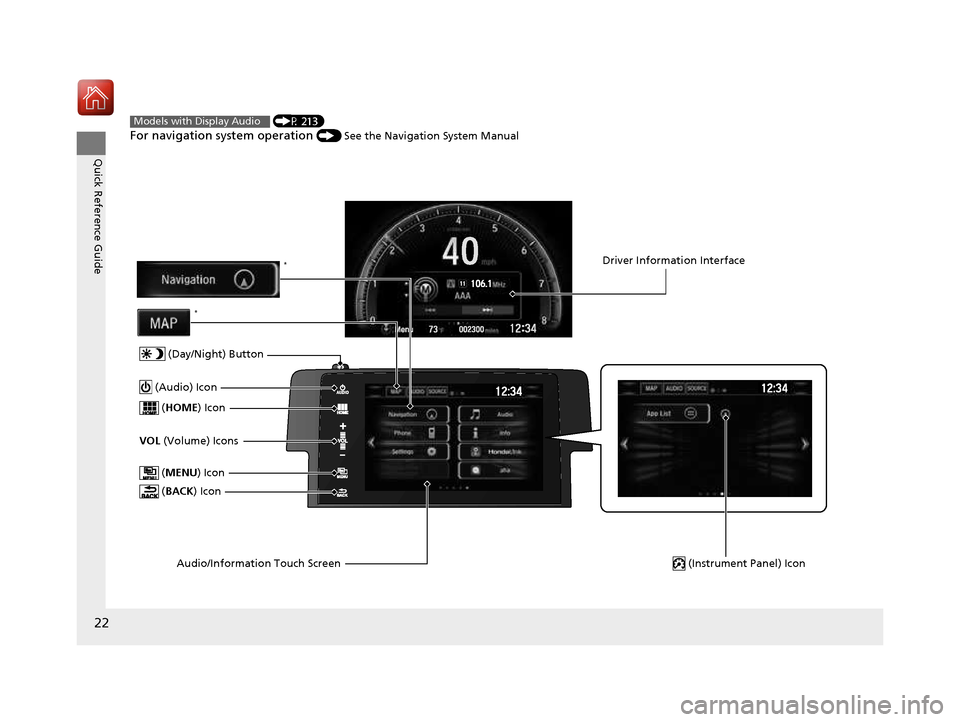
For navigation system operation () See the Navigation System ManualModels with Display Audio
(MENU ) Icon
VOL (Volume) Icons
(
HOME ) Icon
(BACK ) Icon
Audio/Information Touch Screen
(Audio) Icon
Driver Information Interface
(Instrument Panel) Icon
(Day/Night) Button
*
*
16 CIVIC 2D HC2 (0A 01 0C)-31TBG6000.book 22 ページ >0>.>/6年>0月>/>0日 金 曜日 午後4時>/6分
Page 24 of 585
23
Quick Reference Guide
Driving (P 379)
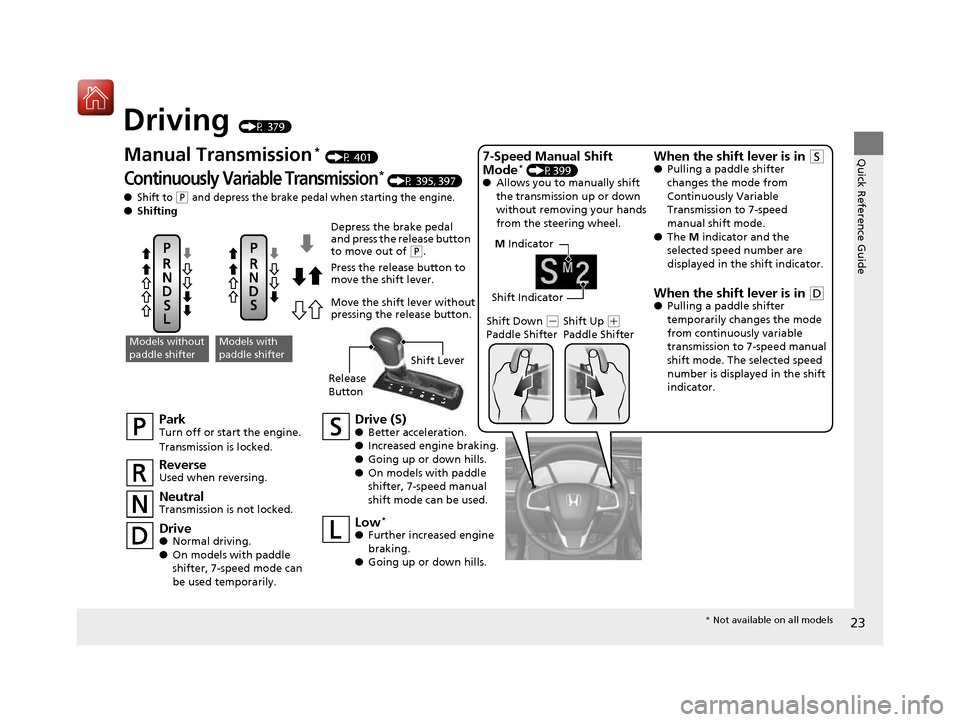
M Indicator
Shift Indicator
Park
Turn off or start the engine.
Transmission is locked. Neutral
Transmission is not locked. Drive (S)●
Better acceleration.
● Increased engine braking.
● Going up or down hills.
● On models with paddle
shifter, 7-speed manual
shift mode can be used.
Models without
paddle shifterModels with
paddle shifter
Depress the brake pedal
and press the release button
to move out of
(P.
Press the release button to
move the shift lever.
Move the shift lever without
pressing the release button.
Reverse
Used when reversing. Drive ● Normal driving.
● On models with paddle
shifter, 7-speed mode can
be used temporarily. Low
*
● Further increased engine
braking.
● Going up or down hills. Shift Down
(-
Paddle Shifter Shift Up (+
Paddle Shifter
7-Speed Manual Shift Mode
*
(P399)
● Allows you to manually shift
the transmission up or down
without removing your hands
from the steering wheel.
When the shift lever is in (S
● Pulling a paddle shifter
changes the mode from
Continuously Variable Transmission to 7-speed manual shift mode.
● The M indicator and the
selected speed number are
displayed in the shift indicator.
When the shift lever is in
(D
● Pulling a paddle shifter
temporarily changes the mode
from continuously variable
transmission to 7-speed manual
shift mode. The selected speed
number is displayed in the shift indicator.
Manual Transmission
*
(P 401)
Continuously Variable Transmission* (P 395, 397)
●Shift to (P and depress the brake pedal when starting the engine.
● Shifting
Release Button Shift Lever
*
Not available on all models
16 CIVIC 2D HC2 (0A 01 0C)-31TBG6000.book 23 ページ >0>.>/6年>0月>/>0日 金 曜日 午後4時>/6分
Page 36 of 585
35
uuFor Safe DrivinguSafety Checklist
Safe Driving
Safety Checklist
For the safety of you and your passengers, make a habit of checking these items
each time before you drive. •After everyone has entered the vehicle, be sure both doors are closed and locked.
Locking the doors helps prevent an occupant from being ejected and an outsider
from unexpectedly opening a door. 2 Locking/Unlocking the Doors from the Inside P. 126
• Adjust your seat to a position suitable for driving. Be sure the front seats are
adjusted as far to the rear as possible while allowing the driver to control the
vehicle. Sitting too close to a front airbag can result in serious or fatal injury in a
crash. 2 Adjusting the Seats P. 159
• Adjust head restraints to the proper position. Head restraints are most effective
when the center of the head restraint alig ns with the center of your head. Taller
persons should adjust their head restraint to the highest position.
2 Adjusting the Front Head Restraints P. 162
• Always wear your seat belt, and make sure you wear it properly. Confirm that any
passengers are properly belted as well. 2 Fastening a Seat Belt P. 40
• Protect children by using seat belts or chil d seats according to a child’s age, height
and weight. 2 Child Safety P. 58
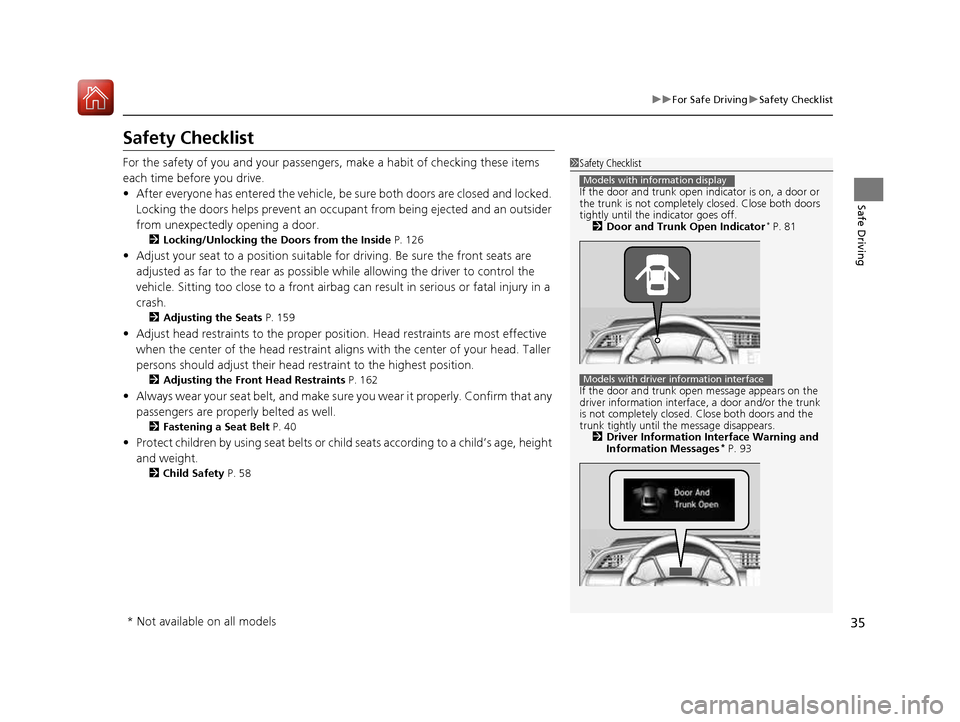
1Safety Checklist
If the door and trunk open indicator is on, a door or the trunk is not completely closed. Close both doors
tightly until the indicator goes off. 2 Door and Trunk Open Indicator *
P. 81
If the door and trunk ope n message appears on the
driver information interface , a door and/or the trunk
is not completely closed. Close both doors and the
trunk tightly until th e message disappears.
2 Driver Information Interface Warning and
Information Messages *
P. 93
Models with information display
Models with driver information interface
* Not available on all models
16 CIVIC 2D HC2 (0A 01 0C)-31TBG6000.book 35 ページ >0>.>/6年>0月>/>0日 金 曜日 午後4時>/6分
Page 39 of 585
uuSeat BeltsuAbout Your Seat Belts
38
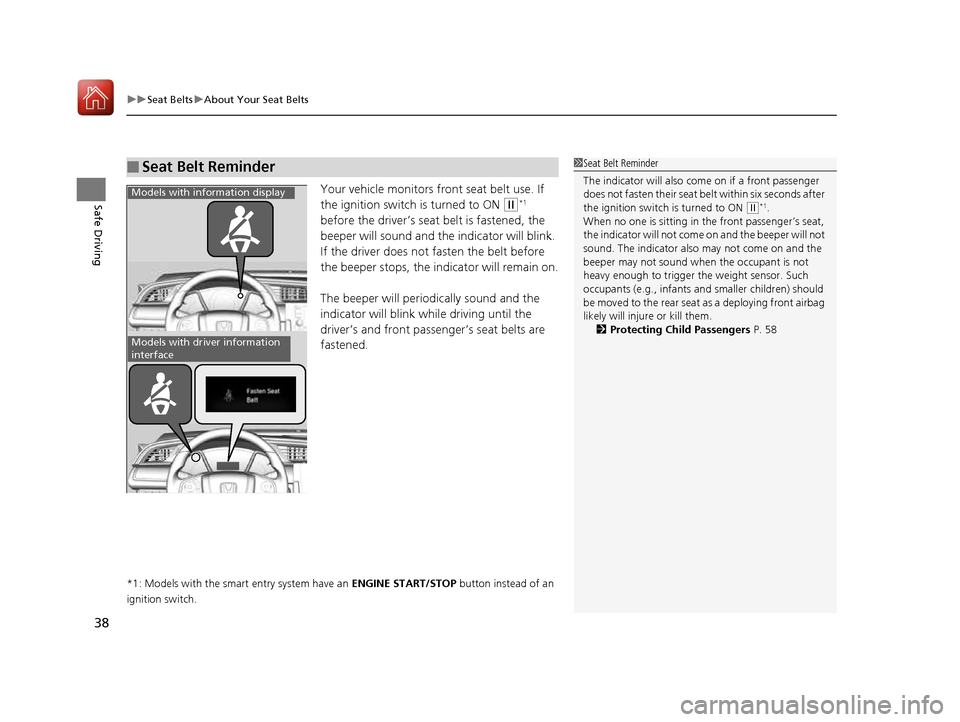
Safe DrivingYour vehicle monitors front seat belt use. If
the ignition switch is turned to ON
(w *1
before the driver’s seat belt is fastened, the
beeper will sound and the indicator will blink.
If the driver does not fasten the belt before
the beeper stops, the indicator will remain on.
The beeper will periodically sound and the
indicator will blink while driving until the
driver’s and front passenger’s seat belts are fastened.
*1: Models with the smart entry system have an ENGINE START/STOP button instead of an
ignition switch.
■Seat Belt Reminder1Seat Belt Reminder
The indicator will also co me on if a front passenger
does not fasten their seat belt within six seconds after
the ignition switch is turned to ON
(w *1
.
When no one is sitting in th e front passenger’s seat,
the indicator will not come on and the beeper will not
sound. The indicator also may not come on and the
beeper may not sound when the occupant is not
heavy enough to trigger th e weight sensor. Such
occupants (e.g., infants and smaller children) should
be moved to the rear seat as a deploying front airbag
likely will injure or kill them.
2 Protecting Child Passengers P. 58
Models with information display
Models with driver information
interface
16 CIVIC 2D HC2 (0A 01 0C)-31TBG6000.book 38 ページ >0>.>/6年>0月>/>0日 金 曜日 午後4時>/6分
Page 56 of 585
55
uuAirbagsuAirbag System Indicators
Continued
Safe Driving
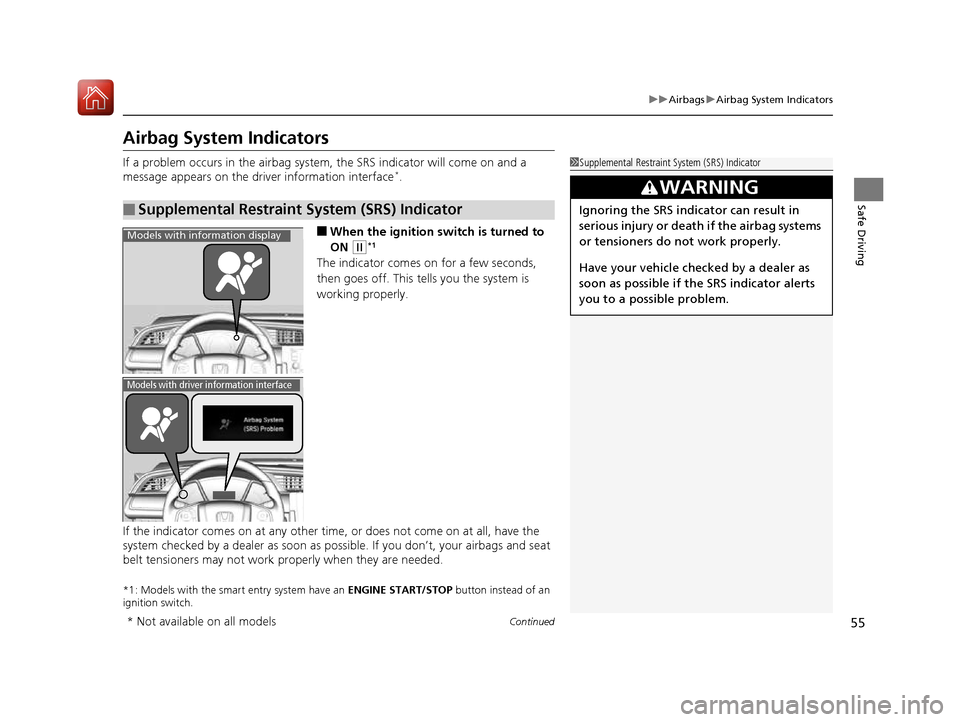
Airbag System Indicators
If a problem occurs in the airbag system, the SRS indicator will come on and a
message appears on the driver information interface *
.
■ When the ignition switch is turned to ON
(w *1
The indicator comes on for a few seconds,
then goes off. This tells you the system is
working properly.
If the indicator comes on at any other time , or does not come on at all, have the
system checked by a dealer as soon as po ssible. If you don’t, your airbags and seat
belt tensioners may not work properly when they are needed.
*1: Models with the smart entry system have an ENGINE START/STOP button instead of an
ignition switch.
■Supplemental Restraint System (SRS) Indicator
1Supplemental Restraint Sy stem (SRS) Indicator
3WARNING
Ignoring the SRS indicator can result in
serious injury or death if the airbag systems
or tensioners do not work properly.
Have your vehicle checked by a dealer as
soon as possible if th e SRS indicator alerts
you to a possible problem.
Models with info rmation display
Models with driver information interface
* Not available on all models
16 CIVIC 2D HC2 (0A 01 0C)-31TBG6000.book 55 ページ >0>.>/6年>0月>/>0日 金 曜日 午後4時>/6分
Page 74 of 585
73
Instrument Panel
This chapter describes the buttons, indicators, and gauges that are used while driving.
Indicators ............................................ 74
Information Display Warning and Information Messages *
.................... 91
Driver Information Interface Warning and Information Messages *
.................... 93
Gauges and Displays
Gauges ............................................ 105 Information Display *
........................ 106
Driver Information Interface *
........... 109
* Not available on all models
16 CIVIC 2D HC2 (0A 01 0C)-31TBG6000.book 73 ページ >0>.>/6年>0月>/>0日 金 曜日 午後4時>/6分
Page 84 of 585
83
uuIndicatorsu
Continued
Instrument Panel
*1:Models with the smart entry system have an ENGINE START/STOP button instead of an ignition switch.
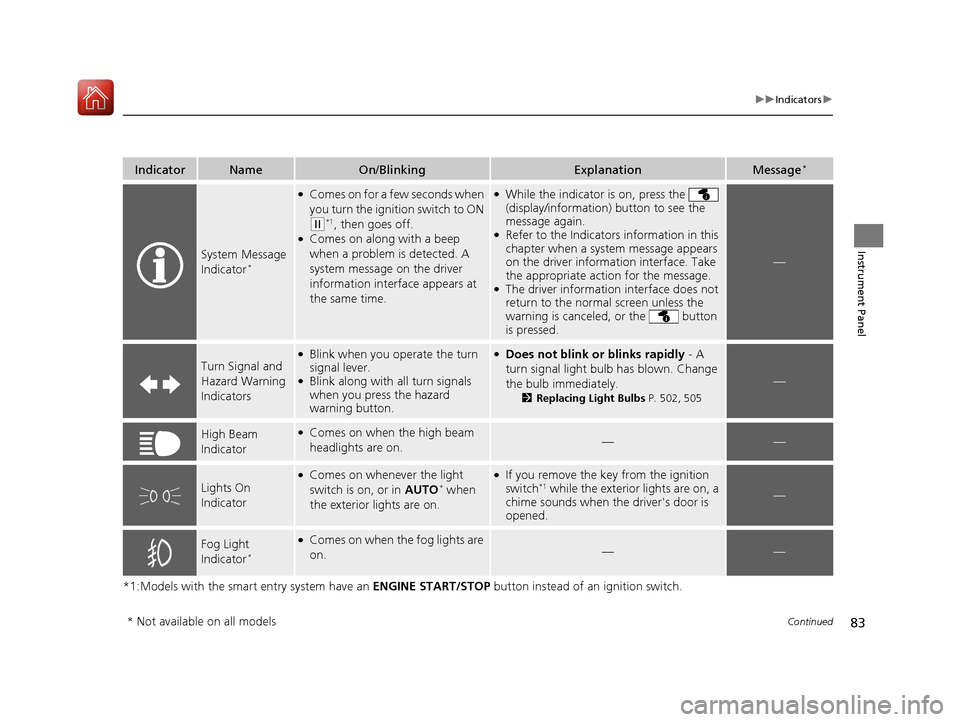
IndicatorNameOn/BlinkingExplanationMessage*
System Message
Indicator*
●
Comes on for a few seconds when
you turn the ignition switch to ON
(w *1
, then goes off.
● Comes on along with a beep
when a problem is detected. A
system message on the driver
information interface appears at
the same time.
●While the indicator is on, press the
(display/information) button to see the
message again.
● Refer to the Indicators information in this
chapter when a system message appears
on the driver information interface. Take
the appropriate action for the message.
● The driver information interface does not
return to the normal screen unless the
warning is canceled, or the button
is pressed.
—
Turn Signal and
Hazard Warning Indicators
●Blink when you operate the turn
signal lever.
● Blink along with all turn signals
when you press the hazard
warning button.●
Does not blink or blinks rapidly - A
turn signal light bulb has blown. Change
the bulb immediately. 2Replacing Light Bulbs P. 502, 505
—
High Beam
Indicator●
Comes on when the high beam
headlights are on.——
Lights On
Indicator
●Comes on whenever the light
switch is on, or in AUTO*
when
the exterior lights are on.● If you remove the key from the ignition
switch *1
while the exterior lights are on, a
chime sounds when the driver's door is
opened.
—
Fog Light
Indicator *●
Comes on when the fog lights are on.
——
* Not available on all models
16 CIVIC 2D HC2 (0A 01 0C)-31TBG6000.book 83 ページ >0>.>/6年>0月>/>0日 金 曜日 午後4時>/6分
Page 92 of 585
91
uuIndicatorsuInformation Display Warning and Information Messages*
Continued
Instrument Panel
Information Display Warning
and Information Messages*
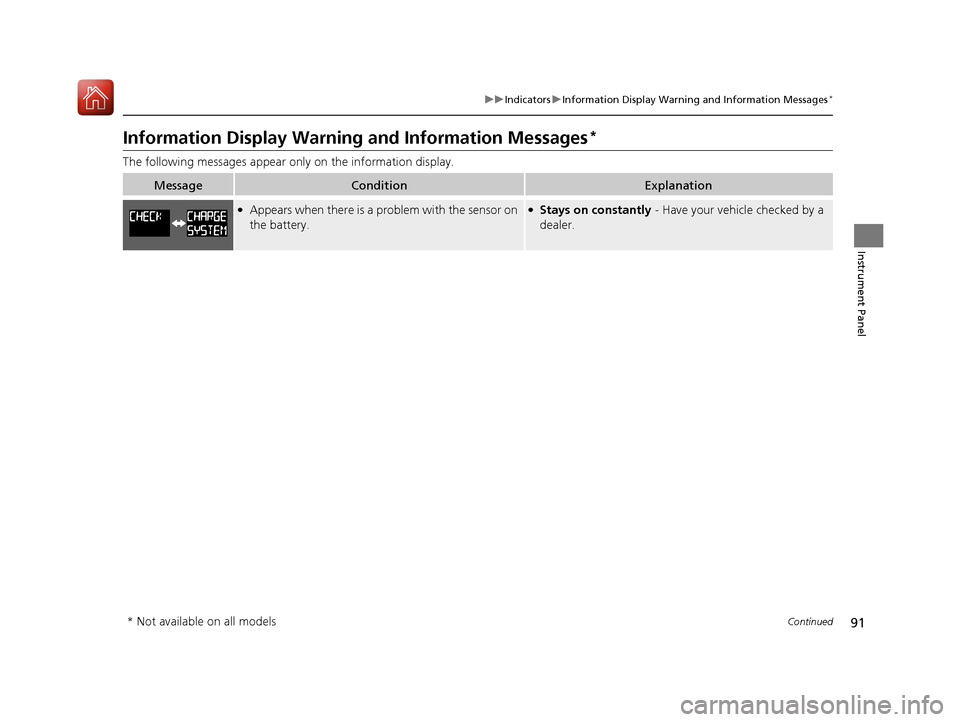
The following messages appear only on the information display.
MessageConditionExplanation
●
Appears when there is a pr oblem with the sensor on
the battery.● Stays on constantly - Have your vehicle checked by a
dealer.
* Not available on all models
16 CIVIC 2D HC2 (0A 01 0C)-31TBG6000.book 91 ページ >0>.>/6年>0月>/>0日 金 曜日 午後4時>/6分
Page 93 of 585
92
uuIndicatorsuInformation Display Warning and Information Messages *
Instrument Panel
MessageConditionExplanation
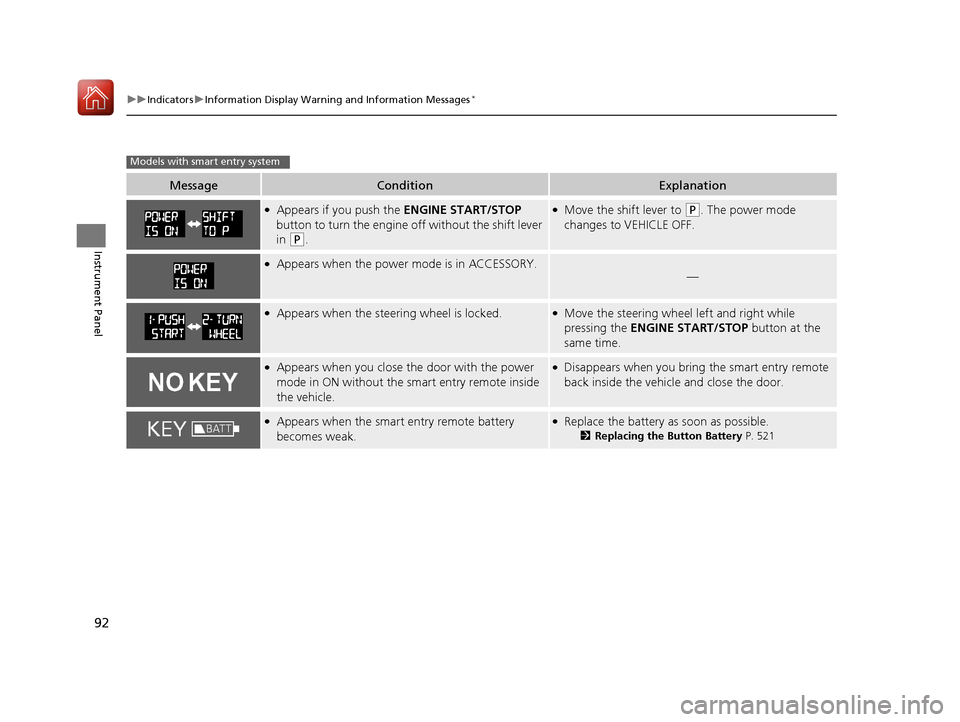
●
Appears if you push the ENGINE START/STOP
button to turn the engine off without the shift lever
in
(P .
●
Move the shift lever to (P . The power mode
changes to VEHICLE OFF.
● Appears when the power mode is in ACCESSORY.
—
●Appears when the steering wheel is locked.●Move the steering wheel left and right while
pressing the ENGINE START/STOP button at the
same time.
● Appears when you close the door with the power
mode in ON without the smart entry remote inside
the vehicle.●Disappears when you bring the smart entry remote
back inside the vehicle and close the door.
●
Appears when the smart entry remote battery
becomes weak.●Replace the battery as soon as possible.
2Replacing the Button Battery P. 521
Models with smart entry system
16 CIVIC 2D HC2 (0A 01 0C)-31TBG6000.book 92 ページ >0>.>/6年>0月>/>0日 金 曜日 午後4時>/6分
Page 106 of 585
105
Instrument Panel
Gauges and Displays
Gauges
Gauges include the speedometer, tachometer, fuel gauge, and related indicators.
They are displayed when the ignition switch is in ON
(w*1
.
Displays your driving speed in mph or km/h.
Shows the number of engine revolutions per minute.
Displays the amount of fuel left in the fuel tank.
Displays the temperature of the engine coolant.
*1: Models with the smart entry system have an ENGINE START/STOP button instead of an
ignition switch.
■Speedometer
■Tachometer
■Fuel Gauge
■Temperature Gauge
1Gauges
Press and hold the km/mil e change knob until you
hear a beep. The speedometer reading and the
displayed measurements switch between mph and
km/h.
Press the (display /information) button
repeatedly until the ic on is shown on the driver
information interface. Press ENTER, then press and
hold it again. The spee dometer reading and the
displayed measurements wi ll switch between mph
and km/h.
Models with information display
Models with driver information interface
1Fuel Gauge
NOTICE
You should refuel when the reading approaches . Running out of fuel can cause the engine to misfire,
damaging the cata lytic converter.
The actual amount of remain ing fuel may differ from
the fuel gauge reading.E
1Temperature Gauge
NOTICE
Driving with the temperat ure gauge pointer in the
upper zone can cause serious engine damage. Pull
safely to the side of th e road and allow engine
temperature to return to normal. 2 Overheating P. 544
16 CIVIC 2D HC2 (0A 01 0C)-31TBG6000.book 105 ページ >0>.>/6年>0月>/>0日 金曜日 午後4時>/6分