light HONDA CIVIC COUPE 2016 10.G User Guide
[x] Cancel search | Manufacturer: HONDA, Model Year: 2016, Model line: CIVIC COUPE, Model: HONDA CIVIC COUPE 2016 10.GPages: 585, PDF Size: 17.41 MB
Page 55 of 585
54
uuAirbagsuSide Curtain Airbags
Safe Driving
■When side curtain airbags deploy in a frontal collision
One or both side curtain airbags may also inflate in a moderate-to-severe angled
frontal collision.
In this case, the side curtain airbags will deploy slightly after the front airbags.
16 CIVIC 2D HC2 (0A 01 0C)-31TBG6000.book 54 ページ >0>.>/6年>0月>/>0日 金 曜日 午後4時>/6分
Page 57 of 585
uuAirbagsuAirbag System Indicators
56
Safe Driving■ When the passen ger airbag off
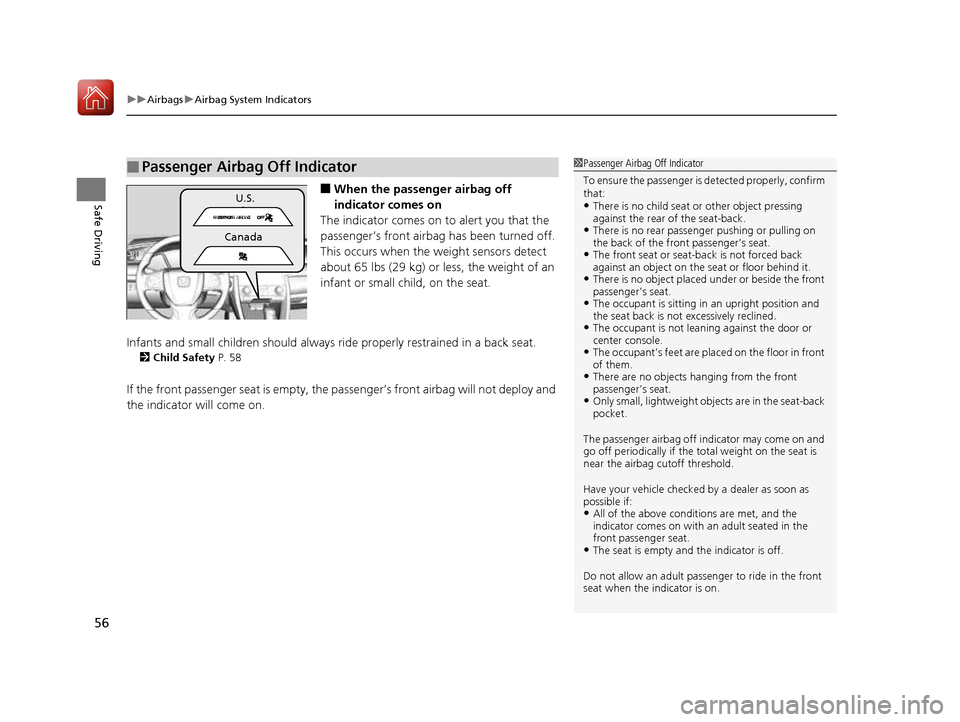
indicator comes on
The indicator comes on to alert you that the
passenger’s front airbag has been turned off.
This occurs when the weight sensors detect
about 65 lbs (29 kg) or less, the weight of an
infant or small child, on the seat.
Infants and small children should always ri de properly restrained in a back seat.
2 Child Safety P. 58
If the front passenger seat is empty, the passenger’s front airbag will not deploy and
the indicator will come on.
■Passenger Airbag Off Indicator1Passenger Airbag Off Indicator
To ensure the passenger is detected properly, confirm
that: • There is no child seat or other object pressing
against the rear of the seat-back.
• There is no rear passenger pushing or pulling on the back of the front passenger’s seat.
• The front seat or seat-b ack is not forced back
against an object on the s eat or floor behind it.
• There is no object placed under or beside the front
passenger’s seat.
• The occupant is sitting in an upright position and
the seat back is not excessively reclined.
• The occupant is not leaning against the door or
center console.
• The occupant’s feet are plac ed on the floor in front
of them.
• There are no objects ha nging from the front
passenger’s seat.
• Only small, lightweight objects are in the seat-back pocket.
The passenger airbag off indicator may come on and
go off periodically if the tota l weight on the seat is
near the airbag cutoff threshold.
Have your vehicle checked by a dealer as soon as possible if:
• All of the above conditions are met, and the
indicator comes on with an adult seated in the
front passenger seat.
• The seat is empty and the indicator is off.
Do not allow an adult passe nger to ride in the front
seat when the indicator is on.
U.S.
Canada
16 CIVIC 2D HC2 (0A 01 0C)-31TBG6000.book 56 ページ >0>.>/6年>0月>/>0日 金 曜日 午後4時>/6分
Page 84 of 585
83
uuIndicatorsu
Continued
Instrument Panel
*1:Models with the smart entry system have an ENGINE START/STOP button instead of an ignition switch.
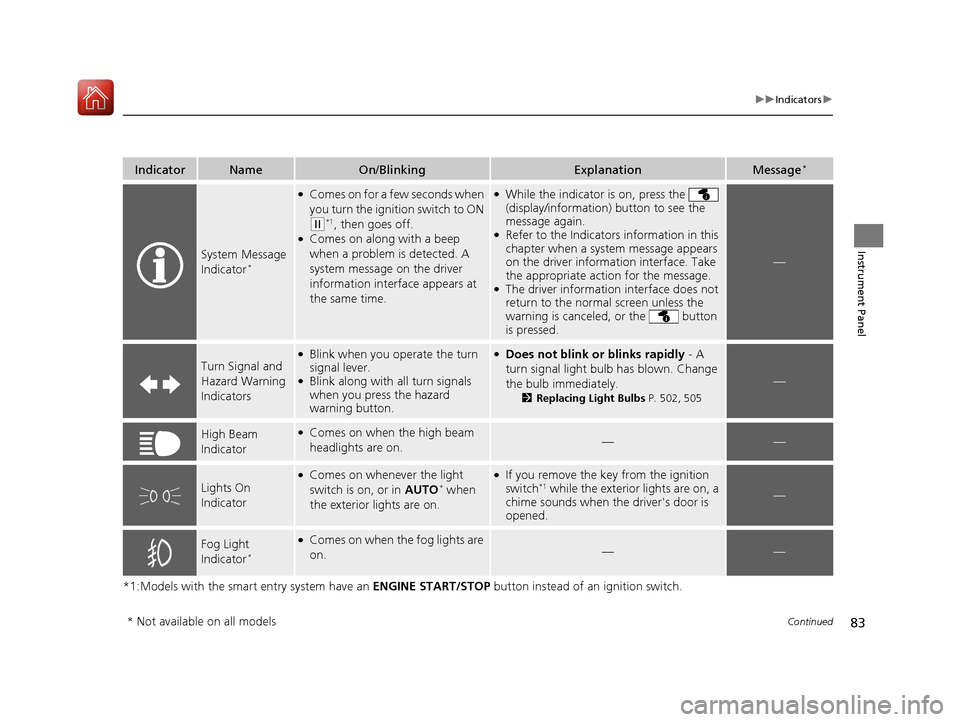
IndicatorNameOn/BlinkingExplanationMessage*
System Message
Indicator*
●
Comes on for a few seconds when
you turn the ignition switch to ON
(w *1
, then goes off.
● Comes on along with a beep
when a problem is detected. A
system message on the driver
information interface appears at
the same time.
●While the indicator is on, press the
(display/information) button to see the
message again.
● Refer to the Indicators information in this
chapter when a system message appears
on the driver information interface. Take
the appropriate action for the message.
● The driver information interface does not
return to the normal screen unless the
warning is canceled, or the button
is pressed.
—
Turn Signal and
Hazard Warning Indicators
●Blink when you operate the turn
signal lever.
● Blink along with all turn signals
when you press the hazard
warning button.●
Does not blink or blinks rapidly - A
turn signal light bulb has blown. Change
the bulb immediately. 2Replacing Light Bulbs P. 502, 505
—
High Beam
Indicator●
Comes on when the high beam
headlights are on.——
Lights On
Indicator
●Comes on whenever the light
switch is on, or in AUTO*
when
the exterior lights are on.● If you remove the key from the ignition
switch *1
while the exterior lights are on, a
chime sounds when the driver's door is
opened.
—
Fog Light
Indicator *●
Comes on when the fog lights are on.
——
* Not available on all models
16 CIVIC 2D HC2 (0A 01 0C)-31TBG6000.book 83 ページ >0>.>/6年>0月>/>0日 金 曜日 午後4時>/6分
Page 100 of 585
99
uuIndicatorsuDriver Information Interface Warning and Information Messages*
Continued
Instrument Panel
MessageConditionExplanation
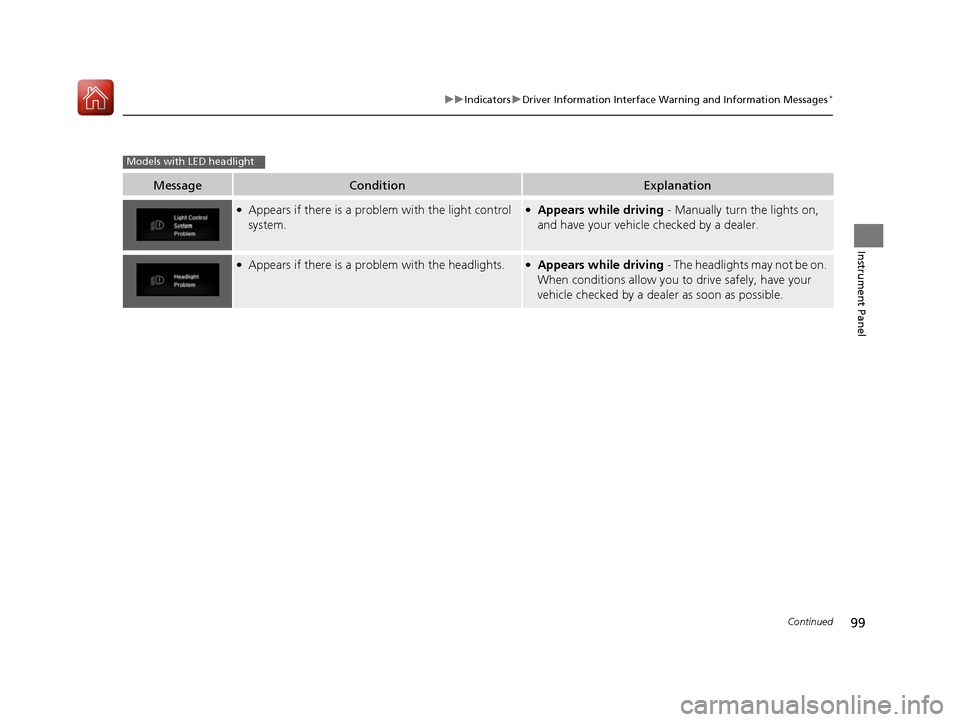
●
Appears if there is a problem with the light control
system.● Appears while driving - Manually turn the lights on,
and have your vehicle checked by a dealer.
●
Appears if there is a pr oblem with the headlights.●
Appears while driving - The headlights may not be on.
When conditions allow you to drive safely, have your
vehicle checked by a deal er as soon as possible.
Models with LED headlight
16 CIVIC 2D HC2 (0A 01 0C)-31TBG6000.book 99 ページ >0>.>/6年>0月>/>0日 金 曜日 午後4時>/6分
Page 114 of 585
113
Controls
This chapter explains how to operate th e various controls necessary for driving.
Clock.................................................. 114
Locking and Unlocking the Doors Key Types and Functions .................. 116
Low Smart Entry Remote Signal Strength*... 118Locking/Unlocking the Doors from the Outside .......................................... 119
Locking/Unlocking the Doors from the Inside ............................................. 126
Auto Door Locking/Unlocking .......... 129
Opening and Closing the Trunk ....... 133
Security System Immobilizer System .......................... 136
Security System Alarm ...................... 136
Opening and Closing the Windows ..... 139
Opening and Closing the Moonroof*..... 142
Operating the Switches Around the
Steering Wheel
Ignition Switch *
............................... 143
ENGINE START/STOP Button *
........... 144
Ignition Switch and Power Mode
Comparison ................................... 147
Turn Signals ..................................... 148
Light Switches.................................. 148 Fog Lights *
...................................... 151
Daytime Running Lights ................... 151
Wipers and Washers ........................ 152
Brightness Control ........................... 154Rear Defogger/Heat ed Door Mirror*
Button ........................................... 155
Adjusting the Steering Wheel........... 156 Adjusting the Mirrors
Interior Rearview Mirror ................... 157
Power Door Mirrors ......................... 158
Adjusting the Seats .......................... 159
Interior Lights/Interior Convenience
Items ................................................ 168
Climate Control System Using Automatic Climate Control .... 179
Synchronized Mode *
....................... 184
Automatic Climate Control Sensors......185
* Not available on all models
16 CIVIC 2D HC2 (0A 01 0C)-31TBG6000.book 113 ページ >0>.>/6年>0月>/>0日 金曜日 午後4時>/6分
Page 117 of 585
116
Controls
Locking and Unlocking the Doors
Key Types and Functions
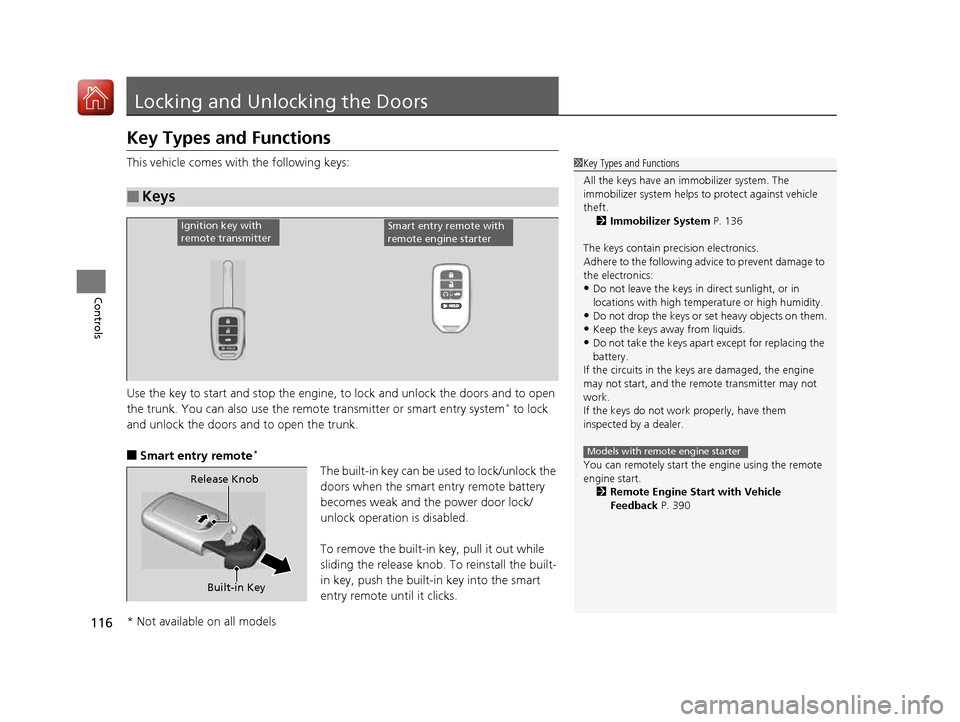
This vehicle comes with the following keys:
Use the key to start and stop the engine, to lock and unlock the doors and to open
the trunk. You can also use the remote transmitter or smart entry system*
to lock
and unlock the doors and to open the trunk.
■ Smart entry remote *
The built-in key can be us ed to lock/unlock the
doors when the smart entry remote battery becomes weak and th e power door lock/
unlock operation is disabled.
To remove the built-in key, pull it out while
sliding the release knob. To reinstall the built-
in key, push the built-in key into the smart
entry remote until it clicks.
■Keys
1Key Types and Functions
All the keys have an immobilizer system. The
immobilizer system helps to protect against vehicle
theft.
2 Immobilizer System P. 136
The keys contain precision electronics.
Adhere to the following advi ce to prevent damage to
the electronics:
• Do not leave the keys in direct sunlight, or in
locations with high temperature or high humidity.
• Do not drop the keys or set heavy objects on them.
• Keep the keys away from liquids.
• Do not take the keys apart except for replacing the
battery.
If the circuits in the keys are damaged, the engine
may not start, and the remote transmitter may not
work.
If the keys do not work properly, have them
inspected by a dealer.
You can remotely start the engine using the remote
engine start.
2 Remote Engine Start with Vehicle
Feedback P. 390
Models with remote engine starter
Ignition key with
remote transmitterSmart entry remote with
remote engine starter
Built-in Key
Release Knob
* Not available on all models
16 CIVIC 2D HC2 (0A 01 0C)-31TBG6000.book 116 ページ >0>.>/6年>0月>/>0日
金曜日 午後4時>/6分
Page 120 of 585
119
uuLocking and Unlocking the DoorsuLocking/Unlocking the Doors from the Outside
Continued
Controls
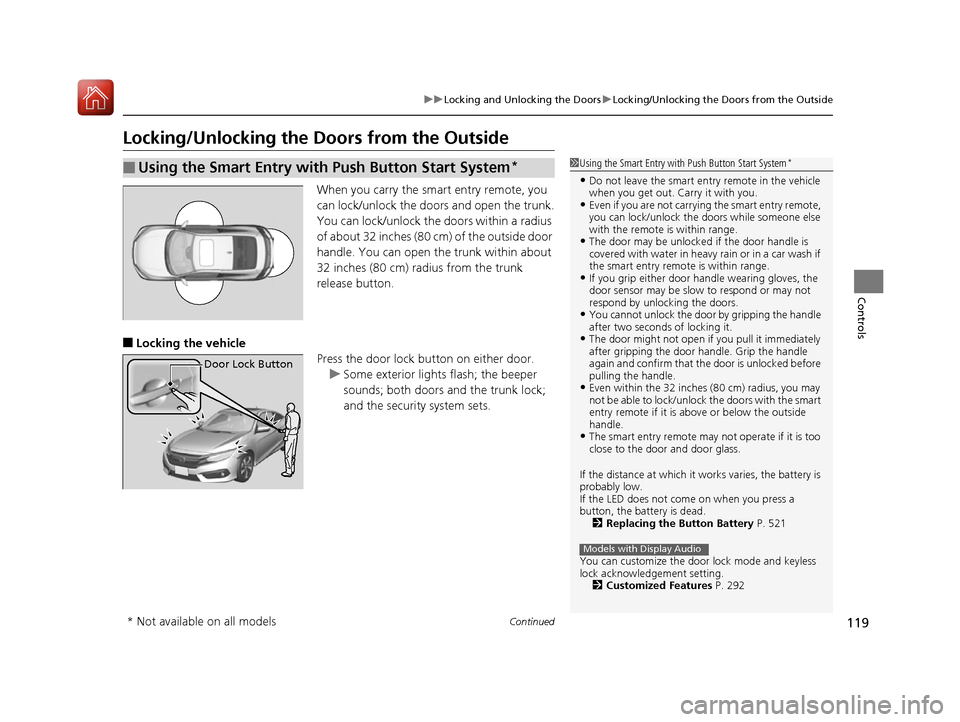
Locking/Unlocking the Doors from the OutsideWhen you carry the smart entry remote, you
can lock/unlock the doors and open the trunk.
You can lock/unlock the doors within a radius
of about 32 inches (80 cm) of the outside door
handle. You can open the trunk within about
32 inches (80 cm) radius from the trunk
release button.
■ Locking the vehicle
Press the door lock button on either door.
uSome exterior lights flash; the beeper
sounds; both doors and the trunk lock;
and the security system sets.
■Using the Smart Entry with Push Button Start System *1Using the Smart Entry with Push Button Start System
*
• Do not leave the smart entry remote in the vehicle
when you get out. Carry it with you.
• Even if you are not carrying the smart entry remote,
you can lock/unlock the doors while someone else
with the remote is within range.
• The door may be unlocked if the door handle is
covered with water in heavy rain or in a car wash if
the smart entry remote is within range.
• If you grip either door handle wearing gloves, the
door sensor may be slow to respond or may not
respond by unlocking the doors.
• You cannot unlock the door by gripping the handle
after two seconds of locking it.
• The door might not open if you pull it immediately
after gripping the door handle. Grip the handle
again and confirm that th e door is unlocked before
pulling the handle.
• Even within the 32 inches (80 cm) radius, you may
not be able to lock/unlock the doors with the smart
entry remote if it is a bove or below the outside
handle.
• The smart entry remote may not operate if it is too
close to the door and door glass.
If the distance at which it works varies, the battery is
probably low.
If the LED does not come on when you press a
button, the battery is dead. 2 Replacing the Button Battery P. 521
You can customize the door lock mode and keyless
lock acknowledge ment setting.
2 Customized Features P. 292
Models with Display Audio
Door Lock Button
* Not available on all models
16 CIVIC 2D HC2 (0A 01 0C)-31TBG6000.book 119 ページ >0>.>/6年>0月>/>0日 金曜日 午後4時>/6分
Page 121 of 585
uuLocking and Unlocking the DoorsuLocking/Unlocking the Doors from the Outside
120
Controls
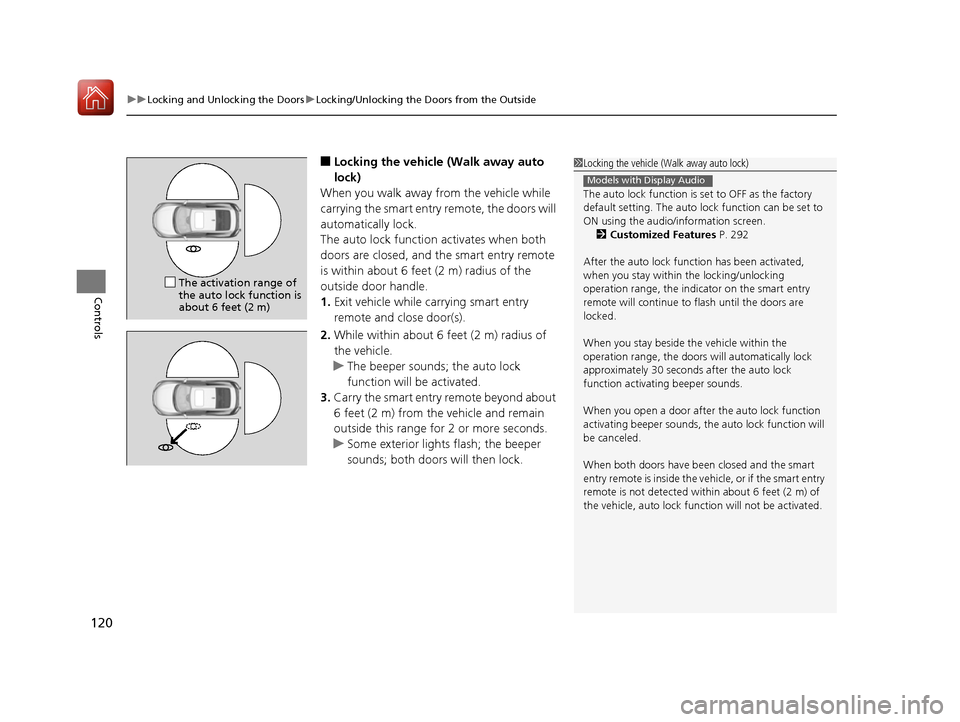
■ Locking the vehicle (Walk away auto
lock)
When you walk away from the vehicle while
carrying the smart entry remote, the doors will
automatically lock.
The auto lock function activates when both
doors are closed, and the smart entry remote
is within about 6 feet (2 m) radius of the
outside door handle. 1. Exit vehicle while carrying smart entry
remote and close door(s).
2. While within about 6 feet (2 m) radius of
the vehicle.
uThe beeper sounds; the auto lock
function will be activated.
3. Carry the smart entry remote beyond about
6 feet (2 m) from the vehicle and remain
outside this range fo r 2 or more seconds.
uSome exterior lights flash; the beeper
sounds; both doors will then lock.
1Locking the vehicle (Walk away auto lock)
The auto lock function is set to OFF as the factory
default setting. The auto lo ck function can be set to
ON using the audio/information screen. 2 Customized Features P. 292
After the auto lock function has been activated,
when you stay within the locking/unlocking
operation range, the indicator on the smart entry
remote will continue to flash until the doors are
locked.
When you stay beside the vehicle within the
operation range, the doors wi ll automatically lock
approximately 30 seconds after the auto lock
function activating beeper sounds.
When you open a door after the auto lock function
activating beeper sounds, the auto lock function will
be canceled.
When both doors have been closed and the smart
entry remote is inside the vehicle, or if the smart entry
remote is not detected with in about 6 feet (2 m) of
the vehicle, auto lock func tion will not be activated.
Models with Display Audio
The activation range of the auto lock function is
about 6 feet (2 m)
16 CIVIC 2D HC2 (0A 01 0C)-31TBG6000.book 120 ページ >0>.>/6年>0月>/>0日 金曜日 午後4時>/6分
Page 123 of 585
uuLocking and Unlocking the DoorsuLocking/Unlocking the Doors from the Outside
122
Controls
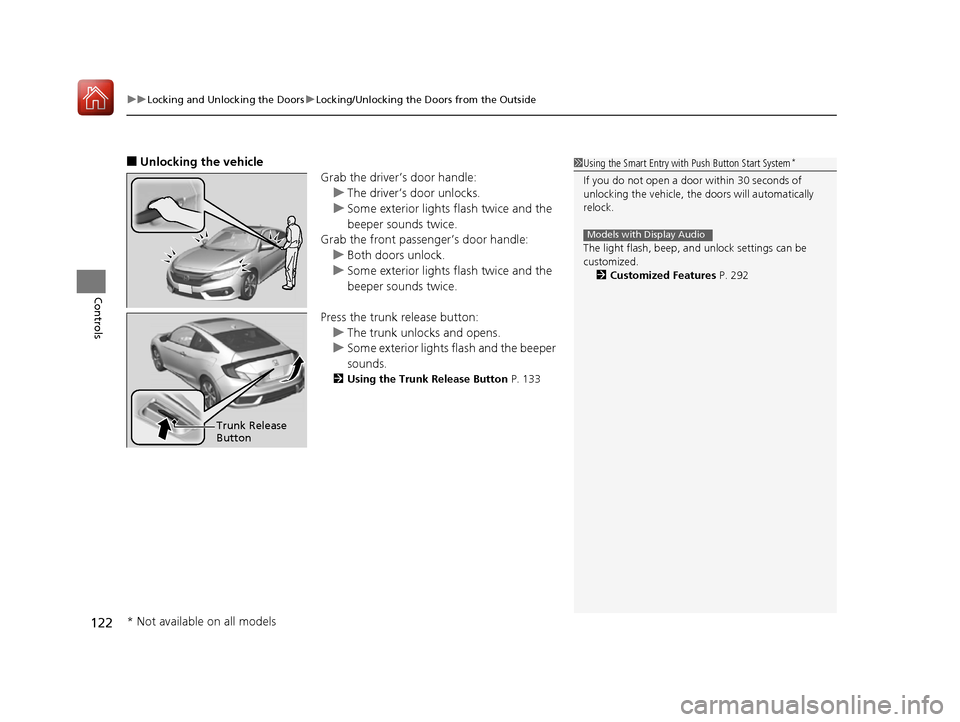
■ Unlocking the vehicle
Grab the driver’s door handle:
uThe driver’s door unlocks.
uSome exterior lights flash twice and the
beeper sounds twice.
Grab the front passenger’s door handle:
uBoth doors unlock.
uSome exterior lights flash twice and the
beeper sounds twice.
Press the trunk release button:
uThe trunk unlocks and opens.
uSome exterior lights flash and the beeper
sounds.
2 Using the Trunk Release Button P. 133
1Using the Smart Entry with Push Button Start System *
If you do not open a door within 30 seconds of
unlocking the vehicle, th e doors will automatically
relock.
The light flash, beep, a nd unlock settings can be
customized. 2 Customized Features P. 292
Models with Display Audio
Trunk Release Button
* Not available on all models
16 CIVIC 2D HC2 (0A 01 0C)-31TBG6000.book 122 ページ >0>.>/6年>0月>/>0日 金曜日 午後4時>/6分
Page 124 of 585

Continued123
uuLocking and Unlocking the DoorsuLocking/Unlocking the Doors from the Outside
Controls
■Locking the doors
Press the lock button.
Once:
uSome exterior lights flash, both doors
lock, and the security system sets.
Twice (within five se conds after the first
push):
uThe beeper sounds and verifies the
security system is set.
■Using the Remote Transmitter1Using the Remote Transmitter
If you do not open a door within 30 seconds of
unlocking the vehicle with the remote transmitter,
the doors will auto matically relock.
You can change the relock timer setting. 2 Customized Features P. 292
If the interior light switch is in the door activated
position, the interior light s come on when you press
the unlock button.
No doors opened: The li ghts fade out after 30
seconds.
Doors relocked with the remote: The lights go off
immediately. 2 Interior Lights P. 168
The remote transmitter us es low-power signals, so
the operating range may vary depending on the
surroundings.
The remote transmitter will not work when the key is
in the ignition switch.
You can lock or unlock doors using the remote
transmitter or smart entry system only when the
power mode is in VEHICLE OFF.
The remote will not lock th e vehicle when a door is
open.
Models with Display Audio
Models without smart entry system
Models with smart entry system
All models
LED
Unlock Button
Lock Button
16 CIVIC 2D HC2 (0A 01 0C)-31TBG6000.book 123 ページ >0>.>/6年>0月>/>0日
金曜日 午後4時>/6分