engine HONDA CIVIC COUPE 2016 10.G Manual Online
[x] Cancel search | Manufacturer: HONDA, Model Year: 2016, Model line: CIVIC COUPE, Model: HONDA CIVIC COUPE 2016 10.GPages: 585, PDF Size: 17.41 MB
Page 300 of 585
Continued299
uuCustomized Featuresu
Features
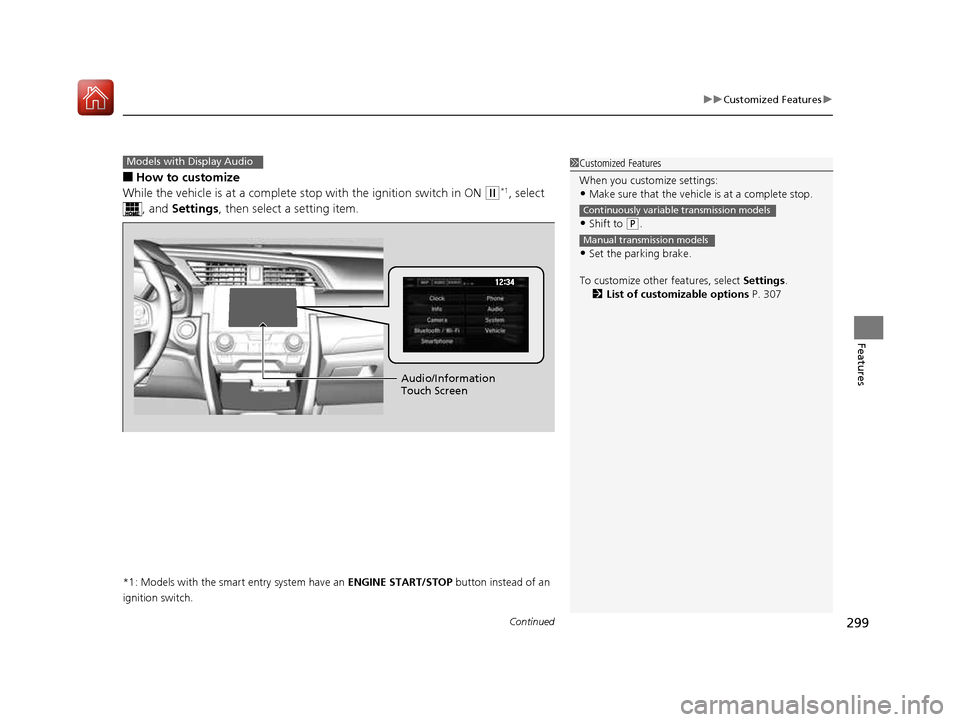
■How to customize
While the vehicle is at a complete st op with the ignition switch in ON
(w*1
, select
, and Settings , then select a setting item.
*1: Models with the smart entry system have an ENGINE START/STOP button instead of an
ignition switch.
Models with Display Audio1Customized Features
When you customize settings: • Make sure that the vehicle is at a complete stop.
• Shift to
(P .
• Set the parking brake.
To customize other features, select Settings.
2 List of customizable options P. 307
Continuously variable transmission models
Manual transmission models
Audio/Information
Touch Screen
16 CIVIC 2D HC2 (0A 01 0C)-31TBG6000.book 299 ページ >0>.>/6年>0月>/>0日 金曜日 午後4時>/6分
Page 318 of 585
317
uuCustomized Featuresu
Continued
Features
*1:Default Setting
*2:Models with the smart entry system have an ENGINE START/STOP button instead of an ignition switch.
*3:Does not appear when you chan ge the screen interface design.
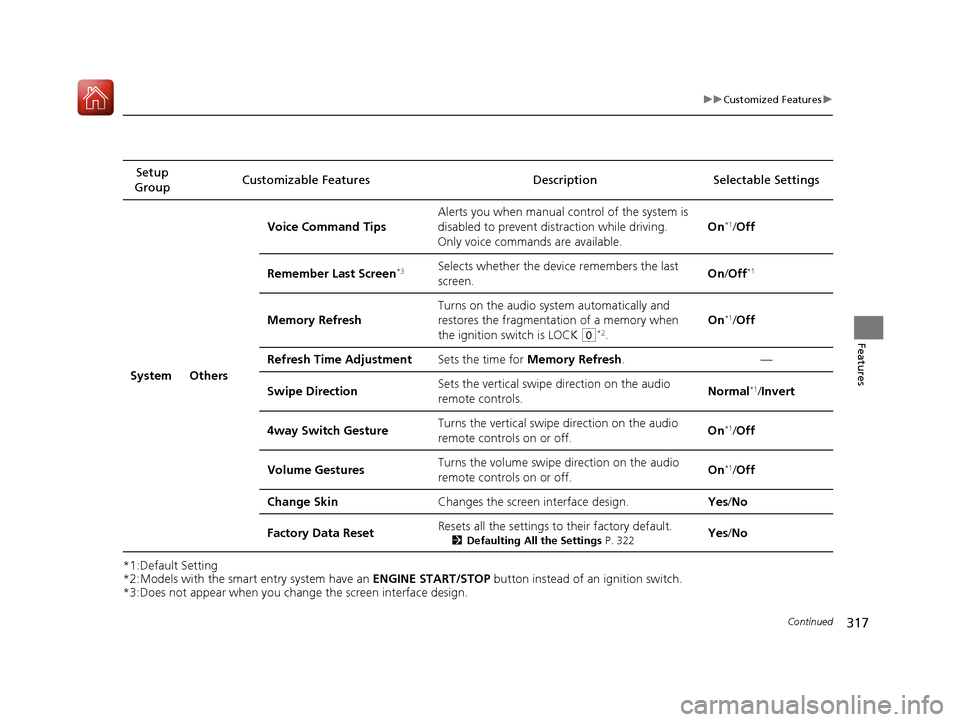
Setup
Group Customizable Features Description Selectable Settings
System Others Voice Command Tips
Alerts you when manual c
ontrol of the system is
disabled to prevent distraction while driving.
Only voice comman ds are available. On
*1
/Off
Remember Last Screen *3Selects whether the device remembers the last
screen. On
/Off *1
Memory Refresh Turns on the audio system automatically and
restores the fragmentation of a memory when
the ignition switch is LOCK
(0
*2
. On
*1
/Off
Refresh Time Adjustment Sets the time for Memory Refresh . —
Swipe Direction Sets the vertical swipe
direction on the audio
remote controls. Normal
*1
/Invert
4way Switch Gesture Turns the vertical swipe direction on the audio
remote controls on or off. On
*1
/Off
Volume Gestures Turns the volume swipe
direction on the audio
remote controls on or off. On
*1
/Off
Change Skin Changes the screen interface design. Yes/No
Factory Data Reset Resets all the settings to their factory default.
2Defaulting All the Settings P. 322Yes
/No
16 CIVIC 2D HC2 (0A 01 0C)-31TBG6000.book 317 ページ >0>.>/6年>0月>/>0日 金曜日 午後4時>/6分
Page 321 of 585
320
uuCustomized Featuresu
Features
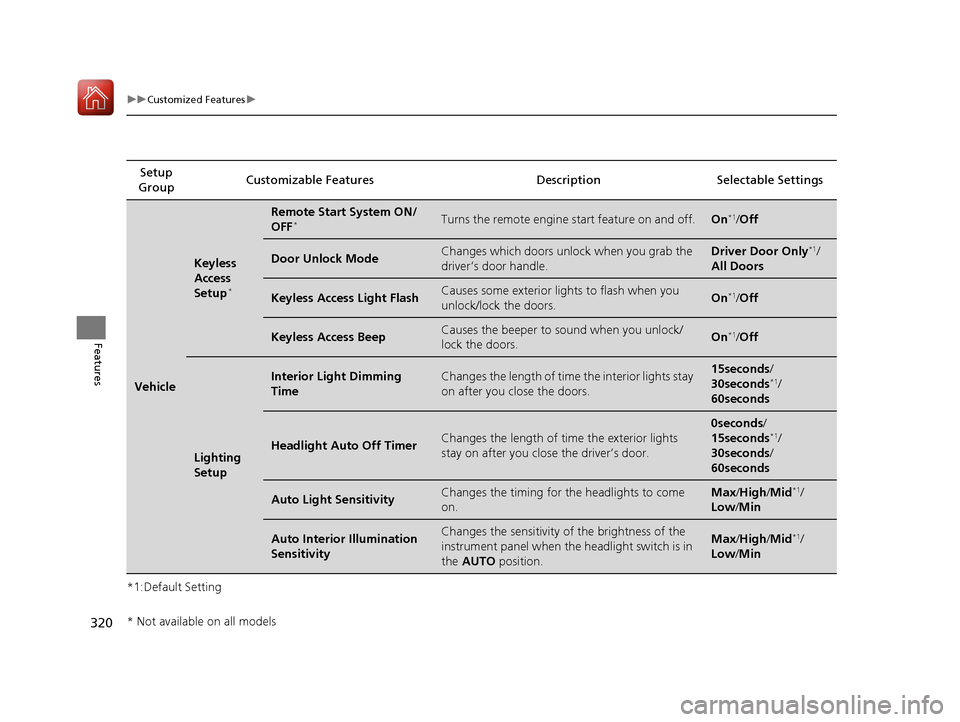
*1:Default SettingSetup
Group Customizable Features Desc
ription Selectable Settings
Vehicle
Keyless
Access
Setup*
Remote Start System ON/ OFF
*Turns the remote engine start feature on and off.On*1
/Off
Door Unlock ModeChanges which doors unlock when you grab the
driver’s door handle.Driver Door Only *1
/
All Doors
Keyless Access Light FlashCauses some exterior lights to flash when you
unlock/lock the doors.On *1
/Off
Keyless Access BeepCauses the beeper to sound when you unlock/
lock the doors.On *1
/Off
Lighting
Setup
Interior Light Dimming TimeChanges the length of time the interior lights stay
on after you close the doors.15seconds /
30seconds *1
/
60seconds
Headlight Auto Off TimerChanges the length of ti me the exterior lights
stay on after you close the driver’s door.
0seconds /
15seconds *1
/
30seconds /
60seconds
Auto Light SensitivityChanges the timing for the headlights to come
on.Max /High /Mid *1
/
Low /Min
Auto Interior Illumination SensitivityChanges the sensitivity of the brightness of the
instrument panel when the headlight switch is in
the AUTO position.Max/High /Mid *1
/
Low /Min
* Not available on all models
16 CIVIC 2D HC2 (0A 01 0C)-31TBG6000.book 320 ページ >0>.>/6年>0月>/>0日 金曜日 午後4時>/6分
Page 322 of 585
321
uuCustomized Featuresu
Features
*1:Default Setting
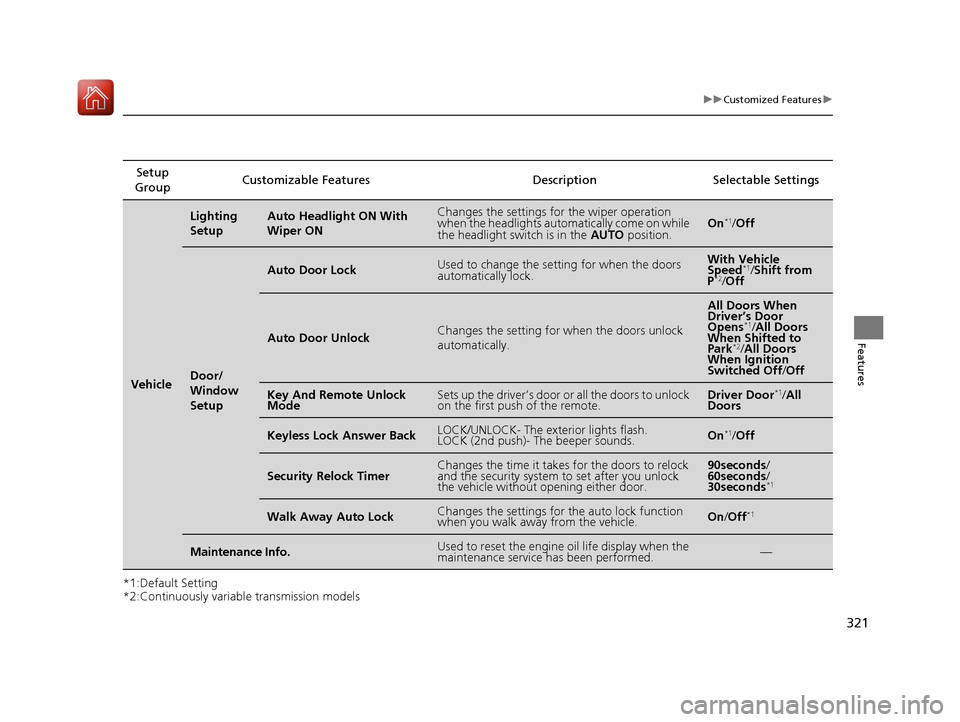
*2:Continuously variable transmission modelsSetup
Group Customizable Features Description Selectable Settings
Vehicle
Lighting
SetupAuto Headlight ON With Wiper ONChanges the settings for the wiper operation
when the headlights automa
tically come on while
the headlight switch is in the AUTO position.On*1
/Off
Door/
Window
Setup
Auto Door LockUsed to change the sett ing for when the doors
automatically lock.With Vehicle
Speed *1
/Shift from
P *2
/Off
Auto Door UnlockChanges the setting for when the doors unlock
automatically.
All Doors When
Driver’s Door
Opens *1
/All Doors
When Shifted to Park *2
/All Doors
When Ignition
Switched Off /Off
Key And Remote Unlock
ModeSets up the driver’s door or all the doors to unlock
on the first push of the remote.Driver Door *1
/All
Doors
Keyless Lock Answer BackLOCK/UNLOCK- The exterior lights flash.
LOCK (2nd push)- The beeper sounds.On *1
/Off
Security Relock TimerChanges the time it takes for the doors to relock
and the security system to set after you unlock
the vehicle without opening either door.90seconds /
60seconds /
30seconds *1
Walk Away Auto LockChanges the settings for the auto lock function
when you walk away from the vehicle.On
/Off *1
Maintenance Info.Used to reset the engine
oil life display when the
maintenance service has been performed.—
16 CIVIC 2D HC2 (0A 01 0C)-31TBG6000.book 321 ページ >0>.>/6年>0月>/>0日 金曜日 午後4時>/6分
Page 326 of 585
325
uuBluetooth® HandsFreeLink ®uHFL Menus
Continued
Features
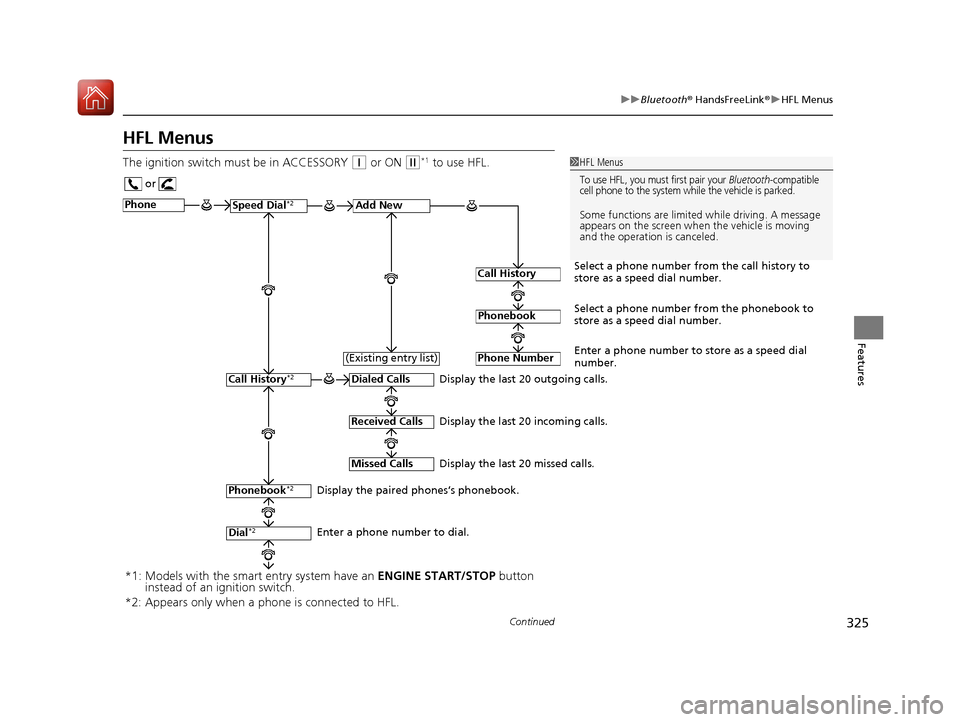
HFL Menus
The ignition switch mu st be in ACCESSORY
(q or ON (w*1
to use HFL.1HFL Menus
To use HFL, you must first pair your Bluetooth-compatible
cell phone to the system while the vehicle is parked.
Some functions are limited while driving. A message
appears on the screen when the vehicle is moving
and the operation is canceled.
or
Display the last 20 outgoing calls.
Display the last 20 incoming calls.
Display the last 20 missed calls.
Phone
Speed Dial
*2Add New
Select a phone number from the call history to
store as a speed dial number.
Call History
PhonebookSelect a phone number from the phonebook to
store as a speed dial number.
Phone Number
Enter a phone number to store as a speed dial
number.
Dialed Calls
Received Calls
Missed Calls
Phonebook *2
Dial*2
Call History *2
Display the paired phones’s phonebook.
Enter a phone number to dial.(Existing entry list)
*1: Models with the smart entry system have an
ENGINE START/STOP button
instead of an ignition switch.
*2: Appears only when a pho ne is connected to HFL.
16 CIVIC 2D HC2 (0A 01 0C)-31TBG6000.book 325 ページ >0>.>/6年>0月>/>0日 金曜日 午後4時>/6分
Page 350 of 585
349
uuBluetooth® HandsFreeLink ®uHFL Menus
Continued
Features
HFL Menus
The ignition switch mu st be in ACCESSORY
(q or ON (w*1
to use HFL.
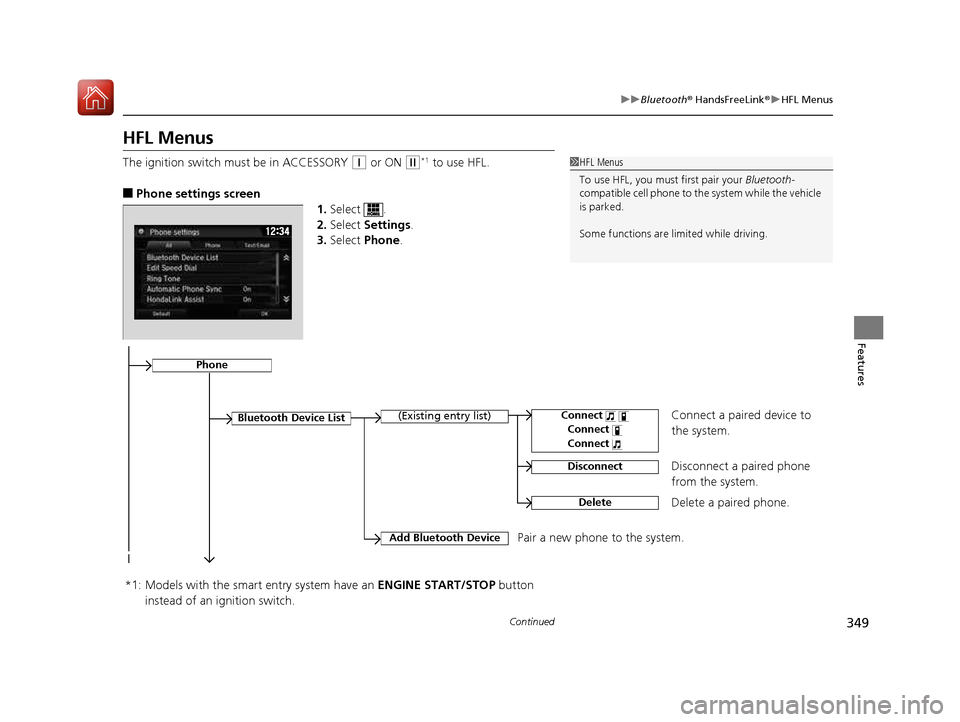
■ Phone settings screen
1.Select .
2. Select Settings .
3. Select Phone .1HFL Menus
To use HFL, you must first pair your Bluetooth-
compatible cell phone to th e system while the vehicle
is parked.
Some functions are limited while driving.
Disconnect a paired phone
from the system.
Bluetooth Device List
(Existing entry list)
Disconnect
DeleteDelete a paired phone.
Add Bluetooth Device
Pair a new phone to the system.
Phone
Connect a paired device to
the system.Connect
Connect
Connect
*1: Models with the smart entry system have an ENGINE START/STOP button
instead of an ignition switch.
16 CIVIC 2D HC2 (0A 01 0C)-31TBG6000.book 349 ページ >0>.>/6年>0月>/>0日 金曜日 午後4時>/6分
Page 380 of 585
379
Driving
This chapter discusses driving, refueling, and information on items such as accessories.
Before Driving
Driving Preparation .......................... 380
Maximum Load Limit........................ 383
Towing a Trailer ................................ 385
When Driving Starting the Engine .................. 386, 388
Precautions While Driving................. 393
Continuously Variable Transmission*... 394
Shifting ............................ 395, 397, 401
ECON Button ................................... 404
Cruise Control ................................. 405Front Sensor Camera *
...................... 408 Adaptive Cruise Control (ACC) with Low
Speed Follow (LSF) *
....................... 410
Road Departure Mitigation (RDM) System*...... 424Lane Keeping Assist System (LKAS)*.... 428
Vehicle Stabilit y Assist (VSA®), aka Electronic
Stability Control (ESC), System........... 435
Agile Handling Assist System............ 437
LaneWatch TM
*
.................................. 438
Tire Pressure Monitoring System (TPMS) ...... 440Tire Pressure Monitoring System (TPMS) -
Required Federal Explanation ......... 443
Braking
Brake System ................................... 445 Anti-lock Brake System (ABS) ........... 451
Brake Assist System ......................... 452
Collision Mitigation Braking System
TM
(CMBS TM
)*
..................................... 453
Parking Your Vehicle When Stopped ................................ 461
Multi-View Rear Camera .................. 462
Refueling
Fuel Information .............................. 464
How to Refuel ................................. 465
Fuel Economy
Improving Fuel Economy .................. 467
Accessories and Modifications ........ 468
* Not available on all models
16 CIVIC 2D HC2 (0A 01 0C)-31TBG6000.book 379 ページ >0>.>/6年>0月>/>0日 金曜日 午後4時>/6分
Page 381 of 585
380
Driving
Before Driving
Driving Preparation
Check the following items before you start driving.
• Make sure there are no obstructions on the windows, door mirrors, exterior
lights, or other parts of the vehicle.
uRemove any frost, snow, or ice.
uRemove any snow on the roof, as this can slip down and obstruct your field of
vision while driving. If frozen solid , remove ice once it has softened.
uWhen removing ice from around the wheels, be sure not to damage the wheel
or wheel components.
• Make sure the hood is securely closed.
uIf the hood opens while driving, your front view will be blocked.
• Make sure the tires are in good condition.
uCheck air pressure, check for damage and excessive wear.
2 Checking and Maintaining Tires P. 510
• Make sure there are no people or ob jects behind or around the vehicle.
uThere are blind spots from the inside.
■Exterior Checks1Exterior Checks
NOTICE
When doors are frozen shut, use warm water around
the door edges to melt any ice. Do not try to force
them open, as this can damage the rubber trim
around the doors. When done, wipe dry to avoid further freezing.
Do not pour warm water into the key cylinder.
You will be unable to insert key if the water freezes in the hole.
Heat from the engine and exhaust can ignite
flammable material s left under the hood, causing a
fire. If you've parked y our vehicle for an extended
period, inspect and remove any debris that may have
collected, such as dried grass and leaves that have
fallen or have been carried in for use as a nest by a
small animal. Also check under the hood for leftover
flammable materials after you or someone else has
performed maintenance on your vehicle.
16 CIVIC 2D HC2 (0A 01 0C)-31TBG6000.book 380 ページ >0>.>/6年>0月>/>0日 金曜日 午後4時>/6分
Page 387 of 585
386
Driving
When Driving
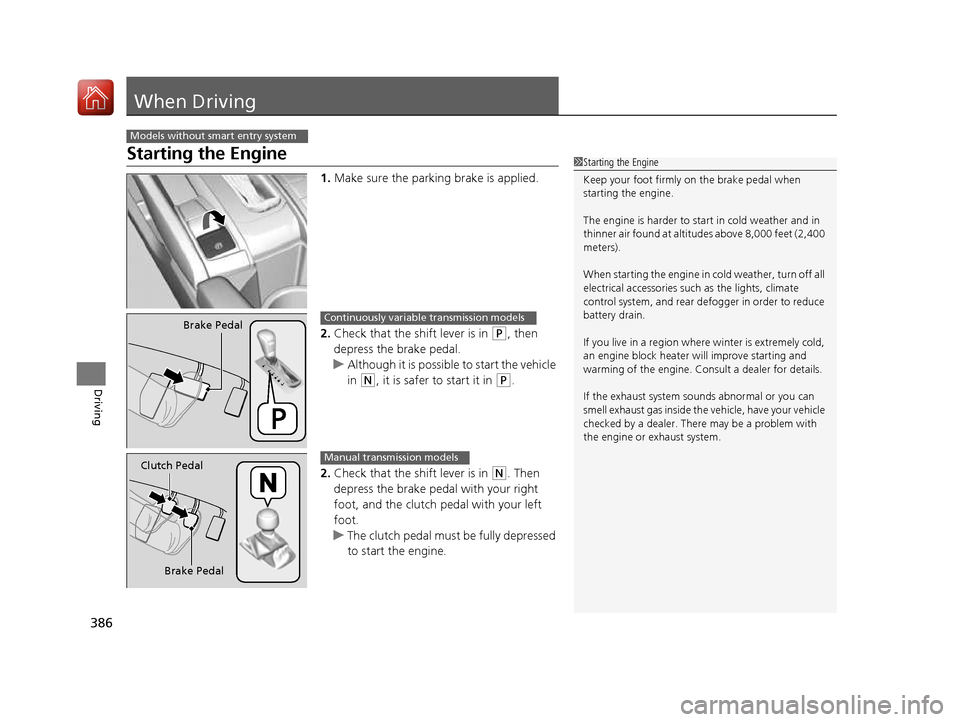
Starting the Engine1.Make sure the parking brake is applied.
2. Check that the shift lever is in
(P , then
depress the brake pedal.
uAlthough it is possible to start the vehicle in
(N , it is safer to start it in (P.
2. Check that the shift lever is in
(N . Then
depress the brake pedal with your right
foot, and the clutch pedal with your left foot.
uThe clutch pedal must be fully depressed
to start the engine.
Models without smart entry system
1Starting the Engine
Keep your foot firmly on the brake pedal when starting the engine.
The engine is harder to st art in cold weather and in
thinner air found at altitudes above 8,000 feet (2,400
meters).
When starting the engine in cold weather, turn off all
electrical accessories such as the lights, climate
control system, and rear de fogger in order to reduce
battery drain.
If you live in a region where winter is extremely cold,
an engine block heater will improve starting and
warming of the engine. Cons ult a dealer for details.
If the exhaust system sounds abnormal or you can
smell exhaust gas inside the vehicle, have your vehicle
checked by a dealer. There may be a problem with
the engine or exhaust system.
Brake PedalContinuously variable transmission models
Brake Pedal
Clutch Pedal
Manual transmission models
16 CIVIC 2D HC2 (0A 01 0C)-31TBG6000.book 386 ページ >0>.>/6年>0月>/>0日
金曜日 午後4時>/6分
Page 388 of 585
387
uuWhen DrivinguStarting the Engine
Driving
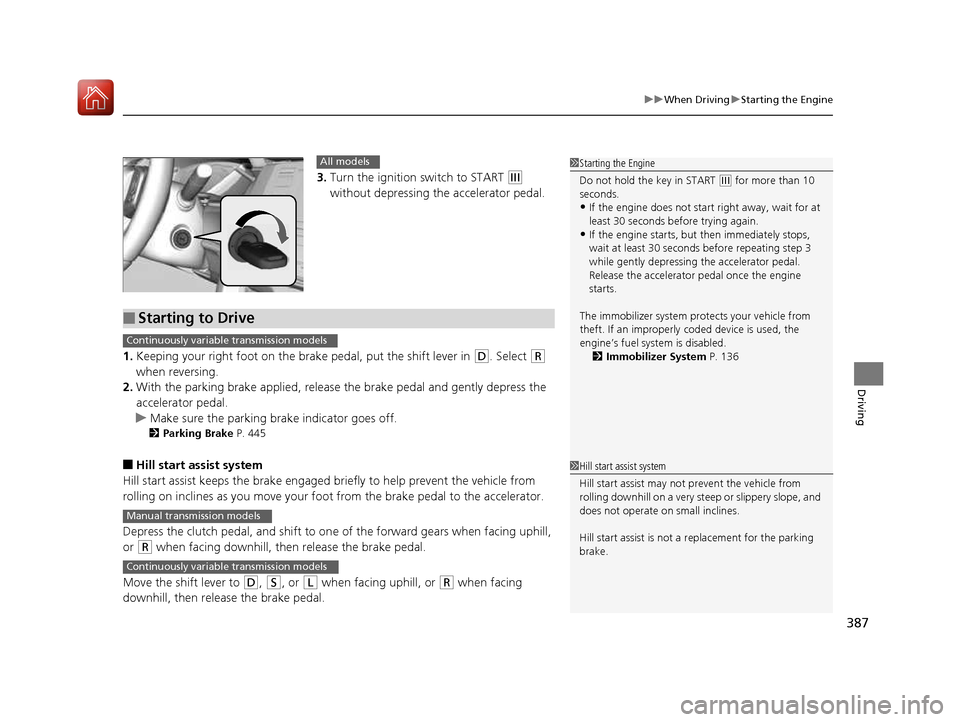
3.Turn the ignition switch to START (e
without depressing the accelerator pedal.
1. Keeping your right foot on the br ake pedal, put the shift lever in
(D. Select (R
when reversing.
2. With the parking brake applied, release the brake pedal and gently depress the
accelerator pedal.
uMake sure the parking brake indicator goes off.
2 Parking Brake P. 445
■ Hill start assist system
Hill start assist keeps the brake engaged br iefly to help prevent the vehicle from
rolling on inclines as you move your foot from the brake pedal to the accelerator.
Depress the clutch pedal, and shift to on e of the forward gears when facing uphill,
or
(R when facing downhill, th en release the brake pedal.
Move the shift lever to
(D , (S, or (L when facing uphill, or (R when facing
downhill, then release the brake pedal.
1Starting the Engine
Do not hold the key in START
(e for more than 10
seconds.
• If the engine does not sta rt right away, wait for at
least 30 seconds before trying again.
• If the engine starts, but then immediately stops,
wait at least 30 seconds before repeating step 3
while gently depressing the accelerator pedal.
Release the accelerator pedal once the engine
starts.
The immobilizer system pr otects your vehicle from
theft. If an improperly c oded device is used, the
engine’s fuel system is disabled. 2 Immobilizer System P. 136
All models
■Starting to Drive
Continuously variable transmission models
Manual transmission models
Continuously variable transmission models
1Hill start assist system
Hill start assist may not prevent the vehicle from
rolling downhill on a very st eep or slippery slope, and
does not operate on small inclines.
Hill start assist is not a replacement for the parking
brake.
16 CIVIC 2D HC2 (0A 01 0C)-31TBG6000.book 387 ページ >0>.>/6年>0月>/>0日 金曜日 午後4時>/6分