ECU HONDA CIVIC COUPE 2017 10.G User Guide
[x] Cancel search | Manufacturer: HONDA, Model Year: 2017, Model line: CIVIC COUPE, Model: HONDA CIVIC COUPE 2017 10.GPages: 595
Page 67 of 595
uuChild Safety uSafety of Infants and Small Children
66
Safe Driving
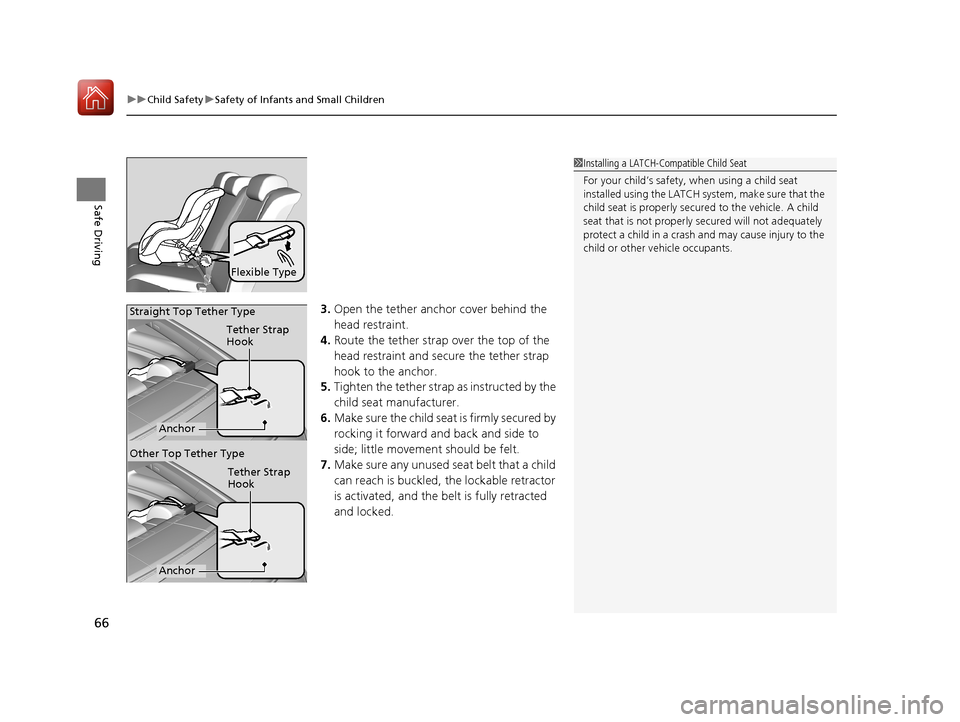
3. Open the tether anchor cover behind the
head restraint.
4. Route the tether strap over the top of the
head restraint and secure the tether strap
hook to the anchor.
5. Tighten the tether strap as instructed by the
child seat manufacturer.
6. Make sure the child seat is firmly secured by
rocking it forward and back and side to
side; little movement should be felt.
7. Make sure any unused seat belt that a child
can reach is buckled, the lockable retractor
is activated, and the be lt is fully retracted
and locked.
Flexible Type
1 Installing a LATCH-Compatible Child Seat
For your child’s safety, when using a child seat
installed using the LATCH system, make sure that the
child seat is properly secured to the vehicle. A child
seat that is not properly secured will not adequately
protect a child in a crash and may cause injury to the
child or other vehicle occupants.
Tether Strap
Hook
Anchor
Straight Top Tether Type
Tether Strap
Hook
Anchor
Other Top Tether Type
17 CIVIC 2D HCM (KA KC KL)-31TBG6100.book 66 ページ 2016年8月31日 水曜日 午後5時43分
Page 68 of 595
Continued67
uuChild Safety uSafety of Infants and Small Children
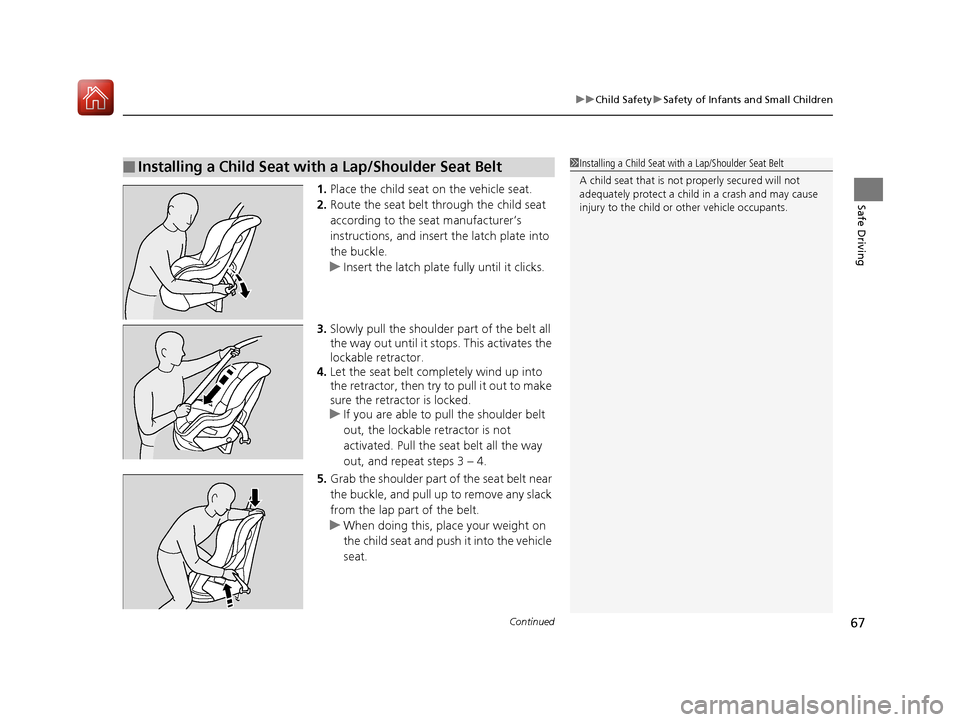
Safe Driving1. Place the child seat on the vehicle seat.
2. Route the seat belt through the child seat
according to the seat manufacturer’s
instructions, and insert the latch plate into
the buckle.
u Insert the latch plate fully until it clicks.
3. Slowly pull the shoulder part of the belt all
the way out until it stops. This activates the
lockable retractor.
4. Let the seat belt completely wind up into
the retractor, then try to pull it out to make
sure the retractor is locked.
u If you are able to pull the shoulder belt
out, the lockable retractor is not
activated. Pull the seat belt all the way
out, and repeat steps 3 – 4.
5. Grab the shoulder part of the seat belt near
the buckle, and pull up to remove any slack
from the lap part of the belt.
u When doing this, place your weight on
the child seat and push it into the vehicle
seat.
■Installing a Child Seat with a Lap/Shoulder Seat Belt1Installing a Child Seat with a Lap/Shoulder Seat Belt
A child seat that is not properly secured will not
adequately protect a child in a crash and may cause
injury to the child or other vehicle occupants.
17 CIVIC 2D HCM (KA KC KL)-31TBG6100.book 67 ページ 2016年8月31日 水曜日 午後5時43分
Page 69 of 595
uuChild Safety uSafety of Infants and Small Children
68
Safe Driving
6. Make sure the child seat is firmly secured by
rocking it forward and back and side to
side; little movement should be felt.
7. Make sure any unused seat belt that a child
can reach is buckled, the lockable retractor
is activated, and the be lt is fully retracted
and locked.
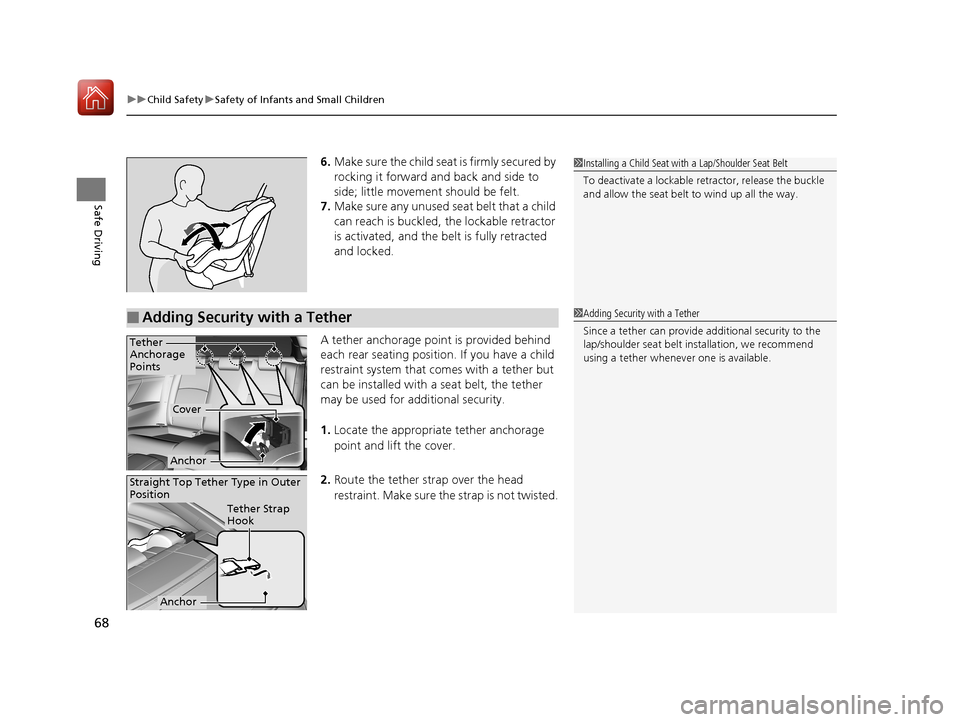
A tether anchorage point is provided behind
each rear seating position. If you have a child
restraint system that comes with a tether but
can be installed with a seat belt, the tether
may be used for additional security.
1. Locate the appropriate tether anchorage
point and lift the cover.
2. Route the tether strap over the head
restraint. Make sure the strap is not twisted.1Installing a Child Seat with a Lap/Shoulder Seat Belt
To deactivate a lockable retractor, release the buckle
and allow the seat belt to wind up all the way.
■Adding Security with a Tether1 Adding Security with a Tether
Since a tether can provide additional security to the
lap/shoulder seat belt in stallation, we recommend
using a tether whenever one is available.
Tether
Anchorage
Points
Cover
Anchor
Straight Top Tether Type in Outer
Position
Tether Strap
Hook
Anchor
17 CIVIC 2D HCM (KA KC KL)-31TBG6100.book 68 ページ 2016年8月31日 水曜日 午後5時43分
Page 70 of 595
69
uuChild Safety uSafety of Infants and Small Children
Safe Driving
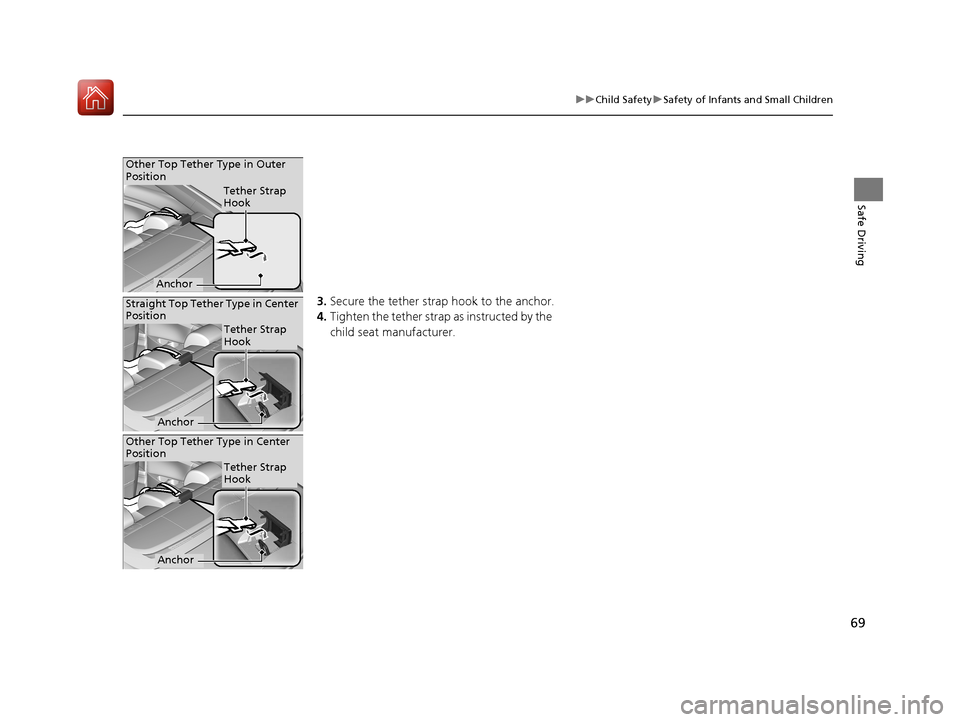
3. Secure the tether strap hook to the anchor.
4. Tighten the tether strap as instructed by the
child seat manufacturer.
Other Top Tether Type in Outer
Position
Tether Strap
Hook
Anchor
Straight Top Tether Type in Center
Position
Tether Strap
Hook
Anchor
Other Top Tether Type in Center
Position
Tether Strap
Hook
Anchor
17 CIVIC 2D HCM (KA KC KL)-31TBG6100.book 69 ページ 2016年8月31日 水曜日 午後5時43分
Page 71 of 595
70
uuChild Safety uSafety of Larger Children
Safe Driving
Safety of Larger Children
The following pages give instructions on how to check proper seat belt fit, what kind
of booster seat to use if one is needed, and important precautions for a child who
must sit in front.
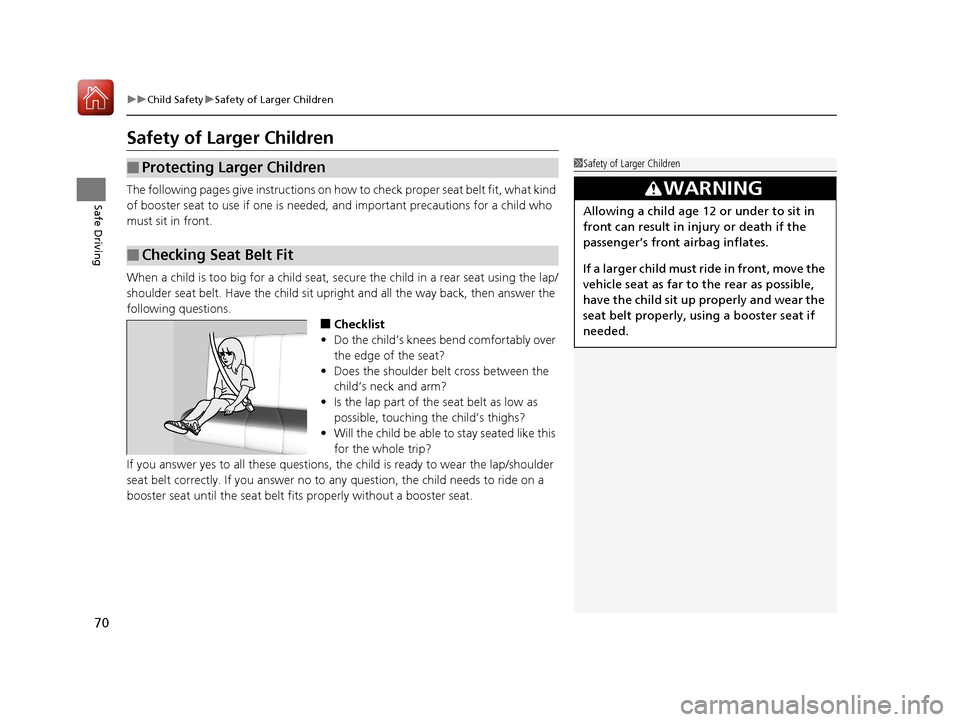
When a child is too big for a child seat, secure the child in a rear seat using the lap/
shoulder seat belt. Have the child sit upright and all the way back, then answer the
following questions.
■Checklist
• Do the child’s knees bend comfortably over
the edge of the seat?
• Does the shoulder belt cross between the
child’s neck and arm?
• Is the lap part of the seat belt as low as
possible, touching the child’s thighs?
• Will the child be able to stay seated like this
for the whole trip?
If you answer yes to all thes e questions, the child is read y to wear the lap/shoulder
seat belt correctly. If you answer no to any question, the child needs to ride on a
booster seat until the seat belt fits properly without a booster seat.
■Protecting Larger Children
■Checking Seat Belt Fit
1 Safety of Larger Children
3WARNING
Allowing a child age 12 or under to sit in
front can result in injury or death if the
passenger’s front airbag inflates.
If a larger child must ri de in front, move the
vehicle seat as far to the rear as possible,
have the child sit up properly and wear the
seat belt properly, using a booster seat if
needed.
17 CIVIC 2D HCM (KA KC KL)-31TBG6100.book 70 ページ 2016年8月31日 水曜日 午後5時43分
Page 72 of 595
71
uuChild Safety uSafety of Larger Children
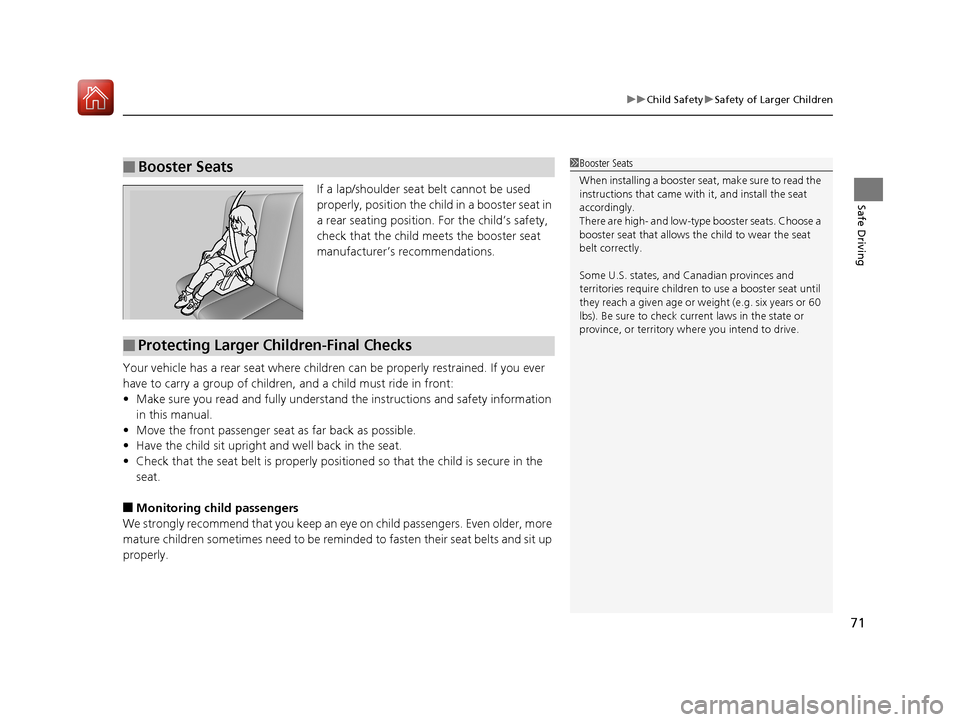
Safe DrivingIf a lap/shoulder seat belt cannot be used
properly, position the child in a booster seat in
a rear seating position. For the child’s safety,
check that the child meets the booster seat
manufacturer’s recommendations.
Your vehicle has a rear seat where children can be properly restrained. If you ever
have to carry a group of children, and a child must ride in front:
• Make sure you read and fully understand the instructions and safety information
in this manual.
• Move the front passenger seat as far back as possible.
• Have the child sit upright and well back in the seat.
• Check that the seat belt is properly positi oned so that the child is secure in the
seat.
■Monitoring child passengers
We strongly recommend that you keep an ey e on child passengers. Even older, more
mature children sometimes need to be remi nded to fasten their seat belts and sit up
properly.
■Booster Seats1 Booster Seats
When installing a booster seat, make sure to read the
instructions that came with it, and install the seat
accordingly.
There are high- and low-type booster seats. Choose a
booster seat that allows the child to wear the seat
belt correctly.
Some U.S. states, and Canadian provinces and
territories require children to use a booster seat until
they reach a given age or we ight (e.g. six years or 60
lbs). Be sure to check current laws in the state or
province, or territory where you intend to drive.
■Protecting Larger Children-Final Checks
17 CIVIC 2D HCM (KA KC KL)-31TBG6100.book 71 ページ 2016年8月31日 水曜日 午後5時43分
Page 87 of 595
86
uuIndicators u
Instrument Panel
*1:Models with the smart entry system have an ENGINE START/STOP button instead of an ignition switch.
*2:Canadian models only: Apply and hold the brake pedal before turning the ignition on.
IndicatorNameOn/BlinkingExplanationMessage*
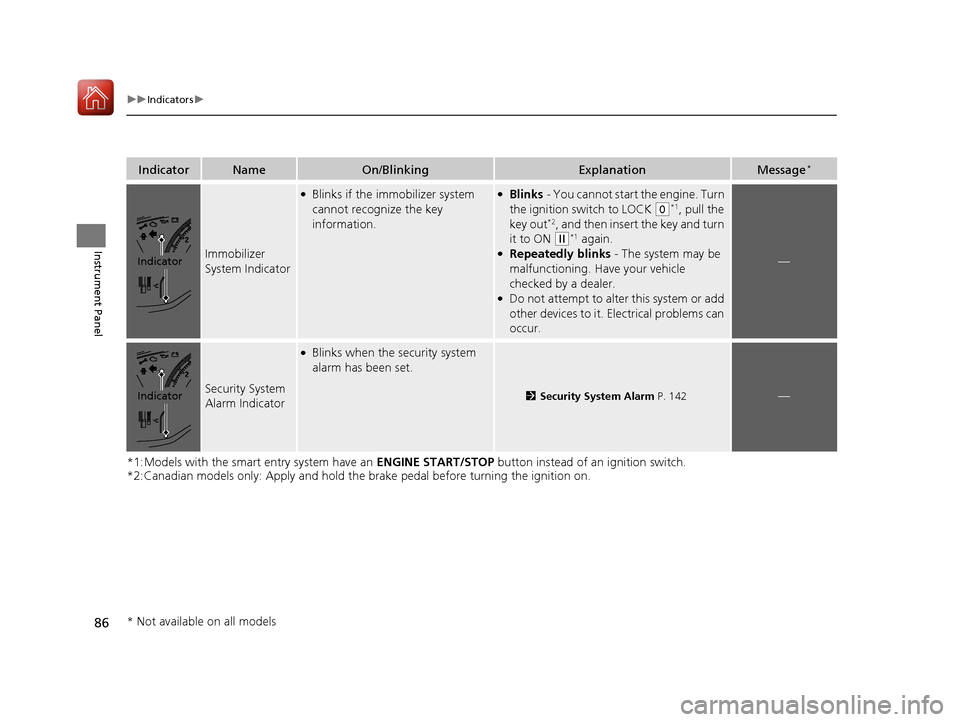
Immobilizer
System Indicator
●Blinks if the immobilizer system
cannot recognize the key
information.●Blinks - You cannot start the engine. Turn
the ignition switch to LOCK
(0*1, pull the
key out*2, and then insert the key and turn
it to ON
(w*1 again.●Repeatedly blinks - The system may be
malfunctioning. Have your vehicle
checked by a dealer.
●Do not attempt to alter this system or add
other devices to it. Electrical problems can
occur.
—
Security System
Alarm Indicator
●Blinks when the security system
alarm has been set.
2 Security System Alarm P. 142—
Indicator
Indicator
* Not available on all models
17 CIVIC 2D HCM (KA KC KL)-31TBG6100.book 86 ページ 2016年8月31日 水曜日 午後5時43分
Page 120 of 595
119
Controls
This chapter explains how to operate the various controls necessary for driving.
Clock.................................................. 120
Locking and Unlocking the Doors Key Types and Functions .................. 122
Low Smart Entry Remote Signal Strength*... 124Locking/Unlocking the Doors from the Outside .......................................... 125
Locking/Unlocking the Doors from the Inside ............................................. 132
Auto Door Locking/Unlocking .......... 135
Opening and Closing the Trunk ....... 139
Security System Immobilizer System .......................... 142
Security System Alarm ...................... 142
Opening and Closing the Windows ..... 145Opening and Closing the Moonroof*..... 148
Operating the Switches Around the
Steering Wheel
Ignition Switch
*............................... 149
ENGINE START/STOP Button*........... 150
Ignition Switch and Power Mode Comparison ................................... 153
Turn Signals ..................................... 154
Light Switches.................................. 154
Fog Lights
*...................................... 157
Daytime Running Lights ................... 157
Wipers and Washers ........................ 158
Brightness Control ........................... 160
Rear Defogger/Heat ed Door Mirror
*
Button ........................................... 161
Adjusting the Steering Wheel........... 162 Adjusting the Mirrors
Interior Rearview Mirror ................... 163
Power Door Mirrors ......................... 164
Adjusting the Seats .......................... 165
Interior Lights/Interior Convenience Items ................................................ 174
Climate Control System Using Automatic Climate Control .... 185
Automatic Climate Control Sensors......191
* Not available on all models
17 CIVIC 2D HCM (KA KC KL)-31TBG6100.book 119 ページ 2016年8月31日 水曜日 午後5時43分
Page 126 of 595
125
uuLocking and Unlocking the Doors uLocking/Unlocking the Doors from the Outside
Continued
Controls
Locking/Unlocking the Doors from the Outside
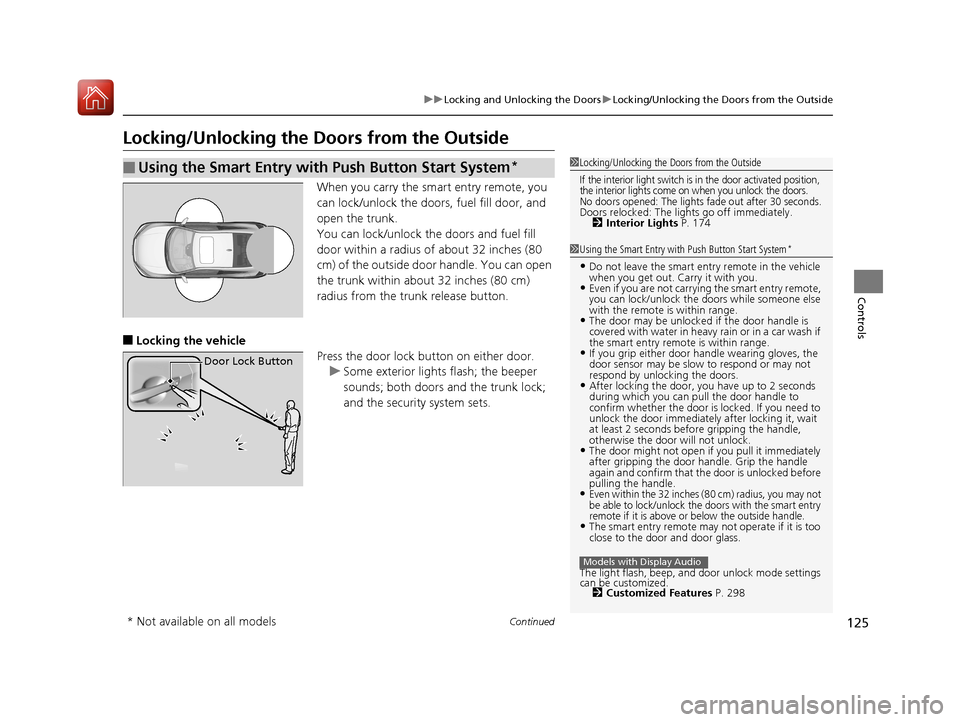
When you carry the sm art entry remote, you
can lock/unlock the doors, fuel fill door, and
open the trunk.
You can lock/unlock the doors and fuel fill
door within a radius of about 32 inches (80
cm) of the outside door handle. You can open
the trunk within about 32 inches (80 cm)
radius from the trunk release button.
■Locking the vehicle Press the door lock button on either door.u Some exterior lights flash; the beeper
sounds; both doors and the trunk lock;
and the security system sets.
■Using the Smart Entry with Push Button Start System*1Locking/Unlocking the Doors from the Outside
If the interior light switch is in the door activated position,
the interior lights come on when you unlock the doors.
No doors opened: The lights fade out after 30 seconds.Doors relocked: The li ghts go off immediately.
2 Interior Lights P. 174
1Using the Smart Entry with Push Button Start System*
•Do not leave the smart entry remote in the vehicle
when you get out. Carry it with you.
•Even if you are not carrying the smart entry remote,
you can lock/unlock the doors while someone else
with the remote is within range.
•The door may be unlocked if the door handle is
covered with water in heavy rain or in a car wash if
the smart entry remote is within range.
•If you grip either door handle wearing gloves, the
door sensor may be slow to respond or may not
respond by unlocking the doors.
•After locking the door, you have up to 2 seconds
during which you can pull the door handle to
confirm whether the door is locked. If you need to
unlock the door immediately after locking it, wait
at least 2 seconds befo re gripping the handle,
otherwise the door will not unlock.
•The door might not open if you pull it immediately
after gripping the door ha ndle. Grip the handle
again and confirm that th e door is unlocked before
pulling the handle.
•Even within the 32 inches (80 cm) radius, you may not
be able to lock/unlock the doors with the smart entry
remote if it is above or below the outside handle.
•The smart entry remote may not operate if it is too
close to the door and door glass.
The light flash, beep, a nd door unlock mode settings
can be customized. 2 Customized Features P. 298
Models with Display Audio
Door Lock Button
* Not available on all models
17 CIVIC 2D HCM (KA KC KL)-31TBG6100.book 125 ページ 2016年8月31日 水曜日 午後5時43分
Page 130 of 595
Continued129
uuLocking and Unlocking the Doors uLocking/Unlocking the Doors from the Outside
Controls
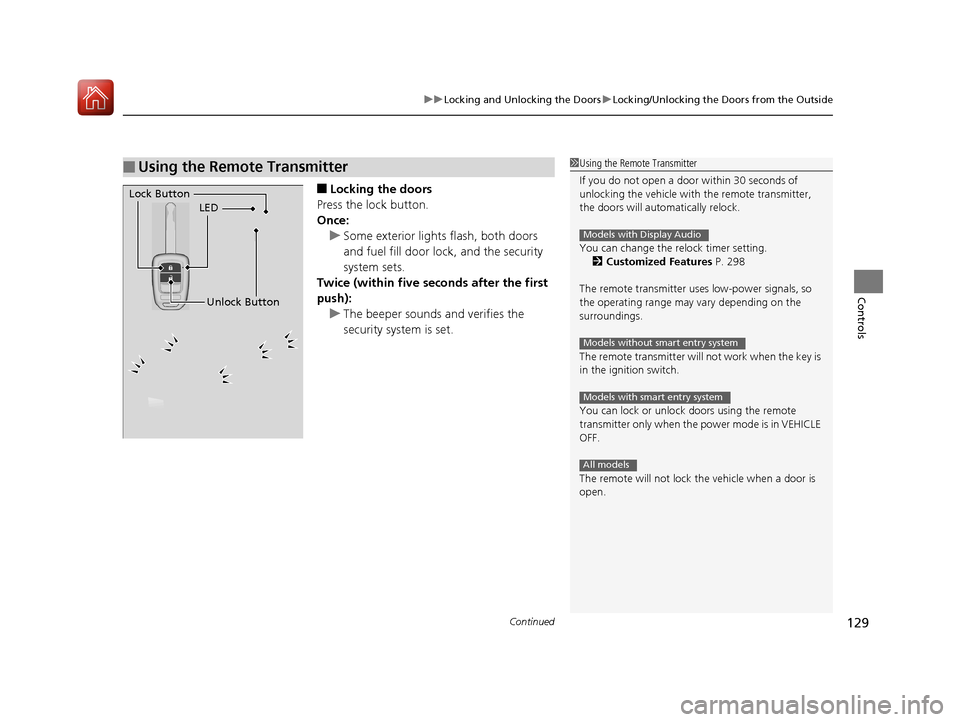
■Locking the doors
Press the lock button.
Once: u Some exterior lights flash, both doors
and fuel fill door lock , and the security
system sets.
Twice (within five se conds after the first
push):
u The beeper sounds and verifies the
security system is set.
■Using the Remote Transmitter1Using the Remote Transmitter
If you do not open a door within 30 seconds of
unlocking the vehicle with the remote transmitter,
the doors will automatically relock.
You can change the relock timer setting. 2 Customized Features P. 298
The remote transmitter us es low-power signals, so
the operating range may vary depending on the
surroundings.
The remote transmitter will not work when the key is
in the ignition switch.
You can lock or unlock doors using the remote
transmitter only when the power mode is in VEHICLE
OFF.
The remote will not lock the vehicle when a door is
open.
Models with Display Audio
Models without smart entry system
Models with smart entry system
All models
LED
Unlock Button
Lock Button
17 CIVIC 2D HCM (KA KC KL)-31TBG6100.book 129 ページ 2016年8月31日 水曜日 午後5時43分