set clock HONDA CIVIC COUPE 2017 10.G Owner's Manual
[x] Cancel search | Manufacturer: HONDA, Model Year: 2017, Model line: CIVIC COUPE, Model: HONDA CIVIC COUPE 2017 10.GPages: 595
Page 300 of 595
299
uuCustomized Features u
Continued
Features
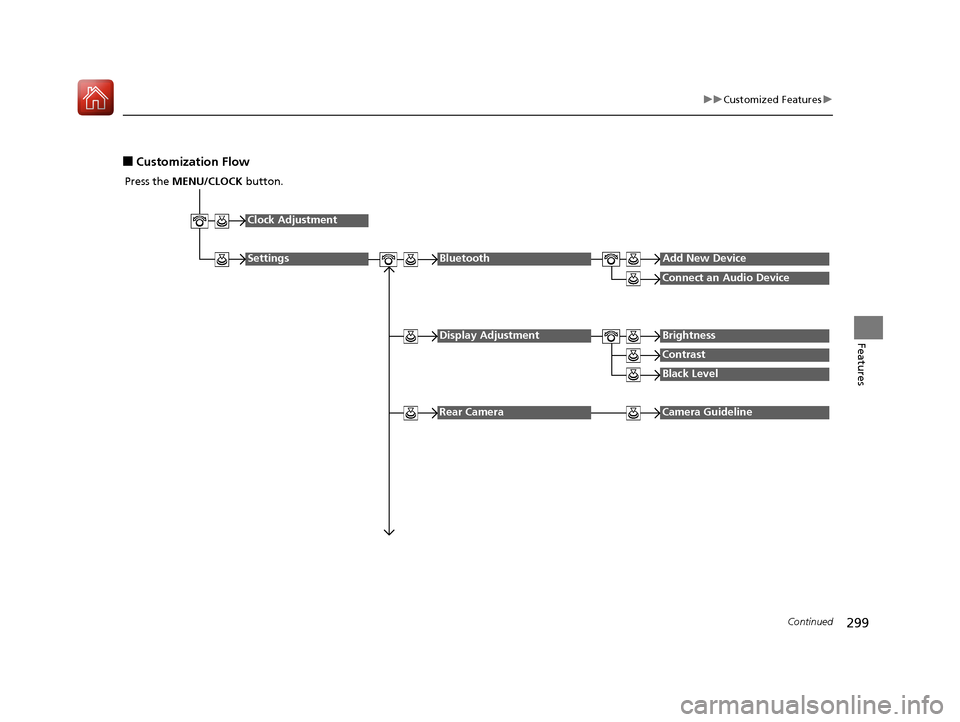
■Customization Flow
Press the MENU/CLOCK button.
Clock Adjustment
SettingsBluetoothAdd New Device
Connect an Audio Device
Display AdjustmentBrightness
Contrast
Black Level
Rear CameraCamera Guideline
17 CIVIC 2D HCM (KA KC KL)-31TBG6100.book 299 ページ 2016年8月31日 水曜日 午後5時43分
Page 303 of 595
302
uuCustomized Features u
Features
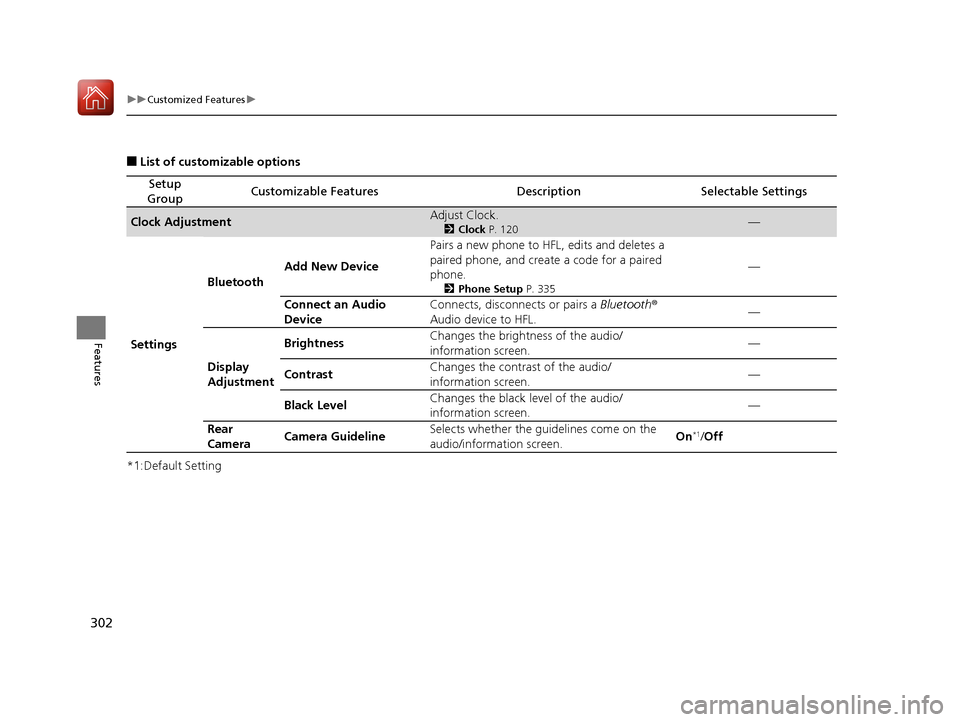
■List of customizable options
*1:Default Setting
Setup
GroupCustomizable FeaturesDescriptionSelectable Settings
Clock AdjustmentAdjust Clock.
2 Clock P. 120—
Settings Bluetooth
Add New Device Pairs a new phone to HFL, edits and deletes a
paired phone, and create a code for a paired
phone.
2
Phone Setup P. 335
—
Connect an Audio
Device Connects, disconnects or pairs a
Bluetooth®
Audio device to HFL. —
Display
Adjustment Brightness
Changes the brightness of the audio/
information screen.
—
Contrast Changes the contrast of the audio/
information screen. —
Black Level Changes the black level of the audio/
information screen. —
Rear
Camera Camera Guideline Selects whether the guidelines come on the
audio/information screen.
On
*1/
Off
17 CIVIC 2D HCM (KA KC KL)-31TBG6100.book 302 ページ 2016年8月31日 水曜日 午後5時43分
Page 304 of 595
303
uuCustomized Features u
Continued
Features
*1:Default Setting
Setup
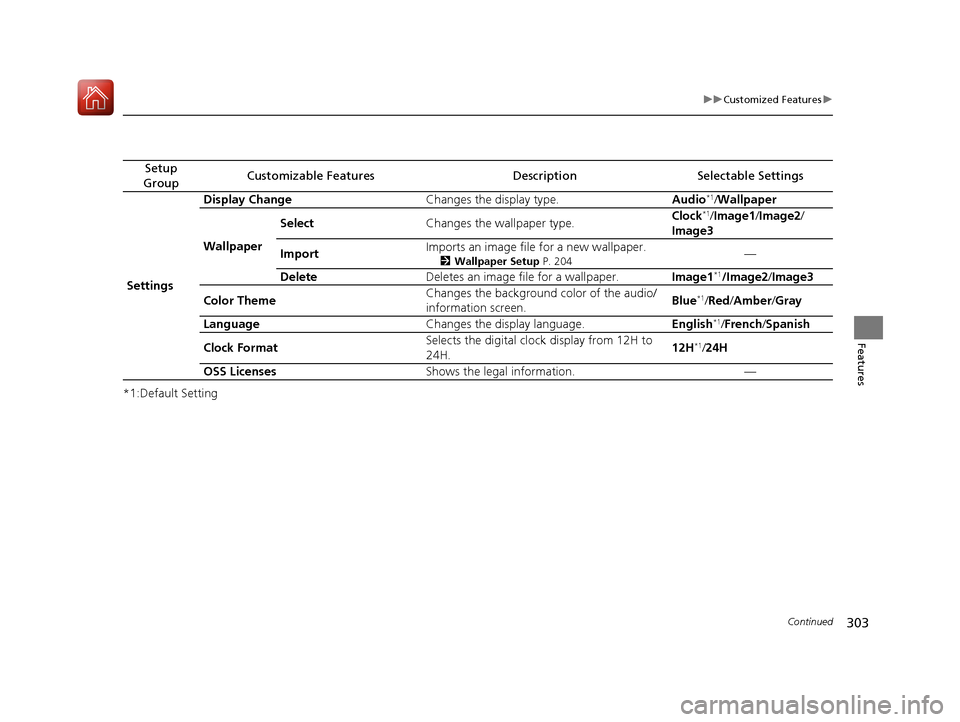
GroupCustomizable FeaturesDescriptionSelectable Settings
Settings Display Change
Changes the display type. Audio
*1/Wallpaper
Wallpaper Select
Changes the wallpaper type. Clock*1/
Image1/ Image2/
Image3
Import Imports an image file for a new wallpaper.
2
Wallpaper Setup P. 204—
Delete Deletes an image file for a wallpaper. Image1
*1/Image2/Image3
Color Theme Changes the background color of the audio/
information screen.
Blue
*1/
Red /Amber /Gray
Language Changes the display language. English
*1/French /Spanish
Clock Format Selects the digital clock display from 12H to
24H. 12H
*1/
24H
OSS Licenses Shows the legal information. —
17 CIVIC 2D HCM (KA KC KL)-31TBG6100.book 303 ページ 2016年8月31日 水曜日 午後5時43分
Page 307 of 595
306
uuCustomized Features u
Features
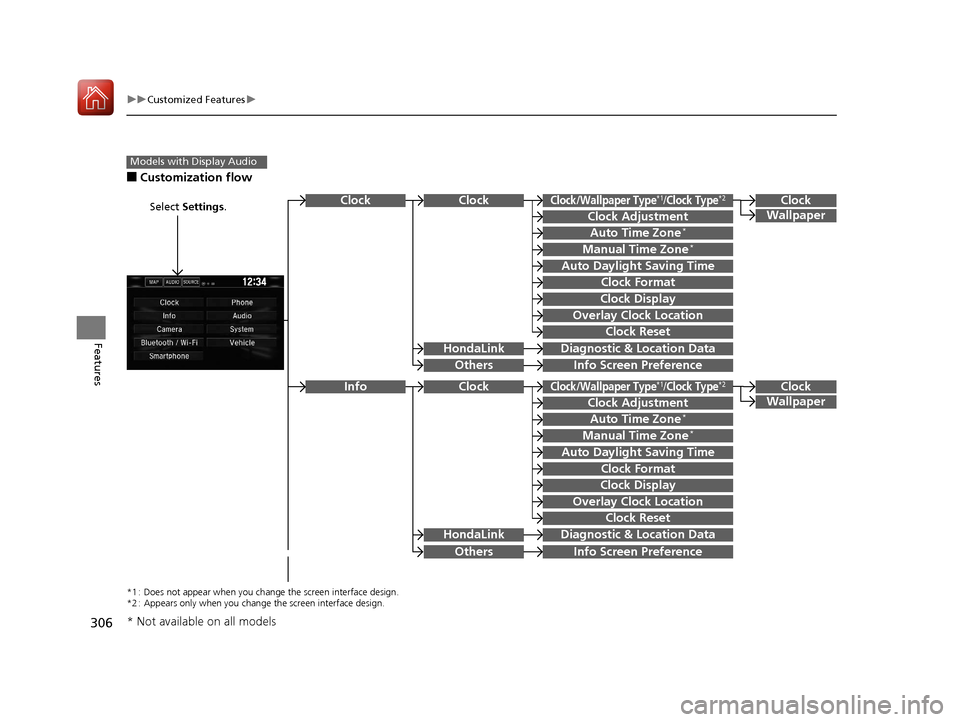
■Customization flow
Models with Display Audio
Select Settings.Clock
Wallpaper
Others
Clock/Wallpaper Type*1/Clock Type*2
Clock Adjustment
Clock Format
ClockClock
Auto Time Zone*
Manual Time Zone*
Auto Daylight Saving Time
Clock Display
Overlay Clock Location
Clock Reset
Info Screen Preference
Clock
Wallpaper
Others
Clock/Wallpaper Type*1/Clock Type*2
Clock Adjustment
Clock Format
Clock
Auto Time Zone*
Manual Time Zone*
Auto Daylight Saving Time
Clock Display
Overlay Clock Location
Clock Reset
Info Screen Preference
Info
HondaLinkDiagnostic & Location Data
HondaLinkDiagnostic & Location Data
*1 : Does not appear when you chang e the screen interface design.
*2 : Appears only when you change the screen interface design.
* Not available on all models
17 CIVIC 2D HCM (KA KC KL)-31TBG6100.book 306 ページ 2016年8月31日 水曜日 午後5時43分
Page 311 of 595
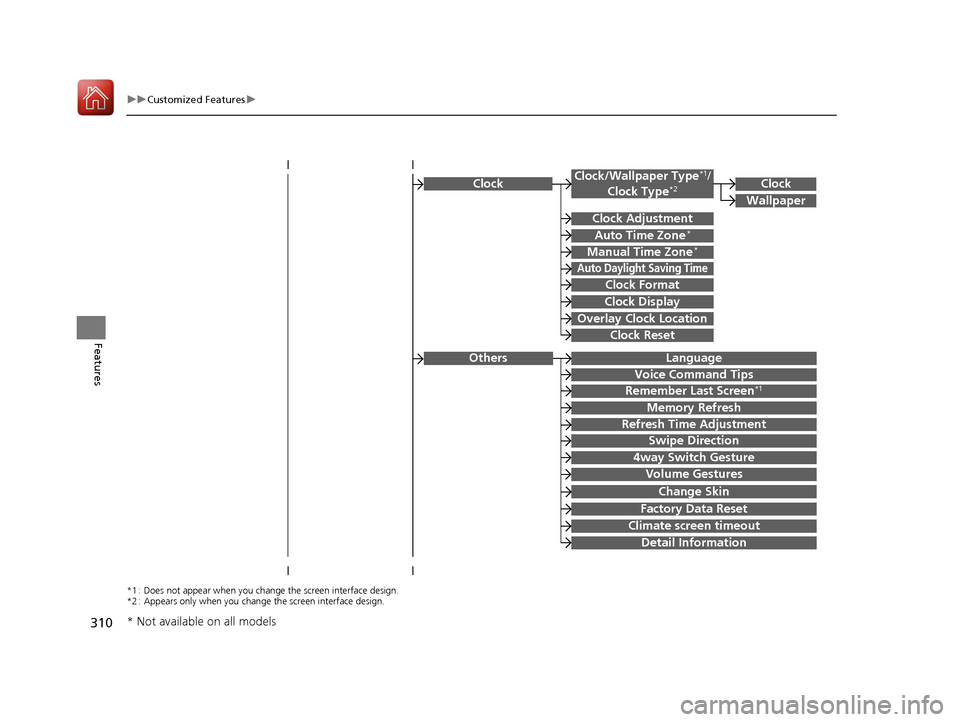
310
uuCustomized Features u
Features
ClockClock/Wallpaper Type*1/
Clock Type*2
Clock Adjustment
Clock Format
Auto Time Zone*
Manual Time Zone*
Auto Daylight Saving Time
Clock Display
Overlay Clock Location
Clock Reset
Clock
Wallpaper
*1 : Does not appear when you chang e the screen interface design.
*2 : Appears only when you change the screen interface design.
Language
Voice Command Tips
Remember Last Screen*1
Memory Refresh
Refresh Time Adjustment
Swipe Direction
Change Skin
Factory Data Reset
Climate screen timeout
4way Switch Gesture
Volume Gestures
Detail Information
Others
* Not available on all models
17 CIVIC 2D HCM (KA KC KL)-31TBG6100.book 310 ページ 2016年8月31日 水曜日 午後5時43分
Page 314 of 595
313
uuCustomized Features u
Continued
Features
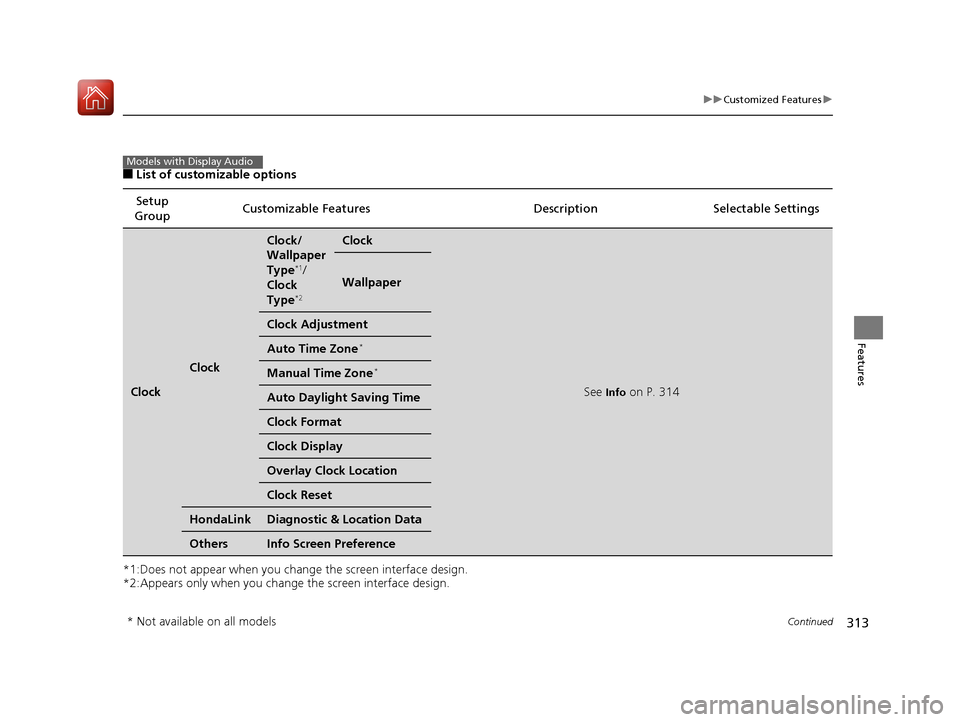
■List of customizable options
*1:Does not appear when you chan ge the screen interface design.
*2:Appears only when you change the screen interface design. Setup
Group Customizable Features
Description Selectable Settings
Clock
Clock
Clock/
Wallpaper
Type
*1/
Clock
Type
*2
Clock
See Info on P. 314
Wallpaper
Clock Adjustment
Auto Time Zone*
Manual Time Zone*
Auto Daylight Saving Time
Clock Format
Clock Display
Overlay Clock Location
Clock Reset
HondaLinkDiagnostic & Location Data
OthersInfo Screen Preference
Models with Display Audio
* Not available on all models
17 CIVIC 2D HCM (KA KC KL)-31TBG6100.book 313 ページ 2016年8月31日 水曜日 午後5時43分
Page 315 of 595
314
uuCustomized Features u
Features
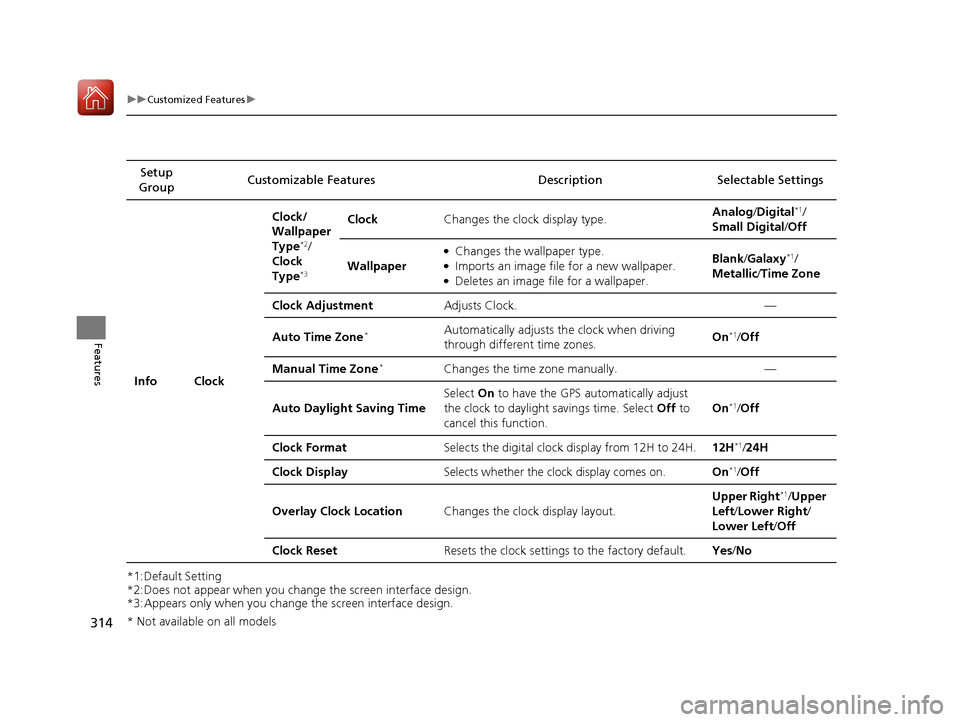
*1:Default Setting
*2:Does not appear when you change the screen interface design.
*3:Appears only when you change the screen interface design.Setup
Group Customizable Features Desc
ription Selectable Settings
Info Clock Clock/
Wallpaper
Type
*2/
Clock
Type
*3
Clock Changes the clock display type. Analog
/Digital*1/
Small Digital /Off
Wallpaper
●Changes the wallpaper type.●Imports an image file for a new wallpaper.●Deletes an image file for a wallpaper. Blank
/Galaxy
*1/
Metallic /Time Zone
Clock Adjustment Adjusts Clock. —
Auto Time Zone
*Automatically adjusts th e clock when driving
through different time zones. On*1/
Off
Manual Time Zone
*Changes the time zone manually. —
Auto Daylight Saving Time Select
On to have the GPS automatically adjust
the clock to daylight savings time. Select Off to
cancel this function. On
*1/
Off
Clock Format Selects the digital clock display from 12H to 24H. 12H
*1/24H
Clock Display Selects whether the clock display comes on. On
*1/Off
Overlay Clock Location Changes the clock display layout. Upper Right
*1/
Upper
Left/ Lower Right/
Lower Left /Off
Clock Reset Resets the clock settings to the factory default. Yes/No
* Not available on all models
17 CIVIC 2D HCM (KA KC KL)-31TBG6100.book 314 ページ 2016年8月31日 水曜日 午後5時43分
Page 323 of 595
322
uuCustomized Features u
Features
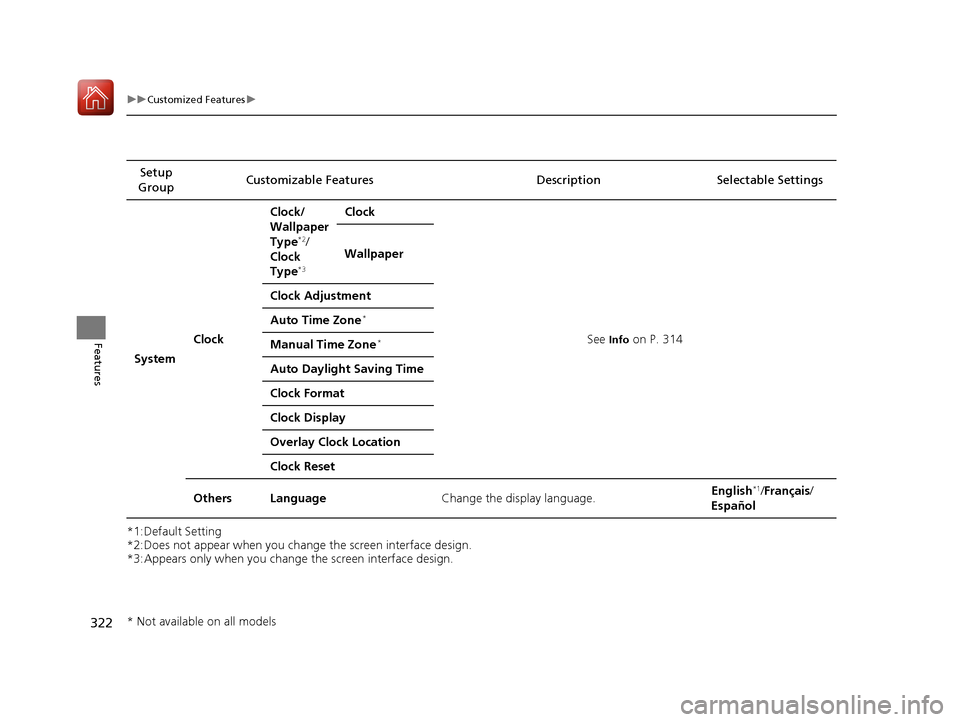
*1:Default Setting
*2:Does not appear when you change the screen interface design.
*3:Appears only when you change the screen interface design.Setup
Group Customizable Features Description Selectable Settings
System Clock Clock/
Wallpaper
Type
*2/
Clock
Type
*3
Clock
See
Info on P. 314
Wallpaper
Clock Adjustment
Auto Time Zone
*
Manual Time Zone*
Auto Daylight Saving Time
Clock Format
Clock Display
Overlay Clock Location
Clock Reset
Others Language Change the display language. English
*1/
Français /
Español
* Not available on all models
17 CIVIC 2D HCM (KA KC KL)-31TBG6100.book 322 ページ 2016年8月31日 水曜日 午後5時43分
Page 505 of 595
504
Maintenance
Replacing Light Bulbs
Headlight Bulbs
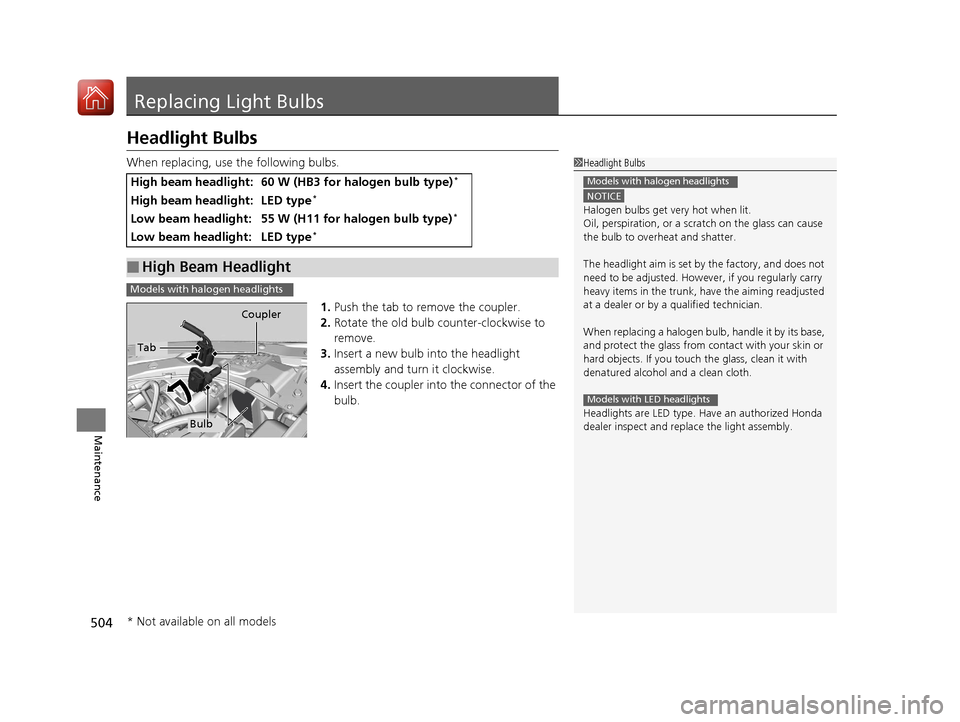
When replacing, use the following bulbs.1.Push the tab to remove the coupler.
2. Rotate the old bulb counter-clockwise to
remove.
3. Insert a new bulb into the headlight
assembly and turn it clockwise.
4. Insert the coupler into the connector of the
bulb.
High beam headlight:60 W (HB3 for halogen bulb type)*
High beam headlight:LED type*
Low beam headlight:55 W (H11 for halogen bulb type)*
Low beam headlight:LED type*
■High Beam Headlight
1Headlight Bulbs
NOTICE
Halogen bulbs get very hot when lit.
Oil, perspiration, or a scratch on the glass can cause
the bulb to overhe at and shatter.
The headlight aim is set by the factory, and does not
need to be adjusted. Howeve r, if you regularly carry
heavy items in the trunk, have the aiming readjusted
at a dealer or by a qualified technician.
When replacing a halogen bu lb, handle it by its base,
and protect the glass from c ontact with your skin or
hard objects. If you touch the glass, clean it with
denatured alcohol and a clean cloth.
Headlights are LED type. Ha ve an authorized Honda
dealer inspect and replace the light assembly.
Models with halogen headlights
Models with LED headlights
Models with halogen headlights
Tab Coupler
Bulb
* Not available on all models
17 CIVIC 2D HCM (KA KC KL)-31TBG6100.book 504 ページ 2016年8月31日 水曜日 午後5時43分
Page 526 of 595
525
Maintenance
Battery
Checking the Battery
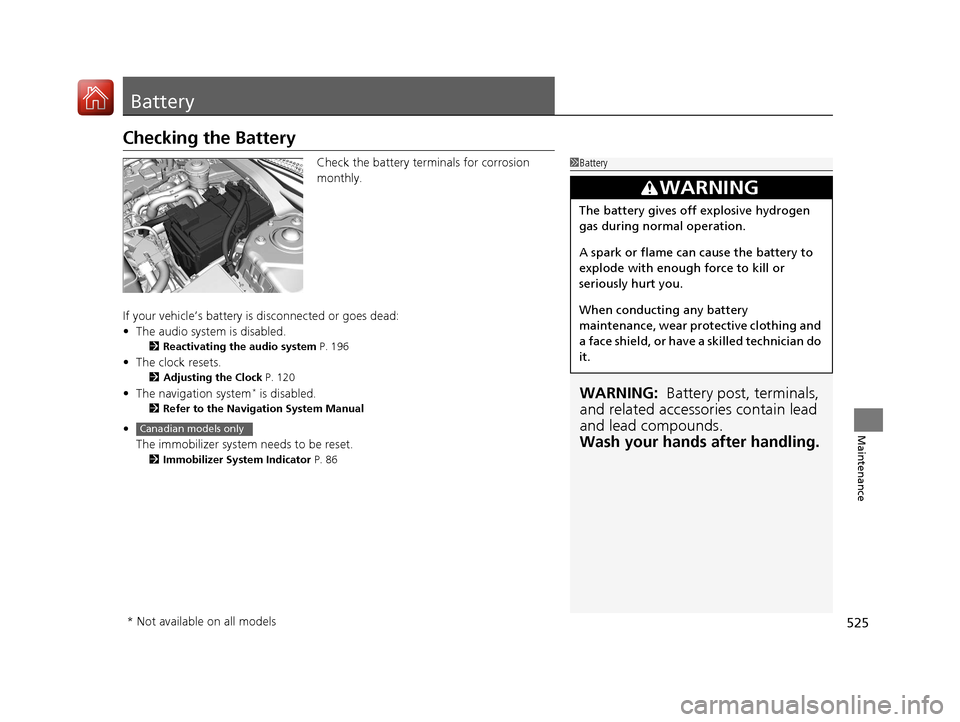
Check the battery terminals for corrosion
monthly.
If your vehicle’s battery is disconnected or goes dead:
• The audio system is disabled.
2 Reactivating the audio system P. 196
•The clock resets.
2 Adjusting the Clock P. 120
•The navigation system* is disabled.
2 Refer to the Navigation System Manual
•
The immobilizer system needs to be reset.
2 Immobilizer System Indicator P. 86
1Battery
WARNING: Battery post, terminals,
and related accessories contain lead
and lead compounds.
Wash your hands after handling.
3WARNING
The battery gives off explosive hydrogen
gas during normal operation.
A spark or flame can cause the battery to
explode with enough force to kill or
seriously hurt you.
When conducting any battery
maintenance, wear prot ective clothing and
a face shield, or have a skilled technician do
it.
Canadian models only
* Not available on all models
17 CIVIC 2D HCM (KA KC KL)-31TBG6100.book 525 ページ 2016年8月31日 水曜日 午後5時43分