audio HONDA CIVIC COUPE 2017 10.G Owner's Guide
[x] Cancel search | Manufacturer: HONDA, Model Year: 2017, Model line: CIVIC COUPE, Model: HONDA CIVIC COUPE 2017 10.GPages: 595
Page 175 of 595
174
Controls
Interior Lights/Interior Convenience Items
Interior Lights
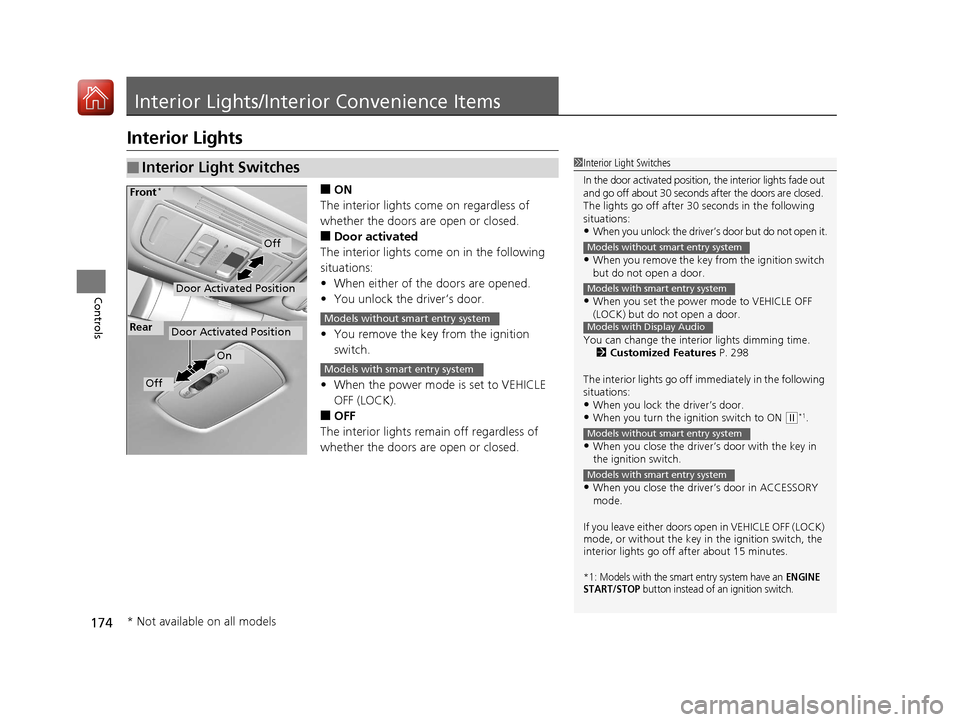
■ON
The interior lights come on regardless of
whether the doors are open or closed.
■Door activated
The interior lights come on in the following
situations:
• When either of the doors are opened.
• You unlock the driver’s door.
• You remove the key from the ignition
switch.
• When the power mode is set to VEHICLE
OFF (LOCK).
■OFF
The interior lights remain off regardless of
whether the doors are open or closed.
■Interior Light Switches1 Interior Light Switches
In the door activated position, the interior lights fade out
and go off about 30 seconds after the doors are closed.
The lights go off after 30 seconds in the following
situations:
•When you unlock the driver’s door but do not open it.
•When you remove the key from the ignition switch
but do not open a door.
•When you set the power mode to VEHICLE OFF
(LOCK) but do not open a door.
You can change the interi or lights dimming time.
2 Customized Features P. 298
The interior lights go off i mmediately in the following
situations:
•When you lock the driver’s door.•When you turn the ignition switch to ON ( w*1.
•When you close the driver’s door with the key in
the ignition switch.
•When you close the driver’s door in ACCESSORY
mode.
If you leave either doors open in VEHICLE OFF (LOCK)
mode, or without the key in the ignition switch, the
interior lights go off after about 15 minutes.
*1: Models with the smart entry system have an ENGINE
START/STOP button instead of an ignition switch.
Models without smart entry system
Models with smart entry system
Models with Display Audio
Models without smart entry system
Models with smart entry system
Door Activated Position
Off
Front*
Door Activated Position
On
Off
RearModels without smart entry system
Models with smart entry system
* Not available on all models
17 CIVIC 2D HCM (KA KC KL)-31TBG6100.book 174 ページ 2016年8月31日 水曜日 午後5時43分
Page 186 of 595
185Continued
Controls
Climate Control System
Using Automatic Climate Control
The automatic climate control system maintains the interior temperature you select.
The system also selects the proper mix of heat ed or cooled air that raises or lowers
the interior temperature to your pr eference as quickly as possible.
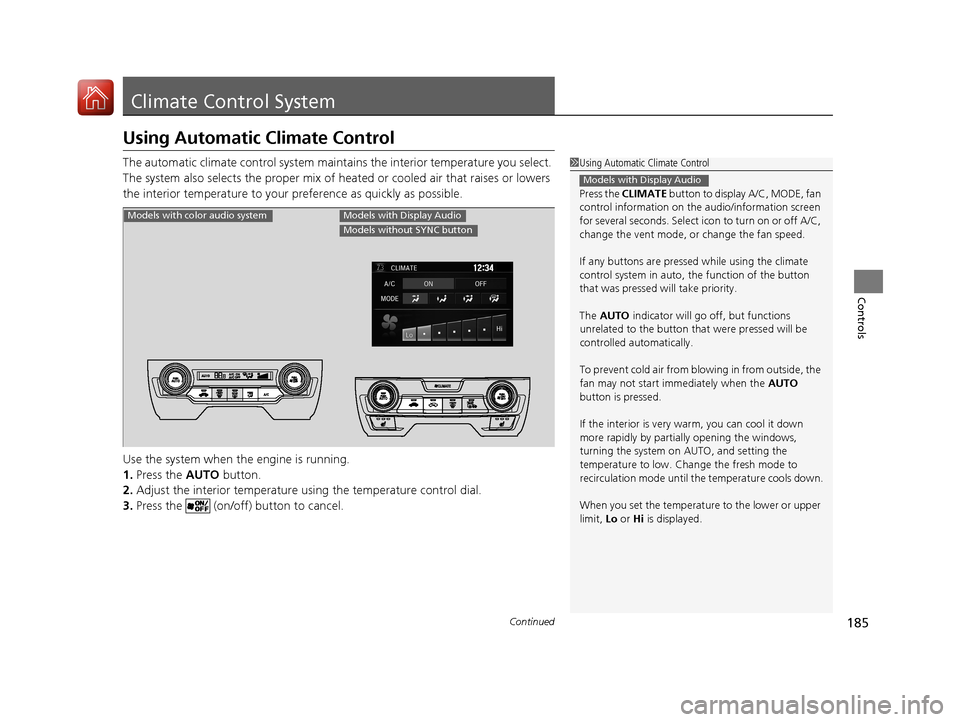
Use the system when the engine is running.
1. Press the AUTO button.
2. Adjust the interior temperature us ing the temperature control dial.
3. Press the (on/off) button to cancel.1Using Automatic Climate Control
Press the CLIMATE button to display A/C, MODE, fan
control information on the audio/information screen
for several seconds. Select ic on to turn on or off A/C,
change the vent mode, or change the fan speed.
If any buttons are presse d while using the climate
control system in auto, the function of the button
that was pressed wi ll take priority.
The AUTO indicator will go off, but functions
unrelated to the button that were pressed will be
controlled automatically.
To prevent cold air from bl owing in from outside, the
fan may not start i mmediately when the AUTO
button is pressed.
If the interior is very warm, you can cool it down
more rapidly by partial ly opening the windows,
turning the system on AUTO, and setting the
temperature to low. Change the fresh mode to
recirculation mode until the temperature cools down.
When you set the temperat ure to the lower or upper
limit, Lo or Hi is displayed.
Models with Display Audio
Models with color audio systemModels with Display Audio
Models without SYNC button
17 CIVIC 2D HCM (KA KC KL)-31TBG6100.book 185 ページ 2016年8月31日 水曜日 午後5時43分
Page 187 of 595
uuClimate Control System uUsing Automatic Climate Control
186
Controls
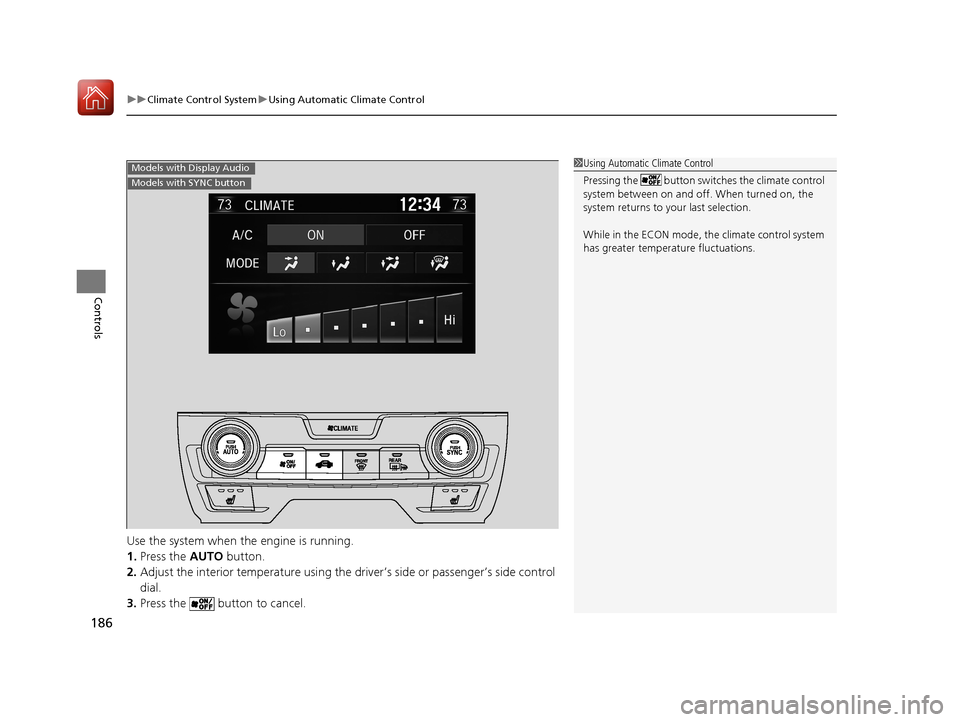
Use the system when the engine is running.
1. Press the AUTO button.
2. Adjust the interior temperature using the dr iver’s side or passenger’s side control
dial.
3. Press the butto n to cancel.
1Using Automatic Climate Control
Pressing the button switches the climate control
system between on and off. When turned on, the
system returns to your last selection.
While in the ECON mode, the climate control system
has greater temperat ure fluctuations.Models with Display Audio
Models with SYNC button
17 CIVIC 2D HCM (KA KC KL)-31TBG6100.book 186 ページ 2016年8月31日 水曜日 午後5時43分
Page 188 of 595
187
uuClimate Control System uUsing Automatic Climate Control
Continued
Controls
■Switching between the recirc ulation and fresh air modes
Press the (recirculation) button a nd switch the mode depending on
environmental conditions.
Recirculation mode (indicator on): Recirculat es air from the vehicle’s interior through
the system.
Fresh air mode (indicator off): Maintains outside ventilation. Keep the system in
fresh air mode in normal situations.
Press the (recirculation) or (fre sh air) button to switch the mode
depending on environmental conditions. Recirculation mode (indicator on): Reci rculates air from the vehicle’s interior
through the system. Fresh air mode (indicator on): Maintain s outside ventilation. Keep the system
in fresh air mode in normal situations.
Models with color audio system
Models with Display Audio
Models with SYNC button
Models with Display Audio
Models without SYNC button
17 CIVIC 2D HCM (KA KC KL)-31TBG6100.book 187 ページ 2016年8月31日 水曜日 午後5時43分
Page 194 of 595
193
Features
This chapter describes how to operate technology features.
Audio SystemAbout Your Audio System ................ 194
USB Port(s) ....................................... 195
Audio System Theft Protection ......... 196
Audio Remote Controls .................... 197
Audio System Basic Operation ........ 201
Audio/Information Screen ................ 202
Adjusting the Sound ........................ 206
Display Setup ................................... 207
Playing the AM/FM Radio ................. 208
Playing an iPod ................................ 210
Models with color audio system
Playing a USB Flash Drive ................. 213
Playing Bluetooth ® Audio................. 216
Audio System Basic Operation ........ 219
Audio/Information Screen ................ 220
Adjusting the Sound ........................ 241
Display Setup ................................... 242
Voice Control Operation .................. 244
Playing AM/FM Radio ....................... 248
Playing SiriusXM ® Radio
*................. 252
Playing an iPod ................................ 260
Song By Voice
TM (SBV) ...................... 263
Playing Pandora ®*............................ 267
Models with Display Audio
Playing a USB Flash Drive ................. 269
Playing Bluetooth ® Audio ................ 272
HondaLink ®..................................... 274
Wi-Fi Connection ............................. 279
Siri Eyes Free .................................... 281
Apple CarPlay .................................. 282
Android Auto .................................. 285
Audio Error Messages ...................... 289
General Information on the Audio System ............................................. 292
Customized Features ........................ 298
Bluetooth® HandsFreeLink® ..... 329, 352
* Not available on all models
17 CIVIC 2D HCM (KA KC KL)-31TBG6100.book 193 ページ 2016年8月31日 水曜日 午後5時43分
Page 195 of 595
194
Features
Audio System
About Your Audio System
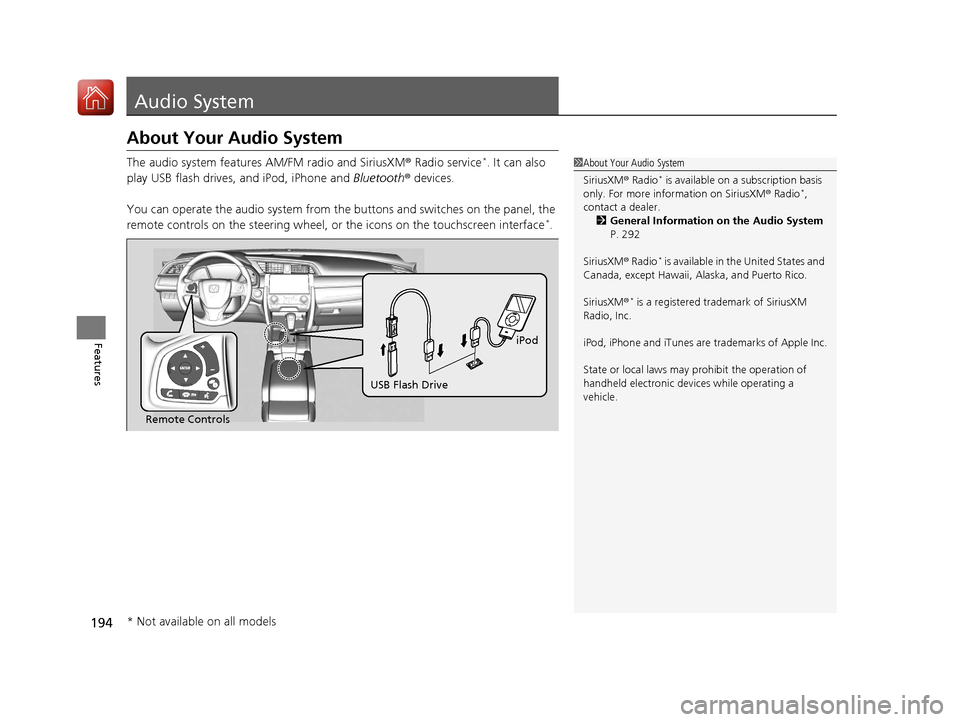
The audio system features AM/FM radio and SiriusXM® Radio service*. It can also
play USB flash drives, and iPod, iPhone and Bluetooth® devices.
You can operate the audio system from the buttons and switches on the panel, the
remote controls on the steering wheel, or the icons on the touchscreen interface
*.
1 About Your Audio System
SiriusXM ® Radio
* is available on a subscription basis
only. For more information on SiriusXM ® Radio*,
contact a dealer.
2 General Information on the Audio System
P. 292
SiriusXM ® Radio
* is available in the United States and
Canada, except Ha waii, Alaska, and Puerto Rico.
SiriusXM ®
* is a registered trademark of SiriusXM
Radio, Inc.
iPod, iPhone and iTunes are trademarks of Apple Inc.
State or local laws may pr ohibit the operation of
handheld electronic devices while operating a
vehicle.
Remote Controls iPod
USB Flash Drive
* Not available on all models
17 CIVIC 2D HCM (KA KC KL)-31TBG6100.book 194 ページ 2016年8月31日 水曜日 午後5時43分
Page 196 of 595
195
uuAudio System uUSB Port(s)
Features
USB Port(s)
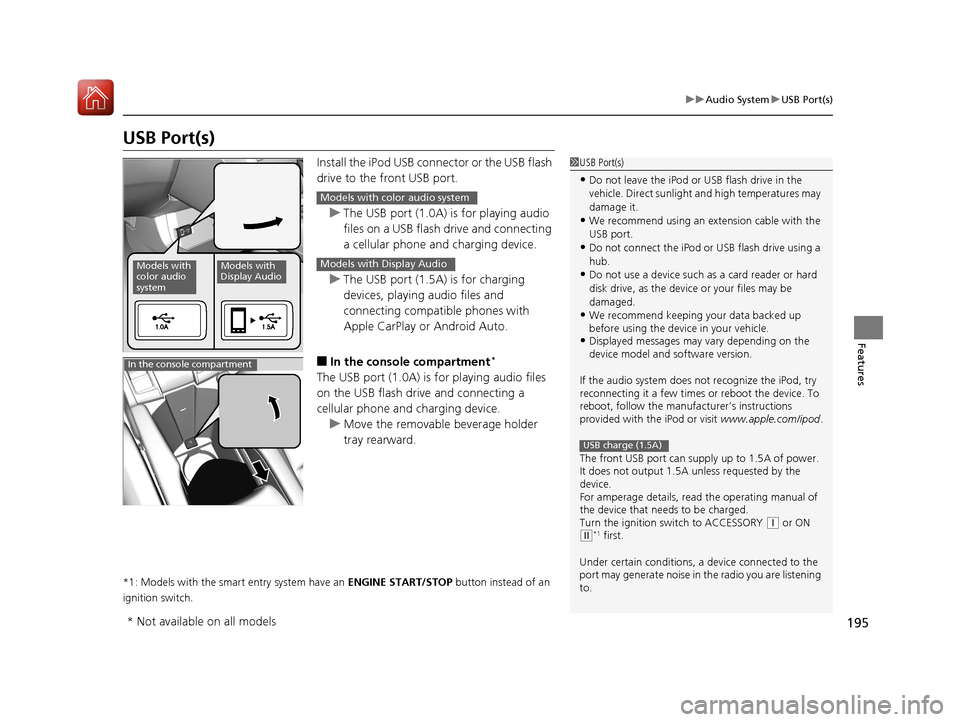
Install the iPod USB connector or the USB flash
drive to the front USB port.
u The USB port (1.0A) is for playing audio
files on a USB flash drive and connecting
a cellular phone and charging device.
u The USB port (1.5A) is for charging
devices, playing audio files and
connecting compatib le phones with
Apple CarPlay or Android Auto.
■In the consol e compartment*
The USB port (1.0A) is for playing audio files
on the USB flash drive and connecting a
cellular phone and charging device.
u Move the removable beverage holder
tray rearward.
*1: Models with the smart entry system have an ENGINE START/STOP button instead of an
ignition switch.
1 USB Port(s)
•Do not leave the iPod or USB flash drive in the
vehicle. Direct sunlight and high temperatures may
damage it.
•We recommend using an ex tension cable with the
USB port.
•Do not connect the iPod or USB flash drive using a
hub.
•Do not use a device such as a card reader or hard
disk drive, as the device or your files may be
damaged.
•We recommend k eeping your data backed up
before using the device in your vehicle.
•Displayed messages may vary depending on the
device model and software version.
If the audio system does not recognize the iPod, try
reconnecting it a few times or reboot the device. To
reboot, follow the manufac turer’s instructions
provided with the iPod or visit www.apple.com/ipod.
The front USB port can suppl y up to 1.5A of power.
It does not output 1.5A unless requested by the
device.
For amperage details, read the operating manual of
the device that ne eds to be charged.
Turn the ignition switch to ACCESSORY
( q or ON (w*1 first.
Under certain condi tions, a device connected to the
port may generate noise in the radio you are listening
to.
USB charge (1.5A)
Models with
color audio
systemModels with
Display Audio
Models with color audio system
Models with Display Audio
In the console compartment
* Not available on all models
17 CIVIC 2D HCM (KA KC KL)-31TBG6100.book 195 ページ 2016年8月31日 水曜日 午後5時43分
Page 197 of 595
196
uuAudio System uAudio System Theft Protection
Features
Audio System Theft Protection
The audio system is disabled when it is di sconnected from the power source, such as
when the battery is disconnected or goes dead. In certain conditions, the system
may display a code entry screen. If this occurs, reactivate the audio system.
■Reactivating th e audio system
1. Turn the ignition switch to ON
(w*1.
2. Turn on the audio system.
3. Press and hold the audio system power button for more than two seconds.
u The audio system is reac tivated when the audio co ntrol unit establishes a
connection with the vehicle control unit. If the control unit fails to recognize
the audio unit, you must go to a dealer and have the audio unit checked.
*1: Models with the smart entry system have an ENGINE START/STOP button instead of an
ignition switch.
17 CIVIC 2D HCM (KA KC KL)-31TBG6100.book 196 ページ 2016年8月31日 水曜日 午後5時43分
Page 198 of 595
197
uuAudio System uAudio Remote Controls
Continued
Features
Audio Remote Controls
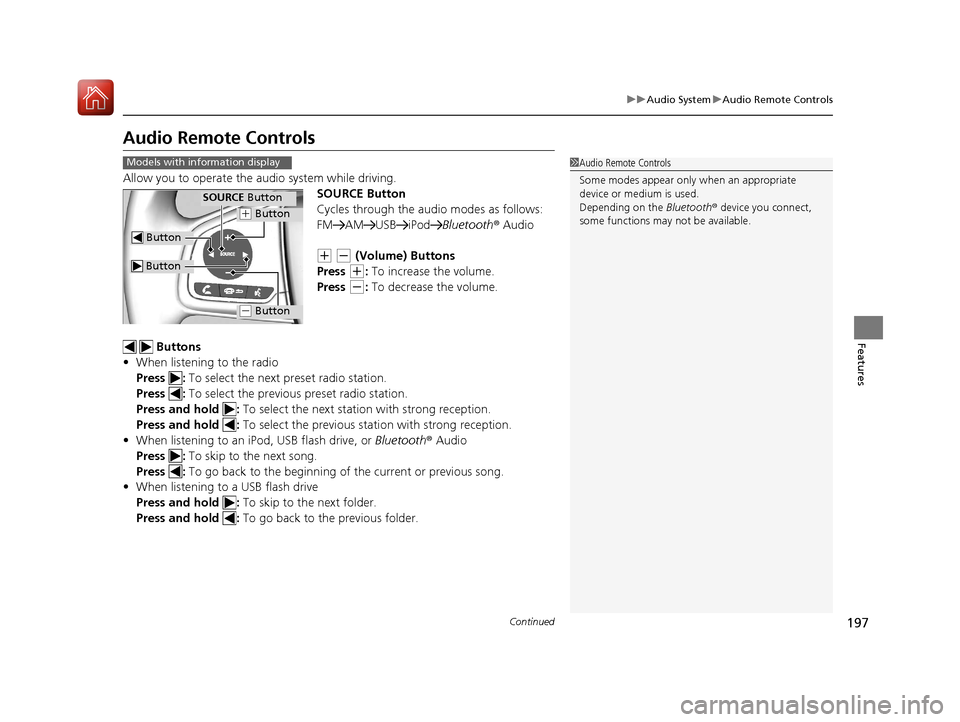
Allow you to operate the au dio system while driving.
SOURCE Button
Cycles through the audio modes as follows:
FM AM USB iPod Bluetooth® Audio
(+ (- (Volume) Buttons
Press
(+: To increase the volume.
Press
(-: To decrease the volume.
Buttons
• When listening to the radio
Press : To select the next preset radio station.
Press : To select the previous preset radio station.
Press and hold : To select the next station with strong reception.
Press and hold : To select the previous station with strong reception.
• When listening to an iPod, USB flash drive, or Bluetooth® Audio
Press : To skip to the next song.
Press : To go back to the beginning of the current or previous song.
• When listening to a USB flash drive
Press and hold : To skip to the next folder.
Press and hold : To go back to the previous folder.
1Audio Remote Controls
Some modes appear only when an appropriate
device or medium is used.
Depending on the Bluetooth® device you connect,
some functions may not be available.Models with information display
Button
SOURCE Button
Button
(+ Button
(- Button
17 CIVIC 2D HCM (KA KC KL)-31TBG6100.book 197 ページ 2016年8月31日 水曜日 午後5時43分
Page 199 of 595
uuAudio System uAudio Remote Controls
198
Features
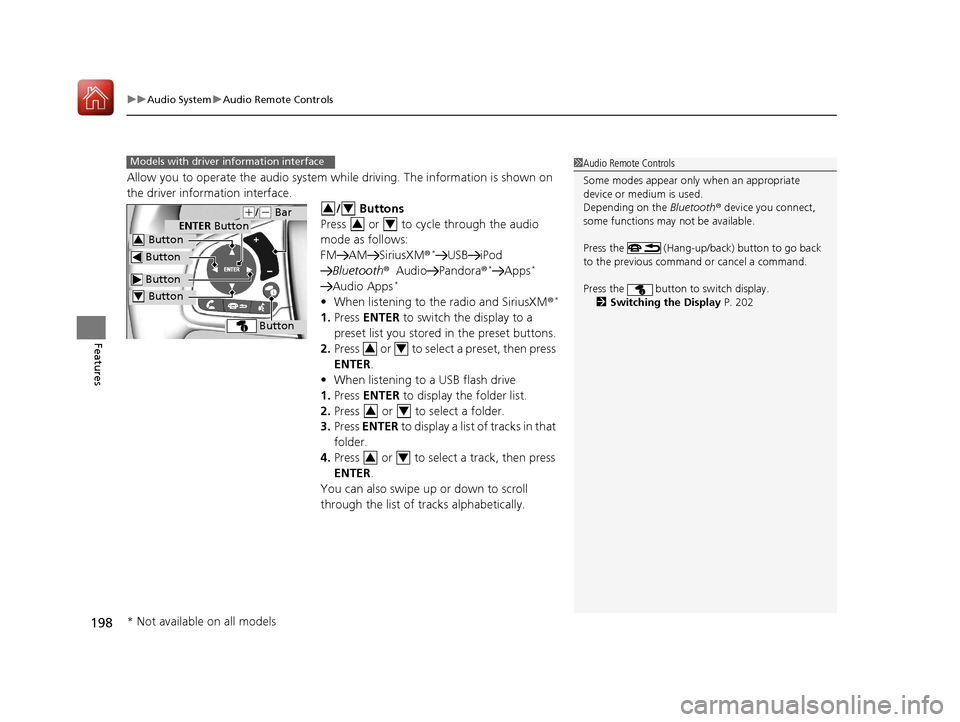
Allow you to operate the audio system wh ile driving. The information is shown on
the driver information interface.
/ Buttons
Press or to cycle through the audio
mode as follows:
FM AM SiriusXM®
*USB iPod
Bluetooth ®Audio Pandora ®*Apps*
Audio Apps*
•When listening to the radio and SiriusXM ®*
1.Press ENTER to switch the display to a
preset list you stored in the preset buttons.
2. Press or to select a preset, then press
ENTER .
• When listening to a USB flash drive
1. Press ENTER to display the folder list.
2. Press or to select a folder.
3. Press ENTER to display a list of tracks in that
folder.
4. Press or to select a track, then press
ENTER .
You can also swipe up or down to scroll
through the list of tracks alphabetically.
1 Audio Remote Controls
Some modes appear only when an appropriate
device or medium is used.
Depending on the Bluetooth® device you connect,
some functions may not be available.
Press the (Hang-up/back) button to go back
to the previous command or cancel a command.
Press the button to switch display. 2 Switching the Display P. 202Models with driver information interface
Button
ENTER Button
Button
(+/(- Bar
Button
Button3
Button4
34
34
34
34
34
* Not available on all models
17 CIVIC 2D HCM (KA KC KL)-31TBG6100.book 198 ページ 2016年8月31日 水曜日 午後5時43分