engine HONDA CIVIC COUPE 2017 10.G Service Manual
[x] Cancel search | Manufacturer: HONDA, Model Year: 2017, Model line: CIVIC COUPE, Model: HONDA CIVIC COUPE 2017 10.GPages: 595
Page 112 of 595
111
uuGauges and Displays uInformation Display*
Continued
Instrument Panel
Information Display*
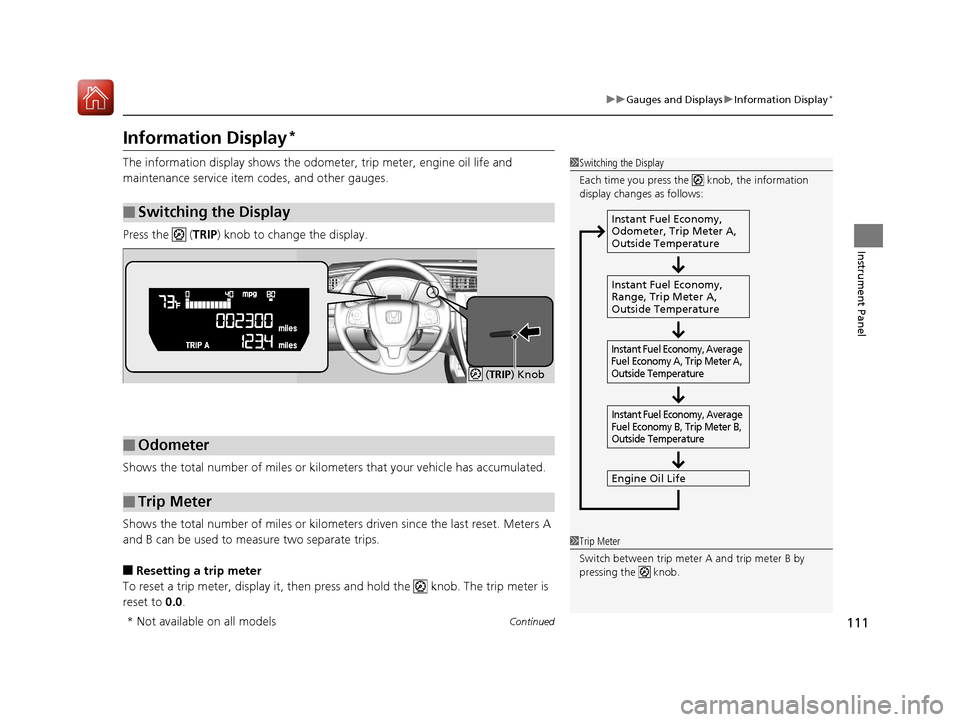
The information display shows the odometer, trip meter, engine oil life and
maintenance service item codes, and other gauges.
Press the ( TRIP) knob to change the display.
Shows the total number of miles or kilome ters that your vehicle has accumulated.
Shows the total number of miles or kilomete rs driven since the last reset. Meters A
and B can be used to measure two separate trips.
■Resetting a trip meter
To reset a trip meter, display it, then pr ess and hold the knob. The trip meter is
reset to 0.0.
■Switching the Display
1Switching the Display
Each time you press the knob, the information
display changes as follows:
Instant Fuel Economy,
Odometer, Trip Meter A,
Outside Temperature
Instant Fuel Economy,
Range, Trip Meter A,
Outside Temperature
Engine Oil Life
Instant Fuel Economy, Average
Fuel Economy A, Trip Meter A,
Outside Temperature Instant Fuel Economy, Average
Fuel Economy B, Trip Meter B,
Outside Temperature
■Odometer
■Trip Meter
( TRIP) Knob
1 Trip Meter
Switch between trip meter A and trip meter B by
pressing the knob.
* Not available on all models
17 CIVIC 2D HCM (KA KC KL)-31TBG6100.book 111 ページ 2016年8月31日 水曜日 午後5時43分
Page 113 of 595
uuGauges and Displays uInformation Display*
112
Instrument Panel
Shows the estimated average fuel economy of each trip meter in mpg or l/100 km.
The display is updated at set intervals. When a trip meter is reset, the average fuel
economy is also reset.
Shows the instant fuel economy as a bar graph in mpg or l/100km.
Shows the remaining oil life and Maintenance Minder
TM.
2 Maintenance MinderTM P. 479
Shows the estimated distance you can travel on the remaining fuel. This distance is
estimated from the fuel economy of your previous trips.
■Average Fuel Economy
■Instant Fuel Economy Gauge
■Engine Oil Life
■Range
1 Average Fuel Economy
Press and hold the km/mile change knob to switch
the measurement.
1Instant Fuel Economy Gauge
Press and hold the km/mile change knob to switch
the measurement.
1 Range
Press and hold the km/mile change knob to switch
the measurement.
17 CIVIC 2D HCM (KA KC KL)-31TBG6100.book 112 ページ 2016年8月31日 水曜日 午後5時43分
Page 114 of 595
113
uuGauges and Displays uInformation Display*
Instrument Panel
Shows the outside temperature in Fahrenheit.
■Adjusting the outside temperature indicator
Adjust the temperature reading up to ± 5°F if the temperature reading seems
incorrect.
1. Turn the ignition switch to ON
(w*1.
2. Press and hold the ( TRIP) knob for 10 seconds or more while the outside
temperature is shown on the information display.
u The information display goes into temp erature adjustment mode. The display
starts showing from -5°F to +5°F.
3. Release the knob when the righ t adjustment amount is shown.
u The adjustment is complete.
*1: Models with the smart entry system have an ENGINE START/STOP button instead of an
ignition switch.
■Outside Temperature1 Outside Temperature
The temperature sensor is in the front bumper.
Road heat and exhaust from another vehicle can
affect the temperature reading when your vehicle
speed is less than 19 mph (30 km/h).
It may take several minutes for the display to be
updated after the temperature reading has stabilized.
17 CIVIC 2D HCM (KA KC KL)-31TBG6100.book 113 ページ 2016年8月31日 水曜日 午後5時43分
Page 117 of 595
uuGauges and Displays uDriver Information Interface*
116
Instrument Panel
Shows the estimated average fuel economy of each trip meter in mpg or l/100 km.
The display is updated at set intervals. When a trip meter is reset, the average fuel
economy is also reset.
Shows the estimated distance you can travel on the remaining fuel. This distance is
estimated from the fuel economy of your previous trips.
Shows the time elapsed since Trip A or Trip B was reset.
Shows the average speed in mph or km/h since Trip A or Trip B was reset.
Shows the remaining oil life and Maintenance Minder
TM.
2 Maintenance MinderTM P. 479
■Average Fuel Economy
■Range
■Elapsed Time
■Average Speed
■Engine Oil Life
1Average Fuel Economy
You can change when to reset the average fuel
economy.
2 Customized Features P. 298
1Elapsed Time
You can change when to reset the elapsed time.
2 Customized Features P. 298
1Average Speed
You can change when to reset the average speed.
2 Customized Features P. 298
17 CIVIC 2D HCM (KA KC KL)-31TBG6100.book 116 ページ 2016年8月31日 水曜日 午後5時43分
Page 120 of 595
119
Controls
This chapter explains how to operate the various controls necessary for driving.
Clock.................................................. 120
Locking and Unlocking the Doors Key Types and Functions .................. 122
Low Smart Entry Remote Signal Strength*... 124Locking/Unlocking the Doors from the Outside .......................................... 125
Locking/Unlocking the Doors from the Inside ............................................. 132
Auto Door Locking/Unlocking .......... 135
Opening and Closing the Trunk ....... 139
Security System Immobilizer System .......................... 142
Security System Alarm ...................... 142
Opening and Closing the Windows ..... 145Opening and Closing the Moonroof*..... 148
Operating the Switches Around the
Steering Wheel
Ignition Switch
*............................... 149
ENGINE START/STOP Button*........... 150
Ignition Switch and Power Mode Comparison ................................... 153
Turn Signals ..................................... 154
Light Switches.................................. 154
Fog Lights
*...................................... 157
Daytime Running Lights ................... 157
Wipers and Washers ........................ 158
Brightness Control ........................... 160
Rear Defogger/Heat ed Door Mirror
*
Button ........................................... 161
Adjusting the Steering Wheel........... 162 Adjusting the Mirrors
Interior Rearview Mirror ................... 163
Power Door Mirrors ......................... 164
Adjusting the Seats .......................... 165
Interior Lights/Interior Convenience Items ................................................ 174
Climate Control System Using Automatic Climate Control .... 185
Automatic Climate Control Sensors......191
* Not available on all models
17 CIVIC 2D HCM (KA KC KL)-31TBG6100.book 119 ページ 2016年8月31日 水曜日 午後5時43分
Page 121 of 595
120
Controls
Clock
Adjusting the Clock
You can adjust the time in the clock display with the ignition switch in ON (w*1.
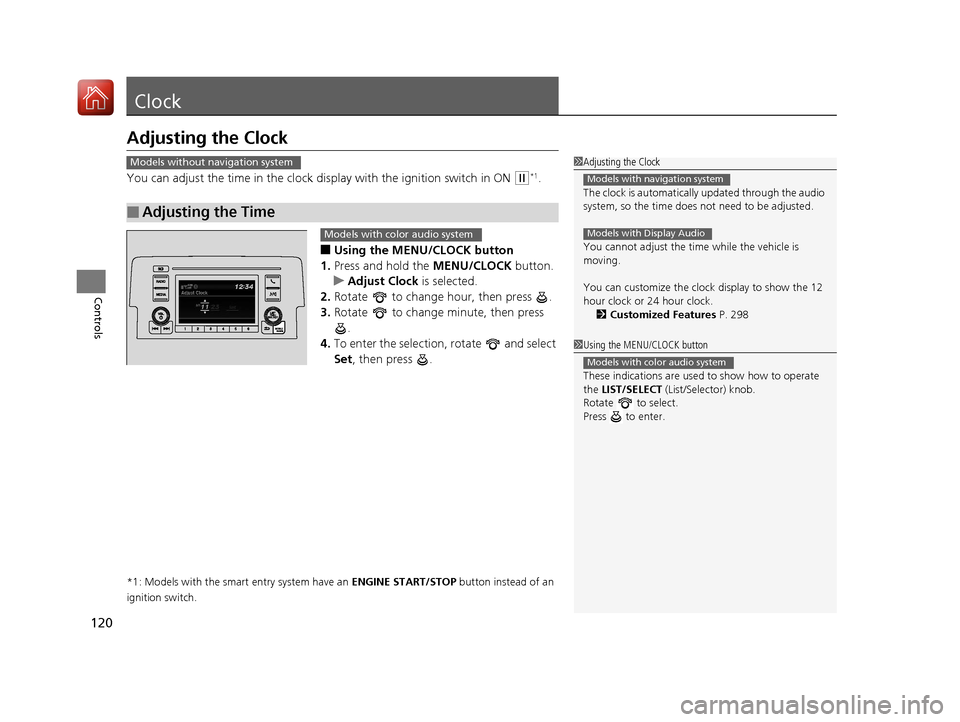
■Using the MENU/CLOCK button
1. Press and hold the MENU/CLOCK button.
u Adjust Clock is selected.
2. Rotate to change hour, then press .
3. Rotate to change minute, then press
.
4. To enter the selection, rotate and select
Set , then press .
*1: Models with the smart entry system have an ENGINE START/STOP button instead of an
ignition switch.
■Adjusting the Time
1 Adjusting the Clock
The clock is automatically updated through the audio
system, so the time does not need to be adjusted.
You cannot adjust the time while the vehicle is
moving.
You can customize the clock display to show the 12
hour clock or 24 hour clock.
2 Customized Features P. 298
Models with navigation system
Models with Display Audio
Models without navigation system
1Using the MENU/CLOCK button
These indications are used to show how to operate
the LIST/SELECT (List/Selector) knob.
Rotate to select.
Press to enter.
Models with color audio system
Models with color audio system
17 CIVIC 2D HCM (KA KC KL)-31TBG6100.book 120 ページ 2016年8月31日 水曜日 午後5時43分
Page 123 of 595
122
Controls
Locking and Unlocking the Doors
Key Types and Functions
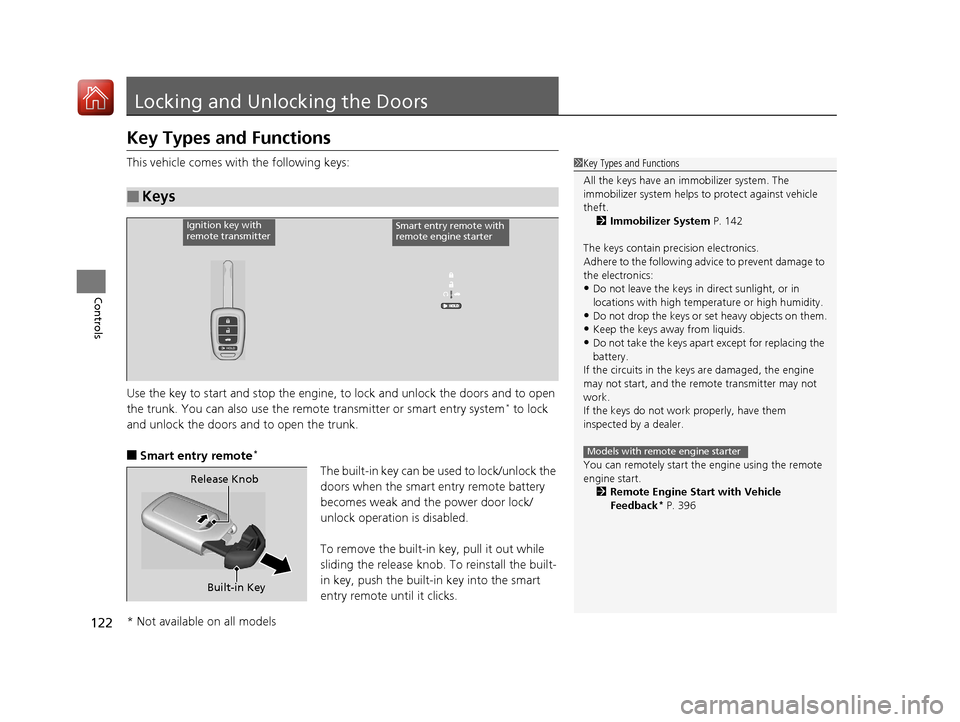
This vehicle comes with the following keys:
Use the key to start and stop the engine, to lock and unlock the doors and to open
the trunk. You can also use the remote transmitter or smart entry system
* to lock
and unlock the doors and to open the trunk.
■Smart entry remote*
The built-in key can be us ed to lock/unlock the
doors when the smart entry remote battery
becomes weak and th e power door lock/
unlock operation is disabled.
To remove the built-in key, pull it out while
sliding the release knob. To reinstall the built-
in key, push the built-in key into the smart
entry remote until it clicks.
■Keys
1 Key Types and Functions
All the keys have an immobilizer system. The
immobilizer system helps to protect against vehicle
theft. 2 Immobilizer System P. 142
The keys contain precision electronics.
Adhere to the following advi ce to prevent damage to
the electronics:
•Do not leave the keys in direct sunlight, or in
locations with high temperature or high humidity.
•Do not drop the keys or set heavy objects on them.
•Keep the keys away from liquids.
•Do not take the keys apart except for replacing the
battery.
If the circuits in the keys are damaged, the engine
may not start, and the remote transmitter may not
work.
If the keys do not work properly, have them
inspected by a dealer.
You can remotely start the engine using the remote
engine start.
2 Remote Engine Start with Vehicle
Feedback
* P. 396
Models with remote engine starter
Ignition key with
remote transmitterSmart entry remote with
remote engine starter
Built-in Key
Release Knob
* Not available on all models
17 CIVIC 2D HCM (KA KC KL)-31TBG6100.book 122 ページ 2016年8月31日 水曜日 午後5時43分
Page 124 of 595
123
uuLocking and Unlocking the Doors uKey Types and Functions
Controls
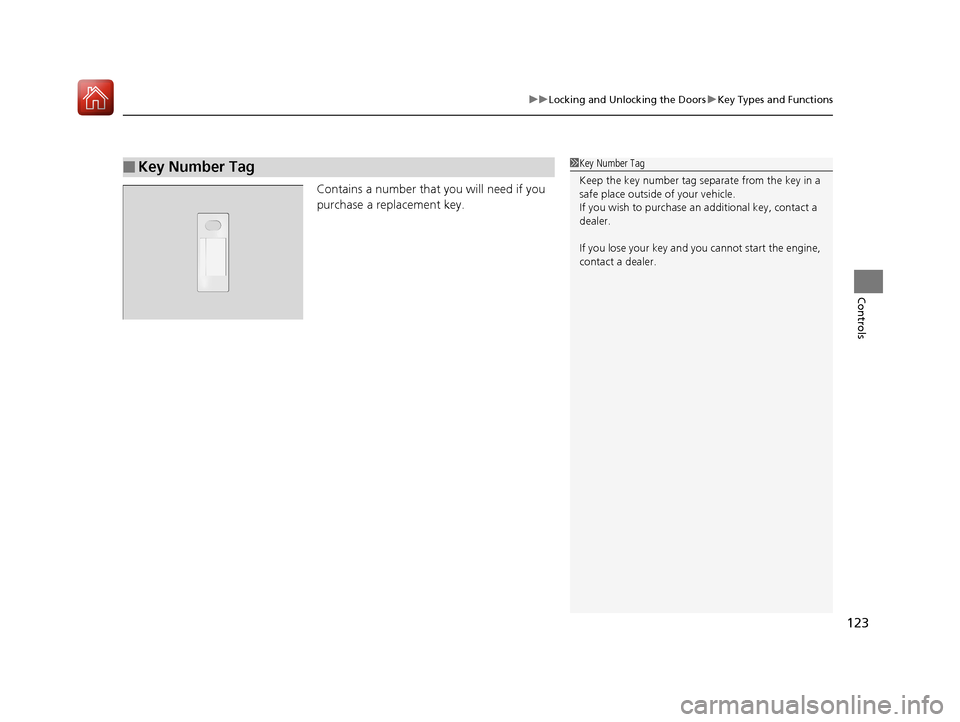
Contains a number that you will need if you
purchase a replacement key.
■Key Number Tag1Key Number Tag
Keep the key number tag separate from the key in a
safe place outside of your vehicle.
If you wish to purchase an additional key, contact a
dealer.
If you lose your key and you cannot start the engine,
contact a dealer.
17 CIVIC 2D HCM (KA KC KL)-31TBG6100.book 123 ページ 2016年8月31日 水曜日 午後5時43分
Page 125 of 595
124
uuLocking and Unlocking the Doors uLow Smart Entry Remote Signal Strength*
Controls
Low Smart Entry Remo te Signal Strength*
The vehicle transmits radio waves to loca te the smart entry remote when locking/
unlocking the doors and fuel fill door, opening the trunk, or starting the engine.
In the following cases, locking/unlocking the doors, opening the trunk, or starting
the engine may be inhibited or operation may be unstable:
• Strong radio waves are being tra nsmitted by nearby equipment.
• You are carrying the smart entry remote together with telecommunications
equipment, laptop computers, ce ll phones, or wireless devices.
• A metallic object is touching or covering the smart entry remote.1Low Smart Entry Remote Signal Strength*
Communication between the smart entry remote and
the vehicle consumes the smart entry remote’s
battery.
Battery life is about two years, but this varies
depending on re gularity of use.
The battery is consumed whenever the smart entry
remote is receivi ng strong radio wave s. Avoid placing
it near electrical appliances such as televisions and
personal computers.
* Not available on all models
17 CIVIC 2D HCM (KA KC KL)-31TBG6100.book 124 ページ 2016年8月31日 水曜日 午後5時43分
Page 138 of 595
137
uuLocking and Unlocking the Doors uCustomizing the Auto Door Locking/Unlocking Setting
Continued
Controls
*1:Models with the smart entry system have an ENGINE START/STOP button instead of an ignition switch.
*2:Default setting
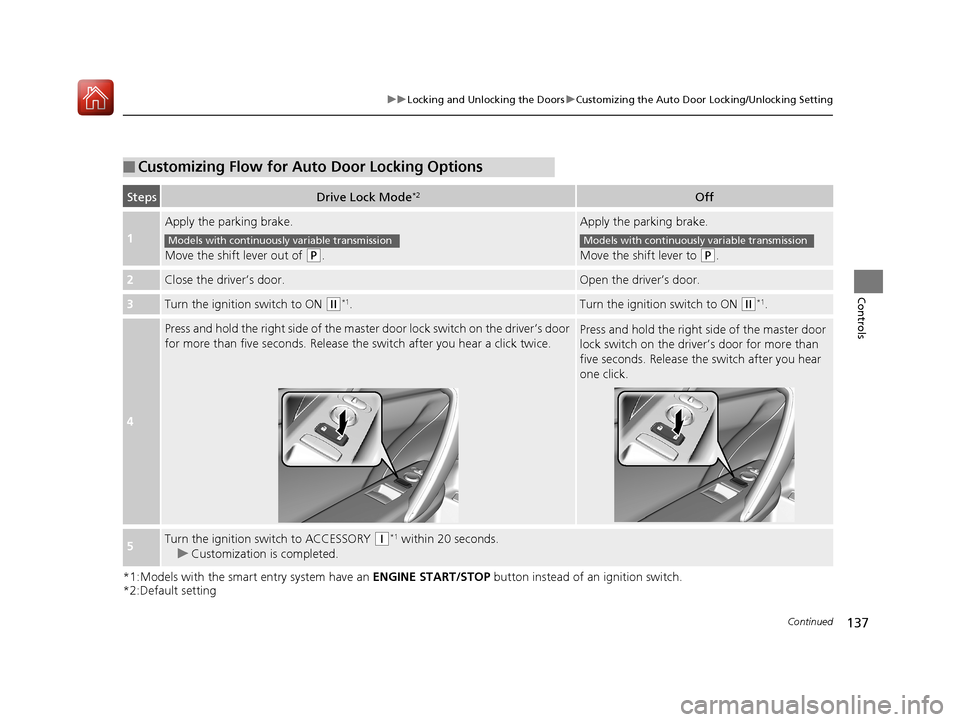
■Customizing Flow for Auto Door Locking Options
StepsDrive Lock Mode*2Off
1
Apply the parking brake.
Move the shift lever out of
(P.
Apply the parking brake.
Move the shift lever to
(P.
2Close the driver’s door.Open the driver’s door.
3Turn the ignition switch to ON (w*1.Turn the ignition switch to ON (w*1.
4
Press and hold the right side of the master door lock switch on the driver’s door
for more than five seconds. Release th e switch after you hear a click twice.Press and hold the right side of the master door
lock switch on the driver’s door for more than
five seconds. Release the switch after you hear
one click.
5Turn the ignition switch to ACCESSORY (q*1 within 20 seconds.
u Customization is completed.
Models with continuously variable transmissionModels with continuously variable transmission
17 CIVIC 2D HCM (KA KC KL)-31TBG6100.book 137 ページ 2016年8月31日 水曜日 午後5時43分