roof HONDA CIVIC COUPE 2017 10.G Owners Manual
[x] Cancel search | Manufacturer: HONDA, Model Year: 2017, Model line: CIVIC COUPE, Model: HONDA CIVIC COUPE 2017 10.GPages: 595
Page 3 of 595
Contents
This owner’s manual should be considered a permanent part of the
vehicle and should remain with the vehicle when it is sold.
This owner’s manual covers all models of your vehicle. You may find
descriptions of equipment and features that are not on your
particular model.
Images throughout this owner’s manual (including the front cover)
represent features and equipment that are available on some, but
not all, models. Your particular mo del may not have some of these
features.
This owner’s manual is for vehicles sold in the United States and
Canada.
The information and specifications in cluded in this publication were
in effect at the time of approval for printing. Honda Motor Co., Ltd.
reserves the right, however, to discontinue or change specifications
or design at any time without notice and without incurring any
obligation.2 Safe Driving P. 33
For Safe Driving P. 34 Seat Belts P. 38 Airbags P. 46
2Instrument Panel P. 75
Indicators P. 76 Gauges and Displays P. 109
2Controls P. 119
Clock P. 120 Locking and Unlocking the Doors P. 122
Opening and Closing the Moonroof* P. 148
Adjusting the Seats P. 165
2 Features P. 193
Audio System P. 194 Audio System Basic Operation P. 201, 219
Customized Features P. 298 Bluetooth® HandsFreeLink ® P. 329, 352
2 Driving P. 385
Before Driving P. 386 Towing a Trailer P. 391
Multi-View Rear Camera P. 468 Refueling P. 470
2Maintenance P. 475
Before Performing Maintenance P. 476 Maintenance MinderTM P. 479
Checking and Maintaining Wiper Blades P. 513
Climate Control System Maintenance P. 529
2Handling the Unexpected P. 537
Tools P. 538 If a Tire Goes Flat P. 539
Overheating P. 553 Indicator, Coming On/Blinking P. 555
When You Cannot Open the Trunk P. 567 Refueling P. 568
2Information P. 569
Specifications P. 570 Identification Numbers P. 574
Emissions Testing P. 577 Warranty Coverages P. 579
17 CIVIC 2D HCM (KA KC KL)-31TBG6100.book 2 ページ 2016年8月31日 水曜日 午後5時43分
Page 8 of 595
7
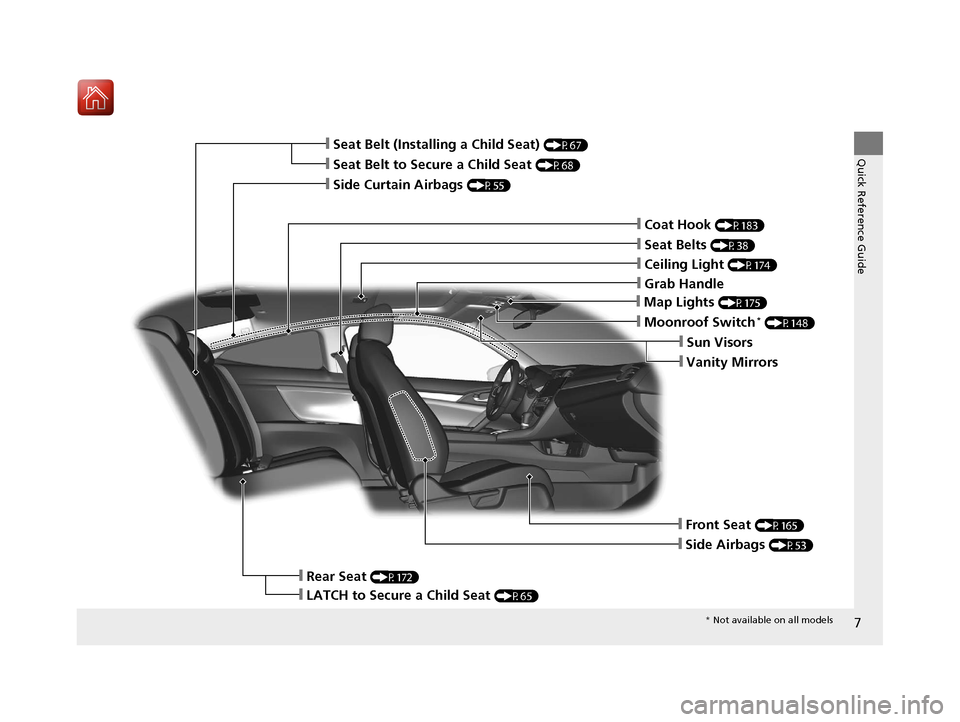
Quick Reference Guide❙Seat Belt to Secure a Child Seat (P68)
❙Seat Belt (Installing a Child Seat) (P67)
❙Moonroof Switch* (P148)
❙Front Seat (P165)
❙Seat Belts (P38)
❙Side Airbags (P53)
❙Rear Seat (P172)
❙LATCH to Secure a Child Seat (P65)
❙Side Curtain Airbags (P55)
❙Coat Hook (P183)
❙Sun Visors
❙Vanity Mirrors
❙Map Lights (P175)
❙Grab Handle
❙Ceiling Light (P174)
* Not available on all models
17 CIVIC 2D HCM (KA KC KL)-31TBG6100.book 7 ページ 2016年8月31日 水曜日 午後5時43分
Page 56 of 595
55
uuAirbags uSide Curtain Airbags
Continued
Safe Driving
Side Curtain Airbags
The side curtain airbags help protect the heads of the driver and passengers in the
outer seating positions during a moderate-to -severe side impact. The side curtain
airbags equipped in this vehicle are also designed to help reduce the likelihood of
partial and complete ejection of vehicle occupants through side windows in crashes,
particularly rollover crashes.
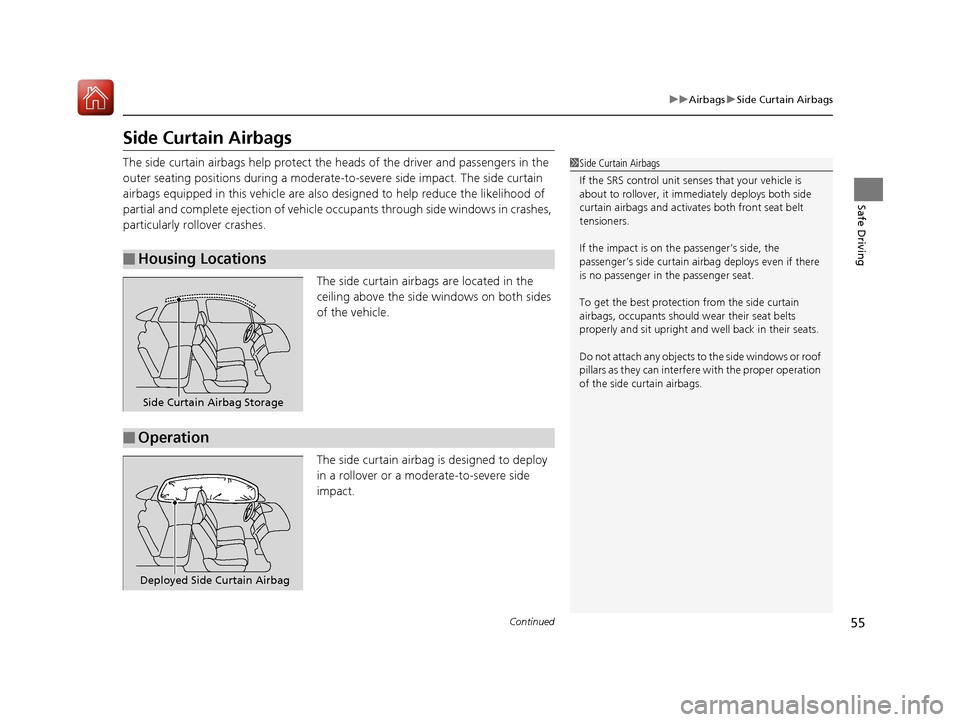
The side curtain airbags are located in the
ceiling above the side windows on both sides
of the vehicle.
The side curtain airbag is designed to deploy
in a rollover or a moderate-to-severe side
impact.
■Housing Locations
1 Side Curtain Airbags
If the SRS control unit sens es that your vehicle is
about to rollover, it imme diately deploys both side
curtain airbags and activates both front seat belt
tensioners.
If the impact is on the passenger’s side, the
passenger’s side curtain airbag deploys even if there
is no passenger in the passenger seat.
To get the best protecti on from the side curtain
airbags, occupants should wear their seat belts
properly and sit upr ight and well back in their seats.
Do not attach any objects to the side windows or roof
pillars as they can interfere with the proper operation
of the side curtain airbags.
Side Curtain Airbag Storage
■Operation
Deployed Side Curtain Airbag
17 CIVIC 2D HCM (KA KC KL)-31TBG6100.book 55 ページ 2016年8月31日 水曜日 午後5時43分
Page 120 of 595
119
Controls
This chapter explains how to operate the various controls necessary for driving.
Clock.................................................. 120
Locking and Unlocking the Doors Key Types and Functions .................. 122
Low Smart Entry Remote Signal Strength*... 124Locking/Unlocking the Doors from the Outside .......................................... 125
Locking/Unlocking the Doors from the Inside ............................................. 132
Auto Door Locking/Unlocking .......... 135
Opening and Closing the Trunk ....... 139
Security System Immobilizer System .......................... 142
Security System Alarm ...................... 142
Opening and Closing the Windows ..... 145Opening and Closing the Moonroof*..... 148
Operating the Switches Around the
Steering Wheel
Ignition Switch
*............................... 149
ENGINE START/STOP Button*........... 150
Ignition Switch and Power Mode Comparison ................................... 153
Turn Signals ..................................... 154
Light Switches.................................. 154
Fog Lights
*...................................... 157
Daytime Running Lights ................... 157
Wipers and Washers ........................ 158
Brightness Control ........................... 160
Rear Defogger/Heat ed Door Mirror
*
Button ........................................... 161
Adjusting the Steering Wheel........... 162 Adjusting the Mirrors
Interior Rearview Mirror ................... 163
Power Door Mirrors ......................... 164
Adjusting the Seats .......................... 165
Interior Lights/Interior Convenience Items ................................................ 174
Climate Control System Using Automatic Climate Control .... 185
Automatic Climate Control Sensors......191
* Not available on all models
17 CIVIC 2D HCM (KA KC KL)-31TBG6100.book 119 ページ 2016年8月31日 水曜日 午後5時43分
Page 147 of 595
146
uuOpening and Closing the Windows uOpening/Closing th e Power Windows
Controls
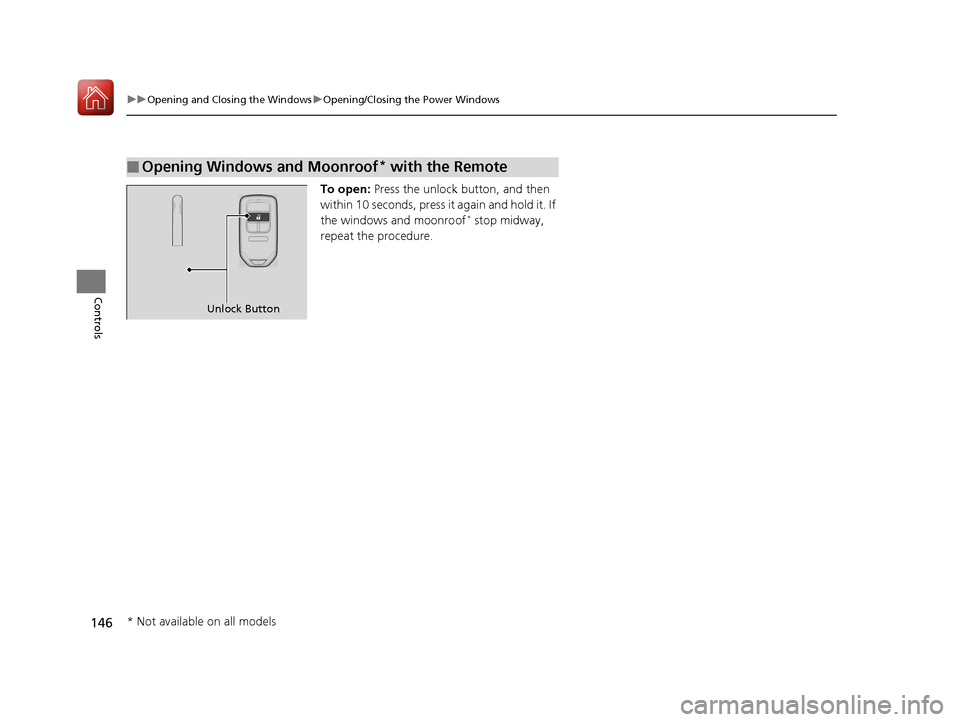
To open: Press the unlock button, and then
within 10 seconds, press it again and hold it. If
the windows and moonroof
* stop midway,
repeat the procedure.
■Opening Windows and Moonroof* with the Remote
Unlock Button
* Not available on all models
17 CIVIC 2D HCM (KA KC KL)-31TBG6100.book 146 ページ 2016年8月31日 水曜日 午後5時43分
Page 148 of 595
147
uuOpening and Closing the Windows uOpening/Closing the Power Windows
Controls
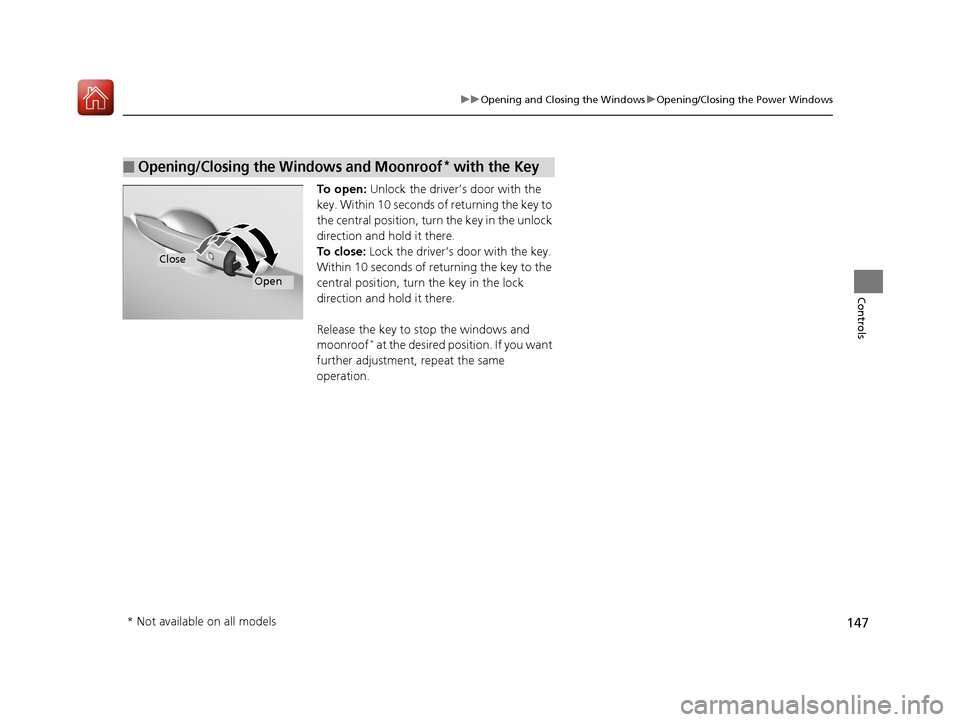
To open: Unlock the driver’s door with the
key. Within 10 seconds of returning the key to
the central position, turn the key in the unlock
direction and hold it there.
To close: Lock the driver’s door with the key.
Within 10 seconds of re turning the key to the
central position, turn the key in the lock
direction and hold it there.
Release the key to stop the windows and
moonroof
* at the desired position. If you want
further adjustment, repeat the same
operation.
■Opening/Closing the Windows and Moonroof* with the Key
Close
Open
* Not available on all models
17 CIVIC 2D HCM (KA KC KL)-31TBG6100.book 147 ページ 2016年8月31日 水曜日 午後5時43分
Page 149 of 595
148
Controls
Opening and Closing the Moonroof*
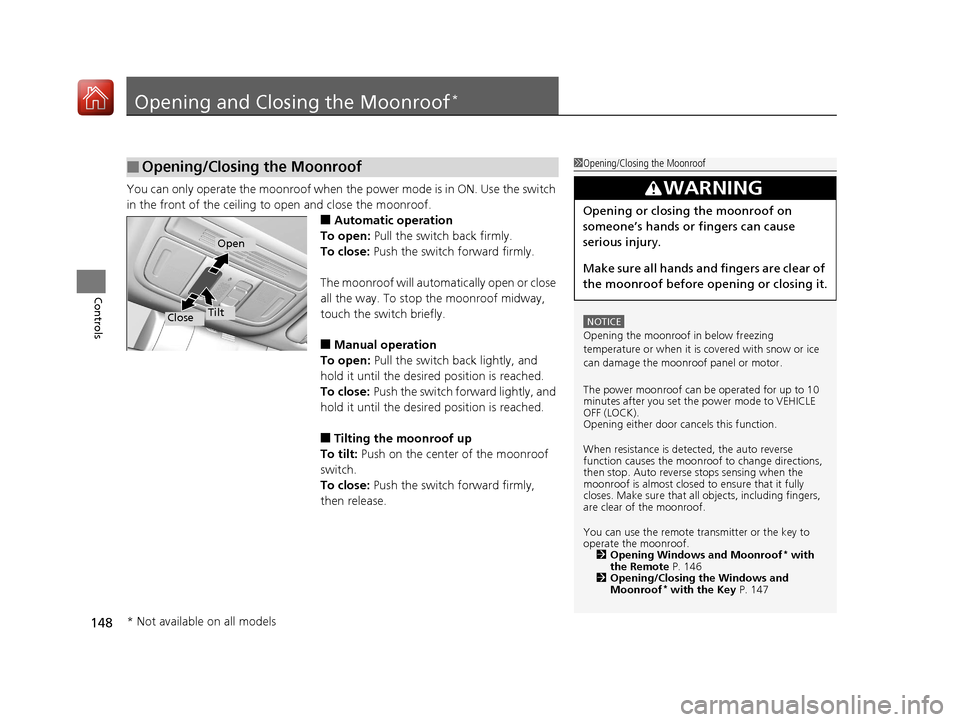
You can only operate the moonroof when the power mode is in ON. Use the switch
in the front of the ceiling to open and close the moonroof.
■Automatic operation
To open: Pull the switch back firmly.
To close: Push the switch forward firmly.
The moonroof will automatically open or close
all the way. To stop the moonroof midway,
touch the switch briefly.
■Manual operation
To open: Pull the switch back lightly, and
hold it until the desired position is reached.
To close: Push the switch fo rward lightly, and
hold it until the desired position is reached.
■Tilting the moonroof up
To tilt: Push on the center of the moonroof
switch.
To close: Push the switch forward firmly,
then release.
■Opening/Closing the Moonroof1 Opening/Closing the Moonroof
NOTICE
Opening the moonroof in below freezing
temperature or when it is covered with snow or ice
can damage the moonr oof panel or motor.
The power moonroof can be operated for up to 10
minutes after you set the power mode to VEHICLE
OFF (LOCK).
Opening either door cancels this function.
When resistance is detected, the auto reverse
function causes the moonroof to change directions,
then stop. Auto reverse stops sensing when the
moonroof is almost closed to ensure that it fully
closes. Make sure that al l objects, including fingers,
are clear of the moonroof.
You can use the remote transmitter or the key to
operate the moonroof. 2 Opening Windows and Moonroof
* with
the Remote P. 146
2 Opening/Closing the Windows and
Moonroof
* with the Key P. 147
3WARNING
Opening or closing the moonroof on
someone’s hands or fingers can cause
serious injury.
Make sure all hands and fingers are clear of
the moonroof before opening or closing it.
Open
CloseTilt
* Not available on all models
17 CIVIC 2D HCM (KA KC KL)-31TBG6100.book 148 ページ 2016年8月31日 水曜日 午後5時43分
Page 176 of 595
175
uuInterior Lights/Interior Convenience Items uInterior Lights
Controls
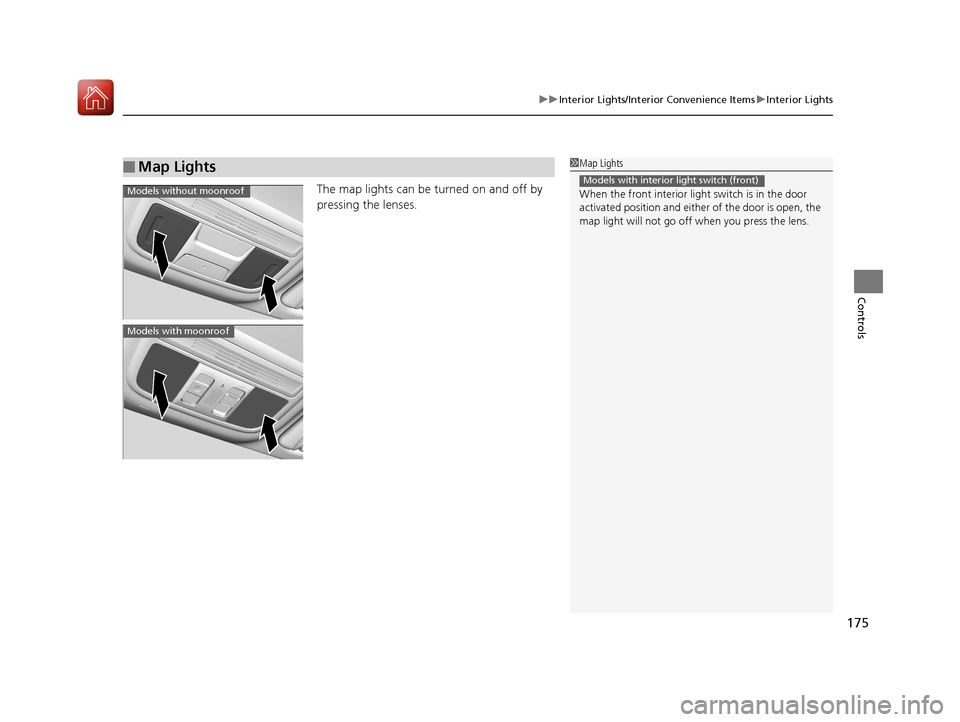
The map lights can be turned on and off by
pressing the lenses.
■Map Lights1Map Lights
When the front interior li ght switch is in the door
activated position and either of the door is open, the
map light will not go off when you press the lens.
Models with interior light switch (front)Models without moonroof
Models with moonroof
17 CIVIC 2D HCM (KA KC KL)-31TBG6100.book 175 ページ 2016年8月31日 水曜日 午後5時43分
Page 245 of 595
244
uuAudio System Basic Operation uVoice Control Operation
Features
Voice Control Operation
Your vehicle has a voice control system that allows hands-free operation.
The voice control system uses the ( Talk) and (hang-up/back) buttons on
the steering wheel and a microphone near the map lights on the ceiling.
To achieve optimum voice recognition when using the voice control system:
• Make sure the correct screen is displa yed for the voice command that you are
using.
• Close the windows and moonroof
*.
• Adjust the dashboard and side vents so air does not blow onto the microphone
on the ceiling.
• Speak clearly in a natural speaking vo ice without pausing between words.
• Reduce any background noise if possible. The system may misinterpret your
command if more than one person is speaking at the same time.
■Voice Recognition
1Voice Control Operation
When you press the button, a helpful prompt asks
what you would like to do. Press and release the
button again to bypass this prompt and give a
command.
1 Voice Recognition
The voice control system can only be used from the
driver’s seat because the microphone unit removes
noises from the front passenger’s side.
* Not available on all models
17 CIVIC 2D HCM (KA KC KL)-31TBG6100.book 244 ページ 2016年8月31日 水曜日 午後5時43分
Page 293 of 595
292
Features
General Information on the Audio System
SiriusXM® Radio Service*
1. You need your radio ID ready before regist ering for subscription. To see the ID on
the screen, select Channel 0.
2. Have your radio ID ready, and either call SiriusXM ® or visit the SiriusXM ® website
to subscribe.
Switch to the SiriusXM ® mode by using the SOURCE button on the steering wheel,
or through the audio/information screen, and stay in this mode for about 30
minutes until the service is activated. Make sure your vehicle is in an open area with
good reception.
Channel Not Subscribed:
You are not subscribed to the channel selected.
Subscription Update:
SiriusXM ® radio is receiving informat ion update from the network.
Channel Not Available:
No such channel exists, or the artist or title information is unavailable.
No Signal:
The signal is too weak in the current location.
Antenna Disconnected:
The SiriusXM ® antenna is disconnected. Contact a dealer.
■Subscribing to SiriusXM ® Radio
■Receiving SiriusXM® Radio
■SiriusXM® Radio Display Messages
1 Subscribing to SiriusXM ® Radio
Contact Information for SiriusXM ® Radio:
•U.S.: SiriusXM ® Radio at www.siriusxm.com or 1-
800-852-9696
•Canada: SiriusXM ® Canada at www.siriusxm.ca , or
1-877-209-0079
1 Receiving SiriusXM ® Radio
The SiriusXM ® satellites are in orbit over the equator;
therefore, objects south of the vehicle may cause
satellite reception interruptions. Sa tellite signals are
more likely to be blocked by tall buildings and
mountains the farther north you travel from the
equator.
You may experience rece ption problems under the
following circumstances:
•In a location with an obstruction to the south of
your vehicle.
•In tunnels
•On the lower level of a multi-tiered road•Large items carried on the roof rack
* Not available on all models
17 CIVIC 2D HCM (KA KC KL)-31TBG6100.book 292 ページ 2016年8月31日 水曜日 午後5時43分