belt HONDA CIVIC COUPE 2018 (in English) Service Manual
[x] Cancel search | Manufacturer: HONDA, Model Year: 2018, Model line: CIVIC COUPE, Model: HONDA CIVIC COUPE 2018Pages: 631, PDF Size: 39.09 MB
Page 83 of 631
81
uuIndicators u
Continued
Instrument Panel
*1:Models with the smart entry system have an ENGINE START/STOP button instead of an ignition switch.
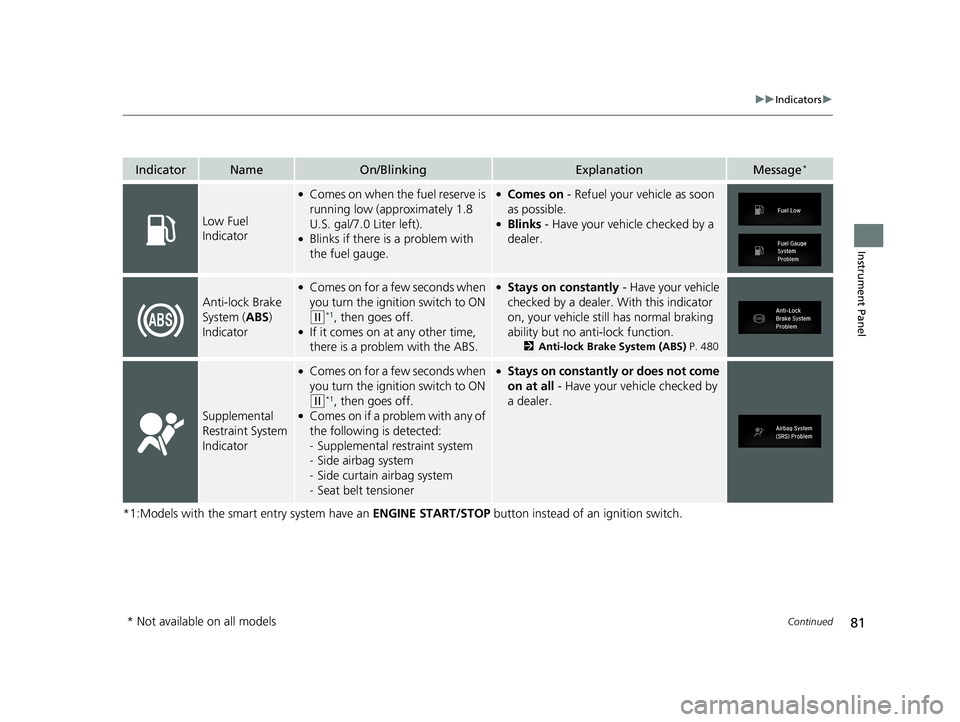
IndicatorNameOn/BlinkingExplanationMessage*
Low Fuel
Indicator
●Comes on when the fuel reserve is
running low (approximately 1.8
U.S. gal/7.0 Liter left).
●Blinks if there is a problem with
the fuel gauge.
●Comes on - Refuel your vehicle as soon
as possible.
●Blinks - Have your vehicle checked by a
dealer.
Anti-lock Brake
System ( ABS)
Indicator
●Comes on for a few seconds when
you turn the ignition switch to ON
(w*1, then goes off.●If it comes on at any other time,
there is a problem with the ABS.
●Stays on constantly - Have your vehicle
checked by a dealer. With this indicator
on, your vehicle still has normal braking
ability but no anti-lock function.
2 Anti-lock Brake System (ABS) P. 480
Supplemental
Restraint System
Indicator
●Comes on for a few seconds when
you turn the ignition switch to ON
(w*1, then goes off.●Comes on if a problem with any of
the following is detected:
-Supplemental restraint system
- Side airbag system
- Side curtain airbag system
- Seat belt tensioner
●Stays on constantly or does not come
on at all - Have your vehicle checked by
a dealer.
* Not available on all models
18 CIVIC 2D HCM (KA KC KL)-31TBG6201.book 81 ページ 2018年10月26日 金曜日 午前9時10分
Page 100 of 631
98
uuIndicators uDriver Information Interface Wa rning and Information Messages*
Instrument Panel
*1:Models with the smart entry system have an ENGINE START/STOP button instead of an ignition switch.
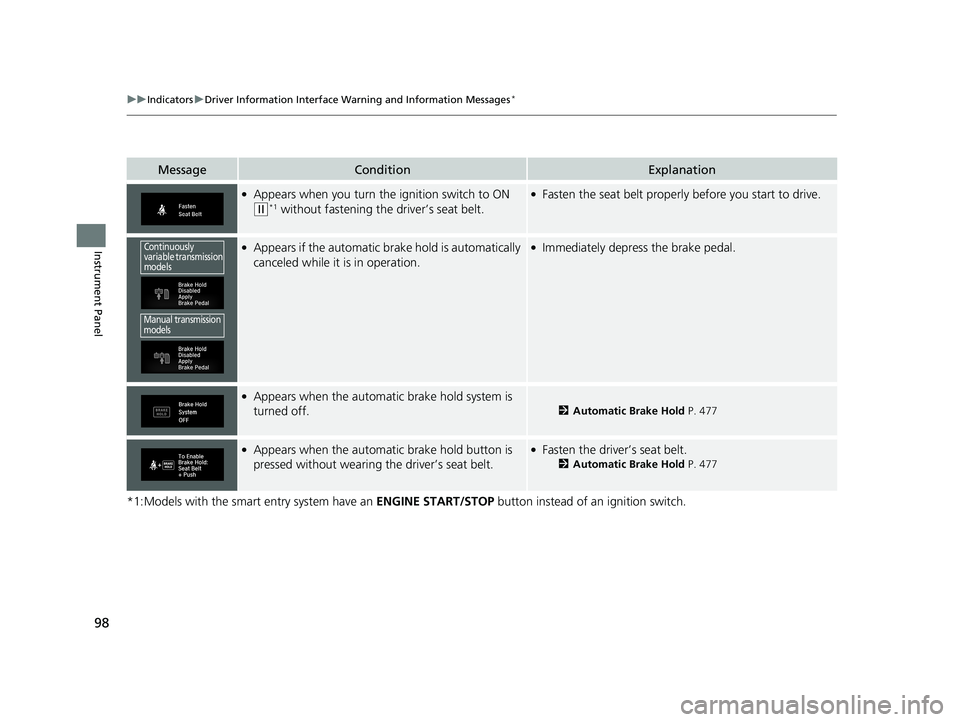
MessageConditionExplanation
●Appears when you turn the ignition switch to ON
(w*1 without fastening the driver’s seat belt.
●Fasten the seat belt properly before you start to drive.
●Appears if the automatic br ake hold is automatically
canceled while it is in operation.●Immediately depress the brake pedal.
●Appears when the automa tic brake hold system is
turned off.
2 Automatic Brake Hold P. 477
●Appears when the automa tic brake hold button is
pressed without wearing the driver’s seat belt.●Fasten the driver’s seat belt.
2 Automatic Brake Hold P. 477
Continuously
variable transmission
models
Manual transmission
models
18 CIVIC 2D HCM (KA KC KL)-31TBG6201.book 98 ページ 2018年10月26日 金曜日 午前9時10分
Page 106 of 631
104
uuIndicators uDriver Information Interface Wa rning and Information Messages*
Instrument Panel
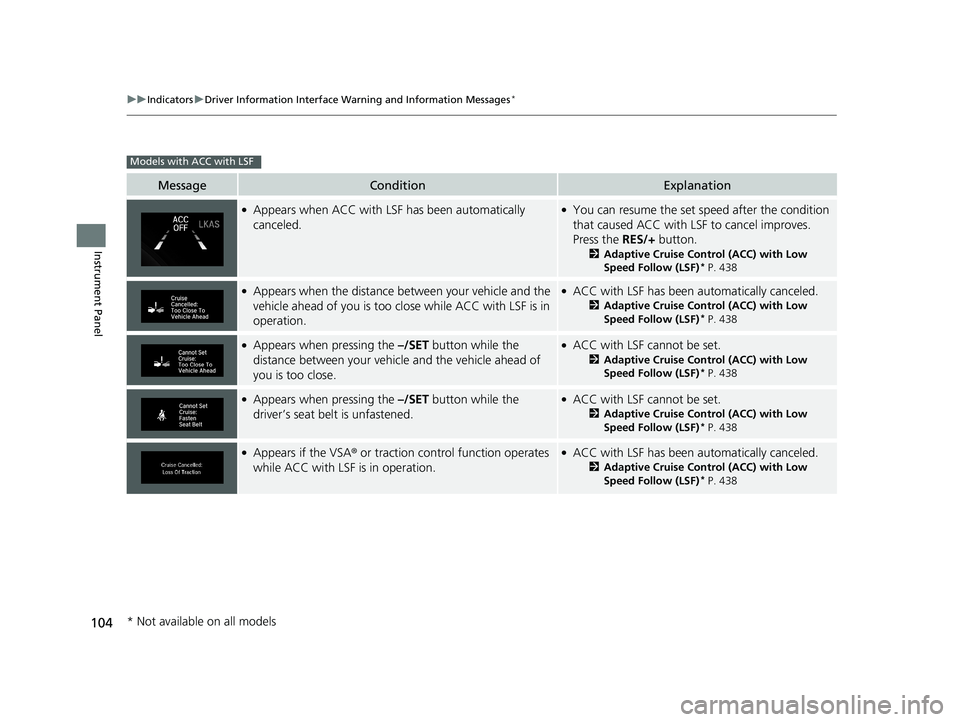
MessageConditionExplanation
●Appears when ACC with LSF has been automatically
canceled.●You can resume the set speed after the condition
that caused ACC with LSF to cancel improves.
Press the RES/+ button.
2Adaptive Cruise Control (ACC) with Low
Speed Follow (LSF)* P. 438
●Appears when the distance be tween your vehicle and the
vehicle ahead of you is too close while ACC with LSF is in
operation.●ACC with LSF has been automatically canceled.
2 Adaptive Cruise Control (ACC) with Low
Speed Follow (LSF)* P. 438
●Appears when pressing the –/SET button while the
distance between your vehicle and the vehicle ahead of
you is too close.●ACC with LSF cannot be set.
2 Adaptive Cruise Control (ACC) with Low
Speed Follow (LSF)* P. 438
●Appears when pressing the –/SET button while the
driver’s seat belt is unfastened.●ACC with LSF cannot be set.
2 Adaptive Cruise Control (ACC) with Low
Speed Follow (LSF)* P. 438
●Appears if the VSA ® or traction control function operates
while ACC with LSF is in operation.●ACC with LSF has been automatically canceled.
2 Adaptive Cruise Control (ACC) with Low
Speed Follow (LSF)* P. 438
Models with ACC with LSF
* Not available on all models
18 CIVIC 2D HCM (KA KC KL)-31TBG6201.book 104 ページ 2018年10月26日 金曜日 午前9時10分
Page 175 of 631
173
uuAdjusting the Seats uFront Seats
Controls
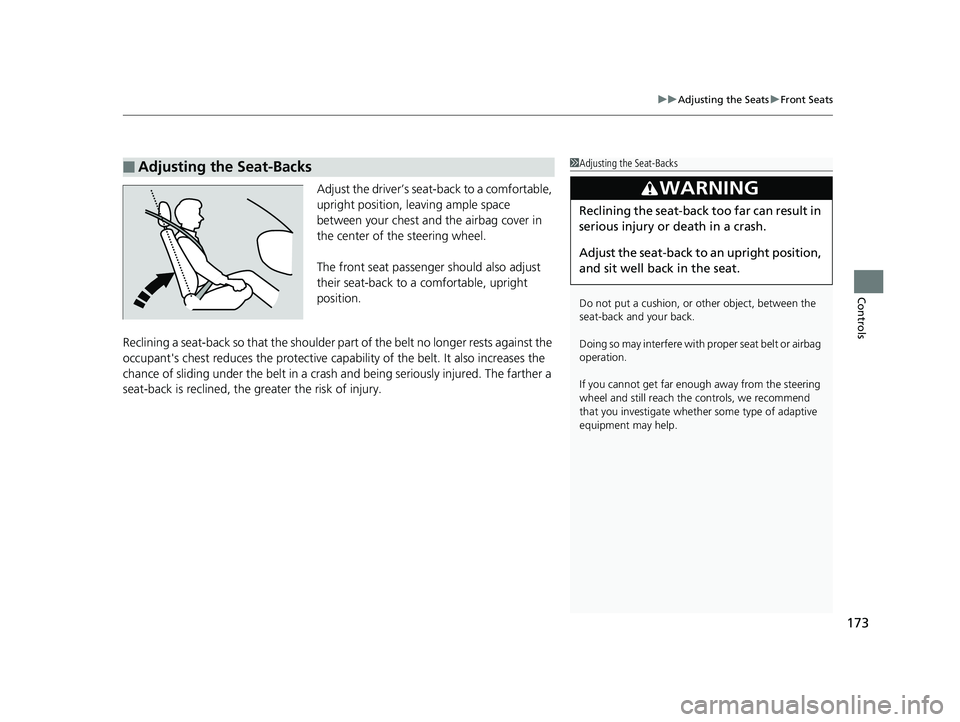
Adjust the driver’s seat -back to a comfortable,
upright position, leaving ample space
between your chest and the airbag cover in
the center of the steering wheel.
The front seat passenger should also adjust
their seat-back to a comfortable, upright
position.
Reclining a seat-back so that the shoulder part of the belt no longer rests against the
occupant's chest reduces the protective capa bility of the belt. It also increases the
chance of sliding under the belt in a crash and being seriously injured. The farther a
seat-back is reclined, the gr eater the risk of injury.
■Adjusting the Seat-Backs1Adjusting the Seat-Backs
Do not put a cushion, or other object, between the
seat-back and your back.
Doing so may interfere with proper seat belt or airbag
operation.
If you cannot get far e nough away from the steering
wheel and still reach th e controls, we recommend
that you investigate whether some type of adaptive
equipment may help.
3WARNING
Reclining the seat-back too far can result in
serious injury or death in a crash.
Adjust the seat-back to an upright position,
and sit well back in the seat.
18 CIVIC 2D HCM (KA KC KL)-31TBG6201.book 173 ページ 2018年10月26日 金曜日 午前9時10分
Page 178 of 631
176
uuAdjusting the Seats uMaintain a Proper Sitting Position
Controls
Maintain a Proper Sitting Position
After all occupants have adjusted their seats and head restraints*1, and put on their
seat belts, it is very important that they continue to sit upright, well back in their
seats, with their feet on the floor, until the vehicle is safely parked and the engine is
off.
Sitting improperly can increase the chance of injury during a crash. For example, if
an occupant slouches, lies down, turns si deways, sits forward, leans forward or
sideways, or puts one or both feet up, the chance of injury during a crash is greatly
increased.
In addition, an occupant who is out of position in the front seat can be seriously or
fatally injured in a crash by striking interior parts of the vehicle or being struck by an
inflating front airbag.
*1: Models without SPORT mode
1 Maintain a Proper Sitting Position
3WARNING
Sitting improperly or out of position can
result in serious injury or death in a crash.
Always sit upright, well back in the seat,
with your feet on the floor.
18 CIVIC 2D HCM (KA KC KL)-31TBG6201.book 176 ページ 2018年10月26日 金曜日 午前9時10分
Page 179 of 631
177
uuAdjusting the Seats uMaintain a Proper Sitting Position
Controls
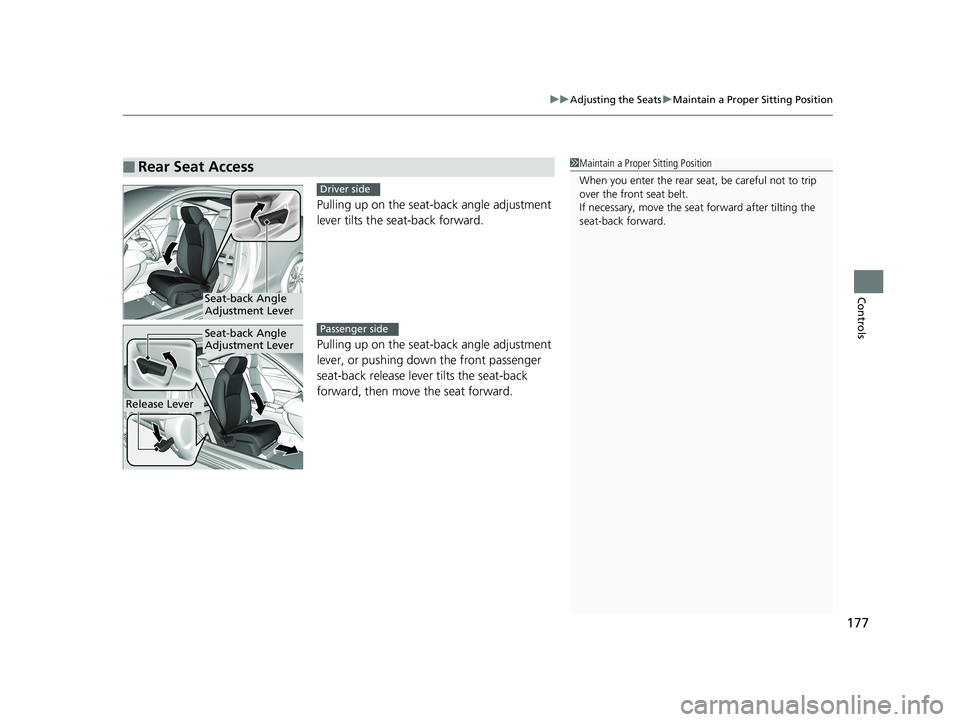
Pulling up on the seat-b ack angle adjustment
lever tilts the seat-back forward.
Pulling up on the seat-b ack angle adjustment
lever, or pushing down the front passenger
seat-back release lever tilts the seat-back
forward, then move the seat forward.
■Rear Seat Access1 Maintain a Proper Sitting Position
When you enter the rear seat, be careful not to trip
over the front seat belt.
If necessary, move the seat forward after tilting the
seat-back forward.
Seat-back Angle
Adjustment Lever
Driver side
Seat-back Angle
Adjustment Lever
Release Lever
Passenger side
18 CIVIC 2D HCM (KA KC KL)-31TBG6201.book 177 ページ 2018年10月26日 金曜日 午前9時10分
Page 180 of 631
178
uuAdjusting the Seats uRear Seats
Controls
Rear Seats
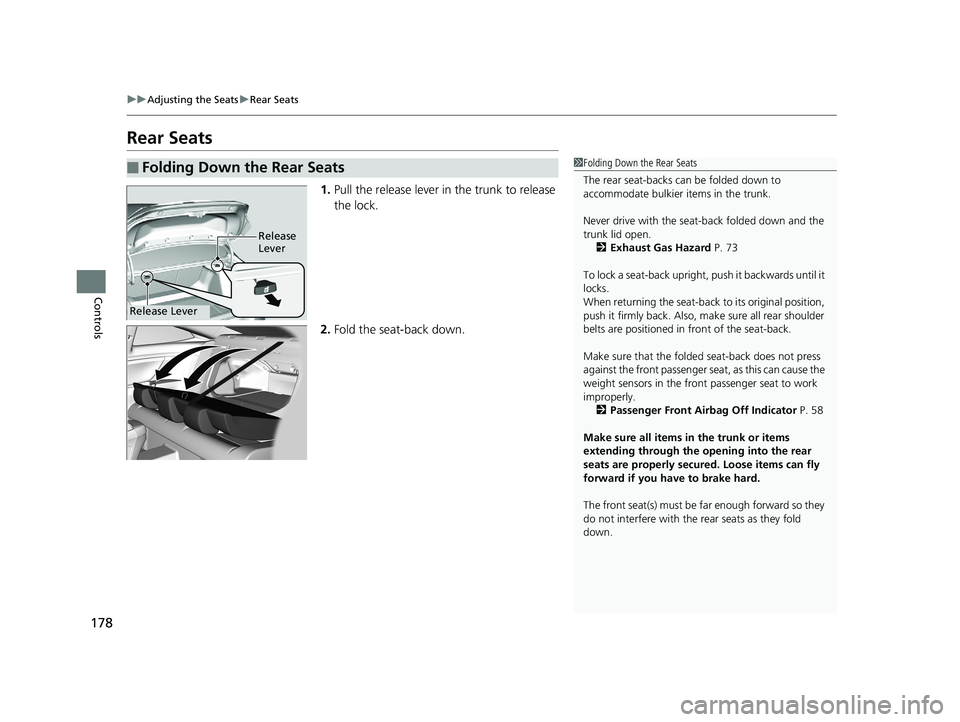
1. Pull the release lever in the trunk to release
the lock.
2. Fold the seat-back down.
■Folding Down the Rear Seats1Folding Down the Rear Seats
The rear seat-backs can be folded down to
accommodate bulkier items in the trunk.
Never drive with the seat-back folded down and the
trunk lid open. 2 Exhaust Gas Hazard P. 73
To lock a seat-back upright, push it backwards until it
locks.
When returning the seat-back to its original position,
push it firmly back. Also, m ake sure all rear shoulder
belts are positioned in front of the seat-back.
Make sure that the folded seat-back does not press
against the front passenger seat, as this can cause the
weight sensors in the front passenger seat to work
improperly. 2 Passenger Front Airbag Off Indicator P. 58
Make sure all items in the trunk or items
extending through the opening into the rear
seats are properly secured. Loose items can fly
forward if you have to brake hard.
The front seat(s) must be far enough forward so they
do not interfere with the rear seats as they fold
down.
Release
Lever
Release Lever
18 CIVIC 2D HCM (KA KC KL)-31TBG6201.book 178 ページ 2018年10月26日 金曜日 午前9時10分
Page 184 of 631
182
uuInterior Lights/Interior Convenience Items uInterior Convenience Items
Controls
Interior Convenience Items
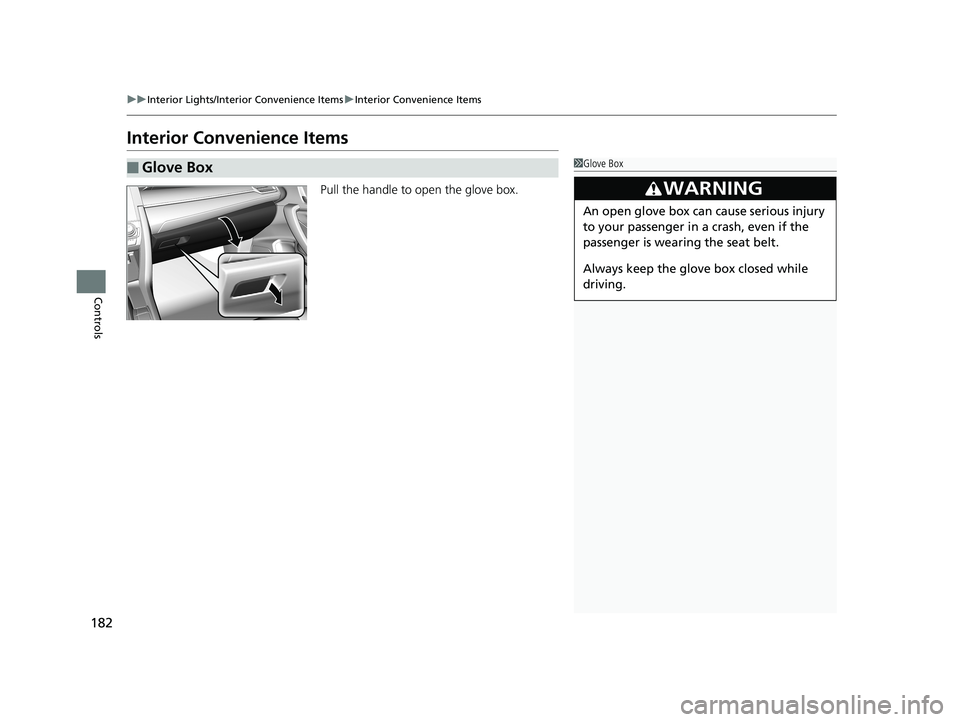
Pull the handle to open the glove box.
■Glove Box1Glove Box
3WARNING
An open glove box can cause serious injury
to your passenger in a crash, even if the
passenger is wearing the seat belt.
Always keep the glove box closed while
driving.
18 CIVIC 2D HCM (KA KC KL)-31TBG6201.book 182 ページ 2018年10月26日 金曜日 午前9時10分
Page 410 of 631
408
uuBefore Driving uDriving Preparation
Driving
• Be sure items placed on the floor behind the front seats cannot roll under the
seats.
u They can interfere with the driver's ability to operate the pedals, the operation
of the seats, or the operation of the sensors under the seats.
• Everyone in the vehicle must fasten their seat belt.
2Fastening a Seat Belt P. 42
•Make sure that the indicators in the ins trument panel come on when you start the
vehicle, and go off soon after.
u Always have a dealer check the vehicle if a problem is indicated.
2 Indicators P. 76
18 CIVIC 2D HCM (KA KC KL)-31TBG6201.book 408 ページ 2018年10月26日 金曜日 午前9時10分
Page 451 of 631
Continued449
uuWhen Driving uAdaptive Cruise Control (ACC) with Low Speed Follow (LSF)*
Driving
■Automatic ca ncellation
The beeper sounds and a message appears on the driver information interface when
ACC with LSF is automatically canceled. Any of these conditions may cause the ACC
with LSF to automatically cancel:
• Bad weather (rain, fog, snow, etc.)
• When the radar sensor in the lower bumper next to the fog light
* gets dirty.
• The vehicle ahead of yo u cannot be detected.
• An abnormal tire condition is de tected, or the tires are skidding.
• Driving on a mountainous road, or driving off road for extended periods.
• Abrupt steering wheel movement.
• When the ABS, VSA ® or CMBS
TM is activated.
• When the ABS or VSA ® system indicator comes on.
• When the vehicle is stopped on a very steep slope.
• When you manually apply the parking brake.
• When the detected vehicle within the AC C with LSF range is too close to your
vehicle.
• The camera behind the rearview mirror, or the area around the camera, including
the windshield, gets dirty.
The ACC with LSF automatic cancellation ca n be also triggered by the following
causes. In these cases, the parking brake will be automatically applied.
• The driver’s seat belt is unfastened when the vehicle is stationary.
• The vehicle stops for more than 10 minutes.
• The engine is turned off.
1Automatic cancellation
Even though ACC with LSF has been automatically
canceled, you can still resu me the prior set speed.
Wait until the condition that caused ACC with LSF to
cancel improves, then press the –/SET button.
* Not available on all models
18 CIVIC 2D HCM (KA KC KL)-31TBG6201.book 449 ページ 2018年10月26日 金曜日 午前9時10分