navigation HONDA CIVIC COUPE 2018 Owner's Manual (in English)
[x] Cancel search | Manufacturer: HONDA, Model Year: 2018, Model line: CIVIC COUPE, Model: HONDA CIVIC COUPE 2018Pages: 631, PDF Size: 39.09 MB
Page 6 of 631
4
Quick Reference Guide
Quick Reference Guide
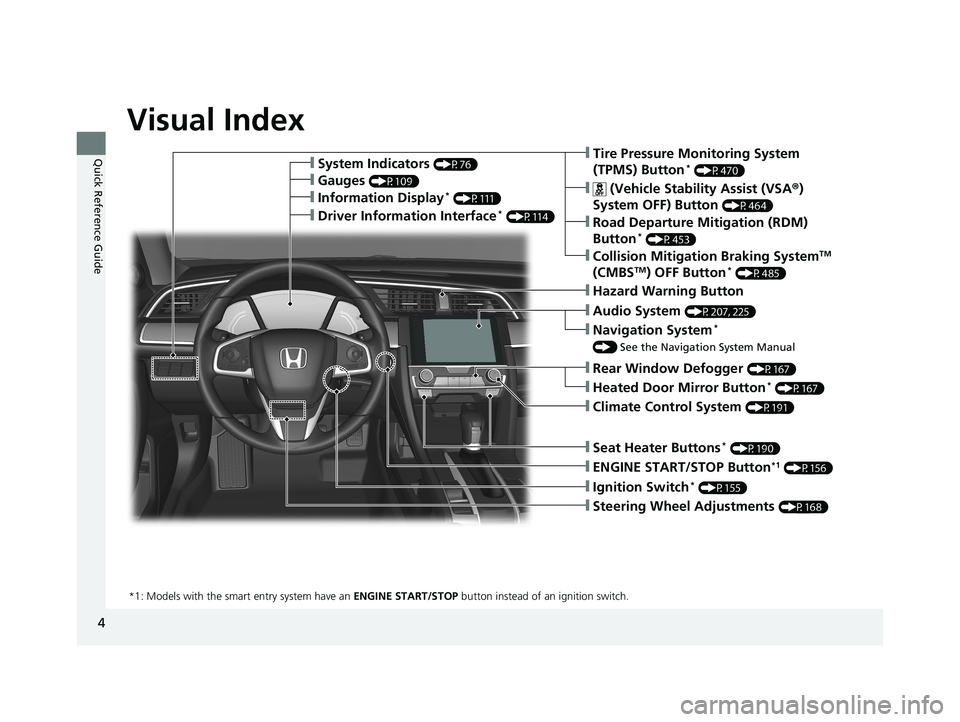
Visual Index
❙Ignition Switch* (P155)
❙ENGINE START/STOP Button*1 (P156)
*1: Models with the smart entry system have an ENGINE START/STOP button instead of an ignition switch.
❙Tire Pressure Monitoring System
(TPMS) Button* (P470)
❙Information Display* (P111)
❙System Indicators (P76)
❙Gauges (P109)
❙Collision Mitigation Braking SystemTM
(CMBSTM) OFF Button* (P485)
❙ (Vehicle Stability Assist (VSA ®)
System OFF) Button
(P464)
❙Road Departure Mitigation (RDM)
Button* (P453)
❙Navigation System*
() See the Navigation System Manual
❙Audio System (P207, 225)
❙Hazard Warning Button
❙Rear Window Defogger (P167)
❙Heated Door Mirror Button* (P167)
❙Climate Control System (P191)
❙Seat Heater Buttons* (P190)
❙Steering Wheel Adjustments (P168)
❙Driver Information Interface* (P114)
18 CIVIC 2D HCM (KA KC KL)-31TBG6201.book 4 ページ 2018年10月26日 金曜日 午前9時10分
Page 7 of 631
5
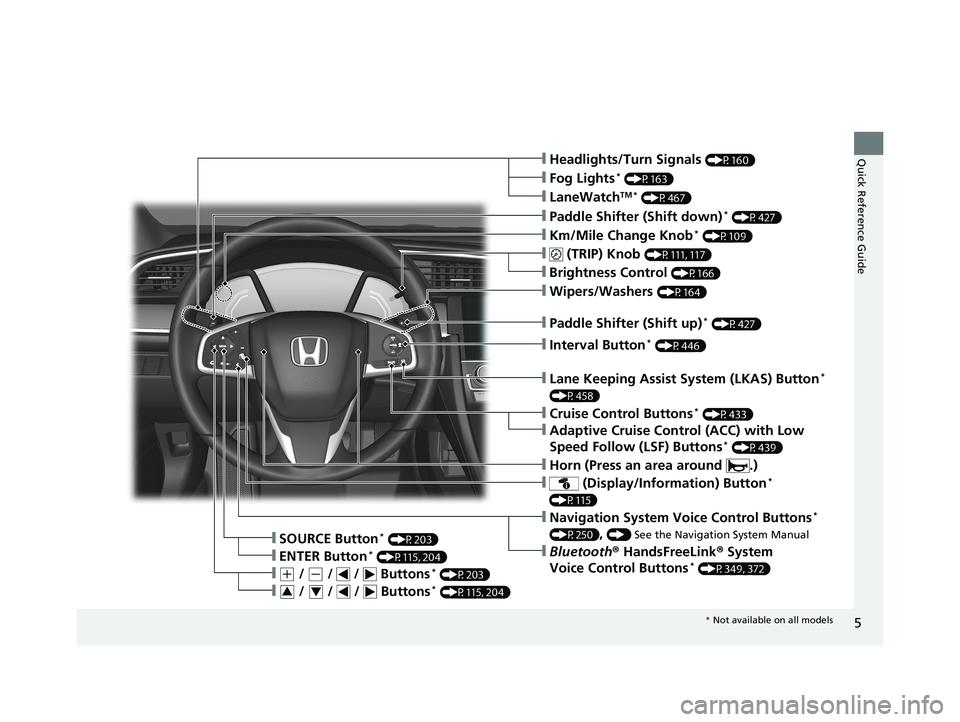
Quick Reference Guide❙Headlights/Turn Signals (P160)
❙Km/Mile Change Knob* (P109)
❙ (TRIP) Knob (P111, 117)
❙SOURCE Button* (P203)
❙Brightness Control (P166)
❙LaneWatchTM * (P467)
❙Fog Lights* (P163)
❙Wipers/Washers (P164)
❙Lane Keeping Assist System (LKAS) Button*
(P458)
❙ (Display/Information) Button*
(P115)
❙Navigation System Voice Control Buttons*
(P250), () See the Navigation System Manual
❙Bluetooth® HandsFreeLink ® System
Voice Control Buttons* (P349, 372)❙ENTER Button* (P115, 204)
❙(+ / (- / / Buttons* (P203)
❙ / / / Buttons* (P115, 204)34
❙Paddle Shifter (Shift down)* (P427)
❙Paddle Shifter (Shift up)* (P427)
❙Interval Button* (P446)
❙Horn (Press an area around .)
❙Cruise Control Buttons* (P433)
❙Adaptive Cruise Control (ACC) with Low
Speed Follow (LSF) Buttons* (P439)
* Not available on all models
18 CIVIC 2D HCM (KA KC KL)-31TBG6201.book 5 ページ 2018年10月26日 金曜日 午前9時10分
Page 15 of 631
13
Quick Reference Guide
Controls (P 125)
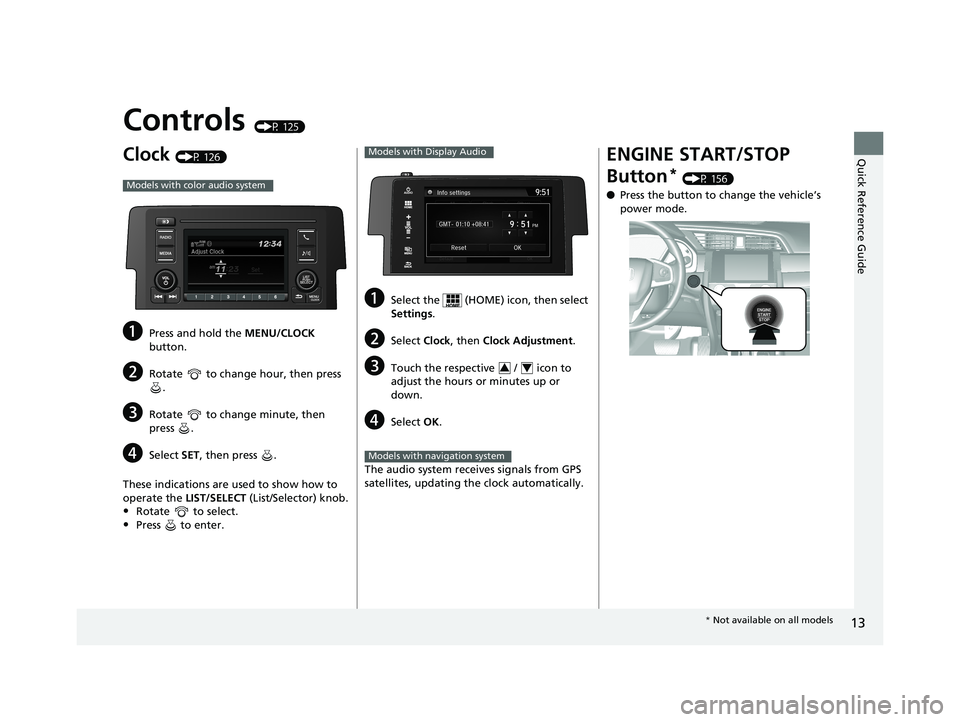
Clock (P 126)
aPress and hold the MENU/CLOCK
button.
bRotate to change hour, then press .
cRotate to change minute, then
press .
dSelect SET, then press .
These indications are used to show how to
operate the LIST/SELECT (List/Selector) knob.
•Rotate to select.
•Press to enter.
Models with color audio system
aSelect the (HOME) icon, then select
Settings.
bSelect Clock, then Clock Adjustment .
cTouch the respective / icon to
adjust the hours or minutes up or
down.
dSelect OK.
The audio system receives signals from GPS
satellites, updating the clock automatically.
Models with Display Audio
34
Models with navigation system
ENGINE START/STOP
Button
* (P 156)
● Press the button to change the vehicle’s
power mode.
* Not available on all models
18 CIVIC 2D HCM (KA KC KL)-31TBG6201.book 13 ページ 2018年10月26日 金曜日 午前9時10分
Page 24 of 631
22
Quick Reference Guide
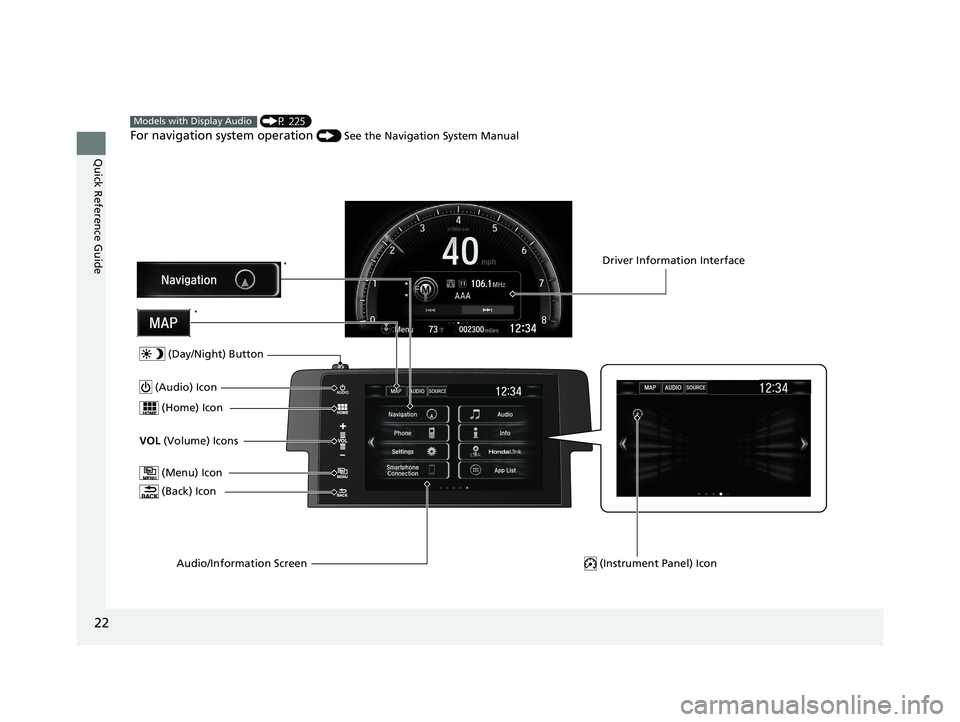
(P 225)
For navigation system operation () See the Navigation System Manual
Models with Display Audio
(Menu) Icon
VOL (Volume) Icons
(Home) Icon
(Back) Icon
Audio/Information Screen
(Audio) Icon
Driver Information Interface
(Instrument Panel) Icon
(Day/Night) Button
*
*
18 CIVIC 2D HCM (KA KC KL)-31TBG6201.book 22 ページ 2018年10月26日 金曜日 午前9時10分
Page 117 of 631
115
uuGauges and Displays uDriver Information Interface*
Continued
Instrument Panel
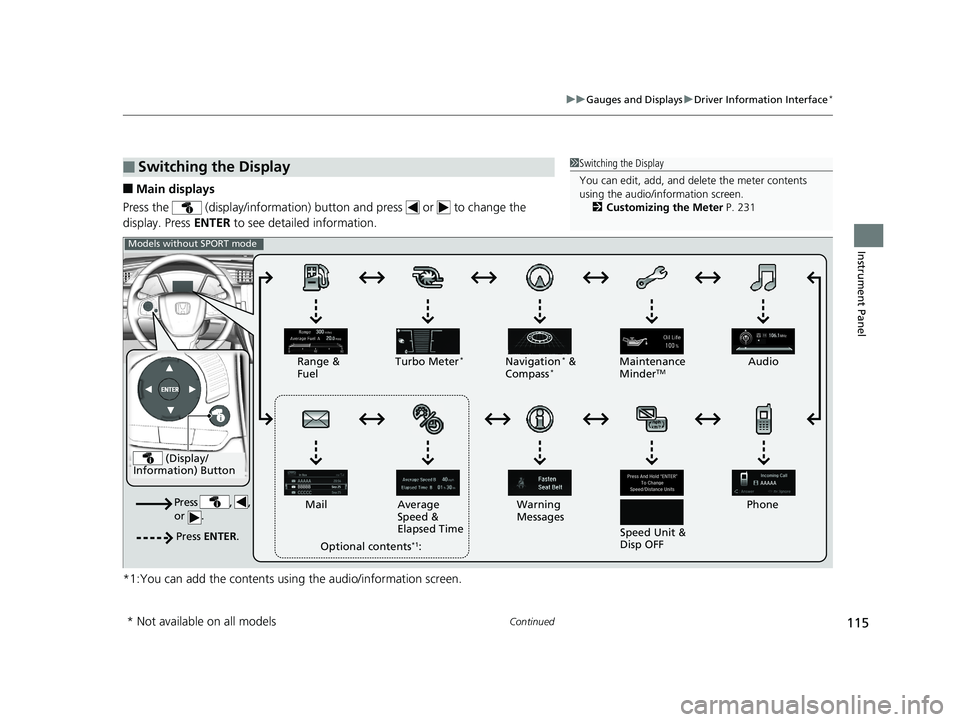
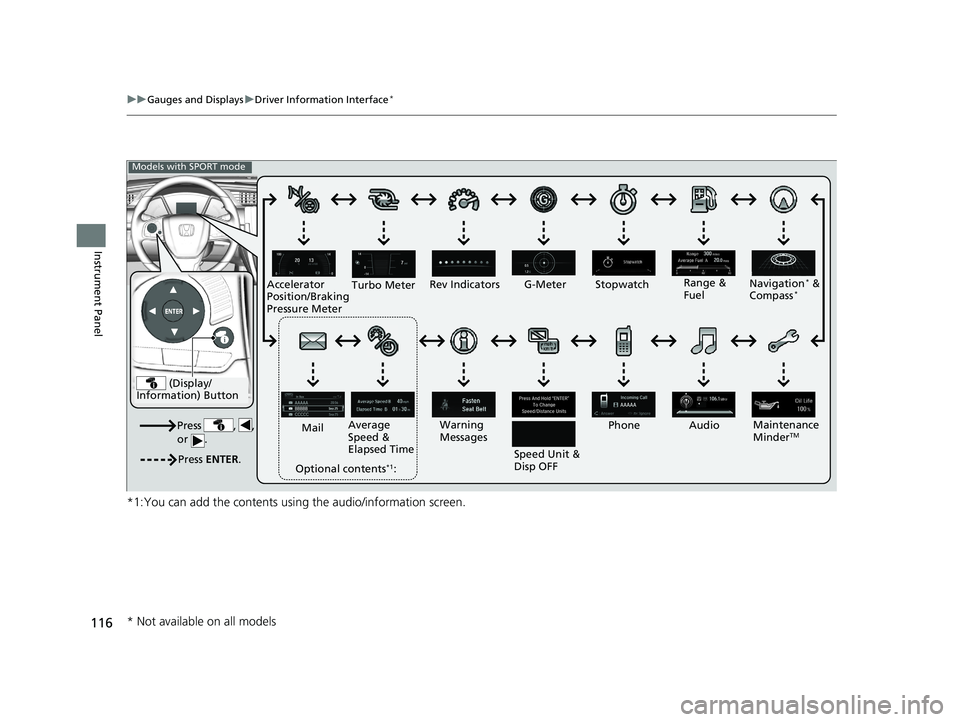
■Main displays
Press the (display/information) button and press or to change the
display. Press ENTER to see detailed information.
*1:You can add the contents using the audio/information screen.
■Switching the Display1 Switching the Display
You can edit, add, and de lete the meter contents
using the audio/information screen.
2 Customizing the Meter P. 231
(Display/
Information) Button
Press , ,
or .
Press ENTER .
Range &
Fuel Turbo Meter*Navigation* &
Compass*Maintenance
MinderTMAudio
Phone
Speed Unit &
Disp OFF
Warning
Messages
Average
Speed &
Elapsed Time
Mail
Optional contents
*1:
Models without SPORT mode
* Not available on all models
18 CIVIC 2D HCM (KA KC KL)-31TBG6201.book 115 ページ 2018年10月26日 金曜日 午前9時10分
Page 118 of 631
116
uuGauges and Displays uDriver Information Interface*
Instrument Panel
*1:You can add the contents usin g the audio/information screen.
(Display/
Information) Button
Press , ,
or .
Press ENTER .
Range &
Fuel
Turbo Meter
Navigation* &
Compass*
Maintenance
MinderTM
Rev Indicators
Audio
Phone
Speed Unit &
Disp OFF
Warning
Messages
Average
Speed &
Elapsed Time
Mail
Optional contents
*1:
Models with SPORT mode
G-Meter Stopwatch
Accelerator
Position/Braking
Pressure Meter
* Not available on all models
18 CIVIC 2D HCM (KA KC KL)-31TBG6201.book 116 ページ 2018年10月26日 金曜日 午前9時10分
Page 122 of 631
uuGauges and Displays uDriver Information Interface*
120
Instrument Panel
The navigation system shows you turn-by -turn directions to your destination.
2Refer to the Navigation System Manual
Shows the current audio information.
2Audio System Basic Operation P. 225
Shows the current mail information.
2Bluetooth ® HandsFreeLink ® P. 372
Shows the current phone information.
2 Bluetooth ® HandsFreeLink ® P. 372
■Turn-by-Turn Directions*
■Audio
■Mail
■Phone
1 Turn-by-Turn Directions*
You can select whether to have the turn-by-turn
display come on or not dur ing the route guidance.
2 Customized Features P. 316
* Not available on all models
18 CIVIC 2D HCM (KA KC KL)-31TBG6201.book 120 ページ 2018年10月26日 金曜日 午前9時10分
Page 128 of 631
126
Controls
Clock
Adjusting the Clock
You can adjust the time in the clock display with the ignition switch in ON (w*1.
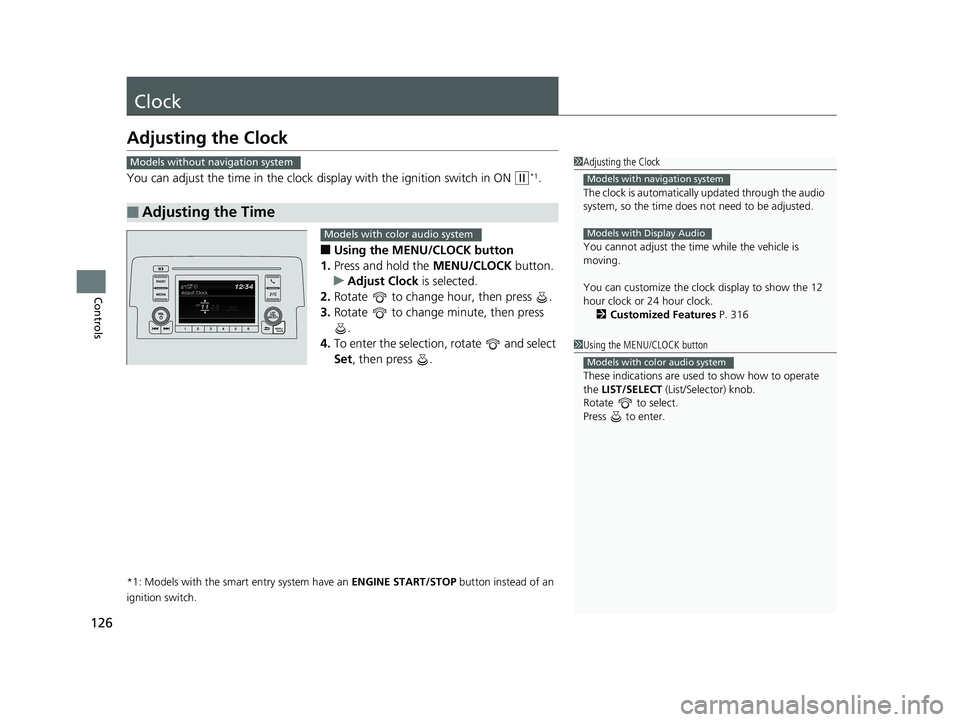
■Using the MENU/CLOCK button
1. Press and hold the MENU/CLOCK button.
u Adjust Clock is selected.
2. Rotate to change hour, then press .
3. Rotate to change minute, then press
.
4. To enter the selection, rotate and select
Set , then press .
*1: Models with the smart entry system have an ENGINE START/STOP button instead of an
ignition switch.
■Adjusting the Time
1 Adjusting the Clock
The clock is automatically updated through the audio
system, so the time does not need to be adjusted.
You cannot adjust the time while the vehicle is
moving.
You can customize the clock display to show the 12
hour clock or 24 hour clock.
2 Customized Features P. 316
Models with navigation system
Models with Display Audio
Models without navigation system
1Using the MENU/CLOCK button
These indications are used to show how to operate
the LIST/SELECT (List/Selector) knob.
Rotate to select.
Press to enter.
Models with color audio system
Models with color audio system
18 CIVIC 2D HCM (KA KC KL)-31TBG6201.book 126 ページ 2018年10月26日 金曜日 午前9時10分
Page 229 of 631
Continued227
uuAudio System Basic Operation uAudio/Information Screen
Features
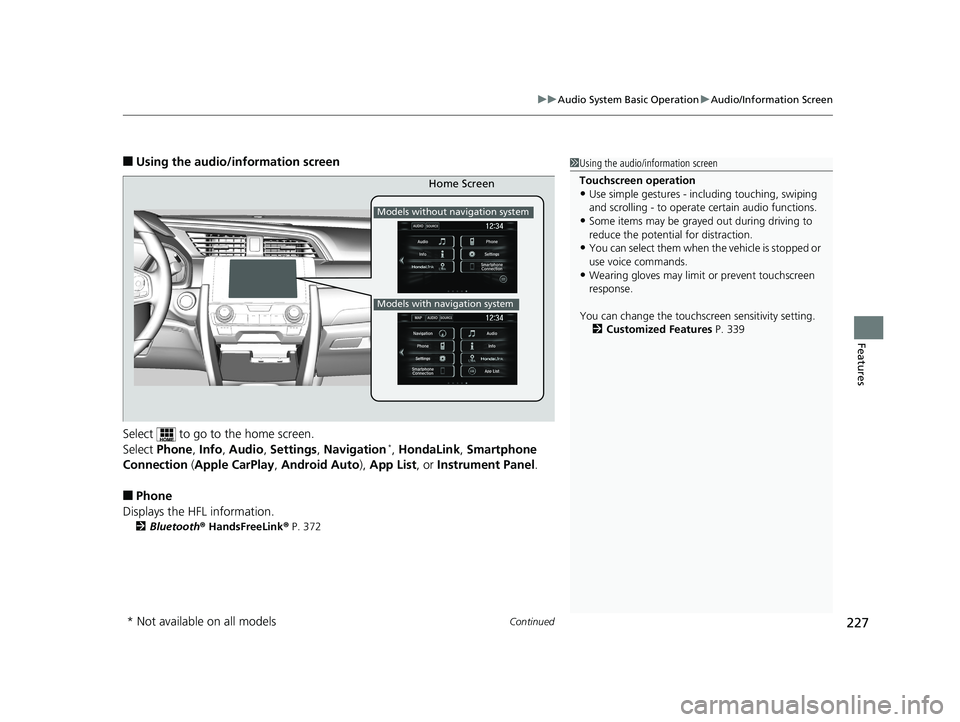
■Using the audio/in formation screen
Select to go to the home screen.
Select Phone , Info , Audio , Settings , Navigation
*, HondaLink , Smartphone
Connection (Apple CarPlay, Android Auto), App List , or Instrument Panel .
■Phone
Displays the HFL information.
2 Bluetooth ® HandsFreeLink ® P. 372
1 Using the audio/in formation screen
Touchscreen operation
•Use simple gestures - in cluding touching, swiping
and scrolling - to operate certain audio functions.
•Some items may be grayed out during driving to
reduce the potential for distraction.
•You can select them when the vehicle is stopped or
use voice commands.
•Wearing gloves may limit or prevent touchscreen
response.
You can change the touchs creen sensitivity setting.
2 Customized Features P. 339
Home Screen
Models without navigation system
Models with navigation system
* Not available on all models
18 CIVIC 2D HCM (KA KC KL)-31TBG6201.book 227 ページ 2018年10月26日 金曜日 午前9時10分
Page 230 of 631
228
uuAudio System Basic Operation uAudio/Information Screen
Features
■Info
Displays Trip Computer or Clock/Wallpaper . Select on the Info Menu screen
to see all available options: Trip Computer, Voice Info, Clock/Wallpaper and
System/Device Information .
Trip Computer :
• Current Drive tab: Displays the current trip information.
• History of Trip A tab: Displays information for the three previous drives. The
information is stored every time you reset Trip A.
To delete the history manually, select Delete History on the History of Trip A
tab. The confirmation message app ears on the screen, then select Yes.
Voice Info : Displays the all commands list.
Clock/Wallpaper : Displays the clock and wallpaper.
System/Device Information :
• System Info: Displays the software version of the audio system.
• USB Info : Displays the memory usage of the USB device.
■Audio
Displays the current audio information.
■Settings
Enters the customiz ing menu screen.
2Customized Features P. 316
■Navigation*
Displays the navigation screen.
2Refer to the Navigation System Manual
* Not available on all models
18 CIVIC 2D HCM (KA KC KL)-31TBG6201.book 228 ページ 2018年10月26日 金曜日 午前9時10分