display HONDA CIVIC COUPE 2019 (in English) User Guide
[x] Cancel search | Manufacturer: HONDA, Model Year: 2019, Model line: CIVIC COUPE, Model: HONDA CIVIC COUPE 2019Pages: 675, PDF Size: 37.28 MB
Page 115 of 675
113
uuGauges and Driver Information Interface uDriver Information Interface
Continued
Instrument Panel
Driver Information Interface
The driver information interface displa ys the odometer, trip meter, outside
temperature, and other gauges.
It also displays important messages such as warnings and other helpful information.
19 CIVIC 2D HCM (KA KL KC)-31TBG6300.book 113 ページ 2018年9月4日 火 曜日 午後1時38分
Page 116 of 675
114
uuGauges and Driver Information Interface uDriver Information Interface
Instrument Panel
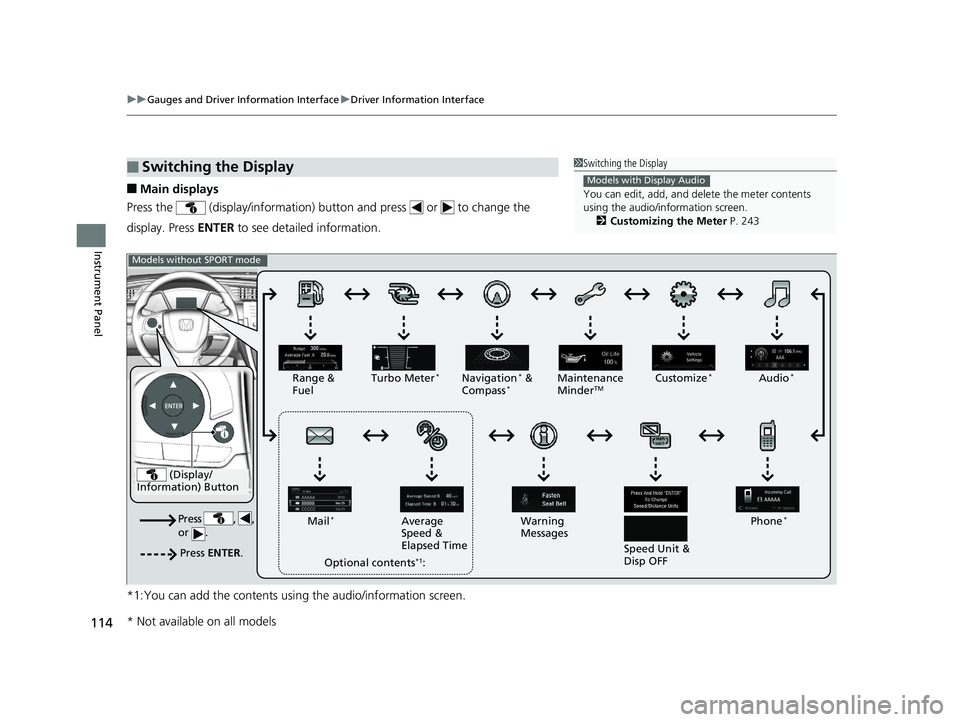
■Main displays
Press the (display/information) butto n and press or to change the
display. Press ENTER to see detailed information.
*1:You can add the contents usin g the audio/information screen.
■Switching the Display1Switching the Display
You can edit, add, and de lete the meter contents
using the audio/information screen. 2 Customizing the Meter P. 243
Models with Display Audio
(Display/
Information) Button
Press , ,
or .
Press ENTER .
Range &
Fuel Turbo Meter*Navigation* &
Compass*Maintenance
MinderTMAudio*
Phone*
Speed Unit &
Disp OFF
Warning
Messages
Average
Speed &
Elapsed Time
Mail
*
Optional contents*1:
Models without SPORT mode
Customize*
* Not available on all models
19 CIVIC 2D HCM (KA KL KC)-31TBG6300.book 114 ページ 2018年9月4日 火
曜日 午後1時38分
Page 117 of 675
115
uuGauges and Driver Information Interface uDriver Information Interface
Continued
Instrument Panel
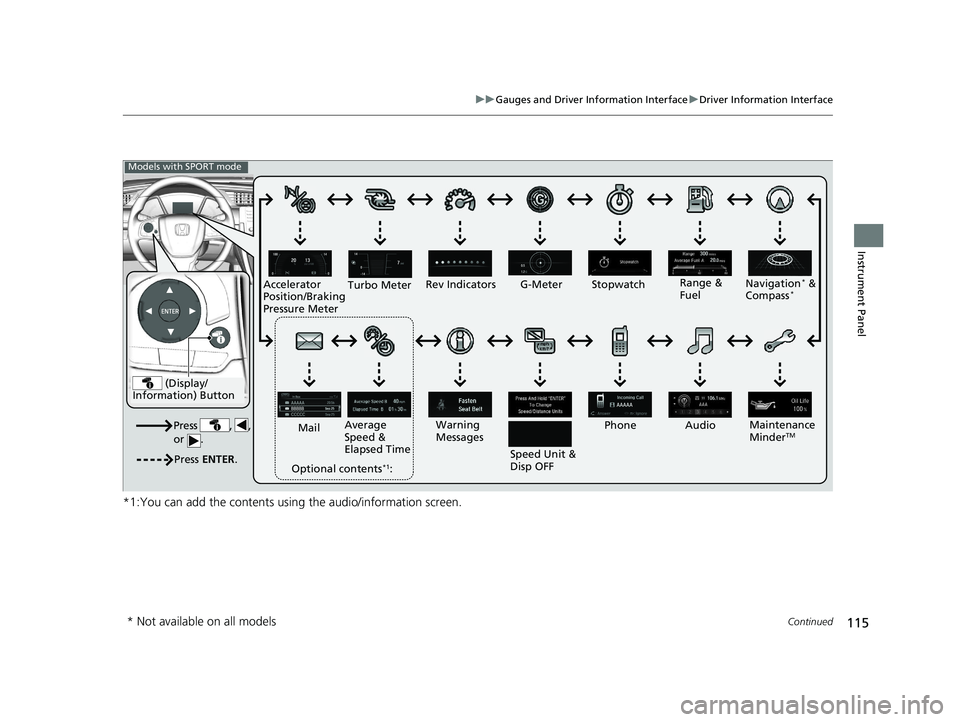
*1:You can add the contents using the audio/information screen.
(Display/
Information) Button
Press , ,
or .
Press ENTER .
Range &
Fuel
Turbo Meter
Navigation* &
Compass*
Maintenance
MinderTM
Rev Indicators
Audio
Phone
Speed Unit &
Disp OFF
Warning
Messages
Average
Speed &
Elapsed Time
Mail
Optional contents
*1:
Models with SPORT mode
G-Meter Stopwatch
Accelerator
Position/Braking
Pressure Meter
* Not available on all models
19 CIVIC 2D HCM (KA KL KC)-31TBG6300.book 115 ページ 2018年9月4日 火 曜日 午後1時38分
Page 118 of 675
uuGauges and Driver Information Interface uDriver Information Interface
116
Instrument Panel
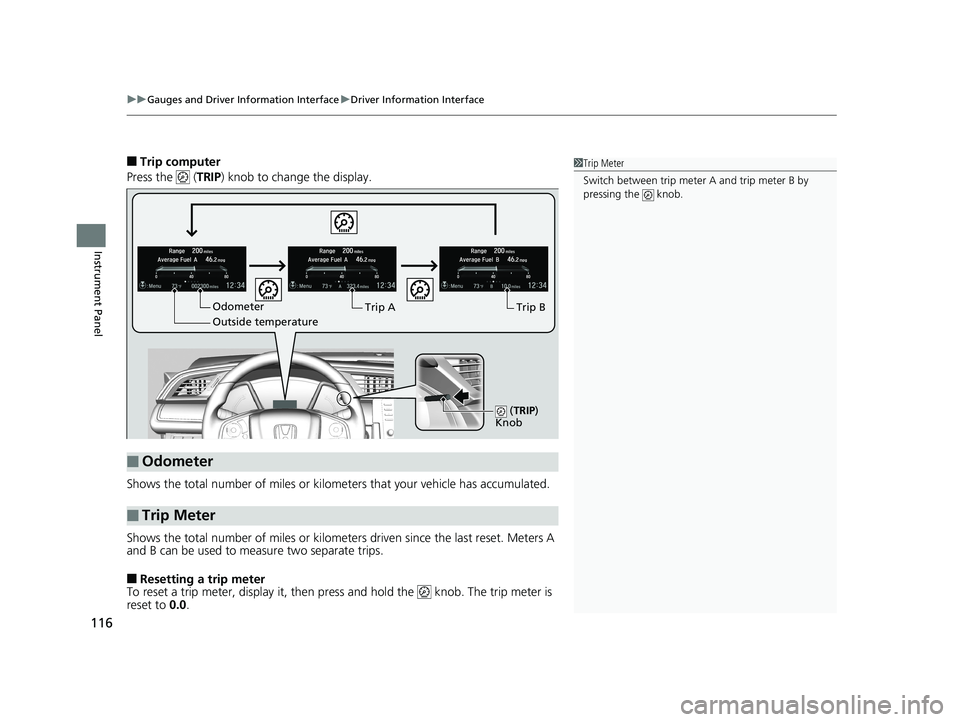
■Trip computer
Press the ( TRIP) knob to change the display.
Shows the total number of miles or kilome ters that your vehicle has accumulated.
Shows the total number of miles or kilomete rs driven since the last reset. Meters A
and B can be used to measure two separate trips.
■Resetting a trip meter
To reset a trip meter, display it, then pr ess and hold the knob. The trip meter is
reset to 0.0 .
■Odometer
■Trip Meter
Odometer
Outside temperature Trip ATrip B
(
TRIP)
Knob
1 Trip Meter
Switch between trip meter A and trip meter B by
pressing the knob.
19 CIVIC 2D HCM (KA KL KC)-31TBG6300.book 116 ページ 2018年9月4日 火 曜日 午後1時38分
Page 119 of 675
Continued117
uuGauges and Driver Information Interface uDriver Information Interface
Instrument Panel
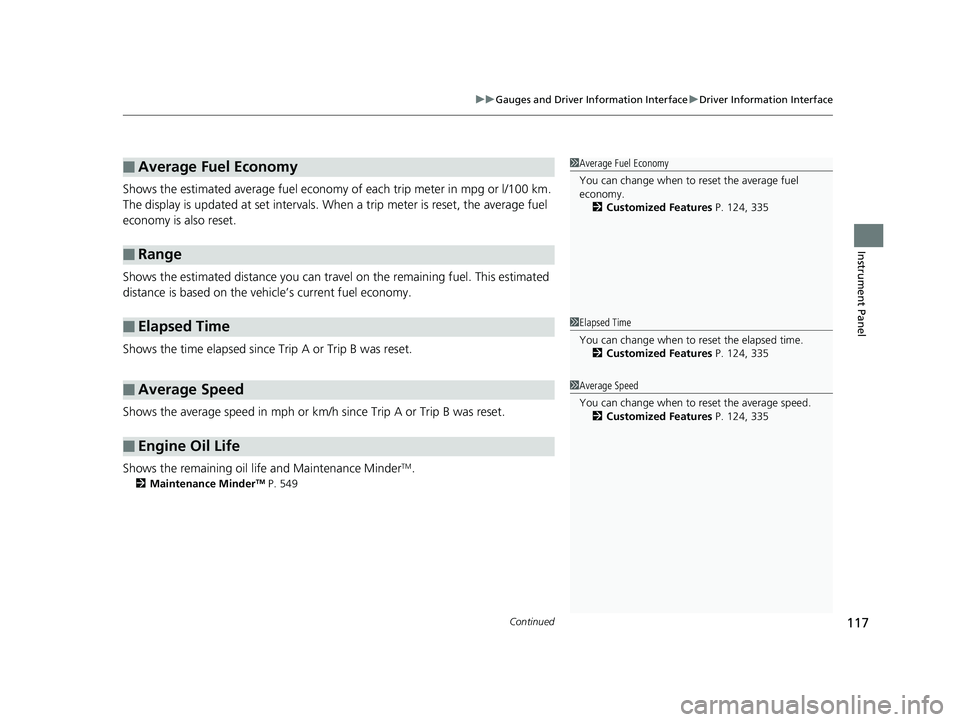
Shows the estimated average fuel economy of each trip meter in mpg or l/100 km.
The display is updated at set intervals. Wh en a trip meter is reset, the average fuel
economy is also reset.
Shows the estimated distance you can trave l on the remaining fuel. This estimated
distance is based on the vehicle’s current fuel economy.
Shows the time elapsed since Trip A or Trip B was reset.
Shows the average speed in mph or km/h since Trip A or Trip B was reset.
Shows the remaining oil life and Maintenance Minder
TM.
2 Maintenance MinderTM P. 549
■Average Fuel Economy
■Range
■Elapsed Time
■Average Speed
■Engine Oil Life
1Average Fuel Economy
You can change when to reset the average fuel
economy.
2 Customized Features P. 124, 335
1Elapsed Time
You can change when to reset the elapsed time.
2 Customized Features P. 124, 335
1Average Speed
You can change when to reset the average speed.
2 Customized Features P. 124, 335
19 CIVIC 2D HCM (KA KL KC)-31TBG6300.book 117 ページ 2018年9月4日 火 曜日 午後1時38分
Page 120 of 675
uuGauges and Driver Information Interface uDriver Information Interface
118
Instrument Panel
Shows the outside temperature in Fahr enheit (U.S.) or Celsius (Canada).
■Adjusting the outside temperature display
Adjust the temperature readi ng by up to ±5°F or ±3°C if the temperature reading
seems incorrect.
Use the customized features in the driver information interface or audio/information
screen to correct the temperature.
2 Customized Features P. 124, 335
Shows the instant fuel economy as a bar graph in mpg or l/100 km.
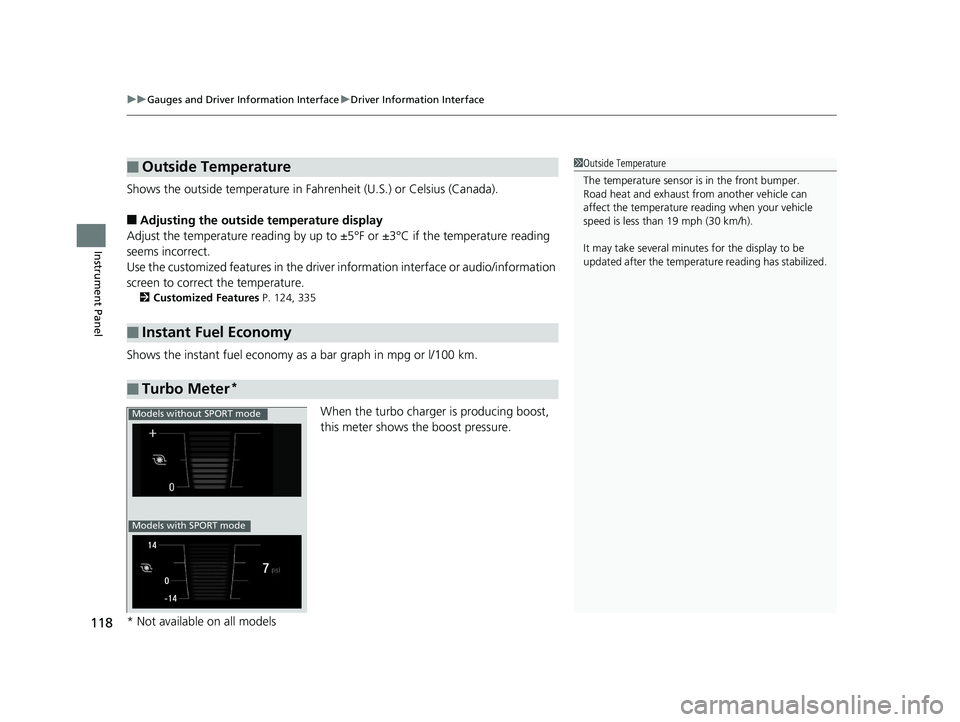
When the turbo charger is producing boost,
this meter shows th e boost pressure.
■Outside Temperature
■Instant Fuel Economy
■Turbo Meter*
1Outside Temperature
The temperature sensor is in the front bumper.
Road heat and exhaust fr om another vehicle can
affect the temperature reading when your vehicle
speed is less than 19 mph (30 km/h).
It may take several minutes for the display to be
updated after the temperature reading has stabilized.
Models without SPORT mode
Models with SPORT mode
* Not available on all models
19 CIVIC 2D HCM (KA KL KC)-31TBG6300.book 118 ページ 2018年9月4日 火 曜日 午後1時38分
Page 121 of 675
Continued119
uuGauges and Driver Information Interface uDriver Information Interface
Instrument Panel
Display Audio shows you turn-by-turn directions to your destination.
When the navigation system is not prov iding driving guidance, an image of a
compass appears in the driver information interface.
2 Refer to the Navigation System Manual
Shows the current audio information.
2Audio System Basic Operation P. 237
Shows the current mail information.
2Bluetooth ® HandsFreeLink ® P. 391
Shows the current phone information.
2 Bluetooth ® HandsFreeLink ® P. 391
■Turn-by-Turn Directions*
■Audio*
■Mail*
■Phone*
1 Turn-by-Turn Directions*
Turn-by-turn directions wi ll be shown on the driver
information interface only when your android phone
is connected to Android Auto. 2 Android Auto P. 303
You can select whether the turn-by-turn display
comes on or not during the route guidance. 2 Customized Features P. 335
Models with Display AudioModels with Display Audio
Models with navigation system
* Not available on all models
19 CIVIC 2D HCM (KA KL KC)-31TBG6300.book 119 ページ 2018年9月4日 火 曜日 午後1時38分
Page 122 of 675
120
uuGauges and Driver Information Interface uDriver Information Interface
Instrument Panel
Displays the strength (G) and direction of the load that is applied to the vehicle
during driving.
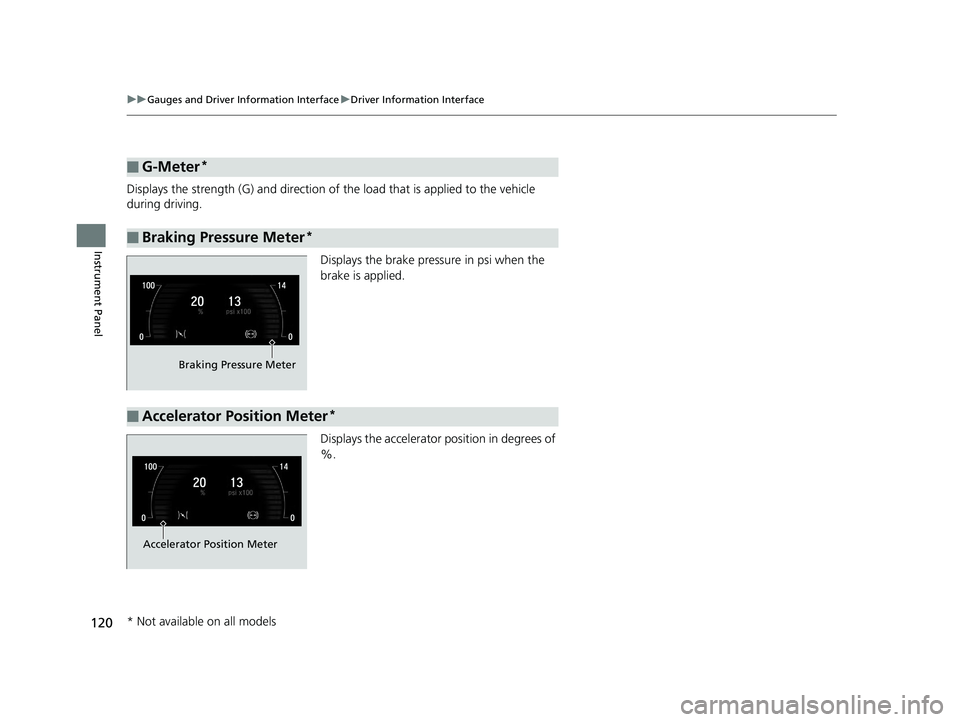
Displays the brake pressure in psi when the
brake is applied.
Displays the accelerator position in degrees of
%.
■G-Meter*
■Braking Pressure Meter*
Braking Pressure Meter
■Accelerator Position Meter*
Accelerator Position Meter
* Not available on all models
19 CIVIC 2D HCM (KA KL KC)-31TBG6300.book 120 ページ 2018年9月4日 火 曜日 午後1時38分
Page 124 of 675
uuGauges and Driver Information Interface uDriver Information Interface
122
Instrument Panel
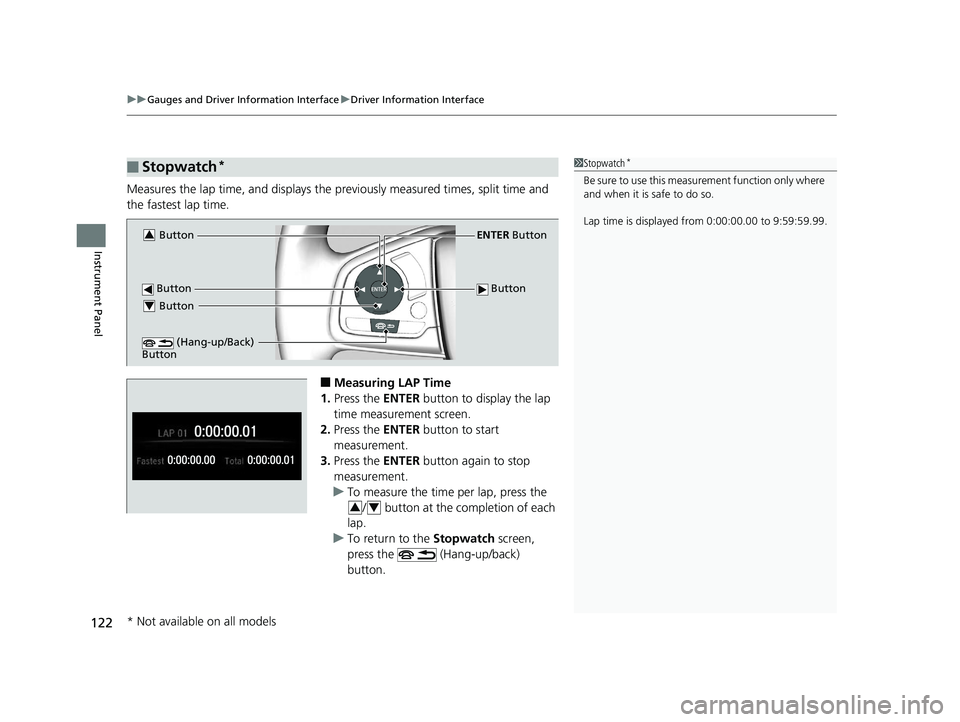
Measures the lap time, and displays the previously measured ti mes, split time and
the fastest lap time.
■Measuring LAP Time
1. Press the ENTER button to display the lap
time measurement screen.
2. Press the ENTER button to start
measurement.
3. Press the ENTER button again to stop
measurement.
u To measure the time per lap, press the
/ button at the completion of each
lap.
u To return to the Stopwatch screen,
press the (Hang-up/back)
button.
■Stopwatch*1 Stopwatch*
Be sure to use this measurement function only where
and when it is safe to do so.
Lap time is displayed fr om 0:00:00.00 to 9:59:59.99.
Button
ENTER Button
Button Button3
Button4
(Hang-up/Back)
Button
34
* Not available on all models
19 CIVIC 2D HCM (KA KL KC)-31TBG6300.book 122 ページ 2018年9月4日 火 曜日 午後1時38分
Page 125 of 675
123
uuGauges and Driver Information Interface uDriver Information Interface
Continued
Instrument Panel
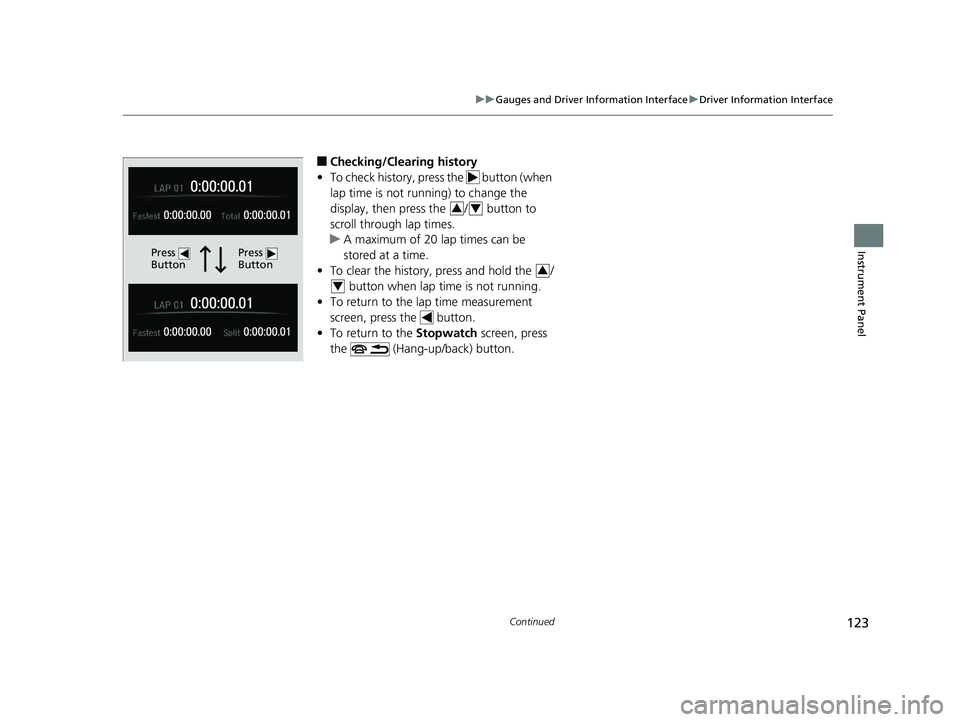
■Checking/Clearing history
• To check history, press the button (when
lap time is not running) to change the
display, then pres s the / button to
scroll through lap times.
u A maximum of 20 lap times can be
stored at a time.
• To clear the history, press and hold the /
button when lap time is not running.
• To return to the lap time measurement
screen, press the button.
• To return to the Stopwatch screen, press
the (Hang-up/back) button.
Press
ButtonPress
Button
34
3
4
19 CIVIC 2D HCM (KA KL KC)-31TBG6300.book 123 ページ 2018年9月4日 火 曜日 午後1時38分