display HONDA CIVIC COUPE 2019 Owner's Manual (in English)
[x] Cancel search | Manufacturer: HONDA, Model Year: 2019, Model line: CIVIC COUPE, Model: HONDA CIVIC COUPE 2019Pages: 675, PDF Size: 37.28 MB
Page 7 of 675
5
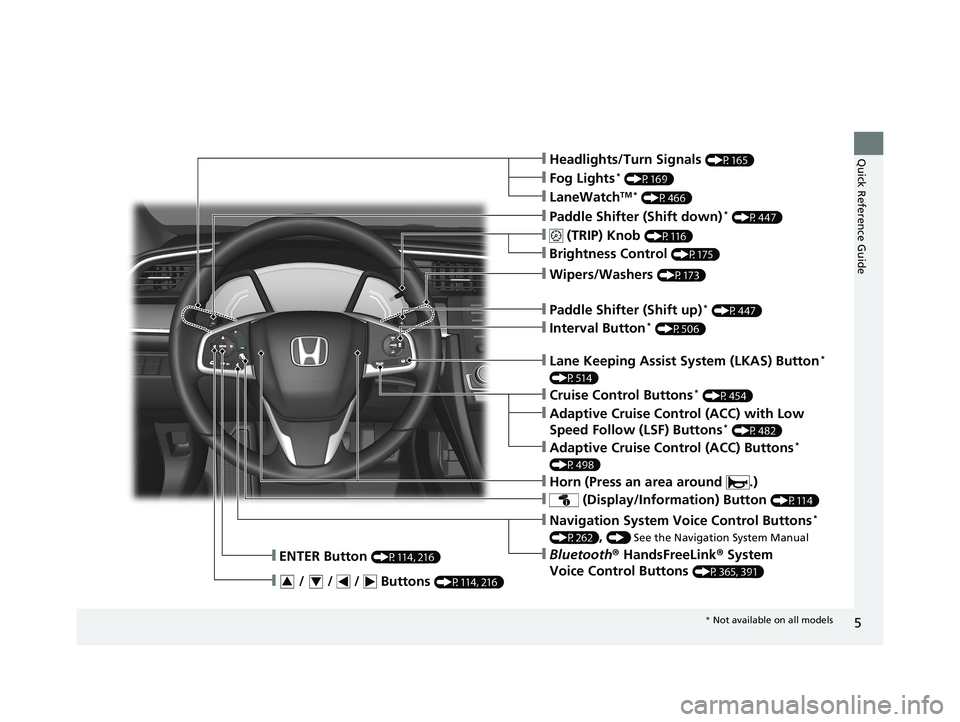
Quick Reference Guide❙Headlights/Turn Signals (P165)
❙ (TRIP) Knob (P116)
❙Brightness Control (P175)
❙LaneWatchTM * (P466)
❙Fog Lights* (P169)
❙Wipers/Washers (P173)
❙ (Display/Information) Button (P114)
❙Navigation System Voice Control Buttons*
(P262), () See the Navigation System Manual
❙Bluetooth® HandsFreeLink ® System
Voice Control Buttons
(P365, 391)
❙ENTER Button (P114, 216)
❙ / / / Buttons (P114, 216)34
❙Paddle Shifter (Shift down)* (P447)
❙Cruise Control Buttons* (P454)
❙Paddle Shifter (Shift up)* (P447)
❙Interval Button* (P506)
❙Adaptive Cruise Control (ACC) Buttons*
(P498)
❙Adaptive Cruise Control (ACC) with Low
Speed Follow (LSF) Buttons* (P482)
❙Lane Keeping Assist System (LKAS) Button*
(P514)
❙Horn (Press an area around .)
* Not available on all models
19 CIVIC 2D HCM (KA KL KC)-31TBG6300.book 5 ページ 2018年9月4日 火曜日 午後1時38分
Page 11 of 675
9
Quick Reference Guide
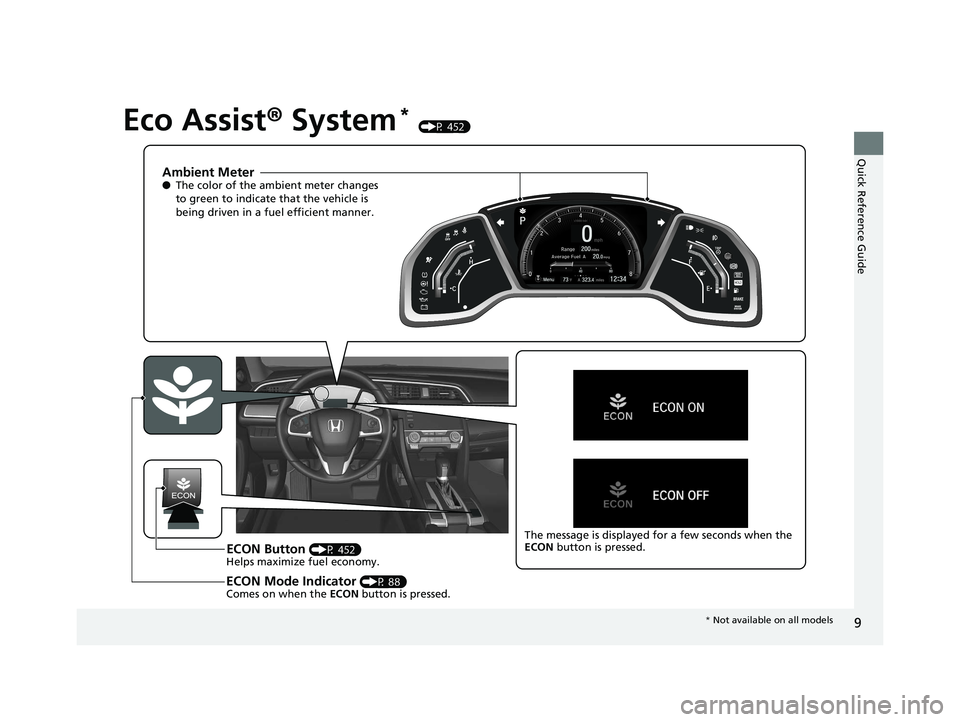
Eco Assist® System* (P 452)
Ambient Meter●The color of the ambient meter changes
to green to indicate that the vehicle is
being driven in a fuel efficient manner.
ECON Button (P 452)
Helps maximize fuel economy.
ECON Mode Indicator (P 88)
Comes on when the ECON button is pressed.
The message is displayed for a few seconds when the
ECON button is pressed.
* Not available on all models
19 CIVIC 2D HCM (KA KL KC)-31TBG6300.book 9 ページ 2018年9月4日 火曜日 午後1時38分
Page 14 of 675
12
Quick Reference Guide
Controls (P 133)
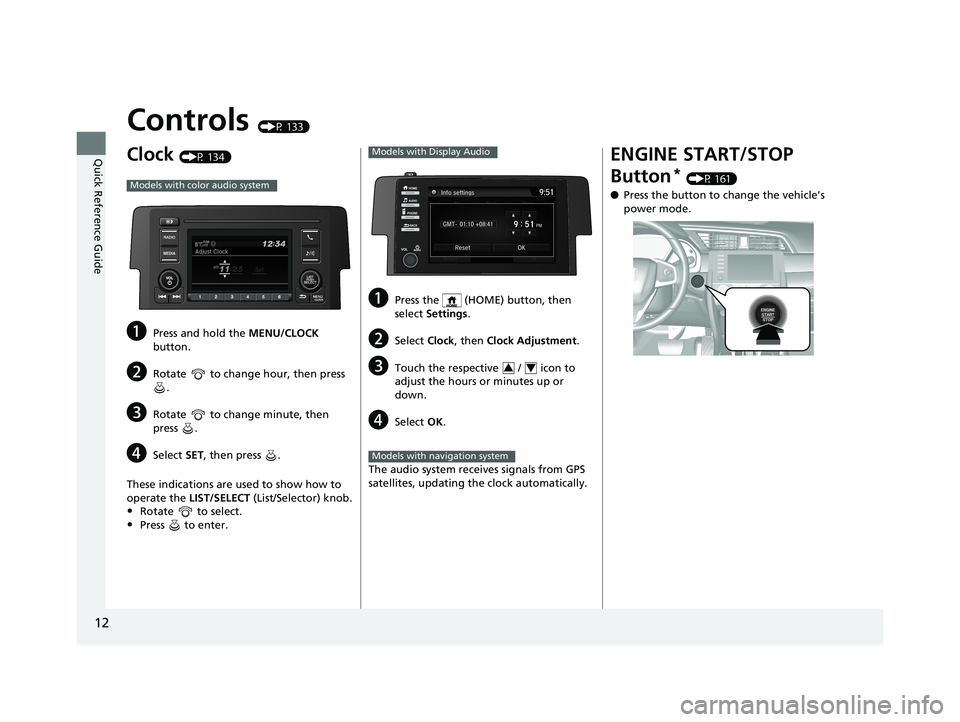
Clock (P 134)
aPress and hold the MENU/CLOCK
button.
bRotate to change hour, then press .
cRotate to change minute, then
press .
dSelect SET, then press .
These indications are used to show how to
operate the LIST/SELECT (List/Selector) knob.
•Rotate to select.
•Press to enter.
Models with color audio system
aPress the (HOME) button, then
select Settings .
bSelect Clock, then Clock Adjustment .
cTouch the respective / icon to
adjust the hours or minutes up or
down.
dSelect OK.
The audio system receives signals from GPS
satellites, updating the clock automatically.
Models with Display Audio
34
Models with navigation system
ENGINE START/STOP
Button
* (P 161)
● Press the button to ch ange the vehicle’s
power mode.
19 CIVIC 2D HCM (KA KL KC)-31TBG6300.book 12 ページ 2018年9月4日 火曜 日 午後1時38分
Page 18 of 675
16
Quick Reference Guide
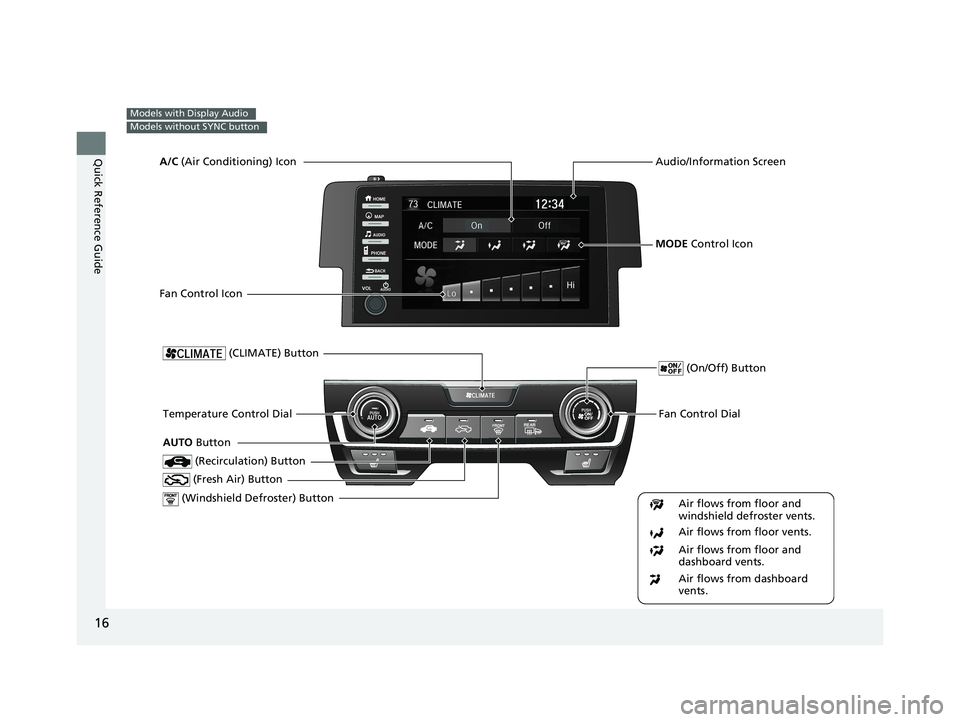
Models with Display Audio
Models without SYNC button
Fan Control Dial
(Windshield Defroster) ButtonTemperature Control Dial
Air flows from floor and
windshield defroster vents.
Air flows from floor vents.
Air flows from floor and
dashboard vents.
Air flows from dashboard
vents.
(Recirculation) Button
(CLIMATE) Button
(Fresh Air) Button
(On/Off) Button
AUTO Button
Audio/Information Screen
MODE Control Icon
A/C
(Air Conditioning) Icon
Fan Control Icon
19 CIVIC 2D HCM (KA KL KC)-31TBG6300.book 16 ページ 2018年9月4日 火曜 日 午後1時38分
Page 19 of 675
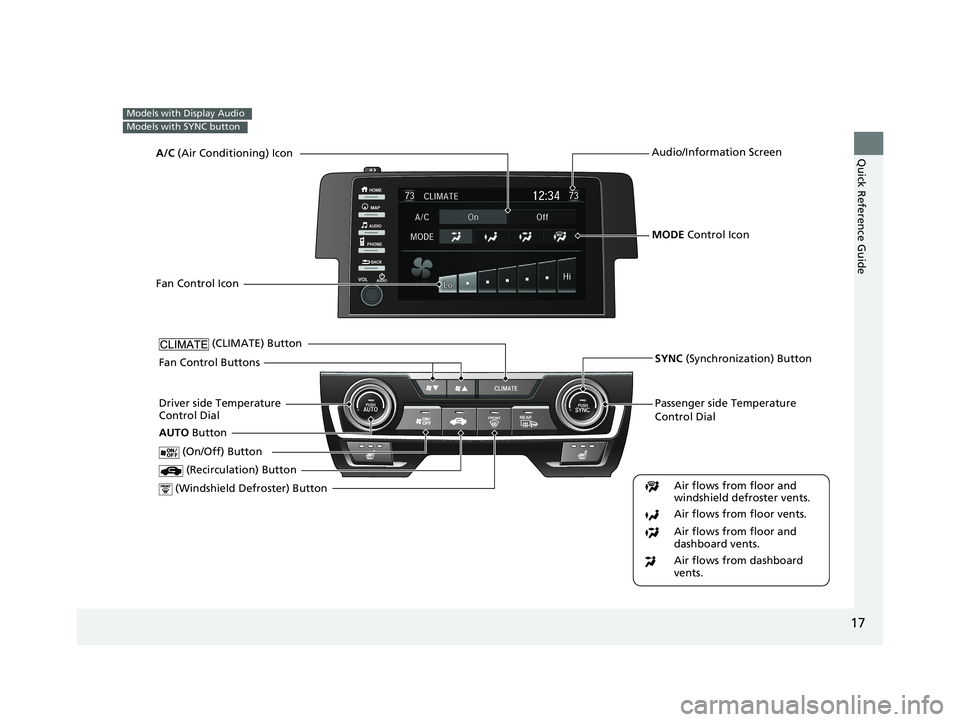
17
Quick Reference Guide
Models with Display Audio
Models with SYNC button
Passenger side Temperature
Control Dial
(Windshield Defroster) ButtonDriver side Temperature
Control Dial (Recirculation) Button
(CLIMATE) Button
(On/Off) Button
AUTO Button
Audio/Information Screen
SYNC (Synchronization) Button
Air flows from floor and
windshield defroster vents.
Air flows from floor vents.
Air flows from floor and
dashboard vents.
Air flows from dashboard
vents.
MODE Control Icon
A/C
(Air Conditioning) Icon
Fan Control Icon
Fan Control Buttons
19 CIVIC 2D HCM (KA KL KC)-31TBG6300.book 17 ページ 2018年9月4日 火曜 日 午後1時38分
Page 20 of 675
18
Quick Reference Guide
Features (P 211)
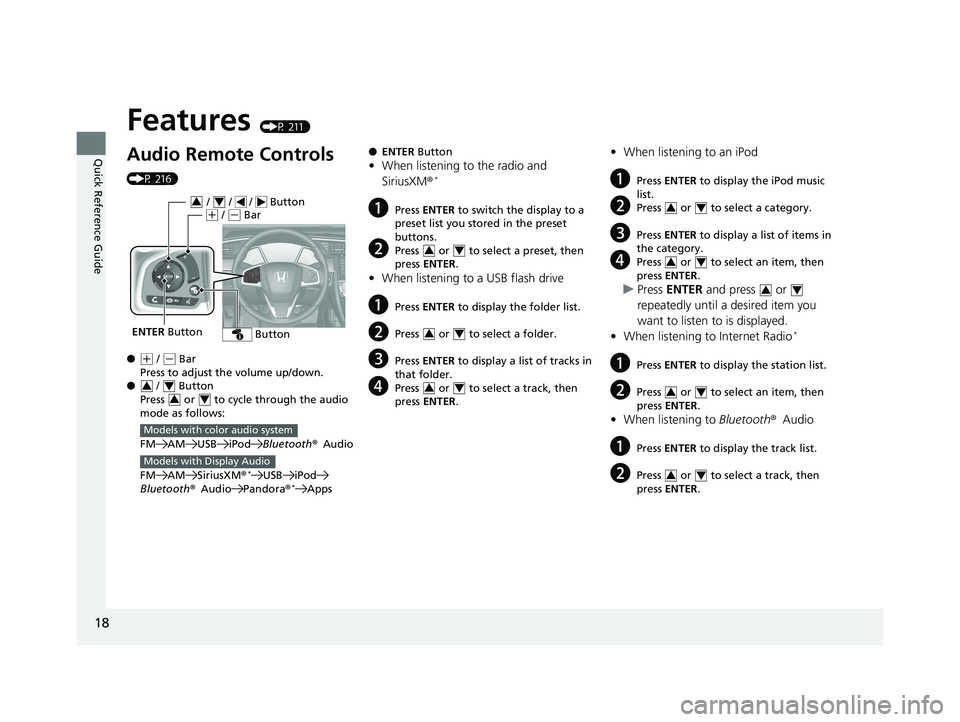
Audio Remote Controls
(P 216)
●
(+ / ( - Bar
Press to adjust the volume up/down.
● / Button
Press or to cycle through the audio
mode as follows:
FM AM USB iPod Bluetooth®Audio
FM AM SiriusXM ®
*USB iPod
Bluetooth ®Audio Pandora®*Apps
ENTER Button
/ / / Button34(+ / (- Bar
Button
34
34
Models with color audio system
Models with Display Audio
● ENTER Button
•When listening to the radio and
SiriusXM ®*
aPress ENTER to switch the display to a
preset list you stored in the preset
buttons.
bPress or to select a preset, then
press ENTER .
•When listening to a USB flash drive
aPress ENTER to display the folder list.
bPress or to select a folder.
cPress ENTER to display a list of tracks in
that folder.
dPress or to select a track, then
press ENTER .
34
34
34
•When listening to an iPod
aPress ENTER to display the iPod music
list.
bPress or to select a category.
cPress ENTER to display a list of items in
the category.
dPress or to select an item, then
press ENTER .
uPress ENTER and press or
repeatedly until a desired item you
want to listen to is displayed.
• When listening to Internet Radio
*
aPress ENTER to display the station list.
bPress or to select an item, then
press ENTER .
•When listening to Bluetooth®Audio
aPress ENTER to display the track list.
bPress or to select a track, then
press ENTER .
34
34
34
34
34
19 CIVIC 2D HCM (KA KL KC)-31TBG6300.book 18 ページ 2018年9月4日 火曜 日 午後1時38分
Page 23 of 675
21
Quick Reference Guide
(P 237)
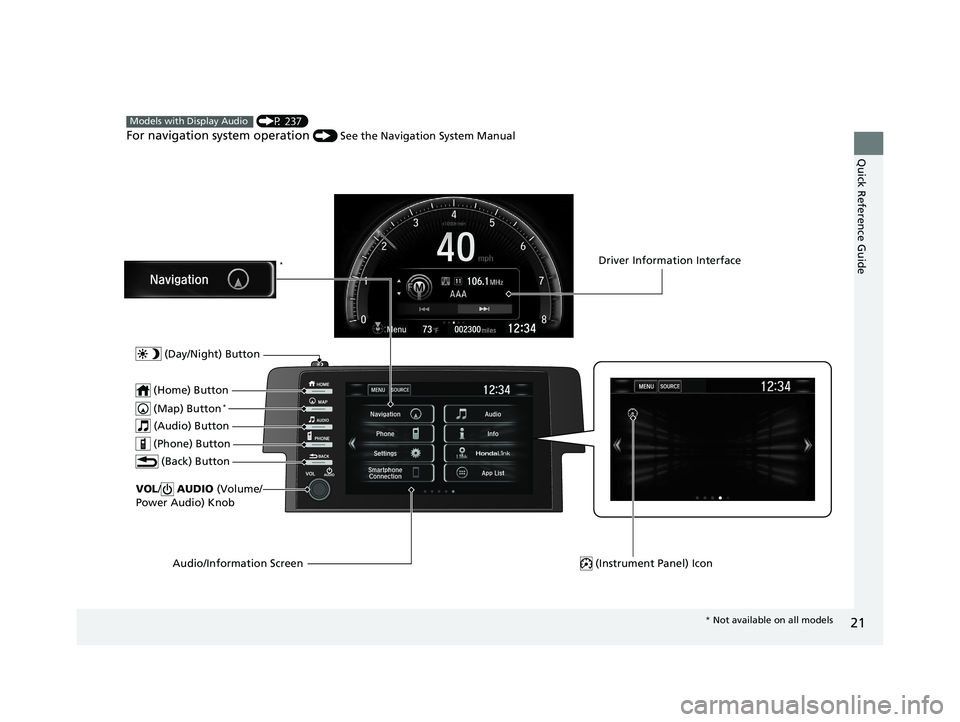
For navigation system operation () See the Navigation System Manual
Models with Display Audio
(Map) Button*
VOL/ AUDIO (Volume/
Power Audio) Knob
(Home) Button
(Back) Button
Audio/Information Screen
(Audio) Button
Driver Information Interface
(Instrument Panel) Icon
(Day/Night) Button
*
(Phone) Button
* Not available on all models
19 CIVIC 2D HCM (KA KL KC)-31TBG6300.book 21 ページ 2018年9月4日 火曜 日 午後1時38分
Page 24 of 675
22
Quick Reference Guide
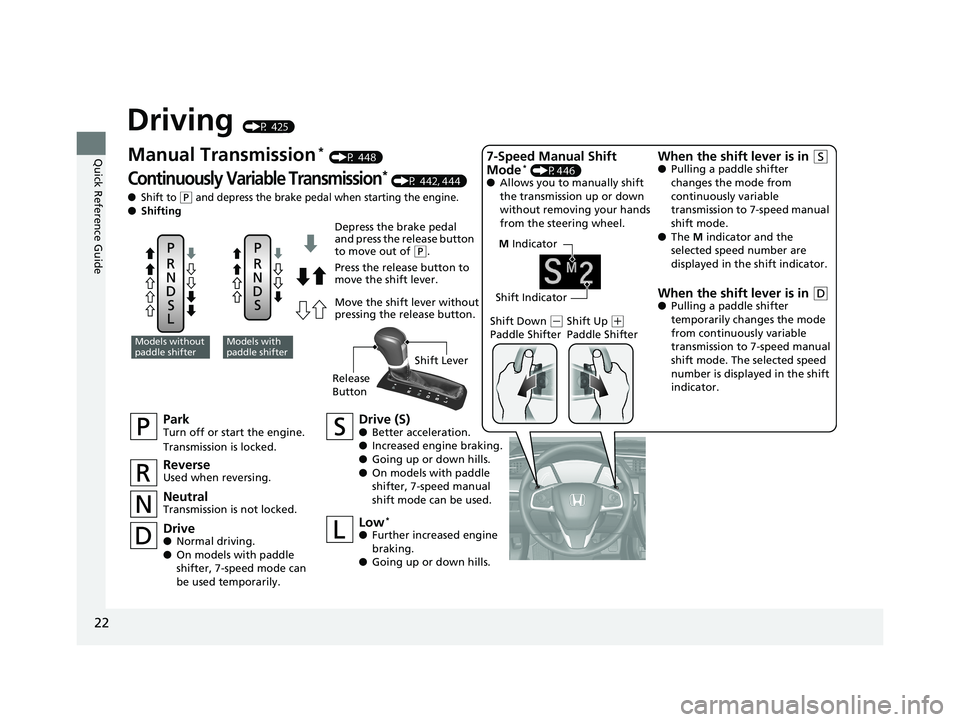
Driving (P 425)
M Indicator
Shift Indicator
ParkTurn off or start the engine.
Transmission is locked.
NeutralTransmission is not locked.
Drive (S)● Better acceleration.
● Increased engine braking.
● Going up or down hills.
● On models with paddle
shifter, 7-speed manual
shift mode can be used.
Models without
paddle shifterModels with
paddle shifter
Depress the brake pedal
and press the release button
to move out of
(P.
Press the release button to
move the shift lever.
Move the shift lever without
pressing the release button.
ReverseUsed when reversing.
Drive● Normal driving.
● On models with paddle
shifter, 7-speed mode can
be used temporarily.
Low*
●Further increased engine
braking.
● Going up or down hills. Shift Down
(
-
Paddle Shifter Shift Up (
+
Paddle Shifter
7-Speed Manual Shift
Mode* (P446)
● Allows you to manually shift
the transmission up or down
without removing your hands
from the steering wheel.
When the shift lever is in (S●Pulling a paddle shifter
changes the mode from
continuously variable
transmission to 7-speed manual
shift mode.
● The M indicator and the
selected speed number are
displayed in the shift indicator.
When the shift lever is in (D● Pulling a paddle shifter
temporarily changes the mode
from continuously variable
transmission to 7-speed manual
shift mode. The selected speed
number is displayed in the shift
indicator.
Manual Transmission* (P 448)
Continuously Variable Transmission* (P 442, 444)
●Shift to (P and depress the brake pedal when starting the engine.
● Shifting
Release
Button Shift Lever
19 CIVIC 2D HCM (KA KL KC)-31TBG6300.book 22 ページ 2018年9月4日 火曜
日 午後1時38分
Page 88 of 675
86
uuIndicators u
Instrument Panel
*1:Models with the smart entry system have an ENGINE START/STOP button instead of an ignition switch.
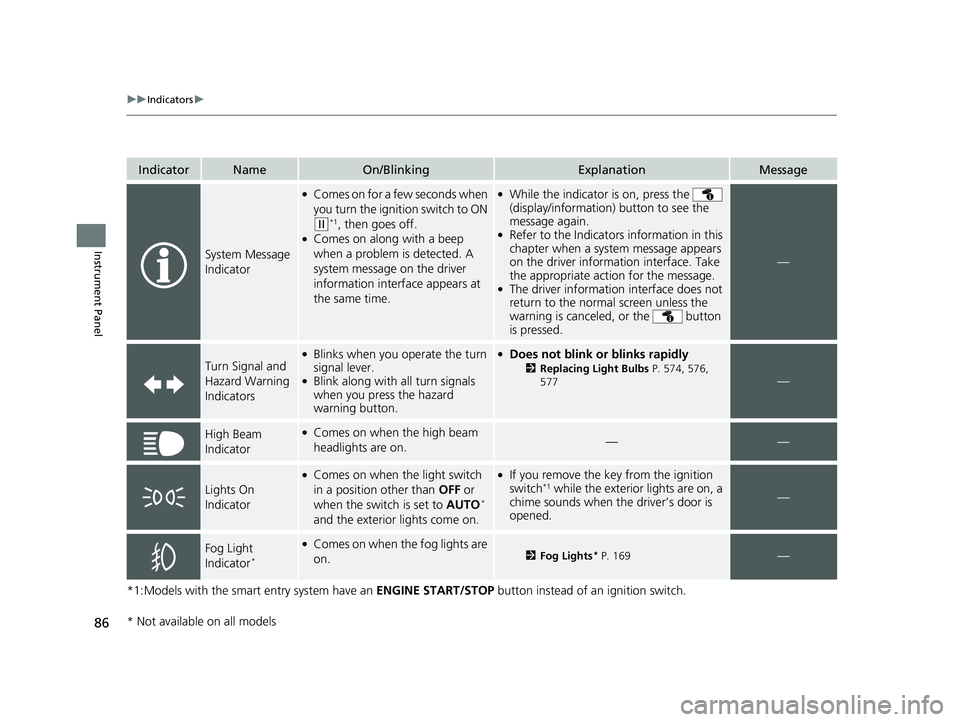
IndicatorNameOn/BlinkingExplanationMessage
System Message
Indicator
●Comes on for a few seconds when
you turn the ignition switch to ON
(w*1, then goes off.●Comes on along with a beep
when a problem is detected. A
system message on the driver
information interface appears at
the same time.
●While the indicator is on, press the
(display/information ) button to see the
message again.
●Refer to the Indicators information in this
chapter when a system message appears
on the driver information interface. Take
the appropriate action for the message.
●The driver information interface does not
return to the normal screen unless the
warning is canceled, or the button
is pressed.
—
Turn Signal and
Hazard Warning
Indicators
●Blinks when you operate the turn
signal lever.
●Blink along with all turn signals
when you press the hazard
warning button.
●Does not blink or blinks rapidly
2 Replacing Light Bulbs P. 574, 576,
577—
High Beam
Indicator●Comes on when the high beam
headlights are on.——
Lights On
Indicator
●Comes on when the light switch
in a position other than OFF or
when the switch is set to AUTO
*
and the exterior lights come on.
●If you remove the key from the ignition
switch*1 while the exterior lights are on, a
chime sounds when the driver’s door is
opened.—
Fog Light
Indicator*
●Comes on when the fog lights are
on.2 Fog Lights* P. 169—
* Not available on all models
19 CIVIC 2D HCM (KA KL KC)-31TBG6300.book 86 ページ 2018年9月4日 火曜 日 午後1時38分
Page 113 of 675
111Continued
Instrument Panel
Gauges and Driver Information Interface
Gauges
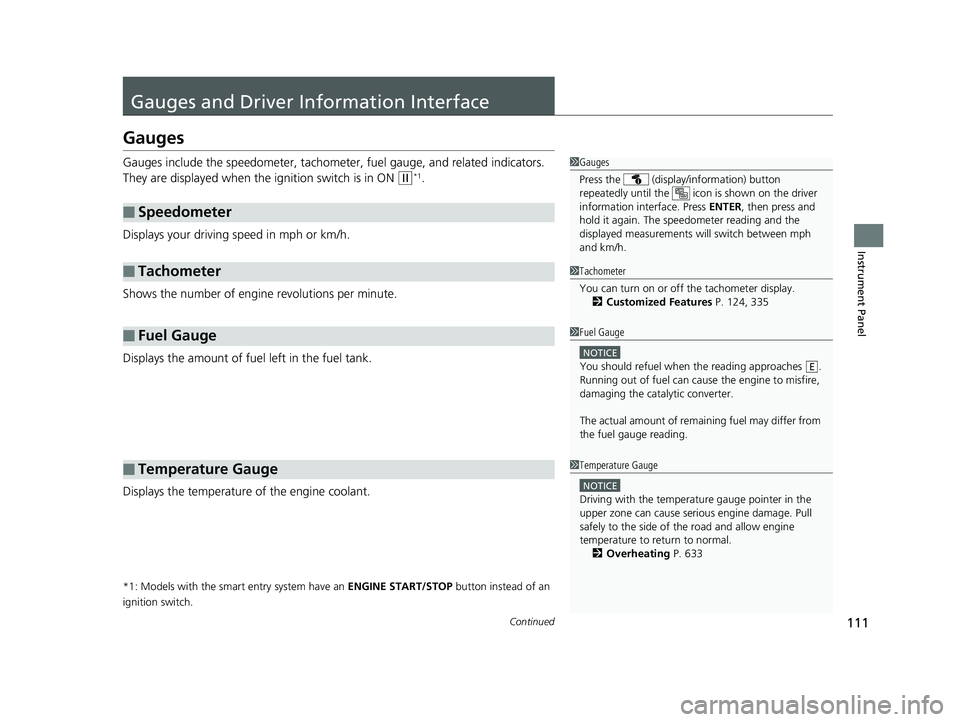
Gauges include the speedometer, tachometer, fuel gauge, and related indicators.
They are displayed when the ignition switch is in ON
(w*1.
Displays your driving speed in mph or km/h.
Shows the number of engine revolutions per minute.
Displays the amount of fuel left in the fuel tank.
Displays the temperature of the engine coolant.
*1: Models with the smart entry system have an ENGINE START/STOP button instead of an
ignition switch.
■Speedometer
■Tachometer
■Fuel Gauge
■Temperature Gauge
1 Gauges
Press the (display /information) button
repeatedly until the ic on is shown on the driver
information interface. Press ENTER , then press and
hold it again. The spee dometer reading and the
displayed measurements wi ll switch between mph
and km/h.
1 Tachometer
You can turn on or off the tachometer display.
2 Customized Features P. 124, 335
1Fuel Gauge
NOTICE
You should refuel when the reading approaches .
Running out of fuel can cause the engine to misfire,
damaging the cata lytic converter.
The actual amount of remain ing fuel may differ from
the fuel gauge reading.E
1 Temperature Gauge
NOTICE
Driving with the temperat ure gauge pointer in the
upper zone can cause serious engine damage. Pull
safely to the side of th e road and allow engine
temperature to return to normal.
2 Overheating P. 633
19 CIVIC 2D HCM (KA KL KC)-31TBG6300.book 111 ページ 2018年9月4日 火 曜日 午後1時38分