steering wheel HONDA CIVIC COUPE 2020 (in English) Service Manual
[x] Cancel search | Manufacturer: HONDA, Model Year: 2020, Model line: CIVIC COUPE, Model: HONDA CIVIC COUPE 2020Pages: 675, PDF Size: 37.35 MB
Page 312 of 675
310
Features
General Information on the Audio System
SiriusXM® Radio Service*
1. You need your radio ID ready before regist ering for subscription. To see the ID on
the screen, select Channel 0.
2. Have your radio ID ready, and either call SiriusXM ® or visit the SiriusXM ® website
to subscribe.
Switch to the SiriusXM ® mode by using the SOURCE button on the steering wheel,
or through the audio/information screen, and stay in this mode for about 30
minutes until the service is activated. Make sure your vehicle is in an open area with
good reception.
Channel Not Subscribed:
You are not subscribed to the channel selected.
Subscription Update:
SiriusXM ® radio is receiving information update from the network.
Channel Not Available:
No such channel exists, or the artist or title information is unavailable.
No Signal:
The signal is too weak in the current location.
Antenna Disconnected:
The SiriusXM ® antenna is disconnected. Contact a dealer.
■Subscribing to SiriusXM ® Radio
■Receiving SiriusXM® Radio
■SiriusXM® Radio Display Messages
1 Subscribing to SiriusXM ® Radio
Contact Information for SiriusXM ® Radio:
•U.S.: SiriusXM ® Radio at www.siriusxm.com/
subscribenow , or 1-866-635-2349
•Canada: SiriusXM ® Canada at www.siriusxm.ca/
subscribe-now , or 1-877-209-0079
1Receiving SiriusXM ® Radio
The SiriusXM ® satellites are in orbit over the equator;
therefore, objects south of the vehicle may cause
satellite rece ption interruptions. Sa tellite signals are
more likely to be blocked by tall buildings and
mountains the farther north you travel from the
equator.
You may experience rece ption problems under the
following circumstances:
•In a location with an obstruction to the south of
your vehicle.
•In tunnels
•On the lower level of a multi-tiered road•Large items carried on the roof rack
* Not available on all models
20 CIVIC 2D HCM (KA KL KC)-31TBG6400.book 310 ページ 2019年6月4日 火 曜日 午前8時32分
Page 348 of 675
346
uuCustomized Features u
Features
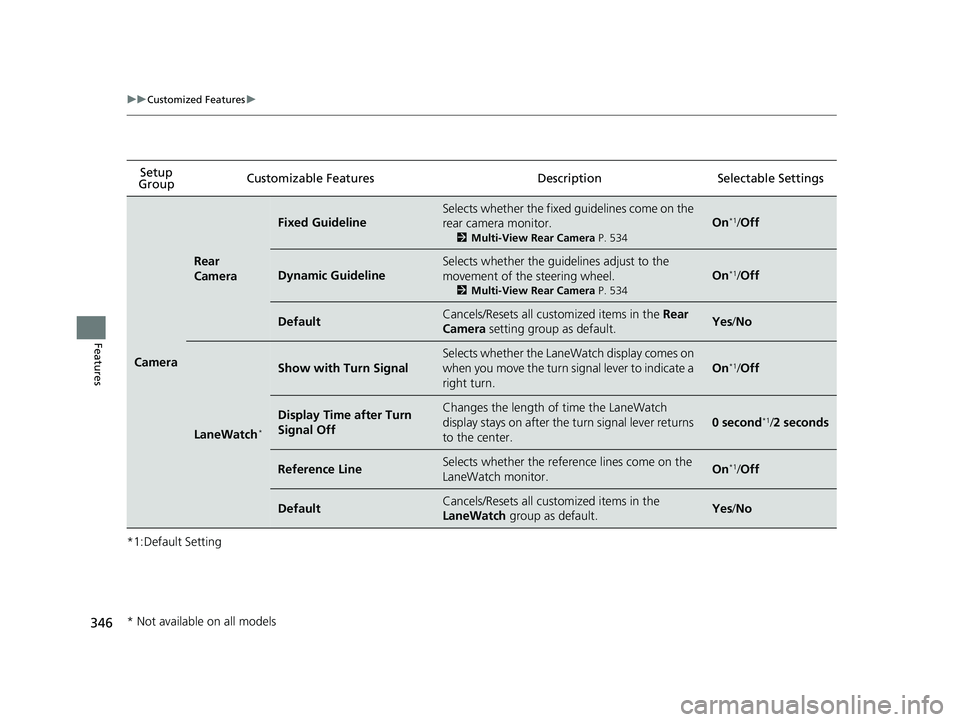
*1:Default SettingSetup
Group Customizable Features Descri
ption Selectable Settings
Camera
Rear
Camera
Fixed Guideline
Selects whether the fixed guidelines come on the
rear camera monitor.
2 Multi-View Rear Camera P. 534
On*1/Off
Dynamic Guideline
Selects whether the guid elines adjust to the
movement of the steering wheel.
2 Multi-View Rear Camera P. 534
On*1/Off
DefaultCancels/Resets all customized items in the Rear
Camera setting group as default.Yes/No
LaneWatch*
Show with Turn Signal
Selects whether the LaneWatch display comes on
when you move the turn signal lever to indicate a
right turn.
On*1/Off
Display Time after Turn
Signal OffChanges the length of time the LaneWatch
display stays on after the turn signal lever returns
to the center.
0 second*1/2 seconds
Reference LineSelects whether the refere nce lines come on the
LaneWatch monitor.On*1/ Off
DefaultCancels/Resets all customized items in the
LaneWatch group as default.Yes/No
* Not available on all models
20 CIVIC 2D HCM (KA KL KC)-31TBG6400.book 346 ページ 2019年6月4日 火 曜日 午前8時32分
Page 367 of 675
365Continued
Features
Bluetooth® HandsFreeLink ®
Bluetooth® HandsFreeLink ® (HFL) allows you to place and receive phone calls using
your vehicle’s audio system, without handling your cell phone.
Using HFL
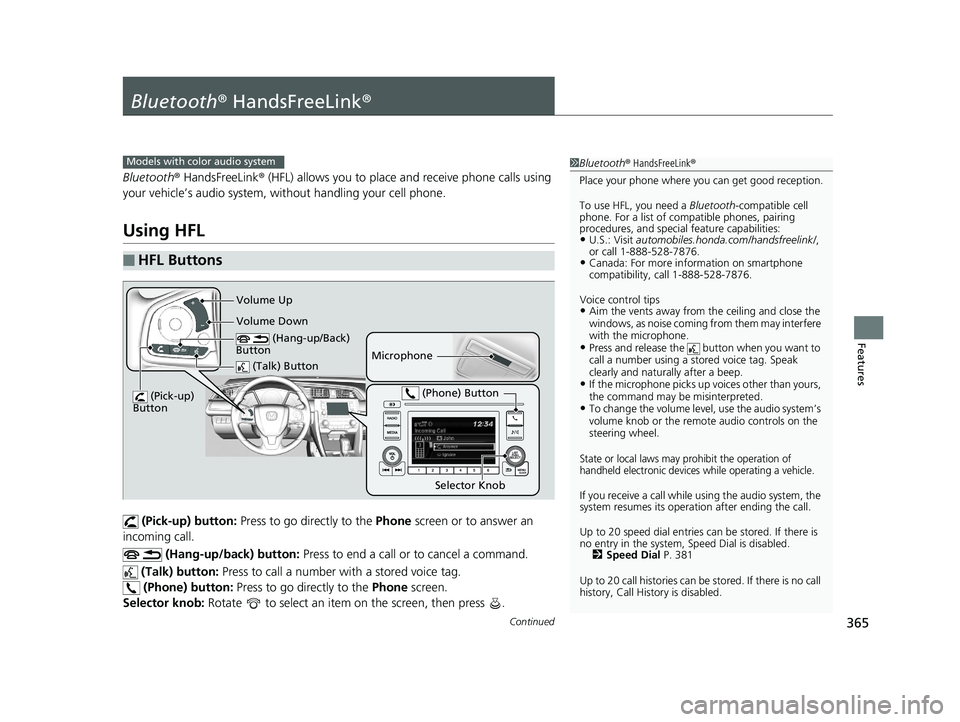
(Pick-up) button: Press to go directly to the Phone screen or to answer an
incoming call.
(Hang-up/back) button: Press to end a call or to cancel a command.
(Talk) button: Press to call a number with a stored voice tag.
(Phone) button: Press to go directly to the Phone screen.
Selector knob: Rotate to select an item on the screen, then press .
■HFL Buttons
1Bluetooth ® HandsFreeLink ®
Place your phone where y ou can get good reception.
To use HFL, you need a Bluetooth-compatible cell
phone. For a list of compatible phones, pairing
procedures, and special feature capabilities:
•U.S.: Visit automobiles.honda.com /handsfreelink/,
or call 1-888-528-7876.
•Canada: For more info rmation on smartphone
compatibility, call 1-888-528-7876.
Voice control tips
•Aim the vents away from the ceiling and close the
windows, as noise coming fr om them may interfere
with the microphone.
•Press and release the button when you want to
call a number using a st ored voice tag. Speak
clearly and naturally after a beep.
•If the microphone picks up vo ices other than yours,
the command may be misinterpreted.
•To change the volume level, use the audio system’s
volume knob or the remote audio controls on the
steering wheel.
State or local laws may pr ohibit the operation of
handheld electronic devices while operating a vehicle.
If you receive a call while using the audio system, the
system resumes its operati on after ending the call.
Up to 20 speed dial entries can be stored. If there is
no entry in the system, Speed Dial is disabled. 2 Speed Dial P. 381
Up to 20 call histories can be stored. If there is no call
history, Call History is disabled.
Models with color audio system
(Talk) Button
Volume Up
Microphone
(Pick-up)
Button
Volume Down
Selector Knob
(Phone) Button
(Hang-up/Back)
Button
20 CIVIC 2D HCM (KA KL KC)-31TBG6400.book 365 ページ 2019年6月4日 火 曜日 午前8時32分
Page 393 of 675
391Continued
Features
Bluetooth® HandsFreeLink ®
Bluetooth® HandsFreeLink ® (HFL) allows you to place and receive phone calls using
your vehicle’s audio system, without handling your cell phone.
Using HFL
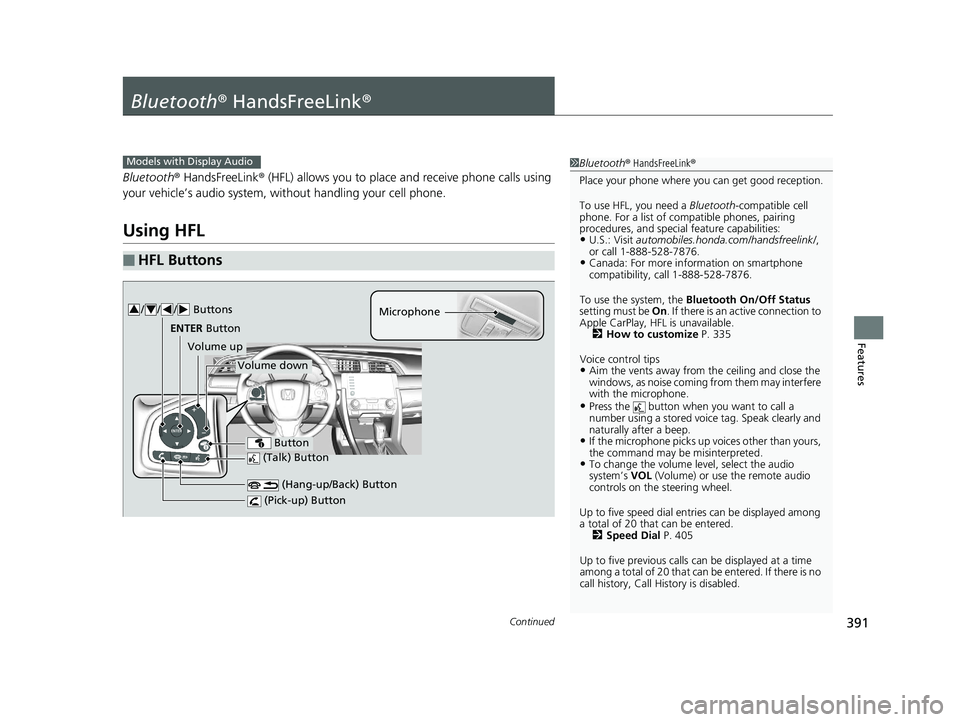
■HFL Buttons
1 Bluetooth ® HandsFreeLink ®
Place your phone where y ou can get good reception.
To use HFL, you need a Bluetooth-compatible cell
phone. For a list of compatible phones, pairing
procedures, and special feature capabilities:
•U.S.: Visit automobiles.honda.com /handsfreelink/,
or call 1-888-528-7876.
•Canada: For more info rmation on smartphone
compatibility, call 1-888-528-7876.
To use the system, the Bluetooth On/Off Status
setting must be On . If there is an active connection to
Apple CarPlay, H FL is unavailable.
2 How to customize P. 335
Voice control tips
•Aim the vents away from the ceiling and close the
windows, as noise coming fr om them may interfere
with the microphone.
•Press the button when you want to call a
number using a stored voic e tag. Speak clearly and
naturally after a beep.
•If the microphone picks up vo ices other than yours,
the command may be misinterpreted.
•To change the volume level, select the audio
system’s VOL (Volume) or use the remote audio
controls on the steering wheel.
Up to five speed dial entries can be displayed among
a total of 20 that can be entered. 2 Speed Dial P. 405
Up to five previous calls can be displayed at a time
among a total of 20 that can be entered. If there is no
call history, Call History is disabled.
Models with Display Audio
(Talk) Button
Volume up Microphone
(Hang-up/Back) Button
(Pick-up) Button
ENTER Button
Button
/ / / Buttons34
Volume down
20 CIVIC 2D HCM (KA KL KC)-31TBG6400.book 391 ページ 2019年6月4日 火 曜日 午前8時32分
Page 429 of 675
Continued427
uuBefore Driving uDriving Preparation
Driving
• Store or secure all items on board properly.
u Carrying too much cargo, or improperly storing it, can affect your vehicle’s
handling, stability, sto pping distance, and tires, and make it unsafe.
2Maximum Load Limit P. 429
•Do not pile items higher than the seat height.
u They can block your view and may be thrown forward in the event of sudden
braking.
• Do not place anything in the front seat footwells. Make sure to secure the floor
mat.
u An object or unsecured floor mat can in terfere with your brake and accelerator
pedal operation while driving.
• If you have any animals on board, do not let them move around in the vehicle.
u They may interfere with driv ing and a crash could occur.
• Securely close and lock both doors and the trunk.
2 Locking/Unlocking the Doors from the Inside P. 146
•Adjust your seating position properly.
u Adjust the front head restraint*1, too.
2 Adjusting the Seats P. 181
2 Adjusting the Front Head Restraints P. 187
•Adjust the mirrors and steering wheel properly.
u Adjust them while sitting in the proper driving position.
2 Adjusting the Mirrors P. 178
2 Adjusting the Steering Wheel P. 177
*1: Models without SPORT mode
■Interior Checks1 Interior Checks
The headlight aim is set by the factory, and does not
need to be adjusted. Howeve r, if you regularly carry
heavy items in the trunk, have the aiming readjusted
at a dealer or by a qualified technician.
20 CIVIC 2D HCM (KA KL KC)-31TBG6400.book 427 ページ 2019年6月4日 火 曜日 午前8時32分
Page 442 of 675
440
uuWhen Driving uPrecautions While Driving
Driving
Precautions While Driving
Avoid driving in deep water and on flooded roads. This can damage the engine or
driveline, or cause elec trical component failure.
If there is a strong impact with something under the vehicle, stop in a safe location.
Check the underside of the vehicle for damage or any fluid leaks.
*1: Models with the smart entry system have an ENGINE START/STOP button instead of an
ignition switch.
■In Rain
■Other Precautions
1 Precautions While Driving
NOTICE
Do not operate the shift lever while pressing the
accelerator pedal. You could damage the
transmission.
NOTICE
If you repeatedly turn the steering wheel at an
extremely low speed, or hold the steering wheel in
the full left or right position for a while, the electric
power steering (EPS) system heats up. The system
goes into a protective mode, and limits its
performance. The steering wheel becomes harder
and harder to operate. Once the system cools down,
the EPS system is restored.
Repeated operation under these conditions can
eventually damage the system.
If the ignition switch is turned to ACCESSORY
( q*1
while driving, the engine will shut down and all
steering and brake power a ssist functions will stop,
making it difficult to control the vehicle.
Do not put the shift lever in
( N, as you will lose
engine braking (and acce leration) performance.
During the first 600 miles (1,000 km) of operation,
avoid sudden acceleration or full throttle operation so
as not to damage the engine or powertrain.
Avoid hard braking for the first 200 miles (300 km).
You should also follow this when the brake pads are
replaced.
20 CIVIC 2D HCM (KA KL KC)-31TBG6400.book 440 ページ 2019年6月4日 火 曜日 午前8時32分
Page 448 of 675
uuWhen Driving uShifting
446
Driving
Use the paddle shifters to change betw een 1st and 7th speeds without releasing
your hands from the steering wheel. The transmission switches to the 7-speed
manual shift mode when you pull a paddle shi fter while driving. This mode is useful
when engine braking is needed.
■When the shift lever is in (D:
The shift mode goes into the 7-speed ma nual shift mode temporarily, and the
number is displayed in the shift indicator.
The 7-speed manual shift mode is canceled automatically if you drive at constant
speed or accelerate, and the number in the shift indicator goes off.
You can cancel this mode by pulling the
(+ paddle shifter for a few seconds.
The 7-speed manual shift mode is especially useful when reducing the vehicle speed
temporarily before making a turn.
■When the shift lever is in (S:
The shift mode goes into the 7- speed manual shift mode. The M indicator and the
speed number are displayed in the shift indicator. As the vehicle speed slows down,
the transmission automatically shifts down accordingly. When the vehicle comes to
a stop, it automatically shifts down into 1st.
If the vehicle speed increases and the engi ne speed reaches near the tachometer’s
red zone, the transmission automatically shifts up.
You can only pull away in 1st speed.
When canceling the 7-speed manual sh ift mode, move the shift lever from
(S to
(D. When the 7-speed manual shift mode is canceled, the M indicator and shift
indicator will turn off.
■7-Speed Manual Shift Mode1 7-Speed Manual Shift Mode
In the 7-speed manual shif t mode, the transmission
shifts up or down by operating either paddle shifter
under the following conditions:
Shift Up: The engine sp eed reaches the lowest
threshold of the hi gher speed position.
Shift Down: The engine sp eed reaches the highest
threshold of the lower speed position.
When the engine speed reaches near the
tachometer’s red zone, the transmission shifts up
automatically.
When the engine speed reaches the lowest threshold
of the selected speed positi on, the transmission shifts
down automatically.
Operating the paddle shifters on slippery surfaces
may cause the tires to lock up. In this case, the 7-
speed manual shift mode is canceled and goes back
to the normal
( D driving mode.
20 CIVIC 2D HCM (KA KL KC)-31TBG6400.book 446 ページ 2019年6月4日 火 曜日 午前8時32分
Page 458 of 675
456
uuWhen Driving uAgile Handling Assist
Driving
Agile Handling Assist
Lightly brakes selective wheels, as needed , when you turn the steering wheel, and
helps support the vehicle’s stability and performance during cornering.
Limited Slip Differential (LSD)
LSD (limited slip differential) is a type of differential that delivers extra torque to the
wheel or the wheels with the most tractio n to minimize wheel slip and maintain
control of the vehicle.
1 Agile Handling Assist
The agile handling assist ca nnot enhance stability in
all driving situations. You still need to drive and
corner at speeds appropriate for the conditions and
always leave a sufficient margin of safety.
When the VSA ® system indicator comes on and stays
on while driving, the agil e handling assist does not
activate.
You may hear a sound coming from the engine
compartment while the agile handling assist is
activated. This is normal.
Models with SPORT mode
1 Limited Slip Differential (LSD)
NOTICE
Make sure both front tires of your vehicle are of the
same brand and specified si ze, and have equal wear.
Otherwise, the LSD may not function properly.
20 CIVIC 2D HCM (KA KL KC)-31TBG6400.book 456 ページ 2019年6月4日 火 曜日 午前8時32分
Page 459 of 675
457
uuWhen Driving uTire Pressure Monitoring System (TPMS)
Continued
Driving
Tire Pressure Monitoring System (TPMS)
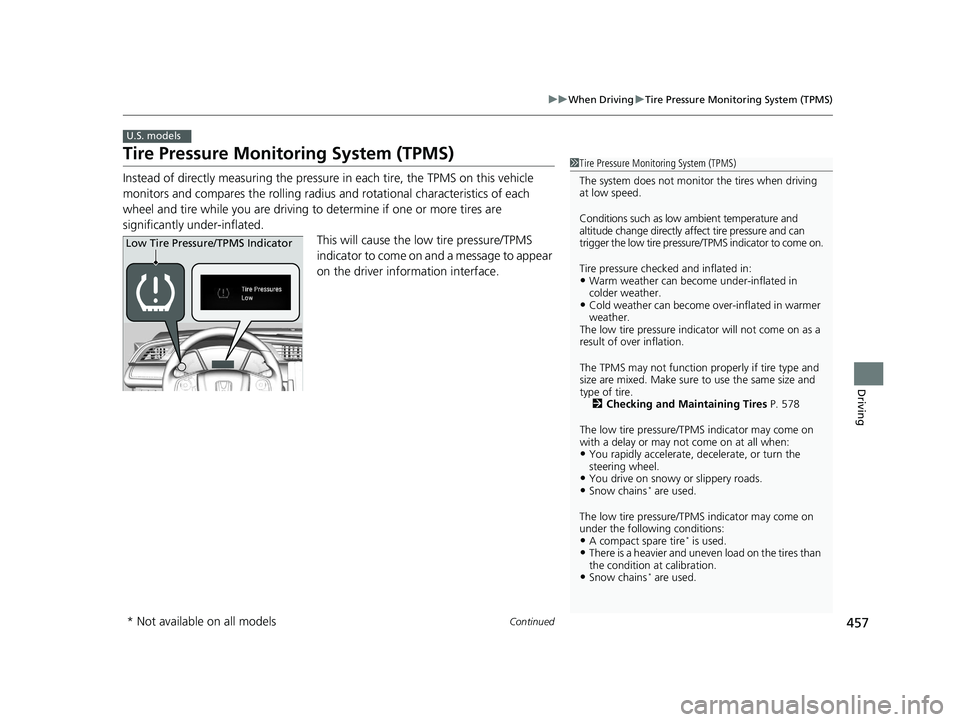
Instead of directly measuring the pressure in each tire, the TPMS on this vehicle
monitors and compares the rolling radius and rotational characteristics of each
wheel and tire while you are driving to determine if one or more tires are
significantly under-inflated. This will cause the low tire pressure/TPMS
indicator to come on and a message to appear
on the driver information interface.
U.S. models
1Tire Pressure Monitoring System (TPMS)
The system does not monitor the tires when driving
at low speed.
Conditions such as low ambient temperature and
altitude change directly a ffect tire pressure and can
trigger the low tire pressure/TPMS indicator to come on.
Tire pressure checked and inflated in:
•Warm weather can beco me under-inflated in
colder weather.
•Cold weather can become over-inflated in warmer
weather.
The low tire pressure indica tor will not come on as a
result of over inflation.
The TPMS may not function pr operly if tire type and
size are mixed. Make sure to use the same size and
type of tire. 2 Checking and Maintaining Tires P. 578
The low tire pressure/TPMS indicator may come on
with a delay or may not come on at all when:
•You rapidly accelerate, decelerate, or turn the
steering wheel.
•You drive on snowy or slippery roads.•Snow chains* are used.
The low tire pressure/TPMS indicator may come on
under the following conditions:
•A compact spare tire* is used.•There is a heavier and uneve n load on the tires than
the condition at calibration.
•Snow chains* are used.
Low Tire Pressure/TPMS Indicator
* Not available on all models
20 CIVIC 2D HCM (KA KL KC)-31TBG6400.book 457 ページ 2019年6月4日 火 曜日 午前8時32分
Page 470 of 675
468
uuHonda Sensing ®u Collision Mitigation Braking SystemTM (CMBSTM)
Driving
Collision Mitigati on Braking SystemTM (CMBSTM)
Can assist you when there is a possibility of your vehicle colliding with a vehicle or a
pedestrian detected in front of yours. The CMBSTM is designed to alert you when a
potential collision is determined, as well as to reduce your vehicle speed to help
minimize collision severity when a collision is deemed unavoidable.
1 Collision Mitigation Braking SystemTM (CMBSTM)
Important Safety Reminder
The CMBS
TM is designed to reduce the severity of an
unavoidable collision. It does not prevent collision nor
stop the vehicle automatically. It is still your
responsibility to operate the brake pedal and steering
wheel appropriately acco rding to the driving
conditions.
When the CMBS
TM activates, the engine may stop
automatically.
Start the engine by normal operation if the engine
stops. 2 Starting the Engine P. 432, 435
The CMBS
TM may not activate or may not detect a
vehicle in front of y our vehicle under certain
conditions: 2 CMBS
TM Conditions and Limitations P. 473
You can read about handling information for the
camera equipped with this system. 2 Front Sensor Camera P. 521
For directions on the prop er handling of the radar
sensor, refer to the following page.
2 Radar Sensor P. 523
Manual transmission models
20 CIVIC 2D HCM (KA KL KC)-31TBG6400.book 468 ページ 2019年6月4日 火 曜日 午前8時32分