steering wheel HONDA CIVIC COUPE 2020 (in English) Repair Manual
[x] Cancel search | Manufacturer: HONDA, Model Year: 2020, Model line: CIVIC COUPE, Model: HONDA CIVIC COUPE 2020Pages: 675, PDF Size: 37.35 MB
Page 520 of 675
uuHonda Sensing ®u Road Departure Mitigation (RDM) System
518
Driving
The system becomes ready to start sear ching for lane markings when all the
following conditions are met:
• The vehicle is traveling between about 45 and 90 mph (72 and 145 km/h).
• The vehicle is on a straight or slightly curved road.
• The turn signals are off.
• The brake pedal is not depressed.
• The wipers are not in continuous operation.
• The vehicle is not accelerating or braking, and the steering wheel is not being
turned.
• The system makes a determination that the driver is not actively accelerating,
braking or steering.
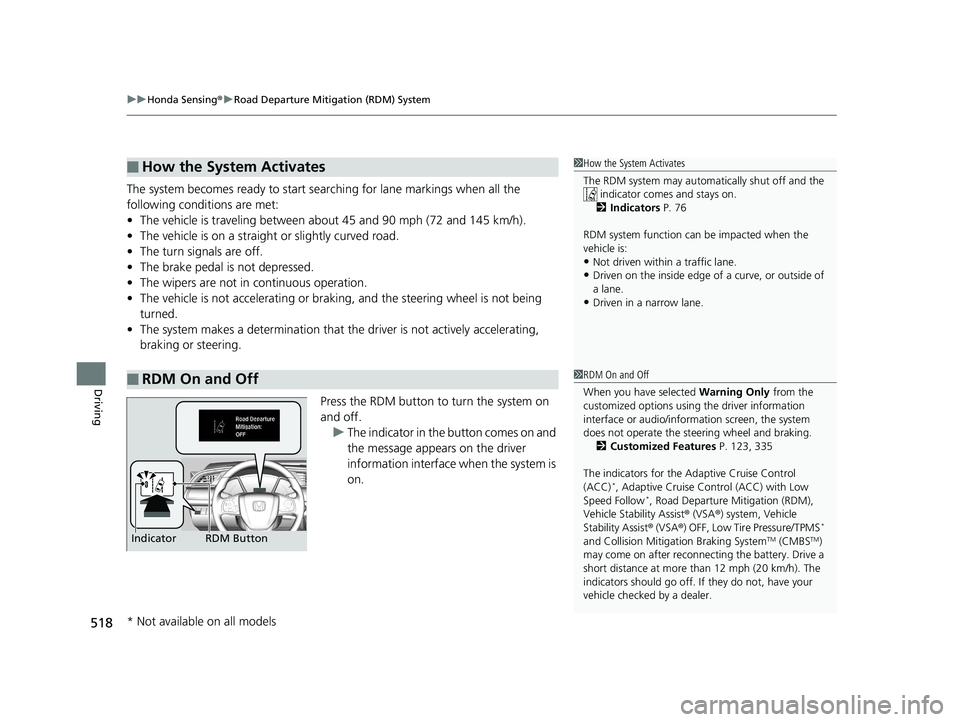
Press the RDM button to turn the system on
and off.u The indicator in the button comes on and
the message appears on the driver
information interface when the system is
on.
■How the System Activates
■RDM On and Off
1How the System Activates
The RDM system may automa tically shut off and the
indicator comes and stays on.
2 Indicators P. 76
RDM system function can be impacted when the
vehicle is:
•Not driven within a traffic lane.•Driven on the inside edge of a curve, or outside of
a lane.
•Driven in a narrow lane.
1 RDM On and Off
When you have selected Warning Only from the
customized options using the driver information
interface or audio/information screen, the system
does not operate the steering wheel and braking. 2 Customized Features P. 123, 335
The indicators for the Adaptive Cruise Control
(ACC)
*, Adaptive Cruise Control (ACC) with Low
Speed Follow*, Road Departure Mitigation (RDM),
Vehicle Stability Assist ® (VSA ®) system, Vehicle
Stability Assist ® (VSA ®) OFF, Low Tire Pressure/TPMS
*
and Collision Mitiga tion Braking SystemTM (CMBSTM)
may come on after reconnect ing the battery. Drive a
short distance at more than 12 mph (20 km/h). The
indicators should go off. If they do not, have your
vehicle checked by a dealer.RDM Button
Indicator
* Not available on all models
20 CIVIC 2D HCM (KA KL KC)-31TBG6400.book 518 ページ 2019年6月4日 火 曜日 午前8時32分
Page 528 of 675
uuBraking uBrake System
526
Driving
The parking brake automatically releases as you depress the accelerator pedal when:
• You are wearing the driver’s seat belt.
• The engine is running.
• The transmission is not in
(P or (N.
• The transmission is not in
(N.
Your vehicle is equipped with disc brakes at all four wheels. A vacuum power assist
helps to reduce the effort needed on the brake pedal. The brake assist system
increases the stopping force when you depress the brake pedal hard in an
emergency situation. The an ti-lock brake system (ABS) helps you retain steering
control when braking very hard.
2 Brake Assist System P. 531
2 Anti-lock Brake System (ABS) P. 530
■Foot Brake
Continuously variable transmission models
Manual transmission models
1Foot Brake
Check the brakes after driving through deep water,
or if there is a buildup of road surface water. If
necessary, dry the brakes by lightly depressing the
pedal several times.
If you hear a continuous me tallic friction sound when
applying the brakes, this is caused by the brake wear
indicator rubbing on the brake rotor and indicates
that the brake pads need to be replaced. Have the
vehicle checked by a deal er. If you hear only an
occasional squeak or squeal when you initially apply
the brake pedal, this may be normal and caused by
high frequency vibration of the brake pads against
the rotating brake disc.
Constantly using the brak e pedal while going down a
long hill builds up heat, which reduces the brake
effectiveness. Apply engine braking by taking your
foot off the accelerator pe dal and downshifting to a
lower gear/speed position. With manual transmission
use a lower gear for gr eater engine braking.
Do not rest your foot on the brake pedal while
driving, as it will lightly apply the brakes and cause
them to lose effectiveness over time and reduce pad
life. It will also conf use drivers behind you.
20 CIVIC 2D HCM (KA KL KC)-31TBG6400.book 526 ページ 2019年6月4日 火 曜日 午前8時32分
Page 532 of 675
530
uuBraking uAnti-lock Brake System (ABS)
Driving
Anti-lock Brake System (ABS)
Helps prevent the wheels from locking up, an d helps you retain steering control by
pumping the brakes rapidly, much faster than you.
The electronic brake distribution (EBD) system, which is part of the ABS, also
balances the front-to-rear braking distri bution according to vehicle loading.
You should never pump the brake pedal. Let the ABS work for you by always
keeping firm, steady pressure on the brake pe dal. This is sometimes referred to as
“stomp and steer.”
■ABS operation
The brake pedal may pulsate slightly when the ABS is working. Depress the brake
pedal and keep holding the pedal firmly do wn. On dry pavement, you will need to
press on the brake pedal very hard before the ABS activates. However, you may feel
the ABS activate immediately if yo u are trying to stop on snow or ice.
ABS may activate when you depress the brake pedal when driving on:
• Wet or snow covered roads.
• Roads paved with stone.
• Roads with uneven surfaces, such as potholes, cracks, manholes, etc.
When the vehicle speed goes unde r 6 mph (10 km/h), the ABS stops.
■ABS1Anti-lock Brake System (ABS)
NOTICE
The ABS may not function correc tly if you use a tire of
the wrong size or type.
If the ABS indicator comes on while driving, there
may be a problem with the system.
While normal braking will not be affected, there is a
possibility that the ABS wi ll not be operating. Have
your vehicle checked by a dealer immediately.
The ABS is not designed for the purpose of reducing
the time or distance it take s for a vehicle to stop: It
is designed to limit bra ke lockup which can lead to
skidding and loss of steering control.
In the following cases, yo ur vehicle may need more
distance to stop than a vehicle without the ABS:
•You are driving on rough or uneven road surfaces,
such as gravel or snow.
•The tires are equipped with snow chains*.
The following may be observed with the ABS system:
•Motor sounds coming from the engine
compartment when the brakes are applied, or
when system checks are being performed after the
engine has been started and while the vehicle
accelerates.
•Brake pedal and/or the ve hicle body vibration when
ABS activates.
These vibrations and sou nds are normal to ABS
systems and are no cause for concern.
* Not available on all models
20 CIVIC 2D HCM (KA KL KC)-31TBG6400.book 530 ページ 2019年6月4日 火 曜日 午前8時32分
Page 536 of 675
534
Driving
Multi-View Rear Camera
About Your Multi-View Rear Camera
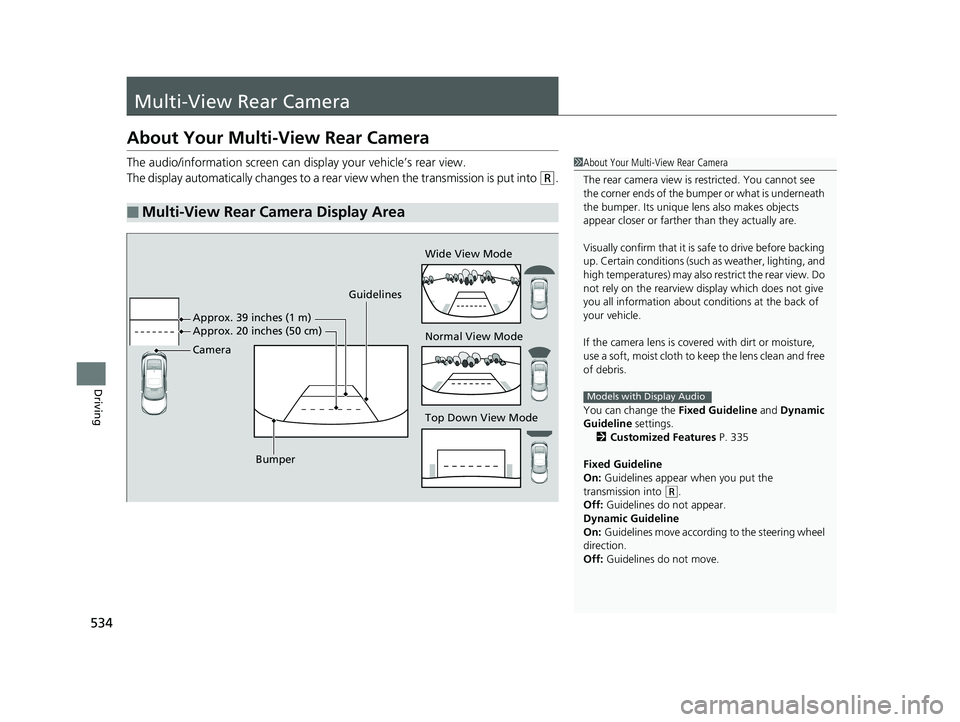
The audio/information screen can display your vehicle’s rear view.
The display automatically changes to a rear view when the transmission is put into
(R.
■Multi-View Rear Camera Display Area
1About Your Multi-View Rear Camera
The rear camera view is restricted. You cannot see
the corner ends of the bum per or what is underneath
the bumper. Its unique le ns also makes objects
appear closer or farther than they actually are.
Visually confirm that it is safe to drive before backing
up. Certain conditions (such as weather, lighting, and
high temperatures) may also re strict the rear view. Do
not rely on the rearview display which does not give
you all information about conditions at the back of
your vehicle.
If the camera lens is cove red with dirt or moisture,
use a soft, moist cloth to keep the lens clean and free
of debris.
You can change the Fixed Guideline and Dynamic
Guideline settings.
2 Customized Features P. 335
Fixed Guideline
On: Guidelines appear when you put the
transmission into
( R.
Off: Guidelines do not appear.
Dynamic Guideline
On: Guidelines move according to the steering wheel
direction.
Off: Guidelines do not move.
Models with Display Audio
Guidelines
Bumper Wide View Mode
Normal View Mode
Top Down View Mode
Camera Approx. 39 inches (1 m)
Approx. 20 inches (50 cm)
20 CIVIC 2D HCM (KA KL KC)-31TBG6400.book 534 ページ 2019年6月4日 火
曜日 午前8時32分
Page 588 of 675
586
uuChecking and Maintaining Tires uWinter Tires
Maintenance
Winter Tires
If driving on snowy or frozen roads, mount all season marked M+S tires, snow tires,
or tire chains; reduce speed; and maintain su fficient distance between vehicles when
driving.
Be particularly careful when operating the steering wheel or brakes to prevent
skidding.
Use tire chains, snow tires, or all season tires when necessary or according to the
law.
When mounting, refer to the following points.
For winter tires:
• Select the size and load ranges that are the same as the original tires.
• Mount the tires to all four wheels.1Winter Tires
NOTICE
Traction devices that are th e wrong size or improperly
installed can damage your vehicle’s brake lines,
suspension, body, and wheels. Stop driving if they are
hitting any part of the vehicle.
3WARNING
Using the wrong chains, or not properly
installing chains, can damage the brake
lines and cause a crash in which you can be
seriously injured or killed.
Follow all instruction s in this owner’s
manual regarding the selection and use of
tire chains.
20 CIVIC 2D HCM (KA KL KC)-31TBG6400.book 586 ページ 2019年6月4日 火 曜日 午前8時32分
Page 605 of 675
603Continued
Handling the Unexpected
If a Tire Goes Flat
Changing a Flat Tire*
If a tire goes flat while driving, grasp the steering wheel firmly, and brake gradually
to reduce speed. Then, stop in a safe plac e. Replace the flat tire with a compact
spare tire. Go to a dealer as soon as possib le to have the full-size tire repaired or
replaced.
1. Park the vehicle on firm, level, non-slip pery surface and apply the parking brake.
2. Put the transmission into
(P.
2. Put the transmission into
(R.
3. Turn on the hazard warning lights an d turn the ignition switch to LOCK
(0*1.
*1: Models with the smart entry system have an ENGINE START/STOP button instead of an
ignition switch.
1 Changing a Flat Tire*
NOTICE
Do not use the jack if it doesn’t work properly. Call
your dealer or a prof essional towing service.
Follow compact spare precautions:
Periodically check the tire pressure of the compact
spare. It should be set to the specified pressure.
Specified Pressure: 60 psi (420 kPa, 4.2 kgf/cm
2)
When driving with the compact spare tire, keep the
vehicle speed under 50 mph (80 km/h). Replace with
a full-size tire as soon as possible.
The compact spare tire and wheel in your vehicle are
specifically for this model. Do not use them with
another vehicle. Do not us e another type of compact
spare tire or wheel with your vehicle.
Do not mount tire chains on a compact spare tire.
If a chain-mounted front tire goes flat, remove one of
the full-size rear tires and replace it with the compact
spare tire. Remove the flat front tire and replace it
with the full-size tire that was removed from the rear.
Mount the tire chains on the front tire.Continuously variable transmission models
Manual transmission models
All models
* Not available on all models
20 CIVIC 2D HCM (KA KL KC)-31TBG6400.book 603 ページ 2019年6月4日 火 曜日 午前8時32分
Page 612 of 675
610
uuIf a Tire Goes Flat uTemporarily Repairing a Flat Tire*
Handling the Unexpected
Temporarily Repairing a Flat Tire*
If the tire has a large cut or is otherwise se verely damaged, you will need to have the
vehicle towed. If the tire only has a smal l puncture, from a nail for instance, you can
use the temporary tire repair kit so that you can drive to the nearest service station
for a more permanent repair.
If a tire goes flat while driving, grasp the steering wheel firmly, and brake gradually
to reduce speed. Then stop in a safe place.
1. Park the vehicle on a firm, level, non-slippery surface and apply the parking brake.
2. Put the transmission into
(R.
3. Turn on the hazard warning lights an d set the power mode to VEHICLE OFF
(LOCK).
1 Temporarily Repairing a Flat Tire*
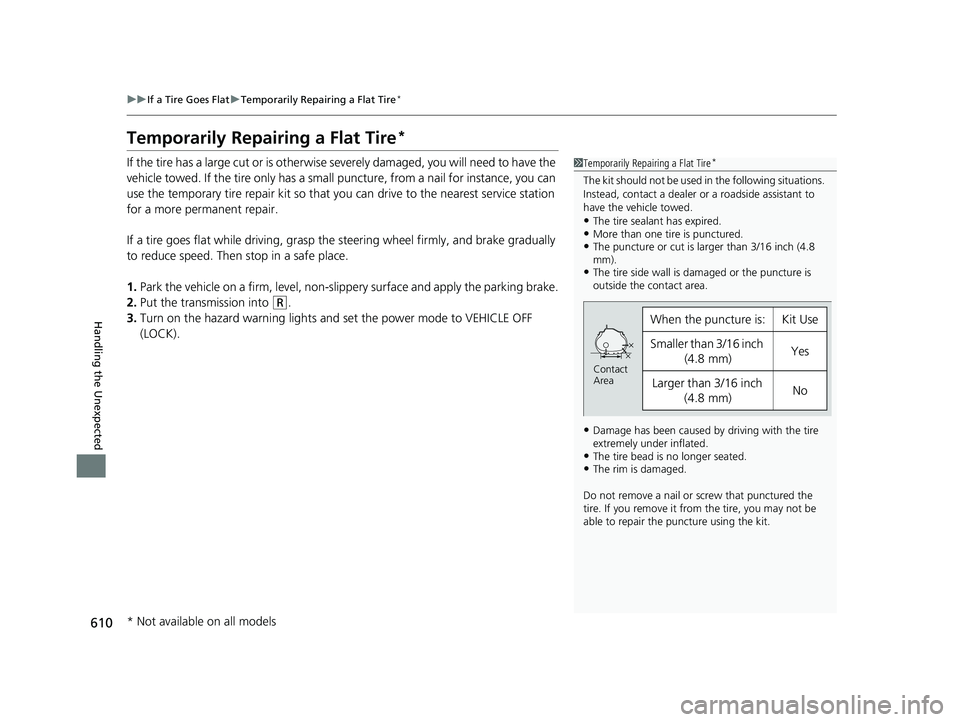
The kit should not be used in the following situations.
Instead, contact a dealer or a roadside assistant to
have the vehicle towed.
•The tire sealant has expired.•More than one tire is punctured.•The puncture or cut is larger than 3/16 inch (4.8
mm).
•The tire side wall is da maged or the puncture is
outside the contact area.
•Damage has been caused by driving with the tire
extremely under inflated.
•The tire bead is no longer seated.•The rim is damaged.
Do not remove a nail or screw that punctured the
tire. If you remove it from the tire, you may not be
able to repair the puncture using the kit.
When the puncture is:Kit Use
Smaller than 3/16 inch
(4.8 mm)Yes
Larger than 3/16 inch
(4.8 mm)No
Contact
Area
* Not available on all models
20 CIVIC 2D HCM (KA KL KC)-31TBG6400.book 610 ページ 2019年6月4日 火 曜日 午前8時32分
Page 627 of 675
625
uuEngine Does Not StartuEmergency Engine Stop
Handling the Unexpected
Emergency Engine Stop
The ENGINE START/STOP button may be used to stop the engine due to an
emergency situation even while driving. If you must stop the engine, do either of the
following operations:
• Press and hold the ENGINE START/STOP button for about two seconds.
• Firmly press the ENGINE START/STOP button three times.
The steering wheel will not lock. However, because turning off the engine disables
the power assist the engine provides to the steering and braking systems, it will
require significantly more physical effort an d time to steer and slow the vehicle. Use
both feet on the brake pedal to slow down the vehicle and stop immediately in a
safe place. With manual transmission models you can also downshift the
transmission to utilize engine braking.
The power mode is in ACCESSORY when the engine is stopped.
To change the mode to VEHICLE OFF, put the transmission into
(P after the vehicle
comes to a complete stop.
Then press the ENGINE START/STOP button twice without depressing the brake
pedal.
The power mode changes to VEHICLE OFF.
Models with smart entry system
1 Emergency Engine Stop
Do not press the ENGINE START/STOP button while
driving unless it is absolute ly necessary for the engine
to be turned off.
If you press the ENGINE START/STOP button while
driving, the beeper sounds.
Continuously variable transmission models
Canadian continuously variable transmission models
Manual transmission models
20 CIVIC 2D HCM (KA KL KC)-31TBG6400.book 625 ページ 2019年6月4日 火 曜日 午前8時32分
Page 638 of 675
636
uuIndicator, Coming On/Blinking uIf the Electric Power Steering (EPS) System Indicator Comes On
Handling the Unexpected
If the Electric Power Steeri ng (EPS) System Indicator
Comes On
■Reasons for the indicator to come on
• Comes on when there is a problem with the EPS system.
• If you depress the accelerator pedal repeatedly to increase the engine
speed while the engine is idling, the indicator comes on, and
sometimes the steering wheel becomes harder to operate.
■What to do when the indicator comes on
Stop the vehicle in a safe place and restart the engine.
If the indicator comes on and stays on, immediately have your vehicle
inspected by a dealer.
20 CIVIC 2D HCM (KA KL KC)-31TBG6400.book 636 ページ 2019年6月4日 火 曜日 午前8時32分
Page 663 of 675
Index
661
Index
Index
Numbers
7-Speed Manual Shift Mode................... 446
Operation ............................................... 447
A
ABS (Anti-lock Brake System) .................. 530
Accelerator Position Meter ..................... 119
Accessories and Modifications ................ 598
Accessory Power Socket ........................... 196
Adaptive Cruise Control (ACC) .......... 90, 494
Adaptive Cruise Control (ACC) with Low Speed Follow .................................... 90, 478
Adaptive Damper System ........................ 453
Adding the Coolant ................................. 562
Additives
Coolant .................................................. 561
Engine Oil ............................................... 554
Washer ................................................... 565
Additives, Engine Oil ............................... 554
Adjusting
Armrest .................................................. 189
Clock ...................................................... 134
Front Head Restraints .............................. 187
Front Seats.............................................. 181
Mirrors.................................................... 178
Rear Seats ............................................... 184
Steering Wheel ....................................... 177
Temperature ........................................... 117
Adjusting the Clock ................................. 134 Adjusting the Sound
........................ 224, 259
Agile Handling Assist ............................... 456
Air Conditioning System (Climate Control System) .................................................... 202
Changing the Mode ................ 202, 203, 204
Defrosting the Windshield and Windows ............................................... 206
Dust and Pollen Filter ............................... 592
Recirculation/Fresh Air Mode ................... 205
Sensors .................................................... 209
Synchronization Mode ............................. 208
Using Automatic Climate Control ............ 202
Air Pressure ............................... 579, 649, 651
Airbags ........................................................ 46
Advanced Airbags ..................................... 52
After a Collision ......................................... 49
Airbag Care ............................................... 59
Event Data Recorder .................................... 0
Front Airbags (SRS) .................................... 49
Indicator .............................................. 57, 82
Passenger Front Airbag Off Indicator ......... 58
Sensors ...................................................... 46
Side Airbags .............................................. 53
Side Curtain Airbags .................................. 55
AM/FM Radio .................................... 226, 266
Android Auto ............................................ 303
Anti-lock Brake System (ABS) .................. 530
Indicator .................................................... 82
Apple CarPlay ........................................... 300
Armrest ..................................................... 189 Audio Remote Controls
........................... 216
Audio System ............................ 212, 219, 237
Adjusting the Sound........................ 224, 259
Audio/Information Screen................ 220, 238
Changing the Home Screen Icon Layout .. 242
Changing the Screen Interface ................ 256
Closing Apps ........................................... 258
Customizing the Meter............................ 243
Display Setup .................................. 225, 260
Error Messages ........................................ 307
General Information ................................ 310
Home Screen........................................... 249
iPod ................................................ 228, 278
Limitations for Manual Operation .............................. 261, 366, 393
Menu Customize ..................................... 257
MP3/WMA/AAC .............................. 231, 287
Reactivating ............................................ 215
Recommended Devices............................ 311
Remote Controls ..................................... 216
Security Code .......................................... 215
Selecting an Audio Source ....................... 261
Status Area ............................................. 255
Theft Protection ...................................... 215
USB Flash Drives ...................................... 311
USB Port(s) .............................................. 213
Wallpaper Setup.............................. 222, 247
Audio/Information Screen ............... 220, 238
Authorized Manuals ................................ 659
Auto Door Locking/Unlocking ................. 149
Customize ....................................... 129, 360
20 CIVIC 2D HCM (KA KL KC)-31TBG6400.book 661 ページ 2019年6月4日 火 曜日 午前8時32分