audio HONDA CIVIC HATCHBACK 2017 10.G Owners Manual
[x] Cancel search | Manufacturer: HONDA, Model Year: 2017, Model line: CIVIC HATCHBACK, Model: HONDA CIVIC HATCHBACK 2017 10.GPages: 641
Page 330 of 641
329
uuCustomized Features u
Continued
Features
*1:Default Setting
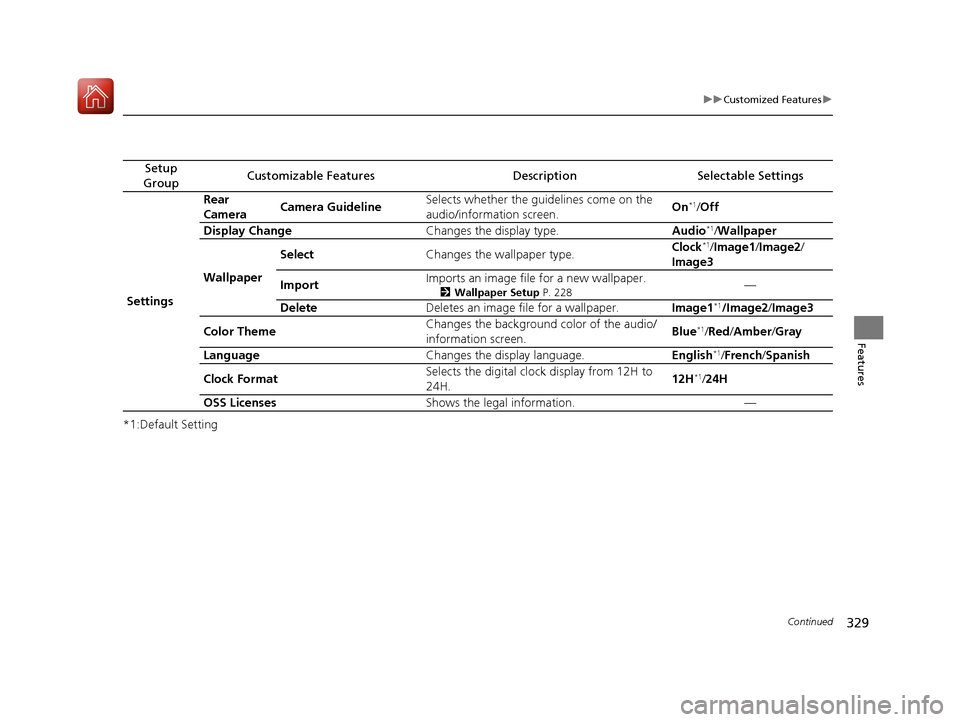
Setup
GroupCustomizable FeaturesDescriptionSelectable Settings
Settings Rear
Camera
Camera Guideline Selects whether the guidelines come on the
audio/information screen.
On
*1/
Off
Display Change Changes the display type. Audio
*1/Wallpaper
Wallpaper Select
Changes the wallpaper type. Clock*1/
Image1 /Image2/
Image3
Import Imports an image file for a new wallpaper.
2
Wallpaper Setup P. 228—
Delete Deletes an image file for a wallpaper. Image1
*1/Image2/Image3
Color Theme Changes the background color of the audio/
information screen. Blue
*1/
Red /Amber /Gray
Language Changes the display language. English
*1/French /Spanish
Clock Format Selects the digital clock display from 12H to
24H. 12H
*1/
24H
OSS Licenses Shows the legal information. —
17 CIVIC 5D (KA KC KL)-31TGG6000.book 329 ページ 2016年6月8日 水曜日 午 後2時8分
Page 331 of 641
330
uuCustomized Features u
Features
*1:Default Setting
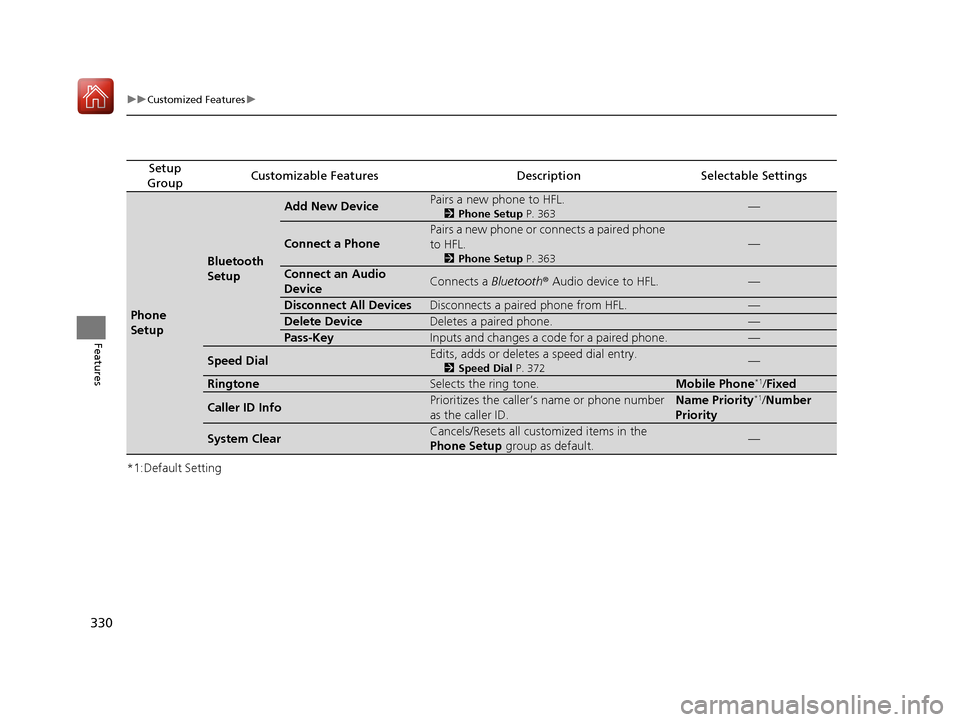
Setup
GroupCustomizable FeaturesDescriptionSelectable Settings
Phone
Setup
Bluetooth
Setup
Add New DevicePairs a new phone to HFL.
2 Phone Setup P. 363—
Connect a Phone
Pairs a new phone or connects a paired phone
to HFL.
2Phone Setup P. 363
—
Connect an Audio
DeviceConnects a Bluetooth® Audio device to HFL.—
Disconnect All DevicesDisconnects a paired phone from HFL.—
Delete DeviceDeletes a paired phone.—
Pass-KeyInputs and changes a code for a paired phone.—
Speed DialEdits, adds or deletes a speed dial entry.
2Speed Dial P. 372—
RingtoneSelects the ring tone.Mobile Phone*1/Fixed
Caller ID InfoPrioritizes the caller’s name or phone number
as the caller ID.Name Priority*1/Number
Priority
System ClearCancels/Resets all customized items in the
Phone Setup group as default.—
17 CIVIC 5D (KA KC KL)-31TGG6000.book 330 ページ 2016年6月8日 水曜日 午 後2時8分
Page 332 of 641
Continued331
uuCustomized Features u
Features
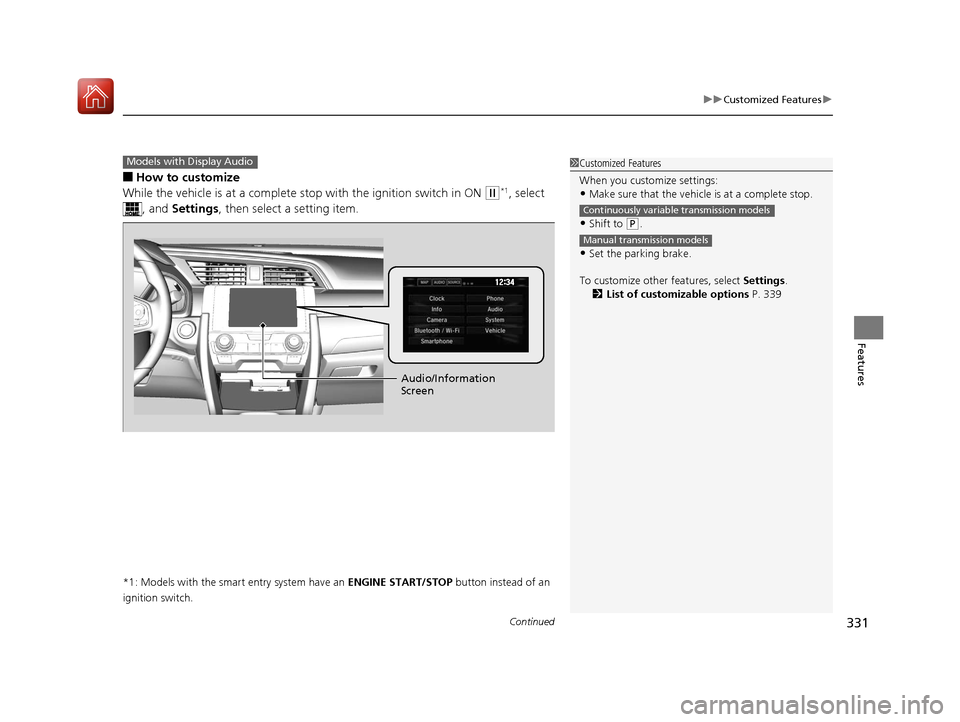
■How to customize
While the vehicle is at a complete st op with the ignition switch in ON
(w*1, select
, and Settings , then select a setting item.
*1: Models with the smart entry system have an ENGINE START/STOP button instead of an
ignition switch.
Models with Display Audio1 Customized Features
When you customize settings:
•Make sure that the vehicle is at a complete stop.
•Shift to (P.
•Set the parking brake.
To customize other features, select Settings.
2 List of customizable options P. 339
Continuously variable transmission models
Manual transmission models
Audio/Information
Screen
17 CIVIC 5D (KA KC KL)-31TGG6000.book 331 ページ 2016年6月8日 水曜日 午 後2時8分
Page 333 of 641
332
uuCustomized Features u
Features
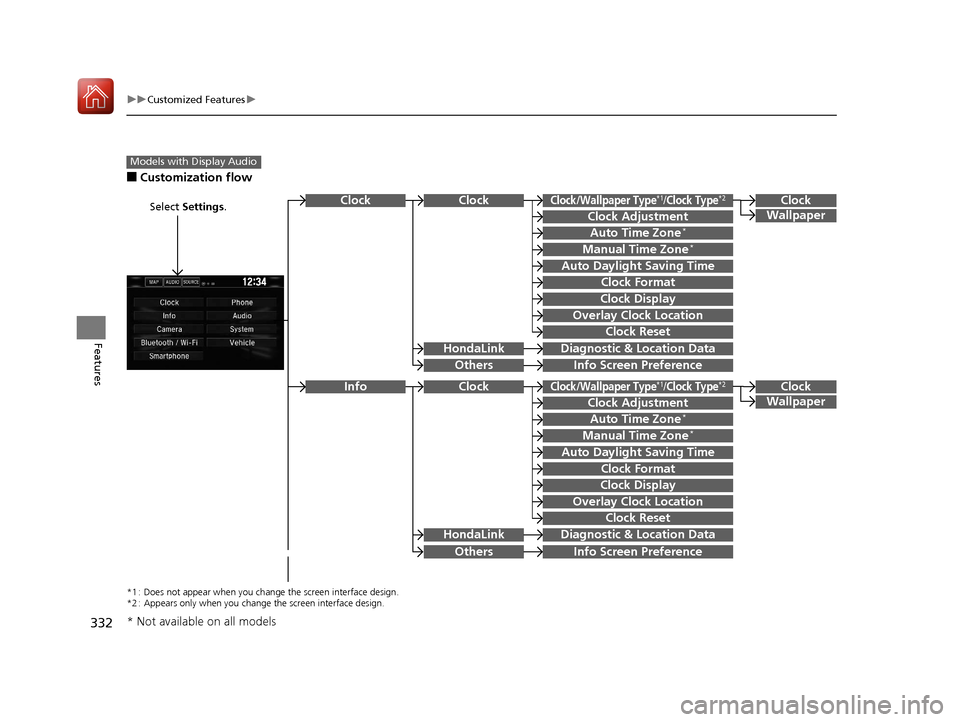
■Customization flow
Models with Display Audio
Select Settings.Clock
Wallpaper
Others
Clock/Wallpaper Type*1/Clock Type*2
Clock Adjustment
Clock Format
ClockClock
Auto Time Zone*
Manual Time Zone*
Auto Daylight Saving Time
Clock Display
Overlay Clock Location
Clock Reset
Info Screen Preference
Clock
Wallpaper
Others
Clock/Wallpaper Type*1/Clock Type*2
Clock Adjustment
Clock Format
Clock
Auto Time Zone*
Manual Time Zone*
Auto Daylight Saving Time
Clock Display
Overlay Clock Location
Clock Reset
Info Screen Preference
Info
HondaLinkDiagnostic & Location Data
HondaLinkDiagnostic & Location Data
*1 : Does not appear when you chan ge the screen interface design.
*2 : Appears only when you change the screen interface design.
* Not available on all models
17 CIVIC 5D (KA KC KL)-31TGG6000.book 332 ページ 2016年6月8日 水曜日 午 後2時8分
Page 334 of 641
333
uuCustomized Features u
Continued
Features
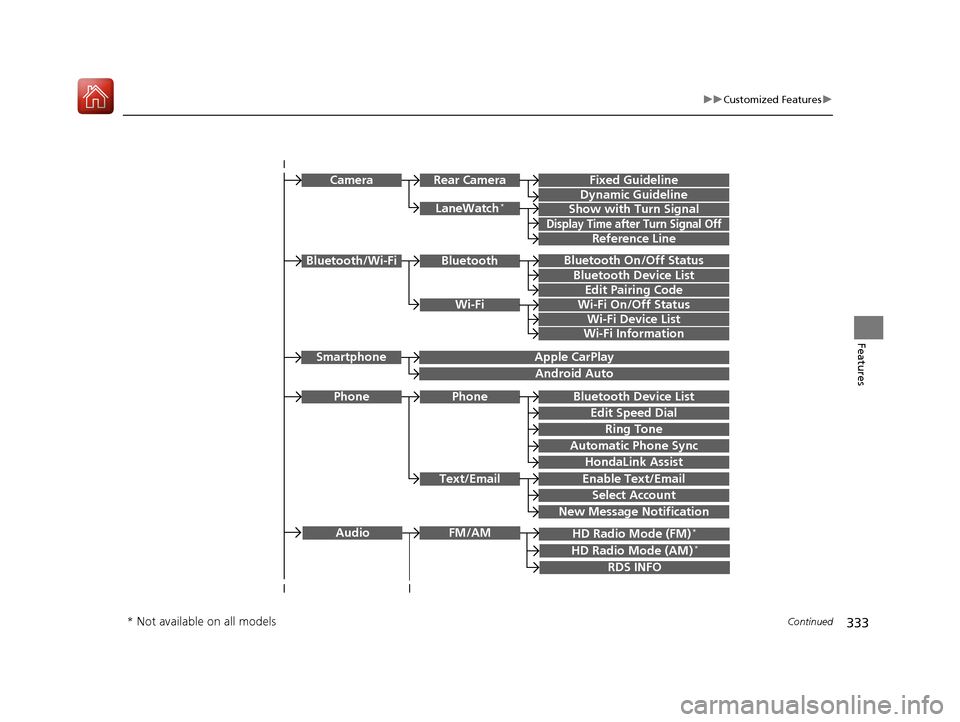
Bluetooth On/Off Status
Bluetooth Device List
Edit Pairing Code
Wi-Fi On/Off Status
Wi-Fi Device List
Wi-Fi
BluetoothBluetooth/Wi-Fi
Wi-Fi Information
Text/Email
Bluetooth Device List
Edit Speed Dial
Ring Tone
Phone
Automatic Phone Sync
HondaLink Assist
Enable Text/Email
Select Account
New Message Notification
Phone
LaneWatch*
Fixed Guideline
Dynamic Guideline
Show with Turn Signal
Rear CameraCamera
Display Time after Turn Signal Off
Reference Line
HD Radio Mode (FM)*
RDS INFO
AudioFM/AM
HD Radio Mode (AM)*
Apple CarPlay
Android Auto
Smartphone
* Not available on all models
17 CIVIC 5D (KA KC KL)-31TGG6000.book 333 ページ 2016年6月8日 水曜日 午 後2時8分
Page 335 of 641
334
uuCustomized Features u
Features
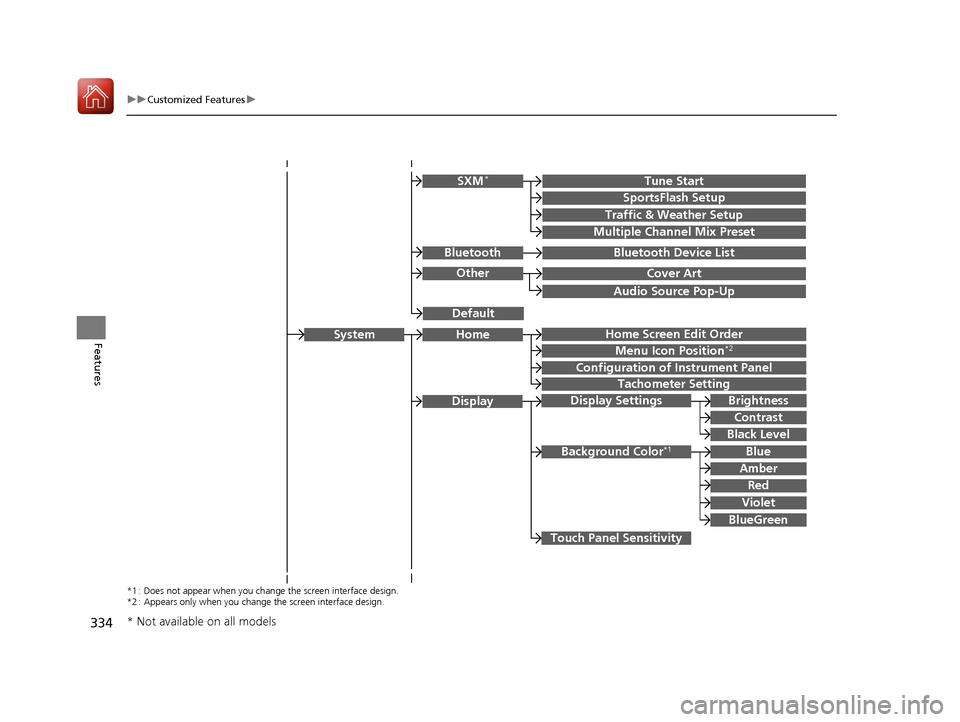
Audio Source Pop-Up
Cover Art
Tune Start
SportsFlash Setup
Traffic & Weather Setup
Other
SXM*
Default
Bluetooth Device ListBluetooth
Multiple Channel Mix Preset
Home Screen Edit Order
Configuration of Instrument Panel
Tachometer Setting
Display Settings
Background Color*1
Display
System
Touch Panel Sensitivity
Brightness
Contrast
Black Level
Blue
Amber
Red
Violet
BlueGreen
Home
Menu Icon Position*2
*1 : Does not appear when you chan ge the screen interface design.
*2 : Appears only when you change the screen interface design.
* Not available on all models
17 CIVIC 5D (KA KC KL)-31TGG6000.book 334 ページ 2016年6月8日 水曜日 午 後2時8分
Page 340 of 641
339
uuCustomized Features u
Continued
Features
■List of customizable options
*1:Does not appear when you chan ge the screen interface design.
*2:Appears only when you change the screen interface design.
Setup
Group Customizable Features Desc
ription Selectable Settings
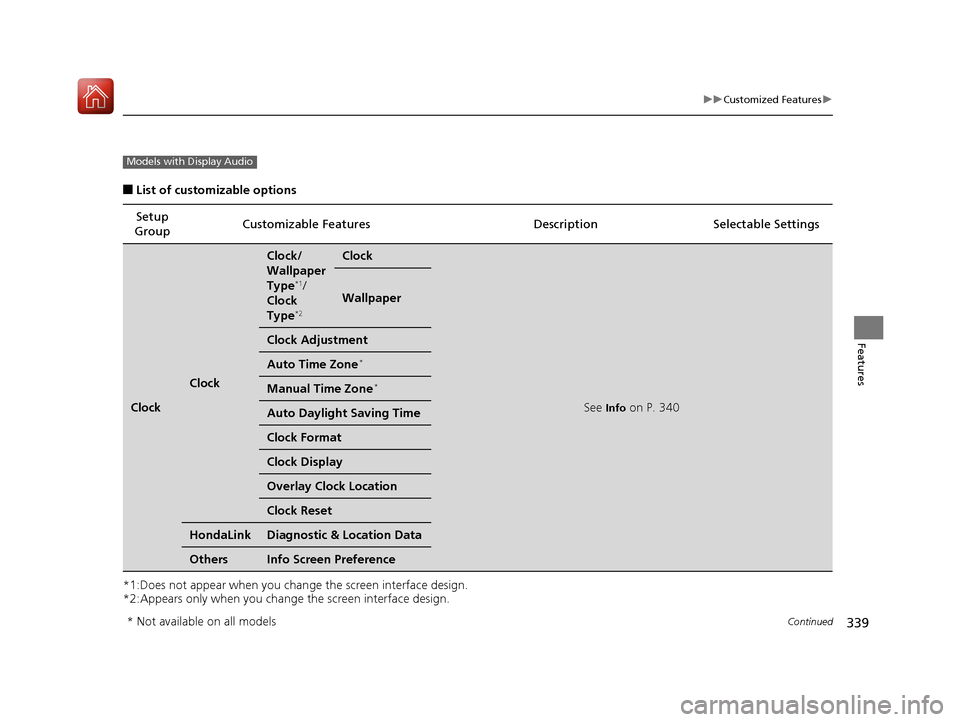
Clock
Clock
Clock/
Wallpaper
Type
*1/
Clock
Type
*2
Clock
See Info on P. 340
Wallpaper
Clock Adjustment
Auto Time Zone*
Manual Time Zone*
Auto Daylight Saving Time
Clock Format
Clock Display
Overlay Clock Location
Clock Reset
HondaLinkDiagnostic & Location Data
OthersInfo Screen Preference
Models with Display Audio
* Not available on all models
17 CIVIC 5D (KA KC KL)-31TGG6000.book 339 ページ 2016年6月8日 水曜日 午 後2時8分
Page 345 of 641
344
uuCustomized Features u
Features
*1:Default SettingSetup
Group Customizable Features Descri
ption Selectable Settings
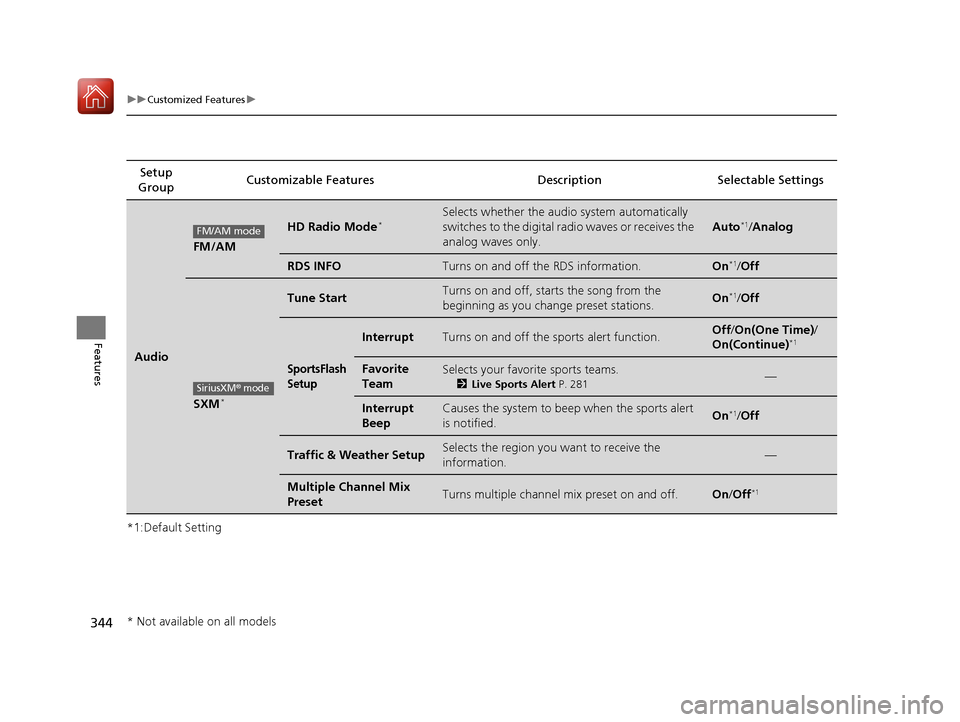
Audio
FM/AM
HD Radio Mode*Selects whether the audio system automatically
switches to the digital radio waves or receives the
analog waves only.
Auto*1/Analog
RDS INFOTurns on and off the RDS information.On*1/ Off
SXM*
Tune StartTurns on and off, starts the song from the
beginning as you change preset stations.On*1/Off
SportsFlash
Setup
InterruptTurns on and off the sports alert function.Off /On(One Time) /
On(Continue)*1
Favorite
TeamSelects your favorite sports teams.
2 Live Sports Alert P. 281—
Interrupt
BeepCauses the system to beep when the sports alert
is notified.On*1/ Off
Traffic & Weather SetupSelects the region you want to receive the
information.—
Multiple Channel Mix
PresetTurns multiple channel mix preset on and off.On /Off*1
FM/AM mode
SiriusXM® mode
* Not available on all models
17 CIVIC 5D (KA KC KL)-31TGG6000.book 344 ページ 2016年6月8日 水曜日 午 後2時8分
Page 346 of 641
345
uuCustomized Features u
Continued
Features
*1:Default Setting
*2:Appears only when you change the screen interface design.
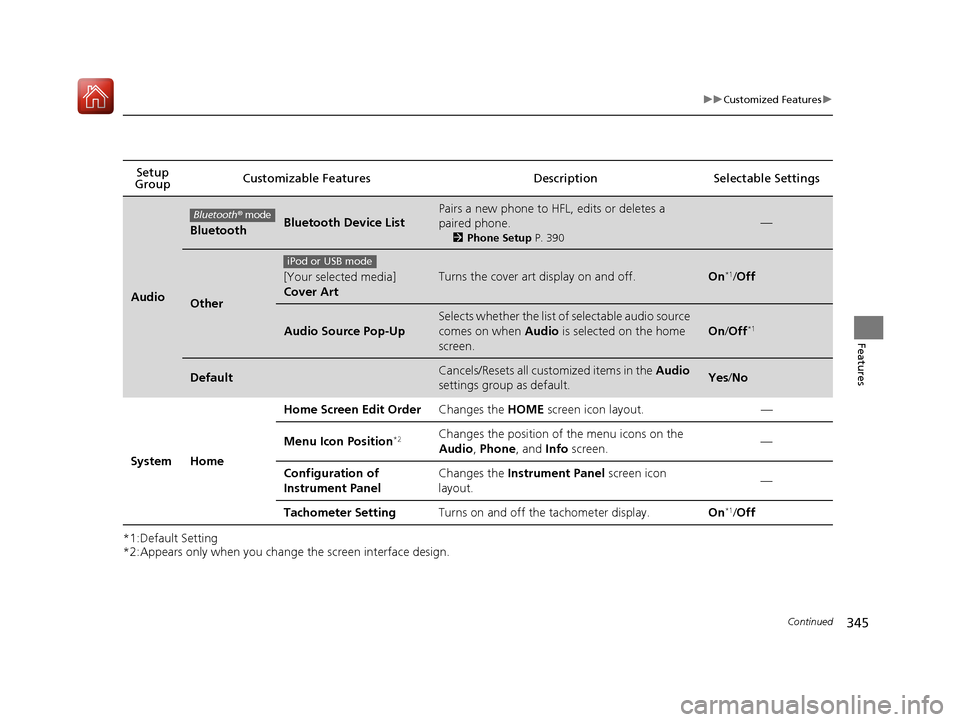
Setup
Group Customizable Features Description Selectable Settings
Audio
BluetoothBluetooth Device List
Pairs a new phone to HFL, edits or deletes a
paired phone.
2
Phone Setup P. 390
—
Other
[Your selected media]
Cover ArtTurns the cover art display on and off.On*1/Off
Audio Source Pop-Up
Selects whether the list of selectable audio source
comes on when Audio is selected on the home
screen.
On /Off*1
DefaultCancels/Resets all customized items in the Audio
settings group as default.Yes /No
System Home Home Screen Edit Order
Changes the HOME screen icon layout. —
Menu Icon Position
*2Changes the position of the menu icons on the
Audio , Phone, and Info screen. —
Configuration of
Instrument Panel Changes the
Instrument Panel screen icon
layout. —
Tachometer Setting Turns on and off the tachometer display. On
*1/Off
Bluetooth ® mode
iPod or USB mode
17 CIVIC 5D (KA KC KL)-31TGG6000.book 345 ページ 2016年6月8日 水曜日 午 後2時8分
Page 347 of 641
346
uuCustomized Features u
Features
*1:Default Setting
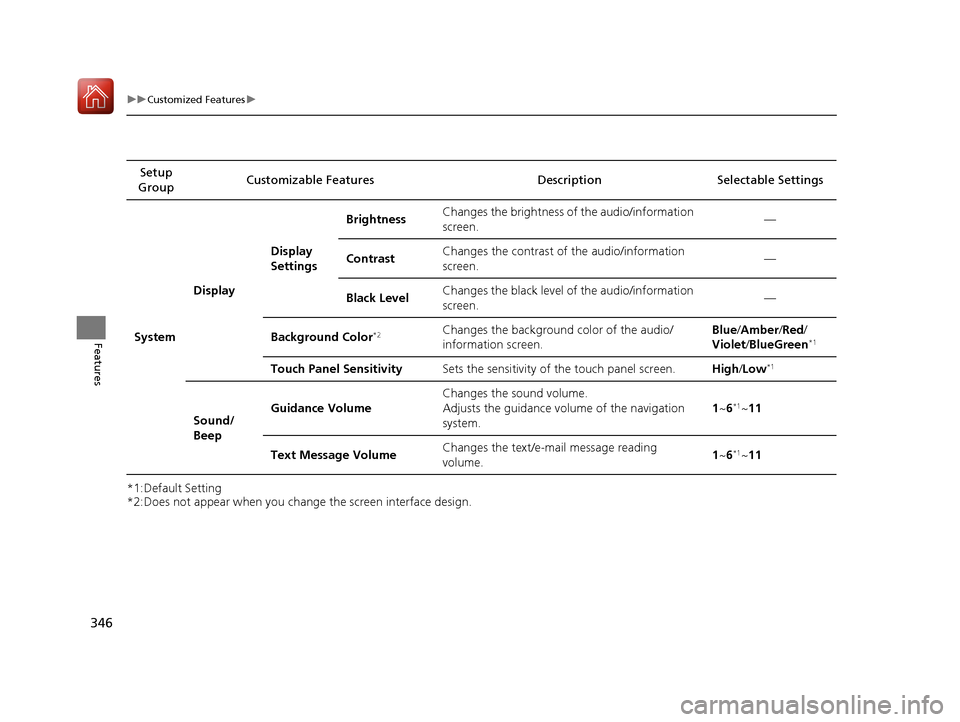
*2:Does not appear when you change the screen interface design.Setup
Group Customizable Features Descri
ption Selectable Settings
System Display
Display
SettingsBrightness
Changes the brightness of the audio/information
screen. —
Contrast Changes the contrast of the audio/information
screen.
—
Black Level Changes the black level of the audio/information
screen. —
Background Color
*2Changes the background color of the audio/
information screen. Blue
/Amber /Red /
Violet /BlueGreen*1
Touch Panel Sensitivity Sets the sensitivity of the touch panel screen. High/Low*1
Sound/
Beep Guidance Volume
Changes the sound volume.
Adjusts the guidance volume of the navigation
system. 1
~6
*1~11
Text Message Volume Changes the text/e-mail message reading
volume. 1
~6
*1~11
17 CIVIC 5D (KA KC KL)-31TGG6000.book 346 ページ 2016年6月8日 水曜日 午 後2時8分