audio HONDA CIVIC HATCHBACK 2017 10.G Owners Manual
[x] Cancel search | Manufacturer: HONDA, Model Year: 2017, Model line: CIVIC HATCHBACK, Model: HONDA CIVIC HATCHBACK 2017 10.GPages: 641
Page 451 of 641
uuWhen Driving uAdaptive Cruise Control (ACC) with Low Speed Follow (LSF)*
450
Driving
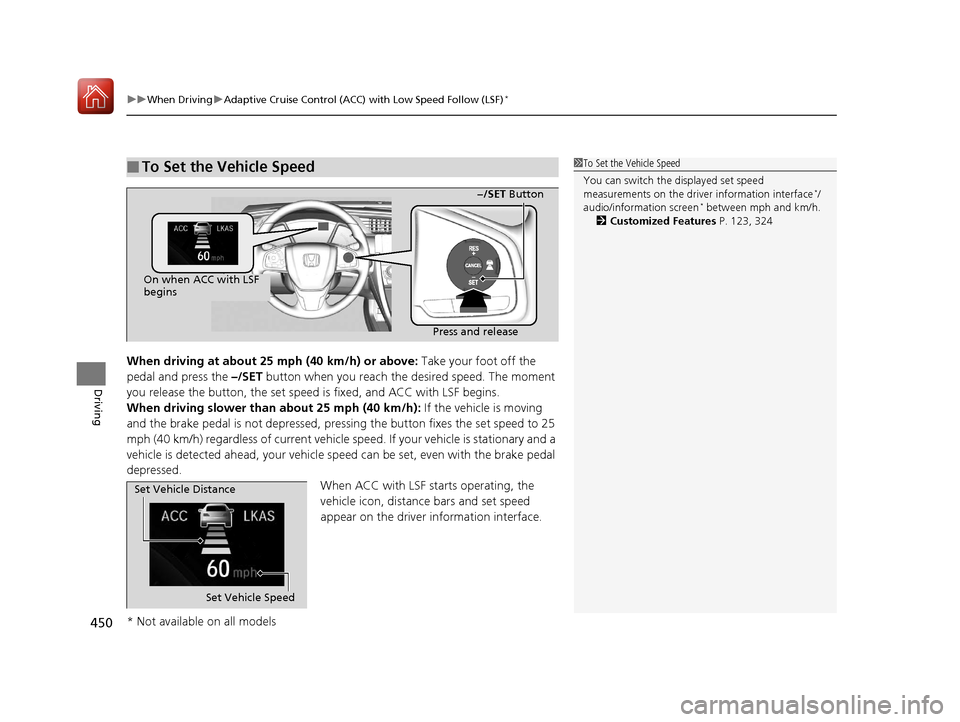
When driving at about 25 mph (40 km/h) or above: Take your foot off the
pedal and press the –/SET button when you reach the desired speed. The moment
you release the button, the set speed is fixed, and ACC with LSF begins.
When driving slower than about 25 mph (40 km/h): If the vehicle is moving
and the brake pedal is not depressed, pressing the button fixes the set speed to 25
mph (40 km/h) regardless of current vehicle sp eed. If your vehicle is stationary and a
vehicle is detected ahead, your vehicle sp eed can be set, even with the brake pedal
depressed.
When ACC with LSF starts operating, the
vehicle icon, distance bars and set speed
appear on the driver information interface.
■To Set the Vehicle Speed1 To Set the Vehicle Speed
You can switch the displayed set speed
measurements on the driver information interface
*/
audio/information screen* between mph and km/h.
2 Customized Features P. 123, 324
On when ACC with LSF
begins
Press and release−/SET Button
Set Vehicle Speed
Set Vehicle Distance
* Not available on all models
17 CIVIC 5D (KA KC KL)-31TGG6000.book 450 ページ 2016年6月8日 水曜日 午
後2時8分
Page 478 of 641
Continued477
uuWhen Driving uRoad Departure Mitigation (RDM) System*
Driving
The system becomes ready to start sear ching for lane markings when all the
following conditions are met:
• The vehicle is traveling between about 45 and 90 mph (72 and 145 km/h).
• The vehicle is on a straight or slightly curved road.
• The turn signals are off.
• The brake pedal is not depressed.
• The wipers are not in continuous operation.
• The system makes a determination that th e driver is not actively accelerating,
braking or steering.
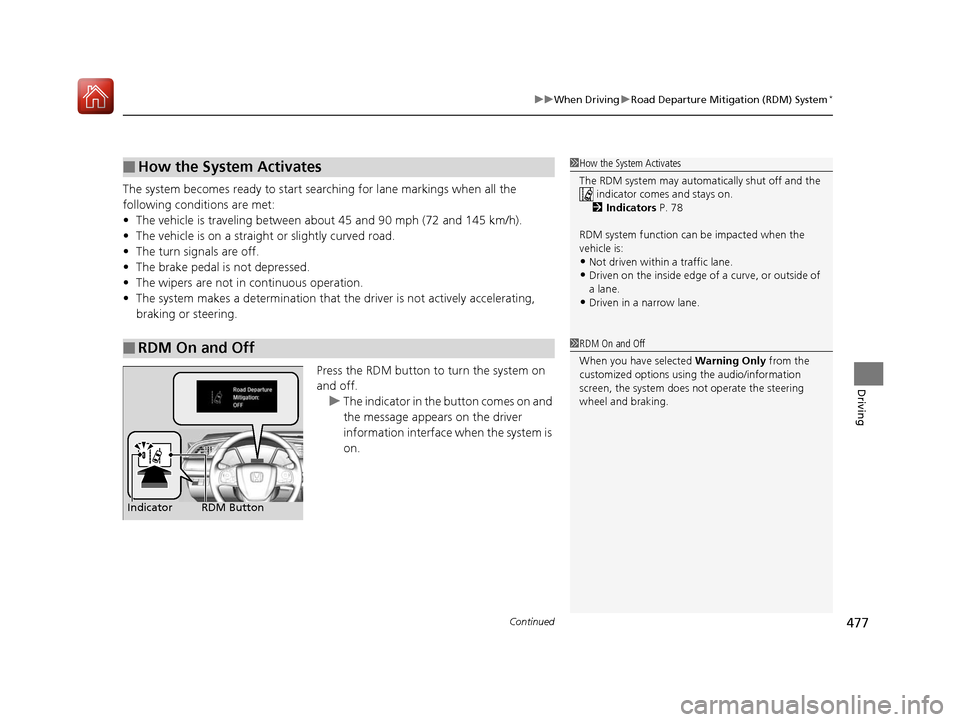
Press the RDM button to turn the system on
and off.u The indicator in the button comes on and
the message appears on the driver
information interface when the system is
on.
■How the System Activates
■RDM On and Off
1 How the System Activates
The RDM system may automa tically shut off and the
indicator comes and stays on.
2 Indicators P. 78
RDM system function can be impacted when the
vehicle is:
•Not driven within a traffic lane.•Driven on the inside edge of a curve, or outside of
a lane.
•Driven in a narrow lane.
1 RDM On and Off
When you have selected Warning Only from the
customized options using the audio/information
screen, the system does not operate the steering
wheel and braking.
RDM Button
Indicator
17 CIVIC 5D (KA KC KL)-31TGG6000.book 477 ページ 2016年6月8日 水曜日 午 後2時8分
Page 491 of 641
490
uuWhen Driving uLaneWatchTM*
Driving
LaneWatchTM*
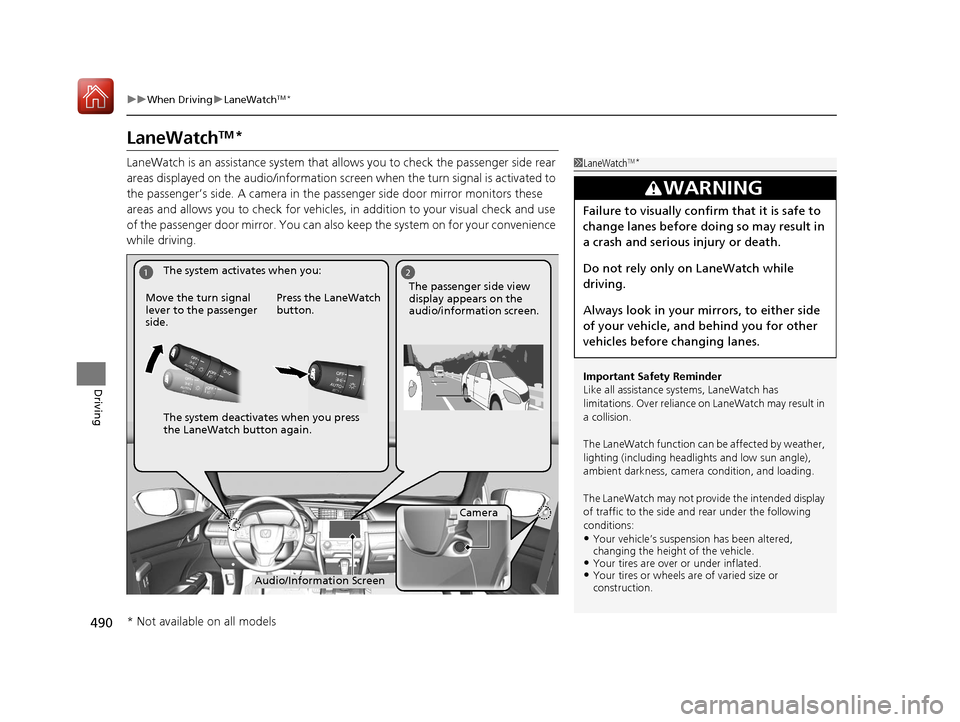
LaneWatch is an assistance system that allows you to check the passenger side rear
areas displayed on the audio/in formation screen when the turn signal is activated to
the passenger’s side. A camera in the passenger side door mirror monitors these
areas and allows you to check for vehicles, in addition to your visual check and use
of the passenger door mirror. You can also keep the system on for your convenience
while driving.1 LaneWatchTM*
Important Safety Reminder
Like all assistance systems, LaneWatch has
limitations. Over reliance on LaneWatch may result in
a collision.
The LaneWatch func tion can be affected by weather,
lighting (including headli ghts and low sun angle),
ambient darkness, camera condition, and loading.
The LaneWatch may not prov ide the intended display
of traffic to the side and rear under the following
conditions:
•Your vehicle’s suspension has been altered,
changing the height of the vehicle.
•Your tires are over or under inflated.•Your tires or wheels are of varied size or
construction.
3WARNING
Failure to visually confirm that it is safe to
change lanes before doing so may result in
a crash and serious injury or death.
Do not rely only on LaneWatch while
driving.
Always look in your mirrors, to either side
of your vehicle, and behind you for other
vehicles before changing lanes.
12
Camera
Audio/Information Screen
Move the turn signal
lever to the passenger
side.
Press the LaneWatch
button.
The passenger side view
display appears on the
audio/information screen.
The system activates when you:
The system deactivates when you press
the LaneWatch button again.
* Not available on all models
17 CIVIC 5D (KA KC KL)-31TGG6000.book 490 ページ 2016年6月8日 水曜日 午
後2時8分
Page 492 of 641
491
uuWhen Driving uLaneWatchTM*
Driving
■Customizing the La neWatch settings*
You can customize the following items using the audio/information screen.
•Show with Turn Signal : Selects whether LaneWatch monitor comes on when
you operate the turn signal light lever.
• Display Time after Turn Signal Off : Changes the length of time the LaneWatch
display stays on after you pull the turn signal lever back.
• Reference Lines : Selects whether the reference lines appear on the LaneWatch
monitor.
• Display : Allows for display adjustments of item s, such as brightness, contrast and
black level. This setting is part of the System setup group.
2Customized Features P. 324
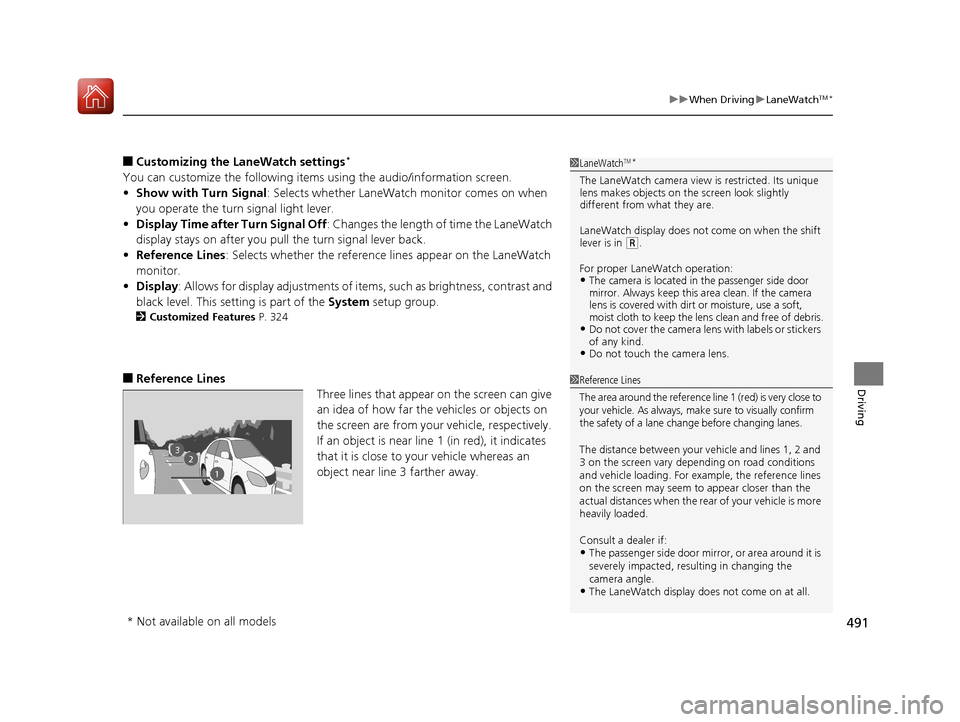
■Reference Lines
Three lines that appear on the screen can give
an idea of how far the vehicles or objects on
the screen are from your vehicle, respectively.
If an object is near line 1 (in red), it indicates
that it is close to your vehicle whereas an
object near line 3 farther away.
1LaneWatchTM*
The LaneWatch camera view is restricted. Its unique
lens makes objects on the screen look slightly
different from what they are.
LaneWatch display does not come on when the shift
lever is in
( R.
For proper LaneWatch operation:
•The camera is located in the passenger side door
mirror. Always keep this area clean. If the camera
lens is covered with dirt or moisture, use a soft,
moist cloth to keep the lens clean and free of debris.
•Do not cover the camera lens with labels or stickers
of any kind.
•Do not touch the camera lens.
23
1
1Reference Lines
The area around the reference line 1 (red) is very close to
your vehicle. As always, m ake sure to visually confirm
the safety of a lane chan ge before changing lanes.
The distance betwee n your vehicle and lines 1, 2 and
3 on the screen vary depending on road conditions
and vehicle loading. For ex ample, the reference lines
on the screen may seem to appear closer than the
actual distances when the rear of your vehicle is more
heavily loaded.
Consult a dealer if:
•The passenger side door mirr or, or area around it is
severely impacted, resulting in changing the
camera angle.
•The LaneWatch display doe s not come on at all.
* Not available on all models
17 CIVIC 5D (KA KC KL)-31TGG6000.book 491 ページ 2016年6月8日 水曜日 午 後2時8分
Page 494 of 641
Continued493
uuWhen Driving uTire Pressure Monitoring System (TPMS)
Driving
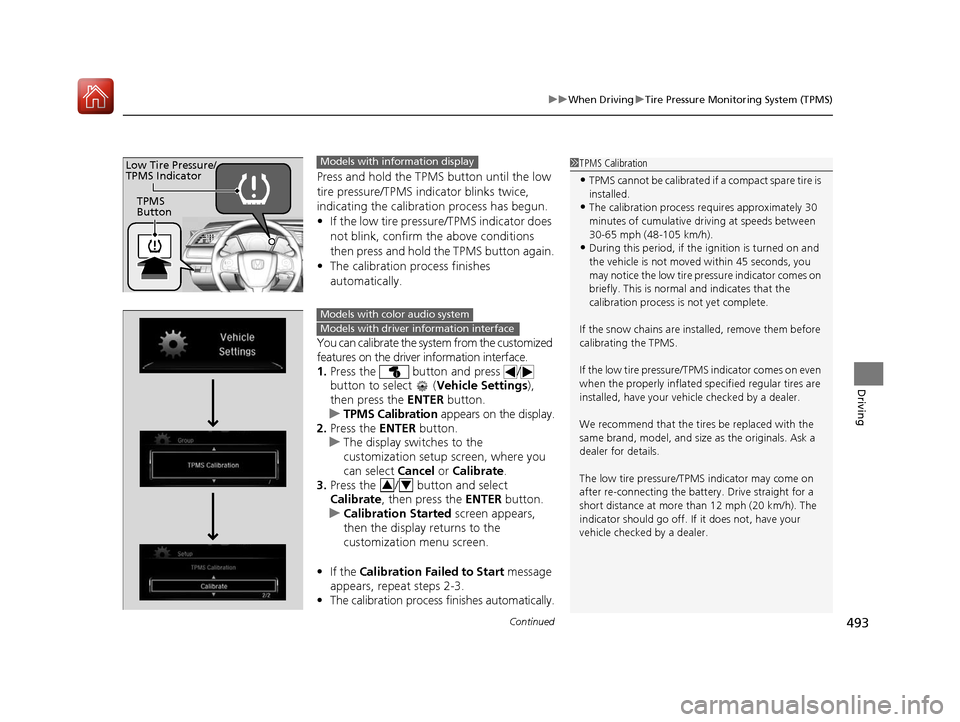
Press and hold the TPM S button until the low
tire pressure/TPMS indicator blinks twice,
indicating the calibration process has begun.
• If the low tire pressure/TPMS indicator does
not blink, confirm the above conditions
then press and hold the TPMS button again.
• The calibration process finishes
automatically.
You can calibrate the system from the customized
features on the driver information interface.
1. Press the button and press /
button to select ( Vehicle Settings),
then press the ENTER button.
u TPMS Calibration appears on the display.
2. Press the ENTER button.
u The display swit ches to the
customization setup screen, where you
can select Cancel or Calibrate .
3. Press the / button and select
Calibrate , then press the ENTER button.
u Calibration Started screen appears,
then the display returns to the
customization menu screen.
• If the Calibration Failed to Start message
appears, repeat steps 2-3.
• The calibration process finishes automatically.
1TPMS Calibration
•TPMS cannot be calibrated if a compact spare tire is
installed.
•The calibration process requires approximately 30
minutes of cumulative dr iving at speeds between
30-65 mph (48-105 km/h).
•During this period, if the ignition is turned on and
the vehicle is not move d within 45 seconds, you
may notice the low tire pressure indicator comes on
briefly. This is normal and indicates that the
calibration process is not yet complete.
If the snow chains are installed, remove them before
calibrating the TPMS.
If the low tire pressure/TPMS indicator comes on even
when the properly inflated specified regular tires are
installed, have your vehicle checked by a dealer.
We recommend that the tires be replaced with the
same brand, model, and size as the originals. Ask a
dealer for details.
The low tire pressure/TPMS indicator may come on
after re-connecting the battery. Drive straight for a
short distance at more than 12 mph (20 km/h). The
indicator should go off. If it does not, have your
vehicle checked by a dealer.
TPMS
Button
Low Tire Pressure/
TPMS IndicatorModels with info rmation display
Models with color audio system
Models with driver information interface
34
17 CIVIC 5D (KA KC KL)-31TGG6000.book 493 ページ 2016年6月8日 水曜日 午 後2時8分
Page 495 of 641
494
uuWhen Driving uTire Pressure Monitoring System (TPMS)
Driving
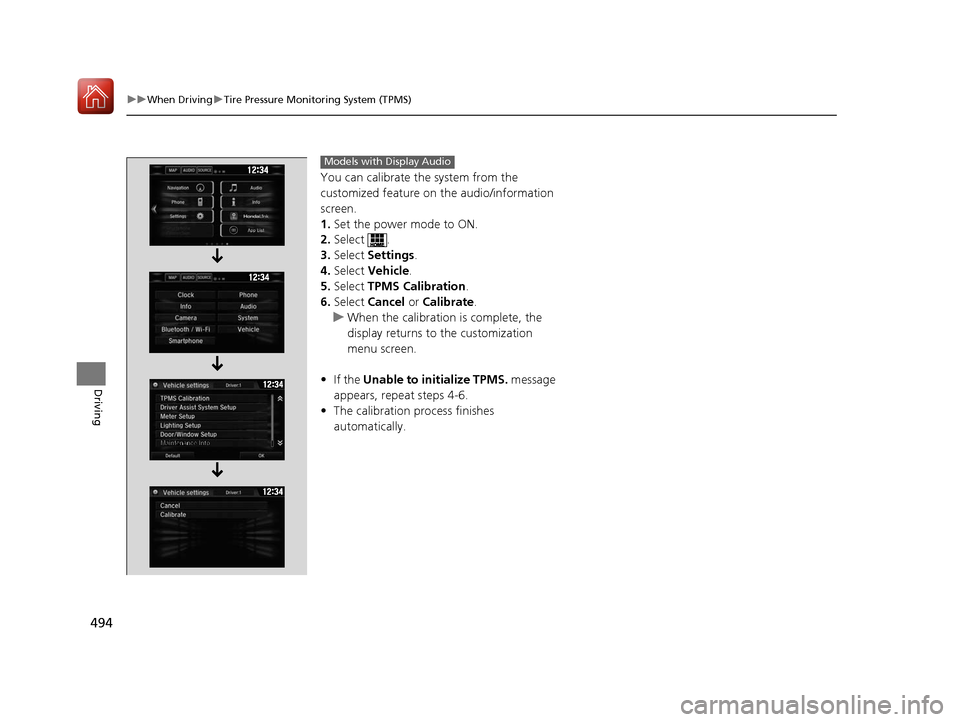
You can calibrate the system from the
customized feature on the audio/information
screen.
1. Set the power mode to ON.
2. Select .
3. Select Settings .
4. Select Vehicle .
5. Select TPMS Calibration .
6. Select Cancel or Calibrate.
u When the calibration is complete, the
display returns to the customization
menu screen.
• If the Unable to initialize TPMS. message
appears, repeat steps 4-6.
• The calibration pr ocess finishes
automatically.
Models with Display Audio
17 CIVIC 5D (KA KC KL)-31TGG6000.book 494 ページ 2016年6月8日 水曜日 午 後2時8分
Page 508 of 641
Continued507
uuBraking uCollision Mitigation Braking SystemTM (CMBSTM)*
Driving
■When the system activates
At system’s earliest collision alert st age, you can change the distance (Long/
Normal /Short ) between vehicles at which alerts will come on through audio/
information screen setting options.
2 List of customizable options P. 126
1When the system activates
The camera in the CMBS
TM is also designed to detect
pedestrians.
However, this pedestrian detection feature may not
activate or may not detect a pedestrian in front of
your vehicle under certain conditions.
Refer to the ones indicating the pedestrian detection
limitations from the list. 2 CMBS
TM Conditions and Limitations P. 510
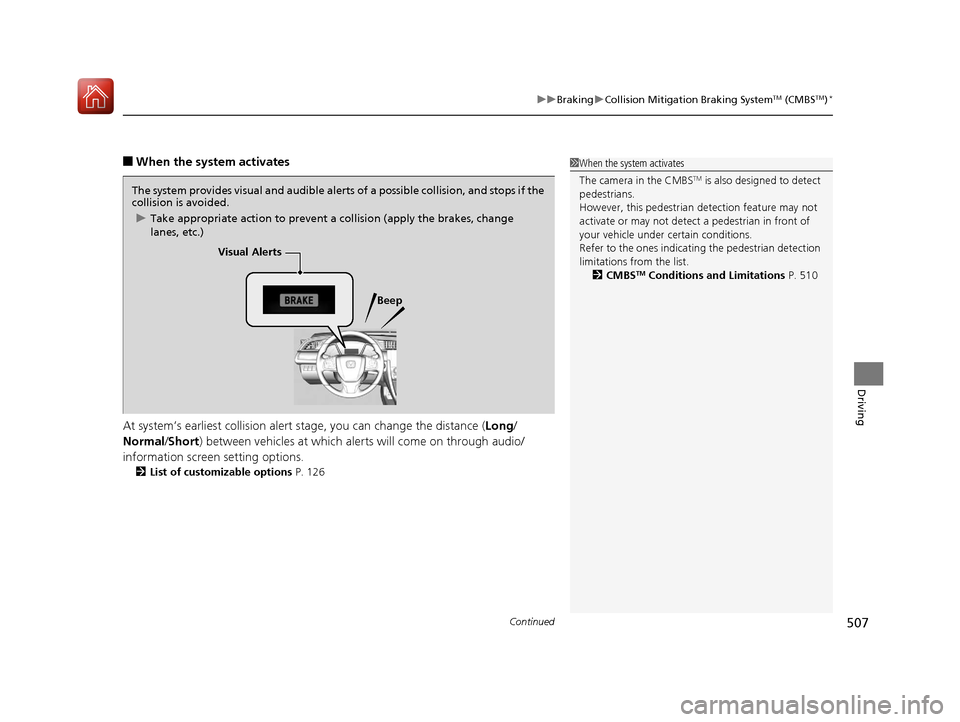
The system provides visual and audible alerts of a possible collision, and stops if the
collision is avoided.
u Take appropriate action to prevent a collision (apply the brakes, change
lanes, etc.)
Visual Alerts
Beep
17 CIVIC 5D (KA KC KL)-31TGG6000.book 507 ページ 2016年6月8日 水曜日 午 後2時8分
Page 516 of 641
515Continued
Driving
Multi-View Rear Camera
About Your Multi-View Rear Camera
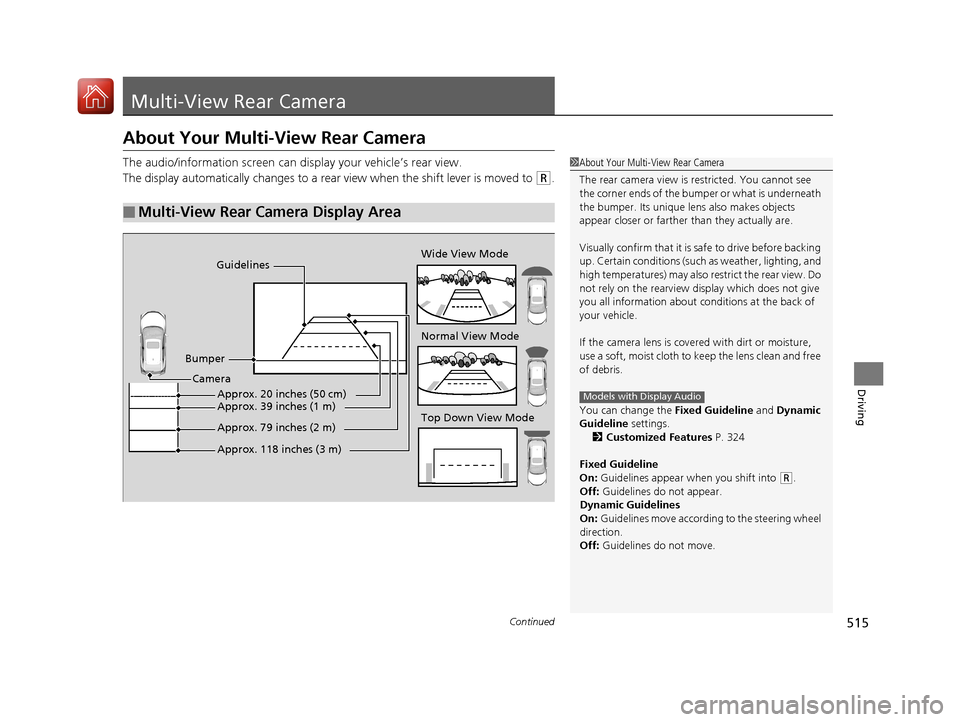
The audio/information screen can display your vehicle’s rear view.
The display automatically changes to a rear view when the shift lever is moved to
(R.
■Multi-View Rear Camera Display Area
1About Your Multi-View Rear Camera
The rear camera view is restricted. You cannot see
the corner ends of the bum per or what is underneath
the bumper. Its unique le ns also makes objects
appear closer or farther than they actually are.
Visually confirm that it is safe to drive before backing
up. Certain conditions (such as weather, lighting, and
high temperatures) may also re strict the rear view. Do
not rely on the rearview display which does not give
you all information about conditions at the back of
your vehicle.
If the camera lens is cove red with dirt or moisture,
use a soft, moist cloth to keep the lens clean and free
of debris.
You can change the Fixed Guideline and Dynamic
Guideline settings. 2 Customized Features P. 324
Fixed Guideline
On: Guidelines appear when you shift into
(R.
Off: Guidelines do not appear.
Dynamic Guidelines
On: Guidelines move according to the steering wheel
direction.
Off: Guidelines do not move.
Models with Display Audio
Guidelines
Bumper Wide View Mode
Normal View Mode
Top Down View Mode
Camera
Approx. 118 inches (3 m)
Approx. 79 inches (2 m)
Approx. 39 inches (1 m)Approx. 20 inches (50 cm)
17 CIVIC 5D (KA KC KL)-31TGG6000.book 515 ページ 2016年6月8日 水曜日 午
後2時8分
Page 517 of 641
uuMulti-View Rear Camera uAbout Your Multi-View Rear Camera
516
Driving
You can view three different camera angles on the rearview display.
Press the LIST/SELECT (selector) knob to switch the angle.
Touch the appropriate icon to switch the angle. : Wide view
: Normal view
: Top down view
• If the last used viewing mode was Wide or Normal, the same mode is selected the
next time you shift into
(R.
• If Top View was last used before you turned off the engine, Wide mode is
selected next time you turn the ignition switch to ON
(w*1 and shift to (R.
• If Top View was last used more th an 10 seconds after you shift from
(R, Wide
mode is selected the next time you shift to
(R.
*1: Models with the smart entry system have an ENGINE START/STOP button instead of an
ignition switch.
1 About Your Multi-View Rear Camera
You can change the Camera Guideline settings.
Camera Guideline
On: Guidelines appear when you shift into
(R.
Off: Guidelines do not appear.
Models with color audio systemModels with color audio system
Models with Display Audio
All models
17 CIVIC 5D (KA KC KL)-31TGG6000.book 516 ページ 2016年6月8日 水曜日 午 後2時8分
Page 536 of 641
535
uuMaintenance MinderTMuTo Use Maintenance MinderTM
Maintenance
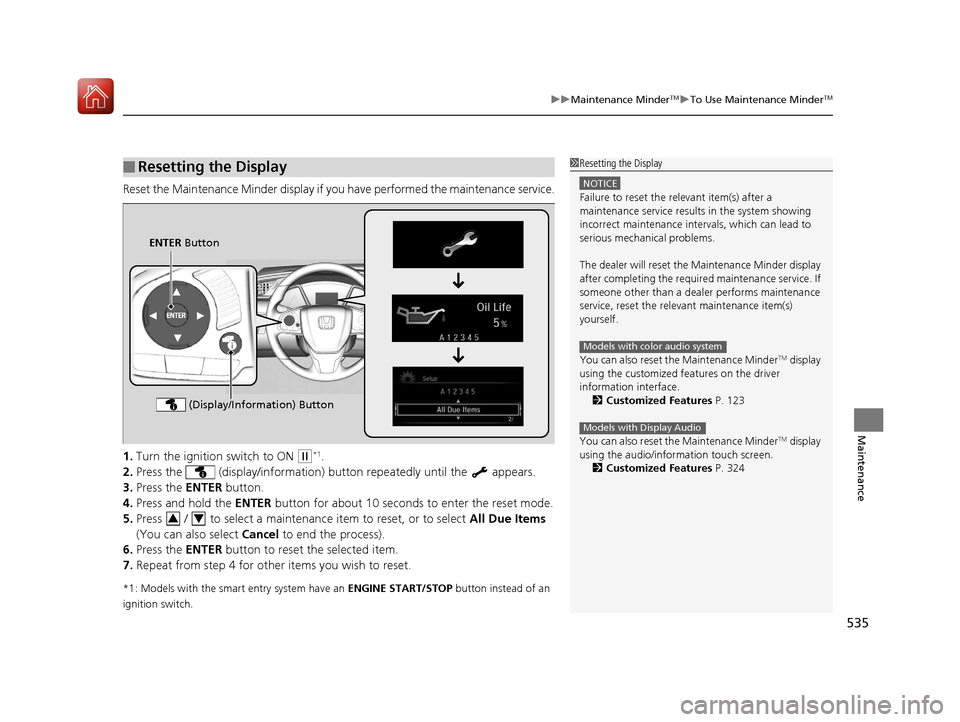
Reset the Maintenance Minder display if y ou have performed the maintenance service.
1. Turn the ignition switch to ON
(w*1.
2. Press the (display/information) bu tton repeatedly until the appears.
3. Press the ENTER button.
4. Press and hold the ENTER button for about 10 second s to enter the reset mode.
5. Press / to select a maintenance item to reset, or to select All Due Items
(You can also select Cancel to end the process).
6. Press the ENTER button to reset the selected item.
7. Repeat from step 4 for other items you wish to reset.
*1: Models with the smart entry system have an ENGINE START/STOP button instead of an
ignition switch.
■Resetting the Display1 Resetting the Display
NOTICE
Failure to reset the relevant item(s) after a
maintenance service results in the system showing
incorrect maintenance interv als, which can lead to
serious mechanical problems.
The dealer will reset the Maintenance Minder display
after completing the required maintenance service. If
someone other than a deal er performs maintenance
service, reset the relevant maintenance item(s)
yourself.
You can also reset the Maintenance Minder
TM display
using the customized features on the driver
information interface.
2 Customized Features P. 123
You can also reset the Maintenance Minder
TM display
using the audio/information touch screen.
2 Customized Features P. 324
Models with color audio system
Models with Display Audio
ENTER Button
(Display/Information) Button
34
17 CIVIC 5D (KA KC KL)-31TGG6000.book 535 ページ 2016年6月8日 水曜日 午 後2時8分