display HONDA CIVIC HATCHBACK 2017 10.G Owners Manual
[x] Cancel search | Manufacturer: HONDA, Model Year: 2017, Model line: CIVIC HATCHBACK, Model: HONDA CIVIC HATCHBACK 2017 10.GPages: 641
Page 391 of 641
uuBluetooth ® HandsFreeLink ®*uHFL Menus
390
Features
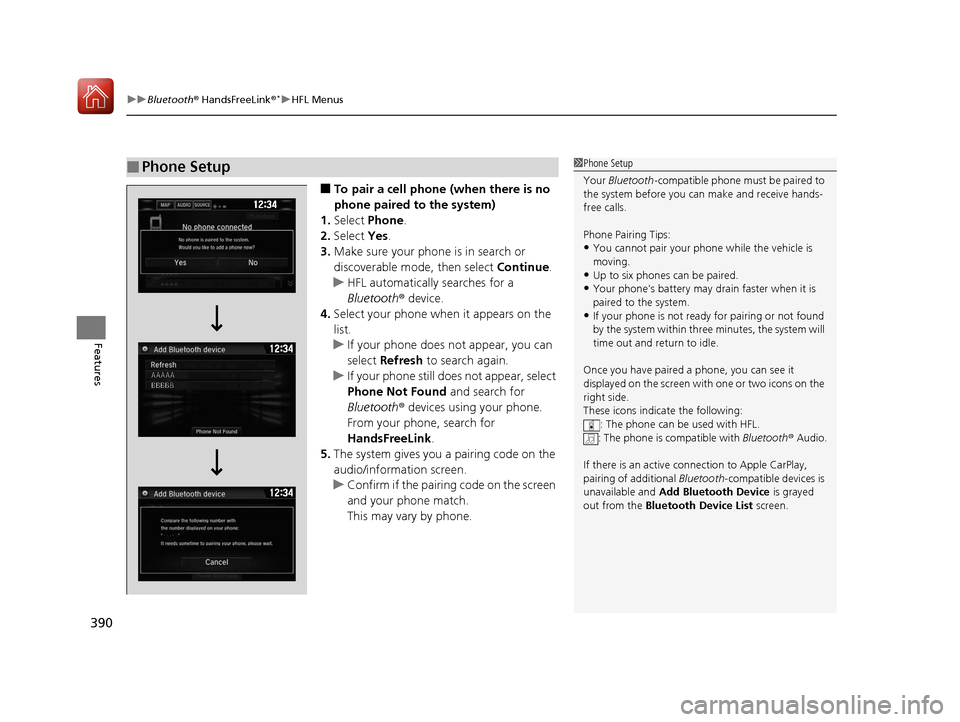
■To pair a cell phone (when there is no
phone paired to the system)
1. Select Phone .
2. Select Yes.
3. Make sure your phone is in search or
discoverable mode, then select Continue.
u HFL automatically searches for a
Bluetooth ® device.
4. Select your phone when it appears on the
list.
u If your phone does not appear, you can
select Refresh to search again.
u If your phone still does not appear, select
Phone Not Found and search for
Bluetooth ® devices using your phone.
From your phone, search for
HandsFreeLink .
5. The system gives you a pairing code on the
audio/information screen.
u Confirm if the pairing code on the screen
and your phone match.
This may vary by phone.
■Phone Setup1Phone Setup
Your Bluetooth -compatible phone must be paired to
the system before you ca n make and receive hands-
free calls.
Phone Pairing Tips:
•You cannot pair your phone while the vehicle is
moving.
•Up to six phones can be paired.
•Your phone's battery may dr ain faster when it is
paired to the system.
•If your phone is not ready for pairing or not found
by the system within three minutes, the system will
time out and return to idle.
Once you have paired a phone, you can see it
displayed on the screen with one or two icons on the
right side.
These icons indicate the following: : The phone can be used with HFL.
: The phone is compatible with Bluetooth® Audio.
If there is an active c onnection to Apple CarPlay,
pairing of additional Bluetooth -compatible devices is
unavailable and Add Bluetooth Device is grayed
out from the Bluetooth Device List screen.
17 CIVIC 5D (KA KC KL)-31TGG6000.book 390 ページ 2016年6月8日 水曜日 午 後2時8分
Page 406 of 641
Continued405
uuBluetooth ® HandsFreeLink ®*uHFL Menus
Features
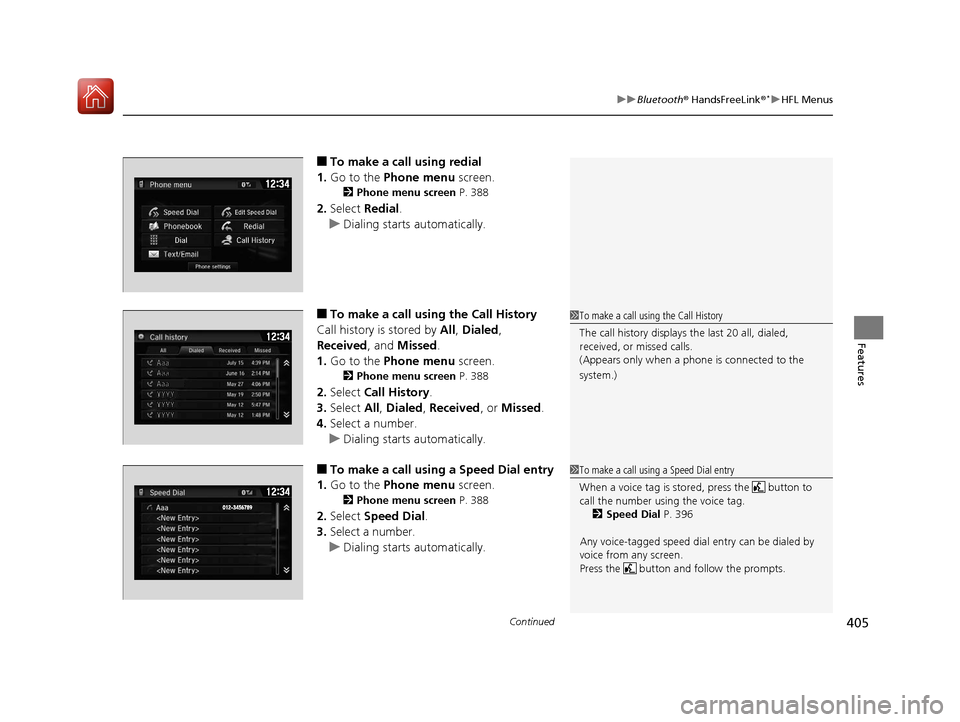
■To make a call using redial
1. Go to the Phone menu screen.
2Phone menu screen P. 388
2.Select Redial .
u Dialing starts automatically.
■To make a call usin g the Call History
Call history is stored by All, Dialed ,
Received , and Missed .
1. Go to the Phone menu screen.
2Phone menu screen P. 388
2.Select Call History .
3. Select All, Dialed , Received , or Missed .
4. Select a number.
u Dialing starts automatically.
■To make a call usin g a Speed Dial entry
1. Go to the Phone menu screen.
2Phone menu screen P. 388
2.Select Speed Dial .
3. Select a number.
u Dialing starts automatically.
1To make a call using the Call History
The call history displays the last 20 all, dialed,
received, or missed calls.
(Appears only when a phone is connected to the
system.)
1 To make a call using a Speed Dial entry
When a voice tag is stored, press the button to
call the number using the voice tag.
2 Speed Dial P. 396
Any voice-tagged speed dial entry can be dialed by
voice from any screen.
Press the button and follow the prompts.
17 CIVIC 5D (KA KC KL)-31TGG6000.book 405 ページ 2016年6月8日 水曜日 午 後2時8分
Page 408 of 641
Continued407
uuBluetooth ® HandsFreeLink ®*uHFL Menus
Features
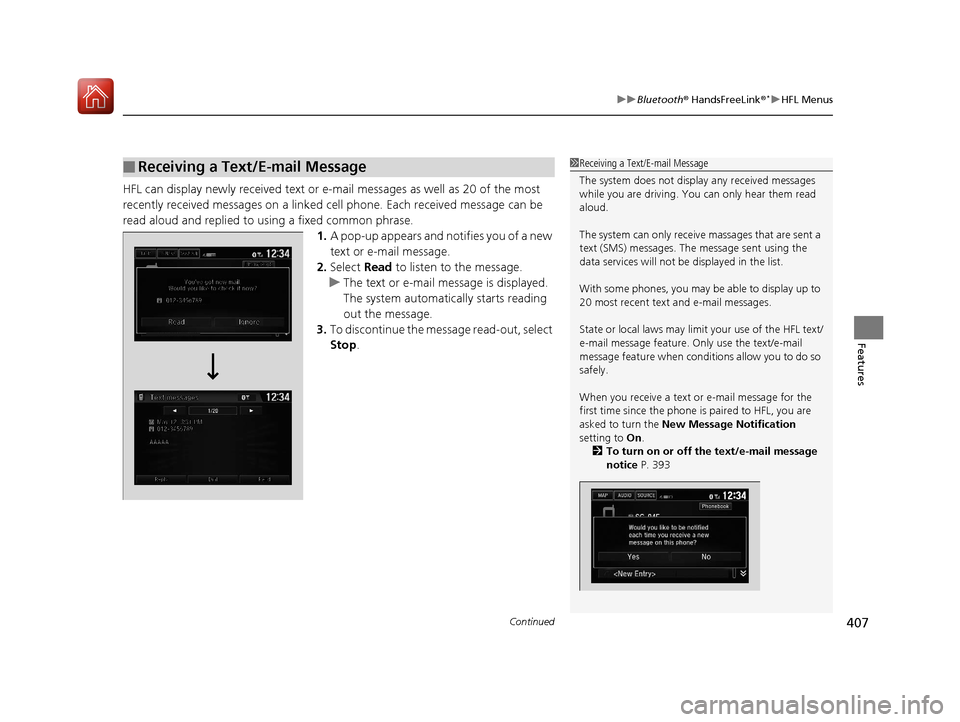
HFL can display newly received text or e- mail messages as well as 20 of the most
recently received messages on a linked ce ll phone. Each received message can be
read aloud and replied to using a fixed common phrase. 1.A pop-up appears and notifies you of a new
text or e-mail message.
2. Select Read to listen to the message.
u The text or e-mail message is displayed.
The system automatically starts reading
out the message.
3. To discontinue the mess age read-out, select
Stop .
■Receiving a Text/E-mail Message1Receiving a Text/E-mail Message
The system does not display any received messages
while you are driving. You can only hear them read
aloud.
The system can only receive massages that are sent a
text (SMS) messages. The message sent using the
data services will not be displayed in the list.
With some phones, you may be able to display up to
20 most recent text and e-mail messages.
State or local laws may limit your use of the HFL text/
e-mail message feature. Only use the text/e-mail
message feature when conditions allow you to do so
safely.
When you receive a text or e-mail message for the
first time since the phone is paired to HFL, you are
asked to turn the New Message Notification
setting to On .
2 To turn on or off the text/e-mail message
notice P. 393
17 CIVIC 5D (KA KC KL)-31TGG6000.book 407 ページ 2016年6月8日 水曜日 午 後2時8分
Page 410 of 641
Continued409
uuBluetooth ® HandsFreeLink ®*uHFL Menus
Features
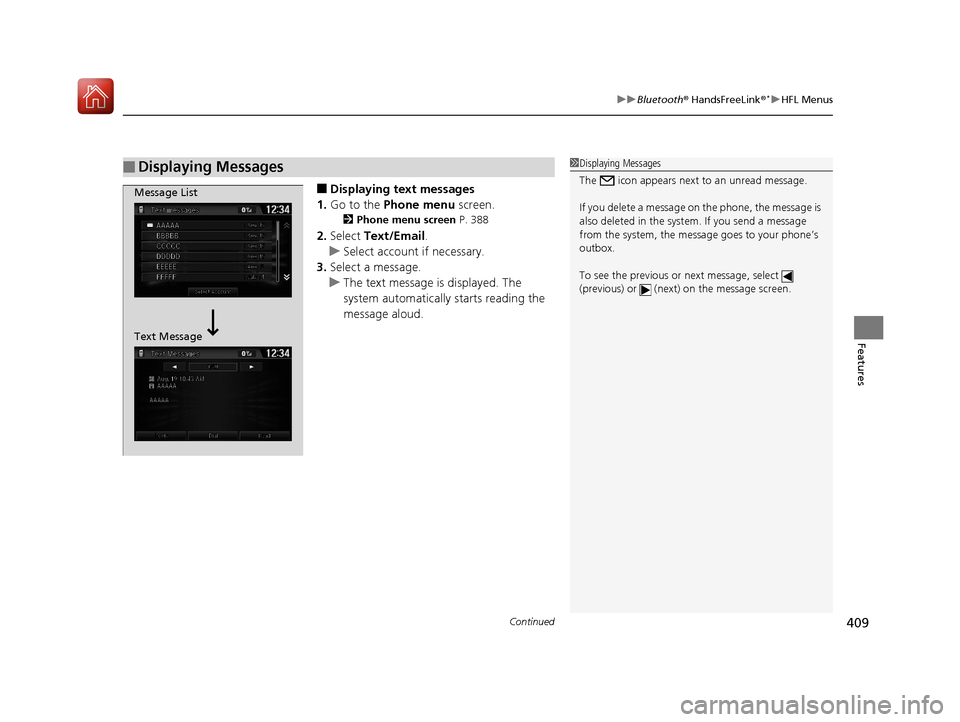
■Displaying text messages
1. Go to the Phone menu screen.
2Phone menu screen P. 388
2.Select Text/Email .
u Select account if necessary.
3. Select a message.
u The text message is displayed. The
system automatically starts reading the
message aloud.
■Displaying Messages1Displaying Messages
The icon appears next to an unread message.
If you delete a message on the phone, the message is
also deleted in the system. If you send a message
from the system, the message goes to your phone’s
outbox.
To see the previous or next message, select
(previous) or (next) on the message screen.
Message List
Text Message
17 CIVIC 5D (KA KC KL)-31TGG6000.book 409 ページ 2016年6月8日 水曜日 午 後2時8分
Page 411 of 641
410
uuBluetooth ® HandsFreeLink ®*uHFL Menus
Features
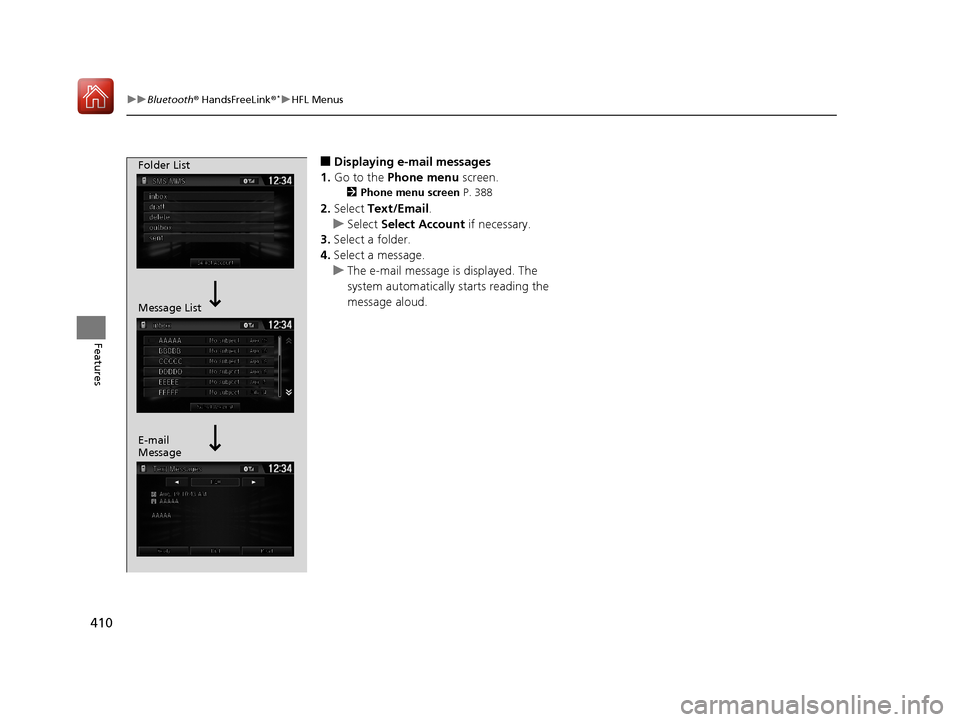
■Displaying e-mail messages
1. Go to the Phone menu screen.
2Phone menu screen P. 388
2.Select Text/Email .
u Select Select Account if necessary.
3. Select a folder.
4. Select a message.
u The e-mail message is displayed. The
system automatically starts reading the
message aloud.
Folder List
Message List
E-mail
Message
17 CIVIC 5D (KA KC KL)-31TGG6000.book 410 ページ 2016年6月8日 水曜日 午 後2時8分
Page 412 of 641
Continued411
uuBluetooth ® HandsFreeLink ®*uHFL Menus
Features
■Read or Stop reading a message
1. Go to the text or e-mail message screen.
u The system automatically starts reading
the message aloud.
2 Displaying Messages P. 409
2.Select Stop to stop reading.
Select Read again to start reading the
message from the beginning.
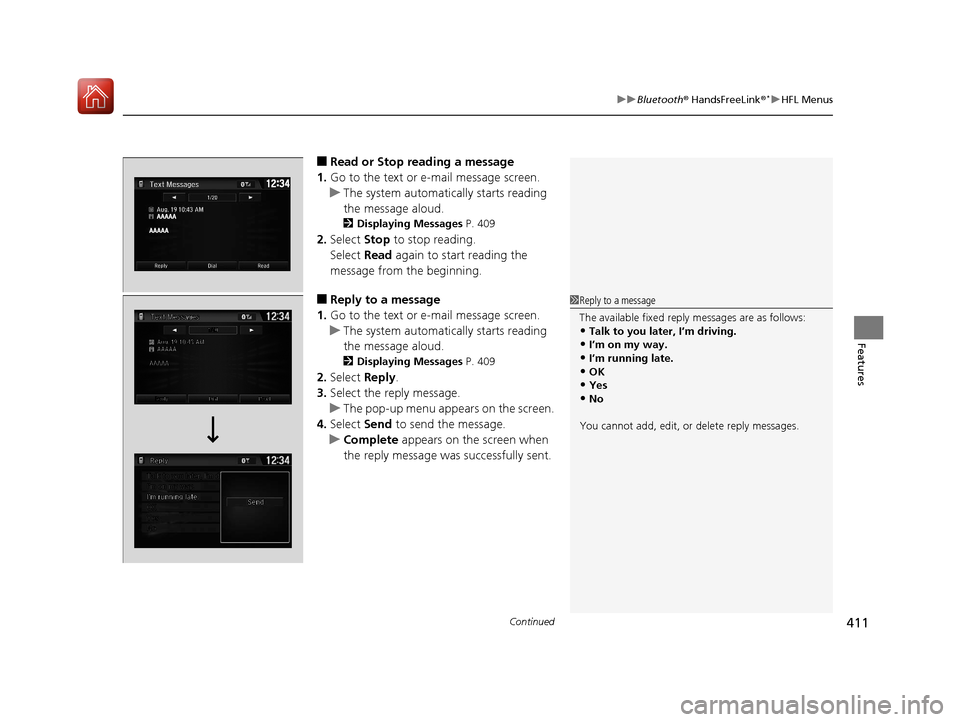
■Reply to a message
1. Go to the text or e-mail message screen.
u The system automatically starts reading
the message aloud.
2 Displaying Messages P. 409
2.Select Reply.
3. Select the reply message.
u The pop-up menu appears on the screen.
4. Select Send to send the message.
u Complete appears on the screen when
the reply message was successfully sent.
1 Reply to a message
The available fixed reply messages are as follows:
•Talk to you later, I’m driving.•I’m on my way.
•I’m running late.
•OK•Yes
•No
You cannot add, edit, or delete reply messages.
17 CIVIC 5D (KA KC KL)-31TGG6000.book 411 ページ 2016年6月8日 水曜日 午 後2時8分
Page 433 of 641
uuWhen Driving uShifting
432
Driving
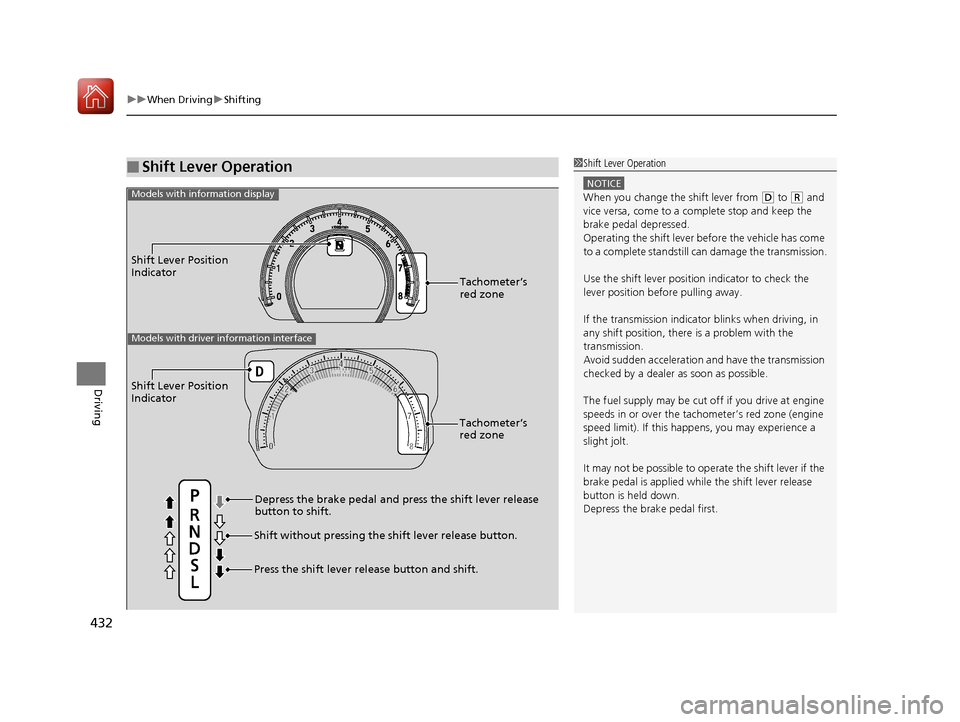
■Shift Lever Operation1Shift Lever Operation
NOTICE
When you change the shift lever from (D to (R and
vice versa, come to a complete stop and keep the
brake pedal depressed.
Operating the shift lever be fore the vehicle has come
to a complete standstill can damage the transmission.
Use the shift lever positi on indicator to check the
lever position befo re pulling away.
If the transmission indicator blinks when driving, in
any shift position, there is a problem with the
transmission.
Avoid sudden acceleration and have the transmission
checked by a dealer as soon as possible.
The fuel supply may be cut of f if you drive at engine
speeds in or over the tachometer’s red zone (engine
speed limit). If this happe ns, you may experience a
slight jolt.
It may not be possible to operate the shift lever if the
brake pedal is applied while the shift lever release
button is held down.
Depress the brake pedal first.
Shift Lever Position
Indicator
Depress the brake pedal and press the shift lever release
button to shift.
Shift without pressing the shift lever release button.
Press the shift lever re lease button and shift.Tachometer’s
red zone
Models with information display
Shift Lever Position
Indicator
Tachometer’s
red zone
Models with driver information interface
17 CIVIC 5D (KA KC KL)-31TGG6000.book 432 ページ 2016年6月8日 水曜日 午 後2時8分
Page 435 of 641
uuWhen Driving uShifting
434
Driving
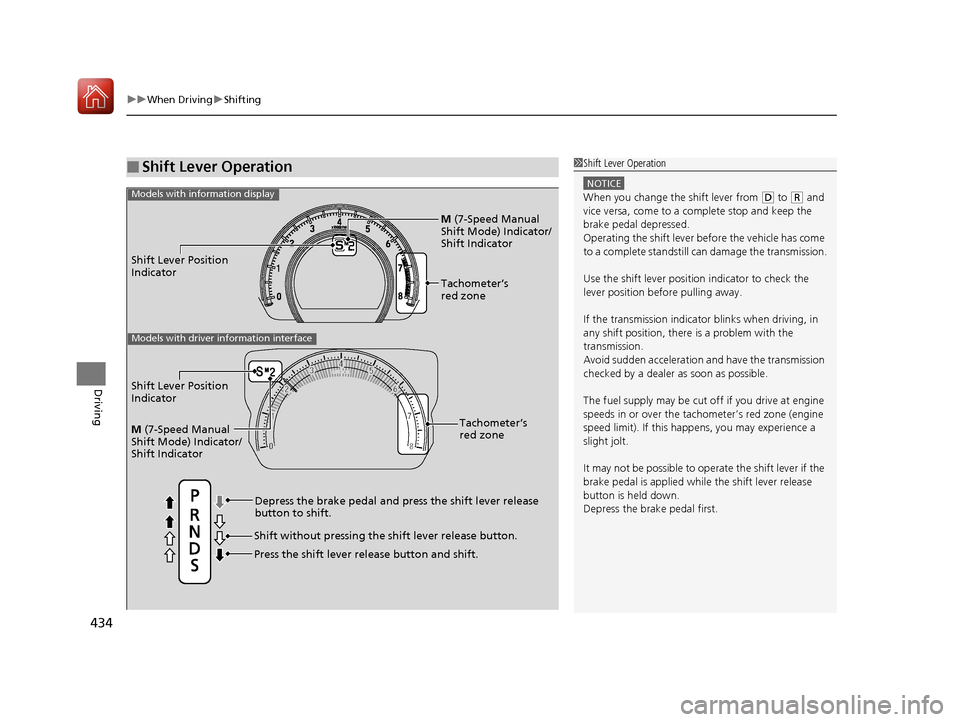
■Shift Lever Operation1Shift Lever Operation
NOTICE
When you change the shift lever from (D to (R and
vice versa, come to a complete stop and keep the
brake pedal depressed.
Operating the shift lever be fore the vehicle has come
to a complete standstill can damage the transmission.
Use the shift lever positi on indicator to check the
lever position befo re pulling away.
If the transmission indicator blinks when driving, in
any shift position, there is a problem with the
transmission.
Avoid sudden acceleration and have the transmission
checked by a dealer as soon as possible.
The fuel supply may be cut of f if you drive at engine
speeds in or over the tachometer’s red zone (engine
speed limit). If this happe ns, you may experience a
slight jolt.
It may not be possible to operate the shift lever if the
brake pedal is applied while the shift lever release
button is held down.
Depress the brake pedal first.
Shift Lever Position
Indicator
Depress the brake pedal and press the shift lever release
button to shift.
Shift without pressing the shift lever release button.
Press the shift lever re lease button and shift.Tachometer’s
red zone
Models with information display
Shift Lever Position
Indicator
Tachometer’s
red zone
Models with driver information interface
M (7-Speed Manual
Shift Mode) Indicator/
Shift Indicator
M (7-Speed Manual
Shift Mode) Indicator/
Shift Indicator
17 CIVIC 5D (KA KC KL)-31TGG6000.book 434 ページ 2016年6月8日 水曜日 午 後2時8分
Page 436 of 641
Continued435
uuWhen Driving uShifting
Driving
Use the paddle shifters to change betw een 1st and 7th speeds without removing
your hands from the steering wheel. The transmission switches to the 7-speed
manual shift mode when you pull a paddle shifter while driving. This mode is useful
when engine braking is needed.
■When the shift lever is in (D:
The shift mode goes into the 7-speed ma nual shift mode temporarily, and the
number is displayed in the shift indicator.
The 7-speed manual shift mode is canceled automatically if you drive at constant
speed or accelerate, and the number in the shift indicator goes off.
You can cancel this mode by pulling the
(+ paddle shifter for a few seconds.
The 7-speed manual shift mode is especially useful when reducing the vehicle speed
temporarily before making a turn.
■When the shift lever is in (S:
The shift mode goes into the 7-speed manual shift mode. The M indicator and the
speed number are displayed in the shift indicator. As the vehicle speed slows down,
the transmission automatically shifts down accordingly. When the vehicle comes to
a stop, it automatically shifts down into 1st.
If the vehicle speed increases and the engi ne speed reaches near the tachometer’s
red zone, the transmission automatically shifts up.
You can only pull away in 1st speed.
When canceling the 7-speed manual shift mode, move the shift lever from
(S to
(D. When the 7-speed manual sh ift mode is canceled, the M indicator and shift
indicator go off.
■7-Speed Manual Shift Mode1 7-Speed Manual Shift Mode
To improve fuel economy, the transmission may shift
up to a higher speed than the seventh under certain
circumstances. In this case, the number in the shift
indicator remains as 7.
In the 7-speed manual shif t mode, the transmission
shifts up or down by operating either paddle shifter
under the following conditions:
Shift Up: The engine sp eed reaches the lowest
threshold of the hi gher speed position.
Shift Down: The engine sp eed reaches the highest
threshold of the lower speed position.
When the engine speed reaches near the
tachometer’s red zone, the transmission shifts up
automatically.
When the engine speed reaches the lowest threshold
of the selected speed positi on, the transmission shifts
down automatically.
Operating the paddle shifte rs on slippery surfaces
may cause the tires to lock up. In this case, the 7-
speed manual shift mode is canceled and goes back
to the normal D driving mode.
17 CIVIC 5D (KA KC KL)-31TGG6000.book 435 ページ 2016年6月8日 水曜日 午 後2時8分
Page 442 of 641
441
uuWhen Driving uECON Button
Driving
ECON Button
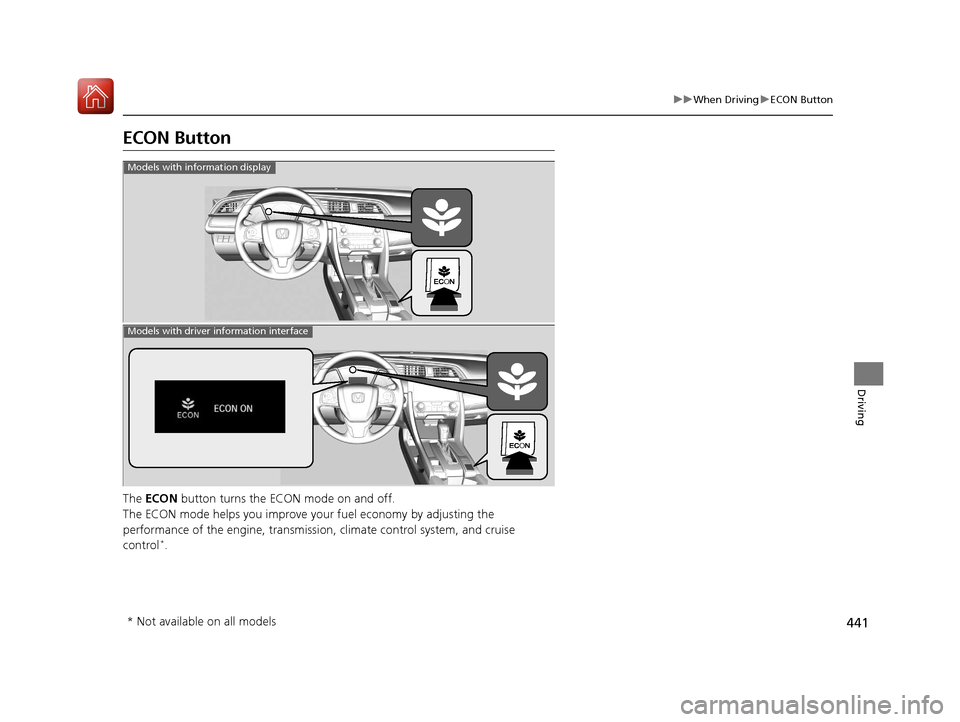
The ECON button turns the ECON mode on and off.
The ECON mode helps you improve yo ur fuel economy by adjusting the
performance of the engine, transmission, climate control system, and cruise
control
*.
Models with information display
Models with driver information interface
* Not available on all models
17 CIVIC 5D (KA KC KL)-31TGG6000.book 441 ページ 2016年6月8日 水曜日 午 後2時8分